bluetooth NISSAN VERSA 2018 Owner's Guide
[x] Cancel search | Manufacturer: NISSAN, Model Year: 2018, Model line: VERSA, Model: NISSAN VERSA 2018Pages: 354, PDF Size: 4.84 MB
Page 207 of 354
∙ “Phone Number” — Speak this com-
mand to place a call by inputting num-
bers. For 7– to 10–digit phone number,
speak the numbers. Say “Correction” at
any time in the process to correct a
misspoken or misinterpreted number.
For phone numbers with more digits or
special characters, say “Special Num-
ber”, then speak the digits. Up to 24 dig-
its can be entered. Available special
characters are “start”, “pound”, “plus”,
and “pause”. When finished, say “Dial” to
initiate the call. Say “Correction” at any
time in the process to correct a misspo-
ken or misinterpreted number or char-
acter.
∙ “Redial” – Speak this command to dial
the number of the last outgoing call.
The system will display “Re-dialing
phonebook entry will be displayed if it
available, otherwise the number being
re-dialed will be displayed.∙ “Call Back” – Speak this command to
dial the number of the last incoming
call. The system will display “Calling
back
the phonebook entry will be displayed if
it available, otherwise the number be-
ing called back will be displayed.
RECEIVING A CALL
When a call is received by the phone con-
nected to the vehicle’s Bluetooth® Hands-
Free Phone System, the call information is
displayed on the control panel display.
Press the
button to accept the call.
Press the
button to reject the call.
DURING A CALL
While a call is active, press thebutton
to access additional options. Speak one of
the following commands:
∙ “(numbers)” – Speak numbers and then
say “Send” or say “Correction” to change
the numbers entered.
∙ “Mute On” or “Mute Off ” – Speak the
command to mute or unmute the sys-
tem.∙ “Transfer Call” – Speak this command to
transfer the call to the handset. To
transfer the call back from the handset
to the Bluetooth® Hands-Free Phone
System, press the
button and
confirm when prompted.
If supported by the phone, the Bluetooth®
Hands-Free Phone System allows for call
waiting functionality. If a call is received
while another call is already active, a mes-
sage will be displayed on the screen. Press
the
button to hold the active call and
switch to the second call. Press the
button to reject the second call.
While the second call is active, pressing
the
button will allow the same com-
mands that are available during any call
and additional commands:
∙ “Switch Call” – Speak this command to
hold the second call and switch back to
the original call.
∙ “End Other Call” – Speak this command
to stay with the second call and end the
original call.
Press the
button to accept the call.
Press the
button to reject the call.
4-72Display screen, heater, air conditioner, audio and phone systems
Page 208 of 354
ENDING A CALL
To end an active call, press thebut-
ton.
TEXT MESSAGING (if so equipped)
WARNING
∙ Laws in some jurisdictions may re-
strict the use of “Text-to-Speech.”
Check local regulations before using
the feature.
∙ Laws in some jurisdictions may re-
strict the use of some of the applica-
tions and features, such as social net-
working and texting. Check local
regulations for any requirements.
∙ Use the text messaging feature af ter
stopping your vehicle in a safe loca-
tion. If you have to use the feature
while driving, exercise extreme cau-
tion at all times so full attention may
be given to vehicle operation.
∙ If you are unable to devote full atten-
tion to vehicle operation while using
the text messaging feature, pull off
the road to a safe location and stop
your vehicle.NOTE:
This feature is automatically disabled if
the connected device does not support
the Message Access Profile (MAP). For
additional information, refer to the
phone’s Owner’s Manual for details and
instructions.
Many phones may require special per-
mission to enable text messaging. Check
the phone’s screen during Bluetooth®
pairing. For some phones, you may need
to enable ‘Notifications’ in the phone’s
Bluetooth menu for text messages to
appear on the headunit. For additional
information, refer to your phone’s Own-
er’s Manual.
Text message integration requires that the
phone support MAP (Message Access Pro-
file) for both receiving and sending text
messages. Some phones may not support
all text messaging features. Please see
www.nissanusa.com/bluetooth or
www.nissan.ca/bluetooth for compatibility
information, as well as your device’s Own-
er’s Manual.
The system allows for the sending and re-
ceiving of text messages through the ve-
hicle interface.Sending a text message:
1. Press the
button.
2. Say “Messaging”.
3. The system will prompt you for a com-
mand. Say “Send Text”.
4. The system will provide a list of avail-
able commands in order to determine
the recipient of the text message.
Choose from the following:
∙ (a name)
∙ Number
∙ Incoming Calls
∙ Outgoing Calls
∙ Missed Calls
For additional information, refer to
“Voice commands” in this section.
Display screen, heater, air conditioner, audio and phone systems4-73
Page 209 of 354
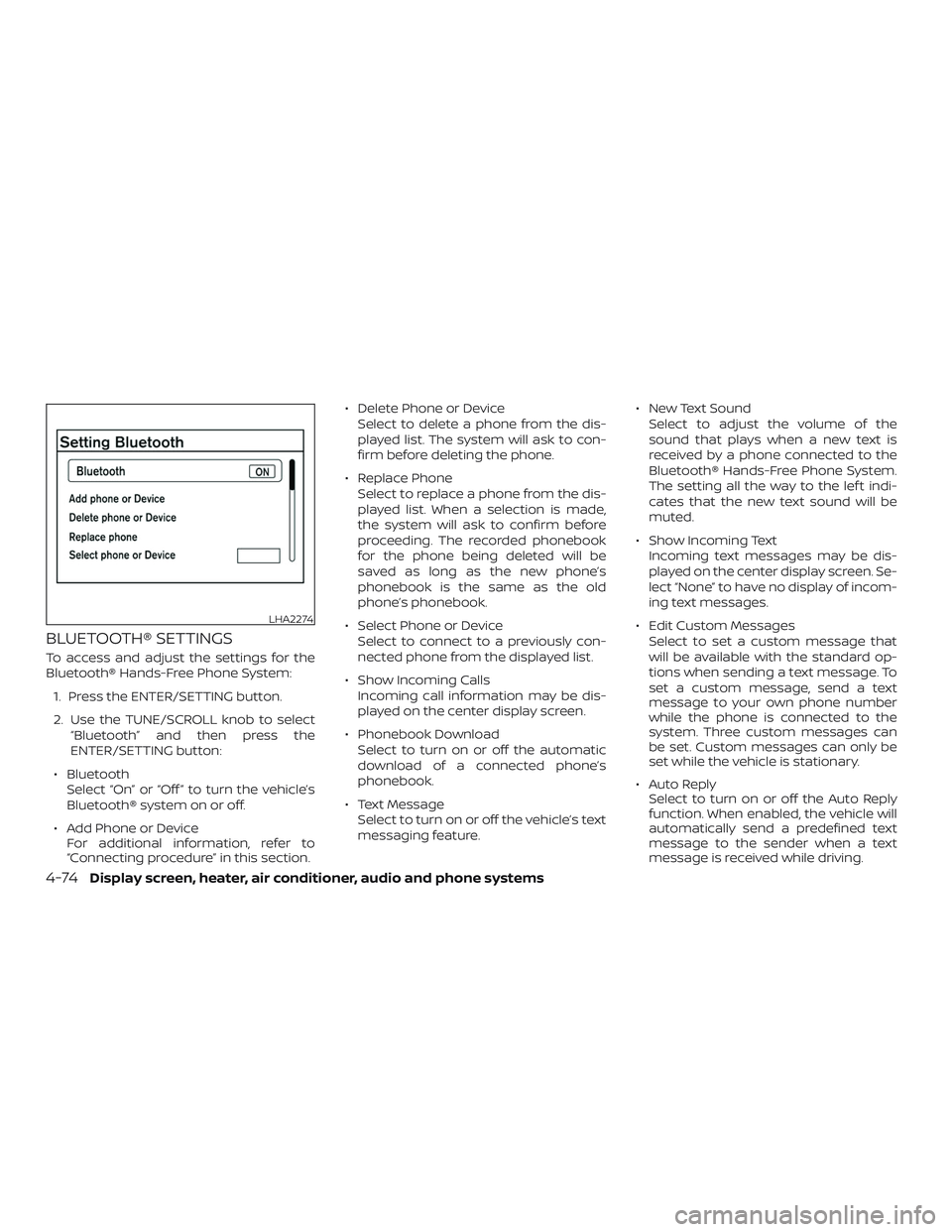
BLUETOOTH® SETTINGS
To access and adjust the settings for the
Bluetooth® Hands-Free Phone System:
1. Press the ENTER/SETTING button.
2. Use the TUNE/SCROLL knob to select
“Bluetooth” and then press the
ENTER/SETTING button:
∙ Bluetooth
Select “On” or “Off ” to turn the vehicle’s
Bluetooth® system on or off.
∙ Add Phone or Device
For additional information, refer to
“Connecting procedure” in this section.∙ Delete Phone or Device
Select to delete a phone from the dis-
played list. The system will ask to con-
firm before deleting the phone.
∙ Replace Phone
Select to replace a phone from the dis-
played list. When a selection is made,
the system will ask to confirm before
proceeding. The recorded phonebook
for the phone being deleted will be
saved as long as the new phone’s
phonebook is the same as the old
phone’s phonebook.
∙ Select Phone or Device
Select to connect to a previously con-
nected phone from the displayed list.
∙ Show Incoming Calls
Incoming call information may be dis-
played on the center display screen.
∙ Phonebook Download
Select to turn on or off the automatic
download of a connected phone’s
phonebook.
∙ Text Message
Select to turn on or off the vehicle’s text
messaging feature.∙ New Text Sound
Select to adjust the volume of the
sound that plays when a new text is
received by a phone connected to the
Bluetooth® Hands-Free Phone System.
The setting all the way to the lef t indi-
cates that the new text sound will be
muted.
∙ Show Incoming Text
Incoming text messages may be dis-
played on the center display screen. Se-
lect “None” to have no display of incom-
ing text messages.
∙ Edit Custom Messages
Select to set a custom message that
will be available with the standard op-
tions when sending a text message. To
set a custom message, send a text
message to your own phone number
while the phone is connected to the
system. Three custom messages can
be set. Custom messages can only be
set while the vehicle is stationary.
∙ Auto Reply
Select to turn on or off the Auto Reply
function. When enabled, the vehicle will
automatically send a predefined text
message to the sender when a text
message is received while driving.
LHA2274
4-74Display screen, heater, air conditioner, audio and phone systems
Page 346 of 354
11 Index
A
Air bag (See supplemental restraint
system).....................1-42
Air bag system
Front (See supplemental front impact
airbagsystem)..............1-51
Air bag warning labels............1-59
Airbagwarninglight..........1-60, 2-17
Air bag warning light,
supplemental..............1-60, 2-17
Air cleaner housing filter..........8-15
Air conditioner
Air conditioner operation........4-13
Air conditioner service..........4-17
Air conditioner specification label . .10-12
Air conditioner system refrigerant
and oil recommendations.......10-7
Air conditioner system refrigerant
recommendations............10-7
Heater and air conditioner controls . .4-9
Servicing air conditioner.........4-17
Air flow charts.................4-14
Anchor point locations...........1-25
Antenna....................4-49
Antifreeze...................5-29
Anti-lock brake warning light........2-13
Anti-lock Braking System (ABS)......5-25
Audible reminders..............2-20
Audio system.................4-17
AMradioreception............4-18
Bluetooth® audio.............4-46Compact disc (CD)
player.............4-29,4-35,4-40
FM/AM radio with compact disc (CD)
player....................4-31
FM-AM radio with compact disc (CD)
player....................4-27
FM/AM/SAT radio with compact
disc(CD)player..............4-36
FMradioreception............4-17
iPod®Player................4-44
iPod® player operation.........4-44
Radio....................4-17
Steering wheel audio control
switch ...................4-48
USBinterface...............4-42
USB (Universal Serial Bus) Connection
Port.....................4-42
Automatic
Automatic power window switch . . .2-31
Automatic door locks.............3-5
AUXjack.................4-30,4-32
B
Battery..................5-29,8-11
Charge warning light...........2-14
Battery replacement............8-20
Keyfob................8-20,8-21
Before starting the engine.........5-10
Belt(Seedrivebelt)..............8-14
Block heater
Engine....................5-31Bluetooth® audio...............4-46
Bluetooth® hands-free phone
system..................4-50,4-65
Booster seats.................1-38
Brake
Anti-lock Braking System (ABS)....5-25
Brakefluid..................8-9
Brakelight(Seestoplight).......8-24
Brakesystem...............5-25
Brakewarninglight............2-13
Brakewearindicators.......2-20,8-17
Parking brake operation.........5-18
Self-adjustingbrakes ..........8-17
Brakeassist..................5-26
Brakefluid....................8-9
Brakes......................8-17
Brakesystem.................5-25
Break-in schedule..............5-20
Brightness control
Instrument panel.............2-23
Bulb check/instrument panel.......2-12
Bulb replacement..............8-24
C
Capacities and recommended fuel/
lubricants....................10-2
Cargo
(See vehicle loading information).....10-13
Car phone or CB radio...........4-49
CDcareandcleaning............4-47
Page 348 of 354
Continuously Variable Transmission
(CVT) fluid...................8-9
Engine coolant...............8-4
Engine oil...................8-6
F.M.V.S.S. certification label..........10-11
Foglightswitch................2-25
Front air bag system (See supplemental
restraint system)................1-51
Frontseats....................1-2
Fuel
Capacities and recommended
fuel/lubricants...............10-2
Fuel economy...............5-22
Fuel-filler cap................3-13
Fuel-filler door lock opener lever....3-13
Fuel-filler lid.................3-13
Fuel gauge..................2-9
Fueloctanerating.............10-5
Fuel recommendation..........10-4
Loose fuel cap warning..........2-6
Fuelefficientdrivingtips...........5-21
Fuel-filler door.................3-13
Fuel gauge....................2-9
Fuses.......................8-18
Fusiblelinks...................8-18
G
Gascap .....................3-13
Gauge
Engine coolant temperature gauge . .2-8
Fuel gauge..................2-9
Odometer..................2-6
Speedometer................2-5
Tachometer.................2-8Trip computer...............2-10
Trip odometer.............2-5,2-6
General maintenance.............9-2
Glovebox....................2-28
H
Hands-free phone system,
Bluetooth®................4-50,4-65
Hazard warning flasher switch........6-2
Headlight and turn signal switch......2-22
Headlightcontrolswitch...........2-22
Headlights ...................8-22
Headrestraints .................1-5
Heater
Heater and air conditioner controls . . .4-9
Heater operation..............4-11
Hood.......................3-10
Horn.......................2-25
I
Ignition switch..................5-8
Important vehicle information label. . . .10-11
Increasing fuel economy...........5-22
Indicator lights and audible reminders
(See warning/indicator lights and audible
reminders)....................2-18
Instrument brightness control.......2-23
Instrument panel.............0-6,2-2
Instrument panel dimmer switch.....2-23
Interiorlight ...............2-32,2-33
Interiortrunklidrelease ...........3-12
iPod®Player ..................4-44ISOFIX child restraints.............1-23
J
Jumpstarting...............6-8,8-13
K
Key.........................3-2
Key fob battery replacement.....8-20,8-21
Keyless entry
Without Intelligent Key system
(See remote keyless entry system). .3-6, 3-7
L
Labels
Air conditioner specification label . . .10-12
Emission control information label . .10-11
Engine serial number...........10-11
F.M.V.S.S. certification label........10-11
Tire and Loading Information label . .10-12
Vehicle identification number (VIN) . .10-10
Vehicle identification number (VIN)
plate.....................10-10
Warning labels (for SRS)..........1-59
LATCH (Lower Anchors and Tethers for
CHildren)System................1-23
License plate
Installing the license plate.......10-12
Light
Airbagwarninglight........1-60, 2-17
Brakelight(Seestoplight)........8-24
11-3
Page 349 of 354
Bulb check/instrument panel......2-12
Bulb replacement.............8-24
Charge warning light...........2-14
ExteriorandInteriorlights........8-24
Foglights..................8-23
Foglightswitch..............2-25
Headlight and turn signal switch....2-22
Headlightcontrolswitch.........2-22
Headlights .................8-22
Interiorlight .............2-32,2-33
Lightbulbs.................8-22
Low tire pressure warning light.....2-15
Passenger air bag and status light . . .1-51
Warning/indicator lights and audible
reminders..................2-18
Lights ......................8-22
Lock
Child safety rear door lock........3-5
Door locks................3-3,3-4
Fuel-filler door lock opener lever....3-13
Power door locks..............3-5
Trunk lid lock opener lever........3-11
Loose fuel cap warning............2-6
Lowfuelwarninglight ............2-15
Low tire pressure warning light.......2-15
Luggage
(See vehicle loading information).....10-13
M
Maintenance
General maintenance...........9-2
Insidethevehicle..............9-3
Maintenance precautions.........8-2
Outsidethevehicle.............9-2Seat belt maintenance..........1-17
Under the hood and vehicle.......9-4
Maintenance log................9-13
Maintenance requirements..........9-2
Maintenance schedules............9-7
Maintenance under severe operation
conditions....................9-12
Malfunctionindicatorlight..........2-18
Manual front seat adjustment........1-3
Manual windows................2-32
Map pocket...................2-27
Meters and gauges...............2-3
Instrument brightness control.....2-23
Mirror
Outsidemirrorcontrol ..........3-17
Outsidemirrors...............3-17
Rearview...................3-17
Vanitymirror................3-16
Mirrors......................3-17
O
Octane rating (See fuel octane rating). . .10-5
Odometer....................2-6
Oil
Capacities and recommended
fuel/lubricants...............10-2
Changing engine oil............8-7
Changing engine oil filter.........8-8
Checking engine oil level.........8-6
Engine oil...................8-6
Engine oil and oil filter
recommendation.............10-6
Engine oil viscosity.............10-7One shot call..............4-54,4-68
Outsidemirrorcontrol ............3-17
Outsidemirrors.................3-17
Overheat
Ifyourvehicleoverheats.........6-11
Owner's manual order form........10-21
Owner's manual/service manual order
information ..................10-21
P
Parking
Parking brake operation.........5-18
Parking/parkingonhills.........5-23
Parkingbrake..................5-18
Phone, Bluetooth® hands-free
system..................4-50,4-65
Power
Power door locks..............3-5
Poweroutlet................2-26
Powerrearwindows............2-31
Power steering system..........5-24
Powerwindows..............2-30
Rearpowerwindows...........2-31
Poweroutlet..................2-26
Powersteering.................5-24
Precautions
Maintenance precautions.........8-2
Precautions on booster
seats............1-20, 1-27, 1-33, 1-38
Precautions on child
restraints .........1-20, 1-27, 1-33, 1-38
Precautionsonseatbeltusage.....1-10
Precautions on supplemental restraint
system....................1-42
11-4