reset NISSAN VERSA 2019 User Guide
[x] Cancel search | Manufacturer: NISSAN, Model Year: 2019, Model line: VERSA, Model: NISSAN VERSA 2019Pages: 372, PDF Size: 4.17 MB
Page 181 of 372
AUDIO button
Push to display the audio screen. When this
button is pushed while the audio screen is
not displayed, the last audio source played
will play.
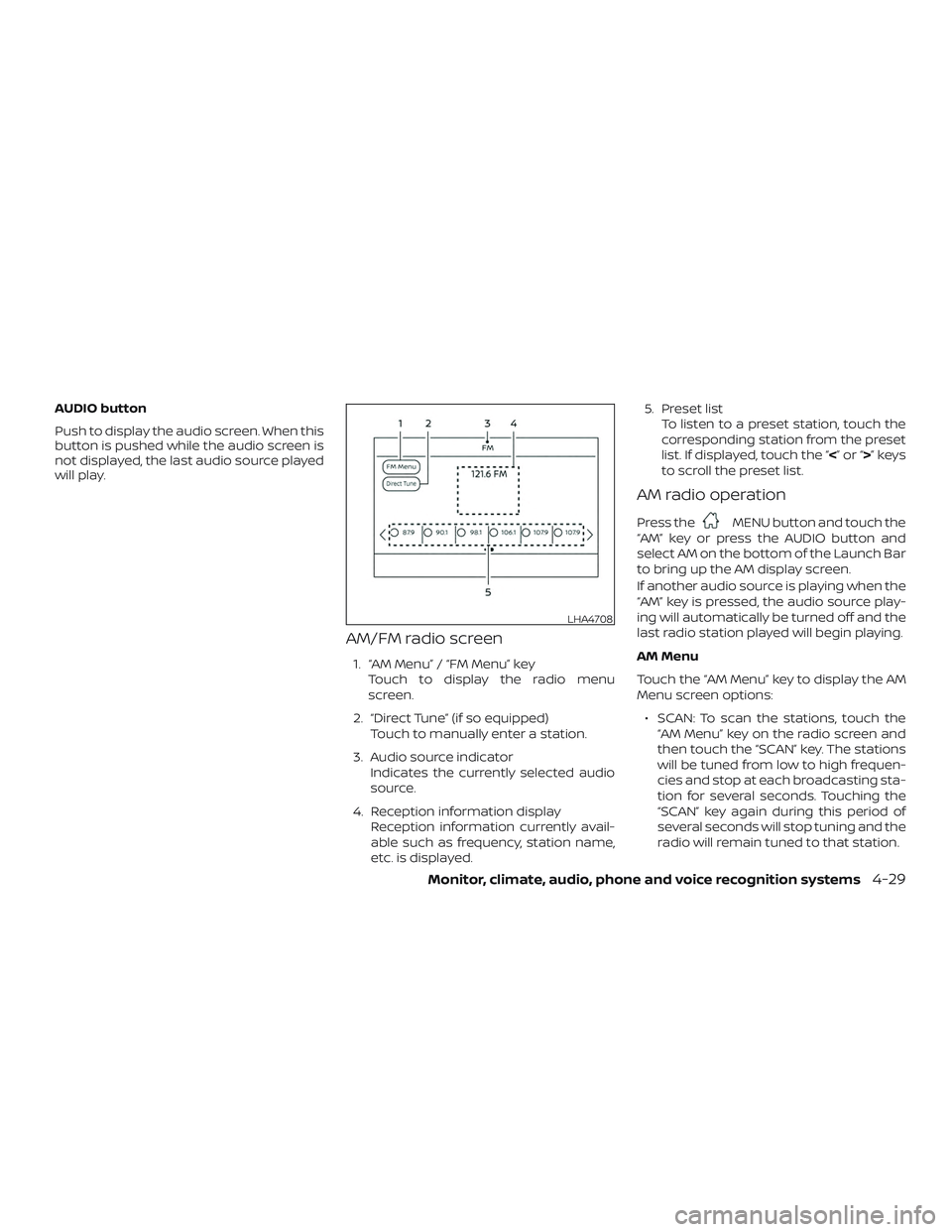
AM/FM radio screen
1. “AM Menu” / “FM Menu” keyTouch to display the radio menu
screen.
2. “Direct Tune” (if so equipped) Touch to manually enter a station.
3. Audio source indicator Indicates the currently selected audio
source.
4. Reception information display Reception information currently avail-
able such as frequency, station name,
etc. is displayed. 5. Preset list
To listen to a preset station, touch the
corresponding station from the preset
list. If displayed, touch the “ <”or“>”keys
to scroll the preset list.
AM radio operation
Press theMENU button and touch the
“AM” key or press the AUDIO button and
select AM on the bottom of the Launch Bar
to bring up the AM display screen.
If another audio source is playing when the
“AM” key is pressed, the audio source play-
ing will automatically be turned off and the
last radio station played will begin playing.
AM Menu
Touch the “AM Menu” key to display the AM
Menu screen options:
∙ SCAN: To scan the stations, touch the “AM Menu” key on the radio screen and
then touch the “SCAN” key. The stations
will be tuned from low to high frequen-
cies and stop at each broadcasting sta-
tion for several seconds. Touching the
“SCAN” key again during this period of
several seconds will stop tuning and the
radio will remain tuned to that station.
LHA4708
Monitor, climate, audio, phone and voice recognition systems4-29
Page 182 of 372
∙ Refresh: Touch the “Refresh” key to scanand update the station list displayed on
the right side of the AM Menu screen.
(SEEK/TRACK) buttons
Press the
orbuttons to tune
from low to high or high to low frequencies
and to stop at the next broadcasting sta-
tion.
1 to 6 Station memory operations
Up to six stations can be registered in the
preset list.
1. Select the AM radio band.
2. Tune to the station you wish to store.
3. Touch and hold one of the preset num- bers in the preset list.
The information such as frequency will be
displayed on the preset list.
To select and listen to the preset stations,
push
on the steering wheel briefly or
touch a preferred station on the preset list
on the radio screen.
FM radio operation
Press theMENU button and touch the
“FM Menu” key or press the AUDIO button
and select FM on the bottom of the Launch
Bar to bring up the FM display screen.
If another audio source is playing when the
“FM” key is pressed, the audio source play-
ing will automatically be turned off and the
last radio station played will begin playing.
The FM stereo indicator (STEREO) is shown
on the screen during FM stereo reception.
When the stereo broadcast signal is weak,
the radio automatically changes from ste-
reo to monaural reception.
FM Menu
Touch the “FM” Menu key to display the FM
Menu screen options:
∙ SCAN: To scan tune the stations, touch the “FM Menu” key on the radio screen
and then touch the “SCAN” key. The sta-
tions will be tuned from low to high fre-
quencies and stop at each broadcast-
ing stations for several seconds.
Touching the “SCAN” key again during
this period of several seconds will stop
tuning and the radio will remain tuned
to that station. ∙ Refresh: Touch the “Refresh” key to up-
date the station list displayed on the
right side of the FM Menu screen.
∙ RDS Info: Radio station and song infor- mation can be displayed on the FM dis-
play screen.
(SEEK/TRACK) buttons
Press the
orbuttons to tune
from low to high or high to low frequencies
and to stop at the next broadcasting sta-
tion.
1 to 12 Station memory operations
Up to 12 stations can be registered in the
preset list.
1. Select the FM radio band.
2. Tune to the station you wish to store.
3. Touch and hold one of the preset num- bers in the preset list.
The information such as frequency will be
displayed on the preset list.
To select and listen to the preset stations,
push
on the steering wheel briefly or
touch a preferred station on the preset list
on the radio screen.
4-30Monitor, climate, audio, phone and voice recognition systems
Page 194 of 372
STEERING WHEEL SWITCH FOR
AUDIO CONTROL
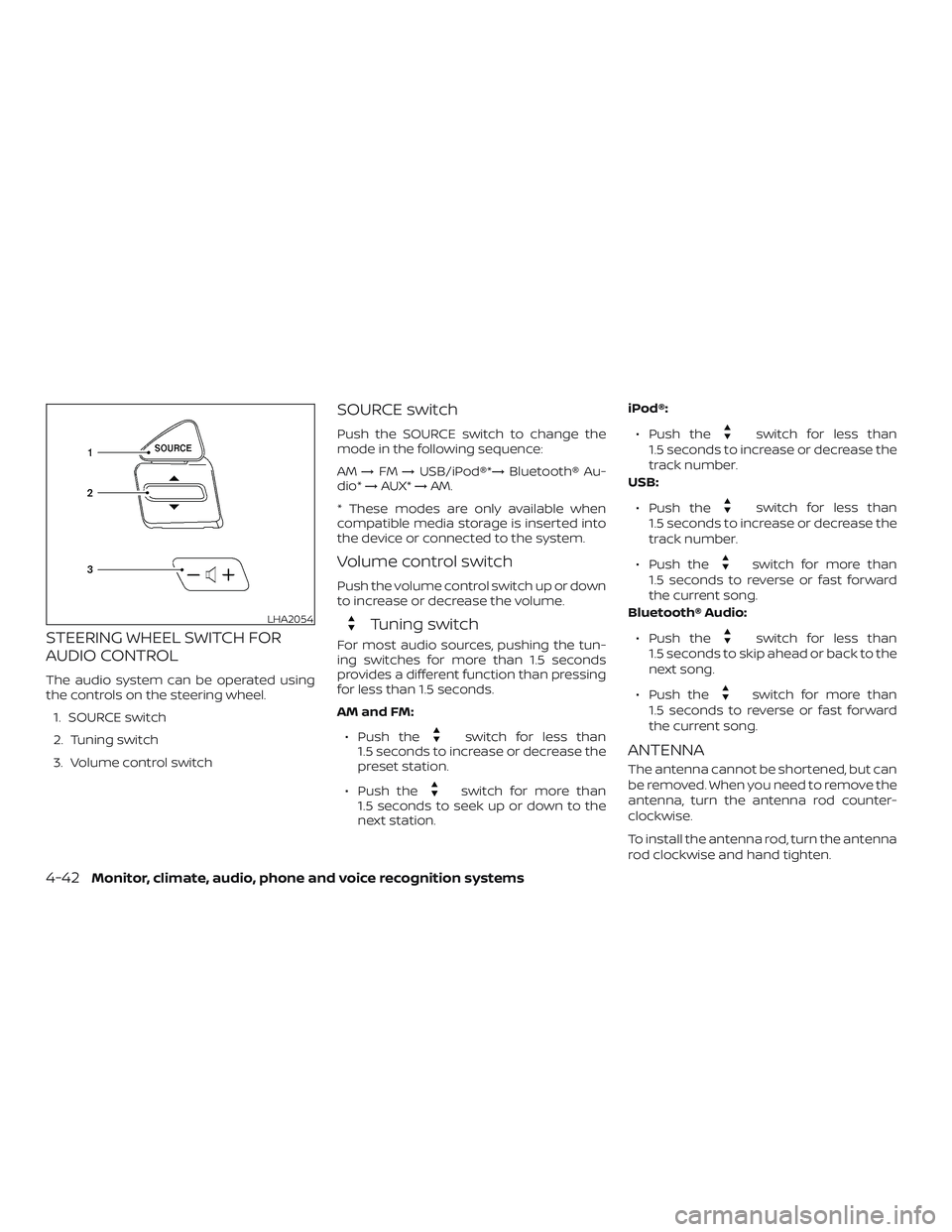
The audio system can be operated using
the controls on the steering wheel.1. SOURCE switch
2. Tuning switch
3. Volume control switch
SOURCE switch
Push the SOURCE switch to change the
mode in the following sequence:
AM →FM →USB/iPod®*→ Bluetooth® Au-
dio* →AUX* →AM.
* These modes are only available when
compatible media storage is inserted into
the device or connected to the system.
Volume control switch
Push the volume control switch up or down
to increase or decrease the volume.
Tuning switch
For most audio sources, pushing the tun-
ing switches for more than 1.5 seconds
provides a different function than pressing
for less than 1.5 seconds.
AM and FM:
∙ Push the
switch for less than
1.5 seconds to increase or decrease the
preset station.
∙ Push the
switch for more than
1.5 seconds to seek up or down to the
next station. iPod®:
∙ Push the
switch for less than
1.5 seconds to increase or decrease the
track number.
USB:
∙ Push the
switch for less than
1.5 seconds to increase or decrease the
track number.
∙ Push the
switch for more than
1.5 seconds to reverse or fast forward
the current song.
Bluetooth® Audio:
∙ Push the
switch for less than
1.5 seconds to skip ahead or back to the
next song.
∙ Push the
switch for more than
1.5 seconds to reverse or fast forward
the current song.
ANTENNA
The antenna cannot be shortened, but can
be removed. When you need to remove the
antenna, turn the antenna rod counter-
clockwise.
To install the antenna rod, turn the antenna
rod clockwise and hand tighten.
LHA2054
4-42Monitor, climate, audio, phone and voice recognition systems
Page 221 of 372
∙ If the low tire pressure warning lightilluminates while driving, avoid sud-
den steering maneuvers or abrupt
braking, reduce vehicle speed, pull off
the road to a safe location and stop
the vehicle as soon as possible. Driv-
ing with under-inflated tires may per-
manently damage the tires and in-
crease the likelihood of tire failure.
Serious vehicle damage could occur
and may lead to an accident and could
result in serious personal injury.
Check the tire pressure for all four
tires. Adjust the tire pressure to the
recommended COLD tire pressure
shown on the Tire and Loading Infor-
mation label to turn the low tire pres-
sure warning light off. If you have a flat
tire, replace it with a spare tire as soon
as possible. (For additional informa-
tion, refer to “Flat tire” in the “In case of
emergency ” section of this manual.) ∙ When replacing a wheel without the
TPMS such as the spare tire, when a
spare tire is mounted or a wheel is
replaced, the TPMS will not function
and the low tire pressure warning
light will flash for approximately
1 minute. The light will remain on af ter
1 minute. Have your tires replaced
and/or TPMS system reset as soon as
possible. It is recommended that you
visit a NISSAN dealer for this service.
∙ Replacing tires with those not origi- nally specified by NISSAN could affect
the proper operation of the TPMS.
∙ Do not inject any tire liquid or aerosol tire sealant into the tires, as this may
cause a malfunction of the tire pres-
sure sensors.
CAUTION
∙ The TPMS may not function properlywhen the wheels are equipped with
tire chains or the wheels are buried in
snow. ∙ Do not place metalized film or any
metal parts (antenna, etc.) on the win-
dows. This may cause poor reception
of the signals from the tire pressure
sensors, and the TPMS will not func-
tion properly.
Some devices and transmitters may tem-
porarily interfere with the operation of the
TPMS and cause the low tire pressure
warning light to illuminate.
Some examples are: ∙ Facilities or electric devices using simi- lar radio frequencies are near the ve-
hicle.
∙ If a transmitter set to similar frequen- cies is being used in or near the vehicle.
∙ If a computer (or similar equipment) or a DC/AC converter is being used in or
near the vehicle.
The low tire pressure warning light may
illuminate in the following cases: ∙ If the vehicle is equipped with a wheel and tire without TPMS.
∙ If the TPMS has been replaced and the ID has not been registered.
Starting and driving5-5
Page 241 of 372
To cancel the preset speed,use one of the
following three methods:
∙ Push the CANCEL switch; the CRUISE indicator light in the instrument panel
goes out.
∙ Tap the brake pedal; the CRUISE indica- tor light goes out.
∙ Push the ON/OFF switch off. The CRUISE indicator light in the instrument panel
goes out.
The cruise control is automatically can-
celed and the CRUISE indicator light in the
instrument panel goes out if: ∙ You depress the brake or clutch pedal while pushing the ACCEL/RES or
COAST/SET switch. The preset speed is
deleted from memory.
∙ The vehicle slows down more than 8 mph (13 km/h) below the set speed.
∙ You depress the clutch pedal (manual transmission), or move the shif t lever
into N (Neutral) (Continuously Variable
Transmission). To reset at a faster cruising speed,
use
one of the following three methods:
∙ Depress the accelerator pedal. When the vehicle attains the desired speed,
push and release the COAST/SET
switch.
∙ Push and hold the ACCEL/RES switch. When the vehicle attains the speed you
desire, release the switch.
∙ Push and release the ACCEL/RES switch. Each time you do this, the set
speed increases by about 1 mph
(1.6 km/h).
To reset at a slower cruising speed, use
one of the following three methods:
∙ Lightly tap the brake pedal. When the vehicle attains the desired speed, push
the COAST/SET switch and release it.
∙ Push and hold the COAST/SET switch. Release the switch when the vehicle
slows to the desired speed.
∙ Push and release the COAST/SET switch. Each time you do this, the set
speed decreases by about 1 mph
(1.6 km/h). To resume the preset speed,
push and
release the ACCEL/RES switch. The vehicle
returns to the last set cruising speed when
the vehicle speed is over 25 mph (40 km/h).
Starting and driving5-25
Page 249 of 372
prevent one drive wheel from slipping by
transferring power to a non-slipping drive
wheel. The
indicator light flashes if
this occurs. All other VDC functions are off
and the
indicator light will not flash.
The VDC system is automatically reset to
on when the ignition switch is placed in the
OFF position then back to the ON position.
The computer has a built-in diagnostic fea-
ture that tests the system each time you
start the engine and move the vehicle for-
ward or in reverse at a slow speed. When
the self-test occurs, you may hear a clunk
noise and/or feel a pulsation in the brake
pedal. This is normal and is not an indica-
tion of a malfunction.
WARNING
∙ The VDC system is designed to help the driver maintain stability but does
not prevent accidents due to abrupt
steering operation at high speeds or
by careless or dangerous driving
techniques. Reduce vehicle speed and
be especially careful when driving and
cornering on slippery surfaces and al-
ways drive carefully. ∙ Do not modif y the vehicle’s suspen-
sion. If suspension parts such as
shock absorbers, struts, springs, sta-
bilizer bars, bushings and wheels are
not NISSAN recommended for your
vehicle or are extremely deteriorated,
the VDC system may not operate
properly. This could adversely affect
vehicle handling performance, and
the
indicator light may flash or
illuminate.
∙ If brake related parts such as brake pads, rotors and calipers are not
NISSAN recommended or are ex-
tremely deteriorated, the VDC system
may not operate properly and
the
indicator light may
illuminate.
∙ If engine control related parts are not NISSAN recommended or are ex-
tremely deteriorated, the
indi-
cator light may illuminate.
∙ When driving on extremely inclined surfaces such as higher banked cor-
ners, the VDC system may not operate
properly and the
indicator light
may flash or illuminate. Do not drive
on these types of roads. ∙ When driving on an unstable surface
such as a turntable, ferry, elevator or
ramp, the
indicator light may
flash or illuminate. This is not a mal-
function. Restart the engine af ter
driving onto a stable surface.
∙ If wheels or tires other than the NISSAN recommended ones are used,
the VDC system may not operate
properly and the
indicator light
may flash or illuminate.
∙ The VDC system is not a substitute for winter tires or tire chains on a snow
covered road.
BRAKE FORCE DISTRIBUTION
During braking while driving through turns,
the system optimizes the distribution of
force to each of the front and rear wheels
depending on the radius of the turn.
Starting and driving5-33
Page 255 of 372
∙ If the low tire pressure warning lightilluminates while driving, avoid sud-
den steering maneuvers or abrupt
braking, reduce vehicle speed, pull off
the road to a safe location and stop
the vehicle as soon as possible. Driv-
ing with under-inflated tires may per-
manently damage the tires and in-
crease the likelihood of tire failure.
Serious vehicle damage could occur
and may lead to an accident and could
result in serious personal injury.
Check the tire pressure for all four
tires. Adjust the tire pressure to the
recommended COLD tire pressure
shown on the Tire and Loading Infor-
mation label to turn the low tire pres-
sure warning light OFF. If you have a
flat tire, replace it with a spare tire as
soon as possible.
∙ When replacing a wheel without the TPMS such as the spare tire, the TPMS
will not function and the low tire pres-
sure warning light will flash for ap-
proximately 1 minute. The light will re-
main on af ter 1 minute. Have your
tires replaced and/or TPMS system
reset as soon as possible. It is recom-
mended that you visit a NISSAN dealer
for these services. ∙ Do not inject any tire liquid or aerosol
tire sealant into the tires, as this may
cause a malfunction of the tire pres-
sure sensors.
∙ Replacing tires with those not origi- nally specified by NISSAN could affect
the proper operation of the TPMS.
CHANGING A FLAT TIRE
If you have a flat tire, follow the instructions
below:
Stopping the vehicle
1. Safely move the vehicle off the road and
away from traffic.
2. Turn on the hazard warning flashers.
3. Park on a level surface and apply the parking brake. Shif t the manual trans-
mission into R (Reverse) or the Continu-
ously Variable Transmission (CVT) into
P (Park).
4. Turn off the engine.
5. Raise the hood to warn other traffic and to signal professional road assis-
tance personnel that you need assis-
tance. 6. Have all passengers get out of the ve-
hicle and stand in a safe place, away
from traffic and clear of the vehicle.
WARNING
∙ Make sure the parking brake is se-curely applied and the manual trans-
mission is shif ted into R (Reverse), or
the Continuously Variable Transmis-
sion (CVT) into P (Park).
∙ Never change tires when the vehicle is on a slope, ice or slippery areas. This is
hazardous.
∙ Never change tires if oncoming traffic is close to your vehicle. Wait for pro-
fessional road assistance.
In case of emergency6-3
Page 319 of 372
∙ When replacing a wheel without theTPMS such as the spare tire, the TPMS
will not function and the low tire pres-
sure warning light will flash for ap-
proximately 1 minute. The light will re-
main on af ter 1 minute. Have your
tires replaced and/or TPMS system
reset as soon as possible. It is recom-
mended that you visit a NISSAN dealer
for this service.
∙ Replacing tires with those not origi- nally specified by NISSAN could affect
the proper operation of the TPMS.
∙ The TPMS sensor may be damaged if it is not handled correctly. Be careful
when handling the TPMS sensor.
∙ When replacing the TPMS sensor, the ID registration may be required. It is
recommended that you visit a NISSAN
dealer for ID registration.
∙ Do not use a valve stem cap that is not specified by NISSAN. The valve stem
cap may become stuck.
∙ Be sure that the valve stem caps are correctly fitted. Otherwise the valve
may be clogged up with dirt and
cause a malfunction or loss of
pressure. ∙ Do not install a damaged or deformed
wheel or tire even if it has been re-
paired. Such wheels or tires could
have structural damage and could fail
without warning.
∙ The use of retread tires is not recommended.
∙ For additional information regarding tires, refer to “Important Tire Safety
Information” (US) or “Tire Safety Infor-
mation” (Canada) in the Warranty In-
formation Booklet.
If excessive tire wear is found, it is recom-
mended that all four tires be replaced with
tires of the same size, brand, construction
and tread pattern. The tire pressure and
wheel alignment should also be checked
and corrected as necessary. It is recom-
mended that you visit a NISSAN dealer for
this service.
Wheel balance
Unbalanced wheels may affect vehicle
handling and tire life. Even with regular use,
wheels can get out of balance. Therefore,
they should be balanced as required. Wheel balance service should be per-
formed with the wheels off the vehicle.
Spin balancing the wheels on the vehicle
could lead to mechanical damage.
∙ For additional information regarding
tires, refer to “Important Tire Safety
Information” (US) or “Tire Safety In-
formation” (Canada) in the Warranty
Information Booklet.
Do-it-yourself8-43
Page 357 of 372
Due to legal requirements in some states
and Canadian Provinces, your vehicle may
be required to be in what is called the
“ready condition” for an
Inspection/Maintenance (I/M) test of the
emission control system.
The vehicle is set to the “ready condition”
when it is driven through certain driving
patterns. Usually, the ready condition can
be obtained by ordinary usage of the ve-
hicle.
If a powertrain system component is re-
paired or the battery is disconnected, the
vehicle may be reset to a “not ready” condi-
tion. Before taking the I/M test, check the
vehicle’s inspection/maintenance test
readiness condition. Place the ignition
switch in the ON position without starting
the engine. If the Malfunction Indicator
Light (MIL) comes on steady for 20 seconds
and then blinks for 10 seconds , the I/M test
condition is “not ready”. If the MIL does not
blink af ter 20 seconds, the I/M test condi-
tion is “ready”. It is recommended that you
visit a NISSAN dealer to set the “ready con-
dition” or to prepare the vehicle for testing.This vehicle is equipped with an Event Data
Recorder (EDR). The main purpose of an
EDR is to record, in certain crash or near
crash-like situations, such as an air bag
deployment or hitting a road obstacle, data
that will assist in understanding how a ve-
hicle’s systems performed. The EDR is de-
signed to record data related to vehicle dy-
namics and safety systems for a short
period of time, typically 30 seconds or less.
The EDR in this vehicle is designed to re-
cord such data as:
∙ How various systems in your vehicle were operating;
∙ Whether or not the driver and passen- ger safety belts were buckled/fastened;
∙ How far (if at all) the driver was depress- ing the accelerator and/or brake pedal;
and,
∙ How fast the vehicle was traveling.
∙ Sounds are not recorded. These data can help provide a better un-
derstanding of the circumstances in which
crashes and injuries occur. NOTE: EDR data
are recorded by your vehicle only if a non-
trivial crash situation occurs; no data are
recorded by the EDR under normal driving
conditions and no personal data (e.g.
name, gender, age and crash location) are
recorded. However, other parties, such as
law enforcement, could combine the EDR
data with the type of personally identif ying
data routinely acquired during a crash in-
vestigation.
To read data recorded by an EDR, special
equipment is required and access to the
vehicle or the EDR is needed. In addition to
the vehicle manufacturer and NISSAN
dealer, other parties, such as law enforce-
ment, that have the special equipment, can
read the information if they have access to
the vehicle or the EDR. EDR data will only be
accessed with the consent of the vehicle
owner or lessee or as otherwise required or
permitted by law.
READINESS FOR INSPECTION/
MAINTENANCE (I/M) TEST
EVENT DATA RECORDERS (EDR)
Technical and consumer information10-21