display NISSAN VERSA 2019 Service Manual
[x] Cancel search | Manufacturer: NISSAN, Model Year: 2019, Model line: VERSA, Model: NISSAN VERSA 2019Pages: 372, PDF Size: 4.17 MB
Page 208 of 372
Voice tag
A voice tag can be recorded for each of the
registered Quick Dial numbers and can be
used to dial the number by speaking it. On
the Quick Dial registration screen, touch
the “Voice Tag” key. Select a relationship
from the list or create a new voice tag. To
record a new voice tag touch the “Custom-
ize” key on the screen then touch the “Store”
key. Speak a name af ter the prompt, the
new tag will be stored. To edit or create a
new voice tag select the “Customize” key
again. Touch the “Play” key to play the re-
corded voice tag, touch the “Restore” key to
edit the voice tag or “Delete” to delete the
current voice tag.
RECEIVING A CALL
When a call is received by the phone con-
nected to the vehicle’s Bluetooth® Hands-
Free Phone System, the call information is
displayed on the control panel display.
Press the
button on the steering
wheel or touch the “
Answer” key on
the screen to accept the call. To reject the
call touch the “
Decline” key on the
screen. If the user is not able to answer the call
right away, touch the “Hold Call” key dis-
played on the screen. A message will be
played for the caller: “I’m not able to take a
call right now.” The user may then accept
the call when available or reject the call.
To reject a call, press and hold the
button on the steering wheel.
DURING A CALL
While a call is active the following options
will appear on the control panel display:
∙ Mute Touch this key to mute or unmute the
system.
∙ Dial Number Touch this key to dial digits during the
phone call.
∙ Use Handset Touch this key to transfer the call to the
handset. To transfer the call back from
the handset to the Bluetooth® Hands-
Free Phone System, press the
button on the control panel then select
the “Transfer Hands-free” key on the
screen. ∙ Switch Call
This option will only be available when a
second call is active.
If supported by the phone, the
Bluetooth® Hands-Free Phone System
allows for call waiting functionality. If a
call is received while another call is al-
ready active, a message will be dis-
played on the screen. Press the
button on the steering wheel or touch
the “
Answer” key on screen to ac-
cept the incoming call. Touch the
“
Decline” key on the screen to re-
ject the second call.
While a call is active, press the
button
on the steering wheel to access additional
options. Speak one of the following com-
mands:
∙ “Send Digits” Speak this command followed by the
digits to enter digits during the phone
call.
∙ “Switch call” Speak this command to hold the sec-
ond call and switch back to the original
call.
4-56Monitor, climate, audio, phone and voice recognition systems
Page 210 of 372
∙ Incoming Calls
∙ Outgoing Calls
∙ Missed Calls
∙ Dial
4. Once a recipient is chosen, the system prompts for which message to send.
Nine predefined messages are avail-
able. To choose one of the predefined
messages, speak one of the following
af ter the tone:
∙ “Driving, can’t text”
∙ “Call me”
∙ “On my way ”
∙ “Running late”
∙ “Okay ”
∙ “Yes”
∙ “No”
∙ “Where are you?”
∙ “When?” Reading a received text message
1. Press and hold the
button on the
steering wheel for less than 1.5 sec-
onds.
2. Say “Read Text” af ter the tone.
The display will show a list of 20 messages
with the sender and delivery time. Touch
the “Next” key on the screen to view all mes-
sages. To view a text message press
the
button on the steering wheel and
speak the number item list on the screen.
The following options will be available:
∙ Play Speak this command to have the sys-
tem say the message.
∙ Reply Speak this command to send a text
message response to the sender of the
text message.
∙ Call Speak this command to call the sender.
∙ Previous Speak this command to move to the
previous text message (if available).
∙Next Speak this command to move to the
next text message (if available). Siri® Eyes Free (if so equipped)
If a connected phone is equipped with Siri®,
it can also be used to create custom mes-
sages that are sent through the phone. For
additional information, refer to “Siri® Eyes
Free” in this section.
NOTE:
Text messages are only displayed if the
vehicle speed is less than 5 mph
(8 km/h).
NOTE:
For Apple iPhones®, text messages can
only be sent through Siri.
Text messaging using the control
panel
Display received message list
1. Press the
button on the control
panel.
2. Touch the “Text Message” key on the screen
3. Touch an item on the list to read or reply to the message.
Up to 100 messages can be stored in the
message list.
4-58Monitor, climate, audio, phone and voice recognition systems
Page 211 of 372
Received message screen
Touching the “Read” key on the incoming
message notification screen or selecting a
message from the message list will show
the details of the received message on the
display.
Available actions:∙Prev. Touch this key to read the previous
message.
∙Next Touch this key to read the next mes-
sage. ∙ Play/Stop
Touch the “Play” key to have the hands-
free phone system read out the re-
ceived message. Touch the “Stop” key to
stop reading.
∙ Call If the sender of the message is regis-
tered in the phonebook, touch the “Call”
key to make a call to the sender.
∙ Reply A reply message can be selected from
the predefined list. Sending a text message (if so equipped)
This function may not be supported de-
pending on the cellular phone.
1. Press the
button on the control
panel.
2. Touch the “Text Message” key on the screen.
3. Touch the “Create Message” key on the screen.
The following items are available:
Available item Action
To Enter Number by Keypad Enter the phone number of the recipient using the keypad. Touch the “OK” key to confirm.
Quick Dial Select a recipient from the quick dial list.
Phonebook Select a recipient from the phonebook.
Call History Select a recipient/phone number from call history.
Select Text Touch to display a list of predefined text messages.
Send Touch to send the message.
Monitor, climate, audio, phone and voice recognition systems4-59
Page 212 of 372
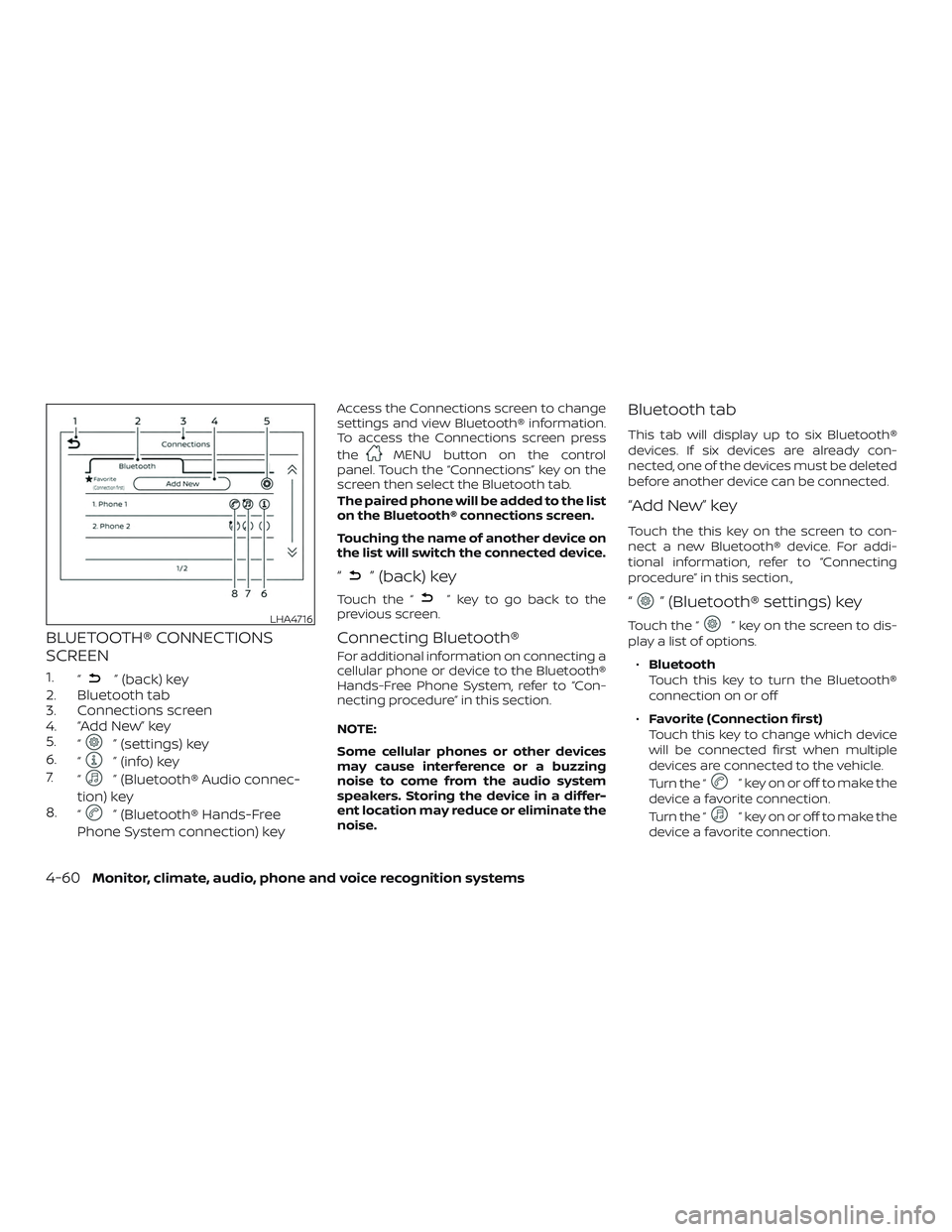
BLUETOOTH® CONNECTIONS
SCREEN
1.“” (back) key
2. Bluetooth tab
3. Connections screen
4. “Add New” key
5. “
” (settings) key
6. “
” (info) key
7. “
” (Bluetooth® Audio connec-
tion) key
8. “
” (Bluetooth® Hands-Free
Phone System connection) key
Access the Connections screen to change
settings and view Bluetooth® information.
To access the Connections screen press
the
MENU button on the control
panel. Touch the “Connections” key on the
screen then select the Bluetooth tab.
The paired phone will be added to the list
on the Bluetooth® connections screen.
Touching the name of another device on
the list will switch the connected device.
“” (back) key
Touch the “” key to go back to the
previous screen.
Connecting Bluetooth®
For additional information on connecting a
cellular phone or device to the Bluetooth®
Hands-Free Phone System, refer to “Con-
necting procedure” in this section.
NOTE:
Some cellular phones or other devices
may cause interference or a buzzing
noise to come from the audio system
speakers. Storing the device in a differ-
ent location may reduce or eliminate the
noise.
Bluetooth tab
This tab will display up to six Bluetooth®
devices. If six devices are already con-
nected, one of the devices must be deleted
before another device can be connected.
“Add New” key
Touch the this key on the screen to con-
nect a new Bluetooth® device. For addi-
tional information, refer to “Connecting
procedure” in this section.,
“” (Bluetooth® settings) key
Touch the “” key on the screen to dis-
play a list of options.
∙ Bluetooth
Touch this key to turn the Bluetooth®
connection on or off
∙ Favorite (Connection first)
Touch this key to change which device
will be connected first when multiple
devices are connected to the vehicle.
Turn the “
” key on or off to make the
device a favorite connection.
Turn the “
” key on or off to make the
device a favorite connection.
LHA4716
4-60Monitor, climate, audio, phone and voice recognition systems
Page 213 of 372
∙Pin
Touch this key to customize the PIN
code. Input a four digit number then
touch the “OK” key. The new PIN will be
set.
“” (info) key
Touch the “” key on the screen to dis-
play the information of the cellular phone
or to delete the device.
Touch the “Delete” key to remove a paired
device then select “Yes” when a message
appears.
“” (Bluetooth® Hands-Free
Phone System connection) key
A list of connected devices will be displayed
on the screen. Touch the “
” key next to
the name to connect a device to the
Hands-Free Phone System. If the phone is
listed as a favorite, a star will appear on the
icon. Select the key again to disconnect the
device. The device will not be removed
from the list. For additional information on
removing a device, refer to “
(info) key”
in this section.
“” (Bluetooth® Audio
connection) key
A list of connected devices will be displayed
on the screen. Touch the “
” key next to
the name to connect a device to
Bluetooth® Audio. If the device is listed as a
favorite, a star will appear on the icon. Se-
lect the key again to disconnect the device.
The device will not be removed from the
list. For additional information on removing
a device, refer to “
(info) key” in this
section.
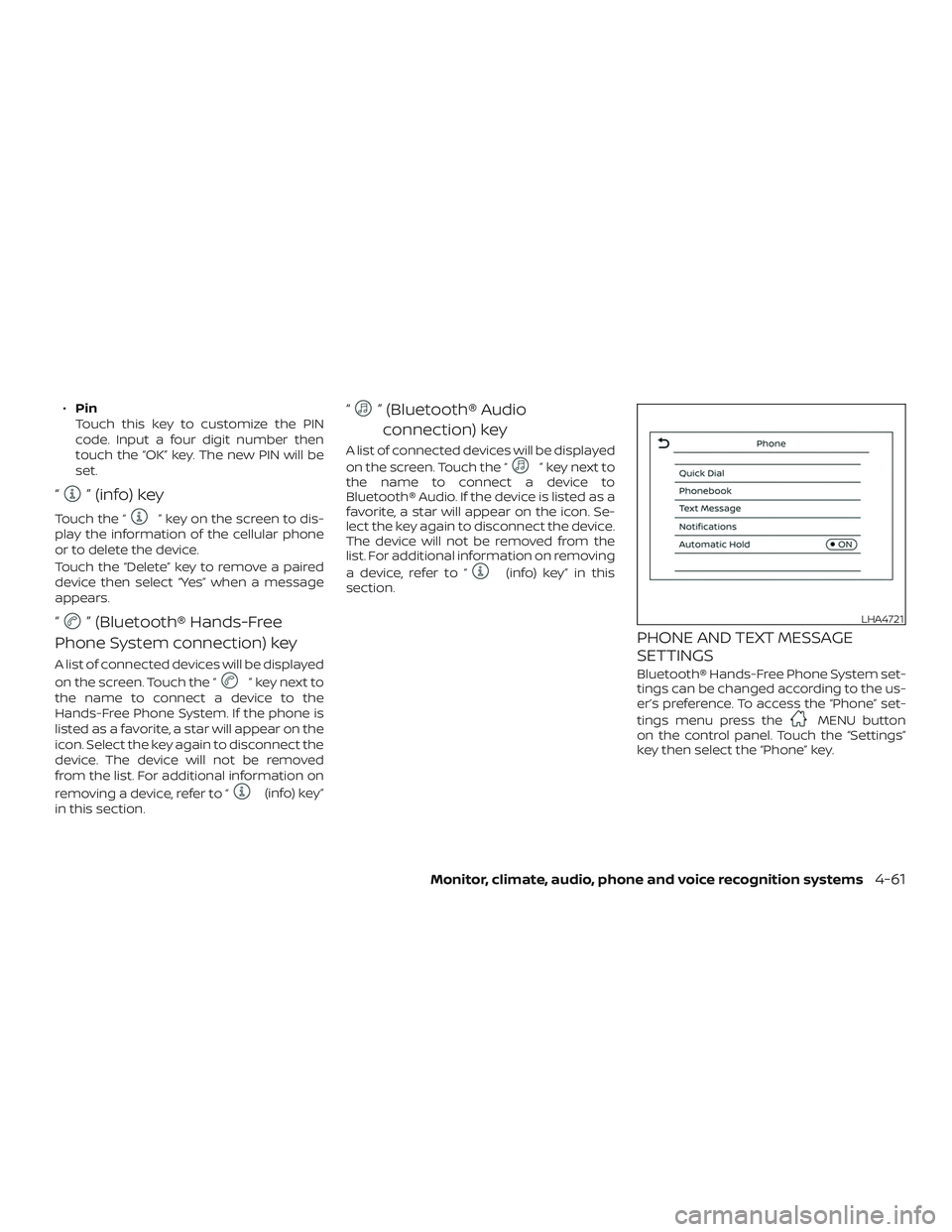
PHONE AND TEXT MESSAGE
SETTINGS
Bluetooth® Hands-Free Phone System set-
tings can be changed according to the us-
er’s preference. To access the “Phone” set-
tings menu press the
MENU button
on the control panel. Touch the “Settings”
key then select the “Phone” key.
LHA4721
Monitor, climate, audio, phone and voice recognition systems4-61
Page 214 of 372
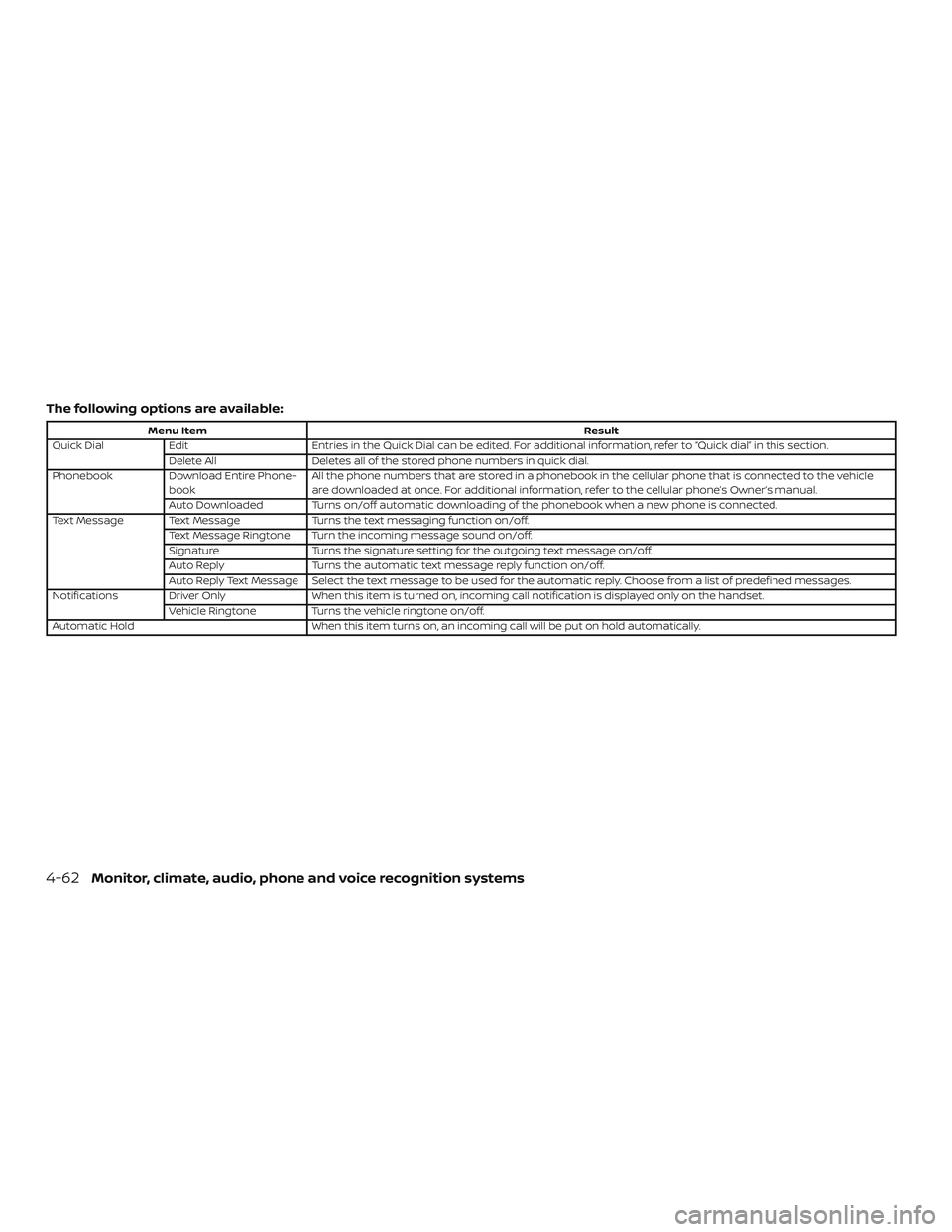
The following options are available:
Menu ItemResult
Quick Dial Edit Entries in the Quick Dial can be edited. For additional information, refer to “Quick dial” in this section.
Delete All Deletes all of the stored phone numbers in quick dial.
Phonebook Download Entire Phone-
book All the phone numbers that are stored in a phonebook in the cellular phone that is connected to the vehicle
are downloaded at once. For additional information, refer to the cellular phone’s Owner’s manual.
Auto Downloaded Turns on/off automatic downloading of the phonebook when a new phone is connected.
Text Message Text Message Turns the text messaging function on/off.
Text Message Ringtone Turn the incoming message sound on/off.
Signature Turns the signature setting for the outgoing text message on/off.
Auto Reply Turns the automatic text message reply function on/off.
Auto Reply Text Message Select the text message to be used for the automatic reply. Choose from a list of predefined messages.
Notifications Driver Only When this item is turned on, incoming call notification is displayed only on the handset.
Vehicle Ringtone Turns the vehicle ringtone on/off.
Automatic Hold When this item turns on, an incoming call will be put on hold automatically.
4-62Monitor, climate, audio, phone and voice recognition systems
Page 220 of 372
Additional information:∙ When replacing a wheel without the TPMS such as the spare tire, the TPMS
does not monitor the tire pressure of
the spare tire.
∙ The TPMS will activate only when the vehicle is driven at speeds above
16 mph (25 km/h). Also, this system may
not detect a sudden drop in tire pres-
sure (for example, a flat tire while driv-
ing).
∙ The low tire pressure warning light does not automatically turn off when the tire
pressure of your tires are adjusted. Af ter
the tires are inflated to the recom-
mended pressure, the vehicle must be
driven at speeds above 16 mph
(25 km/h) to activate the TPMS and turn
off the low tire pressure warning light.
Use a tire pressure gauge to check the
tire pressure.
∙ The CHECK TIRE PRES (pressure) warn- ing message is displayed in the odom-
eter when the low tire pressure warning
light is illuminated and low tire pressure
is detected. The CHECK TIRE PRES warn-
ing message turns off when the low tire
pressure warning light turns off. ∙ The low tire pressure warning light re-
mains illuminated until the tires are in-
flated to the recommended COLD tire
pressure. The CHECK TIRE PRES warning
message is displayed each time the ig-
nition switch is placed in the ON posi-
tion as long as the
low tire pres-
sure warning light remains illuminated.
∙ The CHECK TIRE PRES warning mes- sage is not displayed if the low tire pres-
sure warning light illuminates to indi-
cate a TPMS malfunction.
∙ Tire pressure rises and falls depending on the heat caused by the vehicle’s op-
eration and the outside temperature.
Do not reduce the tire pressure af ter
driving because the tire pressure rises
af ter driving. Low outside temperature
can lower the temperature of the air
inside the tire which can cause a lower
tire inflation pressure. This may cause
the low tire pressure warning light to
illuminate. If the warning light illumi-
nates, check the tire pressure for all four
tires.
∙ The Tire and Loading Information label is located in the driver’s door opening. For additional information, refer to “Low tire
pressure warning light” in the “Instruments
and controls” section and “Tire Pressure
Monitoring System (TPMS)” in the “In case of
emergency” section of this manual.WARNING
∙ Radio waves could adversely affect
electric medical equipment. Those
who use a pacemaker should contact
the electric medical equipment
manufacturer for possible influences
before use.
5-4Starting and driving
Page 227 of 372
WARNING
Do not operate the push-button igni-
tion switch while driving the vehicle ex-
cept in an emergency. (The engine will
stop when the ignition switch is pushed
three consecutive times in quick suc-
cession or the ignition switch is pushed
and held for more than 2 seconds.) If the
engine stops while the vehicle is being
driven, this could lead to a crash and
serious injury.When the ignition switch is pushed without
depressing the brake pedal or the clutch
pedal for manual transmission (M/T) mod-
els, the ignition switch position will illumi-
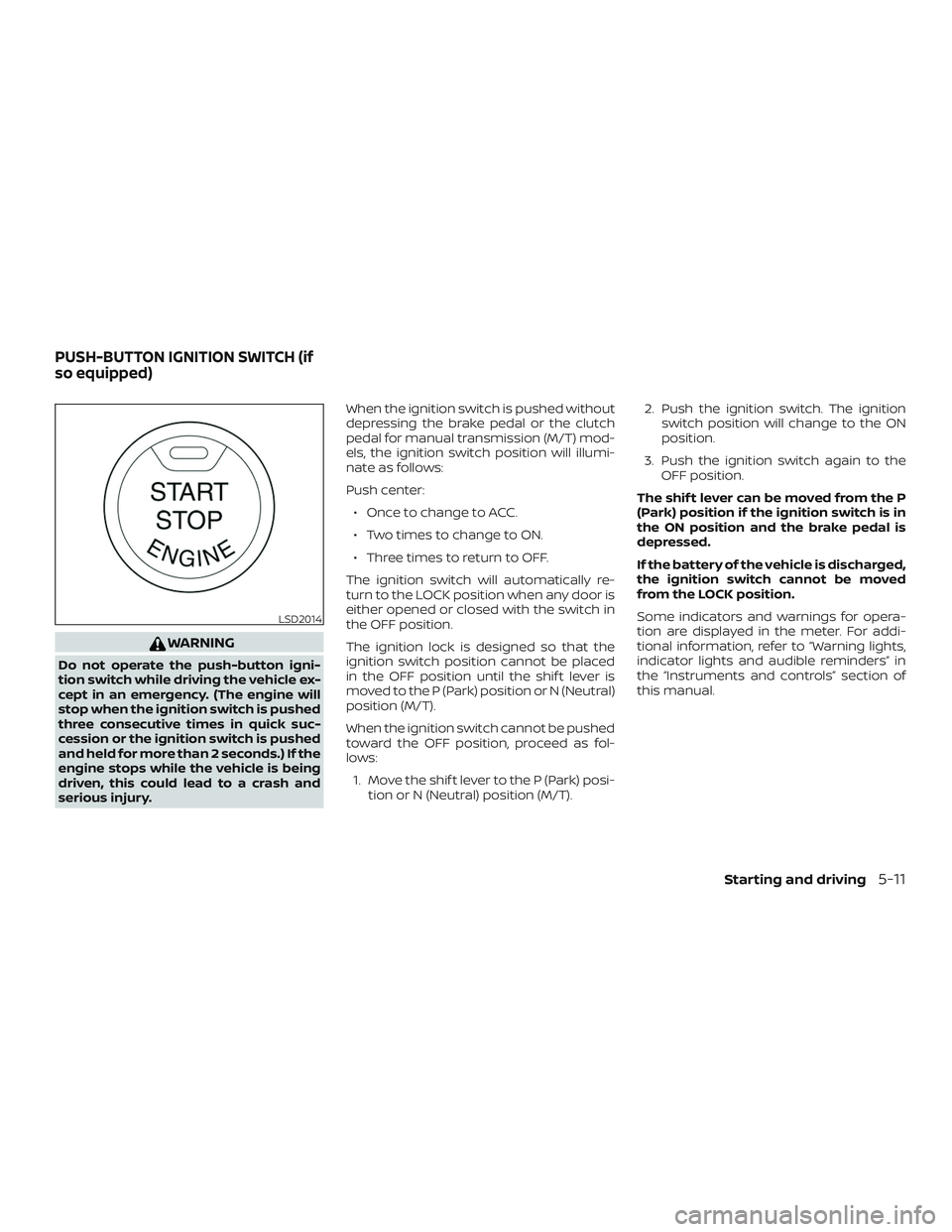
nate as follows:
Push center:
∙ Once to change to ACC.
∙ Two times to change to ON.
∙ Three times to return to OFF.
The ignition switch will automatically re-
turn to the LOCK position when any door is
either opened or closed with the switch in
the OFF position.
The ignition lock is designed so that the
ignition switch position cannot be placed
in the OFF position until the shif t lever is
moved to the P (Park) position or N (Neutral)
position (M/T).
When the ignition switch cannot be pushed
toward the OFF position, proceed as fol-
lows: 1. Move the shif t lever to the P (Park) posi- tion or N (Neutral) position (M/T). 2. Push the ignition switch. The ignition
switch position will change to the ON
position.
3. Push the ignition switch again to the OFF position.
The shif t lever can be moved from the P
(Park) position if the ignition switch is in
the ON position and the brake pedal is
depressed.
If the battery of the vehicle is discharged,
the ignition switch cannot be moved
from the LOCK position.
Some indicators and warnings for opera-
tion are displayed in the meter. For addi-
tional information, refer to “Warning lights,
indicator lights and audible reminders” in
the “Instruments and controls” section of
this manual.
LSD2014
PUSH-BUTTON IGNITION SWITCH (if
so equipped)
Starting and driving5-11
Page 254 of 372
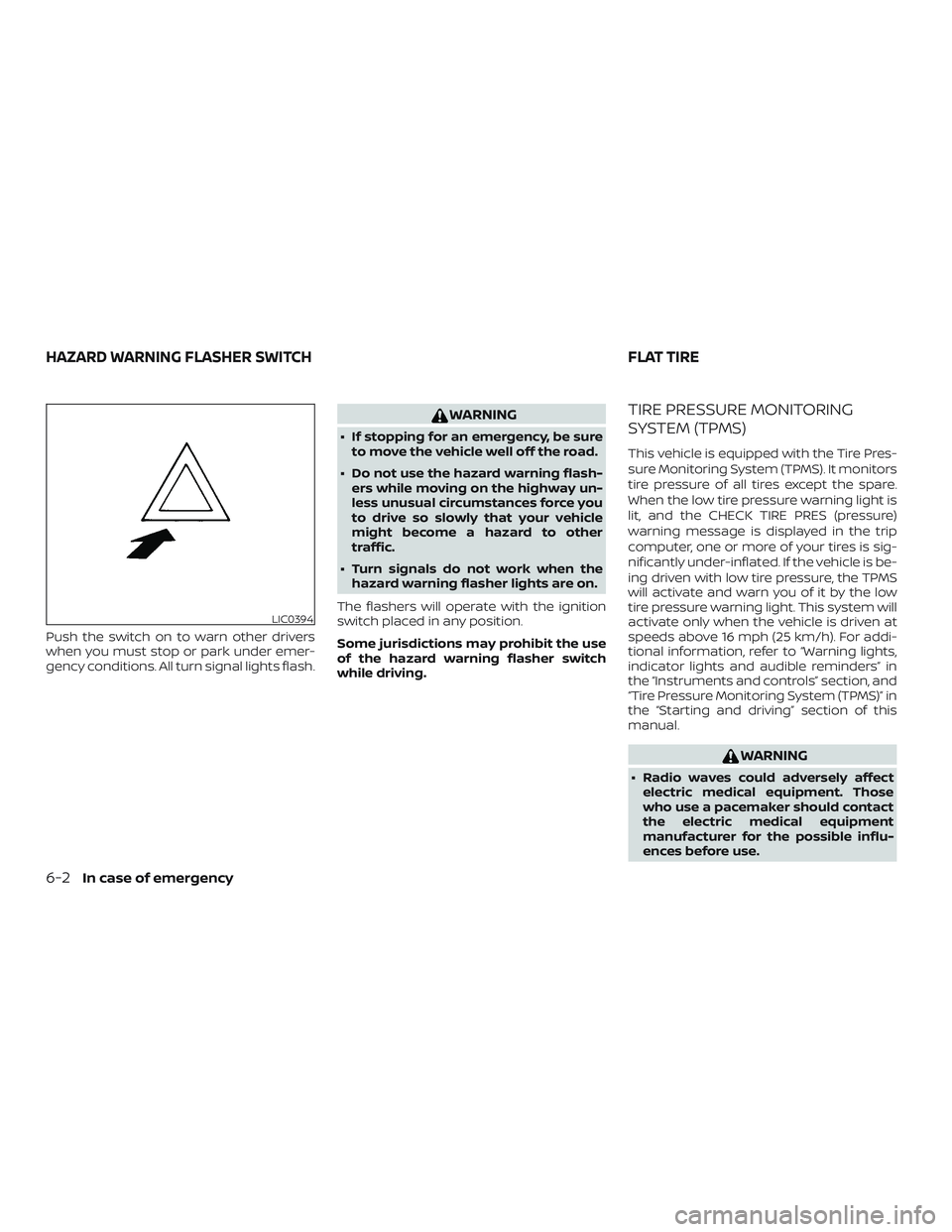
Push the switch on to warn other drivers
when you must stop or park under emer-
gency conditions. All turn signal lights flash.
WARNING
∙ If stopping for an emergency, be sureto move the vehicle well off the road.
∙ Do not use the hazard warning flash- ers while moving on the highway un-
less unusual circumstances force you
to drive so slowly that your vehicle
might become a hazard to other
traffic.
∙ Turn signals do not work when the hazard warning flasher lights are on.
The flashers will operate with the ignition
switch placed in any position.
Some jurisdictions may prohibit the use
of the hazard warning flasher switch
while driving.
TIRE PRESSURE MONITORING
SYSTEM (TPMS)
This vehicle is equipped with the Tire Pres-
sure Monitoring System (TPMS). It monitors
tire pressure of all tires except the spare.
When the low tire pressure warning light is
lit, and the CHECK TIRE PRES (pressure)
warning message is displayed in the trip
computer, one or more of your tires is sig-
nificantly under-inflated. If the vehicle is be-
ing driven with low tire pressure, the TPMS
will activate and warn you of it by the low
tire pressure warning light. This system will
activate only when the vehicle is driven at
speeds above 16 mph (25 km/h). For addi-
tional information, refer to “Warning lights,
indicator lights and audible reminders” in
the “Instruments and controls” section, and
“Tire Pressure Monitoring System (TPMS)” in
the “Starting and driving” section of this
manual.
WARNING
∙ Radio waves could adversely affect electric medical equipment. Those
who use a pacemaker should contact
the electric medical equipment
manufacturer for the possible influ-
ences before use.
LIC0394
HAZARD WARNING FLASHER SWITCH FLAT TIRE
6-2In case of emergency
Page 360 of 372
Childrestraints........1-18, 1-19, 1-20, 1-23LATCH (Lower Anchors and Tethers for
CHildren)System............. .1-23
Precautions on child
restraints .........1-20, 1-27, 1-33, 1-38
Top tether strap anchor point
locations.................. .1-25
Child safety rear door lock ..........3-8
Chimes, audible reminders .........2-21
Cleaningexteriorandinterior......7-2,7-4
Clockset.....................4-5
Clutch Clutchfluid..................8-11
Coldweatherdriving.............5-34
Continuously Variable Transmission
(CVT) .....................5-9,5-16
Continuously Variable Transmission
(CVT) fluid ..................8-10
Driving with Continuously Variable
Transmission (CVT) ..........5-9,5-16
Control panel buttons .............4-3
Brightness/contrast button .......4-7
Controls Audio controls (steering wheel) ....4-42
Heater and air conditioner controls . .4-14
Coolant Capacities and recommended
fuel/lubricants...............10-2
Changing engine coolant .........8-6
Checking engine coolant level ......8-6
Engine coolant temperature gauge . .2-9
Corrosionprotection..............7-7
Cruisecontrol .................5-24
Cupholders...................2-31
Curtain side-impact and rollover air
bag........................1-58 D
Defroster switch Rearwindowdefrosterswitch.....2-24
Dimensions and weights ..........10-10
Dimmer switch for instrument panel . . .2-26
Display controls
(see control panel buttons) ..........4-3
Door locks ..................3-6,3-7
Door open warning light ...........2-14
Drivebelt ....................8-15
Driving Cold weather driving ...........5-34
Driving with Continuously Variable
Transmission (CVT) ..........5-9,5-16
Driving with manual
transmission .............5-10,5-21
Precautions when starting and
driving.....................5-2
Drivingthevehicle...............5-16
E
Economy - fuel .................5-27
Emergency engine shutoff ..........5-13
Emission control information label . . . .10-12
Emission control system warranty . . . .10-19
Engine Before starting the engine ........5-14
Capacities and recommended
fuel/lubricants...............10-2
Changing engine coolant .........8-6
Changing engine oil ............8-8
Changing engine oil filter .........8-9
Checking engine coolant level ......8-6Checking engine oil level
.........8-7
Engine compartment check
locations...................8-4
Engine coolant temperature gauge . .2-9
Engine cooling system ..........8-5
Engine oil ...................8-7
Engine oil and oil filter
recommendation .............10-7
Engine oil pressure warning light ....2-14
Engine oil viscosity .............10-7
Engine serial number ..........10-12
Engine specifications ...........10-9
Starting the engine ............5-14
Engine coolant temperature gauge ....2-9
EventDatarecorders ............10-21
Exhaust gas (Carbon monoxide) .......5-2
Explanation of maintenance items .....9-2
Explanation of scheduled maintenance
items .......................9-5
Extended storage switch ..........8-22
F
Flasher s
(
Seehazardwarningflasherswitch)....6-2
Flattire....................6-2,6-3
Floormatpositioningaid...........7-6
Fluid Brakefluid..................8-10
Capacities and recommended
fuel/lubricants...............10-2
Clutchfluid..................8-11
Continuously Variable Transmission (CVT)
fluid......................8-10
Engine coolant ...............8-5
11-2