fuel NISSAN VERSA NOTE 2015 2.G Owner's Manual
[x] Cancel search | Manufacturer: NISSAN, Model Year: 2015, Model line: VERSA NOTE, Model: NISSAN VERSA NOTE 2015 2.GPages: 384, PDF Size: 3.82 MB
Page 250 of 384
NAVIGATION SYSTEM VOICE
COMMANDS
The following voice commands are available for
the Navigation System:● Street Address (address)
● Points of Interest (name)
● POI by Category
● Home
● Address Book
● Previous Destinations
● Enter Address in Steps
● Cancel Route
For additional information, refer to the separate
Navigation System Owner’s Manual.
AUDIO SYSTEM VOICE
COMMANDS
To access the audio system voice commands: 1. Press the button.
2. Say “Audio”
3. Speak a command from the following avail- able commands:
● Play (AM, FM, etc.)
Allows user to select radio band ●
Tune AM (number)
Allows user to tune directly to a desired AM
frequency
● Tune FM (number)
Allows user to tune directly to a desired FM
frequency
● SXM channel (number)
Allows user to tune directly to a desired
SXM station (if so equipped)
● CD Track (number)
Allows user to select track to be played
● Play Song (name)
Allows user to select song name to be
played
● Play Artist (name)
Allows user to select artist to be played
● Play Album (name)
Allows user to select album name to be
played
For additional information, refer to “Audio sys-
tem” in this section.
INFORMATION VOICE COMMANDS
The following voice commands are available for
the information functions of the Navigation Sys-
tem: ● Traffic
● Fuel Prices
● Stocks
● Movie Listings
● Current Weather
● Weather Map
● 5 — day Forecast
● 6 — hour Forecast
For additional information, refer to the Navigation
System Owner’s Manual.
MY APPS VOICE COMMANDS
Many Apps can be accessed using this voice
command. For additional information, refer to
“NissanConnect
SMMobile Apps” in this section.
Monitor, climate, audio, phone and voice recognition systems4-101
Page 253 of 384
5 Starting and driving
Precautions when starting and driving................5-2
Exhaust gas (carbon monoxide) ..................5-2
Three-way catalyst ..............................5-2
Tire Pressure Monitoring System (TPMS)
(if so equipped) ................................5-3
Avoiding collision and rollover . . ..................5-6
Off-road recovery ...............................5-6
Rapid air pressure loss ..........................5-7
Drinking alcohol/drugs and driving ................5-7
Ignition switch (if so equipped) ......................5-8
Continuously Variable Transmission (CVT)
(if so equipped) ................................5-8
Manual transmission (if so equipped) .............5-9
Ignition switch positions .........................5-9
NISSAN vehicle immobilizer system
(if so equipped) ............................... 5-10
Push-Button Ignition Switch (if so equipped) ........5-10
Operating range ............................... 5-11
Push-button ignition switch positions . . . .........5-11
Emergency engine shut off .....................5-12
NISSAN Intelligent Key® battery discharge .......5-12
NISSAN vehicle immobilizer system .............5-13
Before starting the engine ......................... 5-13
Starting the engine ............................... 5-14Driving the vehicle
................................ 5-15
Continuously Variable Transmission (CVT)
(if so equipped) ............................... 5-15
Manual transmission (if so equipped) ............5-18
Parking brake .................................... 5-20
Cruise control (if so equipped) . . ...................5-21
Precautions on cruise control ...................5-21
Cruise control operations .......................5-22
Break-in schedule ................................ 5-23
Fuel efficient driving tips ........................... 5-23
Increasing fuel economy ........................... 5-25
Parking/parking on hills ............................ 5-25
Power steering ................................... 5-26
Brake system .................................... 5-27
Brake precautions ............................. 5-27
Anti-lock Braking System (ABS) .................5-28
Brake assist .................................. 5-29
V
ehicle Dynamic Control (VDC) system .............5-29
Brake force distribution ........................ 5-30
Cold weather driving .............................. 5-32
Freeing a frozen door lock ......................5-32
Antifreeze ..................................... 5-32
Battery ....................................... 5-32
Page 256 of 384
CAUTION
●Do not use leaded gasoline. Deposits
from leaded gasoline will seriously re-
duce the three-way catalyst’s ability to
help reduce exhaust pollutants.
● Keep your engine tuned up. Malfunc-
tions in the ignition, fuel injection, or
electrical systems can cause overrich
fuel flow into the three-way catalyst,
causing it to overheat. Do not keep driv-
ing if the engine misfires, or if notice-
able loss of performance or other un-
usual operating conditions are
detected. Have the vehicle inspected
promptly by a NISSAN dealer.
● Avoid driving with an extremely low fuel
level. Running out of fuel could cause
the engine to misfire, damaging the
three-way catalyst.
● Do not race the engine while warming it
up.
● Do not push or tow your vehicle to start
the engine.
TIRE PRESSURE MONITORING
SYSTEM (TPMS) (if so equipped)
Each tire, including the spare (if provided) ,
should be checked monthly when cold and in-
flated to the inflation pressure recommended by
the vehicle manufacturer on the vehicle placard
or tire inflation pressure label. (If your vehicle has
tires of a different size than the size indicated on
the vehicle placard or tire inflation pressure label,
you should determine the proper tire inflation
pressure for those tires.)
As an added safety feature, your vehicle has been
equipped with a Tire Pressure Monitoring System
(TPMS) that illuminates a low tire pressure telltale
when one or more of your tires is significantly
under-inflated. Accordingly, when the low tire
pressure telltale illuminates, you should stop and
check your tires as soon as possible, and inflate
them to the proper pressure. Driving on a signifi-
cantly under-inflated tire causes the tire to over-
heat and can lead to tire failure. Under-inflation
also reduces fuel efficiency and tire tread life, and
may affect the vehicle’s handling and stopping
ability. Please note that the TPMS is not a substitute for
proper tire maintenance, and it is the driver’s
responsibility to maintain correct tire pressure,
even if under-inflation has not reached the level to
trigger illumination of the TPMS low tire pressure
telltale.
Your vehicle has also been equipped with a
TPMS malfunction indicator to indicate when the
system is not operating properly. The TPMS mal-
function indicator is combined with the low tire
pressure telltale. When the system detects a
malfunction, the telltale will flash for approxi-
mately one minute and then remain continuously
illuminated. This sequence will continue upon
subsequent vehicle start-ups as long as the mal-
function exists. When the malfunction indicator is
illuminated, the system may not be able to detect
or signal low tire pressure as intended. TPMS
malfunctions may occur for a variety of reasons,
including the installation of replacement or alter-
nate tires or wheels on the vehicle that prevent
the TPMS from functioning properly. Always
check the TPMS malfunction telltale after replac-
ing one or more tires or wheels on your vehicle to
ensure that the replacement or alternate tires and
wheels allow the TPMS to continue to function
properly.
Starting and driving5-3
Page 266 of 384
4. Push the ignition switch while depressingthe brake pedal within 10 seconds after the
chime sounds. The engine will start.
After step 3 is performed, when the ignition
switch is pushed without depressing the brake
pedal, the ignition switch position will change to
“ACC”.
NOTE: ● When the ignition switch is pushed to the
“ACC” or “ON” position or the engine is
started by the above procedures, the
NISSAN Intelligent Key® system warning
light may blink in yellow (on the meter) even
if the NISSAN Intelligent Key® is inside the
vehicle. This is not a malfunction. To stop the
warning light from blinking, touch the ignition
switch with the NISSAN Intelligent Key®
again.
● If the NISSAN Intelligent Key® system warn-
ing light in the meter is blinking in green,
replace the battery as soon as possible.
Refer to “Battery replacement” in the “Main-
tenance and do-it-yourself” section.NISSAN VEHICLE IMMOBILIZER
SYSTEM
The NISSAN Vehicle Immobilizer system will not
allow the engine to start without the use of the
registered key.
If the engine fails to start using a registered key
(for example, when interference is caused by
another registered key, an automated toll road
device or automatic payment device on the key
ring) , restart the engine using the following pro-
cedure:
1. Leave the ignition switch in the ON position for approximately 5 seconds.
2. Place the ignition switch in the OFF or LOCK position, and wait approximately
10 seconds.
3. Repeat Steps 1 and 2.
4. Restart the engine while holding the device (which may have caused the interference)
separate from the registered key.
If the no start condition re-occurs, NISSAN rec-
ommends placing the registered key on a sepa-
rate key ring to avoid interference from other
devices. ●
Make sure the area around the vehicle is
clear.
● Check fluid levels such as engine oil, cool-
ant, brake and clutch fluid (if so equipped) ,
and windshield-washer fluid as frequently as
possible, or at least whenever you refuel.
● Check that all windows and lights are clean.
● Visually inspect tires for their appearance
and condition. Also check tires for proper
inflation.
● Lock all doors.
● Position seat and adjust head
restraints/headrests.
● Adjust inside and outside mirrors.
● Fasten seat belts and ask all passengers to
do likewise.
● Check the operation of warning lights when
the ignition switch is placed in the ON posi-
tion. For additional information, refer to
“Warning/indicator lights and audible re-
minders” in the “Instruments and controls”
section of this manual.
BEFORE STARTING THE ENGINE
Starting and driving5-13
Page 272 of 384
CAUTION
●Do not rest your foot on the clutch pedal
while driving. This may cause clutch
damage.
● Fully depress the clutch pedal before
shifting to help prevent transmission
damage.
● Stop your vehicle completely before
shifting into R (Reverse) .
● When the vehicle is stopped with the
engine running (for example, at a stop
light) , shift to N (Neutral) and release
the clutch pedal with the foot brake
applied.
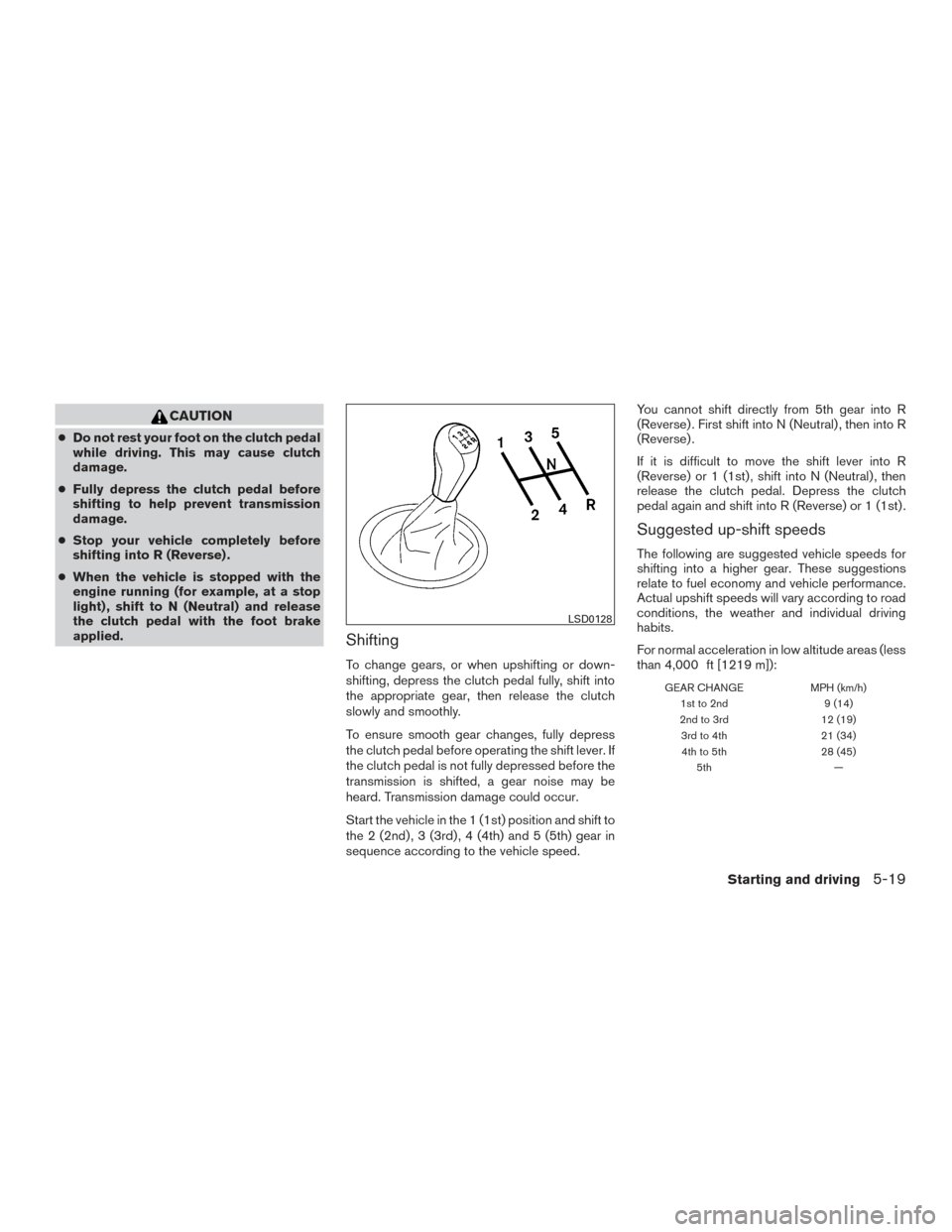
Shifting
To change gears, or when upshifting or down-
shifting, depress the clutch pedal fully, shift into
the appropriate gear, then release the clutch
slowly and smoothly.
To ensure smooth gear changes, fully depress
the clutch pedal before operating the shift lever. If
the clutch pedal is not fully depressed before the
transmission is shifted, a gear noise may be
heard. Transmission damage could occur.
Start the vehicle in the 1 (1st) position and shift to
the 2 (2nd) , 3 (3rd) , 4 (4th) and 5 (5th) gear in
sequence according to the vehicle speed. You cannot shift directly from 5th gear into R
(Reverse) . First shift into N (Neutral) , then into R
(Reverse) .
If it is difficult to move the shift lever into R
(Reverse) or 1 (1st) , shift into N (Neutral) , then
release the clutch pedal. Depress the clutch
pedal again and shift into R (Reverse) or 1 (1st) .
Suggested up-shift speeds
The following are suggested vehicle speeds for
shifting into a higher gear. These suggestions
relate to fuel economy and vehicle performance.
Actual upshift speeds will vary according to road
conditions, the weather and individual driving
habits.
For normal acceleration in low altitude areas (less
than 4,000 ft [1219 m]):
GEAR CHANGE
MPH (km/h)
1st to 2nd 9 (14)
2nd to 3rd 12 (19)
3rd to 4th 21 (34)
4th to 5th 28 (45)
5th —
LSD0128
Starting and driving5-19
Page 276 of 384
To reset at a slower cruising speed,use one
of the following three methods.
● Lightly tap the brake pedal. When the ve-
hicle attains the desired speed, push the
COAST/SET switch and release it.
● Push and hold the COAST/SET switch. Re-
lease the switch when the vehicle slows to
the desired speed.
● Push and release the COAST/SET switch.
Each time you do this, the set speed de-
creases by about 1 MPH (1.6 km/h).
To resume the preset speed, push and re-
lease the ACCEL/RES switch. The vehicle re-
turns to the last set cruising speed when the
vehicle speed is over 25 MPH (40 km/h).CAUTION
During the first 1,200 miles (2,000 km),
follow these recommendations to obtain
maximum engine performance and ensure
the future reliability and economy of your
new vehicle. Failure to follow these rec-
ommendations may result in shortened
engine life and reduced engine
performance.
● Avoid driving for long periods at constant
speed, either fast or slow, and do not run the
engine over 4,000 rpm.
● Do not accelerate at full throttle in any gear.
● Avoid quick starts.
● Avoid hard braking as much as possible. Follow these easy-to-use Fuel Efficient Driving
Tips to help you achieve the most fuel economy
from your vehicle.
1. Use Smooth Accelerator and Brake
Pedal Application
● Avoid rapid starts and stops.
● Use smooth, gentle accelerator and
brake application whenever possible.
● Maintain constant speed while commut-
ing and coast whenever possible.
2. Maintain Constant Speed
● Look ahead to try and anticipate and mini-
mize stops.
● Synchronizing your speed with traffic
lights allows you to reduce your number
of stops.
● Maintaining a steady speed can minimize
red light stops and improve fuel effi-
ciency.
3. Use Air Conditioning (A/C) at Higher
Vehicle Speeds
● Below 40 MPH (64 km/h), it is more
efficient to open windows to cool the
vehicle due to reduced engine load.
BREAK-IN SCHEDULE FUEL EFFICIENT DRIVING TIPS
Starting and driving5-23
Page 277 of 384
●Above 40 MPH (64 km/h), it is more
efficient to use A/C to cool the vehicle
due to increased aerodynamic drag.
● Recirculating the cool air in the cabin
when the A/C is on reduces cooling load.
4. Drive at Economical Speeds and Dis-
tances
● Observing the speed limit and not ex-
ceeding 60 MPH (97 km/h) (where le-
gally allowed) can improve fuel efficiency
due to reduced aerodynamic drag.
● Maintaining a safe following distance be-
hind other vehicles reduces unnecessary
braking.
● Safely monitoring traffic to anticipate
changes in speed permits reduced brak-
ing and smooth acceleration changes.
● Select a gear range suitable to road con-
ditions.
5. Use Cruise Control
● Using cruise control during highway driv-
ing helps maintain a steady speed.
● Cruise control is particularly effective in
providing fuel savings when driving on flat
terrains. 6.
Plan for the Shortest Route
● Utilize a map or navigation system to de-
termine the best route to save time.
7. Avoid Idling
● Shutting off your engine when safe for
stops exceeding 30–60 seconds saves
fuel and reduces emissions.
8. Buy an Automated Pass for Toll Roads
● Automated passes permit drivers to use
special lanes to maintain cruising speed
through the toll and avoid stopping and
starting.
9. Winter Warm Up
● Limit idling time to minimize impact to fuel
economy.
● Vehicles typically need no more than
30 seconds of idling at start-up to effec-
tively circulate the engine oil before driv-
ing.
● Your vehicle will reach its ideal operating
temperature more quickly while driving
versus idling. 10.
Keeping your Vehicle Cool
● Park your vehicle in a covered parking
area or in the shade whenever possible.
● When entering a hot vehicle, opening the
windows will help to reduce the inside
temperature faster, resulting in reduced
demand on your A/C system.
5-24Starting and driving
Page 278 of 384
●Keep your engine tuned up.
● Follow the recommended scheduled main-
tenance.
● Keep the tires inflated to the correct pres-
sure. Low tire pressure increases tire wear
and lowers fuel economy.
● Keep the wheels in correct alignment. Im-
proper alignment increases tire wear and
lowers fuel economy.
● Use the recommended viscosity engine oil.
For additional information, refer to “Engine
oil and oil filter recommendations” in the
“Technical and consumer information” sec-
tion of this manual.
WARNING
● Do not stop or park the vehicle over
flammable materials such as dry grass,
waste paper or rags. They may ignite
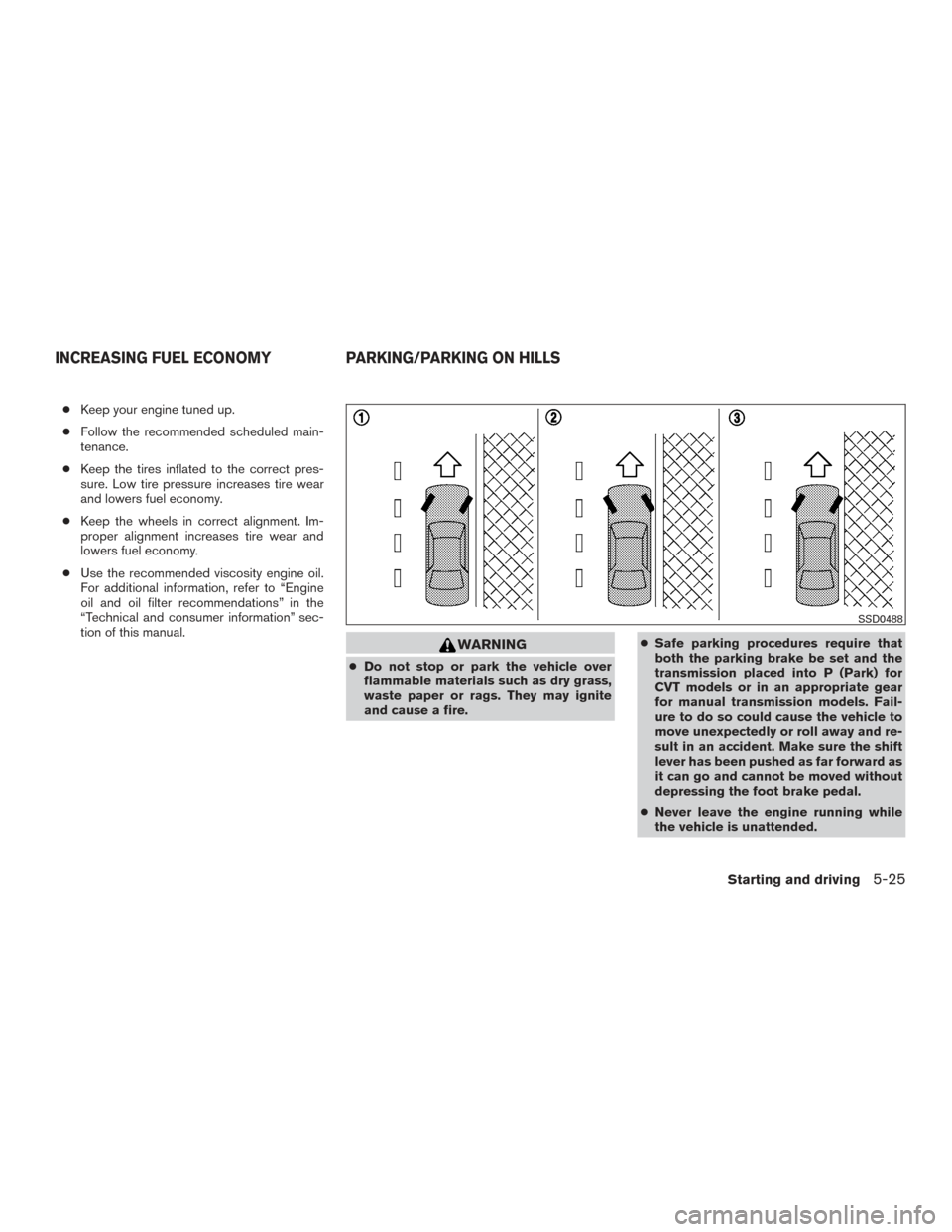
and cause a fire. ●
Safe parking procedures require that
both the parking brake be set and the
transmission placed into P (Park) for
CVT models or in an appropriate gear
for manual transmission models. Fail-
ure to do so could cause the vehicle to
move unexpectedly or roll away and re-
sult in an accident. Make sure the shift
lever has been pushed as far forward as
it can go and cannot be moved without
depressing the foot brake pedal.
● Never leave the engine running while
the vehicle is unattended.
SSD0488
INCREASING FUEL ECONOMY PARKING/PARKING ON HILLS
Starting and driving5-25
Page 311 of 384
Temperature
High temperatures accelerate the rate of corro-
sion to those parts which are not well ventilated.
Air pollution
Industrial pollution, the presence of salt in the air
in coastal areas, or heavy road salt use acceler-
ates the corrosion process. Road salt also accel-
erates the disintegration of paint surfaces.
PROTECT YOUR VEHICLE FROM
CORROSION
●Wash and wax your vehicle often to keep the
vehicle clean.
● Always check for minor damage to the paint
and repair it as soon as possible.
● Keep drain holes at the bottom of the doors
open to avoid water accumulation.
● Check the underbody for accumulation of
sand, dirt or salt. If present, wash with water
as soon as possible.
CAUTION
● NEVER remove dirt, sand or other de-
bris from the passenger compartment
by washing it out with a hose. Remove
dirt with a vacuum cleaner or broom.
● Never allow water or other liquids to
come in contact with electronic compo-
nents inside the vehicle as this may
damage them.
Chemicals used for road surface de-icing are
extremely corrosive. They accelerate corrosion
and deterioration of underbody components
such as the exhaust system, fuel and brake lines,
brake cables, floor pan and fenders.
In winter, the underbody must be cleaned
periodically.
For additional protection against rust and corro-
sion, which may be required in some areas, con-
sult a NISSAN dealer.
7-6Appearance and care
Page 315 of 384
on a fairly steep hill with only the parking brake
applied. If the parking brake needs adjustment,
see a NISSAN dealer.
SeatsCheck seat position controls such as seat
adjusters, seat back recliner, etc. to ensure they
operate smoothly and all latches lock securely in
every position. Check that the head
restraints/headrests move up and down
smoothly and the locks hold securely in all
latched positions.
Seat belts Check that all parts of the seat belt
system (for example, buckles, anchors, adjusters
and retractors) operate properly and smoothly,
and are installed securely. Check the belt web-
bing for cuts, fraying, wear or damage.
Steering wheel Check for changes in the steer-
ing system, such as excessive freeplay, hard
steering or strange noises.
Warning lights and chimes Make sure all
warning lights and chimes are operating properly.
Windshield wiper and washer* Check that
the wipers and washer operate properly and that
the wipers do not streak.
Windshield defroster Check that the air
comes out of the defroster outlets properly and in
sufficient quantity when operating the heater or
air conditioner.Under the hood and vehicle
The maintenance items listed here should be
checked periodically (for example, each time you
check the engine oil or refuel) .
Battery* Check the fluid level in each cell. It
should be between the MAX and MIN lines. Ve-
hicles operated in high temperatures or under
severe conditions require frequent checks of the
battery fluid level.
NOTE:
Care should be taken to avoid situations
that can lead to potential battery discharge
and potential no-start conditions such as:
1. Installation or extended use of electronic accessories that consume battery power
when the engine is not running (Phone char-
gers, GPS, DVD players, etc.)
2. Vehicle is not driven regularly and/or only driven short distances. In these cases, the
battery may need to be charged to maintain
battery health.
Brake and clutch (if so equipped) fluid lev-
els* Make sure that the brake and clutch fluid
level is between the MIN and MAX lines on the
reservoir. Engine coolant level*
Check the coolant level
when the engine is cold.
Engine drive belts* Make sure the drive belts
are not frayed, worn, cracked or oily.
Engine oil level* Check the level after parking
the vehicle on a level surface with the engine off.
Wait more than 10 minutes for the oil to drain
back into the oil pan.
Exhaust system Make sure there are no loose
supports, cracks or holes. If the sound of the
exhaust seems unusual or there is a smell of
exhaust fumes, immediately have the exhaust
system inspected by a NISSAN dealer. Refer to
the carbon monoxide warning in the “Starting and
driving” section of this manual.
Fluid leaks Check under the vehicle for fuel, oil,
water or other fluid leaks after the vehicle has
been parked for a while. Water dripping from the
air conditioner (if so equipped) after use is nor-
mal. If you should notice any leaks or if gasoline
fumes are evident, check for the cause and have
it corrected immediately.
Radiator and hoses Check the front of the
radiator and clean off any dirt, insects, leaves,
etc., that may have accumulated. Make sure the
hoses have no cracks, deformation, rot or loose
connections.
8-4Maintenance and do-it-yourself