manual radio set NISSAN VERSA NOTE 2018 Owner´s Manual
[x] Cancel search | Manufacturer: NISSAN, Model Year: 2018, Model line: VERSA NOTE, Model: NISSAN VERSA NOTE 2018Pages: 878, PDF Size: 9.62 MB
Page 258 of 878
in-vehicle phone module when the ignition
switch is placed in the ON position with the
previously connected cellular phone turned
on and carried in the vehicle.
NOTE:
Some devices require the user to accept
connections to other Bluetooth® de-
vices; however some phones do not con-
nect automatically to the system. For
additional information, refer to the
phone’s Owner’s Manual.
You can connect up to five different
Bluetooth® cellular phones to the in-
vehicle phone module. However, you can
talk on only one cellular phone at a time.
Before using the Bluetooth® Hands-Free
Phone System, refer to the following notes.∙ Set up the wireless connection be- tween a compatible cellular phone and
the in-vehicle phone module before us-
ing the hands-free phone system.
∙ Some Bluetooth® enabled cellular phones may not be recognized or work
properly. Please visit
www.nissanusa.com/bluetooth or
www.nissan.ca/bluetooth for a recom-
mended phone list and connecting in-
structions. ∙ You will not be able to use a hands-free
phone under the following conditions:
– Your vehicle is outside of the cellular service area.
– Your vehicle is in an area where it is difficult to receive a cellular signal;
such as in a tunnel, in an under-
ground parking garage, near a tall
building or in a mountainous area.
– Your cellular phone is locked to pre- vent it from being dialed.
∙ When the radio wave condition is not ideal or ambient sound is too loud, it
may be difficult to hear the other per-
son’s voice during a call.
∙ Do not place the cellular phone in an area surrounded by metal or far away
from the in-vehicle phone module to
prevent tone quality degradation and
wireless connection disruption. ∙ While a cellular phone is connected
through the Bluetooth® wireless con-
nection, the battery power of the cellu-
lar phone may discharge quicker than
usual. The Bluetooth® Hands-Free
Phone System cannot charge cellular
phones.
∙ For additional information, please visit www.nissanusa.com/bluetooth or
www.nissan.ca/bluetooth for trouble-
shooting help.
∙ Some cellular phones or other devices may cause interference or a buzzing
noise to come from the audio system
speakers. Storing the device in a differ-
ent location may reduce or eliminate
the noise.
∙ For additional information, refer to the cellular phone Owner’s Manual regard-
ing the telephone charges, cellular
phone antenna and body, etc.
Monitor, climate, audio, phone and voice recognition systems4-97
Page 324 of 878
TIRE PRESSURE MONITORING
SYSTEM (TPMS) (if so equipped)
This vehicle is equipped with the Tire Pres-
sure Monitoring System (TPMS). It monitors
tire pressure of all tires except the spare.
When the low tire pressure warning light is
lit, and the CHECK TIRE PRES (pressure)
warning message is displayed in the
odometer, one or more of your tires is sig-
nificantly under-inflated. If the vehicle is be-
ing driven with low tire pressure, the TPMS
will activate and warn you of it by the low
tire pressure warning light. This system will
activate only when the vehicle is driven at
speeds above 16 mph (25 km/h). For addi-
tional information, refer to “Warning lights,
indicator lights and audible reminders” in
the “Instruments and controls” section, and
“Tire Pressure Monitoring System (TPMS)” in
the “Starting and driving” section of this
manual.
WARNING
∙ Radio waves could adversely affectelectric medical equipment. Those
who use a pacemaker should contact
the electric medical equipment
manufacturer for the possible influ-
ences before use. ∙ If the low tire pressure warning light
illuminates while driving, avoid sud-
den steering maneuvers or abrupt
braking, reduce vehicle speed, pull off
the road to a safe location and stop
the vehicle as soon as possible. Driv-
ing with under-inflated tires may per-
manently damage the tires and in-
crease the likelihood of tire failure.
Serious vehicle damage could occur
and may lead to an accident and could
result in serious personal injury.
Check the tire pressure for all four
tires. Adjust the tire pressure to the
recommended COLD tire pressure
shown on the Tire and Loading Infor-
mation label to turn the low tire pres-
sure warning light OFF. If you have a
flat tire, replace it with a spare tire as
soon as possible.
∙ When replacing a wheel without TPMS such as the spare tire, TPMS will not
function and the low tire pressure
warning light will flash for approxi-
mately 1 minute. The light will remain
on af ter 1 minute. Have your tires re-
placed and/or TPMS system reset as
soon as possible. It is recommended
that you visit a NISSAN dealer for
these services. ∙ Do not inject any tire liquid or aerosol
tire sealant into the tires, as this may
cause a malfunction of the tire pres-
sure sensors.
∙ Replacing tires with those not origi- nally specified by NISSAN could affect
the proper operation of the TPMS.
CHANGING A FLAT TIRE
If you have a flat tire, follow the instructions
below:
Stopping the vehicle
1. Safely move the vehicle off the road and
away from traffic.
2. Turn on the hazard warning flashers.
3. Park on a level surface and apply the parking brake. Shif t the manual trans-
mission into R (Reverse) or the Continu-
ously Variable Transmission into P
(Park).
4. Turn off the engine.
5. Raise the hood to warn other traffic and to signal professional road assis-
tance personnel that you need assis-
tance.
FLAT TIRE
In case of emergency6-3
Page 427 of 878
C
Capacities and recommended fuel/
lubricants....................10-2
Cargocover...................2-39
Cargo (See vehicle loading information). .10-13
Car phone or CB radio ............4-81
CDcareandcleaning.............4-73
CD player (See audio system). .4-47, 4-52, 4-60
Checking bulbs .................2-15
Childrestraints........1-20, 1-21, 1-23, 1-25 LATCH (Lower Anchors and Tethers for
CHildren)System..............1-25
Precautions on child
restraints .........1-23, 1-30, 1-36, 1-41
Top tether strap anchor point
locations.................. .1-27
Child restraint with top tether strap . . . .1-27
Child safety rear door lock ..........3-8
Chimes, audible reminders .........2-23
Cleaningexteriorandinterior......7-2,7-4
Clock setting (models with Navigation
System) ...................4-7,4-9
Clock setting (models without Navigation
System) ...........4-46,4-50,4-51,4-51
Clutch Clutchfluid.................8-10
C.M.V.S.S. certification label .........10-11
Coldweatherdriving.............5-34
Compact disc (CD) player ....4-47,4-52,4-60
Connect phone ................4-76
Continuously Variable
Transmission (CVT) ............5-9,5-15
Continuously Variable Transmission (CVT)
fluid......................8-9 Driving with Continuously Variable
Transmission (CVT)
..........5-9,5-15
Control panel buttons .............4-4
Brightness/contrast button .......4-9
Settingbutton................4-7
Controls Audio controls (steering wheel) .....4-74
Heater and air conditioner controls . .4-28
Coolant Capacities and recommended
fuel/lubricants...............10-2
Changing engine coolant .........8-5
Checking engine coolant level ......8-5
Engine coolant temperature gauge . .2-9
Corrosionprotection..............7-7
Cruisecontrol .................5-22
Cupholders...................2-36
Curtain side-impact and rollover
airbag..................... .1-59
D
Daytime running light system
(Canada only) ..................2-29
Defroster switch Rearwindowdefrosterswitch.....2-27
Dimensions and weights ...........10-9
Dimmer switch for instrument panel . . .2-29
Display controls
(see control panel buttons) ..........4-4
Door locks ..................3-5,3-6
Door open warning light ...........2-16
Drivebelt ....................8-14
Driving Cold weather driving ...........5-34 Driving with Continuously Variable
Transmission (CVT)
..........5-9,5-15
Driving with manual transmission . . .5-20
Precautions when starting and
driving .....................5-2
Driving the vehicle ...............5-15
E
Economy - fuel .................5-26
Emergency engine shutoff ..........5-13
Emission control information label . . . .10-11
Emission control system warranty . . . .10-18
Engine Before starting the engine ........5-14
Capacities and recommended
fuel/lubricants...............10-2
Changing engine coolant .........8-5
Changing engine oil ............8-7
Changing engine oil filter .........8-8
Checking engine coolant level ......8-5
Checking engine oil level .........8-6
Engine compartment check
locations...................8-3
Engine coolant temperature gauge . .2-9
Engine cooling system ..........8-4
Engine oil ...................8-6
Engine oil and oil filter
recommendation .............
10-6
Engine oil pressure warning light . . . .2-16
Engine oil viscosity .............10-7
Engine serial number ...........10-11
Engine specifications ...........10-8
Starting the engine ............5-14
Engine Block Heater .............5-35
11-2
Page 538 of 878
For additional information, refer to "Check
tire pressure warning message" in this sec-
tion and “Tire Pressure Monitoring System
(TPMS)” in the “Starting and driving” section
and in the “In case of emergency” section of
this manual.
TPMS malfunction
If the TPMS is not functioning properly, the
low tire pressure warning light will flash for
approximately 1 minute when the ignition
switch is placed in the ON position. The
light will remain on af ter 1 minute. Have the
system checked. It is recommended that
you visit a NISSAN dealer for this service.
The "CHECK TIRE PRES" warning does not
appear if the low tire pressure warning light
illuminates to indicate a TPMS malfunction.
For additional information, refer to “Tire
Pressure Monitoring System (TPMS)” in the
“Starting and driving” section and “Tire
pressure” in the “Do-it-yourself ” section of
this manual.WARNING
∙ Radio waves could adversely affectelectric medical equipment. Those
who use a pacemaker should contact
the electric medical equipment
manufacturer for the possible influ-
ences before use.
∙ If the light does not illuminate with the ignition switch placed in the ON
position, have the vehicle checked as
soon as possible. It is recommended
that you visit a NISSAN dealer for this
service.
∙ If the light illuminates while driving, avoid sudden steering maneuvers or
abrupt braking, reduce vehicle speed,
pull off the road to a safe location and
stop the vehicle as soon as possible.
Driving with under-inflated tires may
permanently damage the tires and in-
crease the likelihood of tire failure. Se-
rious vehicle damage could occur and
may lead to an accident and could re-
sult in serious personal injury or
death. Check the tire pressure for all
four tires. Adjust the tire pressure to
the recommended COLD tire pressure show on the Tire and Loading Infor-
mation label located in the driver’s
door opening to turn the low tire pres-
sure warning light off. If the light still
illuminates while driving af ter adjust-
ing the tire pressure, a tire may be flat
or the TPMS may be malfunctioning. If
you have a flat tire, replace it with a
spare tire as soon as possible. If no tire
is flat and all tires are properly in-
flated, have the vehicle checked. It is
recommended that you visit a NISSAN
dealer for this service.
∙ When replacing a wheel without the TPMS such as the spare tire, the TPMS
will not function and the low tire pres-
sure warning light will flash for ap-
proximately 1 minute. The light will re-
main on af ter 1 minute. Have your
tires replaced and/or TPMS system
reset as soon as possible. It is recom-
mended that you visit a NISSAN dealer
for these services.
∙ Replacing tires with those not origi- nally specified by NISSAN could affect
the proper operation of the TPMS.
2-18Instruments and controls
Page 601 of 878

4 Monitor, climate, audio, phone and
voice recognition systems
Control panel buttons — models without
Navigation System (if so equipped)..............4-4
How to use the touch-screen .................4-5
How to use the
MENU button ...........4-7
(brightness control) button .............4-9
How to use the VOL (volume) knob /
PUSH
(power)button ...................4-9
Selecting menu from launch bar .............4-9
Control panel buttons — models with
Navigation System (if so equipped) .............4-10
How to use the touch-screen .................4-11
HowtousetheBACKbutton ................ 4-13
How to use the [
]button .............. 4-13
Clock Set .................................... 4-15
button................................. 4-15
How to use the ON•OFF button/VOL
(volume) control knob ....................... 4-15
How to use the CAMERA button .............4-15
RearView Monitor (if so equipped) ..............4-16
RearView Monitor system operation .........4-17
How to read the displayed lines ..............4-18
Difference between predicted and
actual distances ............................. 4-18Adjusting the screen
........................ 4-20
RearView Monitor system limitations ........4-21
System maintenance ........................ 4-22
Around View® Monitor (if so equipped) ..........4-23
Around View® Monitor system
operation .................................... 4-24
Difference between predicted and
actual distances ............................. 4-27
How to park with predicted course
lines ......................................... 4-29
How to switch the display ...................4-31
Adjusting the screen ........................ 4-31
Around View® Monitor system
limitations ................................... 4-32
System maintenance ........................ 4-34
Vents ........................................... 4-35
Heater and air conditioner (manual) ............4-35
Controls ..................................... 4-36
Heater operation ............................ 4-37
Air conditioner operation ....................4-38
Air flow charts ............................... 4-39
Servicing air conditioner ........................4-43
Audio system ................................... 4-43
Radio ........................................ 4-43
Page 615 of 878
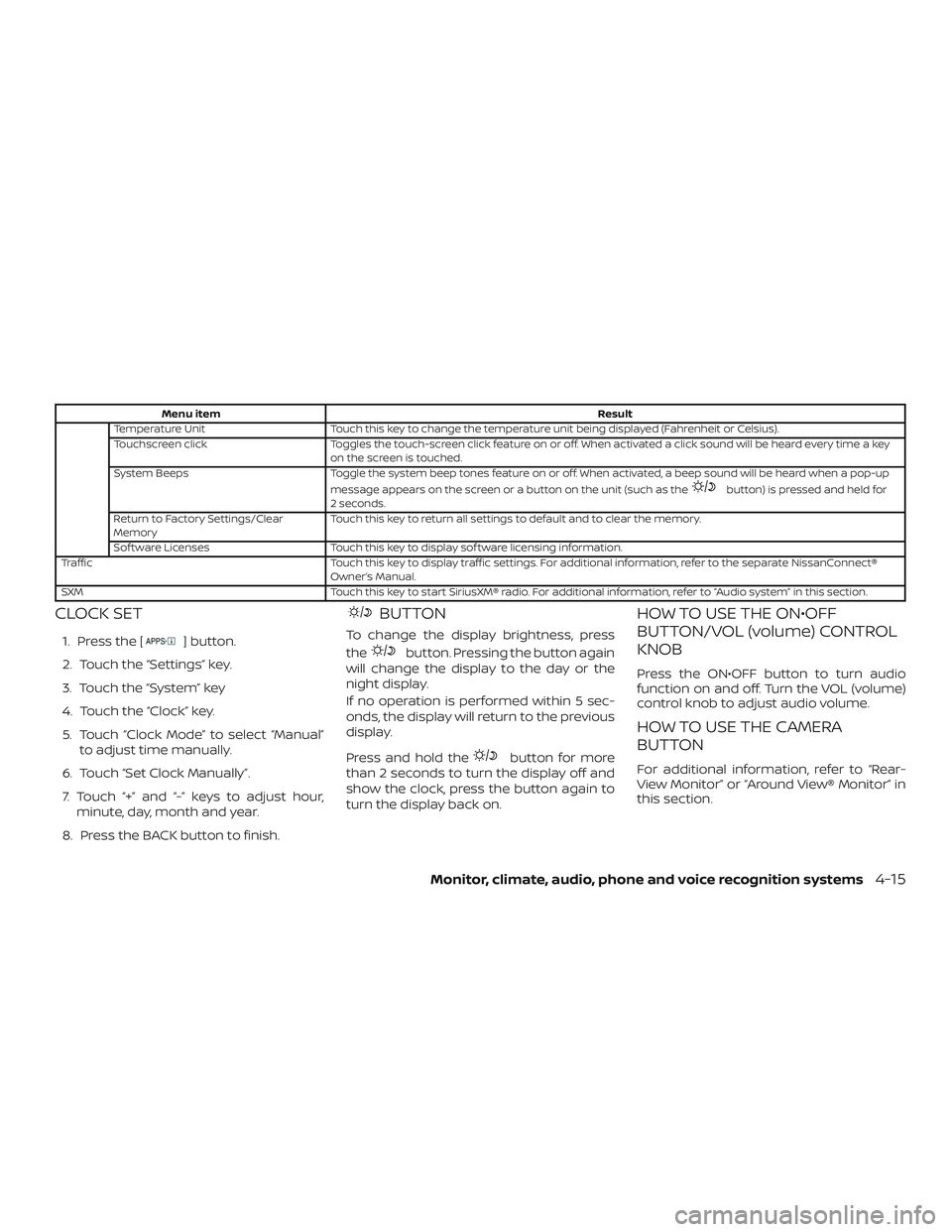
Menu itemResult
Temperature Unit Touch this key to change the temperature unit being displayed (Fahrenheit or Celsius).
Touchscreen click Toggles the touch-screen click feature on or off. When activated a click sound will be heard every time a key
on the screen is touched.
System Beeps Toggle the system beep tones feature on or off. When activated, a beep sound will be heard when a pop-up
message appears on the screen or a button on the unit (such as the
button) is pressed and held for
2 seconds.
Return to Factory Settings/Clear
Memory Touch this key to return all settings to default and to clear the memory.
Sof tware Licenses Touch this key to display sof tware licensing information.
Traffic Touch this key to display traffic settings. For additional information, refer to the separate NissanConnect®
Owner’s Manual.
SXM Touch this key to start SiriusXM® radio. For additional information, refer to “Audio system” in this section.
CLOCK SET
1. Press the [] button.
2. Touch the “Settings” key.
3. Touch the “System” key
4. Touch the “Clock” key.
5. Touch “Clock Mode” to select “Manual” to adjust time manually.
6. Touch “Set Clock Manually”.
7. Touch “+” and “-” keys to adjust hour, minute, day, month and year.
8. Press the BACK button to finish.
BUTTON
To change the display brightness, press
the
button. Pressing the button again
will change the display to the day or the
night display.
If no operation is performed within 5 sec-
onds, the display will return to the previous
display.
Press and hold the
button for more
than 2 seconds to turn the display off and
show the clock, press the button again to
turn the display back on.
HOW TO USE THE ON•OFF
BUTTON/VOL (volume) CONTROL
KNOB
Press the ON•OFF button to turn audio
function on and off. Turn the VOL (volume)
control knob to adjust audio volume.
HOW TO USE THE CAMERA
BUTTON
For additional information, refer to “Rear-
View Monitor” or “Around View® Monitor” in
this section.
Monitor, climate, audio, phone and voice recognition systems4-15
Page 654 of 878
Audio button
Push to display the audio screen. When this
button is pushed while the audio screen is
not displayed, the last audio source played
will play.
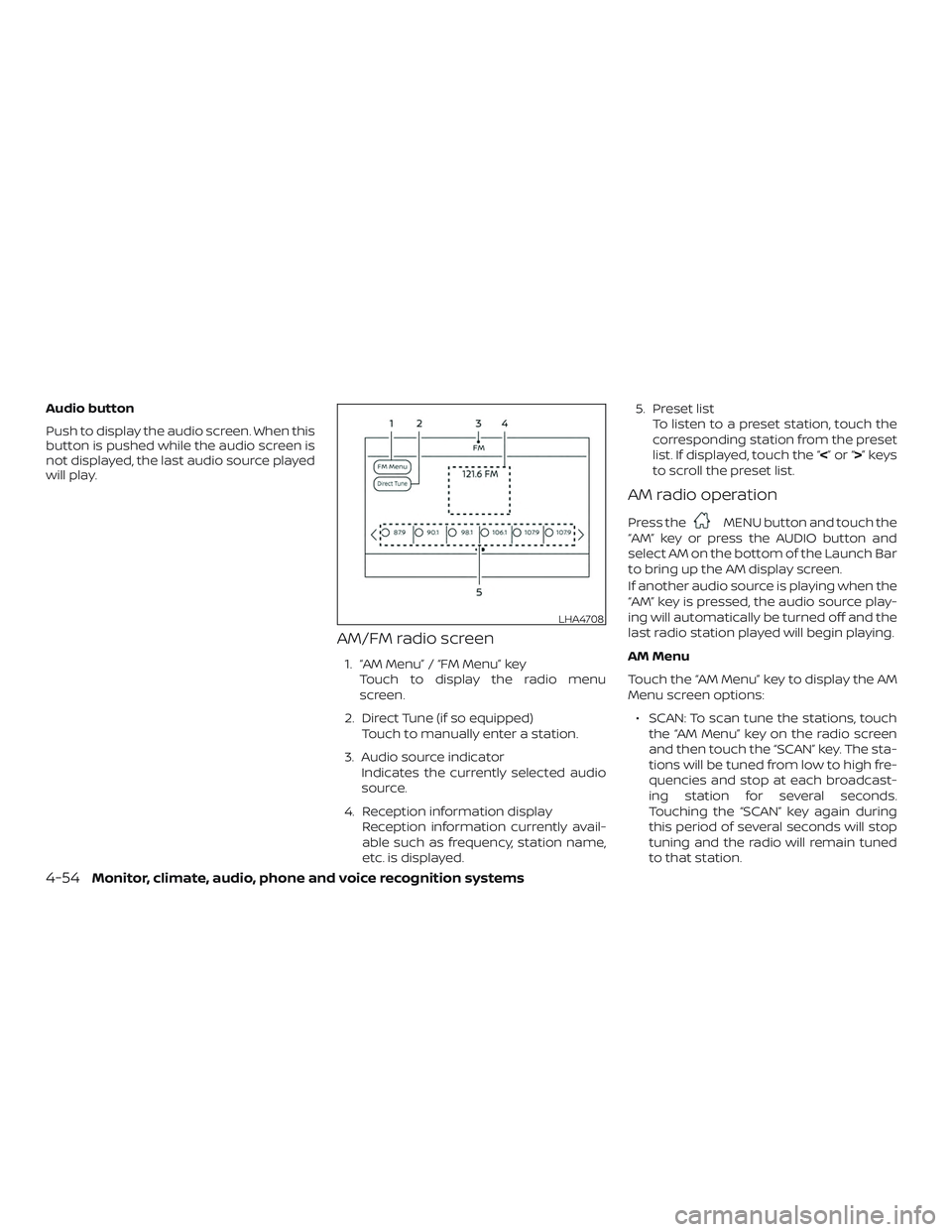
AM/FM radio screen
1. “AM Menu” / “FM Menu” keyTouch to display the radio menu
screen.
2. Direct Tune (if so equipped) Touch to manually enter a station.
3. Audio source indicator Indicates the currently selected audio
source.
4. Reception information display Reception information currently avail-
able such as frequency, station name,
etc. is displayed. 5. Preset list
To listen to a preset station, touch the
corresponding station from the preset
list. If displayed, touch the “ <”or“>”keys
to scroll the preset list.
AM radio operation
Press theMENU button and touch the
“AM” key or press the AUDIO button and
select AM on the bottom of the Launch Bar
to bring up the AM display screen.
If another audio source is playing when the
“AM” key is pressed, the audio source play-
ing will automatically be turned off and the
last radio station played will begin playing.
AM Menu
Touch the “AM Menu” key to display the AM
Menu screen options:
∙ SCAN: To scan tune the stations, touch the “AM Menu” key on the radio screen
and then touch the “SCAN” key. The sta-
tions will be tuned from low to high fre-
quencies and stop at each broadcast-
ing station for several seconds.
Touching the “SCAN” key again during
this period of several seconds will stop
tuning and the radio will remain tuned
to that station.
LHA4708
4-54Monitor, climate, audio, phone and voice recognition systems
Page 659 of 878
![NISSAN VERSA NOTE 2018 Owner´s Manual SXM settings
To view the SXM settings:1. Press the [
] button.
2. Touch the “Settings” key.
3. Touch the “SXM” key.
The signal strength, activation status and
other information are displayed o](/img/5/40333/w960_40333-658.png "NISSAN VERSA NOTE 2018 Owner´s Manual SXM settings
To view the SXM settings:1. Press the [
] button.
2. Touch the “Settings” key.
3. Touch the “SXM” key.
The signal strength, activation status and
other information are displayed o")
SXM settings
To view the SXM settings:1. Press the [
] button.
2. Touch the “Settings” key.
3. Touch the “SXM” key.
The signal strength, activation status and
other information are displayed on the
screen.
FM/AM/SAT radio operation
FM·AM button
Press the FM·AM button to change the
band as follows:
AM →FM1 →FM2 →AM
If another audio source is playing when the
FM·AM button is pressed, the audio source
playing will automatically be turned off and
the last radio station played will begin play-
ing.
The FM stereo indicator (ST) is shown on
the screen during FM stereo reception.
When the stereo broadcast signal is weak,
the radio automatically changes from ste-
reo to monaural reception. SXM band select
Pressing the SXM button will change the
band as follows:
SXM1*
→SXM2* →SXM3*→ SXM1* (satellite, if
so equipped)
When the SXM button is pressed while the
ignition switch is in the ACC or ON position,
the radio will come on at the last station
played.
The last station played will also come on
when the ON-OFF button is pressed.
*When the SXM button is pressed, the sat-
ellite radio mode will be skipped unless an
optional satellite receiver and antenna are
installed and a SiriusXM® Satellite Radio
service subscription is active. Satellite radio
is not available in Alaska, Hawaii and Guam.
If a compact disc is playing when the SXM
button is pressed, the compact disc will
automatically be turned off and the last
radio station played will come on.
While the radio is in SXM mode, the opera-
tion can be controlled through the touch-
screen. Touch the “Channels” key to display
a list of channels. Touch a channel dis-
played on the list to change to that chan-
nel. Touch the “Categories” key to display a list of categories. Touch a category dis-
played on the list to display options within
that category.
Tuning with the touch-screen
When in AM or FM mode, the radio can be
tuned using the touch-screen. To bring up
the visual tuner, touch the “Tune” key on the
lower right corner of the screen. A screen
appears with a bar running from low fre-
quencies on the lef t to high frequencies on
the right. Touch the screen at the location
of the frequency you wish to tune and the
station will change to that frequency. To
return to the regular radio display screen,
touch the “OK” key.
Tuning with the TUNE control knob
The radio can also be manually tuned us-
ing the TUNE knob. When in FM or AM mode,
turn the TUNE knob to the lef t for lower
frequencies or to the right for higher fre-
quencies. When in SXM mode, turn the
TUNE knob to change the channel.
SEEK tuning
When in FM or AM mode, press the seek
buttons
orto tune from low to
high or high to low frequencies and to stop
at the next broadcasting station.
Monitor, climate, audio, phone and voice recognition systems4-59
Page 660 of 878
When in SXM mode, press the seek
buttons
orto change the cat-
egory.
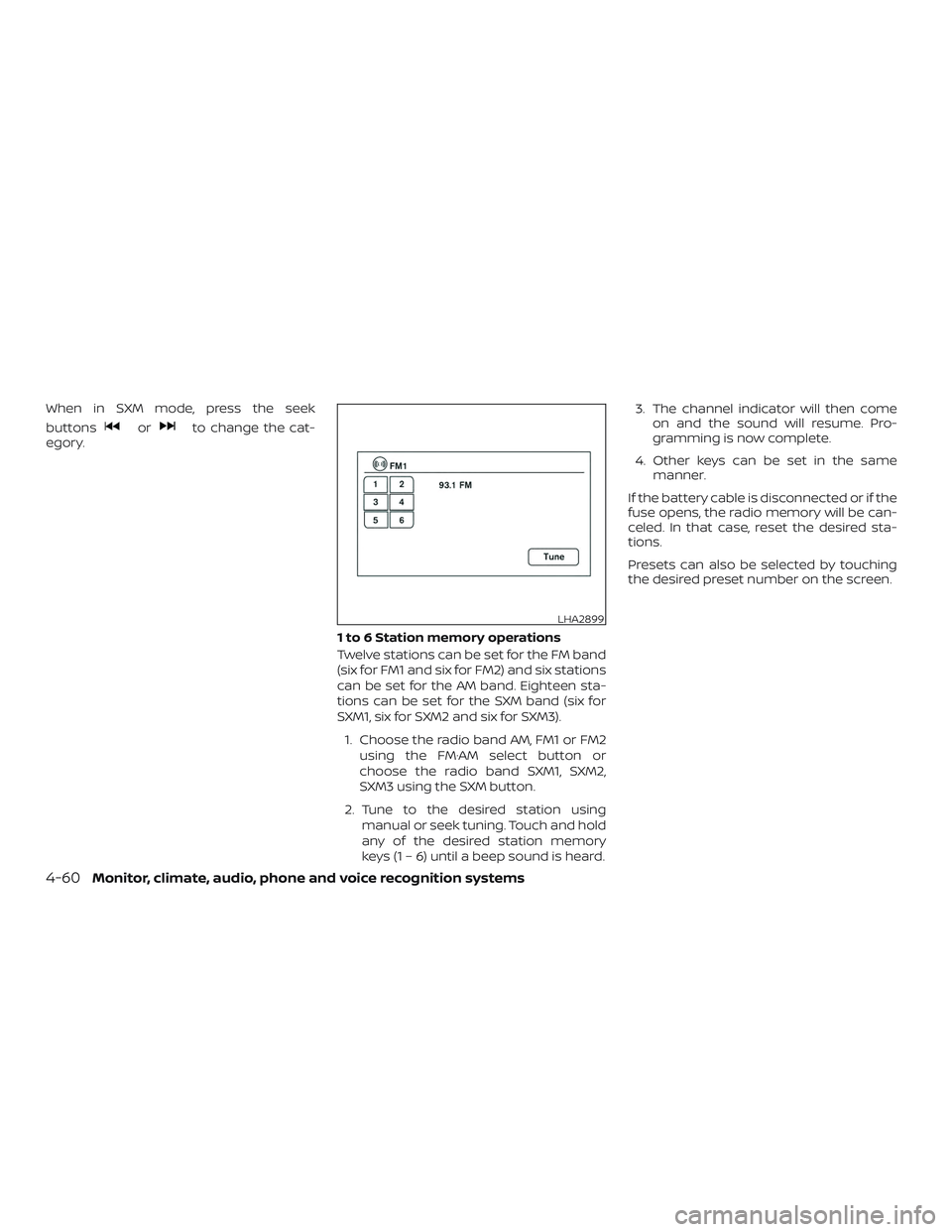
1 to 6 Station memory operations
Twelve stations can be set for the FM band
(six for FM1 and six for FM2) and six stations
can be set for the AM band. Eighteen sta-
tions can be set for the SXM band (six for
SXM1, six for SXM2 and six for SXM3).1. Choose the radio band AM, FM1 or FM2 using the FM·AM select button or
choose the radio band SXM1, SXM2,
SXM3 using the SXM button.
2. Tune to the desired station using manual or seek tuning. Touch and hold
any of the desired station memory
keys (1 – 6) until a beep sound is heard. 3. The channel indicator will then come
on and the sound will resume. Pro-
gramming is now complete.
4. Other keys can be set in the same manner.
If the battery cable is disconnected or if the
fuse opens, the radio memory will be can-
celed. In that case, reset the desired sta-
tions.
Presets can also be selected by touching
the desired preset number on the screen.
LHA2899
4-60Monitor, climate, audio, phone and voice recognition systems
Page 731 of 878
∙ If the low tire pressure warning lightilluminates while driving, avoid sud-
den steering maneuvers or abrupt
braking, reduce vehicle speed, pull off
the road to a safe location and stop
the vehicle as soon as possible. Driv-
ing with under-inflated tires may per-
manently damage the tires and in-
crease the likelihood of tire failure.
Serious vehicle damage could occur
and may lead to an accident and could
result in serious personal injury.
Check the tire pressure for all four
tires. Adjust the tire pressure to the
recommended COLD tire pressure
shown on the Tire and Loading Infor-
mation label, located on the driver’s
door opening, to turn the low tire
pressure warning light off. If you have
a flat tire, replace it with a spare tire as
soon as possible. (For additional in-
formation, refer to “Flat tire” in the “In
case of emergency ” section of this
manual.) ∙ When replacing a wheel without the
TPMS such as the spare tire, when a
spare tire is mounted or a wheel is
replaced, the TPMS will not function
and the low tire pressure warning
light will flash for approximately
1 minute. The light will remain on af ter
1 minute. Have your tires replaced
and/or TPMS system reset as soon as
possible. It is recommended that you
visit a NISSAN dealer for this service.
∙ Replacing tires with those not origi- nally specified by NISSAN could affect
the proper operation of the TPMS.
∙ Do not inject any tire liquid or aerosol tire sealant into the tires, as this may
cause a malfunction of the tire pres-
sure sensors.
CAUTION
Do not place metalized film or any
metal parts (antenna, etc.) on the win-
dows. This may cause poor reception of
the signals from the tire pressure sen-
sors, and the TPMS will not function
properly. Some devices and transmitters may tem-
porarily interfere with the operation of the
TPMS and cause the low tire pressure
warning light to illuminate.
Some examples are:
∙ Facilities or electric devices using simi- lar radio frequencies are near the ve-
hicle.
∙ If a transmitter set to similar frequen- cies is being used in or near the vehicle.
∙ If a computer (or similar equipment) or a DC/AC converter is being used in or
near the vehicle.
The low tire pressure warning light may
illuminate in the following cases: ∙ If the vehicle is equipped with a wheel and tire without TPMS.
∙ If the TPMS has been replaced and the ID has not been registered.
∙ If the wheel is not originally specified by NISSAN.
Starting and driving5-5