media NISSAN VERSA NOTE 2018 Owner´s Manual
[x] Cancel search | Manufacturer: NISSAN, Model Year: 2018, Model line: VERSA NOTE, Model: NISSAN VERSA NOTE 2018Pages: 878, PDF Size: 9.62 MB
Page 658 of 878
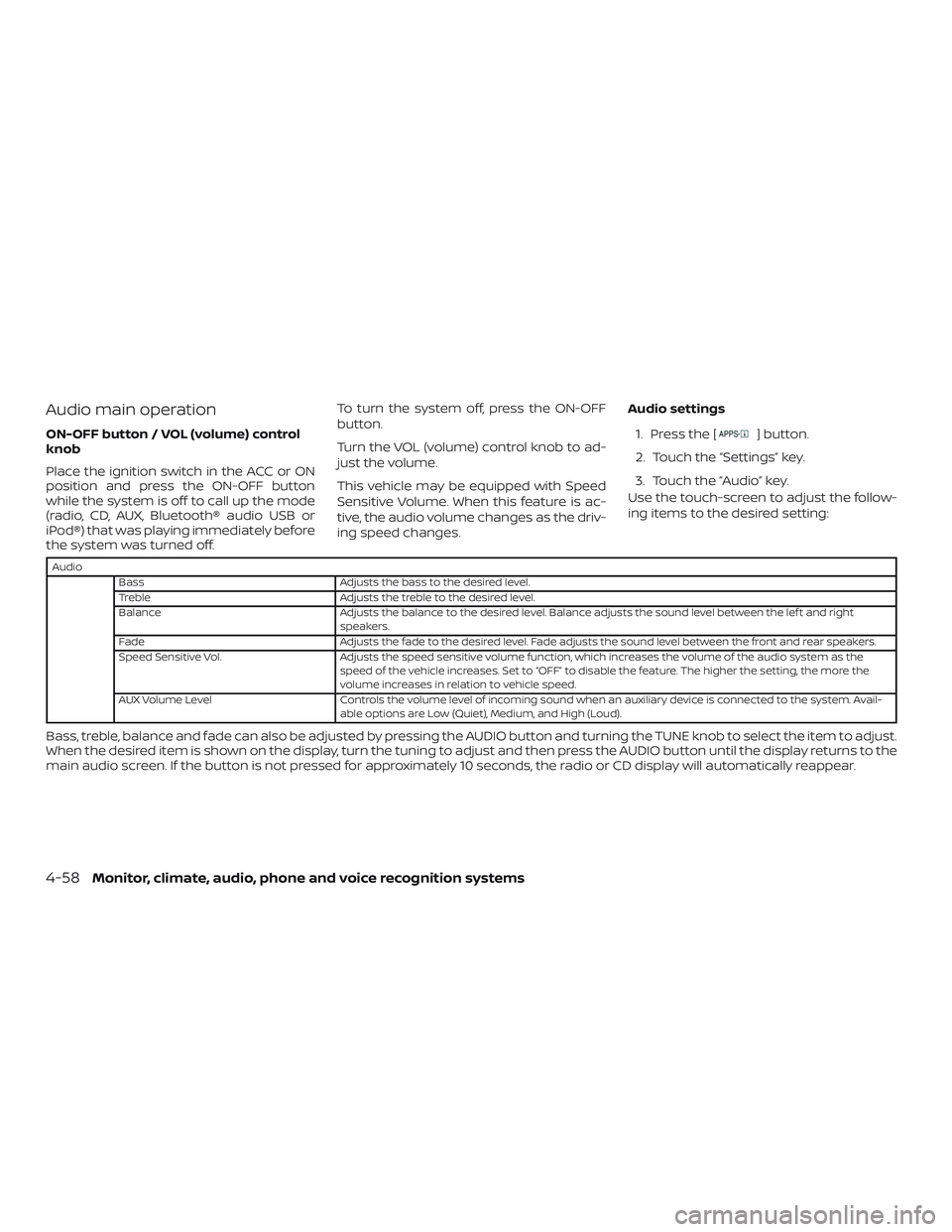
Audio main operation
ON-OFF button / VOL (volume) control
knob
Place the ignition switch in the ACC or ON
position and press the ON-OFF button
while the system is off to call up the mode
(radio, CD, AUX, Bluetooth® audio USB or
iPod®) that was playing immediately before
the system was turned off.To turn the system off, press the ON-OFF
button.
Turn the VOL (volume) control knob to ad-
just the volume.
This vehicle may be equipped with Speed
Sensitive Volume. When this feature is ac-
tive, the audio volume changes as the driv-
ing speed changes.
Audio settings
1. Press the [] button.
2. Touch the “Settings” key.
3. Touch the “Audio” key.
Use the touch-screen to adjust the follow-
ing items to the desired setting:
Audio
Bass Adjusts the bass to the desired level.
Treble Adjusts the treble to the desired level.
Balance Adjusts the balance to the desired level. Balance adjusts the sound level between the lef t and right
speakers.
Fade Adjusts the fade to the desired level. Fade adjusts the sound level between the front and rear speakers.
Speed Sensitive Vol. Adjusts the speed sensitive volume function, which increases the volume of the audio system as the
speed of the vehicle increases. Set to “OFF” to disable the feature. The higher the setting, the more the
volume increases in relation to vehicle speed.
AUX Volume Level Controls the volume level of incoming sound when an auxiliary device is connected to the system. Avail-
able options are Low (Quiet), Medium, and High (Loud).
Bass, treble, balance and fade can also be adjusted by pressing the AUDIO button and turning the TUNE knob to select the item to adjust.
When the desired item is shown on the display, turn the tuning to adjust and then press the AUDIO button until the display returns to the
main audio screen. If the button is not pressed for approximately 10 seconds, the radio or CD display will automatically reappear.
4-58Monitor, climate, audio, phone and voice recognition systems
Page 682 of 878
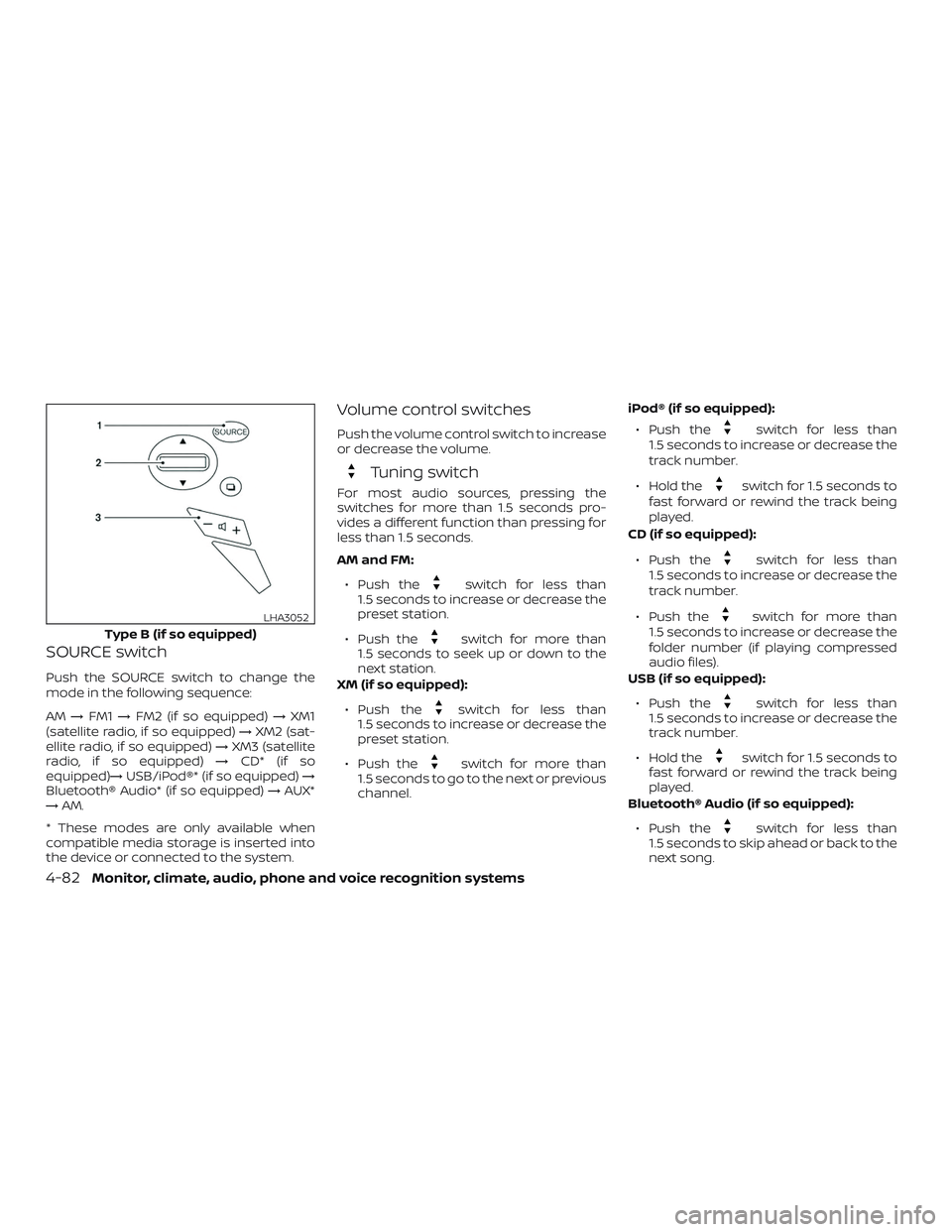
SOURCE switch
Push the SOURCE switch to change the
mode in the following sequence:
AM→FM1 →FM2 (if so equipped) →XM1
(satellite radio, if so equipped) →XM2 (sat-
ellite radio, if so equipped) →XM3 (satellite
radio, if so equipped) →CD* (if so
equipped)→ USB/iPod®* (if so equipped) →
Bluetooth® Audio* (if so equipped) →AUX*
→ AM.
* These modes are only available when
compatible media storage is inserted into
the device or connected to the system.
Volume control switches
Push the volume control switch to increase
or decrease the volume.
Tuning switch
For most audio sources, pressing the
switches for more than 1.5 seconds pro-
vides a different function than pressing for
less than 1.5 seconds.
AM and FM:
∙ Push the
switch for less than
1.5 seconds to increase or decrease the
preset station.
∙ Push the
switch for more than
1.5 seconds to seek up or down to the
next station.
XM (if so equipped):
∙ Push the
switch for less than
1.5 seconds to increase or decrease the
preset station.
∙ Push the
switch for more than
1.5 seconds to go to the next or previous
channel. iPod® (if so equipped):
∙ Push the
switch for less than
1.5 seconds to increase or decrease the
track number.
∙ Hold the
switch for 1.5 seconds to
fast forward or rewind the track being
played.
CD (if so equipped):
∙ Push the
switch for less than
1.5 seconds to increase or decrease the
track number.
∙ Push the
switch for more than
1.5 seconds to increase or decrease the
folder number (if playing compressed
audio files).
USB (if so equipped):
∙ Push the
switch for less than
1.5 seconds to increase or decrease the
track number.
∙ Hold the
switch for 1.5 seconds to
fast forward or rewind the track being
played.
Bluetooth® Audio (if so equipped):
∙ Push the
switch for less than
1.5 seconds to skip ahead or back to the
next song.
Type B (if so equipped)
LHA3052
4-82Monitor, climate, audio, phone and voice recognition systems
Page 686 of 878
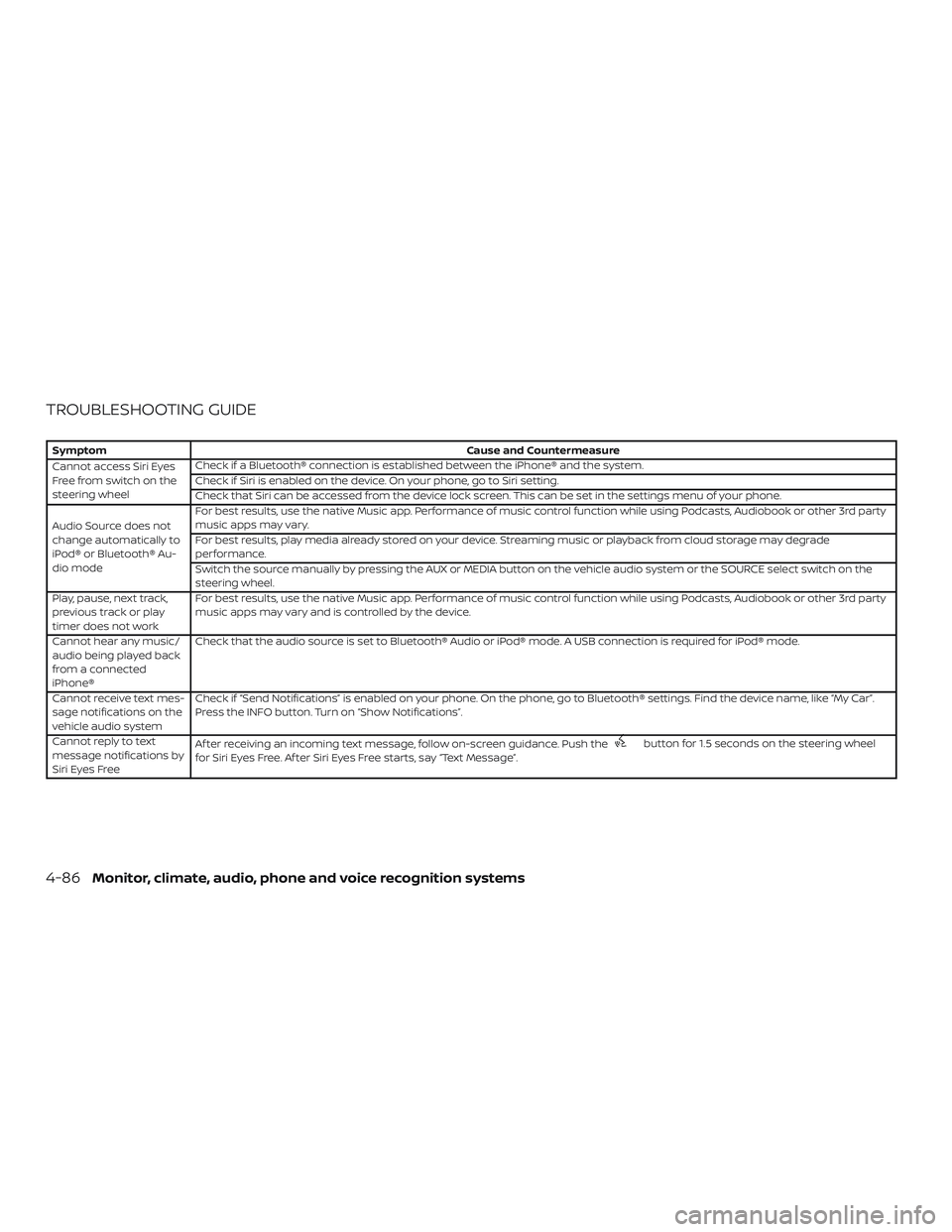
TROUBLESHOOTING GUIDE
SymptomCause and Countermeasure
Cannot access Siri Eyes
Freefromswitchonthe
steering wheel Check if a Bluetooth® connection is established between the iPhone® and the system.
Check if Siri is enabled on the device. On your phone, go to Siri setting.
Check that Siri can be accessed from the device lock screen. This can be set in the settings menu of your phone.
Audio Source does not
change automatically to
iPod® or Bluetooth® Au-
dio mode For best results, use the native Music app. Performance of music control function while using Podcasts, Audiobook or other 3rd party
music apps may vary.
For best results, play media already stored on your device. Streaming music or playback from cloud storage may degrade
performance.
Switch the source manually by pressing the AUX or MEDIA button on the vehicle audio system or the SOURCE select switch on the
steering wheel.
Play, pause, next track,
previous track or play
timer does not work For best results, use the native Music app. Performance of music control function while using Podcasts, Audiobook or other 3rd party
music apps may vary and is controlled by the device.
Cannot hear any music/
audio being played back
from a connected
iPhone® Check that the audio source is set to Bluetooth® Audio or iPod® mode. A USB connection is required for iPod® mode.
Cannot receive text mes-
sage notifications on the
vehicle audio system Check if “Send Notifications” is enabled on your phone. On the phone, go to Bluetooth® settings. Find the device name, like “My Car”.
Press the INFO button. Turn on “Show Notifications”.
Cannot reply to text
message notifications by
Siri Eyes Free Af ter receiving an incoming text message, follow on-screen guidance. Push the
button for 1.5 seconds on the steering wheel
for Siri Eyes Free. Af ter Siri Eyes Free starts, say “Text Message”.
4-86Monitor, climate, audio, phone and voice recognition systems
Page 689 of 878
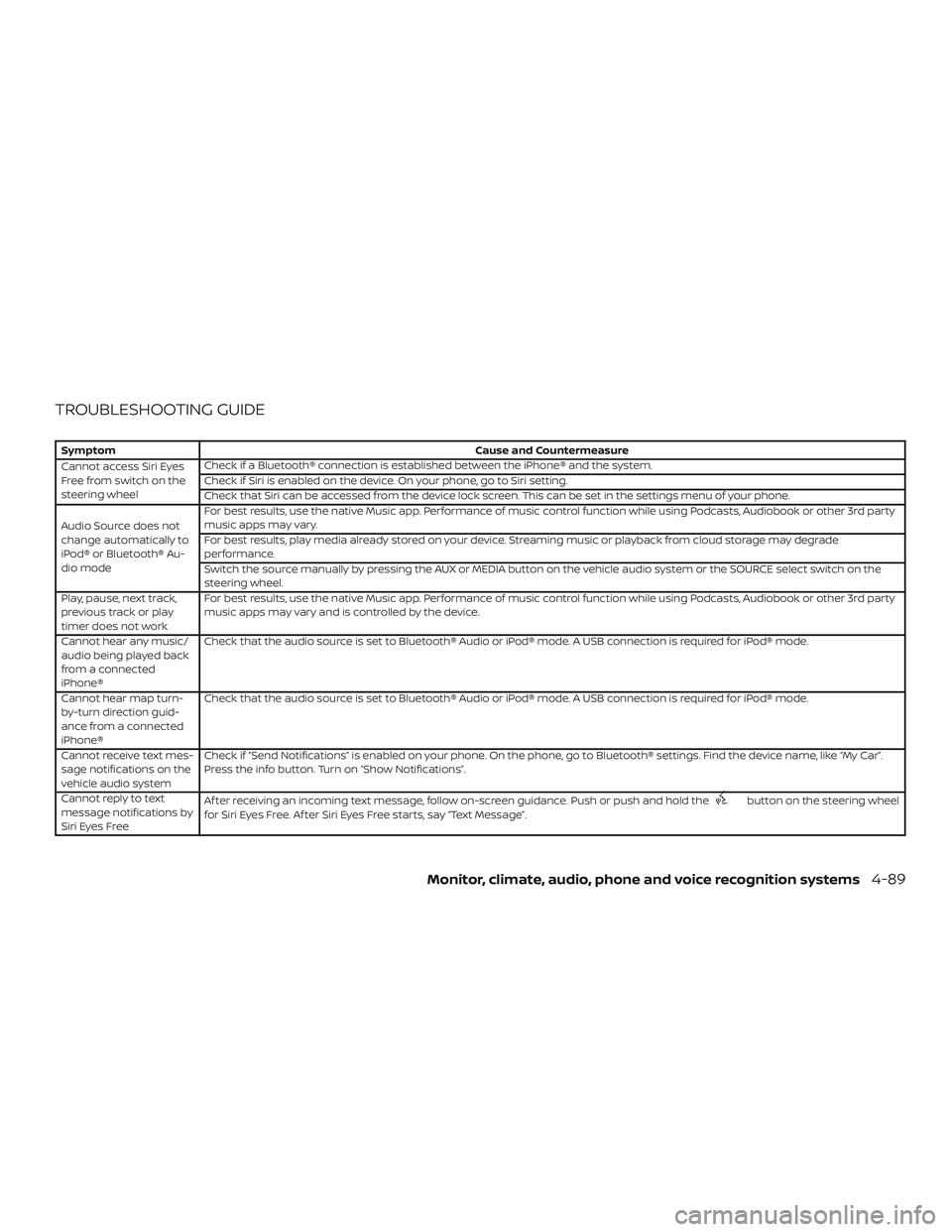
TROUBLESHOOTING GUIDE
SymptomCause and Countermeasure
Cannot access Siri Eyes
Freefromswitchonthe
steering wheel Check if a Bluetooth® connection is established between the iPhone® and the system.
Check if Siri is enabled on the device. On your phone, go to Siri setting.
Check that Siri can be accessed from the device lock screen. This can be set in the settings menu of your phone.
Audio Source does not
change automatically to
iPod® or Bluetooth® Au-
dio mode For best results, use the native Music app. Performance of music control function while using Podcasts, Audiobook or other 3rd party
music apps may vary.
For best results, play media already stored on your device. Streaming music or playback from cloud storage may degrade
performance.
Switch the source manually by pressing the AUX or MEDIA button on the vehicle audio system or the SOURCE select switch on the
steering wheel.
Play, pause, next track,
previous track or play
timer does not work For best results, use the native Music app. Performance of music control function while using Podcasts, Audiobook or other 3rd party
music apps may vary and is controlled by the device.
Cannot hear any music/
audio being played back
from a connected
iPhone® Check that the audio source is set to Bluetooth® Audio or iPod® mode. A USB connection is required for iPod® mode.
Cannot hear map turn-
by-turn direction guid-
ance from a connected
iPhone® Check that the audio source is set to Bluetooth® Audio or iPod® mode. A USB connection is required for iPod® mode.
Cannot receive text mes-
sage notifications on the
vehicle audio system Check if “Send Notifications” is enabled on your phone. On the phone, go to Bluetooth® settings. Find the device name, like “My Car”.
Press the info button. Turn on “Show Notifications”.
Cannot reply to text
message notifications by
Siri Eyes Free Af ter receiving an incoming text message, follow on-screen guidance. Push or push and hold the
button on the steering wheel
for Siri Eyes Free. Af ter Siri Eyes Free starts, say “Text Message”.
Monitor, climate, audio, phone and voice recognition systems4-89
Page 711 of 878
∙ You will not be able to use a hands-freephone under the following conditions:
– Your vehicle is outside of the cellular service area.
– Your vehicle is in an area where it is difficult to receive cellular signal;
such as in a tunnel, in an under-
ground parking garage, near a tall
building or in a mountainous area.
– Your cellular phone is locked to pre- vent it from being dialed.
∙ When the radio wave condition is not ideal or ambient sound is too loud, it
may be difficult to hear the other per-
son’s voice during a call.
∙ Immediately af ter the ignition switch is placed in the ON position, it may be im-
possible to receive a call for a short pe-
riod of time.
∙ Do not place the cellular phone in an area surrounded by metal or far away
from the in-vehicle phone module to
prevent tone quality degradation and
wireless connection disruption. ∙ While a cellular phone is connected
through the Bluetooth® wireless con-
nection, the battery power of the cellu-
lar phone may discharge quicker than
usual. The Bluetooth® Hands-Free
Phone System cannot charge cellular
phones.
∙ For additional information, refer to “Troubleshooting guide” in this section.
You can also visit
www.nissanusa.com/bluetooth or
www.nissan.ca/bluetooth for trouble-
shooting help if the hands-free phone
system seems to be malfunctioning.
∙ Some cellular phones or other devices may cause interference or a buzzing
noise to come from the audio system
speakers. Storing the device in a differ-
ent location may reduce or eliminate
the noise.
∙ For additional information, refer to the cellular phone owner’s manual regard-
ing the telephone charges, cellular
phone antenna and body, etc.
∙ The signal strength display on the monitor will not coincide with the signal
strength display of some cellular
phones.REGULATORY INFORMATION
FCC Regulatory information
– CAUTION: To maintain compliance with FCC’s RF exposure guidelines, use only
the supplied antenna. Unauthorized an-
tenna, modification, or attachments
could damage the transmitter and may
violate FCC regulations.
– Operation is subject to the following two conditions:
1. This device may not cause interference and
2. this device must accept any interfer- ence, including interference that may
cause undesired operation of the de-
vice.
IC Regulatory information
– Operation is subject to the following two conditions: (1) this device may not cause
interference, and (2) this device must ac-
cept any interference, including interfer-
ence that may cause undesired opera-
tion of the device.
– This Class B digital apparatus meets all requirements of the Canadian
Interference-Causing Equipment Regu-
lations.
Monitor, climate, audio, phone and voice recognition systems4-111
Page 728 of 878
WARNING
∙ Do not leave children or adults whowould normally require the assis-
tance of others alone in your vehicle.
Pets should also not be lef t alone.
They could accidentally injure them-
selves or others through inadvertent
operation of the vehicle. Also, on hot,
sunny days, temperatures in a closed
vehicle could quickly become high
enough to cause severe or possibly
fatal injuries to people or animals.
∙ Properly secure all cargo to help pre- vent it from sliding or shif ting. Do not
place cargo higher than the seat-
backs. In a sudden stop or collision,
unsecured cargo could cause per-
sonal injury.
EXHAUST GAS (carbon monoxide)
WARNING
∙ Do not breathe exhaust gases; theycontain colorless and odorless carbon
monoxide. Carbon monoxide is dan-
gerous. It can cause unconsciousness
or death. ∙ If you suspect that exhaust fumes are
entering the vehicle, drive with all
windows fully open, and have the ve-
hicle inspected immediately.
∙ Do not run the engine in closed spaces such as a garage.
∙ Do not park the vehicle with the en- gine running for any extended length
of time.
∙ Keep the rear vent windows, doors and trunk lids (if so equipped) closed
while driving, otherwise exhaust
gases could be drawn into the pas-
senger compartment. If you must
drive with one of these open, follow
these precautions:
1. Open all the windows.
2. Turn the air recirculation mode off and set the fan speed control to
the highest level to circulate the
air.
∙ The exhaust system and body should be inspected by a qualified mechanic
whenever:
a. The vehicle is raised for service. b. You suspect that exhaust fumes
are entering into the passenger
compartment.
c. You notice a change in the sound of the exhaust system.
d. You have had an accident involving damage to the exhaust system,
underbody, or rear of the vehicle.
THREE-WAY CATALYST
The three-way catalyst is an emission con-
trol device installed in the exhaust system.
Exhaust gases in the three-way catalyst
are burned at high temperatures to help
reduce pollutants.
WARNING
∙ The exhaust gas and the exhaust sys-tem are very hot. Keep people, ani-
mals or flammable materials away
from the exhaust system
components.
∙ Do not stop or park the vehicle over flammable materials such as dry
grass, waste paper or rags. They may
ignite and cause a fire.
PRECAUTIONS WHEN STARTING AND
DRIVING
5-2Starting and driving
Page 741 of 878
∙ Make sure the area around the vehicle isclear.
∙ Check fluid levels such as engine oil, coolant, brake and clutch fluid (if so
equipped), and windshield-washer fluid
as frequently as possible, or at least
whenever you refuel.
∙ Check that all windows and lights are clean.
∙ Visually inspect tires for their appear- ance and condition. Also check tires for
proper inflation.
∙ Lock all doors.
∙ Position seat and adjust head restraints/headrests.
∙ Adjust inside and outside mirrors.
∙ Fasten seat belts and ask all passen- gers to do likewise.
∙ Check the operation of warning lights when the ignition switch is placed in the
ON position. For additional information,
refer to “Warning lights, indicator lights
and audible reminders” in the “Instru-
ments and controls” section of this
manual. 1. Apply the parking brake.
2.
Continuously Variable Transmission
model
Move the shif t lever to P (Park) or N
(Neutral). P (Park) is recommended.
The shif t lever cannot be moved out
of P (Park) and into any of the other
gear positions if the ignition switch
is placed in the OFF position or if the
key is removed from the ignition
switch (if so equipped).
The starter is designed not to oper-
ate if the shif t lever is in any of the
driving positions.
Manual transmission model
Depress the clutch pedal to the floor,
move the shif t lever to the N (Neutral)
position, and crank the engine.
The starter is designed not to oper-
ate unless the clutch pedal is fully
depressed.
The Intelligent Key (if so equipped)
must be carried when operating the
push-button ignition switch. 3. For vehicles with a push-button igni-
tion switch, push the ignition switch to
the ON position. Depress the brake
pedal and push the ignition switch to
start the engine. To start the engine
immediately, push and release the igni-
tion switch while depressing the brake
pedal with the ignition switch in any
position. For vehicles without a push-
button ignition switch, crank the en-
gine with your foot off the accelera-
tor pedal by placing the ignition switch
in the START position. Release the igni-
tion switch when the engine starts. If
the engine starts, but fails to run, repeat
the above procedure.
∙ If the engine is very hard to start in extremely cold weather or when re-
starting, depress the accelerator
pedal a little (approximately 1/3 to the
floor) and hold it and then crank the
engine. Release the switch and the
accelerator pedal when the engine
starts.
BEFORE STARTING THE ENGINE STARTING THE ENGINE
Starting and driving5-15
Page 750 of 878
WARNING
Do not use the cruise control when driv-
ing under the following conditions:
∙ When it is not possible to keep thevehicle at a set speed.
∙ In heavy traffic or in traffic that varies in speed.
∙ On winding or hilly roads.
∙ On slippery roads (rain, snow, ice, etc.).
∙ In very windy areas.
Doing so could cause a loss of vehicle
control and result in an accident.
CAUTION
On manual transmission models, do not
shif t into N (Neutral) without depress-
ing the clutch pedal when the cruise
control is set. Should this occur, depress
the clutch pedal and turn the ON/OFF
switch off immediately. Failure to do so
may cause engine damage.
CRUISE CONTROL OPERATIONS
The cruise control allows driving at a speed
between 25 - 89 mph (40 - 144 km/h) with-
out keeping your foot on the accelerator
pedal.
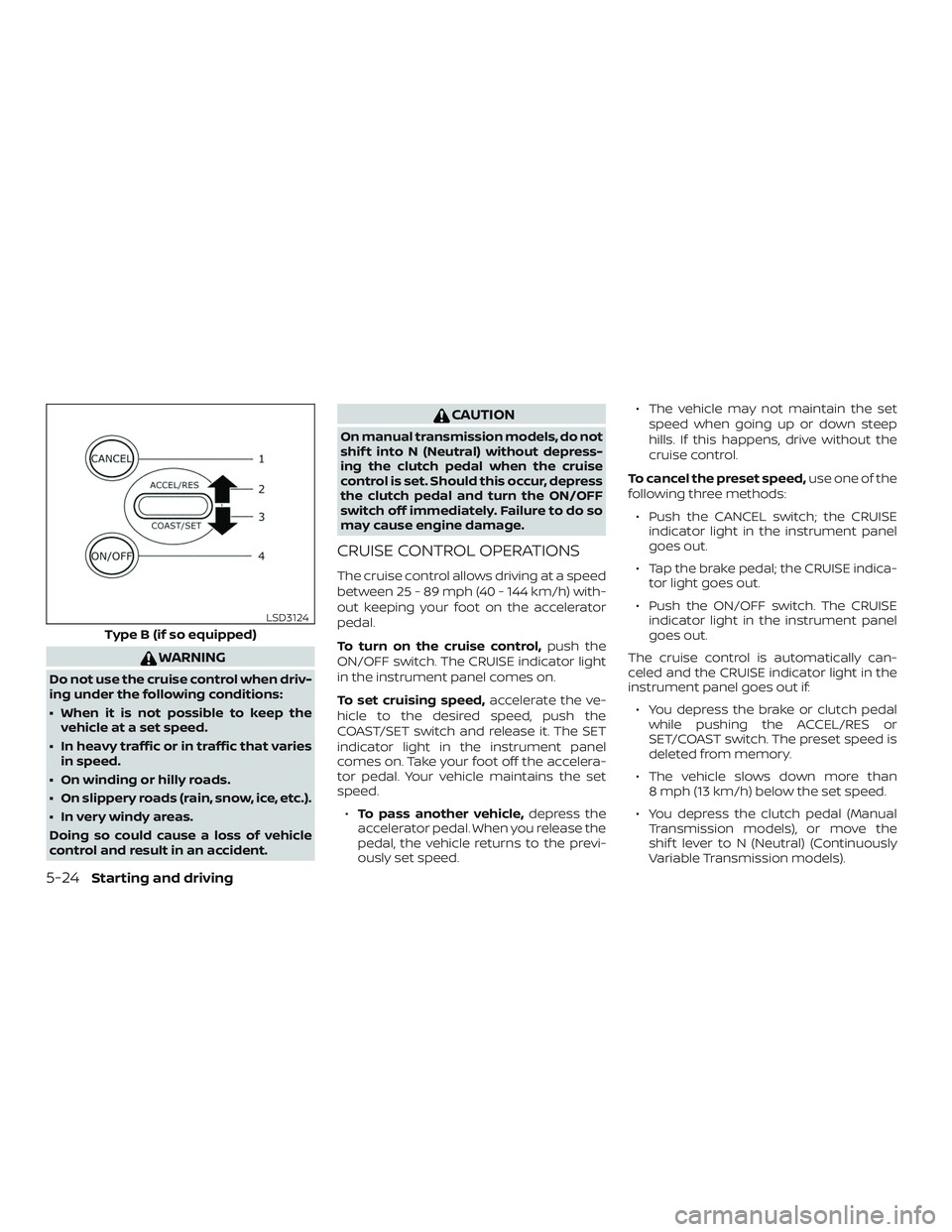
To turn on the cruise control, push the
ON/OFF switch. The CRUISE indicator light
in the instrument panel comes on.
To set cruising speed, accelerate the ve-
hicle to the desired speed, push the
COAST/SET switch and release it. The SET
indicator light in the instrument panel
comes on. Take your foot off the accelera-
tor pedal. Your vehicle maintains the set
speed.
∙ To pass another vehicle, depress the
accelerator pedal. When you release the
pedal, the vehicle returns to the previ-
ously set speed. ∙ The vehicle may not maintain the set
speed when going up or down steep
hills. If this happens, drive without the
cruise control.
To cancel the preset speed, use one of the
following three methods:
∙ Push the CANCEL switch; the CRUISE indicator light in the instrument panel
goes out.
∙ Tap the brake pedal; the CRUISE indica- tor light goes out.
∙ Push the ON/OFF switch. The CRUISE indicator light in the instrument panel
goes out.
The cruise control is automatically can-
celed and the CRUISE indicator light in the
instrument panel goes out if: ∙ You depress the brake or clutch pedal while pushing the ACCEL/RES or
SET/COAST switch. The preset speed is
deleted from memory.
∙ The vehicle slows down more than 8 mph (13 km/h) below the set speed.
∙ You depress the clutch pedal (Manual Transmission models), or move the
shif t lever to N (Neutral) (Continuously
Variable Transmission models).
Type B (if so equipped)
LSD3124
5-24Starting and driving
Page 774 of 878
To start your engine with a booster battery,
the instructions and precautions below
must be followed.
WARNING
∙ If done incorrectly, jump starting canlead to a battery explosion, resulting
in severe injury or death. It could also
damage your vehicle.
∙ Explosive hydrogen gas is always present in the vicinity of the battery.
Keep all sparks and flames away from
the battery.
∙ Do not allow battery fluid to come into contact with eyes, skin, clothing or
painted surfaces. Battery fluid is a
corrosive sulfuric acid solution which
can cause severe burns. If the fluid
should come into contact with any-
thing, immediately flush the con-
tacted area with water.
∙ Keep battery out of the reach of children.
∙ The booster battery must be rated at 12 volts. Use of an improperly rated
battery can damage your vehicle. ∙ Whenever working on or near a bat-
tery, always wear suitable eye protec-
tors (for example, goggles or indus-
trial safety spectacles) and remove
rings, metal bands, or any other jew-
elry. Do not lean over the battery
when jump starting.
∙ Do not attempt to jump start a frozen battery. It could explode and cause
serious injury.
∙ Your vehicle has an automatic engine cooling fan. It could come on at any
time. Keep hands and other objects
away from it.
JUMP STARTING
6-12In case of emergency
Page 785 of 878
AIR FRESHENERS
Most air fresheners use a solvent that
could affect the vehicle interior. If you use
an air freshener, take the following precau-
tions:∙ Hanging-type air fresheners can cause permanent discoloration when they
contact vehicle interior surfaces. Place
the air freshener in a location that al-
lows it to hang free and not contact an
interior surface.
∙ Liquid-type air fresheners typically clip on the vents. These products can cause
immediate damage and discoloration
when spilled on interior surfaces.
Carefully read and follow the manufactur-
er’s instructions before using the air fresh-
eners.
FLOOR MATS (if so equipped)
WARNING
To avoid potential pedal interference
that may result in a collision, injury or
death:
∙ NEVER place a floor mat on top of an- other floor mat in the driver front po-
sition or install them upside down or
backwards. ∙ Use only Genuine NISSAN floor mats,
or equivalent floor mats, that are spe-
cifically designed for use in your ve-
hicle model and model year.
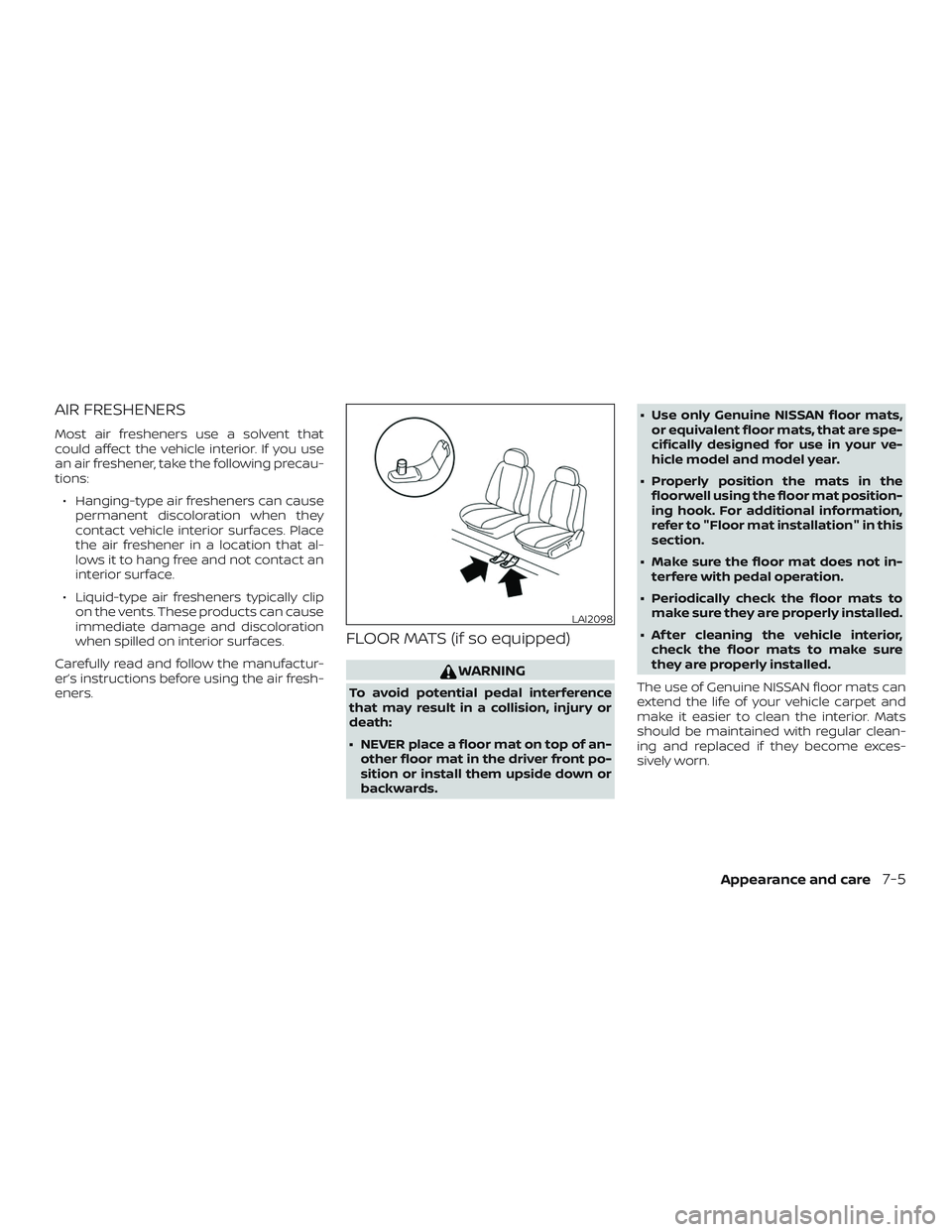
∙ Properly position the mats in the floorwell using the floor mat position-
ing hook. For additional information,
refer to "Floor mat installation" in this
section.
∙ Make sure the floor mat does not in- terfere with pedal operation.
∙ Periodically check the floor mats to make sure they are properly installed.
∙ Af ter cleaning the vehicle interior, check the floor mats to make sure
they are properly installed.
The use of Genuine NISSAN floor mats can
extend the life of your vehicle carpet and
make it easier to clean the interior. Mats
should be maintained with regular clean-
ing and replaced if they become exces-
sively worn.
LAI2098
Appearance and care7-5