turn signal NISSAN VERSA NOTE 2020 Owner´s Manual
[x] Cancel search | Manufacturer: NISSAN, Model Year: 2020, Model line: VERSA NOTE, Model: NISSAN VERSA NOTE 2020Pages: 492, PDF Size: 6.12 MB
Page 11 of 492
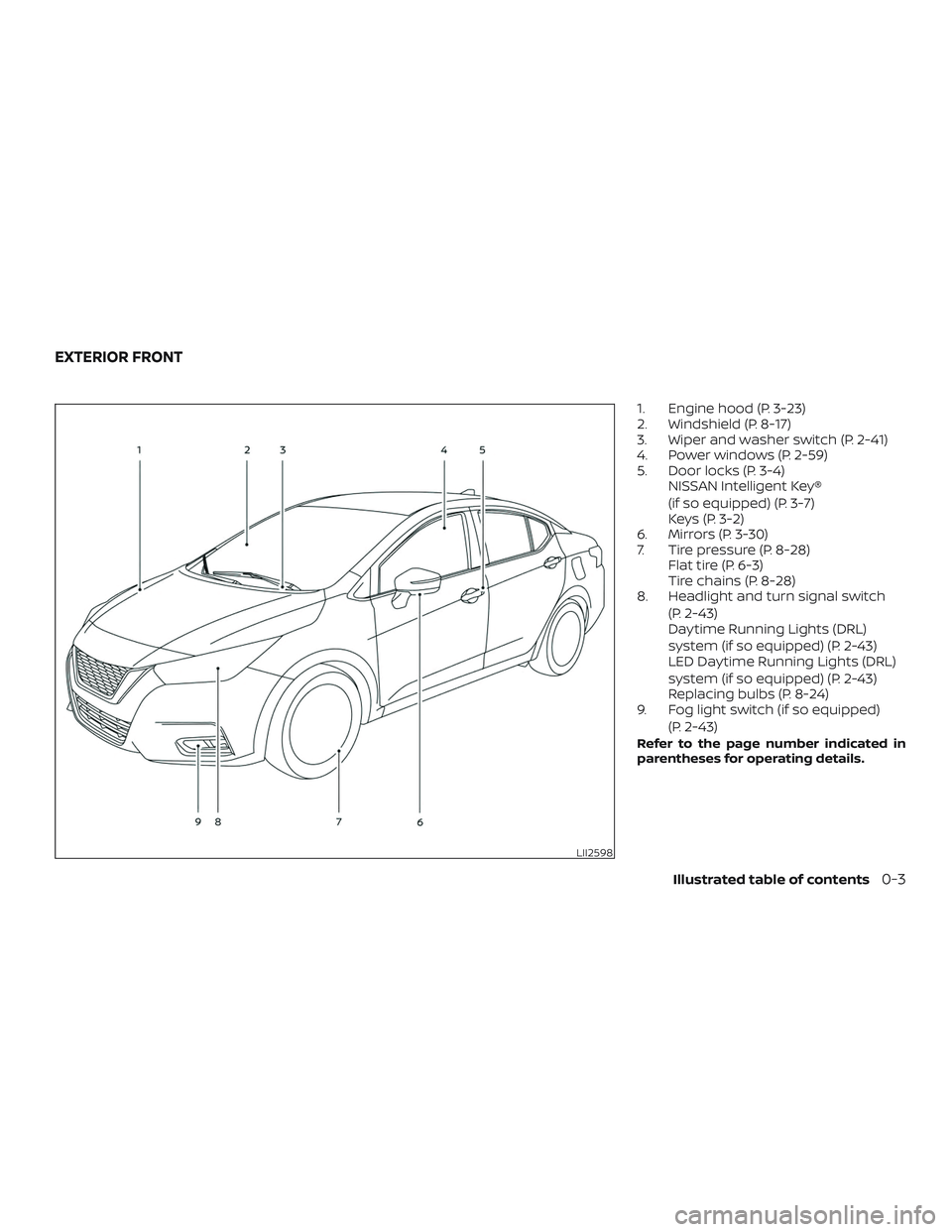
1. Engine hood (P. 3-23)
2. Windshield (P. 8-17)
3. Wiper and washer switch (P. 2-41)
4. Power windows (P. 2-59)
5. Door locks (P. 3-4)NISSAN Intelligent Key®
(if so equipped) (P. 3-7)
Keys (P. 3-2)
6. Mirrors (P. 3-30)
7. Tire pressure (P. 8-28) Flat tire (P. 6-3)
Tire chains (P. 8-28)
8. Headlight and turn signal switch
(P. 2-43)
Daytime Running Lights (DRL)
system (if so equipped) (P. 2-43)
LED Daytime Running Lights (DRL)
system (if so equipped) (P. 2-43)
Replacing bulbs (P. 8-24)
9. Fog light switch (if so equipped)
(P. 2-43)
Refer to the page number indicated in
parentheses for operating details.
LII2598
EXTERIOR FRONT
Illustrated table of contents0-3
Page 14 of 492
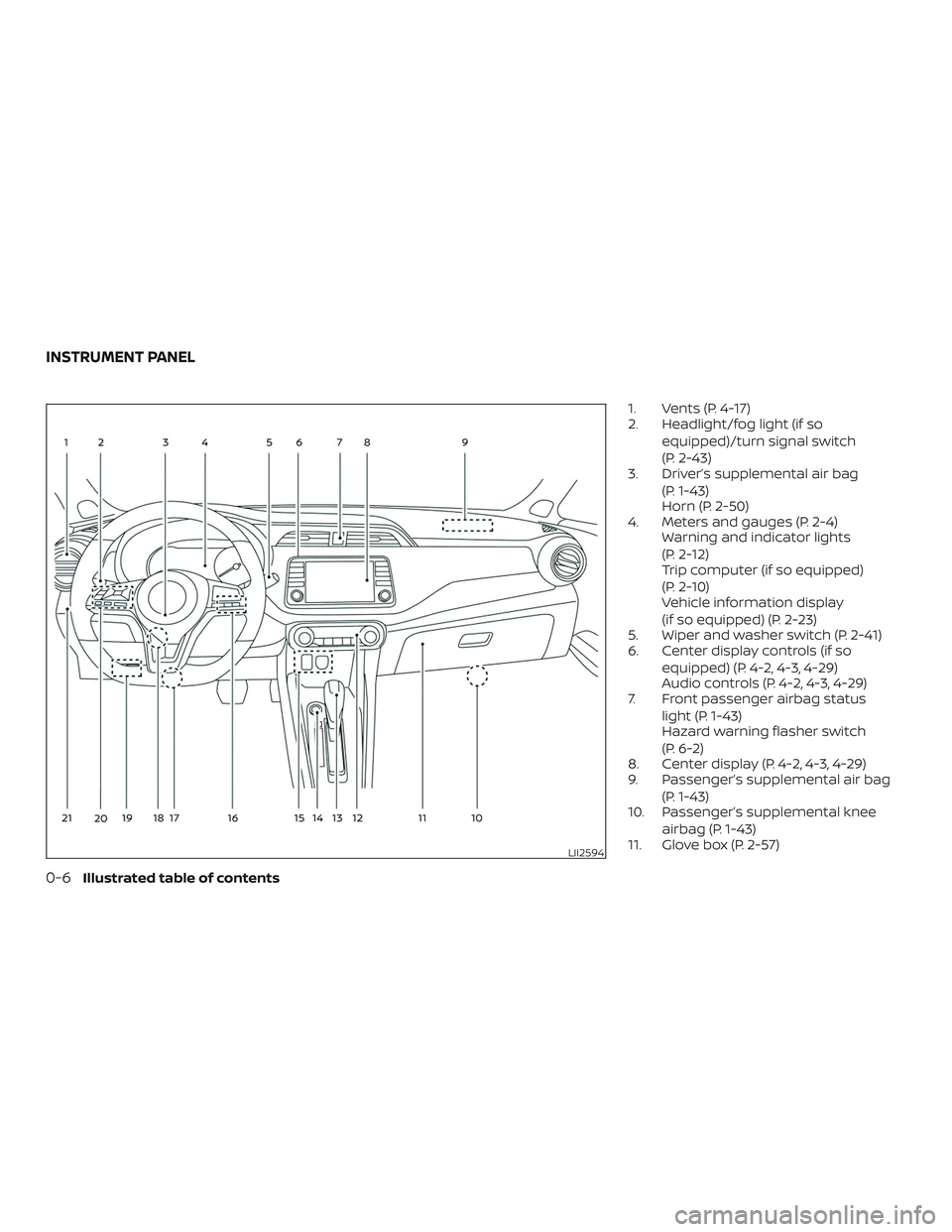
1. Vents (P. 4-17)
2. Headlight/fog light (if soequipped)/turn signal switch
(P. 2-43)
3. Driver’s supplemental air bag
(P. 1-43)
Horn (P. 2-50)
4. Meters and gauges (P. 2-4) Warning and indicator lights
(P. 2-12)
Trip computer (if so equipped)
(P. 2-10)
Vehicle information display
(if so equipped) (P. 2-23)
5. Wiper and washer switch (P. 2-41)
6. Center display controls (if so
equipped) (P. 4-2, 4-3, 4-29)
Audio controls (P. 4-2, 4-3, 4-29)
7. Front passenger airbag status
light (P. 1-43)
Hazard warning flasher switch
(P. 6-2)
8. Center display (P. 4-2, 4-3, 4-29)
9. Passenger’s supplemental air bag
(P. 1-43)
10. Passenger’s supplemental knee
airbag (P. 1-43)
11. Glove box (P. 2-57)
LII2594
INSTRUMENT PANEL
0-6Illustrated table of contents
Page 18 of 492
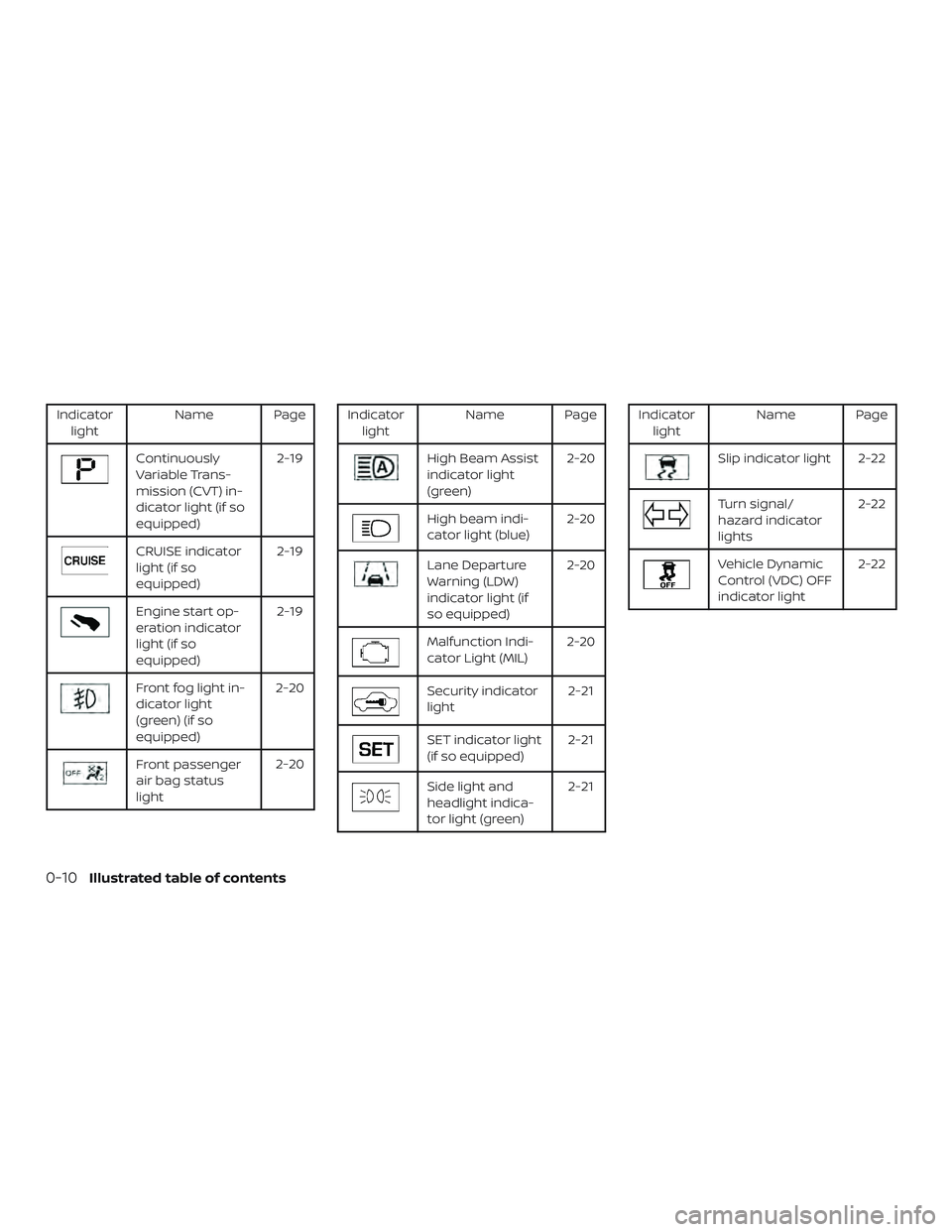
Indicatorlight Name Page
Continuously
Variable Trans-
mission (CVT) in-
dicator light (if so
equipped) 2-19
CRUISE indicator
light (if so
equipped)
2-19
Engine start op-
eration indicator
light (if so
equipped)2-19
Front fog light in-
dicator light
(green) (if so
equipped)2-20
Front passenger
air bag status
light
2-20
Indicator
light Name Page
High Beam Assist
indicator light
(green) 2-20
High beam indi-
cator light (blue)
2-20
Lane Departure
Warning (LDW)
indicator light (if
so equipped)2-20
Malfunction Indi-
cator Light (MIL)
2-20
Security indicator
light 2-21
SET indicator light
(if so equipped)2-21
Side light and
headlight indica-
tor light (green)2-21
Indicator
light Name Page
Slip indicator light 2-22
Turn signal/
hazard indicator
lights 2-22
Vehicle Dynamic
Control (VDC) OFF
indicator light2-22
0-10Illustrated table of contents
Page 84 of 492
2 Instruments and controls
Instrument panel................................2-2
Meters and gauges ..............................2-4
Speedometer and odometer .................2-5
Tachometer ..................................2-8
Fuel gauge ...................................2-9
Distance To Empty (DTE) ......................2-9
Trip computer (if so equipped) ...............2-10
Warning lights, indicator lights and audible
reminders ...................................... 2-12
Checking lights .............................. 2-13
Warning lights ............................... 2-13
Indicator lights .............................. 2-19
Audible reminders ........................... 2-22
Vehicle information display (if so equipped) .....2-23
How to use the vehicle information
display ...................................... 2-24
Startup display .............................. 2-24
Settings ..................................... 2-24
Vehicle information display warnings
and indicators ............................... 2-33
Security system ................................ 2-39
NISSAN Vehicle Immobilizer System .........2-39
Wiper and washer switch .......................2-41
Switch operation ............................ 2-41Rear window and outside mirror
(if so equipped) defroster switch
................2-42
Headlight and turn signal switch ...............2-43
Headlight control switch .....................2-43
Daytime Running Lights (DRL) system
(Type A) (if so equipped) .....................2-47
LED Daytime Running Lights (DRL)
system (Type B) (if so equipped) .............2-47
Instrument brightness control ...............2-48
Turn signal switch ........................... 2-49
Fog light switch (if so equipped) .............2-49
Horn ........................................... 2-50
Heated seat switches (if so equipped) ..........2-50
Lane Departure Warning (LDW) switch
(if so equipped) ................................. 2-51
Automatic Emergency Braking (AEB) with
Pedestrian Detection OFF switch
(if so equipped) ................................. 2-52
Vehicle Dynamic Control (VDC) OFF switch
(if so equipped) ................................. 2-52
R e
ar Automatic Braking (RAB) OFF switch
(if so equipped) ................................. 2-53
Rear Sonar System (RSS) OFF switch
(if so equipped) ................................. 2-53
Page 86 of 492
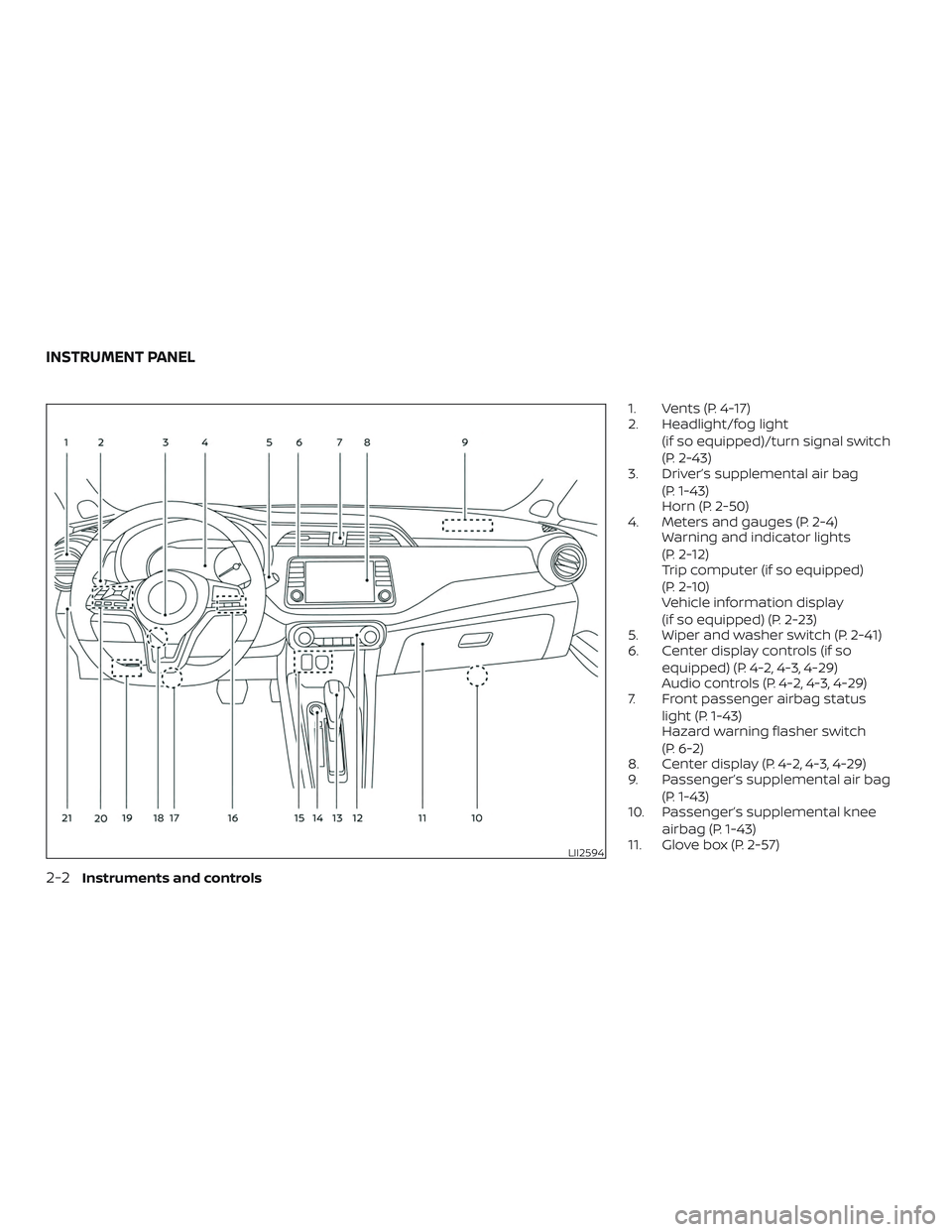
1. Vents (P. 4-17)
2. Headlight/fog light(if so equipped)/turn signal switch
(P. 2-43)
3. Driver’s supplemental air bag
(P. 1-43)
Horn (P. 2-50)
4. Meters and gauges (P. 2-4) Warning and indicator lights
(P. 2-12)
Trip computer (if so equipped)
(P. 2-10)
Vehicle information display
(if so equipped) (P. 2-23)
5. Wiper and washer switch (P. 2-41)
6. Center display controls (if so
equipped) (P. 4-2, 4-3, 4-29)
Audio controls (P. 4-2, 4-3, 4-29)
7. Front passenger airbag status
light (P. 1-43)
Hazard warning flasher switch
(P. 6-2)
8. Center display (P. 4-2, 4-3, 4-29)
9. Passenger’s supplemental air bag
(P. 1-43)
10. Passenger’s supplemental knee
airbag (P. 1-43)
11. Glove box (P. 2-57)
LII2594
INSTRUMENT PANEL
2-2Instruments and controls
Page 96 of 492
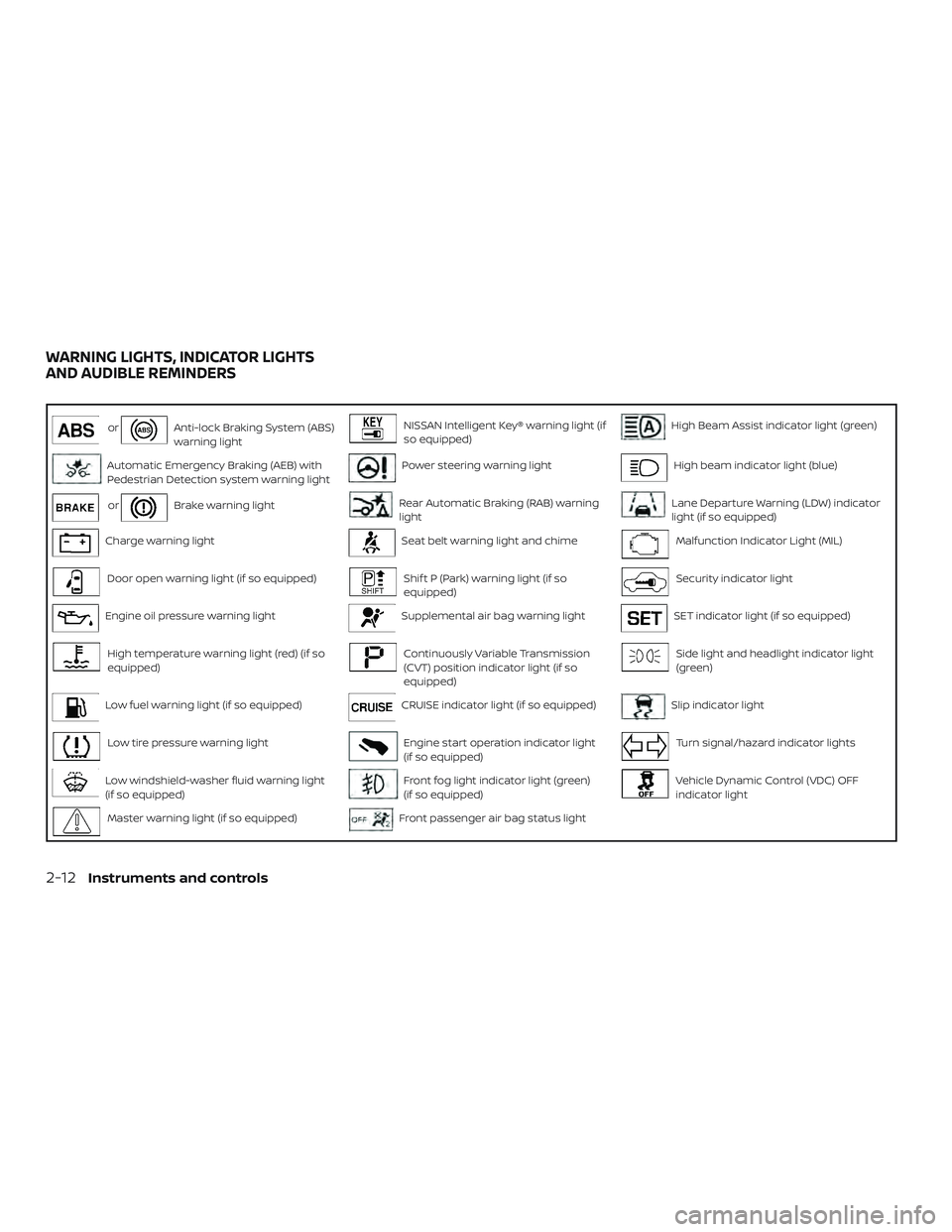
orAnti-lock Braking System (ABS)
warning lightNISSAN Intelligent Key® warning light (if
so equipped)High Beam Assist indicator light (green)
Automatic Emergency Braking (AEB) with
Pedestrian Detection system warning lightPower steering warning lightHigh beam indicator light (blue)
orBrake warning lightRear Automatic Braking (RAB) warning
lightLane Departure Warning (LDW) indicator
light (if so equipped)
Charge warning lightSeat belt warning light and chimeMalfunction Indicator Light (MIL)
Door open warning light (if so equipped)Shif t P (Park) warning light (if so
equipped)Security indicator light
Engine oil pressure warning lightSupplemental air bag warning lightSET indicator light (if so equipped)
High temperature warning light (red) (if so
equipped)Continuously Variable Transmission
(CVT) position indicator light (if so
equipped)Side light and headlight indicator light
(green)
Low fuel warning light (if so equipped)CRUISE indicator light (if so equipped)Slip indicator light
Low tire pressure warning lightEngine start operation indicator light
(if so equipped)Turn signal/hazard indicator lights
Low windshield-washer fluid warning light
(if so equipped)Front fog light indicator light (green)
(if so equipped)Vehicle Dynamic Control (VDC) OFF
indicator light
Master warning light (if so equipped)Front passenger air bag status light
WARNING LIGHTS, INDICATOR LIGHTS
AND AUDIBLE REMINDERS
2-12Instruments and controls
Page 104 of 492
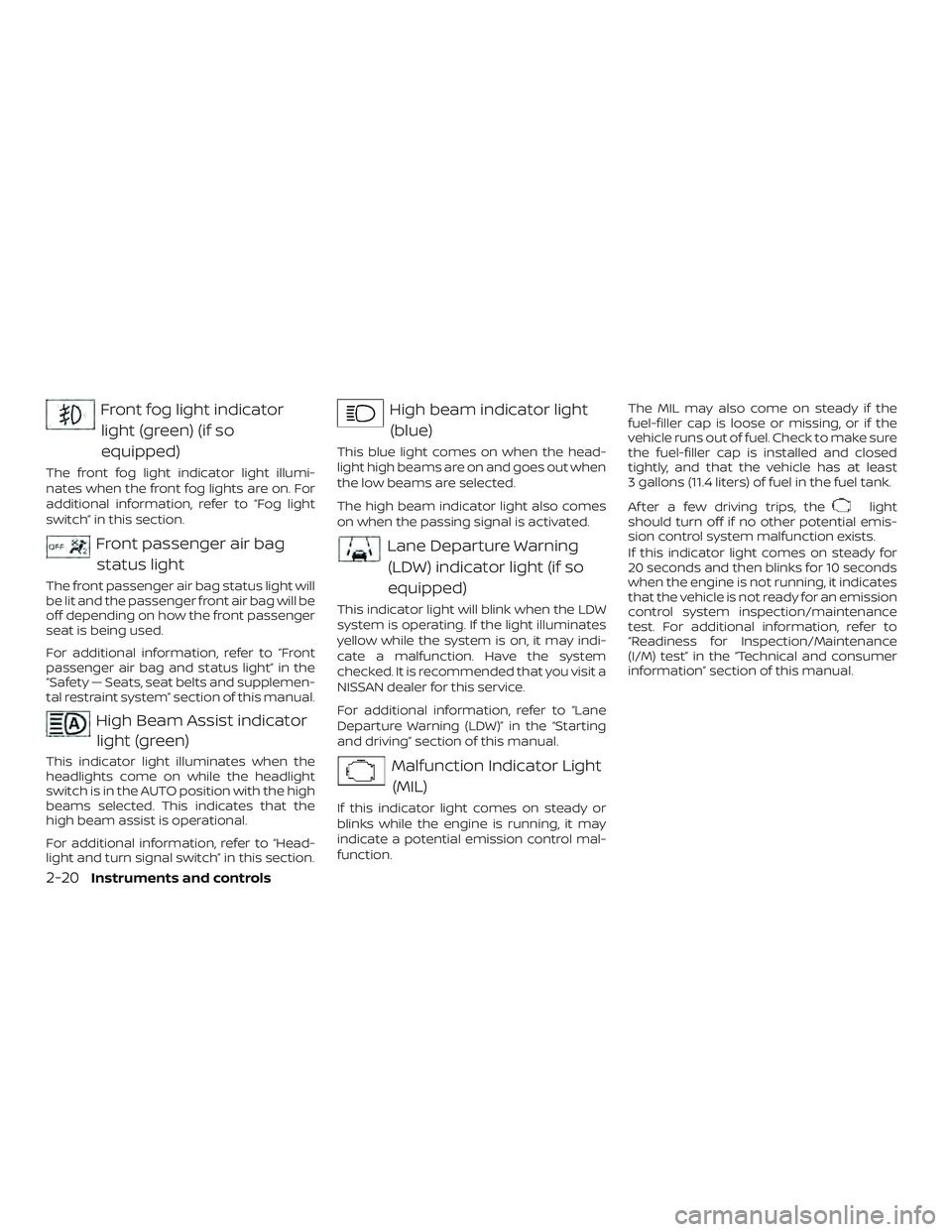
Front fog light indicatorlight (green) (if so
equipped)
The front fog light indicator light illumi-
nates when the front fog lights are on. For
additional information, refer to “Fog light
switch” in this section.
Front passenger air bagstatus light
The front passenger air bag status light will
be lit and the passenger front air bag will be
off depending on how the front passenger
seat is being used.
For additional information, refer to “Front
passenger air bag and status light” in the
“Safety — Seats, seat belts and supplemen-
tal restraint system” section of this manual.
High Beam Assist indicatorlight (green)
This indicator light illuminates when the
headlights come on while the headlight
switch is in the AUTO position with the high
beams selected. This indicates that the
high beam assist is operational.
For additional information, refer to “Head-
light and turn signal switch” in this section.
High beam indicator light
(blue)
This blue light comes on when the head-
light high beams are on and goes out when
the low beams are selected.
The high beam indicator light also comes
on when the passing signal is activated.
Lane Departure Warning(LDW) indicator light (if so
equipped)
This indicator light will blink when the LDW
system is operating. If the light illuminates
yellow while the system is on, it may indi-
cate a malfunction. Have the system
checked. It is recommended that you visit a
NISSAN dealer for this service.
For additional information, refer to “Lane
Departure Warning (LDW)” in the “Starting
and driving” section of this manual.
Malfunction Indicator Light(MIL)
If this indicator light comes on steady or
blinks while the engine is running, it may
indicate a potential emission control mal-
function. The MIL may also come on steady if the
fuel-filler cap is loose or missing, or if the
vehicle runs out of fuel. Check to make sure
the fuel-filler cap is installed and closed
tightly, and that the vehicle has at least
3 gallons (11.4 liters) of fuel in the fuel tank.
Af ter a few driving trips, the
light
should turn off if no other potential emis-
sion control system malfunction exists.
If this indicator light comes on steady for
20 seconds and then blinks for 10 seconds
when the engine is not running, it indicates
that the vehicle is not ready for an emission
control system inspection/maintenance
test. For additional information, refer to
“Readiness for Inspection/Maintenance
(I/M) test” in the “Technical and consumer
information” section of this manual.
2-20Instruments and controls
Page 105 of 492
Operation
The MIL will come on in one of two ways:∙ MIL on steady — An emission control system malfunction has been de-
tected. Check the fuel-filler cap if the
Loose Fuel Cap warning appears in the
vehicle information display (if so
equipped) or the trip computer (if so
equipped). If the fuel-filler cap is loose or
missing, tighten or install the cap and
continue to drive the vehicle. The
light should turn off af ter a few driving
trips. If the
light does not turn off
af ter a few driving trips, have the vehicle
inspected. It is recommended that you
visit a NISSAN dealer for this service. You
do not need to have your vehicle towed
to the dealer.
∙ MIL blinking — An engine misfire has been detected which may damage the
emission control system. To reduce or
avoid emission control system dam-
age:
– do not drive at speeds above 45 mph (72 km/h).
– avoid hard acceleration or decelera- tion.
– avoid steep uphill grades. – if possible, reduce the amount of
cargo being hauled or towed.
The MIL may stop blinking and come on
steady. Have the vehicle inspected. It is rec-
ommended that you visit a NISSAN dealer
for this service. You do not need to have
your vehicle towed to the dealer.
CAUTION
Continued vehicle operation without
having the emission control system
checked and repaired as necessary
could lead to poor driveability, reduced
fuel economy, and possible damage to
the emission control system.
Security indicator light
This light blinks when the ignition switch is
placed in the OFF or LOCK position.
The blinking security indicator light indi-
cates that the security systems equipped
on the vehicle are operational.
For additional information, refer to “Security
systems” in this section.
SET indicator light (if so equipped)
This light comes on while the vehicle speed
is controlled by the cruise control system. If
the light blinks while the engine is running,
it may indicate the cruise control system is
not functioning properly. Have the system
checked. It is recommended that you visit a
NISSAN dealer for this service.
For additional information, refer to “Cruise
control” in the “Starting and driving” section
of this manual.
Side light and headlightindicator light (green)
The side light and headlight indicator light
illuminates when the side light or head-
lights are on. If the headlight switch is in the
AUTO position, the side light and headlight
indicator light will illuminate when the
headlights turn on. For additional informa-
tion, refer to “Headlight and turn signal
switch” in this section.
Instruments and controls2-21
Page 106 of 492
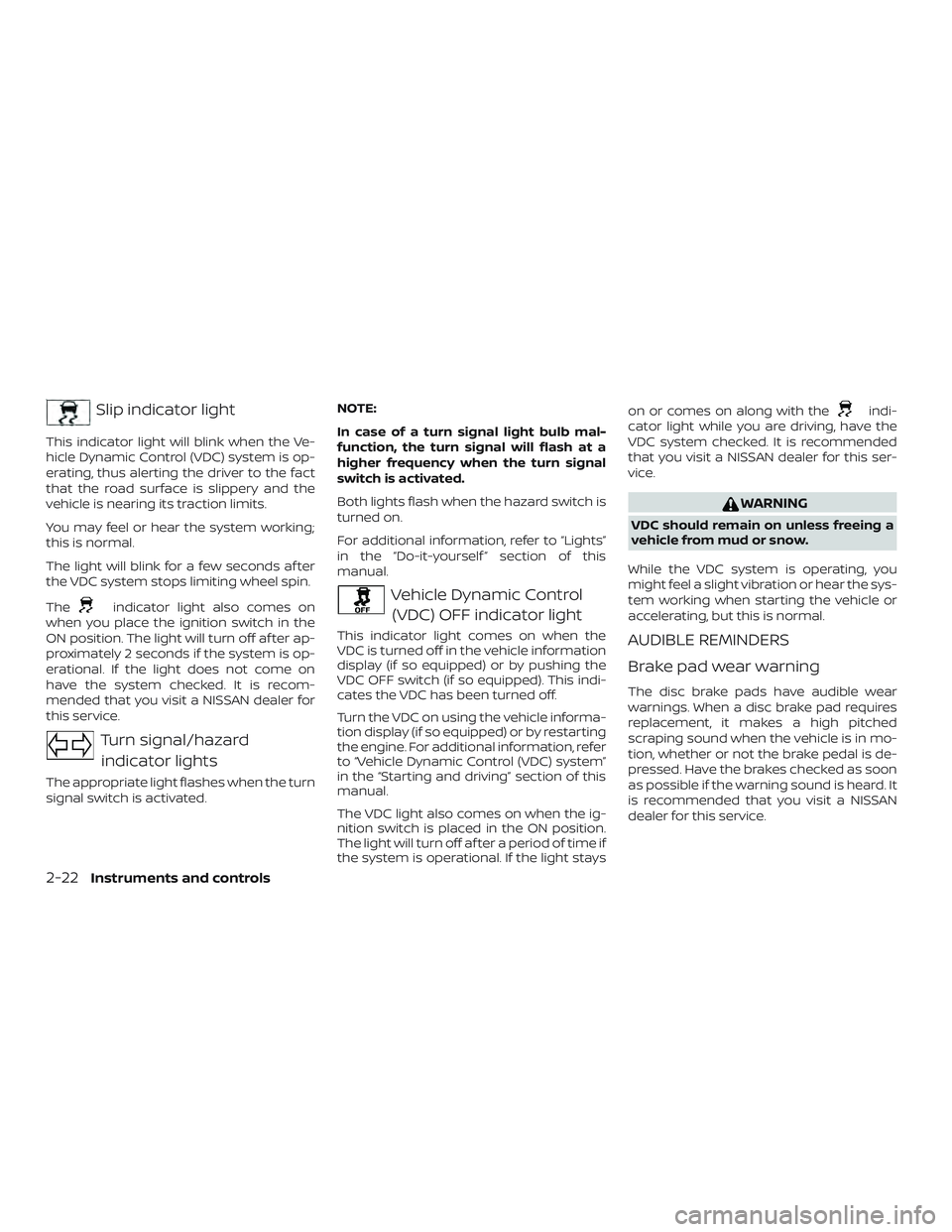
Slip indicator light
This indicator light will blink when the Ve-
hicle Dynamic Control (VDC) system is op-
erating, thus alerting the driver to the fact
that the road surface is slippery and the
vehicle is nearing its traction limits.
You may feel or hear the system working;
this is normal.
The light will blink for a few seconds af ter
the VDC system stops limiting wheel spin.
The
indicator light also comes on
when you place the ignition switch in the
ON position. The light will turn off af ter ap-
proximately 2 seconds if the system is op-
erational. If the light does not come on
have the system checked. It is recom-
mended that you visit a NISSAN dealer for
this service.
Turn signal/hazard
indicator lights
The appropriate light flashes when the turn
signal switch is activated. NOTE:
In case of a turn signal light bulb mal-
function, the turn signal will flash at a
higher frequency when the turn signal
switch is activated.
Both lights flash when the hazard switch is
turned on.
For additional information, refer to “Lights”
in the “Do-it-yourself ” section of this
manual.
Vehicle Dynamic Control
(VDC) OFF indicator light
This indicator light comes on when the
VDC is turned off in the vehicle information
display (if so equipped) or by pushing the
VDC OFF switch (if so equipped). This indi-
cates the VDC has been turned off.
Turn the VDC on using the vehicle informa-
tion display (if so equipped) or by restarting
the engine. For additional information, refer
to “Vehicle Dynamic Control (VDC) system”
in the “Starting and driving” section of this
manual.
The VDC light also comes on when the ig-
nition switch is placed in the ON position.
The light will turn off af ter a period of time if
the system is operational. If the light stays on or comes on along with the
indi-
cator light while you are driving, have the
VDC system checked. It is recommended
that you visit a NISSAN dealer for this ser-
vice.
WARNING
VDC should remain on unless freeing a
vehicle from mud or snow.
While the VDC system is operating, you
might feel a slight vibration or hear the sys-
tem working when starting the vehicle or
accelerating, but this is normal.
AUDIBLE REMINDERS
Brake pad wear warning
The disc brake pads have audible wear
warnings. When a disc brake pad requires
replacement, it makes a high pitched
scraping sound when the vehicle is in mo-
tion, whether or not the brake pedal is de-
pressed. Have the brakes checked as soon
as possible if the warning sound is heard. It
is recommended that you visit a NISSAN
dealer for this service.
2-22Instruments and controls
Page 112 of 492
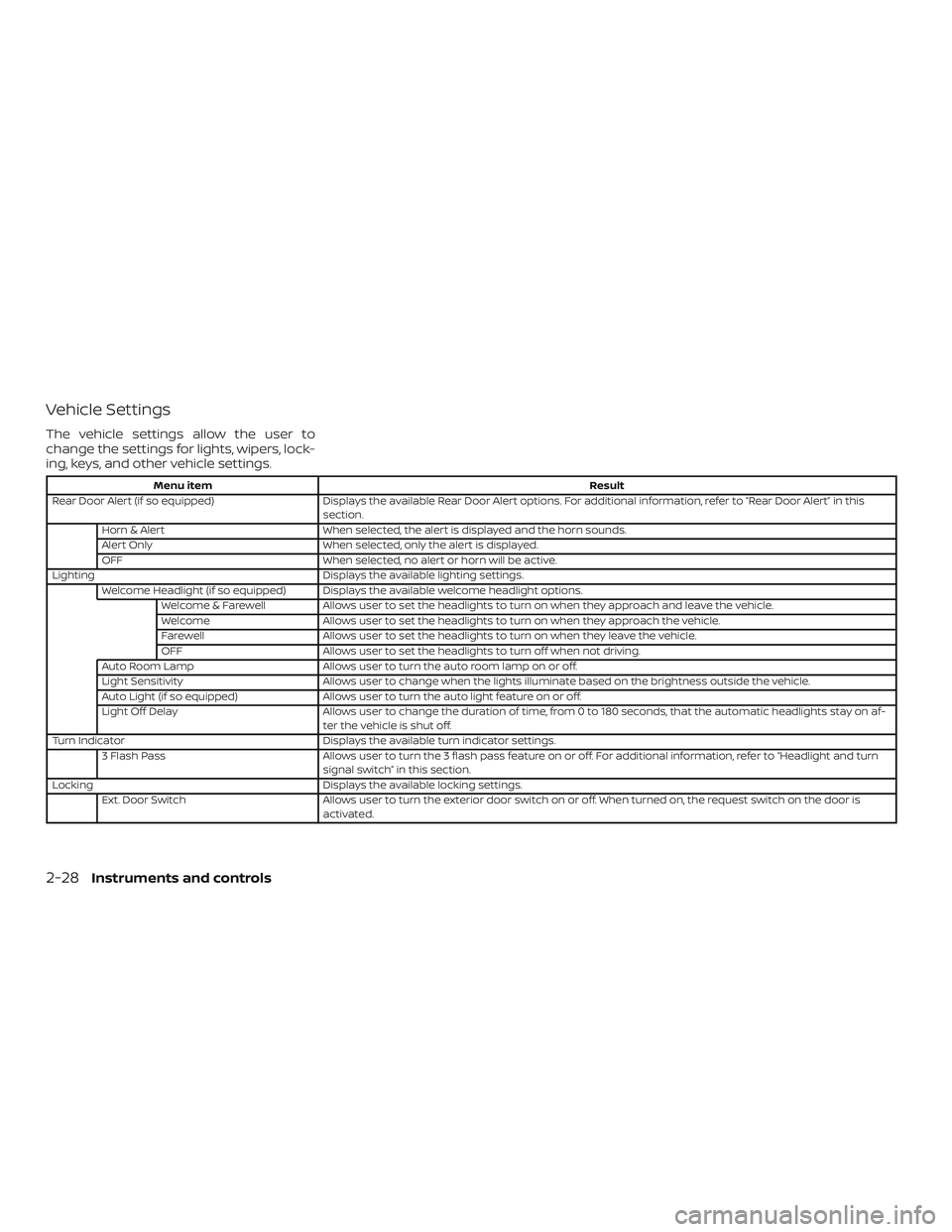
Vehicle Settings
The vehicle settings allow the user to
change the settings for lights, wipers, lock-
ing, keys, and other vehicle settings.
Menu itemResult
Rear Door Alert (if so equipped) Displays the available Rear Door Alert options. For additional information, refer to “Rear Door Alert” in this
section.
Horn & Alert When selected, the alert is displayed and the horn sounds.
Alert Only When selected, only the alert is displayed.
OFF When selected, no alert or horn will be active.
Lighting Displays the available lighting settings.
Welcome Headlight (if so equipped) Displays the available welcome headlight options. Welcome & Farewell Allows user to set the headlights to turn on when they approach and leave the vehicle.
Welcome Allows user to set the headlights to turn on when they approach the vehicle.
Farewell Allows user to set the headlights to turn on when they leave the vehicle.
OFF Allows user to set the headlights to turn off when not driving.
Auto Room Lamp Allows user to turn the auto room lamp on or off.
Light Sensitivity Allows user to change when the lights illuminate based on the brightness outside the vehicle.
Auto Light (if so equipped) Allows user to turn the auto light feature on or off.
Light Off Delay Allows user to change the duration of time, from 0 to 180 seconds, that the automatic headlights stay on af-
ter the vehicle is shut off.
Turn Indicator Displays the available turn indicator settings.
3 Flash Pass Allows user to turn the 3 flash pass feature on or off. For additional information, refer to “Headlight and turn
signal switch” in this section.
Locking Displays the available locking settings.
Ext. Door Switch Allows user to turn the exterior door switch on or off. When turned on, the request switch on the door is
activated.
2-28Instruments and controls