belt NISSAN VERSA SEDAN 2018 Owner´s Manual
[x] Cancel search | Manufacturer: NISSAN, Model Year: 2018, Model line: VERSA SEDAN, Model: NISSAN VERSA SEDAN 2018Pages: 702, PDF Size: 8.98 MB
Page 95 of 702
WARNING
∙ Your brake system may not be work-
ing properly if the warning light is on.
Driving could be dangerous. If you
judge it to be safe, drive carefully to
the nearest service station for repairs.
Otherwise, have your vehicle towed
because driving it could be
dangerous.
∙ Pressing the brake pedal with the en-
gine stopped and/or a low brake fluid
level may increase your stopping dis-
tance and braking will require greater
pedal effort as well as pedal travel.
∙ If the brake fluid level is below the
MINIMUM or MIN mark on the brake
fluid reservoir, do not drive until the
brake system has been checked. It is
recommended that you visit a NISSAN
dealer for this service.
Anti-lock Braking System (ABS) warning
indicator
When the parking brake is released and the
brake fluid level is sufficient, if both the
brake warning light and the ABS warning
light illuminate, it may indicate the ABS is
not functioning properly. Have the brake
system checked and, if necessary, repaired.It is recommended that you visit a NISSAN
dealer for this service. Avoid high-speed
driving and abrupt braking. For additional
information, refer to “Anti-lock Braking Sys-
tem (ABS) warning light” in this section.
Charge warning light
If this light comes on while the engine is
running, it may indicate the charging sys-
tem is not functioning properly. Turn the
engine off and check the generator belt. If
the belt is loose, broken, missing, or if the
light remains on, have the system checked.
It is recommended that you visit a NISSAN
dealer for this service.
CAUTION
∙ Do not ground electrical accessories
directly to the battery terminal. Doing
so will bypass the variable voltage
control system and the vehicle bat-
tery may not charge completely. For
additional information, refer to “Vari-
able voltage control system” in the
“Do-it-yourself ” section of this
manual.
∙ Do not continue driving if the genera-
tor belt is loose, broken or missing.
Door open warning light
This light comes on when any of the doors
are not closed securely while the ignition
switch is in the ON position.
Engine oil pressure
warning light
This light warns of low engine oil pressure. If
the light flickers or comes on during nor-
mal driving, pull off the road in a safe area,
stop the engineimmediatelyand call a
NISSAN dealer or other authorized repair
shop.
The engine oil pressure warning light is
not designed to indicate a low oil level.
Use the dipstick to check the oil level. For
additional information, refer to “Engine oil”
in the “Do-it-yourself ” section of this
manual.
CAUTION
Running the engine with the engine oil
pressure warning light on could cause
serious damage to the engine almost
immediately. Such damage is not cov-
ered by the NISSAN New Vehicle Limited
Warranty. Turn off the engine as soon as
it is safe to do so.
2-14Instruments and controls
Page 98 of 702
∙ When replacing a wheel without the
TPMS such as the spare tire, the TPMS
will not function and the low tire pres-
sure warning light will flash for ap-
proximately 1 minute. The light will re-
main on af ter 1 minute. Have your
tires replaced and/or TPMS system
reset as soon as possible. It is recom-
mended that you visit a NISSAN dealer
for these services.
∙ Replacing tires with those not origi-
nally specified by NISSAN could affect
the proper operation of the TPMS.
CAUTION
∙ The TPMS is not a substitute for the
regular tire pressure check. Be sure to
check the tire pressure regularly.
∙ If the vehicle is being driven at speeds
of less than 16 mph (25 km/h), the
TPMS may not operate correctly.
∙ Be sure to install the specified size of
tires to the four wheels correctly.
Power steering warning
light
WARNING
∙ If the engine is not running or is
turned off while driving, the power as-
sist for the steering will not work.
Steering will be harder to operate.
∙
When the power steering warning light
illuminates with the engine running,
there will be no power assist for the
steering. You will still have control of the
vehicle, but the steering will be harder to
operate. Have the power steering system
checked. It is recommended that you
visit a NISSAN dealer for this service.
When the ignition switch is placed in the ON
position, the power steering warning light
illuminates. Af ter starting the engine, the
power steering warning light turns off. This
indicates the power steering is operational.
If the power steering warning light illumi-
nates while the engine is running, it may
indicate the power steering is not function-
ing properly and may need servicing. Have
the power steering checked. It is recom-
mended that you visit a NISSAN dealer for
this service.When the power steering warning light illu-
minates with the engine running, there will
be no power assist for the steering, but you
will still have control of the vehicle. At this
time, greater steering effort is required to
operate the steering wheel, especially in
sharp turns and at low speeds.
For additional information, refer to “Power
steering” in the “Starting and driving” sec-
tion of this manual.
Seat belt warning light and
chime (if so equipped)
The light and chime remind you to fasten
your seat belts. The light illuminates when-
ever the ignition switch is placed in the ON
or START position and remains illuminated
until the driver’s seat belt is fastened. At the
same time, the chime sounds for about
6 seconds unless the driver’s seat belt is
securely fastened.
The seat belt warning light may also illumi-
nate if the front passenger’s seat belt is not
fastened when the front passenger’s seat
is occupied . For 7 seconds af ter the igni-
tion switch is placed in the ON position, the
system does not activate the warning light
for the front passenger.
Instruments and controls2-17
Page 99 of 702
For additional information, refer to “Seat
belts” in the “Safety—Seats, seat belts and
supplemental restraint system” section of
this manual.
Supplemental air bag
warning light
When the ignition switch is placed in the ON
or START position, the supplemental air
bag warning light illuminates for about
7 seconds and then turns off. This means
the system is operational.
If any of the following conditions occur, the
front air bag, side air bag, curtain air bag,
and pretensioner seat belt systems need
servicing:
∙ The supplemental air bag warning light
remains on af ter approximately 7 sec-
onds.
∙ The supplemental air bag warning light
flashes intermittently.
∙ The supplemental air bag warning light
does not come on at all.
It is recommended that you visit a NISSAN
dealer for these services.
Unless checked and repaired, the supple-
mental restraint system (air bag system)
and/or the pretensioner(s) may not func-tion properly. For additional information, re-
fer to “Supplemental Restraint System
(SRS)” in the “Safety—Seats, seat belts and
supplemental restraint system” section of
this manual.
WARNING
If the supplemental air bag warning
light is on, it could mean that the front
air bag, side air bag, curtain air bag
and/or pretensioner systems will not
operate in an accident. To help avoid
injury to yourself or others, have your
vehicle checked as soon as possible. It is
recommended that you visit a NISSAN
dealer for this service.
INDICATOR LIGHTS
This vehicle has various indicator lights
that may illuminate to indicate a system
status. For additional information, refer to
the specific light in this section.
Continuously Variable
Transmission (CVT)
position indicator light
When the ignition switch is placed in the ON
position, this indicator light shows the shif t
lever position. For additional information,refer to “Driving the vehicle” in the “Starting
and driving” section of this manual.
Cruise main switch
indicator light (if so
equipped)
The light comes on when the cruise control
main switch is pushed. The light goes out
when the main switch is pushed again.
When the cruise main switch indicator light
comes on, the cruise control system is op-
erational. For additional information, refer
to “Cruise control” in the “Starting and driv-
ing” section of this manual.
Front fog light indicator
light (if so equipped)
The front fog light indicator light illumi-
nates when the front fog lights are on. For
additional information, refer to “Fog light
switch” in this section.
Front passenger air bag
status light
The front passenger air bag status light will
be lit and the passenger front air bag will be
off depending on how the front passenger
seat is being used.
2-18Instruments and controls
Page 100 of 702
For additional information, refer to “Front
passenger air bag and status light” in the
“Safety — Seats, seat belts and supplemen-
tal restraint system” section of this manual.
High beam indicator light
(blue)
This blue light comes on when the head-
light high beams are on and goes out when
the low beams are selected.
The high beam indicator light also comes
on when the passing signal is activated.
Malfunction Indicator Light
(MIL)
If this indicator light comes on steady or
blinks while the engine is running, it may
indicate a potential emission control mal-
function.
The MIL may also come on steady if the
fuel-filler cap is loose or missing, or if the
vehicle runs out of fuel. Check to make sure
the fuel-filler cap is installed and closed
tightly, and that the vehicle has at least
3 gallons (11.4 liters) of fuel in the fuel tank.
Af ter a few driving trips, the
light
should turn off if no other potential emis-
sion control system malfunction exists.If this indicator light comes on steady for
20 seconds and then blinks for 10 seconds
when the engine is not running, it indicates
that the vehicle is not ready for an emission
control system inspection/maintenance
test. For additional information, refer to
“Readiness for Inspection/Maintenance
(I/M) test” in the “Technical and consumer
information” section of this manual.
Operation
The MIL will come on in one of two ways:
∙ MIL on steady — An emission control
system malfunction has been de-
tected. Check the fuel-filler cap if the
LOOSE FUEL CAP warning appears in
the trip computer. If the fuel-filler cap is
loose or missing, tighten or install the
cap and continue to drive the vehicle.
The
light should turn off af ter a
few driving trips. If the
light does
not turn off af ter a few driving trips, have
the vehicle inspected. It is recom-
mended that you visit a NISSAN dealer
for this service. You do not need to have
your vehicle towed to the dealer.∙ MIL blinking — An engine misfire has
been detected which may damage the
emission control system. To reduce or
avoid emission control system dam-
age:
– do not drive at speeds above
45 mph (72 km/h).
– avoid hard acceleration or decelera-
tion.
– avoid steep uphill grades.
– if possible, reduce the amount of
cargo being hauled or towed.
The MIL may stop blinking and come on
steady. Have the vehicle inspected. It is rec-
ommended that you visit a NISSAN dealer
for this service. You do not need to have
your vehicle towed to the dealer.CAUTION
Continued vehicle operation without
having the emission control system
checked and repaired as necessary
could lead to poor driveability, reduced
fuel economy, and possible damage to
the emission control system.
Instruments and controls2-19
Page 118 of 702
NISSAN does not record key numbers so it
is very important to keep track of your key
number plate.
A key number is only necessary when you
have lost all your keys. If you still have a key,
it can be duplicated without knowing the
key number.When the doors are locked using one of the
following methods, the doors cannot be
opened using the inside or outside door
handles. The doors must be unlocked to
open the doors.
WARNING
∙ Always have the doors locked while
driving. Along with the use of seat
belts, this provides greater safety in
the event of an accident by helping to
prevent persons from being thrown
from the vehicle. This also helps keep
children and others from unintention-
ally opening the doors, and will help
keep out intruders.
∙ Before opening any door, always look
for and avoid oncoming traffic.∙ To help avoid risk of injury or death
through unintended operation of the
vehicle and/or its systems, including
entrapment in windows and/or inad-
vertent door lock activation, do not
leave children, people who require the
assistance of others and/or pets un-
attended in your vehicle. Additionally,
the temperature inside a closed ve-
hicle on a warm day can quickly be-
come high enough to cause a signifi-
cant risk of injury or death to people
and/or pets.
DOORS
Pre-driving checks and adjustments3-3
Page 215 of 702
Operation is subject to the following two
conditions: (1) this device may not cause
harmful interference, and (2) this device
must accept any interference received,
including interference that may cause
undesired operation of the device.
AVOIDING COLLISION AND
ROLLOVER
WARNING
Failure to operate this vehicle in a safe
and prudent manner may result in loss
of control or an accident.
Be alert and drive defensively at all times.
Obey all traffic regulations. Avoid excessive
speed, high speed cornering, or sudden
steering maneuvers, because these driving
practices could cause you to lose control of
your vehicle.
As with any vehicle, loss of control could
result in a collision with other vehicles or
objects or cause the vehicle to roll over,
particularly if the loss of control causes
the vehicle to slide sideways.
Be attentive at all times, and avoid driving
when tired. Never drive when under the in-
fluence of alcohol or drugs (including pre-
scription or over-the-counter drugs whichmay cause drowsiness). Always wear your
seat belt as outlined in the “Safety – Seats,
seat belts and supplemental restraint sys-
tem” section of this manual, and also in-
struct your passengers to do so.
Seat belts help reduce the risk of injury in
collisions and rollovers.In a rollover crash,
an unbelted or improperly belted person
is significantly more likely to be injured
or killed than a person properly wearing
a seat belt.OFF-ROAD RECOVERY
While driving, the right side or lef t side
wheels may unintentionally leave the road
surface. If this occurs, maintain control of
the vehicle by following the procedure be-
low. Please note that this procedure is only
a general guide. The vehicle must be driven
as appropriate based on the conditions of
the vehicle, road and traffic.
1. Remain calm and do not overreact.
2. Do not apply the brakes.
3. Maintain a firm grip on the steering
wheel with both hands and try to hold a
straight course.4. When appropriate, slowly release the
accelerator pedal to gradually slow the
vehicle.
5. If there is nothing in the way, steer the
vehicle to follow the road while vehicle
speed is reduced. Do not attempt to
drive the vehicle back onto the road
surface until vehicle speed is reduced.
6. When it is safe to do so, gradually turn
the steering wheel until both tires re-
turn to the road surface. When all tires
are on the road surface, steer the ve-
hicle to stay in the appropriate driving
lane.
∙ If you decide that it is not safe to re-
turn the vehicle to the road surface
based on vehicle, road or traffic con-
ditions, gradually slow the vehicle to a
stop in a safe place off the road.
RAPID AIR PRESSURE LOSS
Rapid air pressure loss or a “blow-out” can
occur if the tire is punctured or is damaged
due to hitting a curb or pothole. Rapid air
pressure loss can also be caused by driving
on under-inflated tires.
Rapid air pressure loss can affect the han-
dling and stability of the vehicle, especially
at highway speeds.
5-6Starting and driving
Page 218 of 702
MANUAL TRANSMISSION (if so
equipped)
The ignition switch includes a device that
helps prevent accidental removal of the
key while driving.
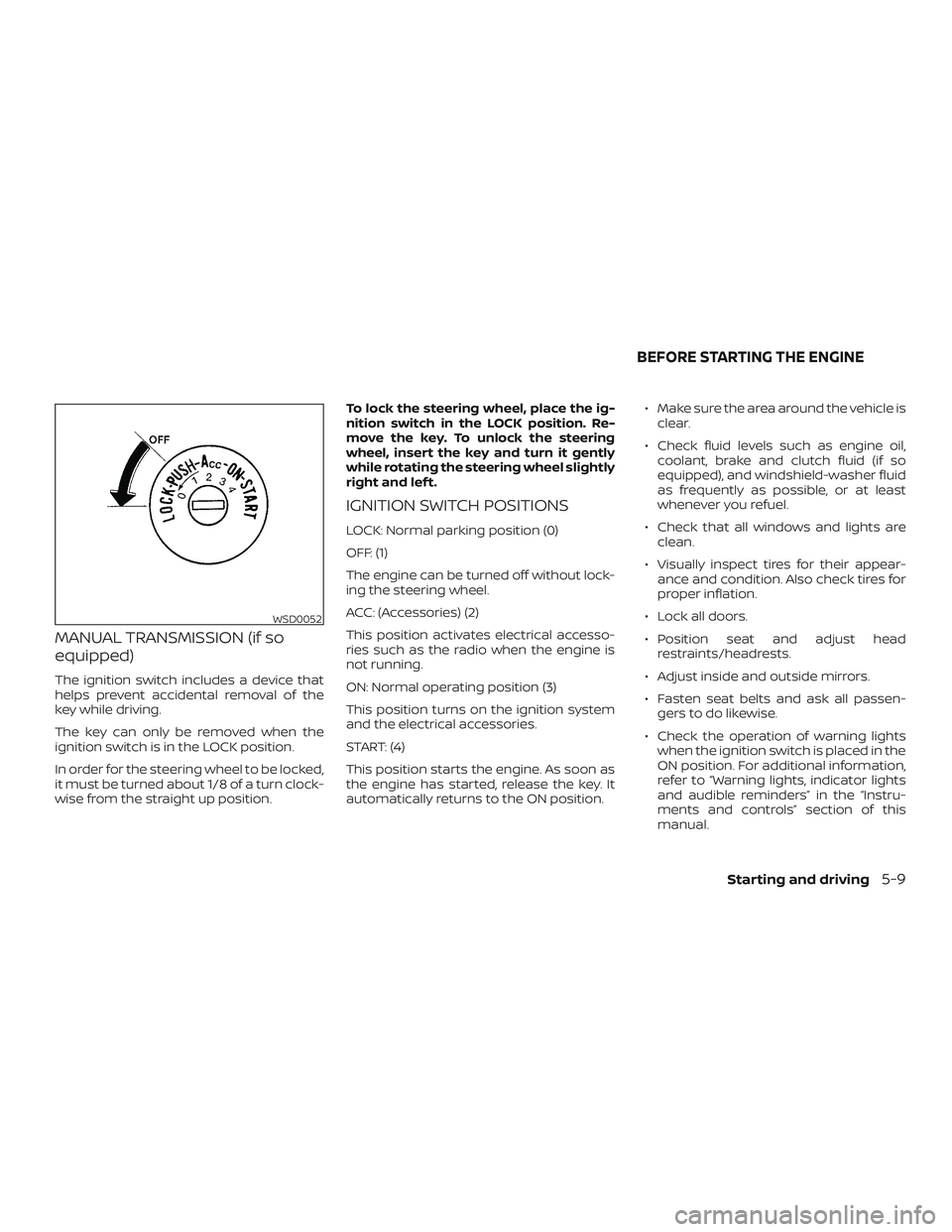
The key can only be removed when the
ignition switch is in the LOCK position.
In order for the steering wheel to be locked,
it must be turned about 1/8 of a turn clock-
wise from the straight up position.To lock the steering wheel, place the ig-
nition switch in the LOCK position. Re-
move the key. To unlock the steering
wheel, insert the key and turn it gently
while rotating the steering wheel slightly
right and lef t.
IGNITION SWITCH POSITIONS
LOCK: Normal parking position (0)
OFF: (1)
The engine can be turned off without lock-
ing the steering wheel.
ACC: (Accessories) (2)
This position activates electrical accesso-
ries such as the radio when the engine is
not running.
ON: Normal operating position (3)
This position turns on the ignition system
and the electrical accessories.
START: (4)
This position starts the engine. As soon as
the engine has started, release the key. It
automatically returns to the ON position.∙ Make sure the area around the vehicle is
clear.
∙ Check fluid levels such as engine oil,
coolant, brake and clutch fluid (if so
equipped), and windshield-washer fluid
as frequently as possible, or at least
whenever you refuel.
∙ Check that all windows and lights are
clean.
∙ Visually inspect tires for their appear-
ance and condition. Also check tires for
proper inflation.
∙ Lock all doors.
∙ Position seat and adjust head
restraints/headrests.
∙ Adjust inside and outside mirrors.
∙ Fasten seat belts and ask all passen-
gers to do likewise.
∙ Check the operation of warning lights
when the ignition switch is placed in the
ON position. For additional information,
refer to “Warning lights, indicator lights
and audible reminders” in the “Instru-
ments and controls” section of this
manual.
WSD0052
BEFORE STARTING THE ENGINE
Starting and driving5-9
Page 250 of 702
2. Turn off the air conditioner. Open all the
windows, move the heater or air condi-
tioner temperature control to maxi-
mum hot and fan control to high
speed.
3. Get out of the vehicle. Look and listen
for steam or coolant escaping from the
radiator before opening the hood. (If
steam or coolant is escaping, turn off
the engine). Do not open the hood fur-
ther until no steam or coolant can be
seen.
4. Open the engine hood.
WARNING
If steam or water is coming from the
engine, stand clear to prevent getting
burned.
5. Visually check drive belts for damage
or looseness. Also check if the cooling
fan is running. The radiator hoses and
radiator should not leak water. If cool-
ant is leaking, the water pump belt is
missing or loose, or the cooling fan
does not run, stop the engine.
WARNING
Be careful not to allow your hands, hair,
jewelry or clothing to come into contact
with, or get caught in, engine belts or
the engine cooling fan. The engine cool-
ing fan can start at any time.
6. Af ter the engine cools down, check the
coolant level in the engine coolant res-
ervoir tank with the engine running.
Add coolant to the engine coolant res-
ervoir tank if necessary. Have your ve-
hicle repaired. It is recommended that
you visit a NISSAN dealer for this ser-
vice.
When towing your vehicle, all State (Provincial
in Canada) and local regulations for towing
must be followed. Incorrect towing equip-
ment could damage your vehicle. Towing in-
structions are available from a NISSAN
dealer. Local service operators are generally
familiar with the applicable laws and proce-
dures for towing. To assure proper towing
and to prevent accidental damage to your
vehicle, NISSAN recommends having a ser-
vice operator tow your vehicle. It is advisable
to have the service operator carefully read
the following precautions:
WARNING
∙ Never ride in a vehicle that is being
towed.
∙ Never get under your vehicle af ter it
has been lif ted by a tow truck.
CAUTION
∙ When towing, make sure that the
transmission, axles, steering system
and powertrain are in working condi-
tion. If any of these conditions apply,
dollies or a flatbed tow truck must be
used.
∙ Always attach safety chains before
towing.
TOWING YOUR VEHICLE
In case of emergency6-11
Page 256 of 702
7 Appearance and care
Cleaning exterior................................ 7-2
Washing...................................... 7-2
Waxing....................................... 7-2
Removing spots.............................. 7-3
Underbody................................... 7-3
Glass......................................... 7-3
Aluminum alloy wheels (if so equipped)....... 7-3
Chromeparts................................ 7-4
Tire dressings................................ 7-4
Cleaning interior................................. 7-4Air fresheners................................ 7-5
Floor mats................................... 7-5
Seatbelts .................................... 7-7
Corrosion protection............................ 7-7
Most common factors contributing to
vehicle corrosion............................. 7-7
Environmental factors influence the
rate of corrosion.............................. 7-7
Protect your vehicle from corrosion..........7-8
Page 262 of 702
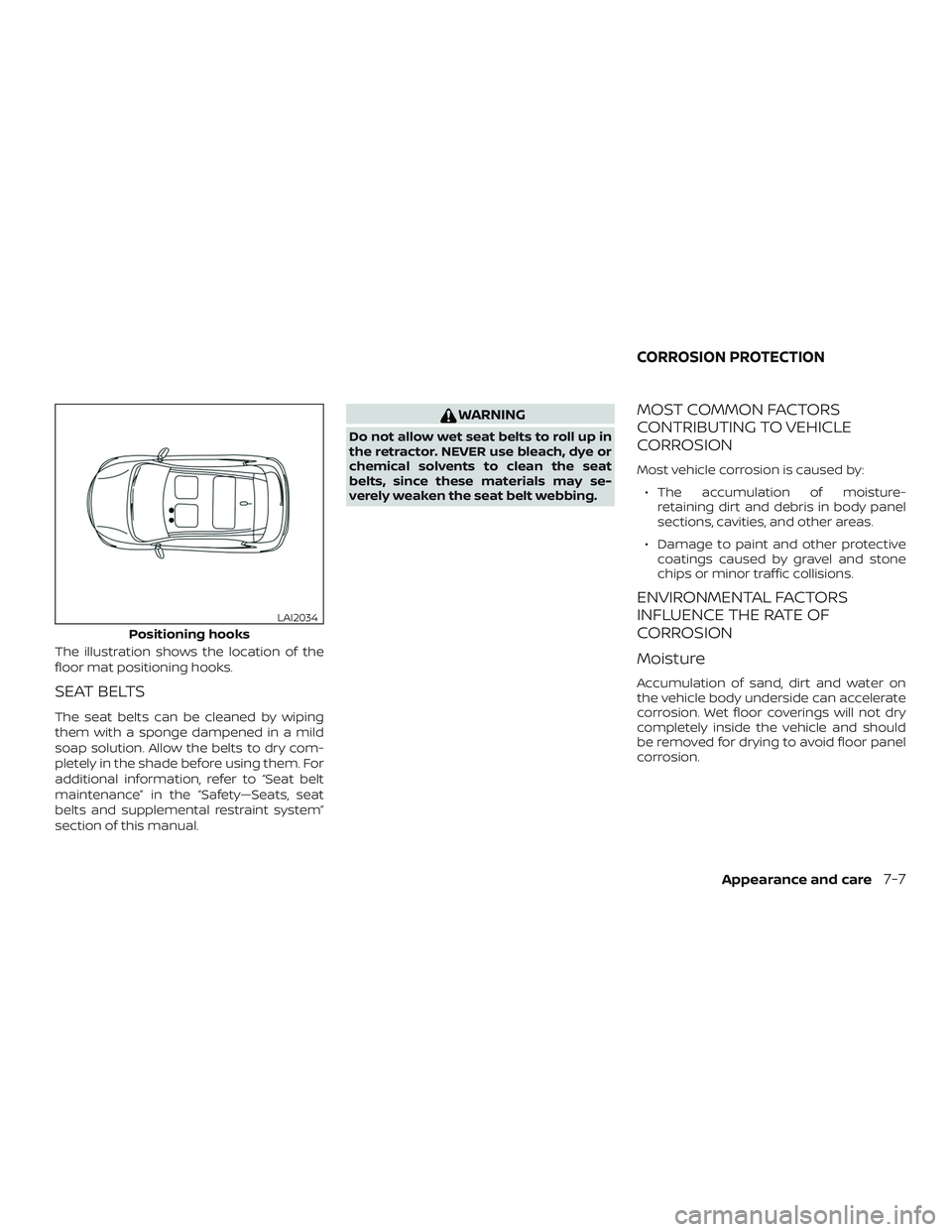
The illustration shows the location of the
floor mat positioning hooks.
SEAT BELTS
The seat belts can be cleaned by wiping
them with a sponge dampened in a mild
soap solution. Allow the belts to dry com-
pletely in the shade before using them. For
additional information, refer to “Seat belt
maintenance” in the “Safety—Seats, seat
belts and supplemental restraint system”
section of this manual.
WARNING
Do not allow wet seat belts to roll up in
the retractor. NEVER use bleach, dye or
chemical solvents to clean the seat
belts, since these materials may se-
verely weaken the seat belt webbing.
MOST COMMON FACTORS
CONTRIBUTING TO VEHICLE
CORROSION
Most vehicle corrosion is caused by:
∙ The accumulation of moisture-
retaining dirt and debris in body panel
sections, cavities, and other areas.
∙ Damage to paint and other protective
coatings caused by gravel and stone
chips or minor traffic collisions.
ENVIRONMENTAL FACTORS
INFLUENCE THE RATE OF
CORROSION
Moisture
Accumulation of sand, dirt and water on
the vehicle body underside can accelerate
corrosion. Wet floor coverings will not dry
completely inside the vehicle and should
be removed for drying to avoid floor panel
corrosion.
Positioning hooks
LAI2034
CORROSION PROTECTION
Appearance and care7-7