ad blue NISSAN VERSA SEDAN 2018 Owner´s Manual
[x] Cancel search | Manufacturer: NISSAN, Model Year: 2018, Model line: VERSA SEDAN, Model: NISSAN VERSA SEDAN 2018Pages: 702, PDF Size: 8.98 MB
Page 5 of 702
Operating, servicing and maintaining a
passenger vehicle or off-road vehicle
can expose you to chemicals including
engine exhaust, carbon monoxide,
phthalates, and lead, which are known
to the State of California to cause can-
cer and birth defects or other reproduc-
tive harm. To minimize exposure, avoid
breathing exhaust, do not idle the en-
gine except as necessary, service your
vehicle in a well-ventilated area and
wear gloves or wash your hands fre-
quently when servicing your vehicle.
For more information go to
www.P65Warnings.ca.gov.
CALIFORNIA PERCHLORATE
ADVISORY
Some vehicle parts, such as lithium bat-
teries, may contain perchlorate material.
The following advisory is provided: “Per-
chlorate Material – special handling may
apply. For additional information, refer to
www.dtsc.ca.gov/hazardouswaste/
perchlorate/”.
BLUETOOTH® is a
trademark owned
by Bluetooth SIG,
Inc. and licensed
to Visteon.
SiriusXM® services
require a subscrip-
tion af ter trial
period and are
sold separately or
as a package. The
satellite service is
available only in
the 48 contiguous
USA and DC.
SiriusXM® satellite
service is also
available in
Canada; see
www.siriusxm.ca.
© Nissan Mexicana, S. A. de C. V.
All rights reserved. No part of this Owner’s
Manual may be reproduced or stored in a
retrieval system, or transmitted in any
form, or by any means, electronic, me-
chanical, photocopying, recording or oth-
erwise, without the prior written permis-
sion of Nissan Mexicana, S. A. de C. V.
Page 16 of 702
18. Cruise control switches
(if so equipped) (P. 5-18)
19. Tilt steering (P. 3-16)
20. Audio control switches (P. 4-47)
Bluetooth® Hands-Free Phone
System switches (P. 4-49)
21. Vehicle Dynamic Control (VDC) OFF
switch (P. 2-26)
22. Fuel-filler door release lever (P. 3-13)
Hood release lever (P. 3-10)
23. Electronic outside rearview mirror
control switch (P. 3-18)
Refer to the page number indicated in
parentheses for operating details.
Illustrated table of contents0-7
Page 18 of 702
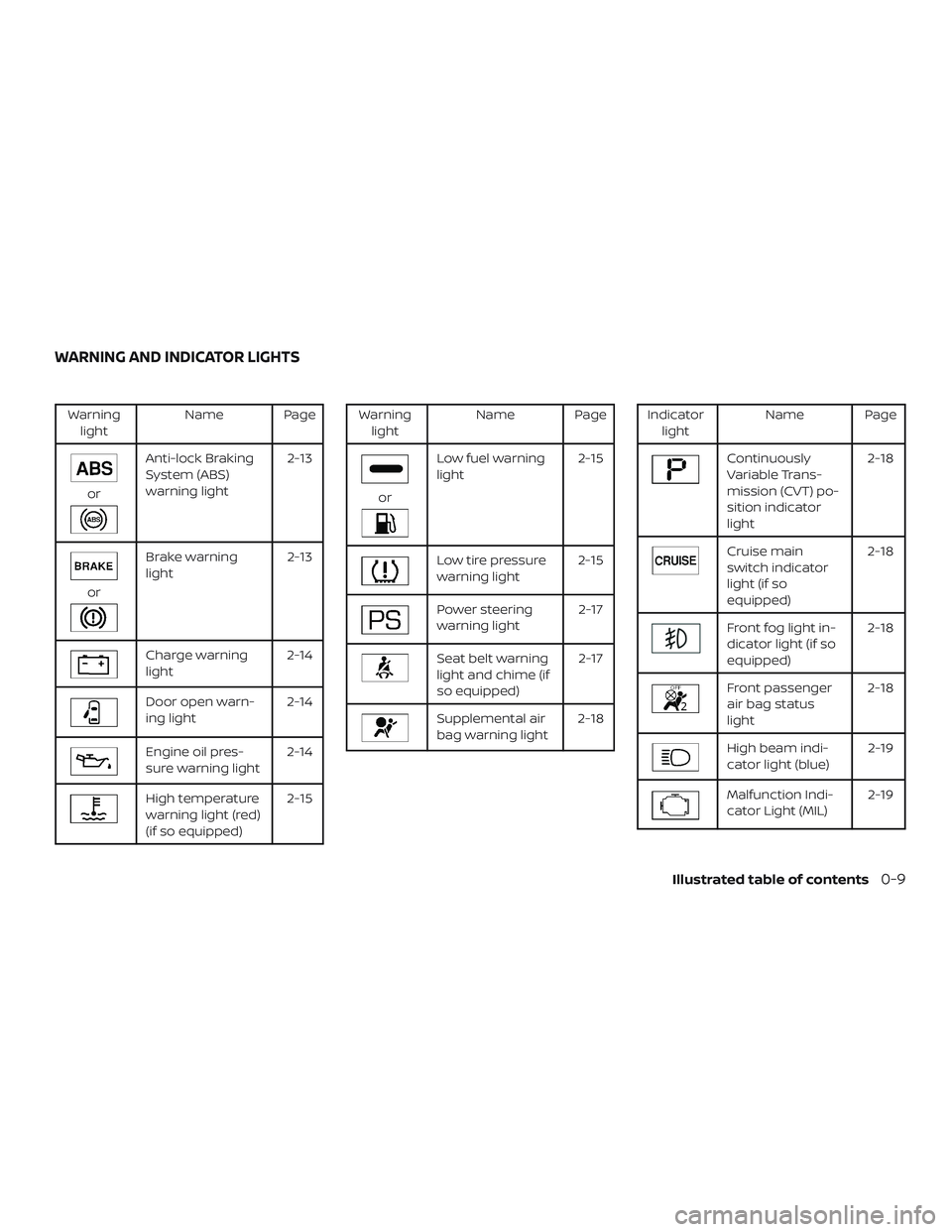
Warning
lightName Page
or
Anti-lock Braking
System (ABS)
warning light2-13
or
Brake warning
light2-13
Charge warning
light2-14
Door open warn-
ing light2-14
Engine oil pres-
sure warning light2-14
High temperature
warning light (red)
(if so equipped)2-15
Warning
lightName Page
or
Low fuel warning
light2-15
Low tire pressure
warning light2-15
Power steering
warning light2-17
Seat belt warning
light and chime (if
so equipped)2-17
Supplemental air
bag warning light2-18
Indicator
lightName Page
Continuously
Variable Trans-
mission (CVT) po-
sition indicator
light2-18
Cruise main
switch indicator
light (if so
equipped)2-18
Front fog light in-
dicator light (if so
equipped)2-18
Front passenger
air bag status
light2-18
High beam indi-
cator light (blue)2-19
Malfunction Indi-
cator Light (MIL)2-19
WARNING AND INDICATOR LIGHTS
Illustrated table of contents0-9
Page 84 of 702
18. Cruise control switches
(if so equipped) (P. 5-18)
19. Tilt steering (P. 3-16)
20. Audio control switches (P. 4-47)
Bluetooth® Hands-Free Phone
System switches (P. 4-49)
21. Vehicle Dynamic Control (VDC) OFF
switch (P. 2-26)
22. Fuel-filler door release lever (P. 3-13)
Hood release lever (P. 3-10)
23. Electronic outside rearview mirror
control switch (P. 3-18)
Refer to the page number indicated in
parentheses for operating details.
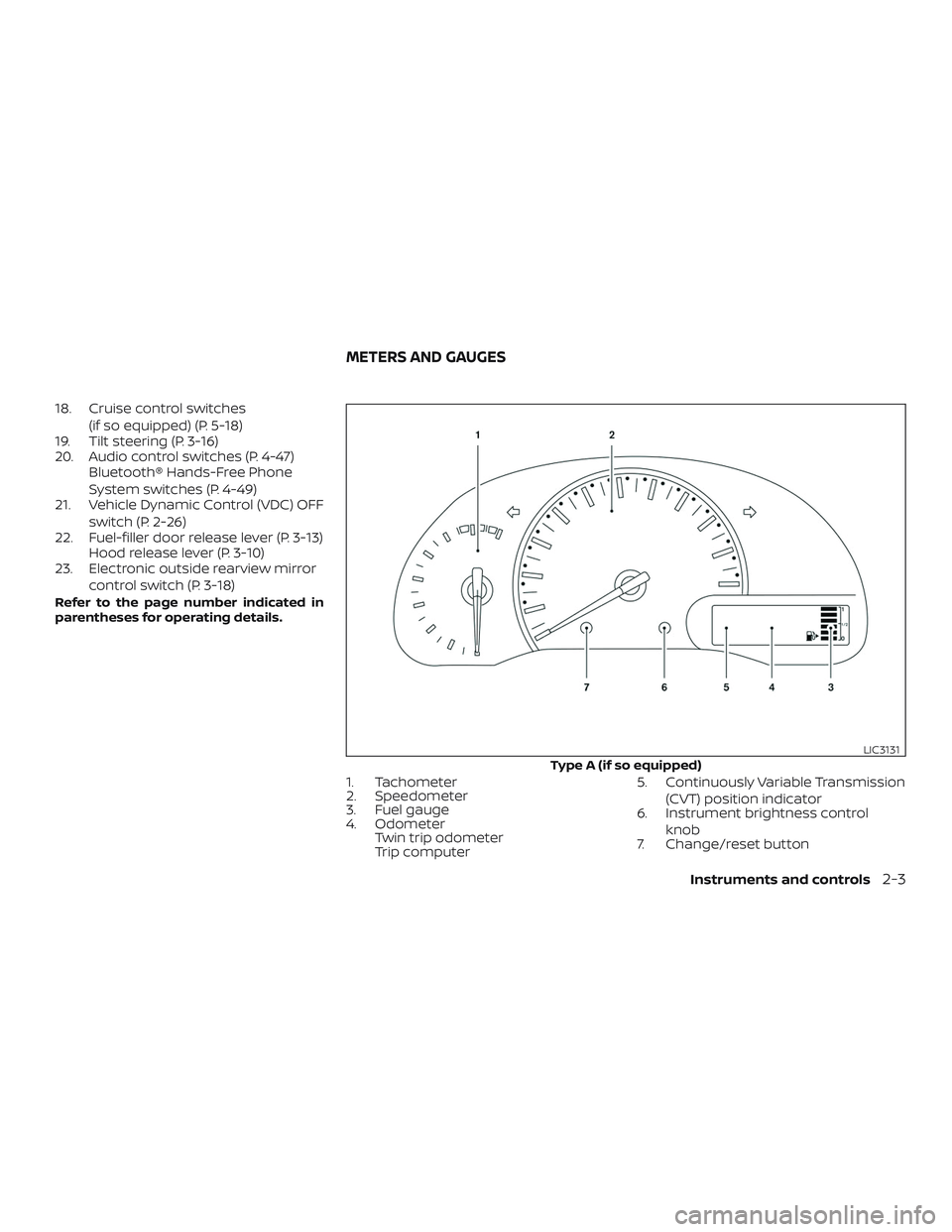
1. Tachometer
2. Speedometer
3. Fuel gauge
4. Odometer
Twin trip odometer
Trip computer5. Continuously Variable Transmission
(CVT) position indicator
6. Instrument brightness control
knob
7. Change/reset button
Type A (if so equipped)
LIC3131
METERS AND GAUGES
Instruments and controls2-3
Page 93 of 702
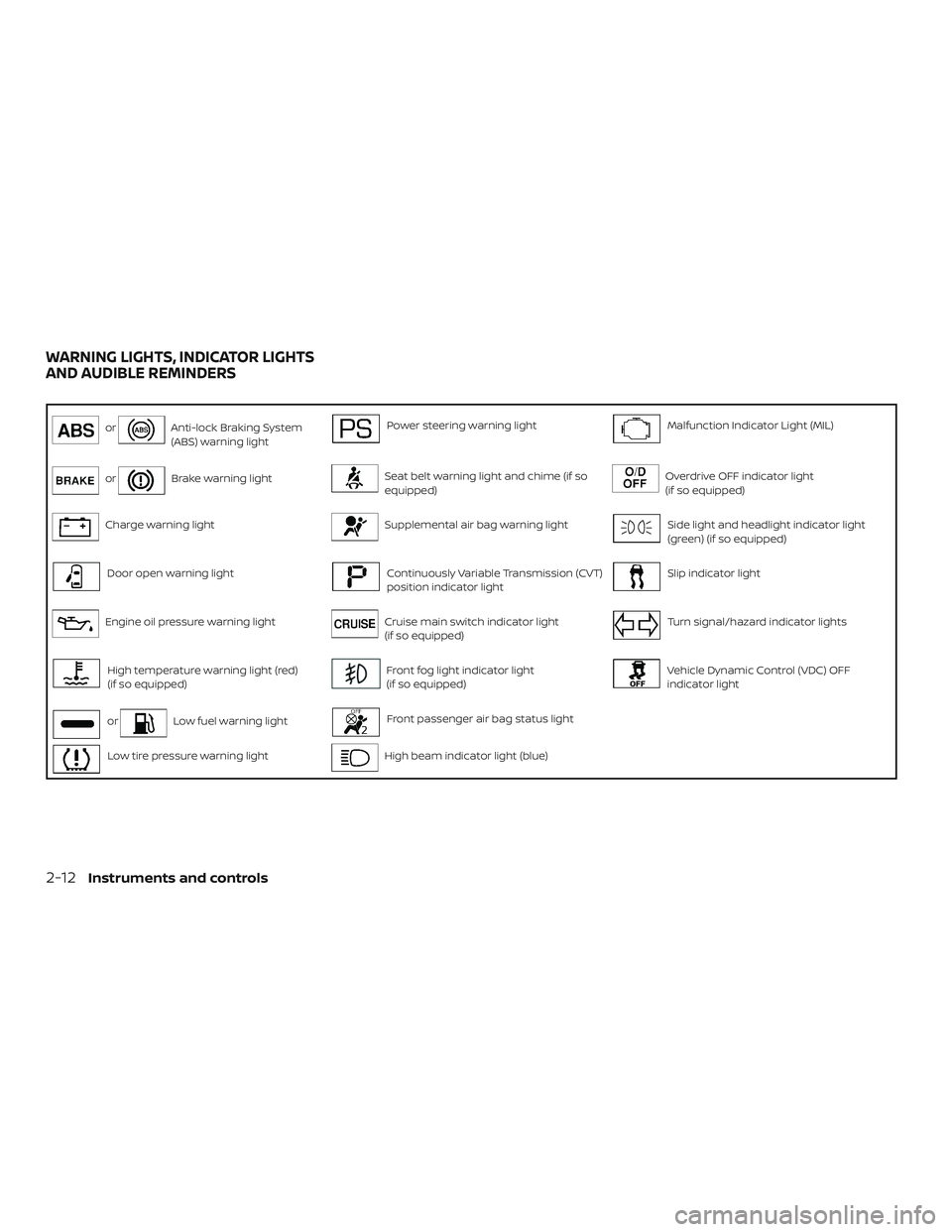
orAnti-lock Braking System
(ABS) warning lightPower steering warning lightMalfunction Indicator Light (MIL)
orBrake warning lightSeat belt warning light and chime (if so
equipped)Overdrive OFF indicator light
(if so equipped)
Charge warning lightSupplemental air bag warning lightSide light and headlight indicator light
(green) (if so equipped)
Door open warning lightContinuously Variable Transmission (CVT)
position indicator lightSlip indicator light
Engine oil pressure warning lightCruise main switch indicator light
(if so equipped)Turn signal/hazard indicator lights
High temperature warning light (red)
(if so equipped)Front fog light indicator light
(if so equipped)Vehicle Dynamic Control (VDC) OFF
indicator light
orLow fuel warning lightFront passenger air bag status light
Low tire pressure warning lightHigh beam indicator light (blue)
WARNING LIGHTS, INDICATOR LIGHTS
AND AUDIBLE REMINDERS
2-12Instruments and controls
Page 100 of 702
For additional information, refer to “Front
passenger air bag and status light” in the
“Safety — Seats, seat belts and supplemen-
tal restraint system” section of this manual.
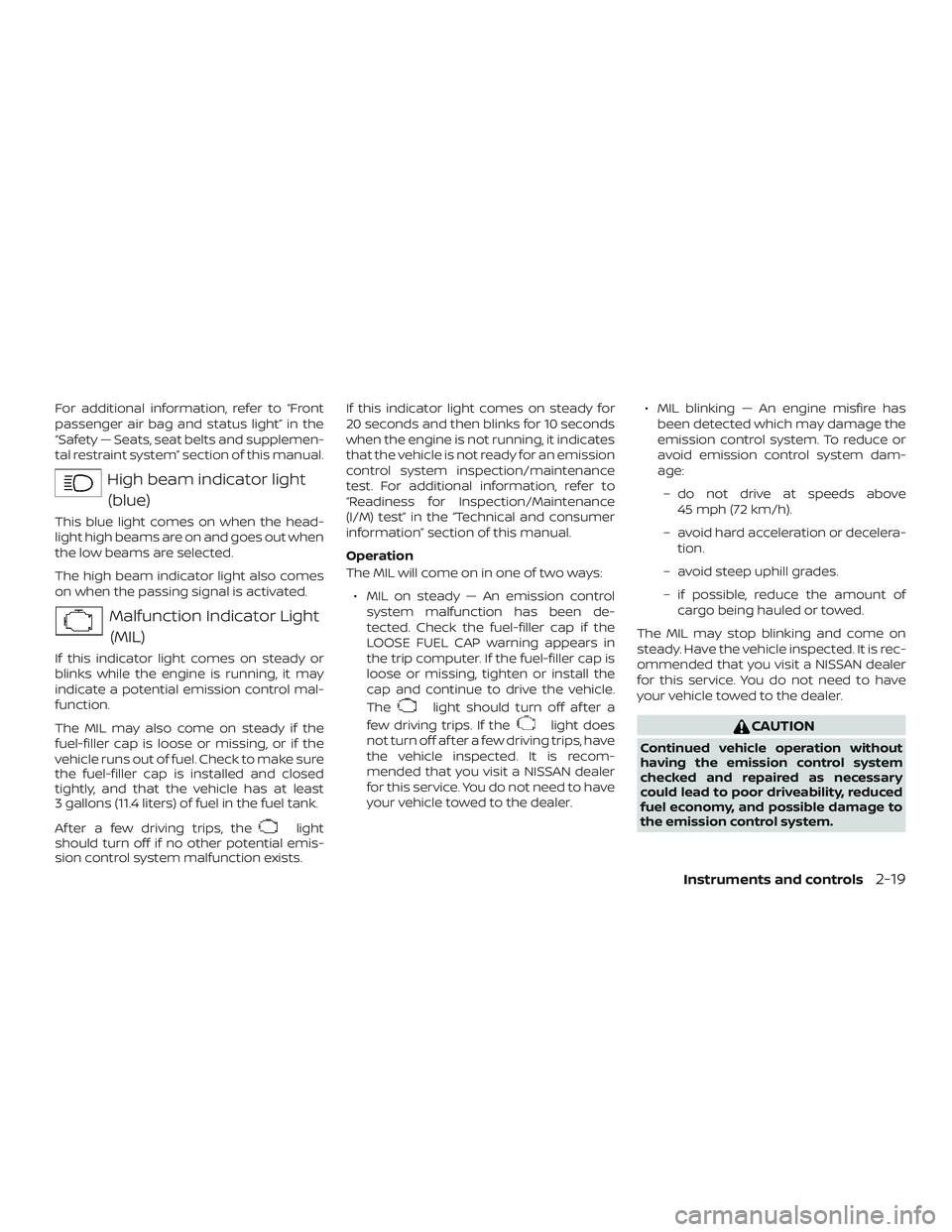
High beam indicator light
(blue)
This blue light comes on when the head-
light high beams are on and goes out when
the low beams are selected.
The high beam indicator light also comes
on when the passing signal is activated.
Malfunction Indicator Light
(MIL)
If this indicator light comes on steady or
blinks while the engine is running, it may
indicate a potential emission control mal-
function.
The MIL may also come on steady if the
fuel-filler cap is loose or missing, or if the
vehicle runs out of fuel. Check to make sure
the fuel-filler cap is installed and closed
tightly, and that the vehicle has at least
3 gallons (11.4 liters) of fuel in the fuel tank.
Af ter a few driving trips, the
light
should turn off if no other potential emis-
sion control system malfunction exists.If this indicator light comes on steady for
20 seconds and then blinks for 10 seconds
when the engine is not running, it indicates
that the vehicle is not ready for an emission
control system inspection/maintenance
test. For additional information, refer to
“Readiness for Inspection/Maintenance
(I/M) test” in the “Technical and consumer
information” section of this manual.
Operation
The MIL will come on in one of two ways:
∙ MIL on steady — An emission control
system malfunction has been de-
tected. Check the fuel-filler cap if the
LOOSE FUEL CAP warning appears in
the trip computer. If the fuel-filler cap is
loose or missing, tighten or install the
cap and continue to drive the vehicle.
The
light should turn off af ter a
few driving trips. If the
light does
not turn off af ter a few driving trips, have
the vehicle inspected. It is recom-
mended that you visit a NISSAN dealer
for this service. You do not need to have
your vehicle towed to the dealer.∙ MIL blinking — An engine misfire has
been detected which may damage the
emission control system. To reduce or
avoid emission control system dam-
age:
– do not drive at speeds above
45 mph (72 km/h).
– avoid hard acceleration or decelera-
tion.
– avoid steep uphill grades.
– if possible, reduce the amount of
cargo being hauled or towed.
The MIL may stop blinking and come on
steady. Have the vehicle inspected. It is rec-
ommended that you visit a NISSAN dealer
for this service. You do not need to have
your vehicle towed to the dealer.CAUTION
Continued vehicle operation without
having the emission control system
checked and repaired as necessary
could lead to poor driveability, reduced
fuel economy, and possible damage to
the emission control system.
Instruments and controls2-19
Page 135 of 702
4 Display screen, heater, air conditioner,
audio and phone systems
RearView Monitor (if so equipped)...............4-2
RearView Monitor system operation..........4-3
How to read the displayed lines...............4-3
Difference between predicted and
actual distances..............................4-4
Adjusting the screen.........................4-6
RearView Monitor system limitations.........4-6
System maintenance.........................4-7
Vents............................................4-8
Heater and air conditioner (manual).............4-8
Controls......................................4-9
Heater operation............................4-10
Air conditioner operation....................4-12
Air flow charts...............................4-13
Servicing air conditioner........................4-16
Audio system...................................4-16
Radio........................................4-16
FM radio reception..........................4-16
AM radio reception..........................4-17
Satellite radio reception (if so equipped).....4-17
Audio operation precautions................4-18
FM/AM radio with compact disc (CD)
player (Type A) (if so equipped)...............4-26FM/AM radio with compact disc (CD)
player (Type B) (if so equipped)...............4-30
FM/AM/SAT radio with compact disc
(CD) player (if so equipped)..................4-35
USB (Universal Serial Bus) connection
port (if so equipped).........................4-41
iPod®* player operation (if so equipped)......4-43
Bluetooth® streaming audio
(if so equipped)..............................4-45
CD care and cleaning........................4-46
Steering wheel switch for audio control......4-47
Antenna.....................................4-48
Car phone or CB radio..........................4-48
Bluetooth® Hands-Free Phone System
(Type A) (if so equipped)........................4-49
Regulatory Information......................4-50
Using the system............................4-51
Control buttons.............................4-53
Getting started..............................4-54
List of voice commands.....................4-55
Voice Adaptation (VA) mode.................4-60
Manual control..............................4-62
Troubleshooting guide......................4-62
Page 136 of 702
Bluetooth® Hands-Free Phone System
(Type B) (if so equipped)........................4-64
Regulatory information......................4-65
Using the system............................4-66
Control buttons.............................4-67
Connecting procedure......................4-68
Voice commands...........................4-69Making a call................................4-70
Receiving a call..............................4-71
During a call.................................4-71
Ending a call.................................4-71
Text messaging (if so equipped).............4-72
Bluetooth® settings.........................4-73
Manual control..............................4-74
Page 160 of 702
∙ When not in use for extended periods of
time, store the cable in a clean, dust free
environment at room temperature and
without direct sun exposure.
∙ Do not use the cable for any other pur-
poses other than its intended use in the
vehicle.
*iPod® is a trademark of Apple Inc., regis-
tered in the U.S. and other countries.
Bluetooth® streaming audio (if so
equipped)
∙ Some Bluetooth® audio devices may
not be recognized by the in-vehicle au-
dio system.
∙ It is necessary to set up the wireless
connection between a compatible
Bluetooth® audio device and the in-
vehicle Bluetooth® module before using
the Bluetooth® audio.
∙ Operating procedure of the Bluetooth®
audio will vary depending on the de-
vices. Make sure how to operate your
audio device before using it with this
system.∙ The Bluetooth® audio may be stopped
under the following conditions:
∙ Receiving a call on the Hands-Free
Phone System.
∙ Checking the connection to the
hands-free phone.
∙ Do not place the Bluetooth® audio de-
vice in an area surrounded by metal or
far away from the in-vehicle Bluetooth®
module to prevent tone quality degra-
dation and wireless connection disrup-
tion.
∙ While an audio device is connected
through the Bluetooth® wireless con-
nection, the battery power of the device
may discharge quicker than usual.
∙ This system supports the Bluetooth®
Audio Distribution Profile (A2DP, AVRCP).
BLUETOOTH® is a
trademark owned
by Bluetooth SIG,
Inc. and licensed
to Visteon.
Display screen, heater, air conditioner, audio and phone systems4-25
Page 167 of 702
Menu itemResult
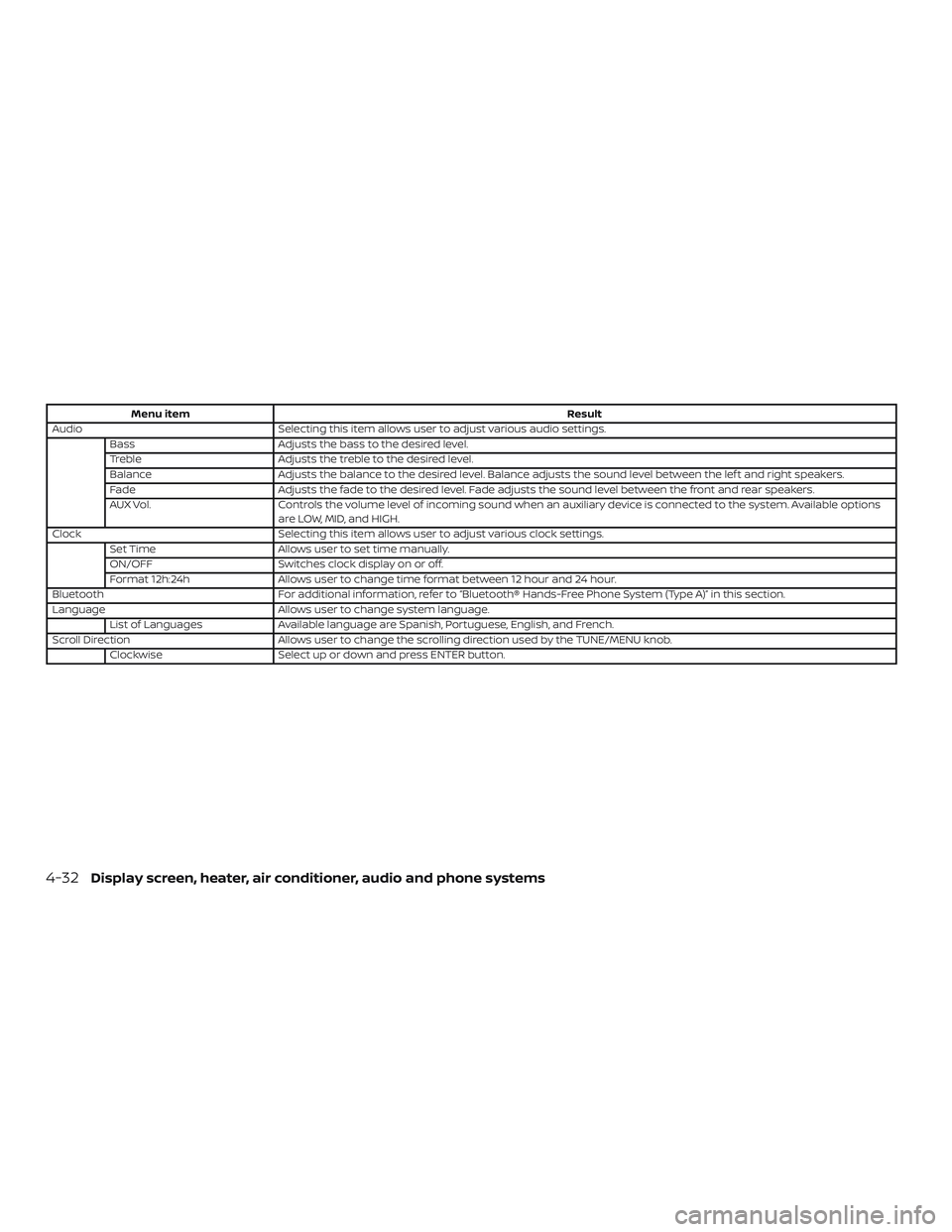
Audio Selecting this item allows user to adjust various audio settings.
Bass Adjusts the bass to the desired level.
Treble Adjusts the treble to the desired level.
Balance Adjusts the balance to the desired level. Balance adjusts the sound level between the lef t and right speakers.
Fade Adjusts the fade to the desired level. Fade adjusts the sound level between the front and rear speakers.
AUX Vol. Controls the volume level of incoming sound when an auxiliary device is connected to the system. Available options
are LOW, MID, and HIGH.
Clock Selecting this item allows user to adjust various clock settings.
Set Time Allows user to set time manually.
ON/OFF Switches clock display on or off.
Format 12h:24h Allows user to change time format between 12 hour and 24 hour.
Bluetooth For additional information, refer to “Bluetooth® Hands-Free Phone System (Type A)” in this section.
Language Allows user to change system language.
List of Languages Available language are Spanish, Portuguese, English, and French.
Scroll Direction Allows user to change the scrolling direction used by the TUNE/MENU knob.
Clockwise Select up or down and press ENTER button.
4-32Display screen, heater, air conditioner, audio and phone systems