fuse NISSAN X-TRAIL 2001 Service Repair Manual
[x] Cancel search | Manufacturer: NISSAN, Model Year: 2001, Model line: X-TRAIL, Model: NISSAN X-TRAIL 2001Pages: 3833, PDF Size: 39.49 MB
Page 14 of 3833
GI-12
HOW TO USE THIS MANUAL
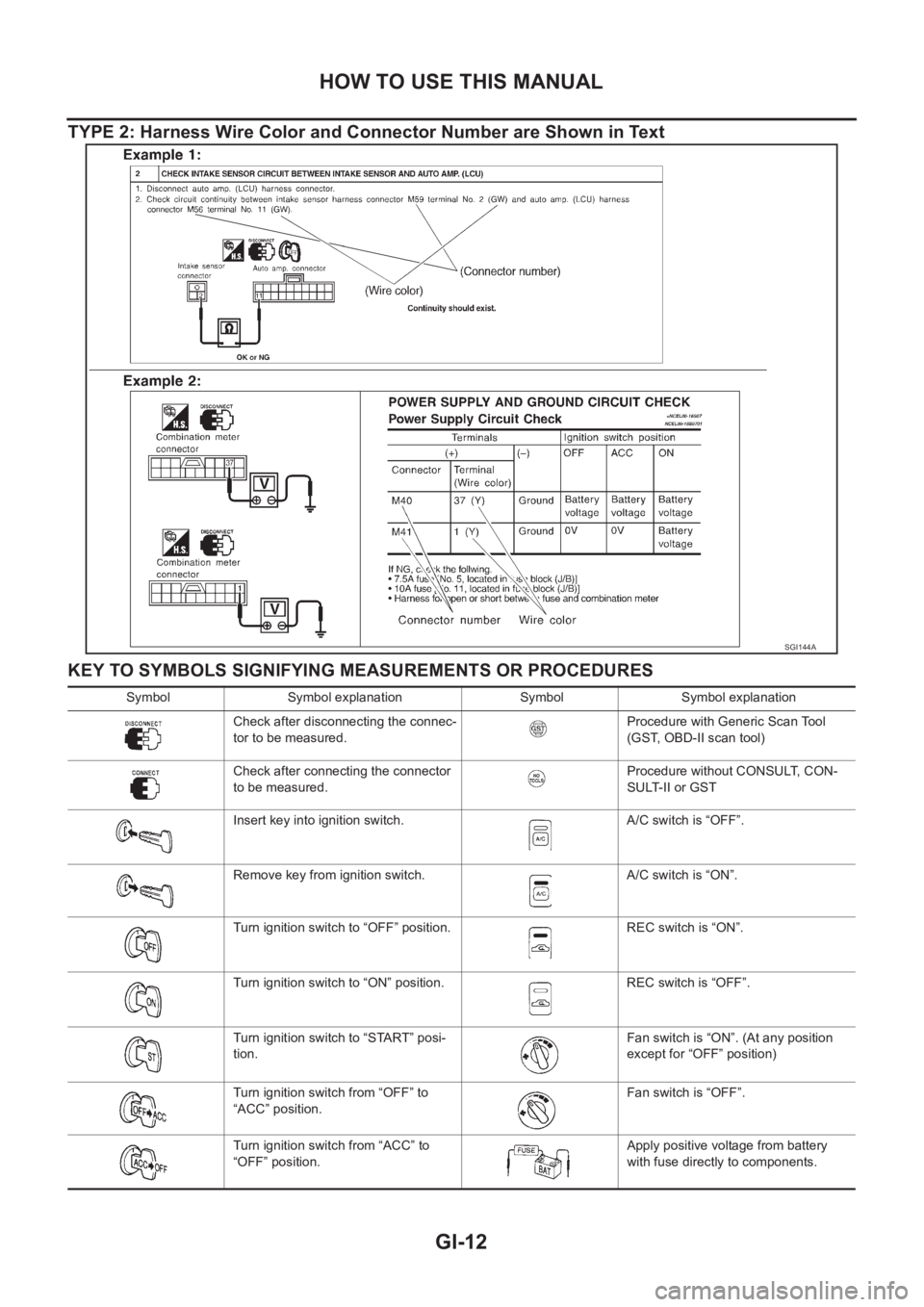
TYPE 2: Harness Wire Color and Connector Number are Shown in Text
KEY TO SYMBOLS SIGNIFYING MEASUREMENTS OR PROCEDURES
SGI144A
Symbol Symbol explanation Symbol Symbol explanation
Check after disconnecting the connec-
tor to be measured.Procedure with Generic Scan Tool
(GST, OBD-II scan tool)
Check after connecting the connector
to be measured.Procedure without CONSULT, CON-
SULT-II or GST
Insert key into ignition switch. A/C switch is “OFF”.
Remove key from ignition switch. A/C switch is “ON”.
Turn ignition switch to “OFF” position. REC switch is “ON”.
Turn ignition switch to “ON” position. REC switch is “OFF”.
Turn ignition switch to “START” posi-
tion.Fan switch is “ON”. (At any position
except for “OFF” position)
Turn ignition switch from “OFF” to
“ACC” position.Fan switch is “OFF”.
Turn ignition switch from “ACC” to
“OFF” position.Apply positive voltage from battery
with fuse directly to components.
Page 18 of 3833
GI-16
HOW TO USE THIS MANUAL
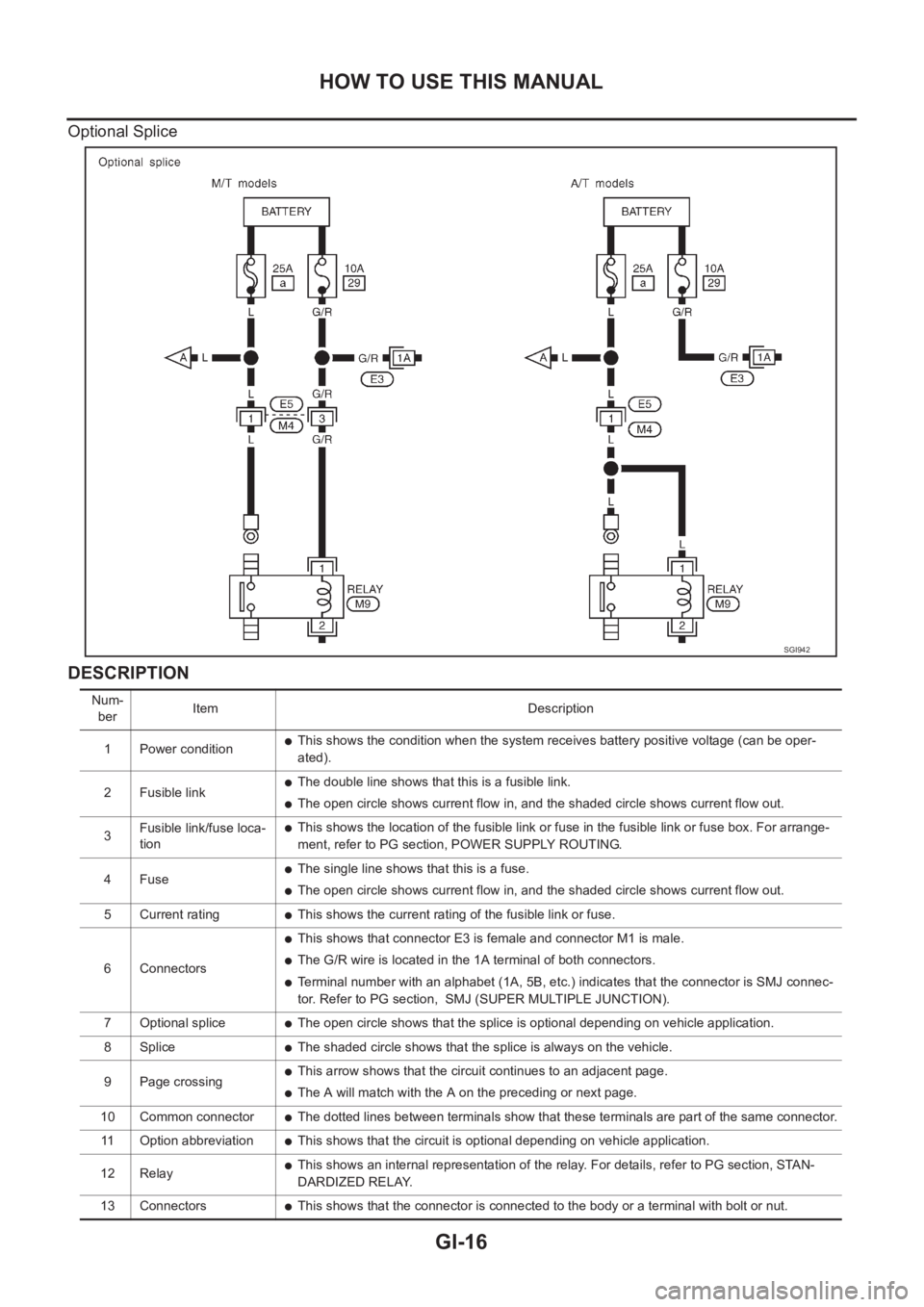
Optional Splice
DESCRIPTION
SGI942
Num-
berItem Description
1 Power condition
●This shows the condition when the system receives battery positive voltage (can be oper-
ated).
2 Fusible link
●The double line shows that this is a fusible link.
●The open circle shows current flow in, and the shaded circle shows current flow out.
3Fusible link/fuse loca-
tion
●This shows the location of the fusible link or fuse in the fusible link or fuse box. For arrange-
ment, refer to PG section, POWER SUPPLY ROUTING.
4Fuse
●The single line shows that this is a fuse.
●The open circle shows current flow in, and the shaded circle shows current flow out.
5 Current rating
●This shows the current rating of the fusible link or fuse.
6 Connectors
●This shows that connector E3 is female and connector M1 is male.
●The G/R wire is located in the 1A terminal of both connectors.
●Terminal number with an alphabet (1A, 5B, etc.) indicates that the connector is SMJ connec-
tor. Refer to PG section, SMJ (SUPER MULTIPLE JUNCTION).
7 Optional splice
●The open circle shows that the splice is optional depending on vehicle application.
8 Splice
●The shaded circle shows that the splice is always on the vehicle.
9 Page crossing
●This arrow shows that the circuit continues to an adjacent page.
●The A will match with the A on the preceding or next page.
10 Common connector
●The dotted lines between terminals show that these terminals are part of the same connector.
11 Option abbreviation
●This shows that the circuit is optional depending on vehicle application.
12 Relay
●This shows an internal representation of the relay. For details, refer to PG section, STAN-
DARDIZED RELAY.
13 Connectors
●This shows that the connector is connected to the body or a terminal with bolt or nut.
Page 19 of 3833
HOW TO USE THIS MANUAL
GI-17
C
D
E
F
G
H
I
J
K
L
MB
GI
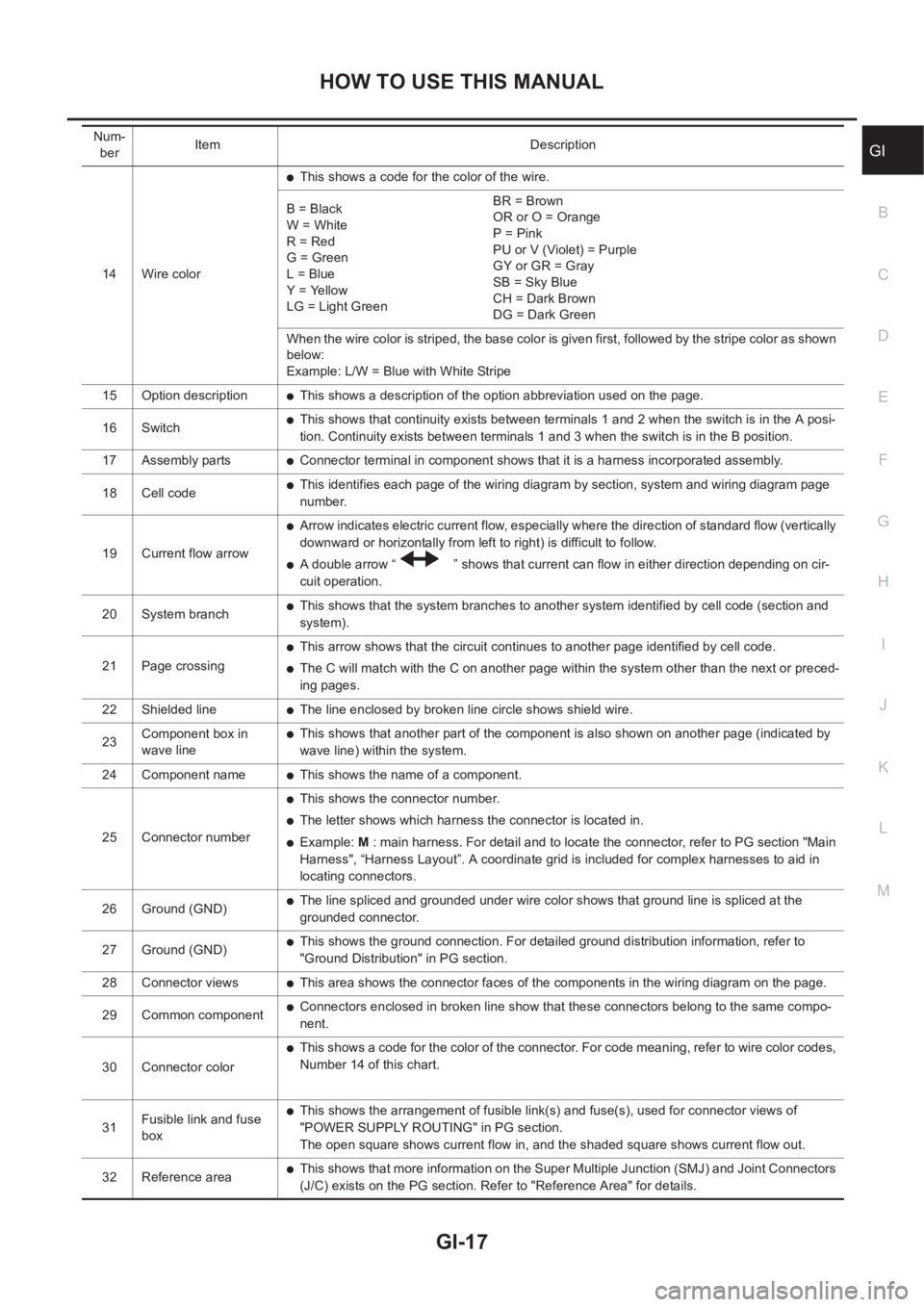
14 Wire color
●This shows a code for the color of the wire.
B = Black
W = White
R = Red
G = Green
L = Blue
Y = Yellow
LG = Light GreenBR = Brown
OR or O = Orange
P = Pink
PU or V (Violet) = Purple
GY or GR = Gray
SB = Sky Blue
CH = Dark Brown
DG = Dark Green
When the wire color is striped, the base color is given first, followed by the stripe color as shown
below:
Example: L/W = Blue with White Stripe
15 Option description
●This shows a description of the option abbreviation used on the page.
16 Switch
●This shows that continuity exists between terminals 1 and 2 when the switch is in the A posi-
tion. Continuity exists between terminals 1 and 3 when the switch is in the B position.
17 Assembly parts
●Connector terminal in component shows that it is a harness incorporated assembly.
18 Cell code
●This identifies each page of the wiring diagram by section, system and wiring diagram page
number.
19 Current flow arrow
●Arrow indicates electric current flow, especially where the direction of standard flow (vertically
downward or horizontally from left to right) is difficult to follow.
●A double arrow “ ” shows that current can flow in either direction depending on cir-
cuit operation.
20 System branch
●This shows that the system branches to another system identified by cell code (section and
system).
21 Page crossing
●This arrow shows that the circuit continues to another page identified by cell code.
●The C will match with the C on another page within the system other than the next or preced-
ing pages.
22 Shielded line
●The line enclosed by broken line circle shows shield wire.
23Component box in
wave line
●This shows that another part of the component is also shown on another page (indicated by
wave line) within the system.
24 Component name
●This shows the name of a component.
25 Connector number
●This shows the connector number.
●The letter shows which harness the connector is located in.
●Example: M : main harness. For detail and to locate the connector, refer to PG section "Main
Harness", “Harness Layout”. A coordinate grid is included for complex harnesses to aid in
locating connectors.
26 Ground (GND)
●The line spliced and grounded under wire color shows that ground line is spliced at the
grounded connector.
27 Ground (GND)
●This shows the ground connection. For detailed ground distribution information, refer to
"Ground Distribution" in PG section.
28 Connector views
●This area shows the connector faces of the components in the wiring diagram on the page.
29 Common component
●Connectors enclosed in broken line show that these connectors belong to the same compo-
nent.
30 Connector color
●This shows a code for the color of the connector. For code meaning, refer to wire color codes,
Number 14 of this chart.
31Fusible link and fuse
box
●This shows the arrangement of fusible link(s) and fuse(s), used for connector views of
"POWER SUPPLY ROUTING" in PG section.
The open square shows current flow in, and the shaded square shows current flow out.
32 Reference area
●This shows that more information on the Super Multiple Junction (SMJ) and Joint Connectors
(J/C) exists on the PG section. Refer to "Reference Area" for details. Num-
berItem Description
Page 28 of 3833
GI-26
SERVICE INFORMATION FOR ELECTRICAL INCIDENT
Cold or Hot Start Up
On some occasions an electrical incident may occur only when the car is started cold, or it may occur when
the car is restarted hot shortly after being turned off. In these cases you may have to keep the car overnight to
make a proper diagnosis.
CIRCUIT INSPECTION
Introduction
In general, testing electrical circuits is an easy task if it is approached in a logical and organized method.
Before beginning it is important to have all available information on the system to be tested. Also, get a thor-
ough understanding of system operation. Then you will be able to use the appropriate equipment and follow
the correct test procedure.
You may have to simulate vehicle vibrations while testing electrical components. Gently shake the wiring har-
ness or electrical component to do this.
NOTE:
Refer to “How to Check Terminal” to probe or check terminal.
Testing for “Opens” in the Circuit
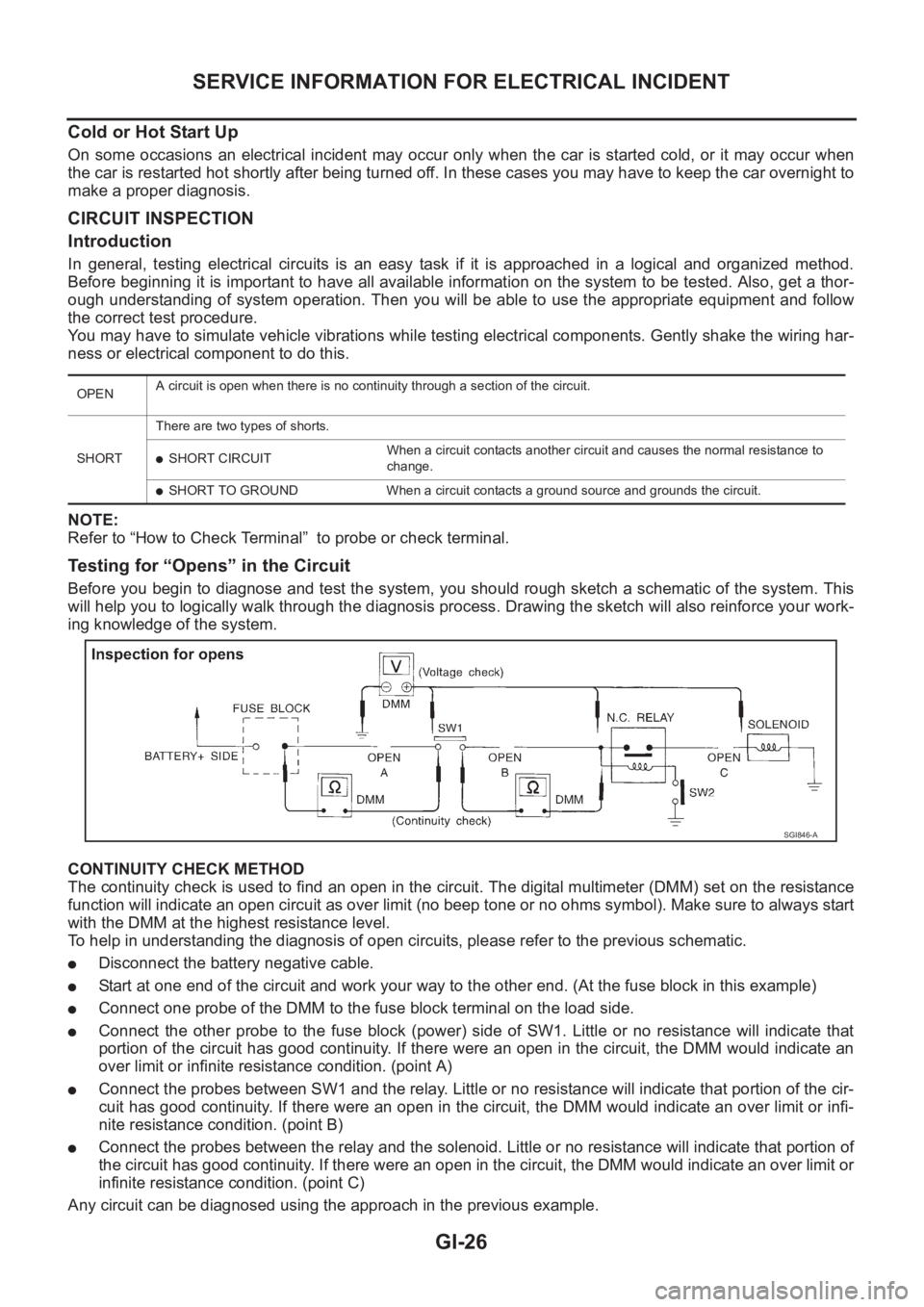
Before you begin to diagnose and test the system, you should rough sketch a schematic of the system. This
will help you to logically walk through the diagnosis process. Drawing the sketch will also reinforce your work-
ing knowledge of the system.
CONTINUITY CHECK METHOD
The continuity check is used to find an open in the circuit. The digital multimeter (DMM) set on the resistance
function will indicate an open circuit as over limit (no beep tone or no ohms symbol). Make sure to always start
with the DMM at the highest resistance level.
To help in understanding the diagnosis of open circuits, please refer to the previous schematic.
●Disconnect the battery negative cable.
●Start at one end of the circuit and work your way to the other end. (At the fuse block in this example)
●Connect one probe of the DMM to the fuse block terminal on the load side.
●Connect the other probe to the fuse block (power) side of SW1. Little or no resistance will indicate that
portion of the circuit has good continuity. If there were an open in the circuit, the DMM would indicate an
over limit or infinite resistance condition. (point A)
●Connect the probes between SW1 and the relay. Little or no resistance will indicate that portion of the cir-
cuit has good continuity. If there were an open in the circuit, the DMM would indicate an over limit or infi-
nite resistance condition. (point B)
●Connect the probes between the relay and the solenoid. Little or no resistance will indicate that portion of
the circuit has good continuity. If there were an open in the circuit, the DMM would indicate an over limit or
infinite resistance condition. (point C)
Any circuit can be diagnosed using the approach in the previous example.
OPENA circuit is open when there is no continuity through a section of the circuit.
SHORTThere are two types of shorts.
●SHORT CIRCUITWhen a circuit contacts another circuit and causes the normal resistance to
change.
●SHORT TO GROUND When a circuit contacts a ground source and grounds the circuit.
SGI846-A
Page 29 of 3833
SERVICE INFORMATION FOR ELECTRICAL INCIDENT
GI-27
C
D
E
F
G
H
I
J
K
L
MB
GI
VOLTAGE CHECK METHOD
To help in understanding the diagnosis of open circuits please refer to the previous schematic.
In any powered circuit, an open can be found by methodically checking the system for the presence of voltage.
This is done by switching the DMM to the voltage function.
●Connect one probe of the DMM to a known good ground.
●Begin probing at one end of the circuit and work your way to the other end.
●With SW1 open, probe at SW1 to check for voltage.
voltage; open is further down the circuit than SW1.
no voltage; open is between fuse block and SW1 (point A).
●Close SW1 and probe at relay.
voltage; open is further down the circuit than the relay.
no voltage; open is between SW1 and relay (point B).
●Close the relay and probe at the solenoid.
voltage; open is further down the circuit than the solenoid.
no voltage; open is between relay and solenoid (point C).
Any powered circuit can be diagnosed using the approach in the previous example.
Testing for “Shorts” in the Circuit
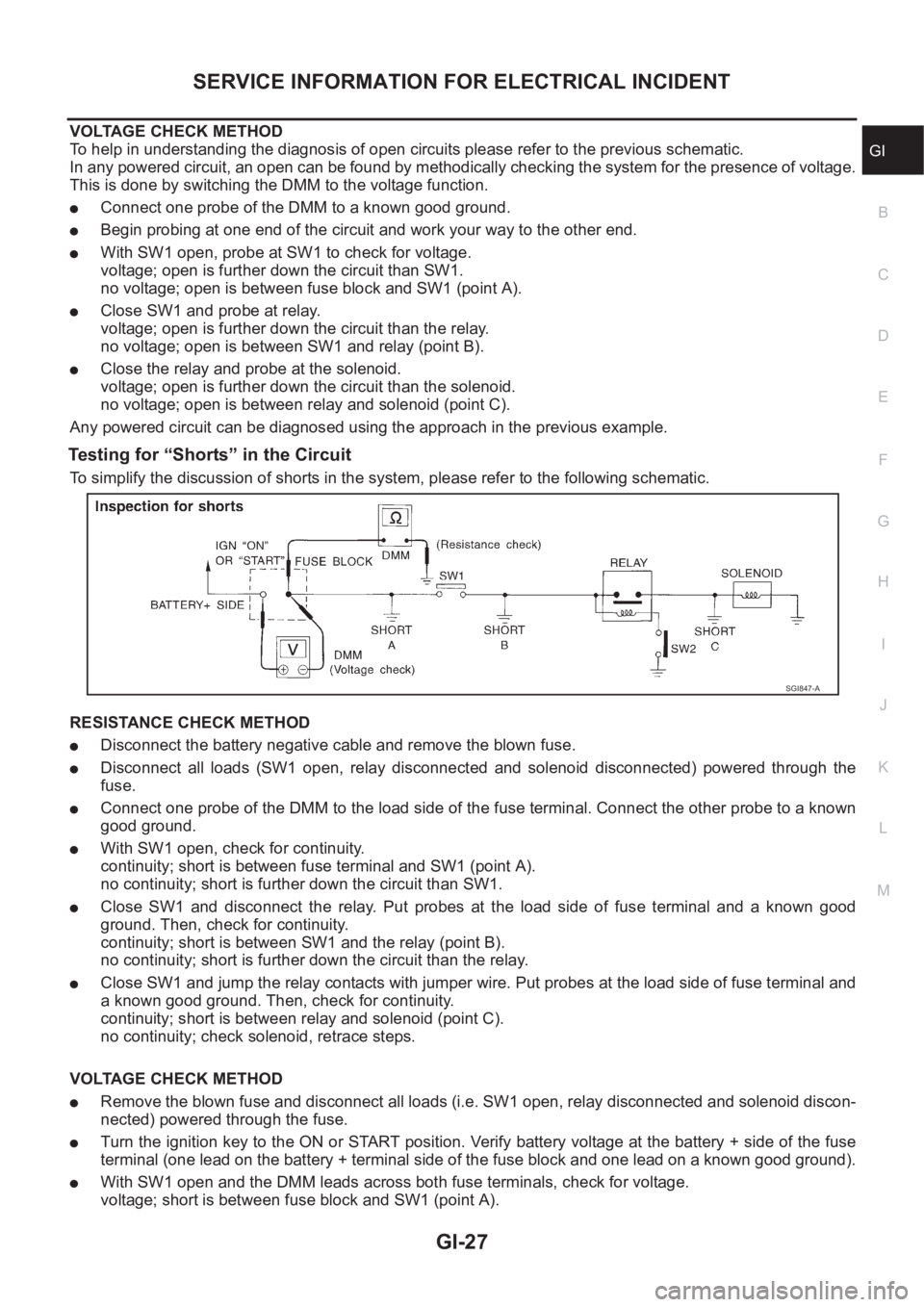
To simplify the discussion of shorts in the system, please refer to the following schematic.
RESISTANCE CHECK METHOD
●Disconnect the battery negative cable and remove the blown fuse.
●Disconnect all loads (SW1 open, relay disconnected and solenoid disconnected) powered through the
fuse.
●Connect one probe of the DMM to the load side of the fuse terminal. Connect the other probe to a known
good ground.
●With SW1 open, check for continuity.
continuity; short is between fuse terminal and SW1 (point A).
no continuity; short is further down the circuit than SW1.
●Close SW1 and disconnect the relay. Put probes at the load side of fuse terminal and a known good
ground. Then, check for continuity.
continuity; short is between SW1 and the relay (point B).
no continuity; short is further down the circuit than the relay.
●Close SW1 and jump the relay contacts with jumper wire. Put probes at the load side of fuse terminal and
a known good ground. Then, check for continuity.
continuity; short is between relay and solenoid (point C).
no continuity; check solenoid, retrace steps.
VOLTAGE CHECK METHOD
●Remove the blown fuse and disconnect all loads (i.e. SW1 open, relay disconnected and solenoid discon-
nected) powered through the fuse.
●Turn the ignition key to the ON or START position. Verify battery voltage at the battery + side of the fuse
terminal (one lead on the battery + terminal side of the fuse block and one lead on a known good ground).
●With SW1 open and the DMM leads across both fuse terminals, check for voltage.
voltage; short is between fuse block and SW1 (point A).
SGI847-A
Page 30 of 3833
GI-28
SERVICE INFORMATION FOR ELECTRICAL INCIDENT
no voltage; short is further down the circuit than SW1.
●With SW1 closed, relay and solenoid disconnected and the DMM leads across both fuse terminals, check
for voltage.
voltage; short is between SW1 and the relay (point B).
no voltage; short is further down the circuit than the relay.
●With SW1 closed, relay contacts jumped with fused jumper wire check for voltage.
voltage; short is down the circuit of the relay or between the relay and the disconnected solenoid (point C).
no voltage; retrace steps and check power to fuse block.
Ground Inspection
Ground connections are very important to the proper operation of electrical and electronic circuits. Ground
connections are often exposed to moisture, dirt and other corrosive elements. The corrosion (rust) can
become an unwanted resistance. This unwanted resistance can change the way a circuit works.
Electronically controlled circuits are very sensitive to proper grounding. A loose or corroded ground can drasti-
cally affect an electronically controlled circuit. A poor or corroded ground can easily affect the circuit. Even
when the ground connection looks clean, there can be a thin film of rust on the surface.
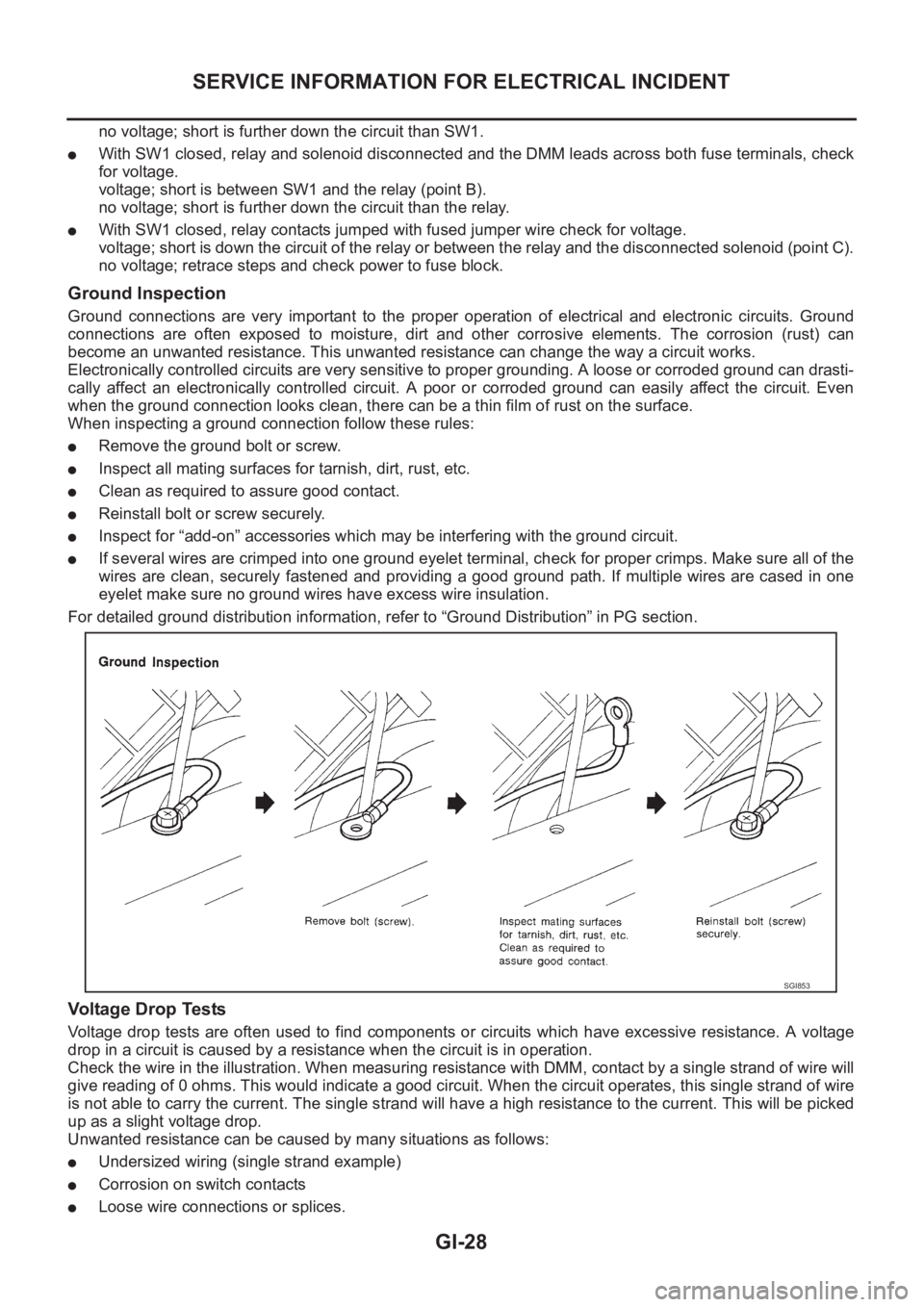
When inspecting a ground connection follow these rules:
●Remove the ground bolt or screw.
●Inspect all mating surfaces for tarnish, dirt, rust, etc.
●Clean as required to assure good contact.
●Reinstall bolt or screw securely.
●Inspect for “add-on” accessories which may be interfering with the ground circuit.
●If several wires are crimped into one ground eyelet terminal, check for proper crimps. Make sure all of the
wires are clean, securely fastened and providing a good ground path. If multiple wires are cased in one
eyelet make sure no ground wires have excess wire insulation.
For detailed ground distribution information, refer to “Ground Distribution” in PG section.
Voltage Drop Tests
Voltage drop tests are often used to find components or circuits which have excessive resistance. A voltage
drop in a circuit is caused by a resistance when the circuit is in operation.
Check the wire in the illustration. When measuring resistance with DMM, contact by a single strand of wire will
give reading of 0 ohms. This would indicate a good circuit. When the circuit operates, this single strand of wire
is not able to carry the current. The single strand will have a high resistance to the current. This will be picked
up as a slight voltage drop.
Unwanted resistance can be caused by many situations as follows:
●Undersized wiring (single strand example)
●Corrosion on switch contacts
●Loose wire connections or splices.
SGI853
Page 176 of 3833
![NISSAN X-TRAIL 2001 Service Repair Manual EM-126
[YD22DDTi]
CATALYST
CATALYST
PFP:20905
Removal and InstallationEBS00LRG
REMOVAL
1. Remove engine undercover.
2. Drain engine coolant. Refer to CO-29, "
Changing Engine Coolant" .
3. Rem](/img/5/57405/w960_57405-175.png "NISSAN X-TRAIL 2001 Service Repair Manual EM-126
[YD22DDTi]
CATALYST
CATALYST
PFP:20905
Removal and InstallationEBS00LRG
REMOVAL
1. Remove engine undercover.
2. Drain engine coolant. Refer to CO-29, \"
Changing Engine Coolant\" .
3. Rem")
EM-126
[YD22DDTi]
CATALYST
CATALYST
PFP:20905
Removal and InstallationEBS00LRG
REMOVAL
1. Remove engine undercover.
2. Drain engine coolant. Refer to CO-29, "
Changing Engine Coolant" .
3. Remove radiator upper and lower hoses.
4. Remove radiator fan. Refer to CO-33, "
Disassembly and Assembly Radiator Fan" .
5. Remove radiator mount bracket and radiator. Refer to CO-32, "
Removal and Installation" .
6. Remove water inlet pipe.
7. Remove insulators.
8. Disconnect exhaust front tube. Refer to EX-2, "
EXHAUST SYSTEM" .
9. Remove catalyst.
CAUTION:
Do not disassemble.
Install two locking pins into both sides of the catalyst. Be careful not to confuse locking pins with insulator
mounting bolts.
INSTALLATION
Install in reverse order of removal.
●Pushing gussets against the oil pan and the catalyst, temporarily tighten the mounting bolt. And then
tighten it to the specified torque.
SBIA0157E
1. Catalyst insulator 2. Catalyst 3. Catalyst rear diffuser
4. Gasket
Catalyst locking pin : Flange bolt (black)
Page 184 of 3833
![NISSAN X-TRAIL 2001 Service Repair Manual EM-134
[YD22DDTi]
OIL PAN AND OIL STRAINER
4. Remove lower oil pan.
a. Insert Tool (seal cutter) between upper oil pan and lower oil pan.
●Be careful not to damage aluminum mating surface.
●Do no](/img/5/57405/w960_57405-183.png "NISSAN X-TRAIL 2001 Service Repair Manual EM-134
[YD22DDTi]
OIL PAN AND OIL STRAINER
4. Remove lower oil pan.
a. Insert Tool (seal cutter) between upper oil pan and lower oil pan.
●Be careful not to damage aluminum mating surface.
●Do no")
EM-134
[YD22DDTi]
OIL PAN AND OIL STRAINER
4. Remove lower oil pan.
a. Insert Tool (seal cutter) between upper oil pan and lower oil pan.
●Be careful not to damage aluminum mating surface.
●Do not insert screwdriver, or oil pan flange will be
deformed.
b. Slide Tool by tapping on the side of the Tool with a hammer.
c. Remove lower oil pan.
5. Remove drive belts.
6. Remove A/C compressor and bracket.
7. Remove front exhaust tube and its support.
8. Set a suitable transmission jack under transaxle and hoist
engine with engine slinger. Refer to EM-193, "
Removal and
Installation" .
9. Remove center member.
10. Remove crankshaft position sensor (TDC) from transaxle.
CAUTION:
●Avoid impacts such as a dropping.
●Do not disassemble.
●Keep it away from metal particles.
●Do not place sensor close to magnetic materials.
11. Remove rear plate cover and four engine-to transaxle bolts.
12. Remove catalyst and rear diffuser. Refer to EM-126, "
Removal
and Installation" .
SEM544G
SEM545G
JEM553G
PBIB0416E
Page 232 of 3833
![NISSAN X-TRAIL 2001 Service Repair Manual EM-182
[YD22DDTi]
CYLINDER HEAD
CYLINDER HEAD
PFP:11041
On-Vehicle ServiceEBS00LRV
CHECKING COMPRESSION PRESSURE
1. Warm up engine thoroughly. Then, stop it.
2. Using CONSULT-II, make sure no err](/img/5/57405/w960_57405-231.png "NISSAN X-TRAIL 2001 Service Repair Manual EM-182
[YD22DDTi]
CYLINDER HEAD
CYLINDER HEAD
PFP:11041
On-Vehicle ServiceEBS00LRV
CHECKING COMPRESSION PRESSURE
1. Warm up engine thoroughly. Then, stop it.
2. Using CONSULT-II, make sure no err")
EM-182
[YD22DDTi]
CYLINDER HEAD
CYLINDER HEAD
PFP:11041
On-Vehicle ServiceEBS00LRV
CHECKING COMPRESSION PRESSURE
1. Warm up engine thoroughly. Then, stop it.
2. Using CONSULT-II, make sure no error codes are indicated for self-diagnosis items. Refer to EC-1412,
"Basic Inspection" .
●Do not disconnect CONSULT-II until the end of this operation; it will be used to check engine rpm and
for error detection at the end of this operation.
3. Disconnect the negative battery terminal.
4. Remove charge air cooler. Refer to EM-122, "
Removal and Installation"
5. To prevent fuel from being injected during inspection, remove
fuel supply pump fuse [ENG CONT (20A)] from fuse box on the
left side of engine compartment.
●Among marks on fuse box, [ENG CONT 2 (20A)] is for fuel
supply pump fuse.
6. Remove glow plugs from all the cylinders. Refer to EM-138,
"Removal and Installation" .
CAUTION:
●Before removal, clean the surrounding area to prevent
entry of any foreign materials into the engine.
●Carefully remove glow plugs to prevent any damage or
breakage.
●Handle with care to avoid applying any shock to glow plugs.
7. Install adapter to installation holes of glow plugs and connect
compression gauge for diesel engine.
8. Connect battery negative terminal.
9. Set the ignition switch to “START” and crank. When gauge
pointer stabilizes, read compression pressure and engine rpm.
Repeat the above steps for each cylinder.
●Always use a fully-charged battery to obtain specified engine
speed.
Compression pressure
Unit: kPa (bar, kg/cm2 , psi)/rpm
●When engine rpm is out of the specified range, check the specific gravity of battery liquid. Measure
again under corrected conditions.
●If engine rpm exceeds the limit, check valve clearance and combustion chamber components (valves,
valve seats, cylinder head gaskets, piston rings, pistons, cylinder bores, cylinder block upper and lower
surfaces) and measure again.
●If compression pressure is low in some cylinders, apply engine oil from glow plug installation hole. Then
check pressure again.
–If compression pressure becomes normal after applying engine oil, piston ring may be worn or dam-
aged. Check piston ring for malfunction. If any, replace piston ring.
–If compression pressure is still low after applying engine oil, valve may be malfunctioning. Check valve
for malfunction. If contact malfunction is found, replace valve or valve seat.
●If compression pressure in adjacent two cylinders is low after applying engine oil, pressure may be
leaking from gasket. In this case, replace cylinder head gasket.
10. Complete this operation as follows:
PBIC0680E
: 18 - 21 N·m (1.8 - 2.2 kg-m, 13 - 15 ft-lb)
SEM112G
Standard Minimum Difference limit between cylinders
2,893 (28.9, 29.5, 419)/200 2,452 (24.52, 25.0, 356)/200 490 (4.90, 5.0, 71)/200
Page 233 of 3833
![NISSAN X-TRAIL 2001 Service Repair Manual CYLINDER HEAD
EM-183
[YD22DDTi]
C
D
E
F
G
H
I
J
K
L
MA
EM
a. Turn the ignition switch to “OFF”.
b. Disconnect battery negative terminal.
c. Install glow plug and install all the parts removed in](/img/5/57405/w960_57405-232.png "NISSAN X-TRAIL 2001 Service Repair Manual CYLINDER HEAD
EM-183
[YD22DDTi]
C
D
E
F
G
H
I
J
K
L
MA
EM
a. Turn the ignition switch to “OFF”.
b. Disconnect battery negative terminal.
c. Install glow plug and install all the parts removed in")
CYLINDER HEAD
EM-183
[YD22DDTi]
C
D
E
F
G
H
I
J
K
L
MA
EM
a. Turn the ignition switch to “OFF”.
b. Disconnect battery negative terminal.
c. Install glow plug and install all the parts removed in step 4.
d. Install fuel supply pump fuse [ENG CONT (20A)].
e. Connect battery negative terminal.
f. Using CONSULT-II make sure no error code is indicated for items of self-diagnosis.
Removal and InstallationEBS00LRW
CAUTION:
Apply new engine oil to parts marked in illustration before installation.
REMOVAL
1. Drain engine coolant. Refer to CO-29, "Changing Engine Coolant" .
2. Remove the following parts:
●Charge air cooler (Refer to EM-122, "Removal and Installation" .)
●Rocker cover (Refer to EM-156, "Removal and Installation" .)
●Air cleaner and air duct (Refer to EM-120, "Removal and Installation" .)
●Vacuum pump (Refer to EM-139, "Removal and Installation" .)
●Injection tube, spill tube and fuel injector (Refer to EM-144, "Removal and Installation" .)
●Intake manifold (Refer to EM-123, "Removal and Installation" .)
●Exhaust manifold and Turbocharger (Refer to EM-127, "Removal and Installation" .)
●Secondary timing chain (Refer to EM-167, "Removal and Installation" .)
●Camshaft (Refer to EM-158, "Removal and Installation" .)
SBIA0193E
1. Glow plug 2. Cylinder head assembly 3. Cylinder head bolt
4. Thermal transmitter 5. Engine coolant temperature sensor 6. Gasket
7. Water outlet 8. Glow plate