oil pressure OLDSMOBILE AURORA 2003 Owners Manual
[x] Cancel search | Manufacturer: OLDSMOBILE, Model Year: 2003, Model line: AURORA, Model: OLDSMOBILE AURORA 2003Pages: 387, PDF Size: 18.05 MB
Page 6 of 387
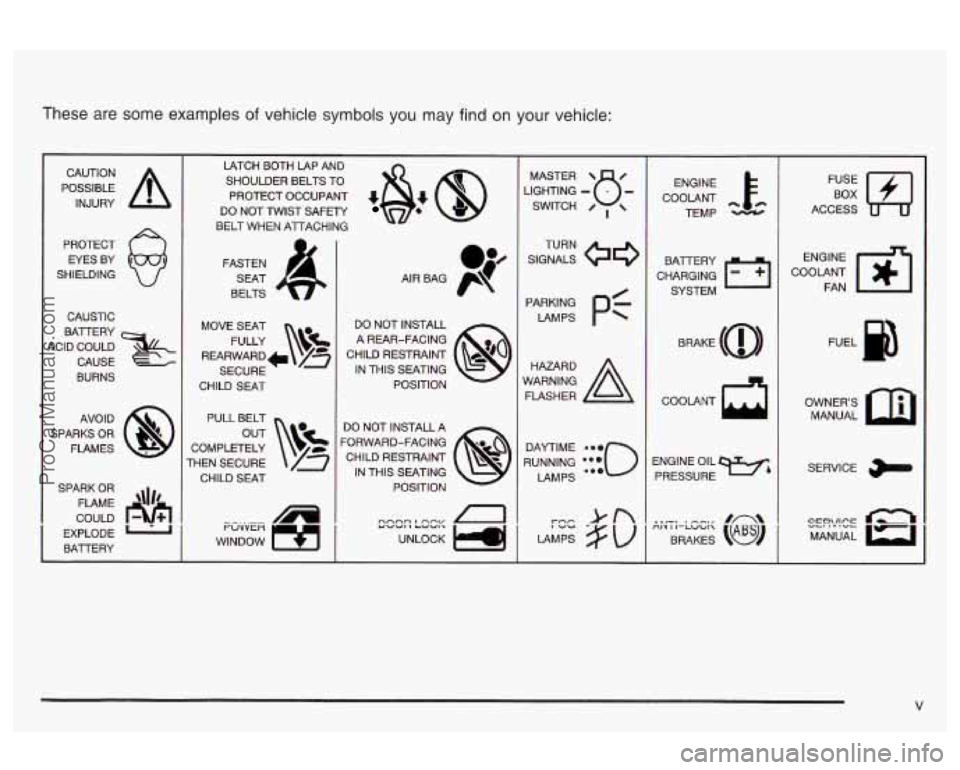
These are some examples of vehicle symbols you may find on your vehicle:
POSSIBLE A
CAUTION
INJURY
PROTECT EYES BY
SHIELDING
CAUSTIC
BATERY
4ClD COULD CAUSE
BURNS
AVO ID
SPARKS OR
FLAMES
SPARK
OR
COULD FLAME
EXPLODE
1'1
BAlTERY L
LATCH BOTH LAP AND SHOULDER BELTS TO
PROTECT OCCUPANT
*&: @
DO NOT TWIST SAFETY
BELT WHEN ATTACHING
MOVE SEAT FULLY
\!$%
REARWARD+ /z
SECURE
CHILD
SEAT
PULL BELT
COMPLETELY
rHEN SECURE CHILD SEAT
WINDOW
9 1
I ruvven "tl
I
1
DO NOT INSTALL A REAR-FACING
CHILD RESTRAINT
IN THIS SEATING
POSITION
DO NOT INSTALL A
'ORWARD-FACING CHILD RESTRAINT IN THIS SEATING POSITION
n
LIGHTING - MASTER SWITCH B- / ,
SIGNALS @e
TURN
LAMPS
P=-
RUNNING i{{o
DAYTIME LAMPS ENGINE
COOLANT TEMP
CHARGING BATTERY
SYSTEM
COOLANT
d
ENGINE OIL PRESSURE
9%
l.fJ
ACCESS
ENGINE
COOLANT FAN
OWNERS MANUAL
SERVICE
CC!?'!!CE Q MANUAL
ProCarManuals.com
Page 114 of 387
3 Instrument Panel
Instrument Panel Overview .............................. -3-2
Hazard Warning Flashers
................................ 3-4
Other Warning Devices
................................... 3-5
Horn
............................................................. 3-5
Tilt Wheel
..................................................... 3-5
Turn SignaVMultifunction Lever
......................... 3-6
Exterior Lamps
............................................. 3-14
Interior Lamps
.............................................. 3-17
Accessory Power Outlets
............................... 3-21
Ashtrays and Cigarette Lighter
........................ 3-22
Climate Controls
............................................ 3.23
Automatic Climate Control System
.................. 3-23
Outlet Adjustment
......................................... 3-27
Steering Wheel Climate Controls
..................... 3-28
Climate Controls Personalization
..................... 3.29
Warning Lights, Gages and Indicators
............. 3-30
Instrument Panel Cluster
............................... -3-31
Speedometer and Odometer
........................... 3-32
I acnorneier .-..
Safety Belt Reminder Light ............................. 3-33
Air Bag Readiness Light
................................ 3-34
Battery Warning Light
.................................... 3.35
Brake System Warning Light
.......................... 3.35
Anti-Lock Brake System Warning Light
............. 3-36
- n no .................................................
Traction Control System (TCS) Warning Light ... 3.37
Traction Control System Active Light
............... 3.38
Engine Coolant Temperature Gage
.................. 3.38
Oil Pressure Light
......................................... 3.42
Cruise Control Light
...................................... 3.43
Fuel Gage
................................................... 3.44
Driver Information Center
(DIC) ....................... 3.45
DIC Warnings and Messages
......................... 3.50
DIC Vehicle Personalization
............................ 3.52
Audio System(s)
............................................. 3.59
Setting the Time
........................................... 3.59
Radio with Cassette and CD
.......................... 3.60
Navigation/Radio System
............................... 3.69
Trunk-Mounted CD Changer
........................... 3-70
Personal Choice Radio Controls
...................... 3.73
Theft-Deterrent Feature
.................................. 3.73
Audio Steering Wheel Controls
....................... 3.74
Care of Your Cassette Tape Player
................. 3-74
Care of Your CDs
......................................... 3-75
Care
of Your CD Player ................................ 3-76
Malfunction Indicator
Lamp
............................. 3.39
I I...I-.-L--A.- ... n,.-J:, n-, --+in- VI luel awl lull ty I laulu I IGL, G~LIUI I u 1 T '2 7A ......................
Diversity Antenna System .............................. 3.76
Chime Level Adjustment
............................... -3-76
3-
1
ProCarManuals.com
Page 155 of 387

Emissions Inspection and Maintenance
Programs
Some state/provincial and local governments have or
may begin programs to inspect the emission control
equipment on your vehicle. Failure to pass this
inspection could prevent you from getting a vehicle
registration.
Here are some things you need to know to help your
vehicle pass an inspection:
Your vehicle will not pass this inspection
if the CHECK
ENGINE light is on or not working properly.
Your vehicle will not pass this inspection
if the OBD
(on-board diagnostic) system determines that critical
emission control systems have not been completely
diagnosed by the system. The vehicle would be
considered not ready for inspection. This can happen
if
you have recently replaced your battery or if your
battery has run down. The diagnostic system is
designed to evaluate critical emission control systems
during normal driving. This may take several days
of routine driving.
If you have done this and your vehicle
still does not pass the inspection for lack of OBD
system readiness, see your dealer or qualified service
center to prepare the vehicle for inspection.
Oil Pressure Light
If you have a problem with
your
oil, this light may stay
on after you start your
engine, or come on when
you are driving.
A warning chime and the DIC message
LOW OIL
PRESSURE may also come on.
These indicate that oil is not going through your engine
quickly enough to keep it cool. The engine could be
low on oil, or could have some other oil problem. Have
it fixed right away.
The oil light could also come on briefly when the ignition
is on but the engine is not running. The light will
come on as a test to show you it is working, but the
light will go out about five seconds after you turn
the ignition to START.
If it doesn’t come on with the
ignition on, you may have a problem with the fuse
or bulb. Have it fixed right away.
3-42
ProCarManuals.com
Page 158 of 387
Driver Information Center (DIG) To turn off messages on the DIC (except LOW OIL
PRESSURE, LOW BRAKE FLUID, PARK BRAKE SET,
STARTING DISABLED and the HOT
... STOP ENGINE
warning), press the RESET button.
Pressing the SELECT right arrow button will allow you
to access the following modes, DATE/ET, FUEL, ECON,
OIL and GAGE. While
in any sf these modes, warning
messages can interrupt and take over the display
until you acknowledge the message, or the condition
causing the problem goes away.
English/Metric
The DIC can display information in either English or
metric. To change the display, press and hold the
ON/OFF button for about three seconds. This will also
change the digital screen for the climate control
system between English and metric.
Date/Elapsed Time
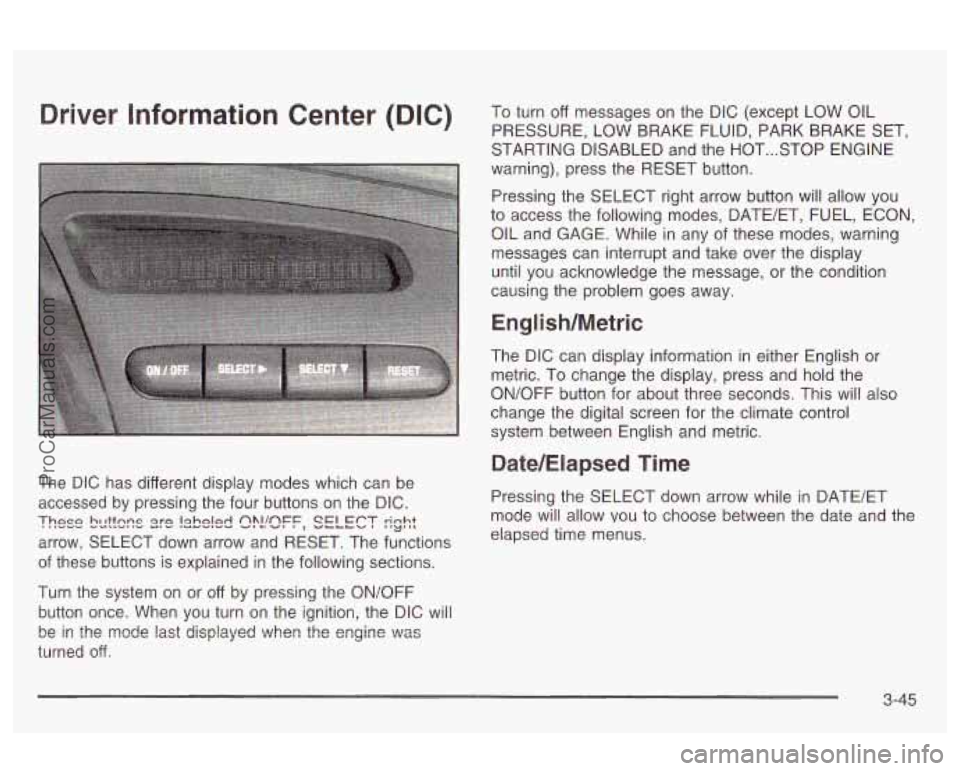
The DIC has different display modes which can be
accessed by pressing the four buttons on the DIC. Pressing the SELECT down arrow while in BATE/ET
arrow, SELECT down arrow and RESET. The functions
These bcttsns s)?!!sFF, SELECT rinht I'LJ',L mode will allow vou to choose between the date and the
elapsed time menus.
of these buttons is explained in the following sections.
Turn the system
on or off by pressing the ON/OFF
button once. When you turn on the ignition, the DIC will
turned
off.
be in the mode last displayed ?..lhen the engine \":as
3-45
ProCarManuals.com
Page 162 of 387
Gage Tire pressure status, such as the following:
TIRE PRESSURE NORMAL or TIRE
PRESSURE LOW
TIRE PRESSURE NORMAL appears when the
check tire pressure system believes your vehicle’s
tire pressures are normal.
if a potential tire
pressure problem is detected, the display will show
TIRE PRESSURE LOW. If you see this message,
you should stop
as soon as you can and check
all four tires for damage.
If a tire is flat, see If a Tire
Goes Flat on page 5-70.
Also check the tire
pressure in all four tires as soon as you can. See
lnflation -- Tire Pressure on page 5-60.
Pressing the SELECT down arrow while in GAGE mode
will allow you to access the battery volts, oil pressure
and tire pressure displays. Pressing and holding
the RESET button for three seconds while
in average
speed and tire pressure displays will reset them.
Pressing the SELECT down arrow in GAGE mode will
show the following displays:
Battery voltage, such as the following:
VOLTS:
13.8
0 Oil pressure, such as the following:
OIL PRESSURE
40 PSI or OIL PRESSURE
276 KPA
Average speed, such as the following:
AVG SPEED
55 MPH or AVG SPEED 90 KM/H There
are times when you will have to reset
(calibrate) the check tire pressure system. Pressing
the RESET button while the TIRE PRESSURE
LOW warning is displayed does not automatically
reset the tire pressure monitoring system. See
Check Tire Pressure System on page 5-62 for more
information.
3-49
ProCarManuals.com
Page 163 of 387
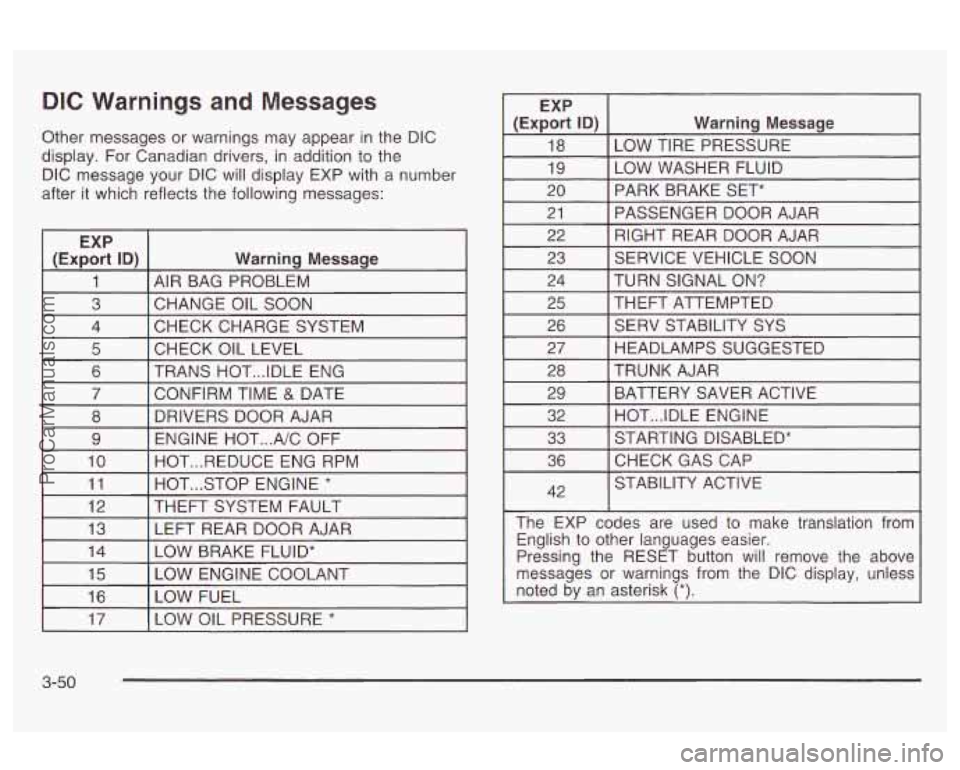
DIC Warnings and Messages
Other messages or warnings may appear in the DIC
display.
For Canadian drivers, in addition to the
DIC message your DIC will display EXP with
a number
after it which reflects the following messages:
EXP
(Export ID)
Warning Message
1 AIR BAG PROBLEM
3 CHECK CHARGE SYSTEM
4
CHANGE OIL SOON
I 5 I CHECK OIL LEVEL I I
6 I TRANS HOT ... IDLE ENG
I 7 I CONFIRM TIME & DATE I
8
ENGINE HOT
... A/C OFF
9 DRIVERS DOOR AJAR
10 HOT
... STOP ENGINE * 11 HOT
... REDUCE ENG RPM
I 12 I THEFT SYSTEM
FAULT I I
13 I LEFT REAR DOOR AJAR
I (ExE% ID) I Warning Message
18
LOW WASHER FLUID
19 LOW TIRE PRESSURE
20 PASSENGER DOOR AJAR
21 PARK BRAKE SET*
RIGHT REAR DOOR AJAR
22
23
TURN SIGNAL
ON? 24 SERVICE VEHICLE
SOON
I 25 I THEFT ATTEMPTED I I
26 [ SERV STABILITY SYS
I 27 I HEADLAMPS SUGGESTED I
28
BATTERY SAVER ACTIVE
29 TRUNK AJAR
32 STARTING DISABLED*
33 HOT
... IDLE ENGINE
36
42 CHECKGASCAP
STABILITY ACTIVE
The EXP codes are used to make translation from English to other languages easier.
Pressing the RESET button will remove the above
messages or warnings from the DIC display, unless
noted by an asterisk
(*).
I 17 I LOW OIL PRESSURE * I
3-50
ProCarManuals.com
Page 212 of 387

Once you are moving on the freeway, make certain you
allow a reasonable following distance.
Expect to move slightly slower at night.
When you want to leave the freeway, move to the
proper lane well in advance.
If you miss your exit, do
not, under any circumstances, stop and back up. Drive
on to the next exit.
The exit ramp can be curved, sometimes quite sharply.
The exit speed is usually posted. Reduce your speed
according to your speedometer, not to your sense
of motion. After driving for any distance at higher
speeds, you may tend to think you are going slower
than you actually are.
Before Leaving on a Long Trip
Make sure you’re ready. Try to be well rested. If you
must start when you’re not fresh
- such as after a day’s
work
- don’t plan to make too many miles that first
part of the journey. Wear comfortable clothing and shoes
vou can easilv drive in.
Is your vehicle ready for a long trip? If you keep it
serviced and maintained, it’s ready to go. If
it needs
service, have it done before starting out. Of course,
you’ll find experienced and able service experts
in dealerships all across North America. They’ll be
ready and wiiiing
to heip if you need it.
Here are some things you can check before a trip:
Windshield Washer Fluid: Is the resewior full? Are
all windows clean inside and outside?
Wiper Blades: Are they in good shape?
Fuel, Engine Oil, Other Fluids: Have you checked
all levels?
Lamps: Are they all working? Are the lenses clean?
Tires: They are vitally important to a safe,
trouble-free trip.
Is the tread good enough for
long-distance driving? Are the tires all inflated to the
recommended pressure?
Weather Forecasts: What’s the weather outlook
along your route? Should you delay your trip a
short time to avoid
a major storm system?
Maps: Do you have up-to-date maps?
4-23
ProCarManuals.com
Page 234 of 387

Section 5 Service and Appearance Care
Service ............................................................ 5-3
Doing Your Own Service Work
........................ -5-4
Adding Equipment to the Outside of Your
Vehicle
...................................................... 5-4
Fuel
................................................................ 5-5
Gasoline Octane
............................................ 5-5
Gasoline Specifications
.................................... 5-5
California Fuel
............................................... 5-6
Additives
......................................... ...... 5-6
Fuels in Foreign Countries
........................... 5-7
Filling Your Tank
........................................ 5-7
Filling a Portable Fuel Container
..... . 5-11
the Hood
.................................................... 5-12
Hood Release
.............................................. 5-13
Engine Compartment Overview
....................... 5-14
Engine Oil
................................................... 5-15
Engine Air Cleaner/Filter
................................ 5-21
P,L!tSrn2.tlC Tr2!ns2x!n !=!!lid ............................. .- E;-33 --
Engine Coolant ............................................. 5-24
Coolant Surge Tank Pressure Cap
.................. 5-28
Engine Overheating
....................................... 5-28
Cooling System
............................................ 5-31
.W indshieid .Washer Fiuid 5-36
Checking Things Under
Power Steering Fluid
..................................... 5-37 ~ ................................
Brakes ........................................................ 5.39
Battery
........................................................ 5.42
Jump Starting
............................................... 5-44
Headlamp Aiming
.............................. ...... 5-50
Bulb Replacement ......................................... -5-54
Halogen Bulbs
............................................. -5-54
Headlamps
................................................. -5-55
Front Turn Signal and Parking Lamps
.......... 5-57
Taillamps, Turn Signal, Stoplamps and
Back-up Lamps
..................................... 5-58
Replacement Bulbs
....................................... 5-58
Windshield Wiper Blade Replacement
.............. 5-59
Tires
.............................................................. 5-60
Inflation
-- Tire Pressure ................................ 5-60
Check Tire Pressure System
.......................... 5-62
Tire Inspection and Rotation
........................... 5-63
When It Is Time for New Tires
....................... 5-65
Buying New Tires
......................................... 5-66
UIIIIUIIII I Ilt: Uudllly uldullly d-UI
Wheel Alignment and Tire Balance .................. 5-68
Wheel Replacement
...................................... 5-68
Tire Chains
................................................. -5-70
If a Tire Goes Flat ........................................ 5-70
Changing a Flat Tire
..................................... 5-71
Compact Spare Tire
5-81
I I.-:+- T. n . ._I.&. . n.-- -I:__ _. re7 ..........................
- ......................................
5- 1
ProCarManuals.com
Page 261 of 387
Coolant Surge Tank Pressure Cap
The cooling system pressure cap is located on the
surge tank.
Notice: Your cooling system pressure cap is a
pressure-type cap and must be tightly installed to
prevent coolant
loss and possible engine damage
from overheating.
Engine Overheating
You will find a coolant temperature gage on your
vehicle’s instrument panel. Your Driver Information
Center (DIC) will also display messages about engine
overheating. See
Engine Coolant Temperature Gage on
page 3-38.
Overheated Engine Protection
Operating Mode
If an overheated engine condition exists and the
message HOT STOP
ENGINE is displayed, an overheat
protection mode which alternates firing groups of
cylinders helps prevent engine damage. In this mode,
you will notice a
loss in power and engine performance.
This operating mode allows your vehicle to be driven
to a safe place in an emergency. Driving extended miles
(km) and/or towing a trailer in the overheat protection
mode should be avoided.
Notice: After driving in the overheated engine
protection operating mode, to avoid engine damage,
allow the engine to cool before attempting any
repair. The engine oil will be severely degraded. Repair the cause of coolant
loss, change the oil and
reset the oil life system. See “Engine
Oil” in the
Index.
5-28
ProCarManuals.com
Page 265 of 387
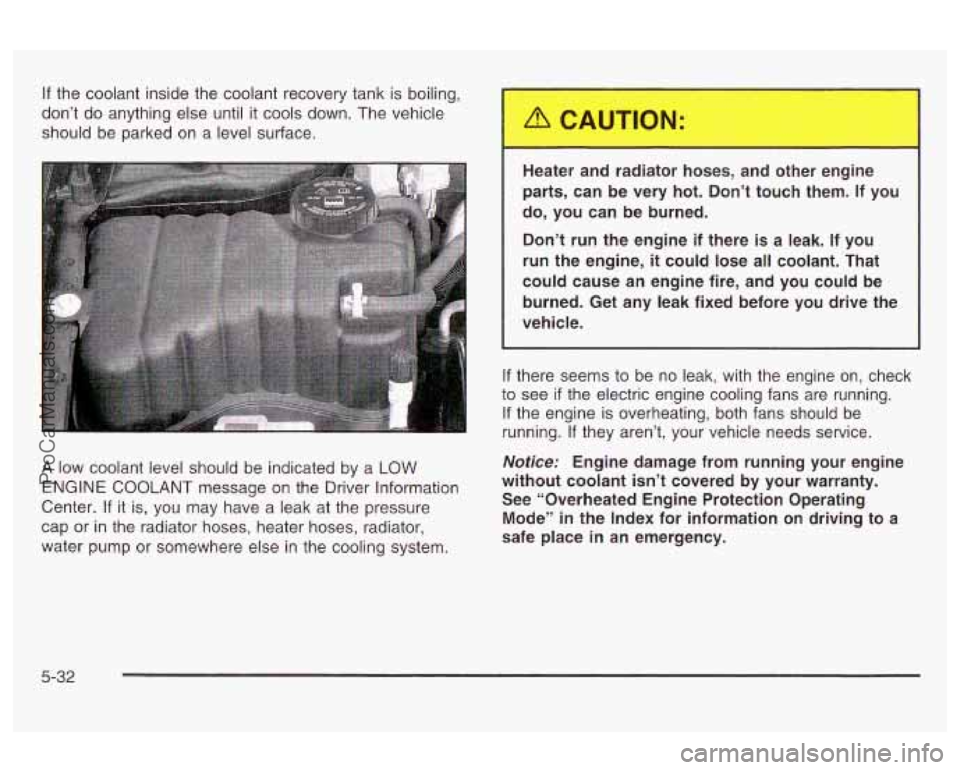
If the coolant inside the coolant recovery tank is boiling,
don’t do anything else until it cools down. The vehicle
should be parked on a level surface.
A low coolant level should be indicated by a LOW
ENGINE COOLANT message on the Driver Information
Center.
If it is, you may have a leak at the pressure
cap or
in the radiator hoses, heater hoses, radiator,
water pump or somewhere else in the cooling system. Heater
and radiator hoses, and other engine
parts, can be very hot. Don’t touch them.
If you
do, you can be burned.
Don’t run the engine if there is a leak. If you
run the engine,
it could lose all coolant. That
could cause an engine fire, and you could be
burned. Get any leak fixed before you drive the
vehicle.
If there seems to be no leak, with the engine on, check
to see
if the electric engine cooling fans are running.
If the engine is overheating, both fans should be
running.
If they aren’t, your vehicle needs service.
Notice: Engine damage from running your engine
without coolant isn’t covered by your warranty.
See “Overheated Engine Protection Operating
Mode’’ in the Index for information on driving to a
safe place
in an emergency.
5-32
ProCarManuals.com