instrument panel OLDSMOBILE BRAVADA 1994 Owners Manual
[x] Cancel search | Manufacturer: OLDSMOBILE, Model Year: 1994, Model line: BRAVADA, Model: OLDSMOBILE BRAVADA 1994Pages: 248, PDF Size: 14.54 MB
Page 22 of 248
Seats & Restraint Systems
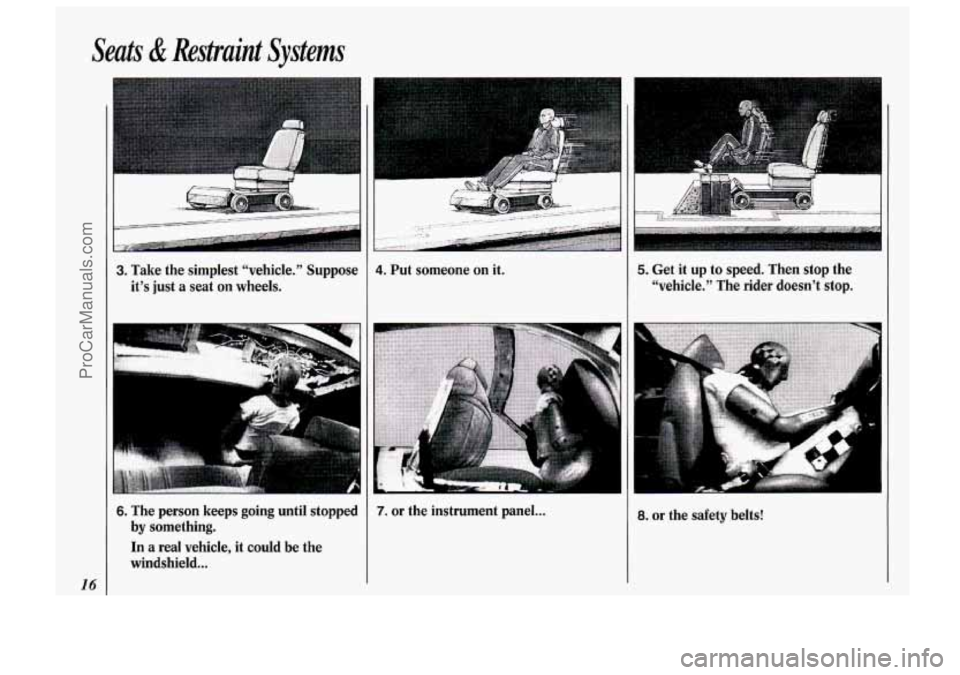
Get it up to speed. Then stop the
“vehicle.’’ The rider doesn’t stop. 3. Take the simplest %chicle." Suppose
it’s just a seat on wheels. 4. Put someone on it. 5.
a.
I“
6. The person keeps going until stopped
by something.
In a real vehicle, it could be the
windshield
...
7. or the instrument panel ... or the safety belts!
16
ProCarManuals.com
Page 43 of 248
Here you can learn about the many standard and optional features on
your Oldsmobile. and information on
starting. shifting and braking
. Also
explained are the instrument panel
and the warning systems that tell you
if everything is working properly -
and what to do if you have a problem .
Part 2
Features & Controls
Keys ........................................................................\
.......................................... .. ....... 38
Locks ........................................................................\
.................................................. 39
Remote Lock Control
........................................................................\
........................ 40
Tailgate ........................................................................\
.............................................. 42
Ignition ........................................................................\
.............................................. 45
Starting Your Engine ........................................................................\
........................ 45
Shifting the Transmission ........................................................................\
................. 48
Parking Brake ........................................................................\
.................................... 51
Shifting into Park ........................................................................\
.............................. 51
Horn ........................................................................\
................................................... 54
Tilt Steering Wheel ........................................................................\
............................ 55
Windows ........................................................................\
............................................ 55
Turn Signal/Multifunction Lever ........................................................................\
..... 55
Windshield Wipers and Washer ........................................................................\
........ 57
Cruise Control ........................................................................\
................................... 59
Headlights
........................................................................\
.......................................... 62
Fog Lights ........................................................................\
.......................................... 63
Overhead Console
........................................................................\
............................. 64
Sun Visors
........................................................................\
......................................... 69
Mirrors
........................................................................\
............................................... 69
Storage Compartments
........................................................................\
..................... 71
Ashtrays and Lighter
........................................................................\
......................... 73
Luggage Carrier ........................................................................\
................................. 74
Warning Lights, Gages and Indicators
..................................................................... 80
Instrument Panel ........................................................................\
............................... 76
37
ProCarManuals.com
Page 51 of 248

U
Ignition Switch
With the ignition key in the ignition
switch, you can turn the switch to five
positions:
Accessory: An “on7’ position in which
you can operate your electrical power
xcessories. Press in the ignition switch
2s you turn the top of it toward you.
Lock: The only position in which you
:an remove the key. This locks your
steering wheel, ignition and
transmission.
Off: Unlocks the steering wheel,
ignition, and transmission, but does not
send electrical power to any accessories.
Use this position if your vehicle must be
pushed or towed, but never try to push-
start your vehicle. A warning chime will
sound if you open the driver’s door
when the ignition is off and the key is in
the ignition.
Run: An “on” position to which the
switch returns after you start your
engine and release the switch. The
switch stays in the
Run position when
the engine is running. But even when
the engine
is not running, you can use
Run to operate your electrical power
accessories, and to display some
instrument panel warning lights.
Start: Starts the engine. When the
engine starts, release the key. The
ignition switch will return to
Run for
normal driving.
Note that even if the engine is not
running, the positions
Accessory and
Run are “on” positions that allow you
to operate your electrical accessories,
such as the radio.
NOTICE:
If your key seems stuck in Lock
and you can’t turn it, be sure it is
all the way in.
If it is, then turn the
steering wheel left and right while
you turn the key hard. But turn the
key only with your hand. Using a
tool to force it could break the key
or the ignition switch. If none of
this works, then your vehicle needs
service.
Starting Your Engine
Move your shift lever to P (Park) or
N (Neutral). Your engine won’t start in
any other position
- that’s a safety
feature. To restart when you’re already
moving, use
N (Neutral) only.
NOTICE:
Don’t try to shift to P (Park) if your
Oldsmobile is moving. If you do,
you could damage the transmission.
Shift to
P (Park) only when your
vehicle is stopped.
45
ProCarManuals.com
Page 62 of 248
Features & Controls
56
Operation of Lights
Although your vehicle’s lighting system (headlights, parking lights, fog lamps,
side marker lights and taillights) meets
all applicable federal lighting
requirements, certain states and
provinces may apply their
own lighting
regulations that may require special
attention before
you operate these lights.
For example, some jurisdictions may
require that you operate your fog lamps
only when your lower beam headlights
are also on, or that headlights be
turned
on whenever you must use your
windshield wipers. In addition, most
jurisdictions prohibit driving solely
with parking lights, especially at dawn
or dusk. It is recommended that you
check with your own state or provincial
highway authority for applicable
lighting regulations.
U
0
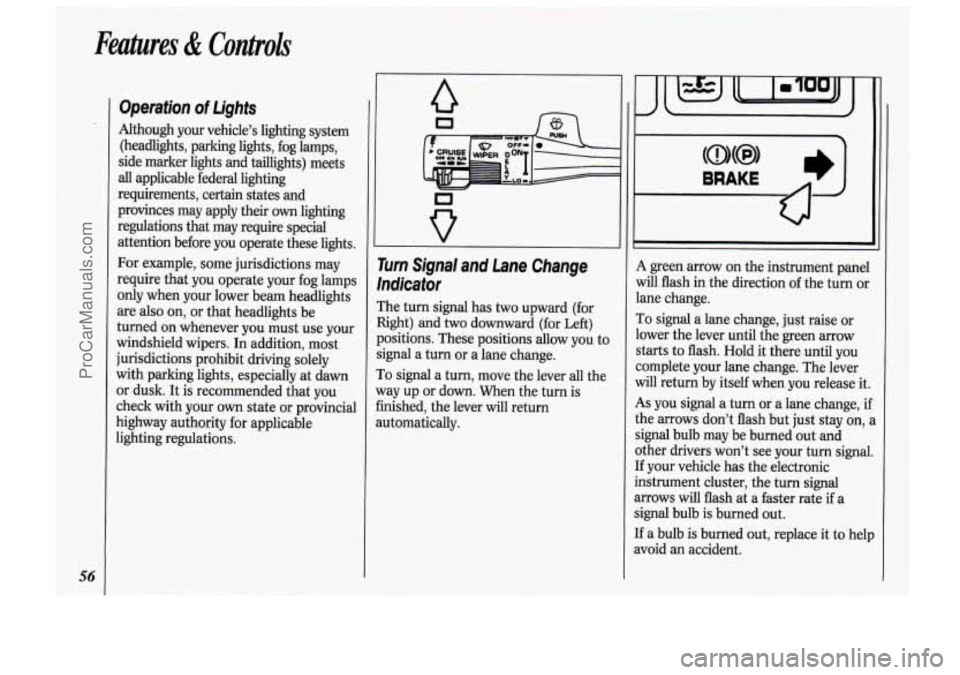
rurn Signal and Lane Change
’ndicator
The turn signal has two upward (for
light) and
two downward (for Left)
)ositions. These positions allow you to
ignal a turn or a lane change.
To signal a turn, move the lever all the
yay up or down. When the turn is
inished, the lever will return
lutomatically.
A green arrow on the instrument panel
will flash in the direction of the turn or
lane change.
To signal a lane change, just raise or
lower the lever until the green arrow
starts to flash. Hold it there until
you
complete your lane change. The lever
will return by itself when you release it.
As you signal a turn or a lane change, ij
the arrows don’t flash but just stay on,
signal bulb may be burned out and
other drivers won’t see your turn signal
If your vehicle has the electronic
instrument cluster, the turn signal
arrows will flash at a faster rate
if a
signal bulb is burned out.
If a bulb is burned out, replace it to hell
avoid an accident.
ProCarManuals.com
Page 68 of 248

Features & Controh
62
Headlights
Push the switch marked pe to turn on:
Parking Lights
Side Marker Lights
Taillights
Instrument Panel Lights
II I II I LIGHTS
Push the -:Q- switch to turn on the
headlights, together with:
Parking Lights
Side Marker Lights
Taillights
Instrument Panel Lights
Pull the switch or press
OFF to turn off
the lights.
Lights on Reminder
If you open the door while leaving the
lights
on, you will hear a warning tone.
Headlight High-Low Beam
To change the headlights from low
beam to high
or high to low, pull the
turn signal lever all the way toward
you.
Then release it.
When the high beams are on,
a blue
light
on the instrument panel also will
be on.
ProCarManuals.com
Page 69 of 248

T
II
instrument Panel intensity
Control
Turn the dial above the headlight
switch to the left to dim your
instrument panel lights. This will also
silence your Lights On Reminder.
Turn the dial to the right to make your
instrument panel lights brighter.
If you
turn the dial all the way to the right
until it cliclts, your interior lights will
come on.
Fog Lights
Use your fog lights for better vision in
foggy or misty conditions. Your parking
lights or low beam headlights must be
on for them to come on.
The fog light switch is on the
instrument panel under the headlight
switch. Press the right side of the switch
to turn the fog lights on, and the left
side of the switch to turn them off. An
indicator light will glow in the right side
of the switch when they are on.
Remember, fog lights alone will not give
off as much light as your headlights.
Never use your fog lights in the dark
without turning on your headlights. The
fog lights will go off whenever your
high beam headlights come on. When
the high beams go
off, the fog lights will
come on again.
L 1
63
ProCarManuals.com
Page 74 of 248

Feahres & Controls
68
I I
111
Center Dome Light
Located in the center of your vehicle,
this light has no switch of its
own. It
will go
on each time you open the
doors.
You can also turn it on by
turning the Instrument Panel Intensity
Control to the right until it cliclts.
L
9ont Reading Lights
rhese lights are part of the rearview
nirror, and may be operated in two
ways:
b With the ignition on, turn each light
on and off with its switch.
With the ignition
off, open any door.
These lights will come
on for about 15
seconds, then turn off. If you turn on
the ignition during this delay, the
lights will turn off immediately.
To avoid draining your vehicle battery’s
Qower, be sure to turn
off all interior
lights when leaving your vehicle. But
remember that the mirror reading lights
will still come on for about
15 seconds,
then turn
off.
Rear Dome Light
The rear dome light will come on with
the center dome light each time you
open the doors. It also has a switch. Be
sure to turn it
off when you are finished
using it.
ProCarManuals.com
Page 78 of 248

Features & C’ntroh
72
t
There are also two storage
compartments with latching lids. Press
the latch and lift the cover to open these.
The smaller compartment has a
molded rack for cassette tapes and
compact discs. The larger
one has a
removable tray. There are two cup
holders inside the
glove
box door. Note that the glove box
light will remain on while the door is
open. You will
find a storage compartment on
each of the front doors. The driver’s
door pocket contains a coin holder.
A narrow storage shelf runs along the
bottom
of the instrument panel. It’s
handy for items such as gloves or small
books.
ProCarManuals.com
Page 79 of 248
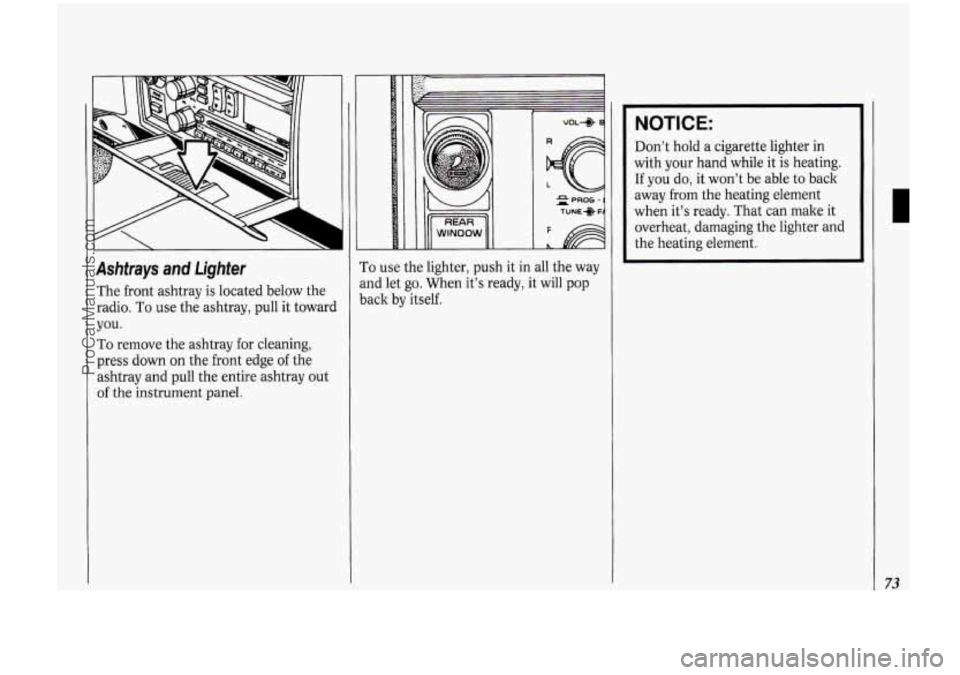
Ashtrays and Lighter
The front ashtray is located below the
radio. To use the ashtray, pull it toward
you.
To remove the ashtray for cleaning,
press down on the front edge of the
ashtray and pull the entire ashtray out
of the instrument panel.
t
1
To use the lighter, push it in all the way
md let go. When it’s ready, it will pop
lack by itself.
NOTICE:
Don’t hold a cigarette lighter in
with your hand while it is heating.
If you do, it won’t be able to back
away
from the heating element
when it’s ready. That can make
it
overheat, damaging the lighter and
the heating element.
73
ProCarManuals.com
Page 83 of 248

The Instrument Panel-Your
Information System
Your instrument panel is designed to let
you know at a glance how your vehicle
is running. You’ll know how fast you’re
going, how much fuel you’re using, and
many other things you’ll need to drive
safely and economically.
The main components
of your
instrument panel are:
1. Side Vents
2. Side Window Defogger
3. Rear Window Wipermasher
4. Rear Window Defogger
5. Light Controls
6. Tilt Steering Wheel Lever
7. Instrument Cluster
8. Gearshift Lever
9. Climate Controls
IO. Lighter
11. Center Vents
12. Glove Box
13. Side Window Defogger
14. Side Vents
15. Audio System
16. Ashtray
17. Tailgate Window Release
18. Power Remote Control Mirrors
19. Ignition Switch
20. Hazard Warning Flashers Switch
21. Horn
22. Fuse Panel (under instrument
panel)
23. Hood Release
24. Turn Signal/Multifunction Lever
25. Parking Brake Release
77
ProCarManuals.com