battery OLDSMOBILE BRAVADA 1998 User Guide
[x] Cancel search | Manufacturer: OLDSMOBILE, Model Year: 1998, Model line: BRAVADA, Model: OLDSMOBILE BRAVADA 1998Pages: 380, PDF Size: 19.2 MB
Page 112 of 380

If you have trouble programming the universal
transmitter, make sure that you have followed the
directions exactly as described and that the battery
in the
hand-held transmitter is not dead. If you still cannot
program
it, rotate the hand-held transmitter end over end
and try again. The universal transmitter may not work
with older garage door openers that do not meet current
Federal Consumer Safety Standards.
If you cannot
program the transmitter after repeated attempts, consult
your Oldsmobile retailer.
Be sure to keep the original hand-held transmitter
in case you need to erase and reprogram the
universal transmitter.
Operating the Transmitter
Press and hold the appropriate button on the universal
transmitter. The red light comes on while the signal is
being transmitted.
Note that the effective transmission range
of the
universal transmitter may differ from the hand-held
transmitter and from one channel to another.
Erasing Channels
To erase all three programmed channels, hold down the
two outside buttons
until the red light begins to flash.
Individual channels cannot be erased, but can be
reprogrammed using the procedure for programming the transmitter explained earlier.
Training a Garage Opener with a
“Rolling Code” Feature
If you programmed the universal transm-itter, but the
garage door
will not open, and if your garage door opener
was manufactured after
1995, your garage door may have
a security feature that changes the “code” of your garage
door opener every time
it is opened or closed.
To determine if your garage door opener has this
“rolling code” feature, press
the appropriate button on
the universal transmitter that was programmed. If the
red light flashes rapidly for one to two seconds, then
turns solid, your garage door opener has this feature.
2-48
ProCarManuals.com
Page 118 of 380

Air Bag Readiness Light
There is an air bag readiness light on the instrument panel,
which shows the air bag symbol. The system checks the
air bag’s electrical system for malfunctions. The light tells
you
if there is an electrical problem. The system check
includes the air bag sensors, the air bag module, the wiring
and the diagnostic module. For more information on the
air
bag system. see “Air Bag“ in the Index.
This light
will come on
when you start your engine,
and
it will flash for a few
seconds. Then the light
should go out. This means
the system
is ready.
If the air bag readiness light stays on after you start the
engine or comes on when you are driving, your air bag
system may not work properly. Have your vehicle
serviced right away.
The air bag readiness light should flash for a few
seconds when
you turn the ignition key to RUN. If the
light doesn’t come on then, have
it fixed so it will be
ready to warn you if there is a problem.
Charging System Indicator ._ Light
1 The charging system light
will come on briefly when
you
turn on the ignition,
but the engine
is not
running, as
a check to
show you
it is working.
It should go out once the engine is running. If it stays
on. or comes
on while you are driving, you may have a
problem with the charging system. It could indicate that
you have problems
with a generator drive belt, or
another electrical problem. Have
it checked right away.
Driving while this light is on could drain your battery.
If you must drive a short distance with the light on, be
certain
to turn off’ all your accessories, such as the radio
and air conditioner.
2-54
ProCarManuals.com
Page 119 of 380
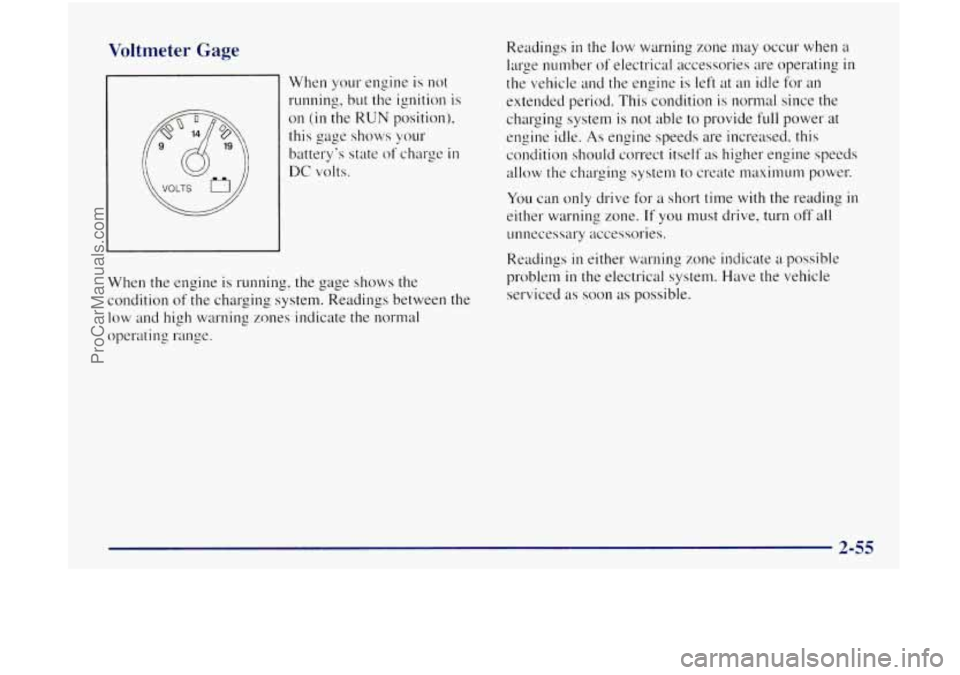
Voltmeter Gage
When your engine is not
running, but the ignition is
on
(in the RUN position),
this gage shows your
battery's state of charge
in
DC volts.
When the engine is running, the gage shows the
condition
of the charging system. Readings between the
low and high warning zones indicate the normal
operating range. Readings
in the
low warning zone may occur when a
large number of electrical accessories are operating
in
the vehicle and the engine is left at an idle for an
extended period. This condition
is normal since the
charging system
is not able to provide full power at
engine idle.
As engine speeds are increased. this
condition should correct itself as higher engine speeds
allow the charging system to create maximum power.
You can only drive for a short time with the reading in
either warning zone. If you must drive, turn off all
unnecessary accessories.
Readings
in either warning zone indicate a possible
problem
in the electrical system. Have the vehicle
serviced
as soon as possible.
ProCarManuals.com
Page 145 of 380

SCAN: Press this button to listen to each selection for a
few seconds. The disc
will go to the next selection, stop
for a few seconds, then
go on to the next selection. Press
this button again to stop scanning. The sound will mute
while scanning, SCAN
will appear on the display.
RCL: Press this button to see which track is playing.
Press
it again within five seconds to see how long it has
been playing. To change what is normally shown on the
display (track or elapsed time), press the button
until
you see the display you want, then hold the button until
the display flashes. While elapsed time is showing, EL
TM will appear on the display.
AM-FM: Press this button to play the radio when a disc
is
in the player.
TAPE-CD: Press this button to change to the tape or
disc function when the radio is
on and either a tape or
CD is inserted. Press AM-FM to return to the radio
while a CD or tape is playing. The inactive tape or CD
will remain safely inside the radio for future listening. If
you have the optional CD changer and the CD changer
is loaded, the TAPE-CD button will activate the changer
and a box will be lighted around CDC
in the display.
EJECT Press this button to remove the compact disc or
cassette tape. The icon with the box around it on the
display will eject and the radio will play. EJECT may be
activated with either the ignition or radio off. Cassettes
and compact discs may be loaded with the radio
and
ignition off if this button is pressed first.
Theft-Deterrent Feature
THEFTLOCK@ is designed to discourage theft of your
radio.
It works by using a secret code to disable all radio
functions whenever battery power is removed.
The THEFTLOCK feature for the radio may be used or
ignored.
If ignored, the system plays normally and the
radio is not protected by the feature. If THEFTLOCK is
activated, your radio will
not operate if stolen.
When THEFTLOCK
is activated, the radio will display
LOC to indicate
a locked condition anytime battery
power
is removed. If your battery loses power for any
reason, you must unlock
the radio with the secret code
before
it will operate.
3-17
ProCarManuals.com
Page 147 of 380

5. Press AM-FM after YOLI have confirmed that the 5. Press MN again to make the last two digits agree
code matches the secret code you have written down.
with yo~lr code.
The display will show SEC, indicating the radio is
now operable and secure.
6. Press HR to make the first one or two digits agree
with your code.
If you enter the wrong code eight times, INOP will
appear on the display. You will have to wait an hour
with the ignition
on before you can try again. When YOLI
try again, you will only have three chances to enter the
correct code before INOP appears.
If you lose or forget your code, contact your retailer.
Disabling the Theft-Deterrent Feature
Enter your secret code as follows; pause no more than
15 seconds between steps:
I. Turn the ignition to ACCESSORY or RUN.
2. Turn the radio off.
3. Press the 1 and 4 buttons together. Hold them down
until SEC shows on the display.
4. Press MN and 000 will appear on the display.
7. Press AM-FM after you have confirmed that the
code matches the secret code
YOLI have written down.
The display
will show ---, indicating that the radio
is no longer secured.
If the code entered is incorrect, SEC will appear on the
display. The radio
will remain secured until the correct
code is entered.
When battery power is removed and later applied to
a
secured radio, the radio won’t turn on and LOC will
appear on the display.
To unlock a secured radio, see “Unlocking the
Theft-Deterrent Feature After a Power
Loss” earlier
in this section.
ProCarManuals.com
Page 193 of 380
I
A CP ""IC\:
Snow can trap exhaust gases under your vehicle.
This can cause deadly CO (carbon monoxide) gas
to get inside.
CO could overcome you and kill
you. You can't see it or smell it,
so you might not
know it is
in your vehicle. Clear away snow from
around the base of your vehicle, especially any
that is blocking your exhaust pipe. And check
around again from time to time to be sure snow
doesn't collect there.
Open
a window just a little on the side of the
vehicle that's away from the wind. This
will help
keep CO out.
Run your engine only as long as you must. This saves
fuel. When you run the engine. make it go a little faster
than just idle. That is, push the accelerator slightly. This
uses less fuel for
the heat that you get and it keeps the
battery charged. You will need
a we.11-charged battery to
restart the vehicle. and possibly
for signaling later on
with your headlamps. Let the heater run for a while.
Then, shut the engine off and
close the window almost
all the way to preserve the heat. Start the engine again
and repeat this only when you feel really uncornfortable
from the
cold. BLI~ do it as little as possible. Preserve the
fuel
as long as you can. To help keep warm, you can get
out
of the vehicle and do some fairly vigorous exercises
every half hour or
so until help comes.
ProCarManuals.com
Page 205 of 380

Trailer Wiring Harness
The trailer wiring harness is an eight-wire harness
assembly. The harness
is stored under the vehicle, on the
driver's side corner frame crossmember. The harness has
a 30-amp feed wire
with an inline fuse located by the
junction block. See "Fuses and Circuit Breakers"
in the
Index. The harness does not have
a connector and
should be wired by
a qualified electrical technician. The
technician can use the following color code chart when
connecting
the wiring harness to your trailer.
Dark Blue: Use for electric trailer brakes or
auxiliary wiring.
Red: Use for battery charging; it connects to the
starter solenoid.
Light Green: Back-up lamps.
Brown: Tdillarnps and parking lamps.
Yellow: Left stoplamp and turn signal.
Dark Green: Right stoplamp and turn signal.
White (Heavy Gauge): Ground wire.
White (Light Gauge): Auxiliary stoplamp.
Securely attach the harness to the trailer, then tape
or strap it to your vehicle's frame rail. Be sure you leave
it loose enough so the wiring doesn't bend or break, but
not
so loose that it drags on the ground. Store the
harness
in its original place. Wrap the harness together
and tie
it neatly so it won't be damaged.
ProCarManuals.com
Page 209 of 380

Jump Starting
If your battery has run down, you may want to
use another vehicle and some jumper cables to start
your vehicle. But please use the following steps to
do
it safely.
NOTICE:
Ignoring these steps could result in costly damage
to your vehicle that wouldn’t be covered by
your warranty.
Do not try to start your vehicle by pushing or
pulling it.
This could damage your vehicle and it
won’t start that way. Batteries can
hurt
you. They can be dangerous
because:
They contain acid that can burn you.
They contain gas that can explode or ignite.
They contain enough electricity to
If you don’t follow these steps exactly, some or all
of these things can hurt you.
burn
you.
1. Check the other vehicle. It must have a 12-volt
battery with a negative ground system.
I NOTICE:
If the other system isn’t a 12-volt system with a
negative ground, both vehicles can be damaged.
ProCarManuals.com
Page 211 of 380

4. Open both hoods and locate the batteries. Find
the positive
(+) and negative (-) terminals on
each battery.
/A CAUTION:
Using a match near a battery can cause battery
gas to explode. People have been hurt doing this,
and some have been blinded. Use a flashlight if
you need more light.
Be sure the battery has enough water. You don’t
need to add water to the Delco Freedom@ battery
installed in every new
GM vehicle. But if a
battery has filler caps, be sure the right amount
of fluid is there. If it is low, add water to take care
of that first. If you don’t, explosive gas could
be present.
Battery fluid contains acid that can burn you.
Don’t get it on you.
If you accidentally get it in
your eyes or on your skin, flush the place with
water and get medical help immediately.
5. Check that the jumper cables don’t have loose or
missing insulation. If they do, you could get a shock.
The vehicles could be damaged too.
Before you connect the cables, here are some basic
things you should know. Positive
(+) will go to
positive (+) and negative (-) will go to an unpainted
metal engine part or
a body metal surface. Don’t
connect positive
(+) to negative (-) or you’ll get a
short that would damage the battery and maybe other
parts too. And don’t connect the negative
(-) to
negative
(-).
6. Connect the red positive
(+) cable to the positive
(+) terminal of the
vehicle with the
dead battery.
5-5
ProCarManuals.com
Page 212 of 380

7. Don’t let the other end
touch metal. Connect it
to the positive
(+)
terminal of the
good battery.
8. Now connect the black
negative
(-) cable to
the good battery’s
negative
(-) terminal.
Don’t let the other end
touch anything until the
next step. The other end
of the negative (-) cable
doesn’t go to the dead
battery. It goes to a heavy
unpainted metal part on
the engine
of the vehicle
with the dead battery.
9. Attach the cable at least
18 inches (45 cm) away
from the dead battery,
but not near engine parts
that move.
The electrical connection is just as
good there, but the
chance
of sparks getting
back to the battery
is
much less.
5-6
ProCarManuals.com