lock Oldsmobile Bravada 2003 s Owner's Guide
[x] Cancel search | Manufacturer: OLDSMOBILE, Model Year: 2003, Model line: Bravada, Model: Oldsmobile Bravada 2003Pages: 410, PDF Size: 20.1 MB
Page 80 of 410
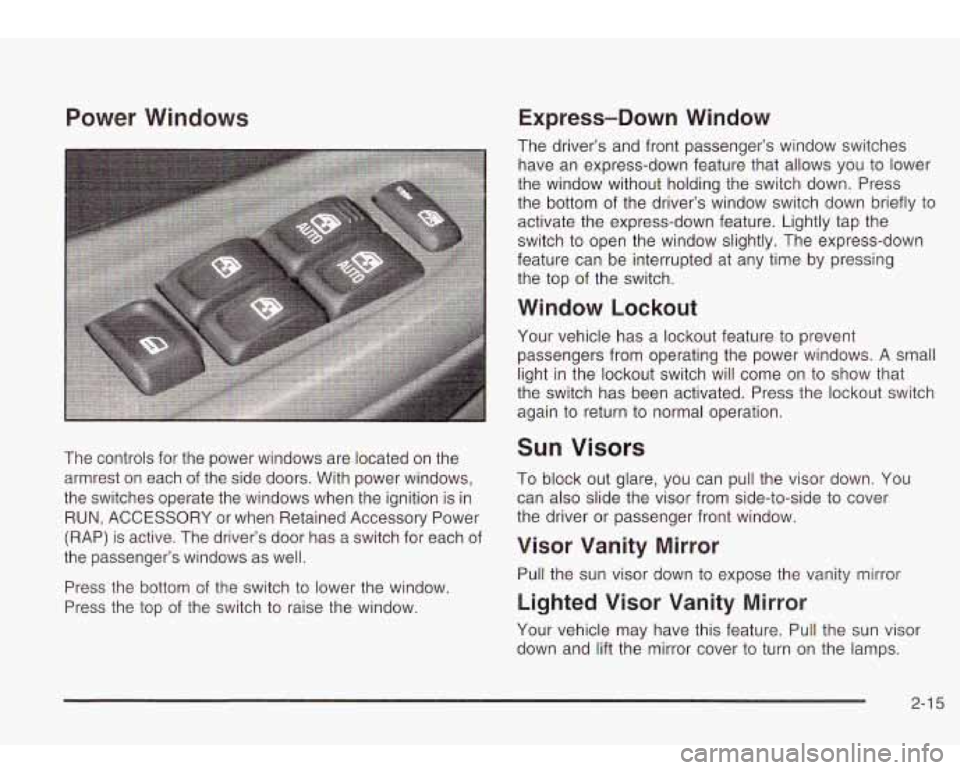
Power Windows
The controls for the power windows are located on the
armrest on each of the side doors. With power windows,
the switches operate the windows when the ignition is in
RUN, ACCESSORY or when Retained Accessory Power
(RAP) is active. The driver’s door has a switch for each of
the passenger’s windows as well.
Press the bottom of the switch
to lower the window.
Press the top of the switch
to raise the window.
Express-Down Window
The driver’s and front passenger’s window switches
have an express-down feature that allows you to lower
the window without holding the switch down. Press
the bottom of the driver’s window switch down briefly
to
activate the express-down feature. Lightly tap the
switch to open the window slightly. The express-down
feature can be interrupted at any time by pressing
the top of the switch.
Window Lockout
Your vehicle has a lockout feature to prevent
passengers from operating the power windows.
A small
light in the lockout switch will come on to show that
the switch has been activated. Press the lockout switch
again to return to normal operation.
Sun Visors
To block out glare, you can pull the visor down. You
can also slide the visor from side-to-side to cover
the driver or passenger front window.
Visor Vanity Mirror
Pull the sun visor down to expose the vanity mirror
Lighted Visor Vanity Mirror
Your vehicle may have this feature. Pull the sun visor
down and lift the mirror cover
to turn on the lamps.
2-1 5
Page 81 of 410
Theft-Deterrent Systems
Vehicle theft is big business, especially in some cities.
Although your vehicle has a number of theft-deterrent
features, we know that nothing we put on it can make it
impossible
to steal. However, there are ways you
can help.
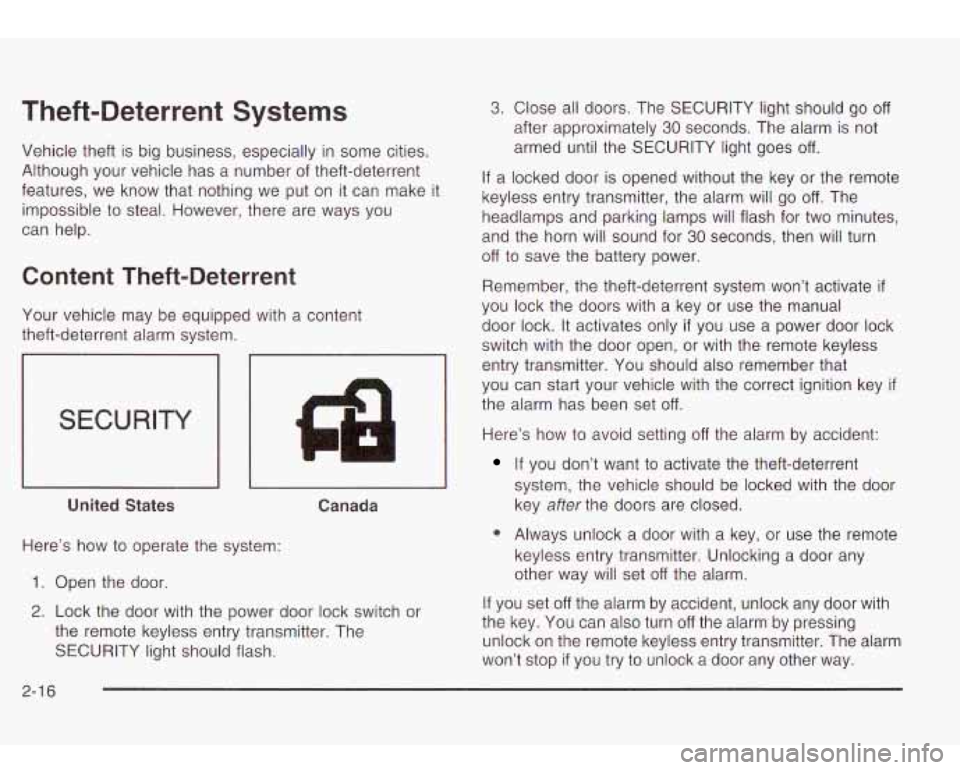
Content Theft-Deterrent
Your vehicle may be equipped with a content
theft-deterrent alarm system.
SECURITY
4 I1
I I I I
United States Canada
Here’s how to operate the system:
1. Open the door.
2. Lock the door with the power door lock switch or
the remote keyless entry transmitter. The
SECURITY light should flash.
3. Close all doors. The SECURITY light should go off
after approximately 30 seconds. The alarm is not
armed until the SECURITY light goes
off.
If a locked door is opened without the key or the remote
keyless entry transmitter, the alarm will go
off. The
headlamps and parking lamps will flash for two minutes,
and the horn will sound for
30 seconds, then will turn
off to save the battery power.
Remember, the theft-deterrent system won’t activate
if
you lock the doors with a key or use the manual
door lock.
It activates only if you use a power door lock
switch with the door open, or with the remote keyless
entry transmitter. You should also remember that
you can start your vehicle with the correct ignition key
if
the alarm has been set off.
Here’s how to avoid setting off the alarm by accident:
If you don’t want to activate the theft-deterrent
system, the vehicle should be locked with the door
key
after the doors are closed.
0 Always unlock a door with a key, or use the remote
keyless entry transmitter. Unlocking a door any
other way will set
off the alarm.
If you set
off the alarm by accident, unlock any door with
the key. You can also turn
off the alarm by pressing
unlock on the remote keyless entry transmitter. The alarm
won’t stop
if you try to unlock a door any other way.
2-1 6
Page 82 of 410
Testing the Alarm
The alarm can be tested by following these steps:
1. From inside the vehicle, lower the driver’s window
and open the driver’s door.
Passlock@
2. Activate the system by locking the doors with the
power door lock switch while the door is open, or
with the remote keyless entry transmitter.
3. Get out of the vehicle, close the door and wait for
the SECURITY light to go out.
4. Then reach in through the window, unlock the door
with the manual door lock and open the door. This
should set
off the alarm.
When the alarm is set the power door unlock switch
is
not operational.
If the alarm does not sound when it should but the
headlamps flash, check
to see if the horn works. The
horn fuse may be blown. To replace the fuse, see
Fuses
and Circuit Breakers on page
5-86.
If the alarm does not sound or the headlamps do not
flash, the vehicle should be serviced by your dealer. Your
vehicle is equipped with the
Passlock@ theft-deterrent system.
Passiock@
is a passive theit-deterrent system.
Passlock@ enables fuel
if the ignition lock cylinder is
turned with a valid key. If a correct key is not used or the
ignition lock cylinder is tampered with, the fuel system
is disabled and the vehicle will not start.
During normal operation, the SECURITY light will turn
off
approximately five seconds after the key is turned
to RUN.
If the engine stalls and the SECURITY light flashes,
wait about
10 minutes until the light stops flashing before
trying
to restart the engine. Remember to release the
key from START as soon as the engine starts.
If the engine does not start after three tries, the vehicle
needs service.
If the engine is running and the SECURITY light comes
on, you will be able
to restart the engine if you turn
the engine
off. However, your Passlock@ system is not
working properly and must be serviced by your
dealer. Your vehicle is not protected by Passlock@ at
this time. You may also want to check the fuse.
See
Fuses and Circuit Breakers on page 5-86. See your
dealer for service.
In an emergency, call the GM Roadside Assistance
Center. See
Roadside Assistance Program on page 7-5.
2-1 7
Page 83 of 410
Starting and Operating Your
Vehicle
New Vehicle Break-In
Notice: Your vehicle doesn’t need an elaborate
“break-in.” But
it will perform better in the long run
if you follow these guidelines:
Keep your speed at 55 mph (88 km/h) or less for
the first
500 miles (805 km).
Don’t drive at any one speed -fast or slow
- for
the first
500 miles (805 km). Don’t make
full-throttle starts.
Avoid making hard stops for the first
200 miles
(322 km) or so. During this time your new brake
linings aren’t yet broken in. Hard stops with new
linings can mean premature wear and earlier
replacement. Follow
this breaking-in guideline
every time you get new brake linings.
Don’t tow a trailer during break-in. See “Towing a
Trailer” in the Index for more information.
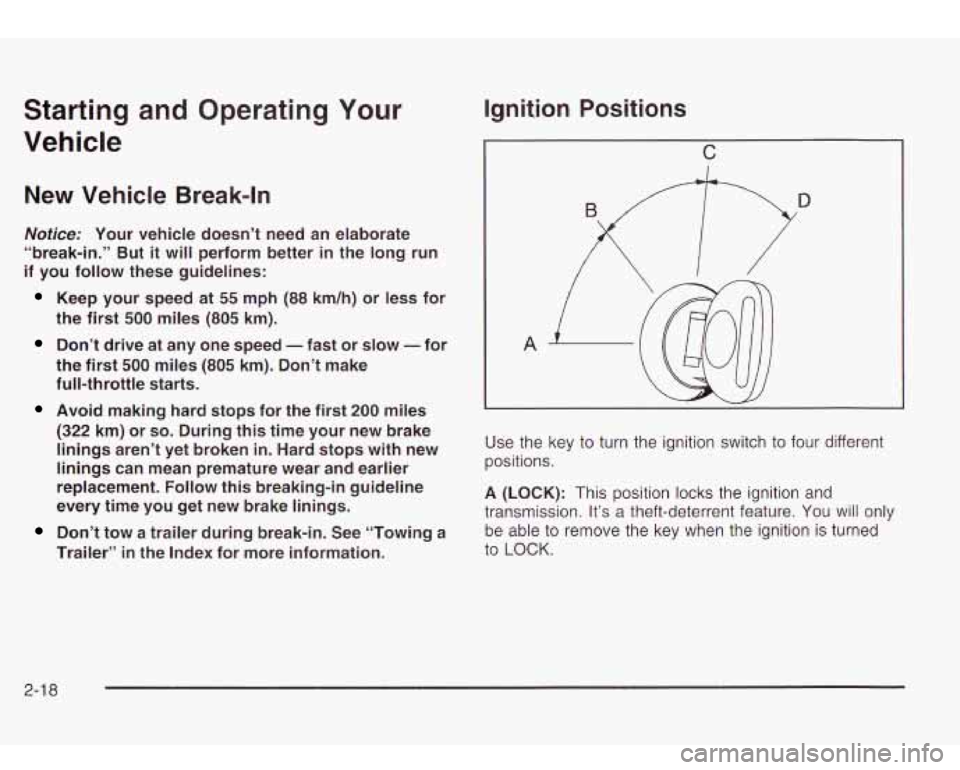
Ignition Positions
C
Use the key to turn the ignition switch to four different
positions.
A (LOCK): This position locks the ignition and
transmission. It’s a theft-deterrent feature. You will only
be able to remove the key when the ignition is turned
to LOCK.
2-1 8
Page 84 of 410
Notice: If your key seems stuck in LOCK and you
can’t turn
it, be sure you are using the correct key; if
so, is it all the way in? Turn the key only with
your hand. Using a tool to force
it could break the
key or the ignition switch. If none of these works,
then your vehicle needs service.
B (ACCESSORY): This position lets you use things like
the radio and the windshield wipers when the engine
is
off.
Notice: Don’t operate accessories in the
ACCESSORY position for long periods of time.
Prolonged operation of accessories
in the
ACCESSORY position could drain your battery and
prevent you from starting your vehicle.
C (RUN): This is the position for driving.
D (START): This position starts the engine,
Retained Accessory Power (RAP)
Your vehicle is equipped with a Retained Accessory
Power (RAP) feature which will allow certain features
01
your vehicle to continue to work up to 20 minutes
after the ignition key is turned to LOCK.
Your radio, power windows, sunroof (option) and
overhead console will work when the ignition key is in
RUN or ACCESSORY. Once the key is turned from
RUN to LOCK, these features will continue to work for
up to
20 minutes or until a door is opened.
Starting Your Engine
Move your shift lever to PARK (P) or NEUTRAL (N). Your
engine won’t start in any other position-that’s a safety
feature. To restart when you’re already moving, use
NEUTRAL (N) only.
Notice: Don’t try to shift to PARK (P) if your
vehicle is moving.
If you do, you could damage the
transmission. Shift to PARK (P) only when your
vehicle is stopped.
1. With your foot off the accelerator pedal, turn the
ignition key to START. When the engine starts,
let go of the key. The idle speed will go down as
your engine gets warm.
Notice: Holding your key in START for longer than
15 seconds at a time will cause your battery to
be drained much sooner. And the excessive heat
can damage your starter motor.
At 15 seconds, the
starter will automatically be disengaged. Wait
about 15 seconds between each try to help avoid
draining your battery or damaging your starter.
2. If it doesn’t start within 10 seconds, push the
accelerator pedal all the way to the floor, while you
hold the ignition key in START. When the engine
starts, let go of the key and let up on the accelerator
pedal. Wait about 15 seconds between each try.
2-1 9
Page 87 of 410
Automatic Transmission Operation
There are several different positions for your shift lever
PARK (P): This position locks the rear wheels. It’s
the best position to use when you start the engine because your vehicle can’t move easily.
It is dangerous to get out of your vehicle if the
shift lever
is not fully in PARK (P) with the
parking brake firmly set. Your vehicle can roll.
Don’t leave your vehicle when the engine
is
running unless you have to. If you have left the
engine running, the vehicle can move suddenly. You or others could be injured. To be sure your vehicle won’t move, even when
you’re on fairly level ground, always set your parking brake and move the shift lever to PARK (P). See “Shifting Into Park (P)”
in the
Index. If you’re pulling a trailer, see “Towing a
Trailer”
in the Index. Ensure
the shift lever is fully in PARK (P) before starting
the engine. Your vehicle has an automatic transmission
shift lock control system. You have to fully apply the
regular brakes before you can shift from PARK
(P) when
the ignition key is in RUN. If you cannot shift out of
PARK (P), ease pressure on the shift lever, press the
button on the shift lever and push the shift lever all
the way into PARK (P) as you maintain brake
application. Move the shift lever into the gear you wish.
See
Shifting Out of Park (P) on page 2-27.
REVERSE (R): Use this gear to back up.
Notice: Shifting to REVERSE (R) while your vehicle
is moving forward could damage your transmission.
Shift to
REVERSE (R) only after your vehicle is
stopped.
To rock your vehicle back and forth to get out of snow,
ice or sand without damaging your transmission,
see
If You Are Stuck: In Sand, Mud, Ice or Snow on
page
4-40.
2-22
Page 89 of 410
FIRST (1): This position gives you even more power
but lower fuel economy than
SECOND (2). You can use
it on very steep hills, or in deep snow or mud.
If the
selector lever is put in FIRST
(1) while the vehicle
is moving forward, the transmission won’t shift into first
gear until the vehicle is going slowly enough.
Notice: If your wheels won’t turn, don’t try to drive.
This might happen if you were stuck in very deep
sand or mud or were up against a solid object. You
could damage your transmission. Also, if you
stop when going uphill, don’t hold your vehicle there
with only the accelerator pedal. This could overheat
and damage the transmission. Use your brakes
or shift into
PARK (P) to hold your vehicle in
position on a hill.
Shift Lock Release
This vehicle is equipped with a shift lock release
system. If your vehicle has a dead battery and you need
to have your vehicle towed, there is a shift lock
release lever that will allow you to move the shift lever
out of PARK (P).
I o access the shift lock release lever, do the following:
1. Press on the sides of the boot around the shift
2. Lift up the boot on the shift lever and you will see
lever
to release the boot.
an orange lever.
3. Lift the orange lever up and move the shift lever out
of
PARK (P).
4. Snap the shift lever boot back in place.
All-Wheel Drive
Your vehicle may have this feature. There is no lever or
switch to engage
or disengage the front axle. It is
fully automatic and adjusts as needed for road
conditions. Your vehicle has an active transfer case
allowing two-wheel-drive operation on dry roads.
The transfer case will shift automatically into all-wheel
drive on slippery surfaces. You may feel an extra
shift when the all-wheel drive engages.
2-24
Page 91 of 410

2. Move the shift lever
into PARK (P) like this:
Press and hold in the button on the lever.
Push the lever all the way toward the front of the
vehicle.
3. Turn the ignition key to LOCK.
4. Remove the key and take it with you. If you can
leave your vehicle with the key, your vehicle is in
PARK
(P).
Leaving Your Vehicle With the Engine
Running
It can be dangerous ,I leave your vehicle --ith
the engine running. Your vehicle could move
suddenly
if the shift lever is not fully in
PARK (P) with the parking brake firmly set.
And,
if you leave the vehicle with the engine
running,
it could overheat and even catch fire.
You or others could be injured. Don’t leave
, your vehicle with the engine running.
If you have to leave your vehicle with the engine
running, be sure your vehicle is in PARK (P) and your
parking brake is firmly set before you leave it. After
you’ve moved the shift lever into PARK (P), hold
the regular brake pedal down. Then, see
if you can
move the shift lever away from PARK (P) without first
pressing the button on the console shift lever. If you can,
it means that the shift lever wasn’t fully locked into
PARK (P).
2-26
Page 92 of 410
Torque Lock
If you are parking on a hill and you don’t shift your
transmission into PARK (P) properly, the weight of the
vehicle may put too much force on the parking pawl
in the transmission. You may find it difficult to pull the
shift lever out of PARK (P). This is called “torque
lock.” To prevent torque lock, set the parking brake and
then shift into PARK
(P) properly before you leave
the driver’s seat. To find out how, see
Shifting Into Park
(P) on page 2-25.
When you are ready to drive, move the shift lever out of
PARK (P)
before you release the parking brake.
If torque lock does occur, you may need to have another
vehicle push yours a little uphill to take some of the
pressure from the parking pawl in the transmission,
so
you can pull the shift lever out of PARK (P).
Shifting Out of Park (P)
Your vehicle has an automatic transmission shift lock
control system. You have to fully apply the regular
brakes before you can shift from PARK (P) when the
ignition is in RUN. See
Automatic Transmission
Operation
on page 2-22.
If you cannot shift out of PARK (P), ease pressure on
the shift lever. Push the shift lever all the way into
PARK (P) as you maintain brake application. Then press
the shift lever button and move the shift lever into the
gear you want.
If you ever hold the brake pedal down but still can’t shift
out of PARK (P), try this:
1. Turn the key to LOCK.
2. Apply and hold the brake until the end of Step 4.
3. Shift to NEUTRAL (N).
4. Start the vehicle and then shift to the drive gear
you want.
5. Have the vehicle fixed as soon as possible.
2-27
Page 100 of 410

Onstar@ System Onstar@ Services
OnStaP uses global positioning system (GPS) satellite
technology, wireless communications, and state of
the art call centers
to provide you with a wide range of
safety, security, information and convenience services.
An OnStaP subscription plan is included in the price
of
your vehicle. You can easily upgrade or extend your
Onstar@ services to meet your personal needs.
A complete Onstar@ user’s guide and the terms and
conditions of the Onstar@ Subscription Service
Agreement are included in your Onstar@ equipped
vehicle’s glove box literature. For more information, visit
www.onstar.com, contact Onstar@ at
1 -888-4-ONSTAR
(1-888-466-7827), or press the blue Onstar@ button
to speak to an Onstar@ advisor 24 hours a day,
7 days
a week.
0 Remote Door Unlock
Remote Diagnostics
Onstar@
MED-NET (Requires separate activation
and annual fee on some plans)
0 Online and Personal Concierge Services
Route Support
RideAssist
0 Information and Convenience Services
2-35