radio Oldsmobile Bravada 2004 s Service Manual
[x] Cancel search | Manufacturer: OLDSMOBILE, Model Year: 2004, Model line: Bravada, Model: Oldsmobile Bravada 2004Pages: 420, PDF Size: 4.37 MB
Page 306 of 420
Notice:If the other vehicle’s system is not a 12-volt
system with a negative ground, both vehicles can
be damaged. Only use vehicles with 12-volt systems
with negative grounds to jump start your vehicle.
2. Get the vehicles close enough so the jumper cables
can reach, but be sure the vehicles aren’t touching
each other. If they are, it could cause a ground
connection you don’t want. You wouldn’t be able to
start your vehicle, and the bad grounding could
damage the electrical systems.
To avoid the possibility of the vehicles rolling, set
the parking brake rmly on both vehicles involved in
the jump start procedure. Put an automatic
transmission in PARK (P) or a manual transmission
in NEUTRAL before setting the parking brake. If
you have a four-wheel-drive vehicle, be sure
the transfer case is not in NEUTRAL.
Notice:If you leave your radio or other accessories
on during the jump starting procedure, they could
be damaged. The repairs would not be covered
by your warranty. Always turn off your radio and
other accessories when jump starting your vehicle.3. Turn off the ignition on both vehicles. Unplug
unnecessary accessories plugged into the cigarette
lighter or accessory power outlets (if equipped).
Turn off the radio and all lamps that aren’t needed.
This will avoid sparks and help to save both
batteries. And it could save your radio!
4. Open both hoods and locate the batteries. Find the
positive (+) and negative (−) terminals on each
battery. Your vehicle has a remote negative (−) jump
starting terminal. You should always use this
remote terminal instead of the terminal on the
battery. The remote negative (−) terminal is located
on the front engine lift bracket and is marked
GND. SeeEngine Compartment Overview on
page 5-12for more information on location.
5-42
Page 354 of 420
Cleaning Vinyl
Use warm water and a clean cloth.
Rub with a clean, damp cloth to remove dirt. You
may have to do this more than once.
Things like tar, asphalt and shoe polish will stain if
you do not get them off quickly. Use a clean cloth
and vinyl cleaner. See your dealer for this product.
Cleaning Leather
Use a soft cloth with lukewarm water and a mild soap or
saddle soap and wipe dry with a soft cloth. Then, let
the leather dry naturally. Do not use heat to dry.
For stubborn stains, use a leather cleaner.
Neveruse oils, varnishes, solvent-based or abrasive
cleaners, furniture polish or shoe polish on leather.
Soiled or stained leather should be cleaned
immediately. If dirt is allowed to work into the nish,
it can harm the leather.
Cleaning the Top of the Instrument
Panel
Use only mild soap and water to clean the top surfaces
of the instrument panel. Sprays containing silicones
or waxes may cause annoying reections in the
windshield and even make it difficult to see through the
windshield under certain conditions.
Cleaning Interior Plastic Components
Use only a mild soap and water solution on a soft cloth
or sponge. Commercial cleaners may affect the
surface nish.
Cleaning Glass Surfaces
Glass should be cleaned often. GM Glass Cleaner or a
liquid household glass cleaner will remove normal
tobacco smoke and dust lms on interior glass. See
Vehicle Care/Appearance Materials on page 5-96.
Notice:If you use abrasive cleaners when cleaning
glass surfaces on your vehicle, you could scratch
the glass and/or cause damage to the rear window
defogger and the integrated radio antenna. When
cleaning the glass on your vehicle, use only a soft
cloth and glass cleaner.
5-90
Page 363 of 420
Fuses and Circuit Breakers
The wiring circuits in your vehicle are protected from
short circuits by a combination of fuses and circuit
breakers. This greatly reduces the chance of res
caused by electrical problems.
Look at the silver-colored band inside the fuse. If the
band is broken or melted, replace the fuse. Be sure you
replace a bad fuse with a new one of the identical
size and rating.
If you ever have a problem on the road and don’t have
a spare fuse, you can borrow one that has the same
amperage. Just pick some feature of your vehicle
that you can get along without — like the radio or
cigarette lighter— and use its fuse, if it is the correct
amperage. Replace it as soon as you can.
Engine Compartment Fuse Block
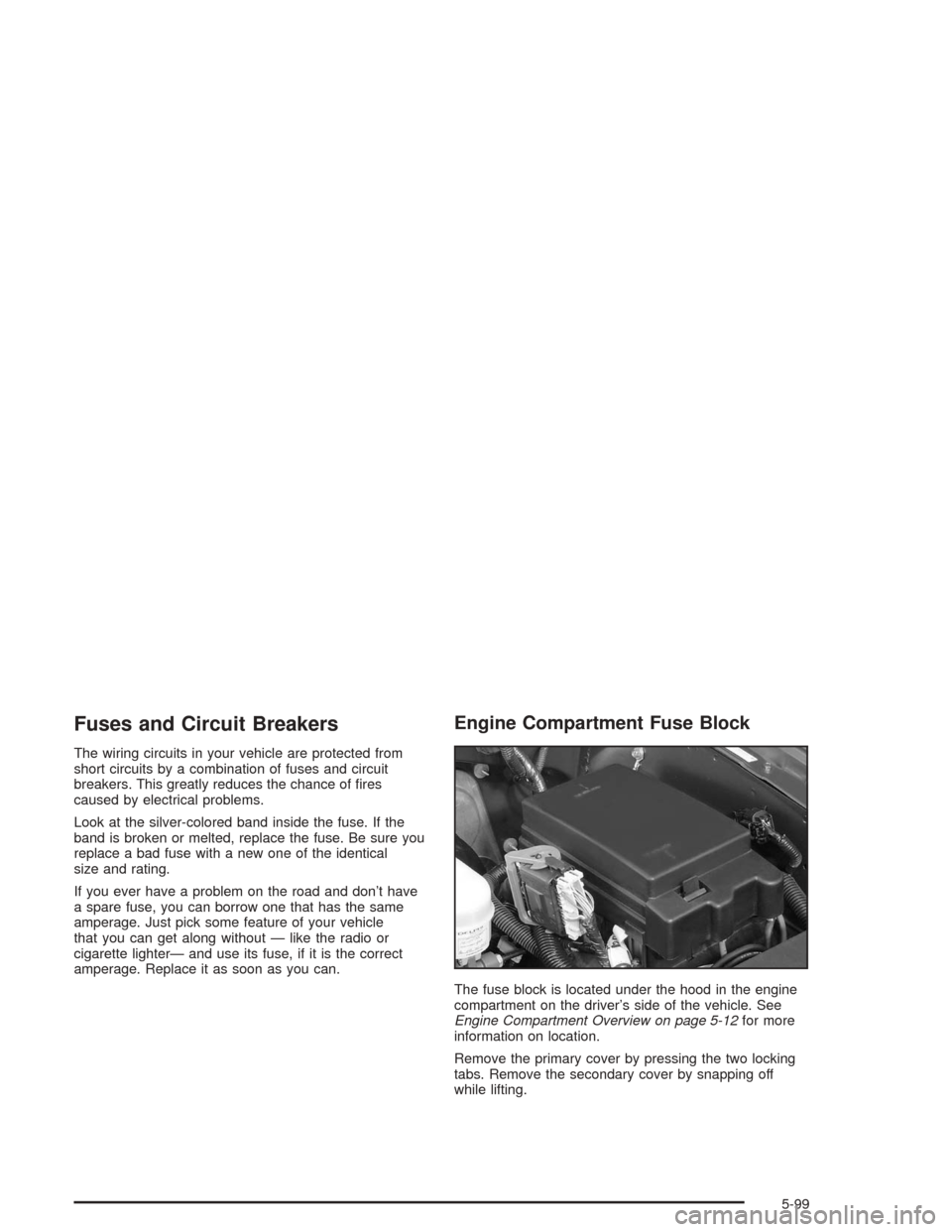
The fuse block is located under the hood in the engine
compartment on the driver’s side of the vehicle. See
Engine Compartment Overview on page 5-12for more
information on location.
Remove the primary cover by pressing the two locking
tabs. Remove the secondary cover by snapping off
while lifting.
5-99
Page 368 of 420
Fuses Usage
25 Blank
26 Blank
27 OH Battery/OnStar
®System
29 Rainsense™ Wipers
30 Parking Lamps
31 Truck Body Controller Accessory
32 Truck Body Controller 5
33 Front Wipers
34 Vehicle Stop
35 Blank
36 Heat Ventilation Air Conditioning B
37 Front Parking Lamps
38 Left Turn Signal
39 Heat Ventilation Air Conditioning 1Fuses Usage
40 Truck Body Controller 4
41 Radio
42 Trailer Park
43 Right Turn Signal
44 Heat Ventilation Air Conditioning
45 Rear Fog Lamps
46 Auxiliary Power 1
47 Ignition 0
48 Four-Wheel Drive
49 Blank
50 Truck Body Controller Ignition
51 Brakes
52 Truck Body Controller Run
5-104
Page 403 of 420
A
Accessory Inator...........................................5-71
Accessory Power Outlets.................................3-20
Adding a Snow Plow or Similar Equipment.........4-49
Adding Washer Fluid.......................................5-36
Additional Program Information........................... 7-9
Additives, Fuel................................................. 5-6
Add-On Electrical Equipment............................5-98
Adjusting the Speakers (Balance/Fade)......3-62, 3-72
After Off-Road Driving.....................................4-28
Air Bag
Readiness Light..........................................3-32
Air Bag Systems.............................................1-46
How Does an Air Bag Restrain?....................1-52
Servicing Your Air Bag-Equipped Vehicle.........1-55
What Makes an Air Bag Inate?....................1-52
What Will You See After an Air Bag Inates?......1-53
When Should an Air Bag Inate?...................1-51
Where Are the Air Bags?..............................1-48
Air Cleaner/Filter, Engine.................................5-19
Airbag Sensing and Diagnostic Module (SDM)....7-10
All-Wheel Drive...............................................5-47
All-Wheel Drive (AWD) System.........................2-24
All-Wheel-Drive Service Light............................3-42
AM ...............................................................3-96
Antenna, Fixed Mast.......................................3-98
Anti-lock Brake System..................................... 4-7Anti-Lock Brake, System Warning Light..............3-35
Appearance Care............................................5-88
Care of Safety Belts....................................5-91
Chemical Paint Spotting...............................5-95
Cleaning the Inside of Your Vehicle................5-88
Cleaning the Outside of Your Vehicle..............5-91
Finish Damage............................................5-94
Sheet Metal Damage...................................5-94
Underbody Maintenance...............................5-95
Vehicle Care/Appearance Materials................5-96
Weatherstrips..............................................5-91
Approaching a Hill..........................................4-21
Ashtrays........................................................3-20
Audio Output..................................................3-90
Audio System(s).............................................3-58
Audio Steering Wheel Controls......................3-95
Care of Your Cassette Tape Player................3-96
Care of Your CD and DVD Player..................3-97
Care of Your CDs and DVDs........................3-97
Chime Level Adjustment...............................3-98
Fixed Mast Antenna.....................................3-98
Navigation/Radio System..............................3-81
Audio Systems
Radio Personalization...................................3-94
Audio System(s)
Radio with Cassette and CD.........................3-59
Radio with Six-Disc CD................................3-69
1
Page 404 of 420
Audio System(s) (cont.)
Rear Seat Audio (RSA)................................3-93
Setting the Time..........................................3-58
Theft-Deterrent Feature................................3-94
Understanding Radio Reception.....................3-96
Automatic Headlamp System............................3-15
Automatic Transmission
Fluid..........................................................5-20
Operation...................................................2-22
B
Backglass Wiper Blade Replacement.................5-55
Backing Up....................................................4-57
Battery..........................................................5-40
BATTERY NOT CHARGING.............................3-55
Battery Replacement......................................... 2-6
Battery Run-Down Protection............................3-19
Before Leaving on a Long Trip.........................4-35
Before You Drive............................................3-82
Before You Go Off-Roading..............................4-16
Brake
Parking......................................................2-24
System Warning Light..................................3-34
Brake Adjustment............................................5-39
Brake Fluid....................................................5-37
Brake Pedal Travel.........................................5-39Brake Wear...................................................5-39
Brakes..........................................................5-37
Braking........................................................... 4-6
Braking in Emergencies..................................... 4-9
Break-In, New Vehicle.....................................2-18
Bulb Replacement...........................................5-50
Replacement Bulbs......................................5-51
Taillamps and Turn Signal Lamps..................5-50
Buying New Tires...........................................5-67
C
California Fuel.................................................. 5-5
Canada – Customer Assistance.......................... 7-5
Canadian Owners................................................ ii
Canadian Roadside Assistance........................... 7-7
Capacities and Specications..........................5-105
Carbon Monoxide...................4-38, 4-50, 2-13, 2-27
Care of
Safety Belts................................................5-91
Your Cassette Tape Player............................3-96
Your CD and DVD Player.............................3-97
Your CDs and DVDs....................................3-97
Cargo Cover..................................................2-41
Cargo Tie Downs............................................2-42
Cassette Tape Messages.................................3-66
Chains, Tires..................................................5-71
2
Page 412 of 420
M
Maintenance Schedule
Additional Required Services........................... 6-6
At Each Fuel Fill........................................... 6-9
At Least Once a Month................................6-10
At Least Once a Year..................................6-10
Introduction.................................................. 6-2
Maintenance Footnotes.................................. 6-8
Maintenance Record....................................6-16
Maintenance Requirements............................. 6-2
Normal Maintenance Replacement Parts.........6-15
Owner Checks and Services........................... 6-9
Recommended Fluids and Lubricants.............6-13
Scheduled Maintenance................................. 6-4
Using Your................................................... 6-2
Your Vehicle and the Environment................... 6-2
Maintenance When Trailer Towing.....................4-59
Making Turns.................................................4-57
Malfunction Indicator Light................................3-36
Matching Transmitter(s) to Your Vehicle............... 2-6
Memory Seat.................................................2-42Message
DIC Warnings and Messages........................3-54
Mexico, Central America and Caribbean
Islands/Countries (Except Puerto Rico and U.S.
Virgin Islands) – Customer Assistance................ 7-5
Mirror Operation.............................................2-29
Mirrors
Automatic Dimming Rearview with OnStar
®
and Compass..........................................2-29
Outside Automatic Dimming Mirror with Curb
View Assist.............................................2-32
Outside Convex Mirror.................................2-31
Outside Heated Mirrors................................2-32
Outside Manual Mirrors................................2-31
Outside Power Mirror...................................2-31
MyGMLink.com................................................ 7-3
N
Navigation/Radio System..................................3-81
New Vehicle Break-In......................................2-18
Normal Maintenance Replacement Parts............6-15
10
Page 414 of 420
Playing a Specic Loaded
Compact Disc.............................................3-77
Playing the Radio...................................3-59, 3-69
Power
Accessory Outlets........................................3-20
Door Locks.................................................. 2-8
Electrical System.........................................5-98
Lumbar Controls........................................... 1-2
Reclining Seatbacks...................................... 1-4
Reduced Engine Light..................................3-42
Seat............................................................ 1-2
Steering Fluid.............................................5-35
Windows....................................................2-15
Power Steering...............................................4-11
Programmable Automatic Door Locks.................. 2-9
Programmable Locking Feature.........................2-10
Programmable Unlocking Feature......................2-11
Programming the HomeLink
®Transmitter...........2-34
Q
Questions and Answers About Safety Belts.........1-12
R
Radiator Pressure Cap....................................5-25
Radios..........................................................3-58
Care of Your Cassette Tape Player................3-96
Care of Your CD and DVD Player..................3-97
Care of Your CDs and DVDs........................3-97
Navigation/Radio System..............................3-81
Radio Personalization...................................3-94
Radio with Cassette and CD.........................3-59
Radio with Six-Disc CD................................3-69
Rear Seat Audio..........................................3-93
Setting the Time..........................................3-58
Theft-Deterrent............................................3-94
Understanding Reception..............................3-96
Rainsense™ Wipers........................................3-10
RDS Messages......................................3-64, 3-75
Reading Lamps..............................................3-19
REAR ACCESS OPEN....................................3-56
Rear Axle......................................................5-48
Locking......................................................4-11
Rear Climate Control System............................3-26
12
Page 417 of 420
Skidding........................................................4-15
Snow Plow....................................................4-49
Some Other Rainy Weather Tips.......................4-32
Spare Tire.....................................................5-87
Special Fabric Cleaning Problems.....................5-89
Specications, Capacities...............................5-105
Speedometer..................................................3-30
Stalling on an Incline.......................................4-26
Starting Your Engine.......................................2-20
Steering........................................................4-11
Steering in Emergencies..................................4-12
Steering Tips..................................................4-11
Steering Wheel Controls, Audio.........................3-95
Stereo RCA Jacks..........................................3-89
Storage Areas
Convenience Net.........................................2-41
Front Storage Area......................................2-39
Glove Box..................................................2-38
Luggage Carrier..........................................2-39
Overhead Console.......................................2-38
Rear Floor Storage Lid.................................2-40
Storing a Flat or Spare Tire and Tools...............5-85
Stuck in Sand, Mud, Ice or Snow......................4-42
Sun Visors.....................................................2-15
Sunglasses Storage Compartment.....................2-38
Sunroof.........................................................2-42T
Tachometer....................................................3-31
Taillamps
Turn Signal Lamps......................................5-50
Testing the Alarm............................................2-17
Theft-Deterrent, Radio.....................................3-94
Theft-Deterrent Systems...................................2-16
Content Theft-Deterrent................................2-16
Passlock
®...................................................2-18
TIGHTEN FUEL CAP......................................3-57
Tilt Wheel........................................................ 3-7
Tire Sidewall Labeling......................................5-56
Tire Size.......................................................5-59
Tire Terminology and Denitions........................5-61
Tires.............................................................5-55
Buying New Tires........................................5-67
Chains.......................................................5-71
Changing a Flat Tire....................................5-74
If a Tire Goes Flat.......................................5-73
Ination - Tire Pressure................................5-64
Inspection and Rotation................................5-65
Spare Tire..................................................5-87
Uniform Tire Quality Grading.........................5-68
Wheel Alignment and Tire Balance.................5-69
Wheel Replacement.....................................5-69
15
Page 418 of 420
Tires (cont.)
When It Is Time for New Tires......................5-66
To Use the Engine Coolant Heater....................2-21
Top Strap......................................................1-36
Top Strap Anchor Location...............................1-38
Torque Lock...................................................2-26
Total Weight on Your Vehicle’s Tires..................4-54
Towing
Recreational Vehicle.....................................4-43
Towing a Trailer..........................................4-50
Your Vehicle...............................................4-43
Traction
Assist System (TAS)...................................... 4-9
Trailer Brakes.................................................4-55
Trailer Wiring Harness.....................................4-60
Transfer Case................................................5-47
Transmission
Fluid, Automatic...........................................5-20
Transmission Operation, Automatic....................2-22
Transmission, Transaxle, Transfer Case Unit
Repair Manual............................................7-12Transportation Options...................................... 7-8
Travel Note Recorder......................................2-38
Traveling to Remote Areas...............................4-18
Trip Information..............................................3-46
Trip Odometer................................................3-30
Turn and Lane Change Signals.......................... 3-8
TURN SIGNAL ON.........................................3-55
Turn Signal/Multifunction Lever........................... 3-8
Turn Signals When Towing a Trailer..................4-57
U
Understanding Radio Reception........................3-96
Uniform Tire Quality Grading............................5-68
United States – Customer Assistance.................. 7-4
Using Cleaner on Fabric..................................5-89
Using HomeLink
®...........................................2-37
Using RDS............................................3-62, 3-73
Using Song List Mode.....................................3-79
16