change time Oldsmobile Cutlass Supreme 1995 Owner's Manuals
[x] Cancel search | Manufacturer: OLDSMOBILE, Model Year: 1995, Model line: Cutlass Supreme, Model: Oldsmobile Cutlass Supreme 1995Pages: 340, PDF Size: 16.68 MB
Page 4 of 340
GENERAL MOTORS, GM'and the GM Emblem,
OLDSMOBILE and the OLDSMOBILE Rocket
Emblem are
registered trademarks of General Mators
Corporation.
This manual includes the latest information at the time it
was printed. We reserve the right to make changes in the
product after, that time without further notice. For
vehicles
first sold in Canada, substitute the name
"General Motors of Canada Limked" for Oldsmobile
Division whenever it appears in this manual.
Please keep this manual in your Oldsmobile,
so it will
be there if you ever need it when you're
on the road. If
you,sell the vehicle, please leave this manual in it so the
new owner can useit.
Litho
in U.S.A.
Part No. 22647449 A Second Edition
L
I
WE SUPPORT VOLUNTARY TECHNICIAN CERTIFICATION THROUGH
AUTOMOTIVE
National Institute for
SERVICE EXCELLENCE
We support voluntary
technician certification.
*! .. .*.
For Canadian Owners Who Prefer a
French Language Manual:
Aux propridtaires canadiens: Vous pouvez vous procurer
un exemplaire de ce guide en fransais chez votre
.
concessionaire ou au DGN Marketing Services Ltd.,
1500 Bonhill Rd., Mississauga, Ontario -L5T 1C7.
,
'Copyright General Motors Corporation 1994
All Rights Reserved
Page 65 of 340
Battery Replacement
Under no&al use, the batteries in your key chain
transmitter should last about two years.
You can tell the batteries are weak if the transmitter
won't work at the normal range
i'n any location. If you
have to get close to your vehicle before the transmitter
works, it's probably time to change the batteries.
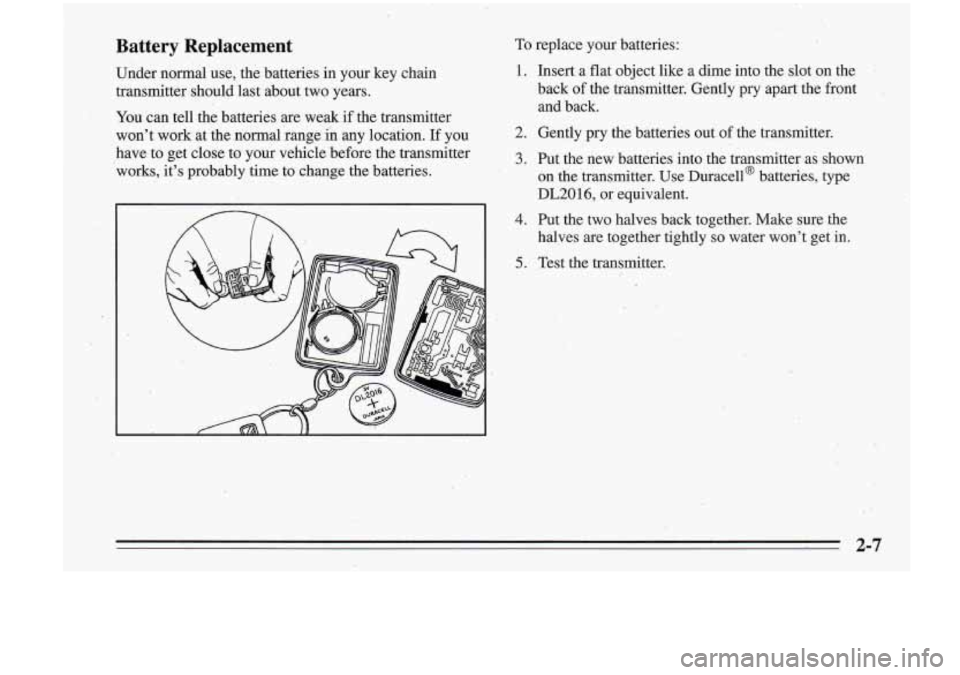
To replace your batteries:
1.
2.
3:
4.
5.
Insert a flat object like a dime into the slot on the
back of the transmitter.' Gently pry apart the front
and back.
Gently
pry the batteries out of the transmitter.
Put the new batteries into the transmitter as shown
on the transmitter. Use Duracella batteries,, type
DL201
6, or equivalent.
Put the two halves back together. Make sure the
halves are together tightly
so water won't get in.
Test the transmitter.
2-7
Page 71 of 340
To start your engine:
1. Without pushing the accelerator pedal, turn your
ignition key to
START. When the engine starts, let
go of the key The idle speed will go down as your
engine gets warm.
NOTICE:
Holding your key in START for longer than -- 15 seconds at a time will cause your battery to be
drained much sooner. And the excessive heat can
.damage your starter motor.
2. If-your engine won’t staq (or starts but then stops),
it could be flooded with
too much gasoline. Try
pushing your accelerator pedal all the way to the
floor and holding it there as you hold the key in
START
for about three sec,onds. If the vehicle starts
briefly but then stops again, do the same thing, but
this time keep the pedal down
for five or six seconds.
This clears the extra gasoline from the engine.
I
NOTICE:
Your engine is designed to work with the .
electronics in your vehicle. If you add electrical
parts or accessories, you could,change the
way
the fuel injection system operates. Before adding
electrical equipment, check with your retailer.
If
you don’t, your engine might not perform
properly.
If you ever have to have your vehicle towed, see
the part of this manual that tells how to do
it
without damaging your vehicle. See “Towing
Your Vehicle” in the Index.
\. 2-13
.
Page 90 of 340
Instrument Panel Lamps
You can brighten or dim the instrument panel lamps by
moving the dial. If you turn the dial all the way to INT,
your courtesy or interior lamps will come on.
Daytime Running Lamps (Canada Only)
Daytime Running Lamps (DRL) can make it easier for
others to see the front of your vehicle during the day.
DRL can be helpful in many different driving
conditions, but they can be especially helpful in the
short periods after dawn and before sunset.
A light sensor makes the DRL work, so be sure the light
sensor hole on top
of the instrument panel isn't covered. The
DRL system will make your low-beam headlamps
come on
at reduced brightness in daylight when:
0 The ignition is on,
0 The headlamp switch is off, and
0 The parking brake is released.
When the
DRL are on, only your low-beam headlamps
will be on. The taillamps, sidemarker and,other lamps
won't
be on. Your instrument panel won't be lit up
either.
When it's dark enough outside, your low-beam
headlamps will change
fo full brightness. The other
lamps that come on with your headlamps will also come
on.
When it's bright enough outside, the regular lamps will
.go
off, and your low-beam headlamps change to the
reduced brightness of
DRL.
; To idle your vehicle with the DRL off, set the parking
brake while the ignition is in
OFF or LOCK. Then start
your vehicle. The
DRL will stay off until you release the
parking brake.
As with any vehicle, you should turn on the regular
headlamp system any time you need it.
. 3 13
Page 125 of 340
I
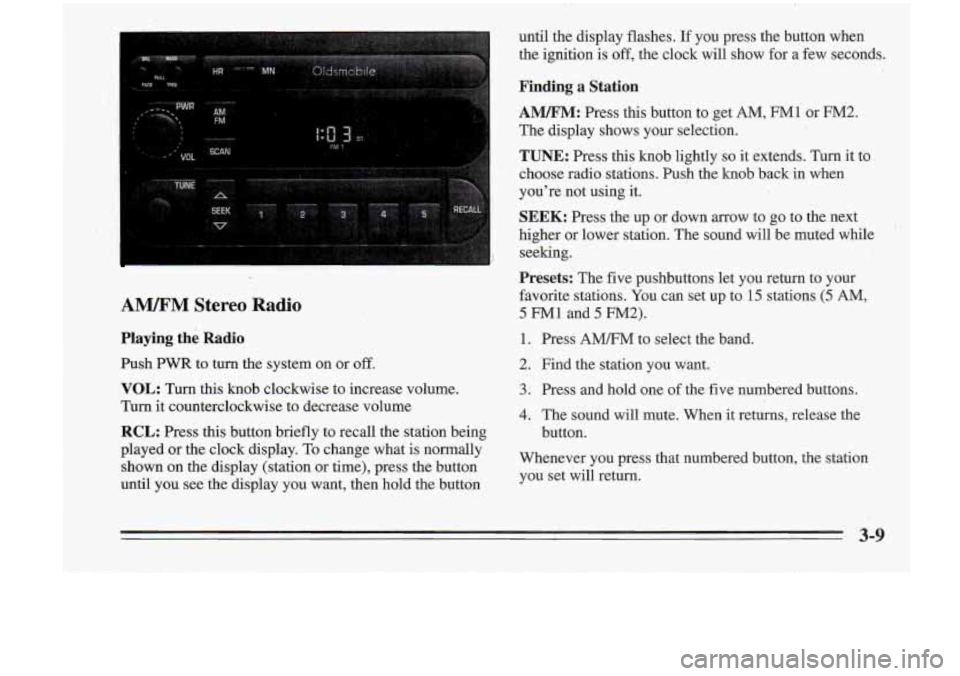
AM/I?M Stereo Radio
Playing the Radio
Push PWR to turn the system on or off.
until the display flashes. If you press the button when
the ignition
is off, the clock will show for a' few seconds.
Finding a Station
AM/FM: Press this button to get AM, FM1 or M.2.
The display shows your selection.
TUNE:'Press this knob lightly
so it extends. Turn it to
choose radio stations. Push the knob back in when
you're not using it.
VOL: Turn this knob clockwise to increase volume.
Turn it counterclockwise to decrease volume
RCL: Press this button briefly to recall the station being
SEEK: Press the up or dawn arrow to go to the next
higher or lower station. The sound will be muted while
seeking.
Presets: The five pushbuttons let you return to your
favorite stations- You can set up to
-15 stations (5 AM,
5 FM1 and 5 FM2).
1. Press AMm' to select the band.
2. Find the station you want. ..
3. Press .and hold one of the five numbered buttons.
4. The sound will mute. When it returns, release the
button.
Played
Or the 'lock To change what is nomallY Whenever you press that numbered button, the station
shown on the display (station
or time), press the button you set will return.
until you see the display you want, then hold the button
3-9
Page 130 of 340
I
.. I. ,. , I
-It is dirt); scratched or Wet.
..
FWD: Press and hold,this button to advance to a
It is very humid. If so, wait about an hour and try . . passage quickly. You -will hear sound at a reduced
volume. The display will show elapsed time.
again.
RCL: Press this button to see which track is playing.
Press it again- within five seconds to see how long it has
been playing. (elapsed time). To change what
is normally
J COW: Press this button to make soft and loud
passages more nearly equal in volume. COMP will appear on the display.
shown on the display (track or elapsed time), press the
RDM: Press this button to hear the tracks in random
button .until you see the display you want, then hold the.
order. Press it again to
turn off random'play.
. button until the display flashes. ' , " AM/FM: Press this button to play the radio when.a disc
SEEK: Press the down mow to go to the start of the 3;'. is playing. The disc will stop but'remain in the player.
CD: Press this button to change.to the disc function
when the radio
is on. The disc will start playing at the
point where it
was stopped. A box will appear around
CD on the display when the disc is active.
' current track, if more than eight seconds. have,piayed: 8''
'. 8 Press the up arrow to go to the next track. If you hold-
the button or press it more than once, the player will
1 continue miwing back or forward through the disc.
-button again to stop scanning. If you turn
off the ignition or radio with a disc in the
3-14
- - -
REV: Press and hold this button to return to a passage
quickly. You will hear sound at a reduced volume. The
display will show elapsed time.
,
player, it will stay in the player. When ,you turn' on the
ignition or system, the disc will start playing where
it
was stopped.
Page 131 of 340
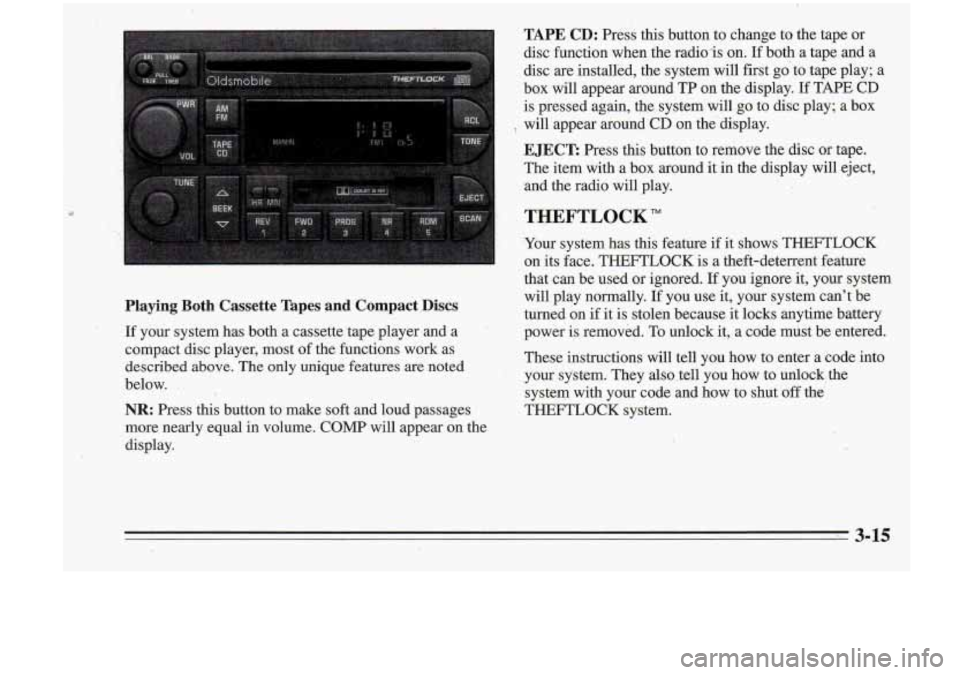
TAPE CD: Press this button to change to the taDe or
Playing Both Cassette Tapes and Compact .Discs
If your system has both a cassette tape player and a
compact disc player, most of the functions work as
described above. The only unique fezares are noted
below.
.
NR: Press this button to make soft and loud pi ages
more nearly equal
in volume. COMP will appear on the
display. disc function when the radio-is on.
Ifboth a
tap; and a
disc are installed, the system will first go to tape play; a
box will appear around TP on the display.
If TAPE CD
is pressed again, the system will go to disc play; a box
EJECT: Press this button to remove the disc or tape.
The item with a box around it in the display will eject,
'8 will appear around CD on the'display.
,, and the radio wi€l play.
THEFTLOCK"
Your system has this feature if it shows THEFTLOCK
on its face. THEFTLOCK is a theft-deterrent feature
that can be used or ignored.
If you ignore it, your system
will play normally.
I€ you use it, your system can't be
turned on if it is stolen because it locks anytime battery
power is removed. To unlock it, a code must be entered.
These instructions will tell you how to enter a code into
,your system. They also .tell you how to unlock, the
system with your code and how to shut off the
THEFTLOCK system.
Page 146 of 340
Remember: Anti-iock doesn’t change the time you need
to get your foot up to the brake pedal.
If you get too
close to the .vehicle in front of you, you won’t have time
to apply your brakes
if that vehicle suddenly. slows or
stops. Always leave enough room up ahead to stop, even
though
you have anti-lock brakes.
,_ Steering
Power Steering
If you lose power steering assist because the engine
stops
or the system is not, functioning, you can steer but
it will take much more effort.
. ..
To Use Anti-Lock
Don’t pump the brakes. Just hold the brake pedal down
and let anti-lock work for you. You may feel the system
working, or you may notice some noise, but this is
normal. When your anti-lock system is adjusting brake
pressure to help avoid a braking skid, the LOW TRAC
light will come’on., See “Anti-Lock Brake System
Active Light”
in the Index.
Braking .,in Emergencies
Usti your anti-lock braking system when you’need to.
With anti-lock, you can steer and brake at the same
time.
In many emergencies, steering can help you more
than even the very best braking.
.‘
Steering Tips
Driving on Curves
It’s important to take curves at a reasonable speed.
A lot of the “driver lost control” accidents mentioned on
the news happen on curves. Here’s why:
Experienced driver or beginner, each
of us is subject to
the samelaws of physics when driving on curves. The
traction of the tires against the road surface makes it
possible for the vehicle to change its path when you
turn
the front wheels. If there’s no traction, inertia will keep
the vehicle going in the same direction. If you’ve ever
tried to steer a vehicle on wet ice, you’ll understand this.
The traction you can get in a curve depends on the
condition of your tires and the road surface, $the angle at
which the curve is banked, and your speed. While
you’re in a curve, speed is the one factor you can
control.
Page 194 of 340
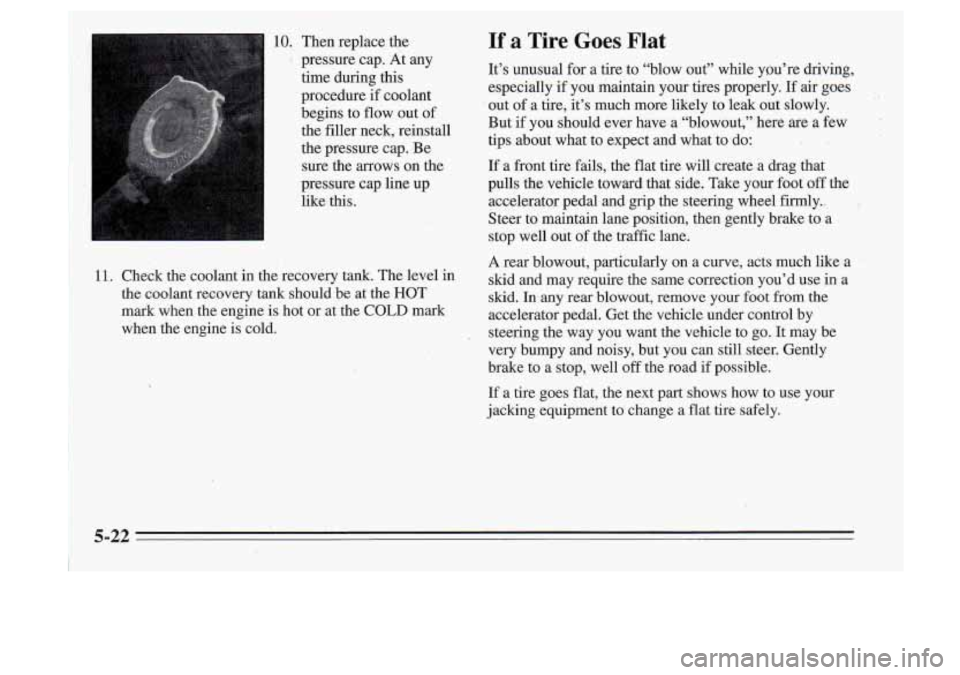
10. Then replace the
’ pressure cap. At any
time during this
procedure if coolant
begins to flow out of
the filler neck, reinstall
the pressure cap. Be
sure the arrows on the
pressure cap line up
like this.
11. Check the coolant in the recovery tank. The level in
the coolant recovery tank should be at the HOT
mark when the engine
is hot or at the COLD mark
when the engine
is cold.
If a Tire Goes Flat
It’s unusual for a tire to “blow out” while you’re \
driving,
especially
if you maintain your tires properly. If air goes
out
of a tire, it’s much more likely to leak out slowly.
But if you should ever have a “blowout,” here are a few
tips about what to expect and what to do:
If a front tire fails, the flat tire will create a drag that
pulls the vehicle toward that side. Take your foot
off the
accelerator pedal and grip the steering wheel firmly.,
Steer to maintain lane position, then gently brake to a
stop well out of the traffic lane.
A rear blowout, particularly on a curve, acts much like a
skid and may require the same correction you’d use in a
skid. In any rear blowout, remove your foot from the
accelerator pedal. Get the vehicle under control by
steering the way you want the vehicle to go.
It may be
very bumpy and noisy, but you can still steer. Gently
brake to a stop, well
off the road if possible.
If a tire goes flat, the next part shows how to
use your
jacking equipment to change a flat tire safely.
Page 220 of 340
NOTICE:
If the air cleaner is off, a backfire can cause a
damaging engine fire. And, dirt can easily ,get
into your engine, which will damage it. Always
have the air cleaner in place when you’re driving.
Automatic Transaxle Fluid
When to Check and Change
A good time to check your automatic transaxle fluid
level is when the engine oil is changed. Refer to the
Maintenance Schedule to determine when to change
your fluid. See “Scheduled Maintenance Services’’ in the
Index.
How to Check
Because this operation can be a little difficult, you may
choose to have this done at your Oldsmobile retailer
Service Department.
If yon do it yourself, be sure to follow all the
instructions here,
or you could get a false reading on the
dipstick.