light Oldsmobile Cutlass Supreme 1996 s Owner's Guide
[x] Cancel search | Manufacturer: OLDSMOBILE, Model Year: 1996, Model line: Cutlass Supreme, Model: Oldsmobile Cutlass Supreme 1996Pages: 356, PDF Size: 18.48 MB
Page 122 of 356
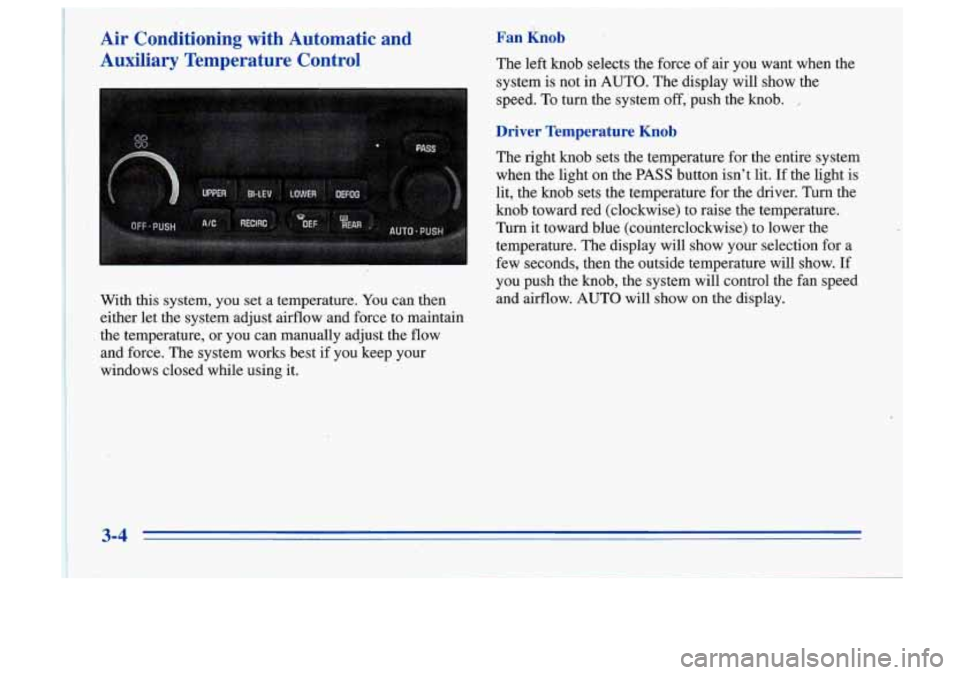
Air Conditioning with Automatic and
-Auxiliary Temperature Control
With this system, you set a temperature. You can then
either let the system adjust airflow and force to maintain
. the temperature, or you can manually adjust the flow
and force. The system works best if you keep your
windows closed while using it.
Fan Knob
The left knob selects the force of air you want when the
system
is not in AUTO. The display will show the
speed. To turn the system off,'push the
knob. ,
Driver Temperature Knob
The right knob sets the temperature for the entire system
when the light on the PASS button isn't lit. If the light is
lit, the knob sets the temperature for the driver. Turn the
knob toward red (clockwise) to raise the temperature.
Turn it toward blue (counterclockwise) to lower the
temperature.
The display will show your selection for a
few seconds, then the outside temperature will show. If
you push the knob, the system will control the fan speed
and airflow. AUTO will show on the display.
3-4
Page 123 of 356
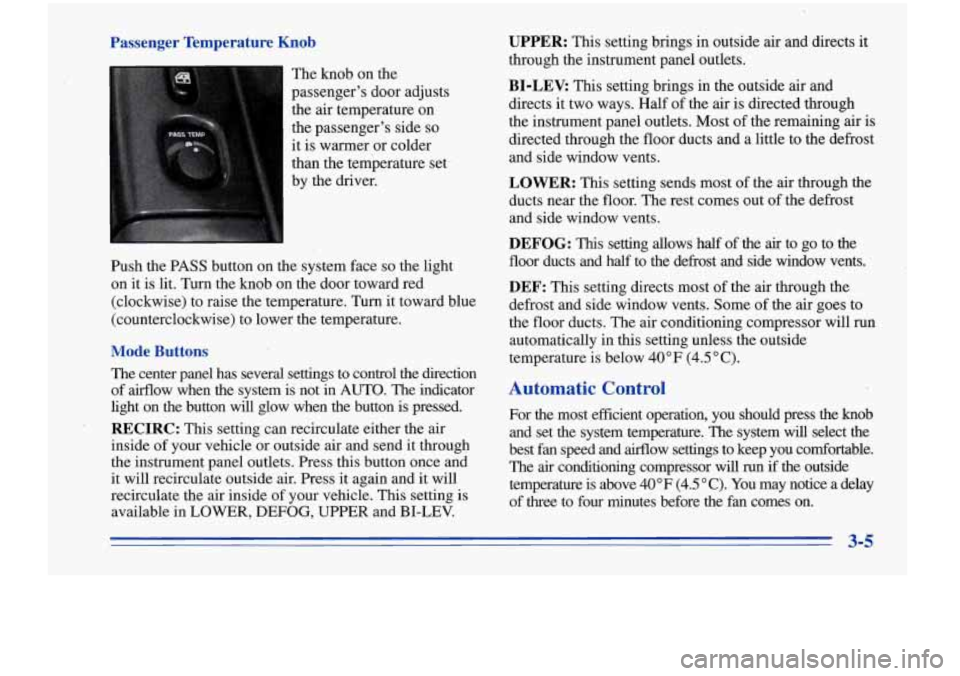
Passenger Temperature Knob
The knob on the
passenger's door adjusts
the air temperature
on
the passenger's side so
it is warmer or colder
than the temperature set.
by the driver.
Push the PASS button on the system face
so the light
on it is lit. Turn the knob on the door toward red
(clockwise) to raise the temperature. Turn it toward blue
(counterclockwise) to lower the temperature.
Mode Buttons
The center panel has several settings to control the direction \
of airflow when the system is not in AUTO. The indicator
light on the button will glow when the button is pressed.
RECIRC: This setting can recirculate either the air
inside of your vehicle or outside air and send it through
the instrument panel outlets. Press this button once and
it will recirculate outside air. Press it again and it will
recirculate the air inside
of your vehicle. This setting is
available in LOWER, DEFOG, UPPER and BI-LEV.
UPPER: This setting brings in outside air and directs it
through the instrument panel outlets.
BI-LEV: This setting brings in the outside air and
directs it two ways. Half of the air is directed through
the instrument panel outlets. Most of the remaining air is
directed through the floor ducts and
a little to the defrost
and side window vents.
LOWER: This setting sends most of the air through the
ducts near the floor. The rest comes out of the defrost
and side window vents.
DEFOG: This setting allows half of the air to go to the
floor ducts and half to the defrost and side window vents.
DEF: This setting directs most of the air through the
defrost and side window vents. Some of the air goes to
the floor ducts. The air conditioning compressor will run
automatically in this setting unless the outside
temperature is below 40°F (4.5"C).
Automatic Control
For the most efficient operation, you should press the knob
and set the system temperature. The system will select the
best fan speed and airflow settings to keep you comfortable.
The
air conditioning compressor will run if the outside
temperature is above 40°F
(4.5 "C). You may notice a delay
of three to four minutes before the fan comes on.
3-5
Page 124 of 356
Manual Control
If you prefer to manually control the heating, cooling and ventilation in your vehicle, set the system to the
temperature and fan speed you want. Next, push the
desired airflow direction pushbutton. The system will
try to maintain the temperature you set using the mode
you select. The following suggestions will help the
system run more efficiently in manual mode.
Air Conditioning
On very hot days, open the windows long enough to
let hot, inside air escape. This reduces the time the
compressor has to run, which should help fuel economy.
For quick cool-down on very hot. days, use RECIRC.
If this setting is used for long periods of time, the air
in
your vehicle may become too dry.
For normal cooling on hot days, use UPPER with the
A/C button pushed in. The system will bring in outside
air and cool
it.
Heating
On cold days, use LOWER. The system will bring in
outside air, heat it and send it to the floor ducts.
If your vehicle has an engine coolant heater, you can use
it to help your system provide warm air faster when it’s
cold outside
(0°F (-18°C) or lower). An engine coolant
heater warms the coolant your engine and heating
system use to provide heat. See “Engine Coolant
Heater” in the Index.
Ventilation
For mild outside temperatures when little heating or
cooling is needed, use UPPER to direct outside air
through your vehicle. Your vehicle also has the
.
flow-through ventilation system, described later in
this section.
Defogging and Defrosting
Your system has two settings for clearing the front and
side windows.
To defrost the windows quickly, use DEF.
To warm passengers while keeping the windows clean,
use DEFOG.
On
cool but sunny days, the sun may warm your upper
body, but your lower body may not be warm enough.
You can use
BI-LEV with the A/C button pushed in.
I The system will bring in outside air and direct it to your
upper body, while sending slightly warmed air
to your
3-6
Page 128 of 356
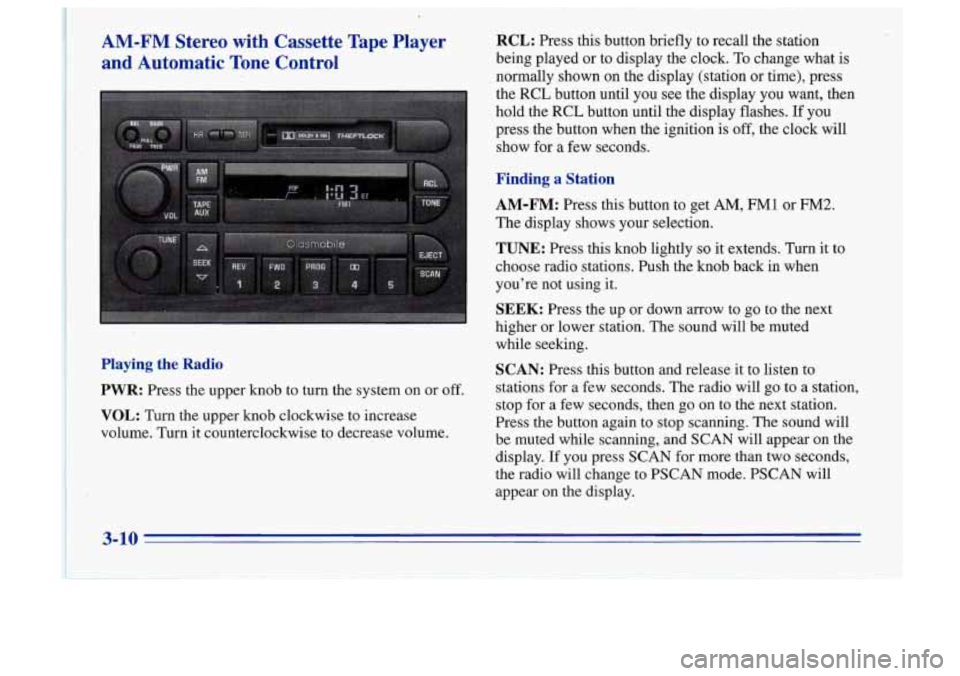
AM-FM Stereo with Cassette Tape Player
and Automatic Tone Control
Playing the Radio
PWR:
Press the upper knob to turn the system on or off.
VOL: Turn the upper knob clockwise to increase
volume. Turn it counterclockwise to decrease volume.
RCL: Press this button briefly to recall the station
being played or to display the clock. To change what is
normally shown on the display (station or time), press
the
RCL button until you see the display you want, then
hold the
RCL button until the display flashes. If you
press the button when the ignition is off, the clock will
show for a few seconds.
Finding a Station
AM-FM: Press this button to get AM, FM1 or FM2.
The display shows your selection.
TUNE: Press this knob lightly so it extends. Turn it to
choose radio stations. Push the knob back
in when
you’re not using
it.
SEEK: Press the up or down arrow to go to the next
higher or lower station. The sound will.be muted
while seeking.
SCAN: Press this button and release it to listen to
stations for a few seconds. The radio will go to a station,
stop for a few seconds, then go on to the next station.
Press the button again to stop scanning. The sound will
be muted while scanning, and SCAN will appear on the
display. If you press SCAN for more than two seconds,
the radio will change to PSCAN mode. PSCAN will
appear on the display.
3-10
Page 129 of 356
PSCAN: Press SCAN for more than two seconds, and
PSCAN will appear on the display. The radio will go to
the first preset station stored on your pushbuttons, stop
for a few seconds, then go on to the next preset station.
Press
SCAN again to stop scanning.
PUSHBUTTONS: The five numbered pushbuttons let
you return to your favorite stations. You can set up to
15 stations (five AM, five FM1 and five FM2).
1.
2.
3.
4.
5.
Press AM-FM to select the band.
Find the station you want by using TUNE or SEEK.
Press TONE to select the graph that best suits the
type of station selected.
Press and hold one of the five numbered buttons.
The sound will mute. When
it returns, release the
button. Whenever you press that numbered button,
the station you set will return and the TONE
equalization that you selected will also be
automatically selected for that button.
If you manually tune or use SEEK or SCAN to find a
frequency stored in a preset, the TONE equalization
stored for that frequency will not be recalled. Always
check the display first to make sure you have the
correct band.
Setting the Tone
TONE: This feature allows you to choose preset treble
and bass equalization settings designed for jazz, vocal,
pop, rock and classical stations.
JAZZ will appear on the
display when you first press TONE. Each time you press
it, another setting will appear on the display. Press it
again after CLASSIC appears and MANUAL will
appear. Manual tone control will return to the
TREB
and BASS knobs. Also; if you use the TREB and
BASS knobs, control will return to them and MANUAL
will appear.
BASS: Press this knob lightly so it extends. Turn the
knob to increase or decrease bass. When you use this
control, the radio’s TONE setting will switch to manual.
Push the knob back in when you’re not using it.
TREB: Press this knob lightly so it extends. Then pull
the
knob all the way out. Turn the knob to increase or
decrease treble. When you use this control, the radio’s
TONE setting will switch
to manual. Push the knob back
in when you’re not using it.
3-11
Page 130 of 356
Adjusting the Speakers
BAL: Press this knob lightly so it extends. Turn the
knob
to move the sound to the left or right speakers. Use
the middle position to balance these speakers. Push the
knob back in when you’re not using it.
FADE: Press the knob lightly so it extends. Then pull
the knob all the way 0u.t. Turn it to move the sound to
the front or rear speakers. Use the middle position to
balance these speakers. Push the knob back in when
you’re not using it.
Push the knob back in when you’re not using it.
Playing a Cassette Tape
Your tape player is built to work best with tapes that are
’ 30 to 45 minutes long on each side. Tapes longer than
that
are so thin they may not work well in this player.
The longer side with
the tape visible should face to the
right.
If the ignition is on, but the radio is off, the tape
will begin playing. If you hear nothing but a garbled sound, the tape may not be in squarely. Press EJECT to
remove the tape and start over.
While the tape is playing, use the VOL, FADE, BAL,
TREB, BASS and TONE controls just as you do for the
radio. The display will show TP with a box around it
and an arrow to show which side of the tape is playing. Your
tape bias is set automatically. When a metal or
chrome tape is inserted, HI-BIAS appears on the
display.
If you want to insert a tape when the ignition is
off, first press EJECT or
RCL.
If E and a number appear on the radio display, the tape
won’t play because
of an error.
E10: The tape is tight and the player can’t turn the
tape hubs. Remove the tape. Hold the tape with the
open end down and try to turn the right hub
counterclockwise with a pencil. Turn the tape over
and repeat. If the hubs do not turn easily, your tape
may be damaged and should not be used in the
player.
Try a new tape to make sure your player is
working properly.
Ell: The tape is broken. Try a new tape.
IT any error occurs repeatedly or if an error can’t be
corrected, please contact your retailer.
If your radio
displays an error number, write
it down and provide it to
your retailer when reporting the problem.
REV (1): Press this button to reverse the tape rapidly.
Press
it again to return to playing speed. The radio will
play the last-selected station while the tape reverses. You
may select stations during
REV operation by using TUNE.
3-12
Page 132 of 356
AM-FM Stereo with Compact Disc Player
with Automatic Tone Control (Option)
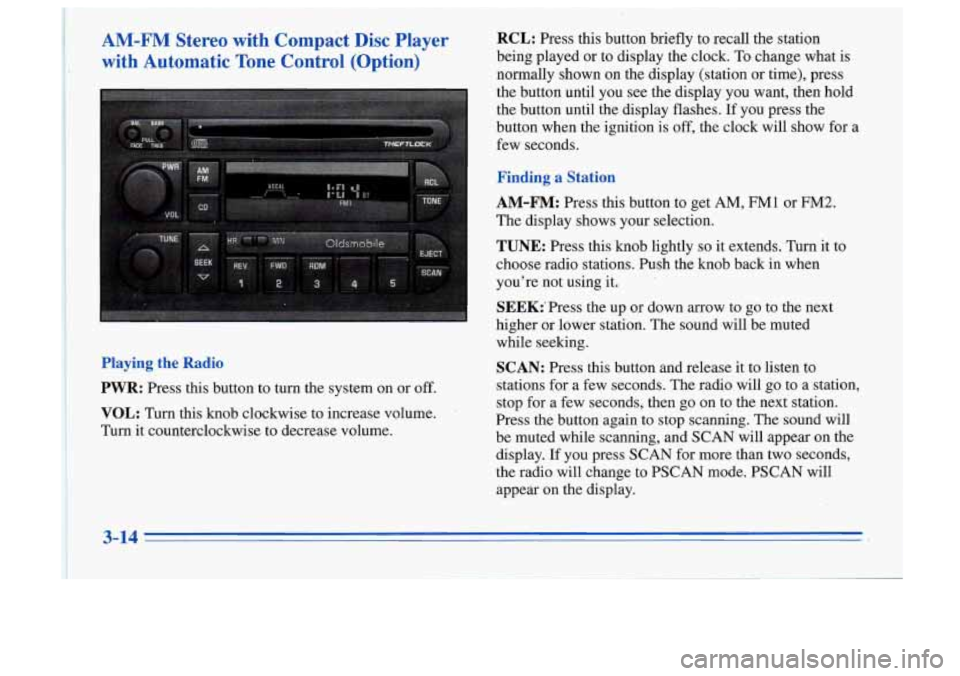
Playing the Radio
PWR:
Press this button to turn the system on or off.
VOL: Turn this knob clockwise to increase volume.
Turn it counterclockwise to decrease volume.
RCL: Press this button briefly to recall the station
being played
or to display the clock. To .change what is
normally shown on the display (station or time), press
the button until you see the display you want, then hold
the button until the display flashes.
If you press the
buttan
when the ignition is off, the clock will show for a
few seconds.
Finding a Station
AM-FM:
Press this button to get AM, FM1 or FM2.
The display shows your selection.
TUNE: Press this knob lightly so it extends. Turn it to
choose radio stations. Push the knob back in when
you’re not using it.
SEEK:‘Press the up or down arrow to go to the next
higher or lower station. The sound will be muted
while seeking.
SCAN: Press this button and release it to listen to
stations for a few seconds. The radio will go to a station,
stop for a few seconds, then go on to the next station.
Press the button again to stop scanning. The sound will
be muted while scanning,
and SCAN will appear on the
display.
If you press SCAN for more than two seconds,
the radio will change to PSCAN mode. PSCAN will
appear on the display.
3-14
Page 133 of 356
PSCAN: Press SCAN for more than two seconds, and
PSCAN will appear on the display. The radio will go to
the first preset station stored on your pushbuttons, stop
for a few seconds, then go on to the next preset station.
Press SCAN again to stop scanning.
PUSHBUTTONS: The five numbered pushbuttons let
you return to your favorite stations. You can set up to
15 stations (five AM,
five FM1 and five FM2).
1.
2.
3.
4.
5.
Press AM-FM to select the band.
Find the station you want by using.TUNE or SEEK.
Press TONE to select the graph that best suits the
type of station selected.
Press and hold one of the five numbered buttons.
The sound will mute. When it returns, release the
button. Whenever you press that numbered button,
the station you set will return and the TONE
equalization that
you selected will also be
automatically selected for that button.
If you manually tune or use SEEK or SCAN to find a
frequency stored in a preset, the TONE equalization
stored for that frequency will not be recalled. Always
check the display first to make sure you have the
correct band.
Setting the Tone
TONE:
This feature allows you to choose preset treble,
and bass equalization settings designed for jazz, vocal,
pop, rock and classical stations.
JAZZ will appear on the
display when you first press TONE. Each time you press
it, another setting will appear on the display. Press it
again after CLASSIC appears and MANUAL will
appear. Tone control will return to the TREB and BASS
knobs. Also, if you use the TREB and BASS knobs,
control will return to them and MANUAL will, appear.
BASS: Press this knob lightly so it extends. Turn the
knob to increase or decrease bass. The ‘middle position is
a detent. When you use this control, the radio’s TONE
setting will switch to manual.
TREB: Press this knob lightly so it extends. Then pull
the knob all the way out. Turn the knob to increase or
decrease treble. The middle position is a detent. When
you use this control, the radio’s TONE setting will
switch to manual.
Push the knobs back in when you’re not using them.
3-15
Page 134 of 356
I
Adjusting the Speakers
BAL: Press this knob, lightly so it extends, Tm the
knob to move the sound to the left or right speakers. Use
the middk position to balance these speakers.
FADE: Press the knob lightly--so it 'extends. Then pull
-. the knoti.all the way out. T& it to move the sound to
, the front or rear speakers. 'Use the middle position to'
I -balance these speakers.'
Push the knob back in when you're,not.using it.
Playing a Compact Disc 8.
Insert a disc partway into the slot, label side,up. The
player will pull it in. If the'ignition is
on and the radio is
off, the disc should begin playing.
If you're driving on a very rough road or if it's very hot,
the disc may not play and
Em, (error) may appear on
the display. When things get back to normzil, the disc
should play.
If the disc comes out, it could be that:
-, ,
The disc is upside down.
It is dirty, scratched or wet.
It is very humid. (If so, wait about an hour and
try again.)
RCL: Press this button to see which track is playing.
x Press it again within five seconds to see how long it has
been playing.
To change what is normally shown on the
display (track or elapsed-time), press the button until
you see the display you want, then hold the button until
the display flashes. While elapsed time is showing,
EL TM will appear on the display.
REV (1): Press and hold this button to quickly reverse
within a track (song). You will hear sound at a reduced
volume. The display will show elapsed time.
FWD (2): Press and hold this button to quickly advance
within a track (song). You will hear sound at a reduced
volume. The display will show elapsed time.
RDM (3): Press this button to hear the tracks in random,
rather than sequential, order. RDM will appear on the
display when you press
this button. Press RDM again to
turn
off random play.
AM-FM: Press this button to play the radio when a disc
is in the player.
CD: Press this button to change to the disc function
when the radio is
on if a disc is already loaded. The.disc
will start playing at the point where
it was stopped. A
box will appear around CD on the display'when the disc
is active.
3-16
Page 136 of 356
RCL: Press this button briefly to recall the station
being played or to display the clock. To change what is
normally shown on the display (station or time), press
the RCL button until you see the display you want, then
press the button when the ignition is off, the clock will
show for a few seconds.
~ ' hold the RCL button until the display flashes. If you
Finding a Station
AM-FM: Press this button to get AM, FM1 or FM2.
The display shows your selection.
TUNE: Press this knob lightly so it extends. 'Turn it to
choose radio stations. Push the knob back in when
you're not using it.
SEEK: Press the up or down arrow to go to the next
higher or lower station. The sound will be muted
while seeking.
SCAN: Press this button and release it to listen to
stations for a few seconds. The radio will go to a station,
stop for a few seconds, then go on to the next station.
Press the button again to stop scanning. The sound will
be muted while scanning, and SCAN will appearon the
display. If you press SCAN for more than two seconds,
the radio will change to PSCAN mode. PSCAN will
appear on the display.
PSCAN: Press SCAN for more than two seconds, and
PSCAN will appear on the display. The radio will go
to
the first preset station stored on your pushbuttons, stop
for a few seconds, then go on to the next preset station.
Press SCAN again to stop scanning.
PUSHBUTTONS: The five numbered pushbuttons let
you return to your favorite stations. You can set up to
15 stations (five AM, five
mM1 and five FM2).
1. Press AM-FM to select the band.
2. Find the station you want by using TUNE or SEEK.
3. Press TONE to select the graph that best suits the
type of station selected.
4. Press and hold one of the five numbered buttons.
5. The sound will mute. When it returns, release the
button. Whenever you press that numbered button,
the station you set will return and the TONE
equalization that you selected will also be
automatically selected for that button.
If you manually tune or use SEEK or SCAN to find a
frequency stored in a preset, the TONE equalization
stored for that frequency will not be recalled. Always
check the display first to make sure you have the
correct band.