door lock OLDSMOBILE SILHOUETTE 1994 User Guide
[x] Cancel search | Manufacturer: OLDSMOBILE, Model Year: 1994, Model line: SILHOUETTE, Model: OLDSMOBILE SILHOUETTE 1994Pages: 276, PDF Size: 15.82 MB
Page 52 of 276

Features & Controls
50
Battery Replacement
Under normal use, the batteries in your
key chain transmitter should last about
two years.
You can tell the batteries are weak if the
transmitter won‘t work at the normal
range in any location.
If you have to get
close to your vehicle before the
transmitter works, it’s probably time
to
change the batteries.
To Replace Batteries in the Remote
Lock Control:
1. Insert a coin into the slot in the back
of the transmitter, and turn
counterclockwise to open the cover.
2. Remove the cover.
3. Remove and replace the two 3-volt
batteries
(DL 20 16).
4. Reassemble the transmitter.
5. Check the transmitter operation.
I Illuminated Entry System
(OPTION)
This option comes with the optional
remote lock control system.
When you open the driver’s door, by
itself or in combination with any
passenger door or the liftgate, the
interior lights will come on and then
gradually dim to off
10 seconds after the
kt door is closed.
(If the driver’s door
has not been opened, the interior lights
will immediately dim to off.)
When you press
a on your remote
transmitter, the lights inside your
vehicle will go on, then gradually dim to
off after about
40 seconds, unless a
door or the liftgate is opened.
When you turn on the ignition, the
interior lights will immediately dim to
off. Vehicle
theft is big business, especially
in some cities. Although your
Oldsmobile has a number of theft
deterrent features, we know that
nothing we put
on it can make it
impossible to steal. However, there are
ways you can help.
Key in the Ignition
If you walk away from your vehicle with
the keys inside, it’s an easy target for
joy riders or professional thieves
- so
don’t do it.
When you park your Oldsmobile and
open the driver’s door, you’ll hear a
chime reminding you to remove your
key from the ignition and take it with
you. Always do this. Your steering
wheel will be locked, and
so will your
ignition and transaxle. And remember
to lock the doors.
ProCarManuals.com
Page 53 of 276

Parking at Night
Park in a lighted spot, close all windows
and lock your vehicle. Remember to
keep your valuables out
of sight. Put
them in a storage area, or take them
with you.
If you park in a lot where someone will
be watching your vehicle,
it's best to
lock it up and take your keys. But what
if you have to leave your ignition key?
What if
you have to leave something
valuable in your vehicle?
Put your valuables in a storage area,
Parking Lots
like your glove box or locking storage
bin.
Lock the storage bin.
Lock all the doors except the driver's.
Then take the door key with you.
Sliding Door
To open the sliding door from outside
the vehicle, pull the front of the latch
release out and then toward the rear.
If
you slide the door all the way back, it
will latch in the open position.
To move the door forward, you must
first pull the inside or outside latch
release out and then forward or the
door will remain latched in the open
position.
51
ProCarManuals.com
Page 54 of 276
Features & Controls
52
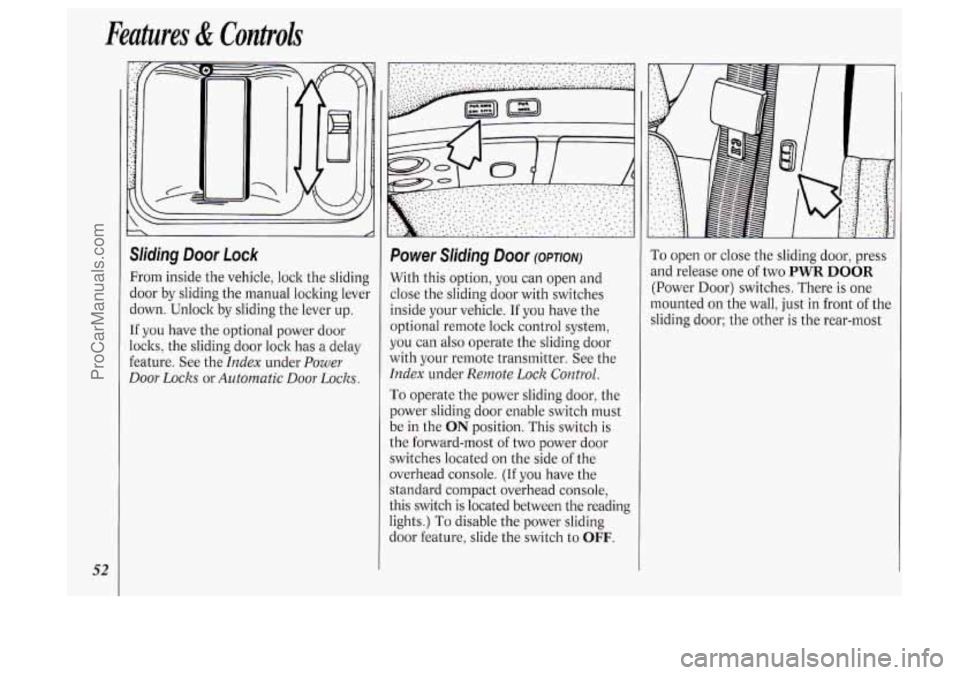
Sliding Door Lock
From inside the vehicle, lock the sliding
door by sliding the manual locking lever
down. Unlock by sliding the lever up.
If you have the optional power door
locks, the sliding door lock has a delay
feature. See the
Index under Power
Door Locks
or Automatic Door Locks.
Power Sliding Door (OPTION)
With this option, you can open and
close the sliding door with switches
inside your vehicle. If you have the
optional remote lock control system,
you can also operate the sliding door
with your remote transmitter. See the
Index under Remote Lock Control.
To operate the power sliding door, the
power sliding door enable switch must
be in the
ON position. This switch is
the forward-most of two power door
switches located on the side of the
overhead console.
(If you have the
standard compact overhead console,
this switch is located between the reading
lights.)
To disable the power sliding
door feature, slide the switch to
OFF.
1
To open or close the sliding door, press
and release one
of two PWR DOOR
(Power Door) switches. There is one
mounted
on the wall, just in front of the
sliding door; the other
is the rear-most
ProCarManuals.com
Page 55 of 276

switch on the side of the overhead
console. (If you have the standard
compact overhead console, this switch
is located between the reading lights.)
The sliding door must be unlocked for
the power sliding door to operate. The
ignition does not have to be on, and the
key does not have to be in the ignition.
To prevent accidental operation
of the
sliding door, disable the power sliding
door by placing the power sliding door
enable switch in the
OFF position. The
power sliding door will only open if
the transaxle is in
P (Park). The
transaxle does not have to be in
P
(Park) to close the door. If the enable
switch is
ON and the power sliding
door is open or in the process
of closing
when you shift out of
P (Park), a
buzzer will sound and the '- -. light on
your instrument panel will flash (see the
Index under Sliding Door Ajar Warning
Light).
This is a warning that the sliding
door
is not completely closed.
c
53
ProCarManuals.com
Page 57 of 276
and release. The door will close
completely and latch for you.
To manually close the power sliding
door when the enable switch is in the
OFF position, pull the inside or outside
latch release and slide the door all the
way forward to the latch position.
Sliding Door Security Lock
Your Oldsmobile is equipped with a
sliding door security lock that helps
prevent passengers from opening the
sliding door from the inside.
If you have the optional power sliding
door, you can override the security lock
by pressing the
PWR DOOR (Power
Door) switch when the power sliding
door enable switch
is in the ON
position. See Power Sliding Door earlier
in this section.
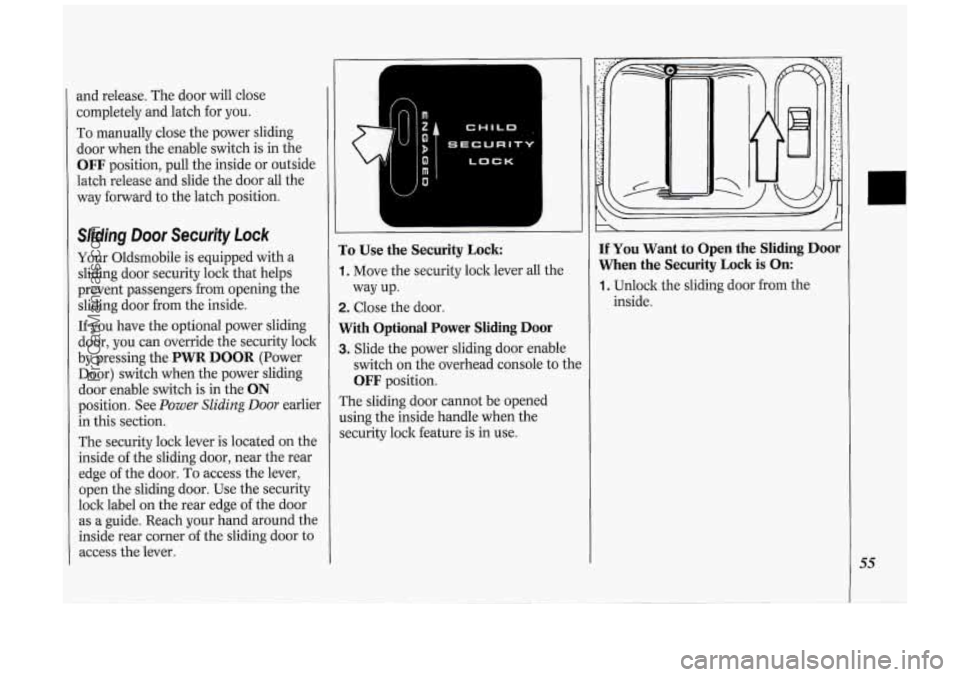
The security lock lever is located
on the
inside
of the sliding door, near the rear
edge of the door. To access the lever,
open the sliding door. Use the security
lock label
on the rear edge of the door
as a guide. Reach your hand around the
inside rear corner
of the sliding door to
access the lever.
I-c; '
LOCK
To Use the Security Lock:
1. Move the security lock lever all the
2. Close the door.
With Optional Power Sliding Door
3. Slide the power sliding door enable
way
up.
switch
on the overhead console to thc
OFF position.
The sliding door cannot be opened
using the inside handle when the
security lock feature is in use.
If You Want to Open the Sliding Door
When the Security Lock is On:
1. Unlock the sliding door from the
inside.
55
ProCarManuals.com
Page 58 of 276

Features & Controls
56
2. Then open the door from the outside.
With Optional Power Sliding Door
2. Slide the power sliding door enable
3. Press either PWR DOOR (Power
You should let adults and older children
know how the security lock works, and
how to cancel the lock.
If you don’t,
adults or older children who ride in the
rear won’t be able to open the sliding
door from the inside when the security
lock feature is
in use.
switch
to the ON position.
Door) switch.
0
CHILD
bECURIT
LOCK
To Cancel the Sliding Door Lock:
1. Unlock the sliding door from the
2. Move the security lock lever all the
The sliding door lock will now work
normally. inside
and open the door.
way down.
~
!iffgate Lock
I‘o unlock, insert the door key and turn
:he lock clockwise. The liftgate will
mtomatically lock when
you close it.
[f you have the optional power door
ocks or the remote lock control system,
:he liftgate will lock and unlock
lifferently. See the
Index under Power
9oor Locks or Remote Lock Control.
ProCarManuals.com
Page 60 of 276

Features & Con&oli
58
U
I Ignition Switch
With the ignition key in the ignition
switch, you can turn the switch to five
positions:
Accessory: An “on” position in which
you can operate your electrical power
accessories. Press in the ignition switch
as you turn the top
of it toward you.
Lock: The only position in which you
can remove the ltey. This loclts your
steering wheel, ignition and transaxle.
Off Unlocks the steering wheel,
ignition, and transaxle, but does not
send electrical power to any accessories
Use this position
if your vehicle must be
pushed or towed, but never try to push-
start your vehicle.
A warning chime will
sound
if you open the driver’s door the
ignition.
Run: An “on” position to which the
switch returns after you start your
engine and release the switch. The
switch stays in the
Run position when
the engine is running. But even when
the engine is not running, you can use
Run to operate your electrical power
accessories, and to display some
instrument panel warning lights.
Start: Starts the engine. When the
engine starts, release the ltey. The
ignition switch will return to
Run for
normal driving.
Note that even if the engine is not
running, the positions
Accessory and
Run are “on” positions that allow you
to operate your electrical accessories,
such as the radio.
NOTICE:
If your key seems stuck in Lock
and you can’t turn it, be sure it is
all the way in. If it is, then turn the
steering wheel left and right while
you turn the key hard. But turn the
key only with your hand. Using a
tool
to force it could break the key
or the ignition switch. If none of
this works, then your vehicle needs
service.
I Starting Your Engine
Engines start differently. The 8th digit
of your Vehicle Identification Number
(VIN) shows the code letter or number
for your engine.
You will find the VIN
at the top left of your instrument panel.
(See
Vehicle Identification Number in
the
Index.) Follow the proper steps to
start the engine.
Move your shift lever
to P (Park) or N
(Neutral). Your engine won’t start in
any other position
- that’s a safety
feature.
To restart when you’re already
moving, use
N (Neutral) only.
ProCarManuals.com
Page 89 of 276
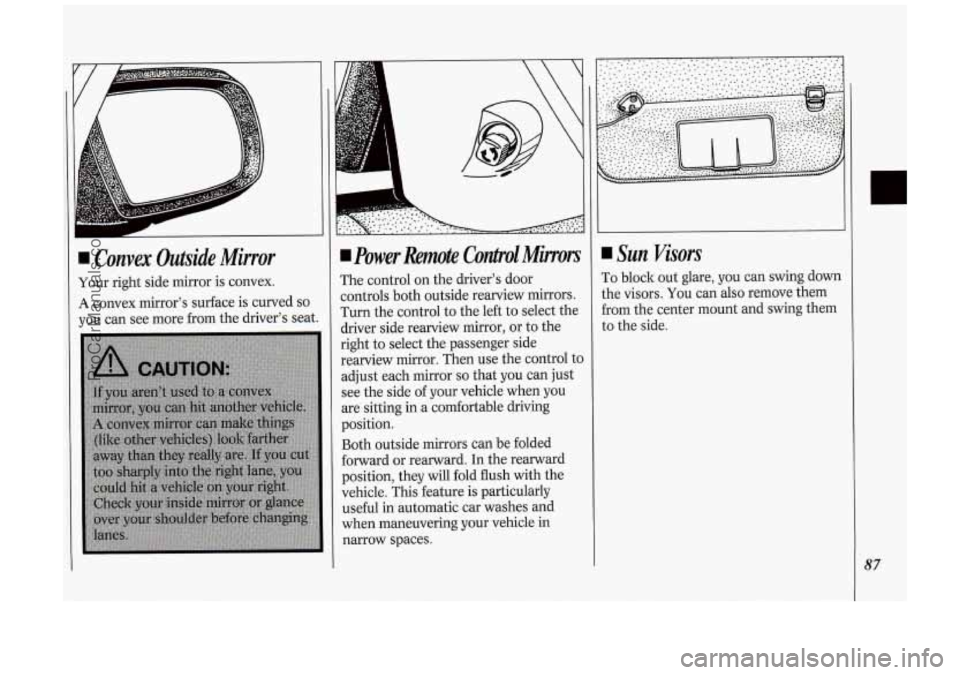
I Convex Outside Mirror
Your right side mirror is convex.
A convex mirror's surface is curved so
you can see more from the driver's seat.
power Remote Contpol Minors
The control on the driver's door
controls both outside rearview mirrors.
Turn the control to the left to select the
driver side rearview mirror, or to the
right
to select the passenger side
rearview mirror. Then use the control to
adjust each mirror
so that you can just
see the side of your vehicle when you
are sitting in a comfortable driving
position.
Both outside mirrors can be folded
forward or rearward. In the rearward
position, they will fold flush with the
vehicle. This feature is particularly
useful
in automatic car washes and
when maneuvering your vehicle in
narrow spaces.
Sun Visors
To block out glare, you can swing down
the visors. You can also remove them
from the center mount and swing them
to the side.
87
ProCarManuals.com
Page 92 of 276

Features & Controls
90
Locking Storage Bin
At the base of the center instrument
panel console is a storage bin. Use the
door key
to lock and unlock it. To open
the bin, pinch the latch release.
To remove the bin for cleaning, open it
part way, then pull out and slightly up.
To clean the inside of the bin, vacuum
or wipe with a slightly damp cloth.
To replace the bin, set the hinge pins
:one on each side
of the bin, at the
lottom) into the hinge guides (one at
:ach side
of the console opening, at the
lase), then close the bin.
If the hinge
)ins are placed properly in the guides,
he bin will close easily.
Side Ashtrays
To open the ashtray, press one side and
turn it open.
To remove the ashtray for cleaning,
press the snuffer as
you lift up the
bottom
of the ashtray.
ProCarManuals.com
Page 97 of 276
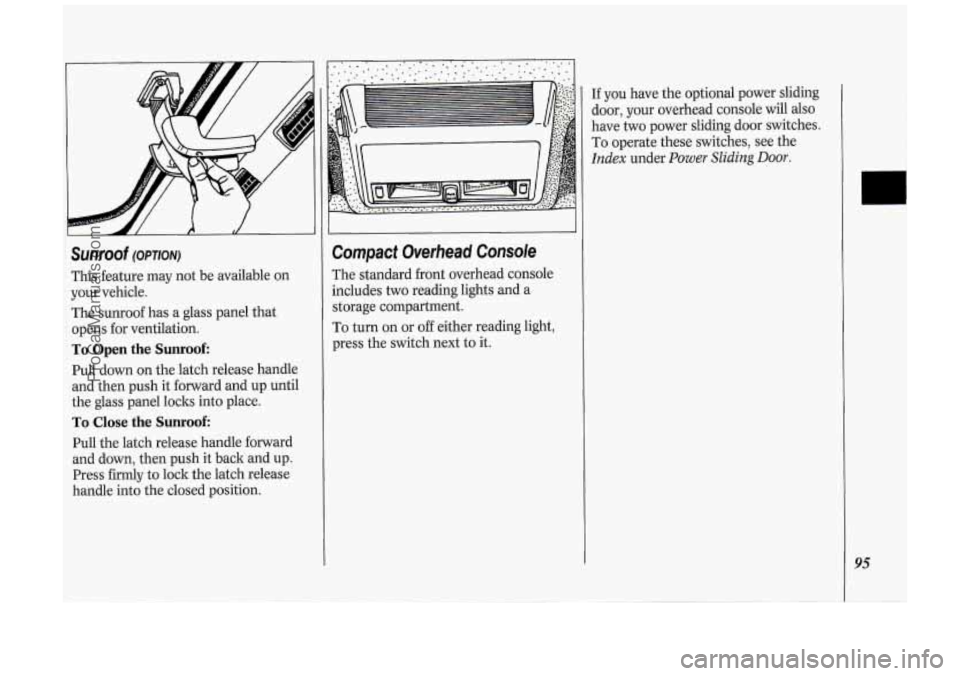
Sunroof (OPTION)
This feature may not be available on
your vehicle.
The sunroof has a glass panel that
opens for ventilation.
To Open the Sunroof:
Pull down on the latch release handle
and then push it forward and up until
the glass panel loclts into place.
To Close the Sunroof:
Pull the latch release handle forward
and down, then push it back and up.
Press firmly to lock the latch release
handle into the closed position.
Compact Overhead Console
The standard front overhead console
includes
two reading lights and a
storage compartment.
To turn on or
off either reading light,
press the switch next to it.
If you have the optional power sliding
door, your overhead console will
also
have two power sliding door switches.
To operate these switches, see the
Index under Power Sliding Door.
95
ProCarManuals.com