light Oldsmobile Silhouette 2004 s Owners Manual
[x] Cancel search | Manufacturer: OLDSMOBILE, Model Year: 2004, Model line: Silhouette, Model: Oldsmobile Silhouette 2004Pages: 462, PDF Size: 3.1 MB
Page 377 of 462

{CAUTION:
In¯ating something too much can make it
explode, and you or others could be injured.
Be sure to read the in¯ator instructions, and
in¯ate any object only to its recommended
pressure.
To use your accessory in¯ator system, do the following:
1. Turn the ignition to ACCESSORY or RUN.
2. Attach the appropriate nozzle adapter, if required,
to the end of the hose that has the pressure gage.
3. Attach that end of the hose to the object you wish
to in¯ate.
4. Remove the protective cap covering the outlet.
5. Attach the other end of the hose to the outlet.
6. Press the accessory in¯ator switch. The light in the
switch will come on to show the system is working.
If the accessory in¯ator system does not turn on or
the light does not come on, the fuse may be blown or
installed incorrectly. See
Fuses and Circuit Breakers
on page 5-101or see your dealer for service.Your accessory in¯ator will automatically shut off after
about 10 minutes. The light in the switch will blink.
After about one minute you can use the system again.
Press the switch and the indicator light will come on.
Notice:If you run the accessory in¯ator longer
than 30 minutes at a time, you could damage
the in¯ator. The repairs would not be covered by
your warranty. Run the in¯ator for short periods of
time only.
After running the accessory in¯ator for 30 minutes, wait
at least 10 minutes before restarting the accessory
in¯ator.
To turn off the in¯ator, do the following:
1. Press the switch and detach the hose, ®rst from
the in¯ated object, then from the outlet.
2. Put the protective cap back on.
3. Place the in¯ator kit tools in the pouch, and store
in the glove box.
To put the cap back on, line up the tabs at the back
of the cover and put it in place. Push down the tab to
secure the cap.
5-75
Page 393 of 462

Compact Spare Tire
Although the compact spare tire was fully in¯ated when
your vehicle was new, it can lose air after a time.
Check the in¯ation pressure regularly. It should be
60 psi (420 kPa).
After installing the compact spare on your vehicle,
you should stop as soon as possible and make sure
your spare tire is correctly in¯ated. The compact spare
is made to perform well at speeds up to 65 mph
(105 km/h) for distances up to 3,000 miles (5 000 km),
so you can ®nish your trip and have your full-size
tire repaired or replaced where you want. Of course,
it's best to replace your spare with a full-size tire as soon
as you can. Your spare will last longer and be in good
shape in case you need it again.
Notice:When the compact spare is installed, don't
take your vehicle through an automatic car wash
with guide rails. The compact spare can get caught
on the rails. That can damage the tire and wheel,
and maybe other parts of your vehicle.
Don't use your compact spare on other vehicles.
And don't mix your compact spare tire or wheel with other
wheels or tires. They won't ®t. Keep your spare tire and
its wheel together.
Notice:Tire chains won't ®t your compact spare.
Using them can damage your vehicle and can
damage the chains too. Don't use tire chains on
your compact spare.
All-Wheel Drive
After installing a compact spare tire on a vehicle with
all-wheel drive you will need to drive with light to
moderate acceleration, for 10 seconds, in a straight line.
This action will allow the vehicle to detect the compact
spare tire and disable the all-wheel drive system.
The AWD DISABLE message will come on the
instrument panel cluster indicating that the all-wheel
drive system is off. You may detect a slight pull during
this time, but this is normal.
Notice:You may damage your vehicle's all-wheel
drive system if your vehicle is driven for an
extended period with a compact spare tire installed
and the all-wheel drive system in operation.
See ªAll-Wheel Drive Systemº and ªAWD Disable
Warning Messageº in the Index for more
information.
5-91
Page 401 of 462

Vehicle Care/Appearance Materials
See your GM dealer for more information on purchasing
the following products.
Vehicle Care/Appearance Materials
Description Usage
Polishing Cloth
Wax-TreatedInterior and exterior
polishing cloth.
Tar and Road
Oil RemoverRemoves tar, road oil
and asphalt.
Chrome Cleaner
and PolishUse on chrome or
stainless steel.
White Sidewall
Tire CleanerRemoves soil and black
marks from whitewalls.
Vinyl CleanerCleans vinyl tops,
upholstery and
convertible tops.
Glass CleanerRemoves dirt, grime,
smoke and ®ngerprints.
Chrome and Wire
Wheel CleanerRemoves dirt and grime
from chrome wheels and
wire wheel covers.
Finish EnhancerRemoves dust,
®ngerprints, and surface
contaminants. Spray on
wipe off.
Vehicle Care/Appearance Materials
(cont'd)
Description Usage
Swirl Remover PolishRemoves swirl marks,
®ne scratches and
other light surface
contamination.
Cleaner WaxRemoves light scratches
and protects ®nish.
Foaming Tire Shine
Low GlossCleans, shines and
protects in one easy step,
no wiping necessary.
Wash Wax ConcentrateMedium foaming
shampoo. Cleans and
lightly waxes.
Biodegradable and
phosphate free.
Spot LifterQuickly and easily
removes spots and stains
from carpets, vinyl and
cloth upholstery.
Odor EliminatorOdorless spray odor
eliminator used on
fabrics, vinyl, leather
and carpet.
See your General Motors parts department for these
products. See
Recommended Fluids and Lubricants
on page 6-12.
5-99
Page 403 of 462

Headlamp Wiring
The headlamp wiring is protected by an internal circuit
breaker in the instrument panel fuse panel. An electrical
overload will cause the lamps to go on and off, or in
some cases to remain off. If this happens, have
your headlamp wiring checked right away.
Windshield Wiper Fuses
The windshield wiper motor is protected by an internal
circuit breaker and a fuse. If the motor overheats due
to heavy snow, etc., the wiper will stop until the
motor cools. If the overload is caused by some electrical
problem, be sure to get it ®xed.
Power Windows and Other Power
Options
Circuit breakers in the instrument panel fuse panel
protect the power windows and other power accessories.
When the current load is too heavy, the circuit breaker
opens and closes, protecting the circuit until the
problem is ®xed.
Fuses and Circuit Breakers
The wiring circuits in your vehicle are protected from
short circuits by a combination of fuses, circuit breakers,
and fusible thermal links.
Look at the silver-colored band inside the fuse. If the
band is broken or melted, replace the fuse. Be sure you
replace a bad fuse with a new one of the identical
size and rating.
If you ever have a problem on the road and do not have
a spare fuse, you can borrow one that has the same
amperage or use one of the spare fuses in the
underhood fuse block. Just pick some feature of your
vehicle that you can get along without Ð like the radio or
cigarette lighter Ð and use its fuse, if it is the right
amperage. Replace it as soon as you can.
There are two fuse blocks in your vehicle, the instrument
panel fuse block and the underhood fuse block.
5-101
Page 404 of 462
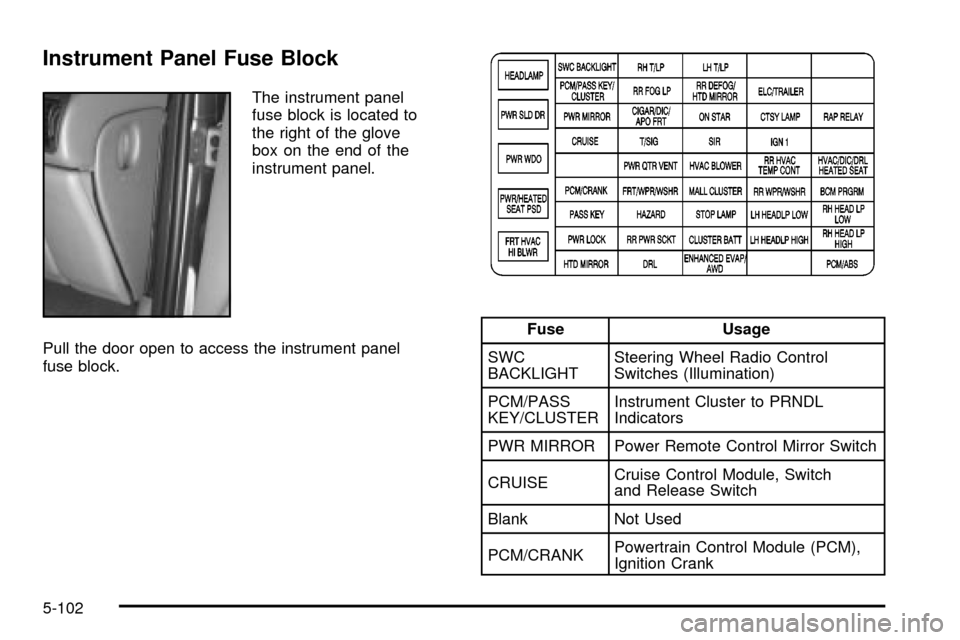
Instrument Panel Fuse Block
The instrument panel
fuse block is located to
the right of the glove
box on the end of the
instrument panel.
Pull the door open to access the instrument panel
fuse block.
Fuse Usage
SWC
BACKLIGHTSteering Wheel Radio Control
Switches (Illumination)
PCM/PASS
KEY/CLUSTERInstrument Cluster to PRNDL
Indicators
PWR MIRROR Power Remote Control Mirror Switch
CRUISECruise Control Module, Switch
and Release Switch
Blank Not Used
PCM/CRANKPowertrain Control Module (PCM),
Ignition Crank
5-102
Page 405 of 462

Fuse Usage
PASS KEY PASS-Key
žIII System
PWR LOCK Power Door Locks
HTD MIRROR Heated Mirrors
RH T/LP Not Used
RR FOG LP Not Used
CIGAR/DIC/
APO FRTCigarette Lighter, DIC, Front
Auxiliary Power Outlets, Data Link
T/SIG Turn Signal Switch
PWR QTR
VENTInterior Lamp and Multifunction
Switch (Power Vent Switch),
Auto Level
FRT/WPR/
WSHRWindshield Wiper/Washer Motor
and Switch
HAZARD Hazard Switch
RR PWR SCKTRear Electric Accessory Plug
Housing
DRLDaytime Running Lamp Control
Module
LH T/LP Not Used
Fuse Usage
RR DEFOG/
HTD MIRRORRear Window Defogger Relay,
Heated Mirrors
ON STAR OnStar
ž
SIR In¯atable Restraint Control Module
HVAC
BLOWERHeater-A/C Control
MALL
CLUSTERInstrument Cluster, Body Control
Module, Electronic Level Control
(ELC) Sensor and Relay, Theft,
Door Ajar
STOP LAMP Stoplamp Switch
CLUSTER
BATTModule/Electronic Brake Control
Module/Electronic Brake Traction
Control Module (EBCM/EBTCM)
ENHANCED
EVAP/AWDEvaporative Emissions (EVAP)
Canister Vent Solenoid Valve,
All-Wheel Drive (AWD)
Blank Not Used
ELC/TRAILERELC Air Compressor and ELC
Height Sensor, Trailer Harness
CTSY LAMP Courtesy Lamp
5-103
Page 408 of 462

Fuse Usage
5Ignition Switch to Fuses (Instrument
Panel): ABS/TCS Ignition, Cruise,
DRL, Electronic PRNDL, Ignition 1,
AWD, PSD, Air Bag, Turn Signal
and Powertrain Control Module
[IGN MAIN Relay (Underhood Fuse
Block: A/C Clutch, Electronic
Ignition, Ignition 1-U/H, INJ, TCC)]
6 Coolant Fans
7Fuses (Instrument Panel): ABS
Module Battery, Cigarette Lighter,
Courtesy Lamps, Front Power
Socket, Power Locks, Power Mirrors
and Right Rear Power Socket,
OnStar, RAP
8Ignition Switch to Fuses (I/P): Body
Control Module Program, Front
Comfort Controls Low/Medium
Blower, Front Wiper/Washer,
HVAC/DRL, MALL/Radio/DIC,
Power Quarter Vent, Rear HVAC,
Rear Wiper/Washer. SWC
Accessory and Power Window
Circuit Breaker, RAP
18 Fuel Injectors 1±6
19 Not UsedFuse Usage
20 Not Used
21Evaporative Emissions (EVAP)
Canister Purge Valve, Heated
Oxygen Sensors 1 and 2, Mass Air
Flow (MAF) Sensor
22 Not Used
23 Not Used
24 Not Used
25 Ignition Control Module (ICM)
26 Not Used
27Transaxle Range Switch to
Back-up Lamps
28A/C Clutch Relay to A/C
Compressor Clutch Oil
29Driver Information Display, Heater
A/C Control, Radio, Rear (LH and
RH) Side Door Actuator Control
Motor, Remote Control Door Lock
Receiver (RCDLR), Security
Indicator Lamp and Theft-Deterrent
Shock Sensor
30 Generator
5-106
Page 420 of 462

(c)Visually inspect hoses and have them replaced if they
are cracked, swollen or deteriorated. Inspect all pipes,
®ttings and clamps; replace with genuine GM parts as
needed. To help ensure proper operation, a pressure test
of the cooling system and pressure cap and cleaning the
outside of the radiator and air conditioning condenser is
recommended at least once a year.
(d)Visually inspect wiper blades for wear or cracking.
Replace blade inserts that appear worn or damaged
or that streak or miss areas of the windshield.
(e)Make sure the safety belt reminder light and all your
belts, buckles, latch plates, retractors and anchorages
are working properly. Look for any other loose or
damaged safety belt system parts. If you see anything
that might keep a safety belt system from doing its
job, have it repaired. Have any torn or frayed safety belts
replaced. Also look for any opened or broken air bag
coverings, and have them repaired or replaced. (The air
bag system does not need regular maintenance.)
(f)Lubricate all key lock cylinders, hood latch
assemblies, secondary latches, pivots, spring anchor
and release pawl, hood and door hinges, rear folding
seats, liftgate hinges, fuel door hinge, power sliding door
cable and sliding door track(s). More frequent lubrication
may be required when exposed to a corrosive
environment. Applying silicone grease on weatherstrips
with a clean cloth will make them last longer, seal
better and not stick or squeak.
(g)If you drive regularly under dusty conditions, the
®lter may require replacement more often.
(h)Change automatic transaxle ¯uid and ®lter if the
vehicle is mainly driven under one or more of these
conditions:
þIn heavy city traffic where the outside temperature
regularly reaches 90ÉF (32ÉC) or higher.
þIn hilly or mountainous terrain.
þWhen doing frequent trailer towing.
þUses such as found in taxi, police or delivery
service.
(i)Drain, ¯ush and re®ll cooling system. See Engine
Coolant on page 5-22for what to use. Inspect hoses.
Clean radiator, condenser, pressure cap and ®ller neck.
Pressure test the cooling system and pressure cap.
(j)
Check system for interference or binding and
for damaged or missing parts. Replace parts as needed.
Replace any components that have high effort or
excessive wear. Do not lubricate accelerator or cruise
control cables.
(k)A ¯uid loss in any vehicle system could indicate a
problem. Have the system inspected and repaired
and the ¯uid level checked. Add ¯uid if needed.
6-8
Page 445 of 462

A
Accessory In¯ator...........................................5-74
Accessory Power Outlets.................................3-27
Adding Washer Fluid.......................................5-37
Additional Program Information........................... 7-9
Additives, Fuel................................................. 5-6
Add-On Electrical Equipment...........................5-100
Adjusting the Captain's Chairs
(Second Row).............................................1-14
Adjusting the Speakers
(Balance/Fade)....................................3-66, 3-76
Air Bag
Readiness Light..........................................3-45
Air Bag Systems.............................................1-70
How Does an Air Bag Restrain?....................1-76
Servicing Your Air Bag-Equipped Vehicle.........1-78
What Makes an Air Bag In¯ate?....................1-75
What Will You See After an
Air Bag In¯ates?......................................1-76
When Should an Air Bag In¯ate?...................1-75
Where Are the Air Bags?..............................1-72
Air Cleaner/Filter, Engine.................................5-18
Airbag Sensing and Diagnostic
Module (SDM).............................................7-10
All-Wheel Drive......................................5-48, 5-91
All-Wheel Drive Disable Warning Message..........3-59
All-Wheel-Drive (AWD) System.........................4-10
AM ...............................................................3-98
Antenna, Fixed Mast......................................3-100Anti-lock Brake System (ABS)............................ 4-6
Anti-Lock Brake System Warning Light...............3-47
Appearance Care............................................5-92
Care of Safety Belts....................................5-95
Chemical Paint Spotting...............................5-98
Cleaning the Inside of Your Vehicle................5-92
Cleaning the Outside of Your Vehicle..............5-95
Finish Damage............................................5-98
Sheet Metal Damage...................................5-98
Underbody Maintenance...............................5-98
Vehicle Care/Appearance Materials................5-99
Weatherstrips..............................................5-95
Arming and Disarming the Content
Theft-Deterrent System.................................2-67
Arming Con®rmation........................................2-27
Arming with the Power Lock Switch...................2-26
Arming with the Remote Keyless Entry
Transmitter.................................................2-27
Arming with Your Key......................................2-27
Audio Speakers..............................................3-87
Audio System(s).............................................3-63
Audio Steering Wheel Controls......................3-97
Care of Your Cassette Tape Player................3-98
Care of Your CD and DVD Player................3-100
Care of Your CDs and DVDs........................3-99
Fixed Mast Antenna...................................3-100
Radio with Cassette and CD.........................3-64
Radio with Six-Disc CD................................3-74
Rear Seat Audio (RSA)........................3-92, 3-94
Setting the Time..........................................3-63
1
Page 446 of 462

Audio System(s) (cont.)
Theft-Deterrent Feature................................3-96
Understanding Radio Reception.....................3-98
Automatic Door Locks.....................................2-62
Automatic Level Control...................................4-38
Automatic Transaxle
Fluid..........................................................5-19
Operation...................................................2-34
B
Backing Up....................................................4-44
Battery..........................................................5-41
Battery Replacement......................................... 2-8
Battery Run-Down Protection............................3-22
Before Leaving on a Long Trip.........................4-22
Before You Drive............................................3-85
Bench Seat, Split............................................. 1-9
Brake
Parking......................................................2-37
System Warning Light..................................3-46
Brake Fluid....................................................5-38
Brake Wear...................................................5-40
Brakes..........................................................5-38
Braking........................................................... 4-6
Braking in Emergencies..................................... 4-8
Break-In, New Vehicle.....................................2-30
Bulb Replacement...........................................5-50
Front Turn Signal, Sidemarker and
Parking Lamps.........................................5-52Bulb Replacement (cont.)
Halogen Bulbs............................................5-50
Headlamps.................................................5-50
Replacement Bulbs......................................5-56
Taillamps, Turn Signal, Stoplamps
and Back-up Lamps.................................5-54
Buying New Tires...........................................5-70
C
California Fuel.................................................. 5-5
Canada ± Customer Assistance.......................... 7-5
Canadian Owners................................................ ii
Canadian Roadside Assistance........................... 7-8
Canceling the Sliding Door
Security Lock..............................................2-16
Capacities and Speci®cations..........................5-108
Captain Chairs, Rear.......................................1-14
Carbon Monoxide...................4-26, 4-38, 2-21, 2-42
Care of
Safety Belts................................................5-95
Your Cassette Tape Player............................3-98
Your CD and DVD Player...........................3-100
Your CDs and DVDs....................................3-99
Cargo Lamp...................................................3-22
Carrier Assembly-Differential
(Rear Drive Module)....................................5-49
Cassette Tape Messages.................................3-71
CD Adapter Kits.............................................3-71
2