ECO mode Oldsmobile Silhouette 2004 s User Guide
[x] Cancel search | Manufacturer: OLDSMOBILE, Model Year: 2004, Model line: Silhouette, Model: Oldsmobile Silhouette 2004Pages: 462, PDF Size: 3.1 MB
Page 218 of 462

Error Displays
·
An error of the vehicle's speed sensor or fuel
sender will cause -E- to be displayed.
·In the absence of vehicle communications, a dash
ª- -º is displayed.
If one of these error messages appear, see your dealer.
Trip Computer
There are ®ve trip computer displays available by
pushing the MODE button. The information will appear
in the following order:
AVG ECON (Average Fuel Economy):This shows the
average fuel economy since the last reset.
INST ECON (Instant Fuel Economy):This shows fuel
economy for the most recent second of driving.RANGE (Trip Range):This shows the estimated
distance that can be traveled with the remaining fuel.
The fuel economy used to calculate range is based
on the last few hours of driving.
FUEL USED (Trip Fuel Used):This shows the
accumulated fuel used since the last reset.
AVG SPEED (Average Speed):This shows the
average speed since the last reset.Resetting the Trip Computer
Press and hold the MODE and E/M buttons for at least
two seconds. The reset is acknowledged with the
display showing all segments brie¯y. A reset can only
be done in AVG ECON, FUEL USED and AVG SPEED
displays. AVG ECON, FUEL USED and AVG SPEED
can only be reset independently. Only the mode
that is displayed will be reset.
3-62
Page 226 of 462

SEEK and a negative number will appear on the display
while the cassette player is in the previous mode.
Pressing this pushbutton multiple times or holding it will
increase the number of selections to be searched
back, up to -9.
2 NEXT:Your tape must have at least three seconds of
silence between each selection for next to work. Press
this pushbutton to go to the next selection on the tape.
If you press the pushbutton more than once, the player
will continue moving forward through the tape. SEEK and
a positive number will appear on the display.
3 REV (Reverse):Press this pushbutton to reverse
the tape rapidly. Press it again to return to playing
speed. The radio will play while the tape reverses.
The station frequency and REV will appear on
the display. You may select stations during reverse
operation using TUNE, SEEK, or PSCAN.
4 FWD (Forward):Press this pushbutton to advance
quickly. Press this pushbutton again to return to playing
speed. The radio will play while the tape advances.
The station frequency and FWD will appear on
the display. You may select stations during forward
operation by using TUNE, SEEK, or PSCAN.5XSIDE:Press this pushbutton to play the other side
of the tape.
qSEEKr:The right arrow is the same as the
NEXT pushbutton, and the left arrow is the same as the
PREV pushbutton. If you hold either arrow or press it
more than once, the player will continue moving forward
or backward through the tape. SEEK and a positive
or a negative number will appear on the display.
BAND:Press this button to listen to the radio when a
tape or CD is playing. The inactive tape or CD will
remain safely inside the radio for future listening.
TAPE CD:Press this button to play a tape or CD when
listening to the radio. The inactive tape or CD will
remain safely inside the radio for future listening.
ZEJT (Eject):Press this button, located to the right
of the cassette tape slot, to eject a tape. Eject may
be activated with the radio off. Cassette tapes may be
loaded with the radio off if this button is pressed ®rst.
3-70
Page 234 of 462

To use the PTY interrupt feature, press and hold the
P-TYPE button until you hear a beep on the PTY you
want to interrupt with. When selected, an asterisk will
appear beside that PTY on the display. You may select
multiple interrupts if desired. When you are listening to a
CD, the last selected RDS station will interrupt play if that
selected program type format is broadcast.
SCAN:You can scan the stations within a PTY by
performing the following:
1. Press the P-TYPE button to activate program type
select mode. P-TYPE and the last selected PTY will
appear on the display.
2. Turn the P-TYPE knob to select a PTY.
3. Once the desired PTY is displayed, press and hold
either SCAN arrow, and the radio will begin
scanning the stations in the PTY.
4. Press either SCAN arrow to stop at a station.
If both PTY and TRAF are on, the radio will scan for
stations with the selected PTY and traffic
announcements.
BAND (Alternate Frequency):Alternate frequency
allows the radio to switch to a stronger station with the
same program type. To turn alternate frequency on press
and hold BAND for two seconds AF ON will appear on the
display. The radio may switch to stronger stations.To turn alternate frequency off press and hold BAND
again for two seconds. AF OFF will appear on the
display. The radio will not switch to other stations. When
you turn the ignition off and then on again, the alternate
frequency feature will automatically be turned on.
Setting Preset PTYs (RDS Only)
The six numbered pushbuttons let you return to your
favorite PTYs. These buttons have factory PTY presets.
You can set up to 12 PTYs (six FM1 and six FM2) by
performing the following steps:
1. Press BAND to select FM1 or FM2.
2. Press the P-TYPE button to activate program type
select mode. P-TYPE and the last selected PTY will
appear on the display.
3. Turn the P-TYPE knob to select a PTY.
4. Press and hold one of the six numbered
pushbuttons until you hear a beep. Whenever you
press that numbered pushbutton, the PTY you
set will return.
5. Repeat the steps for each pushbutton.
3-78
Page 239 of 462

sSEEKt:Press the left arrow to go to the start of the
current track, if more than ten seconds have passed.
Press the right arrow to go to the next track. If you hold an
arrow or press it more than once, the player will continue
moving backward or forward through the CD.
sSCANt:To scan one CD, press and hold either
SCAN arrow for more than two seconds until SCAN
appears on the display and you hear a beep. Use this
feature to listen to 10 seconds of each track of the
currently selected CD. Press either SCAN arrow again,
to stop scanning.
To scan all loaded CDs, press and hold either SCAN
arrow for more than four seconds until CD SCAN
appears on the display and you hear a beep. Use this
feature to listen to 10 seconds of the ®rst tracks of each
CD loaded. Press either SCAN arrow again, to stop
scanning.
RCL (Recall):Press this knob to see how long the
current track has been playing. To change the default
on the display (track and elapsed time), press the knob
until you see the display you want, then hold the
knob until the display ¯ashes. The selected display will
now be the default.BAND:Press this button to play the radio when a
CD(s) is playing. The inactive CD will remain safely
inside the radio for future listening.
CD AUX (Auxiliary):Press this button to play a CD
when listening to the radio.Using Song List Mode
The six-CD CD changer has a feature called song list.
This feature is capable of saving 20 track selections.
To save tracks into the song list feature, perform
the following steps:
1. Turn the CD player on and load it with at least one
CD. See ªLOAD CDº listed previously in this section
for more information.
2. Check to see that the CD changer is not in song list
mode. S-LIST should not appear in the display. If
S-LIST is present, press the SONG LIST button
to turn it off.
3. Select the desired CD by pressing the numbered
pushbutton and then use the SEEK SCAN right
arrow button to locate the track that you want
to save. The track will begin to play.
3-83
Page 240 of 462

4. Press and hold the SONG LIST button to save the
track into memory. When SONG LIST is pressed a
beep will be heard immediately. After two seconds
of continuously pressing SONG LIST, two beeps will
sound to con®rm that the track has been saved.
5. Repeat Steps 3 and 4 for saving other selections.
S-LIST FULL will appear on the display if you try to save
more than 20 selections.
To play the song list, press the SONG LIST button.
One beep will be heard and S-LIST will appear on the
display. The recorded tracks will begin to play in
the order that they were saved.
You may seek through the song list by using the SEEK
SCAN arrows. Seeking past the last saved track will
return you to the ®rst saved track.
To delete tracks from the song list, perform the
following steps:
1. Turn the CD player on.
2. Press the SONG LIST button to turn song list on.
S-LIST will appear on the display.
3. Press the SEEK SCAN arrows to select the desired
track to be deleted.
4. Press and hold the SONG LIST button for two
seconds. When SONG LIST is pressed, a beep
will be heard immediately. After two secondsof continuously pressing the SONG LIST button,
two beeps will be heard to con®rm that the track has
been deleted.
After a track has been deleted, the remaining tracks
are moved up the list. When another track is added to
the song list, the track will be added to the end of
the list.
To delete the entire song list, perform the following steps:
1. Turn the CD player on.
2. Press the SONG LIST button to turn song list on.
S-LIST will appear on the display.
3. Press and hold the SONG LIST button for more
than four seconds. A beep will be heard, followed
by two beeps after two seconds and a ®nal beep will
be heard after four seconds. S-LIST EMPTY will
appear on the display indicating that the song
list has been deleted.
If a CD is ejected, and the song list contains saved
tracks from that CD, those tracks are automatically
deleted from the song list. Any tracks saved to the song
list again are added to the bottom of the list.
To end song list mode, press the SONG LIST button.
One beep will be heard and S-LIST will be removed from
the display.
3-84
Page 249 of 462
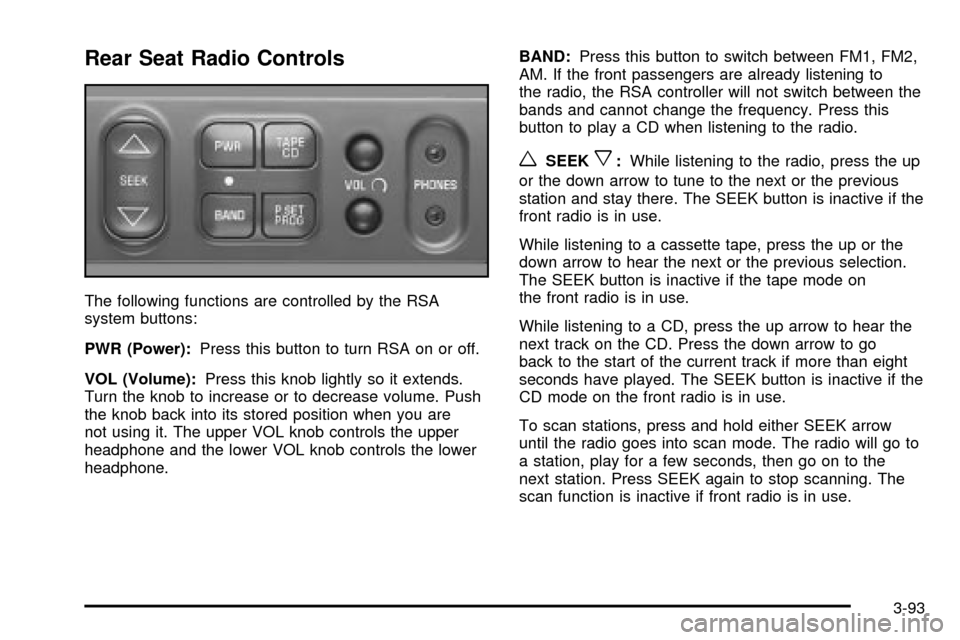
Rear Seat Radio Controls
The following functions are controlled by the RSA
system buttons:
PWR (Power):Press this button to turn RSA on or off.
VOL (Volume):Press this knob lightly so it extends.
Turn the knob to increase or to decrease volume. Push
the knob back into its stored position when you are
not using it. The upper VOL knob controls the upper
headphone and the lower VOL knob controls the lower
headphone.BAND:Press this button to switch between FM1, FM2,
AM. If the front passengers are already listening to
the radio, the RSA controller will not switch between the
bands and cannot change the frequency. Press this
button to play a CD when listening to the radio.
wSEEKx:While listening to the radio, press the up
or the down arrow to tune to the next or the previous
station and stay there. The SEEK button is inactive if the
front radio is in use.
While listening to a cassette tape, press the up or the
down arrow to hear the next or the previous selection.
The SEEK button is inactive if the tape mode on
the front radio is in use.
While listening to a CD, press the up arrow to hear the
next track on the CD. Press the down arrow to go
back to the start of the current track if more than eight
seconds have played. The SEEK button is inactive if the
CD mode on the front radio is in use.
To scan stations, press and hold either SEEK arrow
until the radio goes into scan mode. The radio will go to
a station, play for a few seconds, then go on to the
next station. Press SEEK again to stop scanning. The
scan function is inactive if front radio is in use.
3-93
Page 251 of 462

Rear Seat Radio Controls
The following functions are controlled by the RSA
system buttons:
RSA PWR (Power):Press this button to turn RSA on
or off. The headphone symbol will appear on the display
above the video screen when the system is on.
BAND:Press this button to switch between FM1, FM2,
or AM when the headphones are on channel B. The
selected radio station will appear on the display above
the video screen. If the front passengers are already
listening to the radio, the RSA controller will not switch
between the bands and cannot change the station.
qr(Tune):While listening to the radio, press the
right or the left arrow to tune to the next or the previous
station and stay there. These arrows are inactive if
the front radio is in use.
While listening to a cassette tape, press the right or the
left arrow to hear the next or the previous selection.
These arrows are inactive if the tape mode on the front
radio is in use.
While listening to a CD, press the right arrow to hear
the next track on the CD. Press the left arrow to go back
to the start of the current track, if more than eight
seconds have played. These arrows are inactive if the
CD mode on the front radio is in use.
3-95
Page 368 of 462

Maximum Loaded Vehicle Weight:The sum of curb
weight; accessory weight; vehicle capacity weight;
and production options weight.
Normal Occupant Weight:The number of occupants
a vehicle is designed to seat multiplied by 150 pounds
(68 kg). See
Loading Your Vehicle on page 4-33.
Occupant Distribution:Designated seating positions.
Outward Facing Sidewall:The side of a asymmetrical
tire that has a particular side that faces outward
when mounted on a vehicle. The side of the tire that
contains a whitewall, bears white lettering or bears
manufacturer, brand and or model name molding that
is higher or deeper than the same moldings on the other
sidewall of the tire.
Passenger (P-Metric) Tire:A tire used on passenger
cars and some light duty trucks and multipurpose
vehicles.
Recommended In¯ation Pressure:Vehicle
manufacturer's recommended tire in¯ation pressure and
shown on the tire placard. See
In¯ation - Tire Pressure
on page 5-67andLoading Your Vehicle on page 4-33.
Radial Ply tire:A pneumatic tire in which the ply cords
that extend to the beads are laid at 90 degrees to the
centerline of the tread.Rim:A metal support for a tire and upon which the tire
beads are seated.
Sidewall:The portion of a tire between the tread and
the bead.
Speed Rating:An alphanumeric code assigned to a
tire indicating the maximum speed at which a tire
can operate.
Traction:The friction between the tire and the road
surface. The amount of grip provided.
Tread:The portion of a tire that comes into contact
with the road.
Treadwear Indicators:Narrow bands, sometimes
called ªwear bars,º that show across the tread of a tire
when only 2/32 inch of tread remains. See
When It
Is Time for New Tires on page 5-70.
UTQGS:Uniform Tire Quality Grading Standards, a tire
information system that provides consumers with
ratings for a tire's traction, temperature and treadwear.
Ratings are determined by tire manufacturers using
government testing procedures. The ratings are molded
into the sidewall of the tire. See
Uniform Tire Quality
Grading on page 5-71.
5-66
Page 393 of 462

Compact Spare Tire
Although the compact spare tire was fully in¯ated when
your vehicle was new, it can lose air after a time.
Check the in¯ation pressure regularly. It should be
60 psi (420 kPa).
After installing the compact spare on your vehicle,
you should stop as soon as possible and make sure
your spare tire is correctly in¯ated. The compact spare
is made to perform well at speeds up to 65 mph
(105 km/h) for distances up to 3,000 miles (5 000 km),
so you can ®nish your trip and have your full-size
tire repaired or replaced where you want. Of course,
it's best to replace your spare with a full-size tire as soon
as you can. Your spare will last longer and be in good
shape in case you need it again.
Notice:When the compact spare is installed, don't
take your vehicle through an automatic car wash
with guide rails. The compact spare can get caught
on the rails. That can damage the tire and wheel,
and maybe other parts of your vehicle.
Don't use your compact spare on other vehicles.
And don't mix your compact spare tire or wheel with other
wheels or tires. They won't ®t. Keep your spare tire and
its wheel together.
Notice:Tire chains won't ®t your compact spare.
Using them can damage your vehicle and can
damage the chains too. Don't use tire chains on
your compact spare.
All-Wheel Drive
After installing a compact spare tire on a vehicle with
all-wheel drive you will need to drive with light to
moderate acceleration, for 10 seconds, in a straight line.
This action will allow the vehicle to detect the compact
spare tire and disable the all-wheel drive system.
The AWD DISABLE message will come on the
instrument panel cluster indicating that the all-wheel
drive system is off. You may detect a slight pull during
this time, but this is normal.
Notice:You may damage your vehicle's all-wheel
drive system if your vehicle is driven for an
extended period with a compact spare tire installed
and the all-wheel drive system in operation.
See ªAll-Wheel Drive Systemº and ªAWD Disable
Warning Messageº in the Index for more
information.
5-91
Page 437 of 462

·Emergency Tow:Tow to the nearest dealership
for warranty service or in the event of a
vehicle-disabling accident. Assistance when the
vehicle is mired in sand, mud or snow.
·Flat Tire Change:Installation of a spare tire will be
covered at no charge. (The customer is responsible
for the repair or replacement of the tire if not
covered by a warrantable failure.)
·Jump Start:No-start occurrences which require a
battery jump start will be covered at no charge.
·Dealer Locator Service
·Trip Routing:Your Roadside Assistance
Representative can provide you with speci®c
information regarding this feature.
·Trip Interruption Expense Bene®ts:Your
Roadside Assistance Representative can provide
you with speci®c information regarding this feature.
In many instances, mechanical failures are covered
under Oldsmobile's Bumper-to-Bumper warranty.
However, when other services are utilized, our Roadside
Assistance Representatives will explain any payment
obligations you might incur.For prompt and efficient assistance when calling,
please provide the following to the Roadside Assistance
Representative:
·Your name, home address, and home telephone
number
·Telephone number of your location
·Location of the vehicle
·Model, year, color, and license plate number
·Mileage, Vehicle Identi®cation Number and delivery
date of the vehicle
·Description of the problem
While we hope you never have the occasion to use our
service, it is added security while traveling for you and
your family. Remember, we are only a phone call away.
Oldsmobile Roadside Assistance: 1-800-442-OLDS
(6537), text telephone (TTY) users, call 1-888-889-2438.
Oldsmobile reserves the right to limit services or
reimbursement to an owner or driver when, in
Oldsmobile's judgement, the claims become excessive
in frequency or type of occurrence.
Roadside Assistance is not part of or included in the
coverage provided by the New Vehicle Limited Warranty.
Oldsmobile reserves the right to make any changes
or discontinue the Roadside Assistance program at any
time without noti®cation.
7-7