audio Oldsmobile Silhouette 2004 s Owner's Guide
[x] Cancel search | Manufacturer: OLDSMOBILE, Model Year: 2004, Model line: Silhouette, Model: Oldsmobile Silhouette 2004Pages: 462, PDF Size: 3.1 MB
Page 248 of 462

Battery Replacement
To change the batteries, do the following:
1. Remove the screw and open the battery door
located on the back of the remote control.
2. Replace the two AAA batteries in the compartment.
Make sure that they are installed correctly.
3. Replace the battery door and screw.
If the remote control is to be stored for a long period of
time, remove the batteries and keep them in a cool,
dry place.
Rear Seat Audio (RSA)
(Without Entertainment System)
This feature allows rear seat passengers to listen to and
control any of the music sources: radio, cassette
tapes, and CDs. However, the rear seat passengers can
only control the music sources that the front seatpassengers are not listening to. For example, rear seat
passengers may listen to a cassette tape or CD
through headphones, while the driver listens to the radio
through the front speakers. The rear seat passengers
have control of the volume for each set of headphones.
Be aware that the front seat audio controls always
have priority over the RSA controls. If the front seat
passengers switch the source for the main radio
to a remote source, the RSA will play the same remote
source. The rear speakers will be muted when the
RSA power is turned on. You may operate the RSA
functions even when the main radio is off.
Primary Radio Controls
The following function is controlled by the knob on the
main radio:
PWR (Power):Press this knob twice to turn RSA off.
3-92
Page 250 of 462

P.SET PROG (Preset Program):The front passengers
must be listening to something different for each of
these functions to work:
·Press this button to scan through the preset radio
stations set on the pushbuttons on the main radio.
The radio will go to a preset station stored on
your pushbuttons, play for a few seconds, then go
on to the next preset station. Press this button
again to stop scanning presets.
·If your vehicle has the Radio with Cassette and CD,
when a cassette tape is playing, press this button to
go to the other side of the tape.
·If your vehicle has the Radio with Six-Disc CD,
when a CD is playing, press this button to select the
next CD, if multiple CDs are loaded.
TAPE CD:Press this button to play a cassette tape or
CD when listening to the radio. The inactive tape or
CD will remain safely inside the radio for future listening.
Rear Seat Audio (RSA)
(With Entertainment System)
This feature allows rear seat passengers to listen to and
control any of the entertainment sources: radio,
cassette tapes, CDs, DVD, and auxiliary device.
However, the rear seat passengers can only control the
music sources that the front seat passengers are not
listening to. For example, rear seat passengers
may listen to a cassette tape or CD through headphones
while the driver listens to the radio through the front
speakers. The rear seat passengers have control of the
volume for each set of headphones. Be aware that
the front seat audio controls always have priority over
the RSA controls. The rear speakers will be muted when
the RSA power is turned on. You may operate the
RSA functions even when the main radio is off. The DVD
or auxiliary device will always be available on channel
A of the headphones. All other sources are available on
channel B. You will not be able to listen to XM, on
channel B, if you are listening to a DVD or an auxiliary
device on channel B and vice versa.
3-94
Page 253 of 462
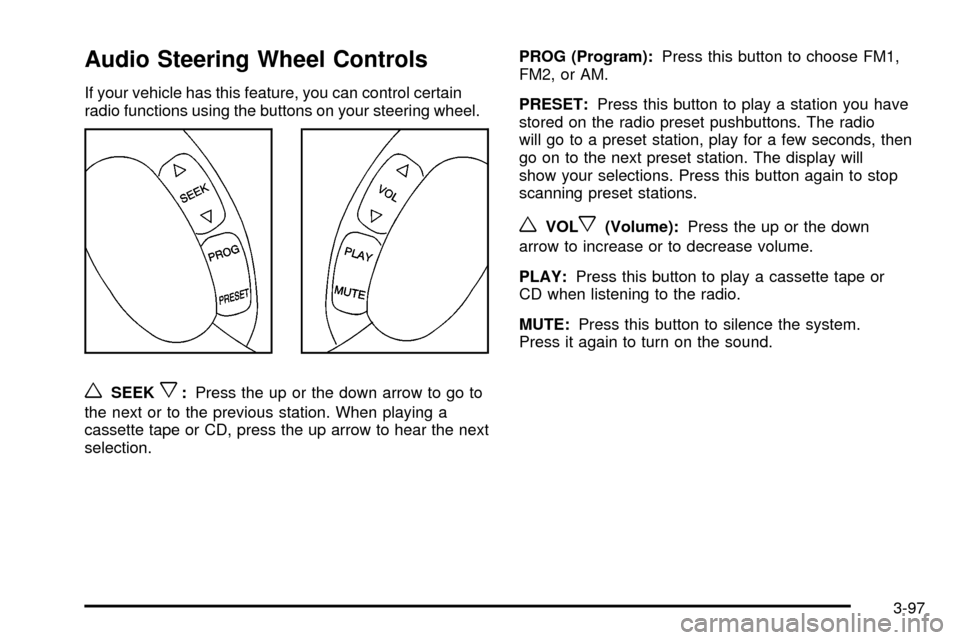
Audio Steering Wheel Controls
If your vehicle has this feature, you can control certain
radio functions using the buttons on your steering wheel.
wSEEKx:Press the up or the down arrow to go to
the next or to the previous station. When playing a
cassette tape or CD, press the up arrow to hear the next
selection.PROG (Program):Press this button to choose FM1,
FM2, or AM.
PRESET:Press this button to play a station you have
stored on the radio preset pushbuttons. The radio
will go to a preset station, play for a few seconds, then
go on to the next preset station. The display will
show your selections. Press this button again to stop
scanning preset stations.
wVOLx(Volume):Press the up or the down
arrow to increase or to decrease volume.
PLAY:Press this button to play a cassette tape or
CD when listening to the radio.
MUTE:Press this button to silence the system.
Press it again to turn on the sound.
3-97
Page 344 of 462

Vehicle Storage
If you are not going to drive your vehicle for 25 days
or more, remove the black, negative (-) cable from
the battery. This will help keep your battery from
running down.
{CAUTION:
Batteries have acid that can burn you and gas
that can explode. You can be badly hurt if you
are not careful. See
Jump Starting on page 5-42
for tips on working around a battery without
getting hurt.
Contact your dealer to learn how to prepare your
vehicle for longer storage periods.
Also, for your audio system, see
Theft-Deterrent
Feature on page 3-96.
Jump Starting
If your battery has run down, you may want to use
another vehicle and some jumper cables to start your
vehicle. Be sure to follow the steps below to do it safely.
On vehicles equipped with the optional power sliding
door, a low-voltage battery or replacing a battery may
cause the system to become inoperative. See
Power
Sliding Door (PSD) on page 2-17for more information.
{CAUTION:
Batteries can hurt you. They can be dangerous
because:
·They contain acid that can burn you.
·They contain gas that can explode
or ignite.
·They contain enough electricity to
burn you.
If you do not follow these steps exactly, some
or all of these things can hurt you.
5-42
Page 445 of 462

A
Accessory In¯ator...........................................5-74
Accessory Power Outlets.................................3-27
Adding Washer Fluid.......................................5-37
Additional Program Information........................... 7-9
Additives, Fuel................................................. 5-6
Add-On Electrical Equipment...........................5-100
Adjusting the Captain's Chairs
(Second Row).............................................1-14
Adjusting the Speakers
(Balance/Fade)....................................3-66, 3-76
Air Bag
Readiness Light..........................................3-45
Air Bag Systems.............................................1-70
How Does an Air Bag Restrain?....................1-76
Servicing Your Air Bag-Equipped Vehicle.........1-78
What Makes an Air Bag In¯ate?....................1-75
What Will You See After an
Air Bag In¯ates?......................................1-76
When Should an Air Bag In¯ate?...................1-75
Where Are the Air Bags?..............................1-72
Air Cleaner/Filter, Engine.................................5-18
Airbag Sensing and Diagnostic
Module (SDM).............................................7-10
All-Wheel Drive......................................5-48, 5-91
All-Wheel Drive Disable Warning Message..........3-59
All-Wheel-Drive (AWD) System.........................4-10
AM ...............................................................3-98
Antenna, Fixed Mast......................................3-100Anti-lock Brake System (ABS)............................ 4-6
Anti-Lock Brake System Warning Light...............3-47
Appearance Care............................................5-92
Care of Safety Belts....................................5-95
Chemical Paint Spotting...............................5-98
Cleaning the Inside of Your Vehicle................5-92
Cleaning the Outside of Your Vehicle..............5-95
Finish Damage............................................5-98
Sheet Metal Damage...................................5-98
Underbody Maintenance...............................5-98
Vehicle Care/Appearance Materials................5-99
Weatherstrips..............................................5-95
Arming and Disarming the Content
Theft-Deterrent System.................................2-67
Arming Con®rmation........................................2-27
Arming with the Power Lock Switch...................2-26
Arming with the Remote Keyless Entry
Transmitter.................................................2-27
Arming with Your Key......................................2-27
Audio Speakers..............................................3-87
Audio System(s).............................................3-63
Audio Steering Wheel Controls......................3-97
Care of Your Cassette Tape Player................3-98
Care of Your CD and DVD Player................3-100
Care of Your CDs and DVDs........................3-99
Fixed Mast Antenna...................................3-100
Radio with Cassette and CD.........................3-64
Radio with Six-Disc CD................................3-74
Rear Seat Audio (RSA)........................3-92, 3-94
Setting the Time..........................................3-63
1
Page 446 of 462

Audio System(s) (cont.)
Theft-Deterrent Feature................................3-96
Understanding Radio Reception.....................3-98
Automatic Door Locks.....................................2-62
Automatic Level Control...................................4-38
Automatic Transaxle
Fluid..........................................................5-19
Operation...................................................2-34
B
Backing Up....................................................4-44
Battery..........................................................5-41
Battery Replacement......................................... 2-8
Battery Run-Down Protection............................3-22
Before Leaving on a Long Trip.........................4-22
Before You Drive............................................3-85
Bench Seat, Split............................................. 1-9
Brake
Parking......................................................2-37
System Warning Light..................................3-46
Brake Fluid....................................................5-38
Brake Wear...................................................5-40
Brakes..........................................................5-38
Braking........................................................... 4-6
Braking in Emergencies..................................... 4-8
Break-In, New Vehicle.....................................2-30
Bulb Replacement...........................................5-50
Front Turn Signal, Sidemarker and
Parking Lamps.........................................5-52Bulb Replacement (cont.)
Halogen Bulbs............................................5-50
Headlamps.................................................5-50
Replacement Bulbs......................................5-56
Taillamps, Turn Signal, Stoplamps
and Back-up Lamps.................................5-54
Buying New Tires...........................................5-70
C
California Fuel.................................................. 5-5
Canada ± Customer Assistance.......................... 7-5
Canadian Owners................................................ ii
Canadian Roadside Assistance........................... 7-8
Canceling the Sliding Door
Security Lock..............................................2-16
Capacities and Speci®cations..........................5-108
Captain Chairs, Rear.......................................1-14
Carbon Monoxide...................4-26, 4-38, 2-21, 2-42
Care of
Safety Belts................................................5-95
Your Cassette Tape Player............................3-98
Your CD and DVD Player...........................3-100
Your CDs and DVDs....................................3-99
Cargo Lamp...................................................3-22
Carrier Assembly-Differential
(Rear Drive Module)....................................5-49
Cassette Tape Messages.................................3-71
CD Adapter Kits.............................................3-71
2
Page 455 of 462

PASS-KeyžIII Security Message.......................3-58
Plan Ahead When Possible................................ 7-8
Playing a Cassette Tape..................................3-69
Playing a CD.........................................3-71, 3-80
Playing a Speci®c Loaded CD..........................3-81
Playing the Radio...................................3-64, 3-74
Power
Accessory Outlets........................................3-27
Door Locks.................................................2-11
Eight-Way Seats........................................... 1-4
Electrical System.......................................5-101
Rear Quarter Windows.................................2-25
Six-Way Seats.............................................. 1-4
Sliding Door................................................2-17
Sliding Door Warning Message......................3-57
Steering Fluid.............................................5-36
Windows....................................................2-24
Power Steering...............................................4-10
Pretensioners, Safety Belt................................1-45
Primary Radio Controls....................................3-92
Programmable Automatic
Door Locks.................................................2-12
Programmable Modes.............2-61, 2-62, 2-63, 2-64,
2-65, 2-66, 2-67
Programming Mode
Entering.....................................................2-61
Exiting.......................................................2-69
Programming the HomeLink
žTransmitter...........2-48
Q
Questions and Answers About Safety Belts.........1-27
R
Radiator Pressure Cap....................................5-25
Radio Data System (RDS).......................3-67, 3-77
Radio Messages.....................................3-69, 3-80
Radios..........................................................3-63
Care of Your Cassette Tape Player................3-98
Care of Your CD and DVD Player................3-100
Care of Your CDs and DVDs........................3-99
Radio with Cassette and CD.........................3-64
Radio with Six-Disc CD................................3-74
Rear Seat Audio..................................3-92, 3-94
Setting the Time..........................................3-63
Theft-Deterrent............................................3-96
Understanding Reception..............................3-98
RDS Messages......................................3-68, 3-79
Rear Climate Control System...................3-34, 3-36
Rear Hatch Ajar Warning Message....................3-58
Rear Reading Lamps......................................3-22
Rear Safety Belt Comfort Guides......................1-42
Rear Seat Audio (RSA)...........................3-92, 3-94
Rear Seat Operation......................................... 1-8
Rear Seat Outside Passenger Positions.............1-39
11
Page 458 of 462

Service Engine Soon Light in the United States
or Check Engine Light in Canada.....................3-49
Service Manuals.............................................7-12
Setting Preset PTYs (RDS Only).......................3-78
Setting Preset Stations............................3-65, 3-75
Setting the Temperature...........................3-36, 3-38
Setting the Time.............................................3-63
Setting the Tone (Bass/Treble)..................3-66, 3-76
Sheet Metal Damage.......................................5-98
Shifting Into Park (P).......................................2-38
Shifting Out of Park (P)...................................2-41
Shoulder Belt Height Adjuster...........................1-30
Skidding........................................................4-14
Sliding Door Delayed Locking...........................2-13
Sliding Door Lock...........................................2-14
Sliding Door, Power........................................2-17
Sliding Door Security Lock...............................2-15
Sliding Doors, Dual.........................................2-13
Some Other Rainy Weather Tips.......................4-19
Special Fabric Cleaning Problems.....................5-93
Speci®cations, Capacities...............................5-108
Speedometer..................................................3-43
Split Bench Seats............................................. 1-9
Starting Your Engine.......................................2-32Steering........................................................4-10
Steering in Emergencies..................................4-11
Steering Tips..................................................4-10
Steering Wheel Controls, Audio.........................3-97
Stereo RCA Jacks..........................................3-87
Storage Areas................................................2-51
Compact Overhead Console..........................2-52
Convenience Center.....................................2-58
Convenience Net.........................................2-56
Cupholder(s)...............................................2-52
Front Seat Storage Net................................2-54
Glove Box..................................................2-51
Luggage Carrier..........................................2-54
Overhead Console.......................................2-53
Rear Storage Area.......................................2-56
Storing a Flat or Spare Tire and Tools...............5-87
Storing the Spare Tire and Tools.......................5-88
Stowable Seat................................................1-19
Stuck in Sand, Mud, Ice or Snow......................4-30
Sun Visors.....................................................2-25
Switchbanks...................................................3-23
Overhead Console.......................................3-24
Instrument Panel.........................................3-23
14