instrument panel OPEL AMPERA E 2017.5 Manual user
[x] Cancel search | Manufacturer: OPEL, Model Year: 2017.5, Model line: AMPERA E, Model: OPEL AMPERA E 2017.5Pages: 265, PDF Size: 6.24 MB
Page 197 of 265

Driving and operating195
3. Open the tailgate. Lift the rearfloor storage cover and remove
the charge cord.
4. Plug the charge cord into the electrical outlet. Electrical
requirements 3 208.
Verify the charge cord status.
Charge cord 3 205.
Select the appropriate charge
level. See "Charge limit selection" in Programmable charging
3 197.5. Plug in the vehicle plug of the
charge cord into the charge port
on the vehicle. Verify that the
charging status indicator
illuminates on top of the
instrument panel and an audible
beep occurs. Charging status
3 204.
6. Once charging, the vehicle plug will be locked to the charge port
and cannot be disconnected while
charging is active.
Stop charging 1. To stop charging, when inside the
vehicle, use the Stop button on
the Charging screen. See
"Temporary charge mode
override and cancel” in Programmable charging 3 197.
Additionally, the stop charge button on the radio remote control may also be used. Press and hold
5 on the radio remote control.
This will also unlock the vehicle
plug.
2. Unplug the vehicle plug of the charge cord from the vehicle.
3. Close the charge port door by pressing firmly in the centre until it
engages.
4. Unplug the charge cord from the electrical outlet.
5. Place the charge cord into the storage compartment.
Page 198 of 265
196Driving and operatingDC (direct current) charging
Check the charging station DC
vehicle plug for compatibility with the
DC charge port on this vehicle. When
recharging at a DC fast charge
station, the power cable connected to the vehicle must be less than
10 metres in length.
Follow the steps listed on the
charging station to perform a DC
vehicle charge.
If for any reason DC charging does not begin or is interrupted, check the
DC charge station display for
messages. Unplug to restart the DC
charge process.
Start charging 1. Make sure the vehicle is parked.
2. Push the rearward edge of the charge port door and release to
open the door.
In cold weather conditions, ice
may form around the charge port
door. The charge port door may
not open on the first attempt.
Remove ice from the area andrepeat attempt to open the charge port door.
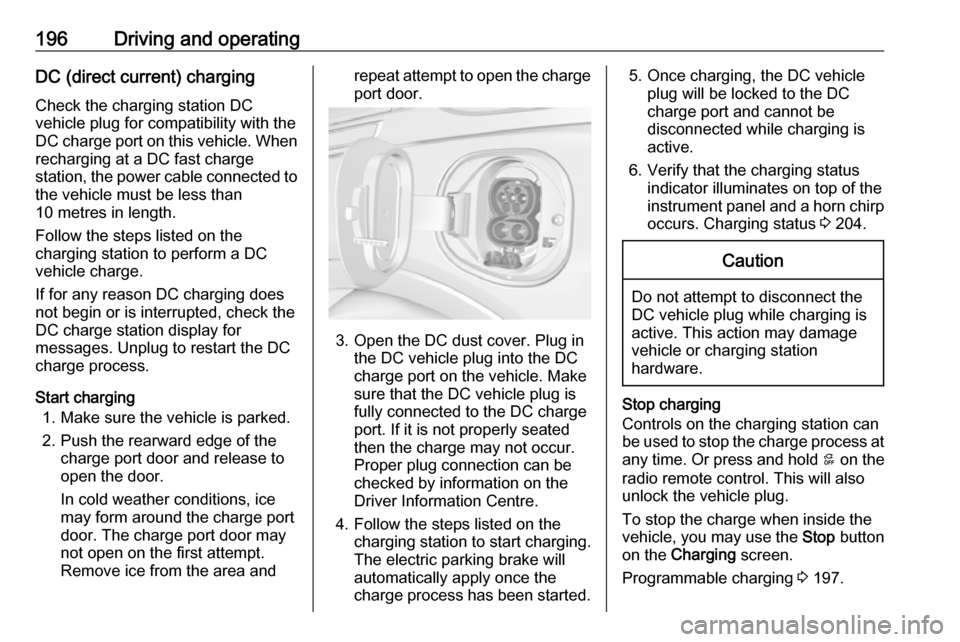
3. Open the DC dust cover. Plug in the DC vehicle plug into the DC
charge port on the vehicle. Make
sure that the DC vehicle plug is
fully connected to the DC charge
port. If it is not properly seated
then the charge may not occur.
Proper plug connection can be
checked by information on the
Driver Information Centre.
4. Follow the steps listed on the charging station to start charging.
The electric parking brake will
automatically apply once the
charge process has been started.
5. Once charging, the DC vehicle plug will be locked to the DC
charge port and cannot be
disconnected while charging is
active.
6. Verify that the charging status indicator illuminates on top of the
instrument panel and a horn chirp occurs. Charging status 3 204.Caution
Do not attempt to disconnect the
DC vehicle plug while charging is
active. This action may damage vehicle or charging station
hardware.
Stop charging
Controls on the charging station can
be used to stop the charge process at any time. Or press and hold 5 on the
radio remote control. This will also unlock the vehicle plug.
To stop the charge when inside the
vehicle, you may use the Stop button
on the Charging screen.
Programmable charging 3 197.
Page 199 of 265

Driving and operating197There is also an available mobile app
with several charging functions.
Smartphone remote function 3 26.Automatic power supply cut-off
When the vehicle no longer needs to
use power from the charging station,
the charging process will be stopped. Use the radio remote control to unlock
the DC vehicle plug.
Energy can still be consumed from
the charging station when the
vehicle’s displays and indicators
show that the high voltage battery is
fully charged. This is to ensure the
high voltage battery is in optimal
temperature operating range to
maximise vehicle range.
Programmable charging 3 197.
End charging
1. Wait until the charging process has been fully stopped, the
vehicle plug is unlocked and the
charging status indicator is solid
green or off.
2. Unplug the DC vehicle plug from the DC charge port on the vehicle
and close the dust cover.
3. Close the charge port door by pressing firmly in the centre to
latch properly.
4. Manually disengage the electric parking brake before driving the
vehicle.
5. To start another DC charge, remove the DC vehicle plug and
reconnect.
Programmable charging
Programmable charge modes To view the current charge mode
status in the Infotainment display,
touch Energy and then Charging.
The charge start and charge
complete time estimations are also displayed on the screen. These
estimations are most accurate when
the vehicle is plugged in and in
moderate temperature conditions.
Also, to get an accurate time
estimate, the vehicle uses an internal clock for programmable charging, notthe clock in the instrument panel.Charge mode selection
Touch Energy and then Charging and
select the desired charging mode.Immediate
The vehicle starts charging as soon
as it is connected to an electrical outlet.
Select the Charge limit , see below.
Departure
The vehicle estimates the charging start time considering the
programmed departure time for the
current day of the week. Charging
begins at the start time and is
Page 206 of 265

204Driving and operatingTo cancel a temporary override,
unplug the charge cord, wait for
ten seconds, and then plug the
charge cord back in. A double horn
chirp will sound and charging will be
delayed.
Programmable charging 3 197.
Charging status
The vehicle has a charging status
indicator at the centre of the
instrument panel near the
windscreen. When the vehicle is
plugged in and the vehicle power is
off, the charging status indicator
indicates the following:
● Short flashing green – One horn chirp: Vehicle is plugged in. High
voltage battery is not fully
charged. High voltage battery is
charging. Flash rate increases
from one to four flashes as the
high voltage battery charges.
● Short flashing green – Two audible beeps: Vehicle is
charging but will delay by
programmable charging at least
once before the charge is
complete. Flash rate increases
from one to four flashes as the high voltage battery charges.
● Short flashing green – Four audible beeps: Insufficient time to
fully charge by departure time due to the selected rate
preference. To increase the high
voltage battery state of charge at
the departure time perform a
delayed charging override. See
"Delayed charging override"
under Programmable charging
3 197.● Long flashing green – Two horn
chirps: Charging is delayed by
programmable charging.
Charging will begin later.
● Solid green – No horn chirps: Charging is complete.
● Solid yellow – No horn chirp: Vehicle is plugged in. It is normalfor the charging status indicator
to turn yellow for a few seconds
after plugging in a compatible
charge cord. The solid yellow
may remain illuminated
depending on the vehicle.
This may also indicate that the
charging system has detected a
fault and will not charge the high
voltage battery.
● No light signal (upon plug‐in) – No horn chirps: Charge cord
connection should be checked.
● No light signal (after indication of
green or yellow charging status
indicator) – No horn chirps:
Charge cord connection should
be checked. If connection is
correct, this may be due to a
power failure and charging will
Page 212 of 265

210Vehicle careVehicle careGeneral Information...................210
Accessories and vehicle modifications .......................... 210
Lifting the vehicle .....................211
Vehicle storage ........................211
Vehicle checks ........................... 213
Performing work ......................213
Bonnet ..................................... 213
Cooling system ........................214
Washer fluid ............................ 216
Brakes ..................................... 216
Brake fluid ............................... 217
Vehicle battery ......................... 217
Wiper blade replacement ........219
Headlight aiming ......................219
Bulb replacement .......................220
Halogen bulbs ......................... 220
Xenon headlights .....................220
Front turn signal lights .............220
Tail lights ................................. 221
Side turn signal lights ..............221
Number plate light ...................221
Electrical system ........................222
High voltage devices and wiring ...................................... 222Electrical system overload .......222
Fuses ....................................... 223
Engine compartment fuse box . 224
Instrument panel fuse box .......227
Vehicle tools .............................. 230
Tools ........................................ 230
Wheels and tyres .......................230
Tyres ....................................... 230
Winter tyres ............................. 231
Tyre designations ....................231
Tyre pressure .......................... 231
Tyre pressure monitoring system .................................... 233
Tread depth ............................. 235
Changing tyre and wheel size . 235
Wheel covers ........................... 236
Tyre chains .............................. 236
Jump starting ............................. 237
Towing ....................................... 239
Towing the vehicle ...................239
Towing another vehicle ...........240
Appearance care .......................240
Exterior care ............................ 240
Interior care ............................. 242General Information
Accessories and vehicle modifications
We recommend the use of genuine
parts and accessories and factory
approved parts specific for your
vehicle type. We cannot assess or
guarantee reliability of other products
- even if they have a regulatory or
otherwise granted approval.
Any modification, conversion or other changes made to standard vehicle
specifications (including, without
limitation, software modifications,
modifications of the electronic control
units) may invalidate the warranty
offered by Opel. Furthermore, such
changes may affect driver assistance systems and cause the vehicle to no
longer conform to the operating
permit, impacting the validity of your
vehicle registration.
Page 225 of 265
Vehicle care223Headlight wiringAn electrical overload may cause the
lights to go on and off or in some
cases to remain off. In this case, have
the headlight wiring checked
immediately by a workshop.
Windscreen wipers
If the wiper motor overheats due to
heavy snow or ice, the windscreen
wipers will stop until the motor cools
down and the wiper control is turned
off. After removal of the blockage, the wiper motor will restart when moving
the control to the desired operating
position.
Although the circuit is protected from electrical overload, overload due to
heavy snow or ice may cause wiper
linkage damage.
Always clear ice and heavy snow from the windscreen before using the
windscreen wipers. If the overload is
caused by an electrical problem and
not snow or ice, it must be serviced.Fuses
Data on the replacement fuse must match the data on the defective fuse.
There are two fuse boxes in the
vehicle:
● in the front left of the engine compartment
● on the left side of the instrument panel
Before replacing a fuse, turn off the respective switch and the vehicle.
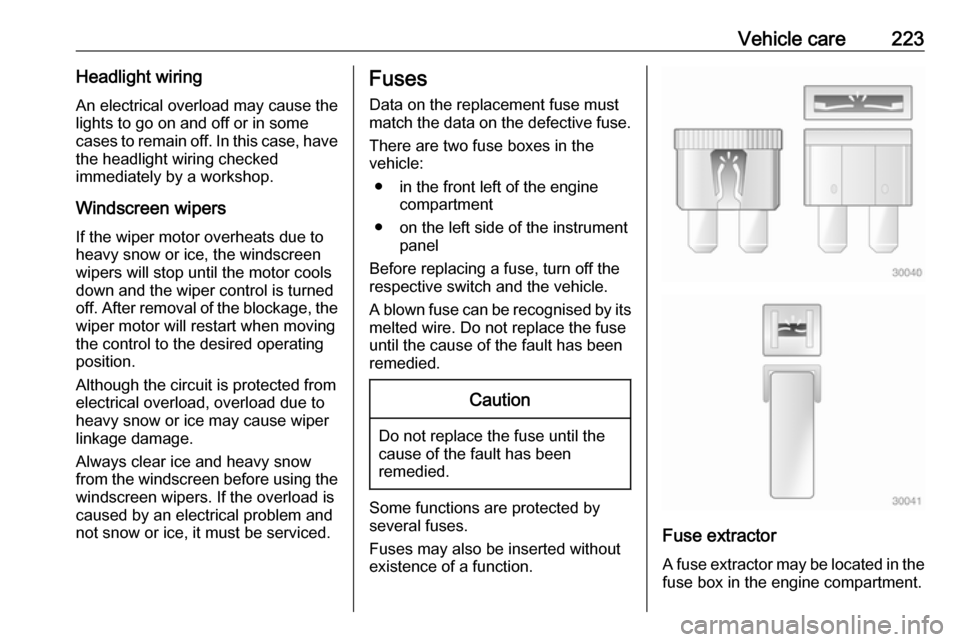
A blown fuse can be recognised by its melted wire. Do not replace the fuse
until the cause of the fault has been
remedied.Caution
Do not replace the fuse until the
cause of the fault has been
remedied.
Some functions are protected by
several fuses.
Fuses may also be inserted without
existence of a function.
Fuse extractor
A fuse extractor may be located in the
fuse box in the engine compartment.
Page 229 of 265

Vehicle care227NumberUsage46Integrated chassis control
module47Headlight levelling device48Integrated chassis control
module49Interior rear view mirror50–51E-booster52Rear camera53Run/Crank54A/C control module55Rechargeable energy
storage system pump56–57Power electronics coolant
pump58Engine control module59Electric steering column
lockNumberUsage60HVAC electric heater61On-board charging module62Transmission range control
module 163Electric cooling fan64Engine control module65Auxiliary heater pump66Powertrain relay67Drive unit controller68Rear window defogger69Second run/Crank relay70A/C control module71–72Transmission range control
module73Single power inverter
module74–After having changed defective fuses,
close the fuse box cover and press
until it engages.
If the fuse box cover is not closed
correctly, malfunctions may occur.
Instrument panel fuse boxInstrument panel fuse box on the
left side end
The fuse box is located on the driver's
side behind a cover in the instrument
panel.
To open the compartment, compress
the locking tabs, fold cover down and
remove.
Page 231 of 265

Vehicle care229The instrument panel fuse block is on
the left side of the instrument panel.
To access the fuses, open the fuse
panel door by pulling out.NumberUsage1Video processing module2Indicator light solar sensor3Side blind zone alert4Passive entry, passive start5Central gateway module6Body control module 47Body control module 38Body control module 29Body control module 110Trailer interface module 111Amplifier12Body control module 813Data link connector 114Automatic parking assist15Data link connector 2NumberUsage16Single power inverter
module 117Body control module 618Body control module 519–20–21–22–23USB24Wireless charging module25Reflected LED alert display26Heated steering wheel27–28Instrument cluster 229Trailer interface module 230Headlight levelling device31OnStar32–NumberUsage33Heating, ventilation, and air
conditioning module34–35Instrument panel cluster 136Regen on demand37–38–39–40–41–42–43Body control module 744Sensing and diagnostic
module45Front camera module46Vehicle integration control
module47Single power inverter
module 2
Page 244 of 265

242Vehicle careUnderbody
Some areas of the vehicle underbody
have a PVC undercoating while other critical areas have a durable
protective wax coating.
After the underbody is washed, check
the underbody and have it waxed if
necessary.
Bitumen/rubber materials could
damage the PVC coating. Have
underbody work carried out by a
workshop.
Before and after winter, wash the
underbody and have the protective
wax coating checked.
Interior care
Interior and upholstery Only clean the vehicle interior,
including the instrument panel fascia
and panelling, with a dry cloth or
interior cleaner.
Clean the leather upholstery with
clear water and a soft cloth. In case of
heavy soiling, use leather care.The instrument cluster and the
displays should only be cleaned using
a soft damp cloth. If necessary use a
weak soap solution.
Do not spray cleaners directly on any switches or controls.
Clean fabric upholstery with a
vacuum cleaner and brush. Remove
stains with an upholstery cleaner.
Clothing fabrics may not be
colourfast. This could cause visible
discolourations, especially on light-
coloured upholstery. Removable
stains and discolourations should be
cleaned as soon as possible.
Clean seat belts with lukewarm water or interior cleaner.Caution
Close Velcro fasteners as open
Velcro fasteners on clothing could damage seat upholstery.
The same applies to clothing with
sharp-edged objects, like zips or
belts or studded jeans.
Plastic and rubber parts
Plastic and rubber parts can be
cleaned with the same cleaner as
used to clean the body. Use interior cleaner if necessary. Do not use any
other agent. Avoid solvents and petrol in particular. Do not use high-
pressure jet cleaners.
Page 248 of 265

246Technical dataTechnical dataVehicle identification..................246
Vehicle Identification Number ..246
Identification plate ...................246
Vehicle data ............................... 248
Performance ............................ 248
Vehicle weight ......................... 248
Vehicle dimensions .................249
Tyre pressures ........................ 250Vehicle identification
Vehicle IdentificationNumber
The Vehicle Identification Number
may be embossed on the instrument
panel, visible through the windscreen, or in the engine compartment on the
right body panel.
The Vehicle Identification Number
may be stamped on the identification
plate, or in the engine compartment on the body panel.
Identification plate
The identification plate is located on
the front left or right door frame.