charge OPEL AMPERA E 2017.5 User Guide
[x] Cancel search | Manufacturer: OPEL, Model Year: 2017.5, Model line: AMPERA E, Model: OPEL AMPERA E 2017.5Pages: 265, PDF Size: 6.24 MB
Page 79 of 265
Instruments and controls77Power indicator gauge
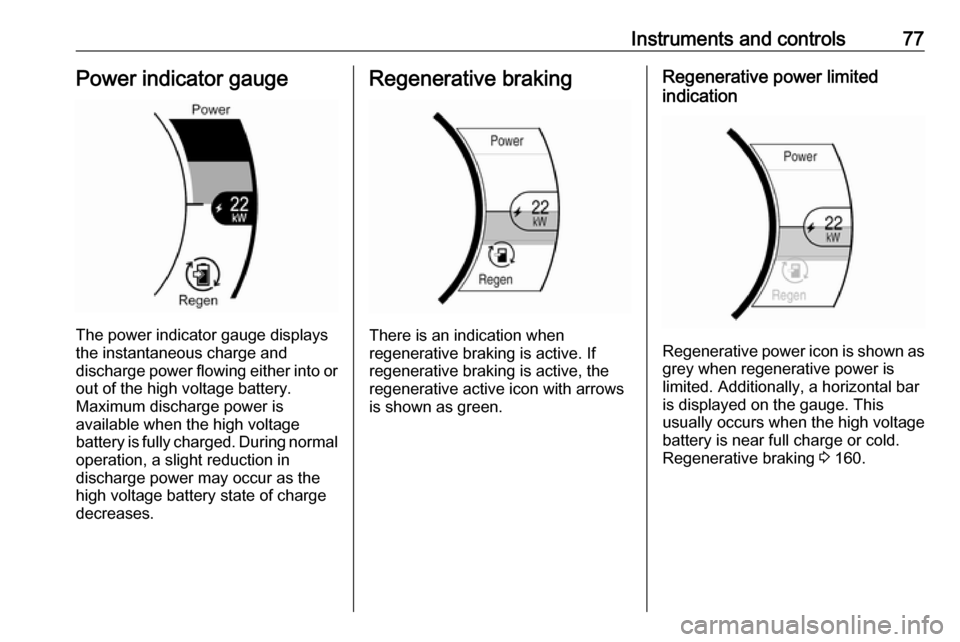
The power indicator gauge displays
the instantaneous charge and
discharge power flowing either into or out of the high voltage battery.
Maximum discharge power is
available when the high voltage
battery is fully charged. During normal
operation, a slight reduction in
discharge power may occur as the
high voltage battery state of charge
decreases.
Regenerative braking
There is an indication when
regenerative braking is active. If
regenerative braking is active, the regenerative active icon with arrowsis shown as green.
Regenerative power limited
indication
Regenerative power icon is shown as grey when regenerative power is
limited. Additionally, a horizontal bar
is displayed on the gauge. This
usually occurs when the high voltage
battery is near full charge or cold.
Regenerative braking 3 160.
Page 90 of 265
88Instruments and controls
Charging
Charge mode selection 3 197.
Programmable charging
Programmable charging 3 197.
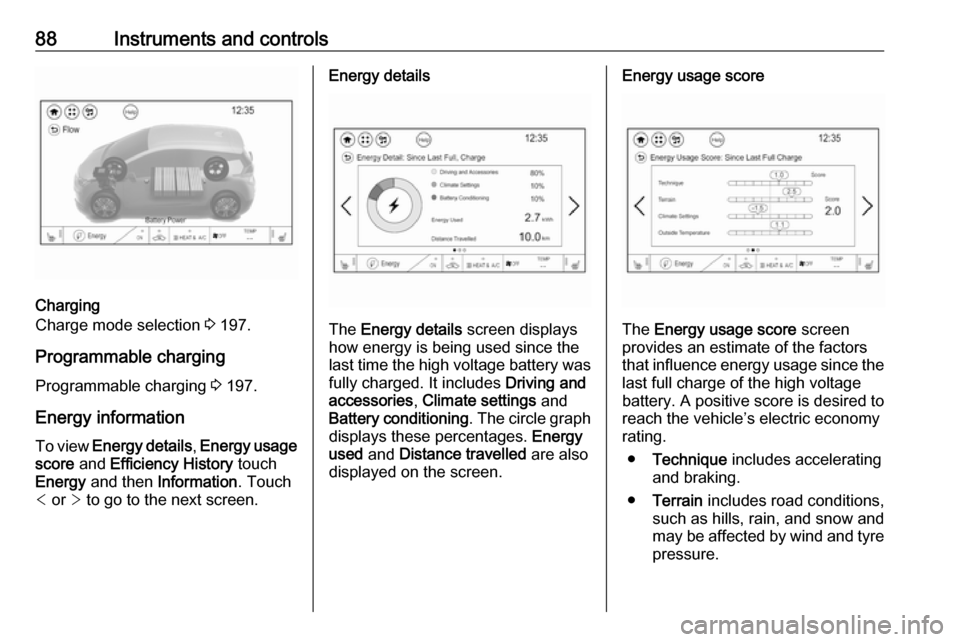
Energy information To view Energy details , Energy usage
score and Efficiency History touch
Energy and then Information . Touch
< or > to go to the next screen.
Energy details
The Energy details screen displays
how energy is being used since the
last time the high voltage battery was
fully charged. It includes Driving and
accessories , Climate settings and
Battery conditioning . The circle graph
displays these percentages. Energy
used and Distance travelled are also
displayed on the screen.
Energy usage score
The Energy usage score screen
provides an estimate of the factors
that influence energy usage since the last full charge of the high voltage
battery. A positive score is desired to
reach the vehicle’s electric economy
rating.
● Technique includes accelerating
and braking.
● Terrain includes road conditions,
such as hills, rain, and snow and
may be affected by wind and tyre
pressure.
Page 91 of 265
Instruments and controls89●Climate settings includes how the
heating and air conditioning are
used.
● Outside temperature includes the
effect that hot or cold air has on
vehicle aerodynamics.
● Score is the sum of the individual
scores.
The individual scores provide an
understanding of how electric
economy are different from day-to-
day, even when travelling the same
route.
All values are reset after a complete
charge and may not be stable until approximately 16 km have beendriven.Efficiency History
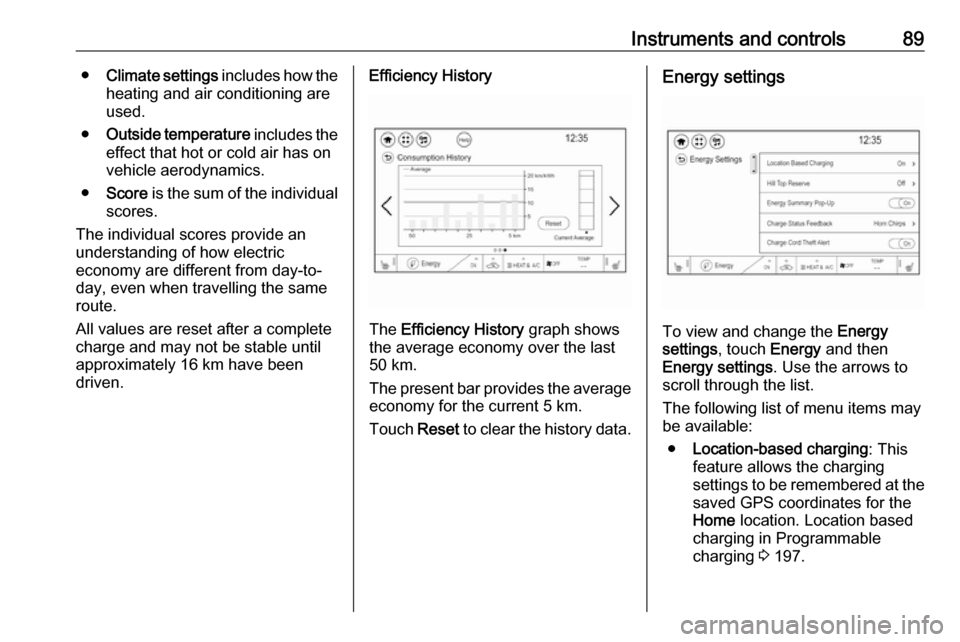
The Efficiency History graph shows
the average economy over the last
50 km.
The present bar provides the average economy for the current 5 km.
Touch Reset to clear the history data.
Energy settings
To view and change the Energy
settings , touch Energy and then
Energy settings . Use the arrows to
scroll through the list.
The following list of menu items may
be available:
● Location-based charging : This
feature allows the charging settings to be remembered at the
saved GPS coordinates for the
Home location. Location based
charging in Programmable
charging 3 197.
Page 92 of 265

90Instruments and controls●Hill Top Reserve : Select Off, On ,
On – home only , or On – away
only . Regenerative braking
3 160.
● Energy summary pop-up : Set the
energy summary pop-up feature
to On or Off.
● Charge status feedback : Set the
charge status feedback feature to Horn chirps or Off.
● Charge power loss alert : This
feature allows an alert to sound
when the vehicle is charging and
loses power at the electrical
outlet. Set the charge power loss alert feature to On or Off.
● Radio power down : This allows
high voltage battery power to be
conserved. Set the value for the
reminder to be displayed. To set
high voltage battery charge level
for Radio power down , touch
Energy , then Energy settings ,
then Radio power down . Select
Off , 2% , 4% , 6% , 8% , 10% .Low power mode
This allows high voltage battery
power to be conserved.1. Press and hold m of the
Infotainment system.
2. Touch Yes on the Info display.
The screen will turn off.
3. Press m again to turn the display
on.Vehicle messages
Messages are indicated in the Driver
Information Centre, in some cases
together with a warning and signal
chime.
Press 9 on the steering wheel to
confirm a message.
Vehicle and service messages
The vehicle messages are displayed
as text. Follow the instructions given
in the messages.
Page 93 of 265

Instruments and controls91Some important messages may
appear additionally in the Info display.
Some messages only pop-up for a
few seconds.
Warning chimes
When starting the propulsion
system or whilst driving
Only one warning chime will sound at a time.
The warning chime regarding not
fastened seat belts has priority over
any other warning chime.
● If seat belt is not fastened.
● If a door or the tailgate is not fully
closed when starting off.
● If a certain speed is exceeded with parking brake applied.
● If approaching a vehicle ahead too rapidly.
● If a programmed speed or speed
limit is exceeded.
● If a warning message appears in the Driver Information Centre.
● If the electronic key is not in the passenger compartment.● If the parking assist detects anobject.
● If an unintended lane change occurs.
● If safety function of the power tailgate detects obstacles in the
moving area.
When the vehicle is parked and/or the driver's door is opened
● With exterior lights on.
Battery voltage When the vehicle battery voltage is
running low, a warning message will
appear in the Driver Information
Centre.
1. Switch off any electrical consumers which are not requiredfor a safe drive, e.g. seat heating,
heated rear window or other main consumers.
2. Charge the vehicle battery by driving continuously for a while or
by using a charging device.The warning message will disappear
after the vehicle has been started
twice without a voltage drop.
If the vehicle battery cannot be
recharged, have the cause of the fault
remedied by a workshop.
Page 101 of 265
Lighting99LightingExterior lighting............................ 99
Light switch ................................ 99
Automatic light control .............100
High beam ............................... 100
High beam assist .....................100
Headlight flash ......................... 101
Headlight range adjustment ....101
Daytime running lights .............102
Hazard warning flashers ..........102
Turn and lane-change signals . 102
Rear fog light ........................... 102
Parking lights ........................... 103
Reversing lights .......................103
Misted light covers ...................103
Interior lighting ........................... 103
Instrument panel illumination control ..................................... 103
Interior lights ............................ 104
Reading lights .......................... 104
Sunvisor lights ......................... 104
Lighting features ........................104
Entry lighting ............................ 104
Exit lighting .............................. 104
Battery discharge protection ....105Exterior lighting
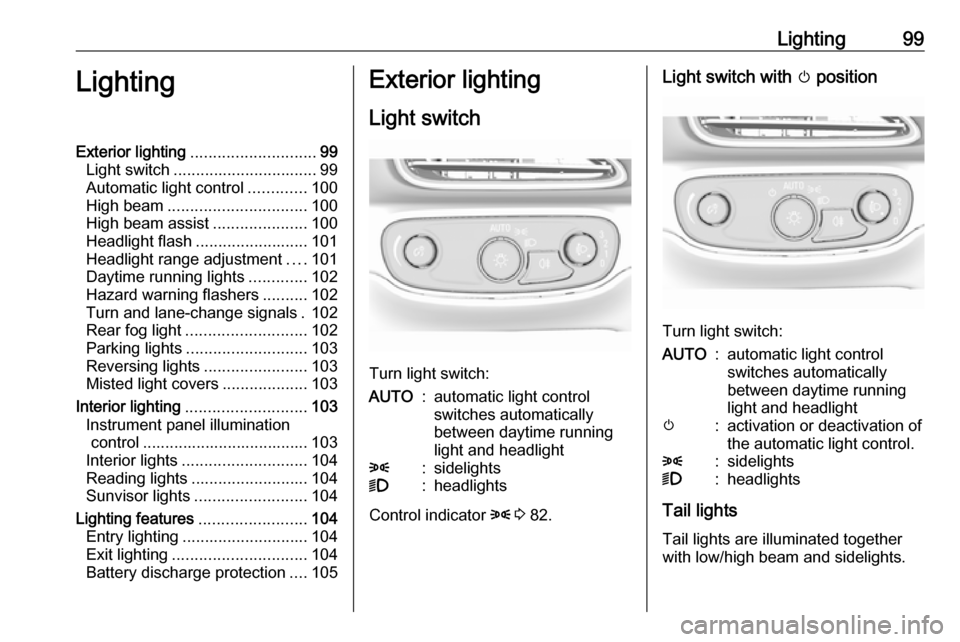
Light switch
Turn light switch:
AUTO:automatic light control
switches automatically
between daytime running
light and headlight8:sidelights9:headlights
Control indicator 8 3 82.
Light switch with m position
Turn light switch:
AUTO:automatic light control
switches automatically
between daytime running
light and headlightm:activation or deactivation of
the automatic light control.8:sidelights9:headlights
Tail lights
Tail lights are illuminated together
with low/high beam and sidelights.
Page 107 of 265

Lighting105Battery discharge protection
Vehicle battery state of charge
function
The vehicle battery saver feature is
designed to protect the vehicle's 12-
volt battery. If any interior light is left
on and the vehicle is switched off, the vehicle battery discharge protection
system automatically turns the lights
off after approx. ten minutes.
If the exterior lights are left on, they
turn off when the vehicle is switched
off. If the sidelights are switched on
when the vehicle is switched off, the
sidelights remain on until they are
manually switched off.
Page 150 of 265

148Driving and operatingDriving and
operatingDriving hints ............................... 148
Driving economically ...............148
Control of the vehicle ...............149
Starting and operating ...............149
New vehicle running-in ............149
Power button ........................... 149
Retained power off ..................151
Starting and stopping the vehicle .................................... 151
Parking .................................... 152
Electric vehicle operation modes ........................................ 154
Operation ................................. 154
Drive modes ............................ 154
Electric drive unit .......................155
Operation ................................. 155
Brakes ........................................ 158
Antilock brake system .............158
Parking brake .......................... 159
Regenerative braking ..............160
Ride control systems .................162
Traction Control system ..........162
Electronic Stability Control ......163Driver assistance systems .........164
Cruise control .......................... 164
Speed limiter ........................... 165
Forward collision alert .............167
Following distance indication ...169
Active emergency braking .......169
Front pedestrian protection .....172
Parking assist .......................... 174
Side blind spot alert .................181
Lane change alert ....................183
Panoramic view system ...........184
Rear view camera ...................185
Rear cross traffic alert .............187
Traffic sign assistant ................188
Lane keep assist .....................191
Charging .................................... 193
Programmable charging ..........197
Programmed charging override .................................. 203
Charging status .......................204
Charge cord ............................. 205
Electrical requirements ............208
Towing ....................................... 209
General information .................209Driving hints
Driving economically The following advice is intended to
help maximise energy efficiency and
range.
In colder temperatures, while these
efficiency tips will help, the electric
vehicle's driving range may be lower
due to higher energy usage.
The weight of additional cargo in the
vehicle affects efficiency and range.
Avoid carrying more than is needed.
Avoid unnecessary use of electrical
accessories. Power used for
functions other than propelling the
vehicle will reduce electric vehicle
range.
Always keep the tyres properly
inflated and the vehicle properly
aligned.
Driving style
Avoid unnecessary rapid
accelerations and decelerations.
Use cruise control when appropriate.
Page 152 of 265

150Driving and operatingIf the vehicle will not start, place the
radio remote control in the transmitter
pocket, inside the centre console.
Starting and stopping the vehicle
3 151.Switching on the vehicle
With the vehicle off and the brake
pedal applied, pressing the POWER
m once will place the vehicle in
accessory power mode. When 4
illuminates in the instrument cluster, the vehicle is ready to be driven. This could take up to 15 seconds atextremely cold temperatures.
Press POWER m once more. Release
button after starting procedure
begins.Switching off the vehicle
With the vehicle in P, press
POWER m briefly in each mode or
when engine is running and vehicle is
stationary. Some functions remain
active until driver's door is opened.
If the vehicle is not in P when
switching off the vehicle, P will be
automatically engaged before the
vehicle is switched off.A chime will sound if the driver's door is opened while the vehicle is
switched on. Always press
POWER m to switch off the vehicle
before exiting the vehicle.Emergency shut off during driving
If the vehicle needs to be switched off during driving in case of emergency,
press POWER m for more than
two seconds or press twice briefly
within five seconds.
Starting and stopping the vehicle
3 151.
Service mode
This power mode is available forservice and diagnostics and to verify
the proper operation of the service
vehicle soon control indicator as may
be required for emission inspection
purposes.
With the vehicle switched off and the brake pedal not applied, pressing and
holding POWER m for more than five
seconds will place the vehicle in
service mode. The instruments and
audio systems will operate as they do in accessory power mode, but the
vehicle will not be able to be driven.
The propulsion system will not start in service mode. Press POWERm again
to switch the vehicle off.Caution
Service mode will discharge the
12-volt vehicle battery. Do not use
service mode for an extended
period, or the vehicle may not
start.
Operation in case of failure
If the vehicle does not start due to a
low radio remote control battery, a
message will be displayed in the
Driver Information Centre.
To still drive the vehicle, proceed as
follows:
1. Open the centre console and remove the small tray from the
centre console. Place the radio
remote control in the pocket with
the buttons facing the bottom of
the vehicle.
Other objects, e.g. other keys,
transponder, tags, coins etc. must
be removed.
Page 156 of 265
154Driving and operatingAfter an accident, park the vehicle
with a minimum distance of
15 metres to other objects.
Call the hotline number given on the
label to get further instructions on how to handle the vehicle.Electric vehicle
operation modes
Operation This vehicle is a purely electricallydriven vehicle. It always uses an
electric propulsion system to drive the
vehicle. Electricity is the vehicle's only source of energy.
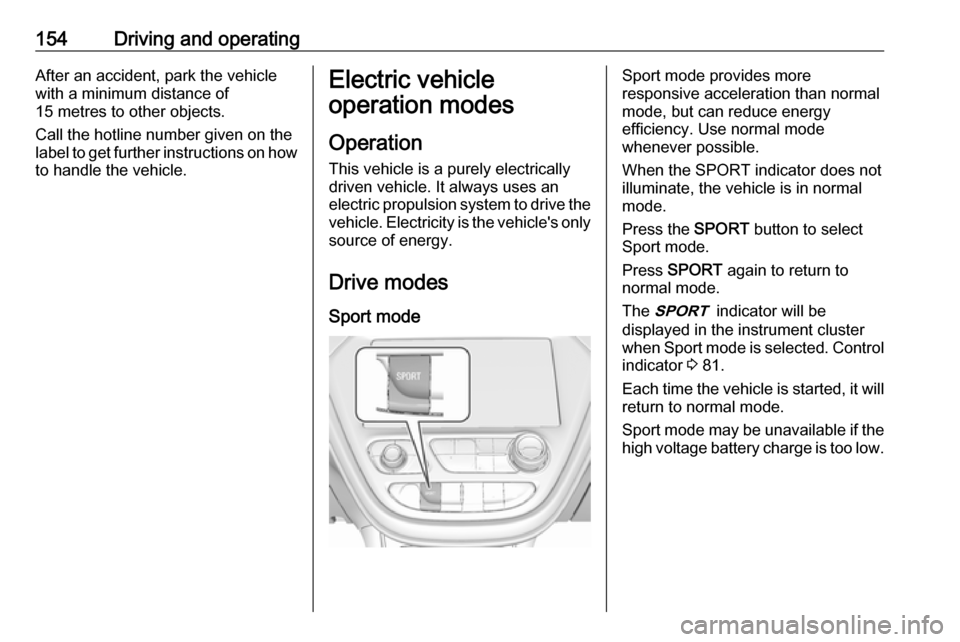
Drive modes Sport modeSport mode provides more
responsive acceleration than normal
mode, but can reduce energy
efficiency. Use normal mode
whenever possible.
When the SPORT indicator does not
illuminate, the vehicle is in normal
mode.
Press the SPORT button to select
Sport mode.
Press SPORT again to return to
normal mode.
The 3 indicator will be
displayed in the instrument cluster
when Sport mode is selected. Control indicator 3 81.
Each time the vehicle is started, it will
return to normal mode.
Sport mode may be unavailable if the high voltage battery charge is too low.