charge OPEL AMPERA E 2017.5 Owner's Manual
[x] Cancel search | Manufacturer: OPEL, Model Year: 2017.5, Model line: AMPERA E, Model: OPEL AMPERA E 2017.5Pages: 265, PDF Size: 6.24 MB
Page 22 of 265

20Keys, doors and windowsBattery replacement, in Radio remotecontrol 3 17.
Electronic key synchronisation
The electronic key synchronises itself automatically during every starting
procedure.
Fault
If the central locking cannot be
operated or the propulsion system
cannot be started, the cause may be
one of the following:
● Fault in electronic key.
● Electronic key is out of reception range.
● The battery voltage is too low.
● Overload of the central locking system by operating at frequent
intervals, the power supply is
interrupted for a short time.
● Interference from higher-power radio waves from other sources.
To rectify the cause of the fault,
change the position of the electronic
key.
Manual unlocking 3 20.Memorised settings
Whenever the vehicle is switched off, the following settings are
automatically memorised by the
electronic key:
● automatic climate control
● lighting
● Infotainment system
● central locking system
● comfort settings
The saved settings are automatically
used the next time the vehicle is
switched on with the memorised
electronic key 3 19.
A precondition is that Personalisation
by driver is activated in the personal
settings of the Info display. This must
be set for each electronic key which is
used. The status change is available
only after locking and unlocking the
vehicle.
Vehicle personalisation 3 92.
Central locking system
Unlocks and locks doors, load
compartment and charge port door.A pull on an interior door handle
unlocks the respective door. Pulling the handle once more opens the door.
Note
In the event of an accident in which
airbags or belt pretensioners are
deployed, the vehicle is
automatically unlocked.
Note
A short time after unlocking with the
remote control the doors are locked
automatically if no door has been
opened. A precondition is that the
setting is activated in the vehicle
personalisation 3 92.
Page 23 of 265
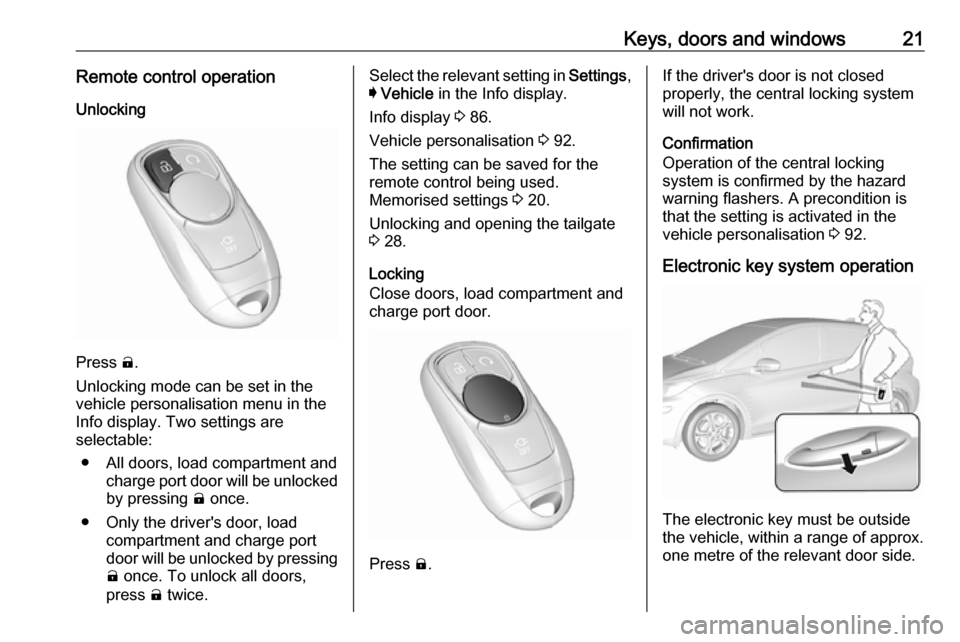
Keys, doors and windows21Remote control operationUnlocking
Press (.
Unlocking mode can be set in the vehicle personalisation menu in the
Info display. Two settings are
selectable:
● All doors, load compartment and charge port door will be unlocked
by pressing ( once.
● Only the driver's door, load compartment and charge portdoor will be unlocked by pressing
( once. To unlock all doors,
press ( twice.
Select the relevant setting in Settings,
I Vehicle in the Info display.
Info display 3 86.
Vehicle personalisation 3 92.
The setting can be saved for the remote control being used.
Memorised settings 3 20.
Unlocking and opening the tailgate 3 28.
Locking
Close doors, load compartment and
charge port door.
Press ).
If the driver's door is not closed
properly, the central locking system will not work.
Confirmation
Operation of the central locking
system is confirmed by the hazard
warning flashers. A precondition is
that the setting is activated in the
vehicle personalisation 3 92.
Electronic key system operation
The electronic key must be outside
the vehicle, within a range of approx. one metre of the relevant door side.
Page 24 of 265

22Keys, doors and windowsUnlocking
Press the button on the respective
exterior door handle and pull the
handle.
Unlocking mode can be set in the
vehicle personalisation menu in the
Info display. Two settings are
selectable:
● All doors, load compartment and charge port door will be unlocked
by pressing the button on any
exterior handle once.
● Only the driver's door, load compartment and charge portdoor will be unlocked by pressing
the button on the driver's doorexterior handle once. To unlock
all doors, press button twice.
The setting can be changed in the
menu Settings in the Info display.
Vehicle personalisation 3 92.
Locking
Press the button on any exterior door
handle.
All doors, load compartment and
charge port door will be locked.
The system locks if any of the
following occurs:
● It has been more than five seconds since unlocking.
● The button on an exterior handle has been pressed twice within
five seconds to unlock the
vehicle.
● Any door has been opened and all doors are now closed.
If the driver's door is not closed
properly, the electronic key remains in the vehicle or the vehicle is not off,
locking will not be permitted.
If there have been two or more
electronic keys in the vehicle and the
vehicle was on once, the doors will be
locked even if just one electronic key
is taken out of the vehicle.
Unlocking and opening the tailgate
The tailgate can be unlocked and
opened by pushing the touchpad
switch when the electronic key is in
range. The doors remain locked.
Load compartment 3 28.
Page 25 of 265
Keys, doors and windows23Operation with buttons on the
electronic key
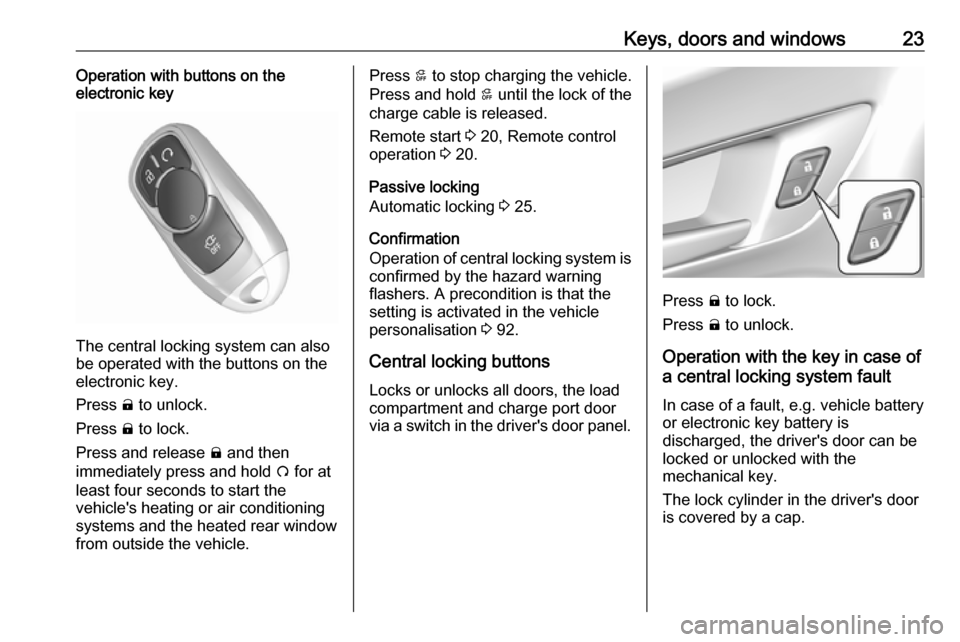
The central locking system can also
be operated with the buttons on the
electronic key.
Press ( to unlock.
Press ) to lock.
Press and release ) and then
immediately press and hold O for at
least four seconds to start the
vehicle's heating or air conditioning systems and the heated rear window
from outside the vehicle.
Press 5 to stop charging the vehicle.
Press and hold 5 until the lock of the
charge cable is released.
Remote start 3 20, Remote control
operation 3 20.
Passive locking
Automatic locking 3 25.
Confirmation
Operation of central locking system is
confirmed by the hazard warning
flashers. A precondition is that the
setting is activated in the vehicle
personalisation 3 92.
Central locking buttons Locks or unlocks all doors, the load
compartment and charge port door
via a switch in the driver's door panel.
Press ) to lock.
Press ( to unlock.
Operation with the key in case of
a central locking system fault
In case of a fault, e.g. vehicle battery
or electronic key battery is
discharged, the driver's door can be
locked or unlocked with the
mechanical key.
The lock cylinder in the driver's door
is covered by a cap.
Page 26 of 265

24Keys, doors and windows
To remove the cap, press button at
the back and extract the key blade
from the housing. Insert the key into
the recess at the bottom of the cap
and swivel the key upward.
Electronic key system 3 19.
Manual unlocking
Manually unlock the driver's door by
inserting and turning the key in the
lock cylinder.
The other doors can be opened by
pulling the interior handle twice or by pressing ( in the driver's door panel.
The load compartment and charge
port door will possibly not be
unlocked.
By switching on the vehicle, the anti-
theft locking system is deactivated.
Manual locking
Push inside locking knob of all doors
except driver's door or press ) in the
driver's door panel. Then close the
driver's door and lock it from the
outside by turning the key in the lock
cylinder. The charge port door and
tailgate are possibly not locked.
Page 27 of 265

Keys, doors and windows25
After locking, cover the lock cylinder
with the cap: insert the cap with the
lower side in the recesses, swivel and
push the cap until it engages at the
upper side.
Delayed locking
This feature delays the actual locking of the doors and arming of the anti-
theft alarm system for five seconds when the power door lock switch or
electronic key is used to lock the
vehicle.
Delayed locking can only be turned
on when the Unlocked door anti
lockout feature has been turned off.
This can be changed in the vehicle
settings.
Vehicle personalisation 3 92.
On : When pressing the central
locking button ), three chimes will
sound to signal delayed locking is
activated.
The doors will not lock until five
seconds after the last door is closed. Delayed locking can be temporarily
overridden by pressing the central
locking button ) or ) on the
electronic key.
Off : The doors will lock immediately
when pressing the central locking
button ) or ) on the electronic key.
Automatic locking Automatic locking after driving off
This security feature can be
configured to automatically lock all
doors, load compartment and charge
port door after the shift lever is moved out of P.
When at a standstill after driving, the
vehicle will be unlocked automatically
as soon as the vehicle is switched off.Activation or deactivation of
automatic locking can be set in the
menu Settings , I Vehicle in the Info
display.
Info display 3 86.
Vehicle personalisation 3 92.
The setting can be saved for the electronic key being used 3 20.
Automatic relock after unlocking
This feature can be configured to
automatically lock all doors, load
compartment and charge port door a short time after unlocking with the
electronic key, provided no door has
been opened.
Activation or deactivation of
automatic relock can be set in the
menu Settings , I Vehicle in the Info
display.
Info display 3 86.
Vehicle personalisation 3 92.
The setting can be saved for the
electronic key being used 3 20.
Page 29 of 265

Keys, doors and windows27● Welcome lighting: Request lightwhen approaching the vehicle.
● Location services: Save the parked location or start
navigation at the vehicle’s GPS
coordinates.Setup function ● KeyPass setup
● Managing priority setting ● Modifying priority setting
● RevocationActive remote function ● Door lock/unlock
● Remote start/stop
● Panic alarm activation/ termination
● Remote charge termination
● High voltage charge functions ● Temporary charging override
update
● Change the charging mode permanently
● Update departure time schedule●High voltage priority charging
activation and deactivation
● Select charge level/limit preference screen
● Vehicle locator
● Routing /available mileagePassive function
Approach detection/welcome lightingVisual display for vehicle information ● Low high voltage battery indication
● Tyre pressure
● Remote engine start status
● Odometer reading
● Rear closure ajar switch status
● Electric parking brake status
● Bonnet status
● High voltage battery state of charge status
● GPS signal for end of trip
● Charge mode status ● Available mileage
● Charge start and end times status● Full week of time baseddelayed charging status
● Disable rate based and delayed charging status
● High voltage charging system fault (unable to
charge)
● High voltage charger power level
● High voltage battery charge cord connected indication
● Charge complete
● Usable state of charge
● High voltage depletion mode range
● High voltage battery state of charge status
Pairing A smartphone must be paired to the
KeyPass module and then it must be
connected to the vehicle before it can
be used.
Page 63 of 265
Storage61
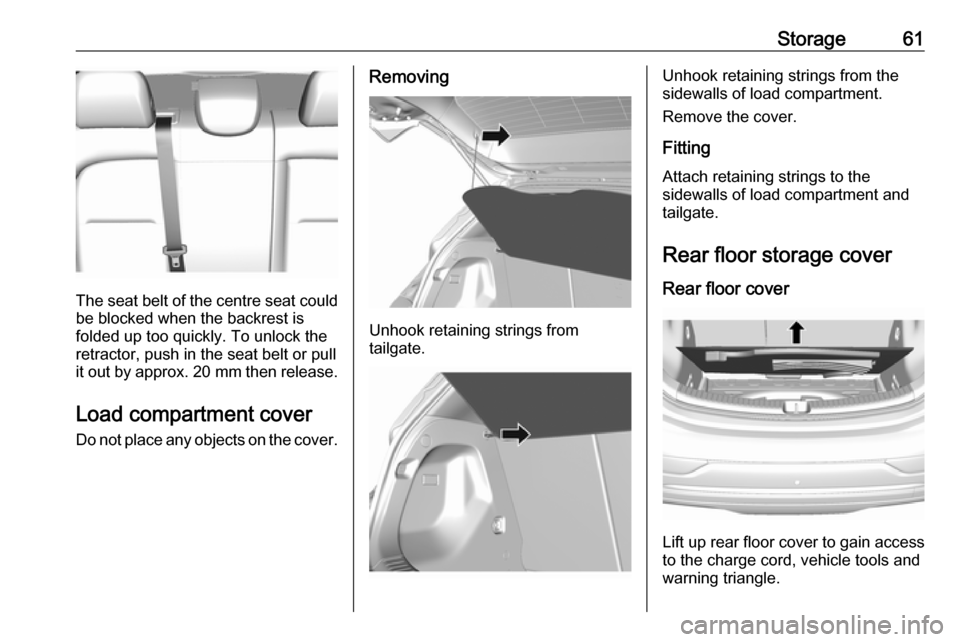
The seat belt of the centre seat couldbe blocked when the backrest is
folded up too quickly. To unlock the
retractor, push in the seat belt or pull
it out by approx. 20 mm then release.
Load compartment cover
Do not place any objects on the cover.
Removing
Unhook retaining strings from
tailgate.
Unhook retaining strings from the
sidewalls of load compartment.
Remove the cover.
Fitting Attach retaining strings to the
sidewalls of load compartment and
tailgate.
Rear floor storage cover Rear floor cover
Lift up rear floor cover to gain access
to the charge cord, vehicle tools and
warning triangle.
Page 73 of 265
Instruments and controls71USB charging port
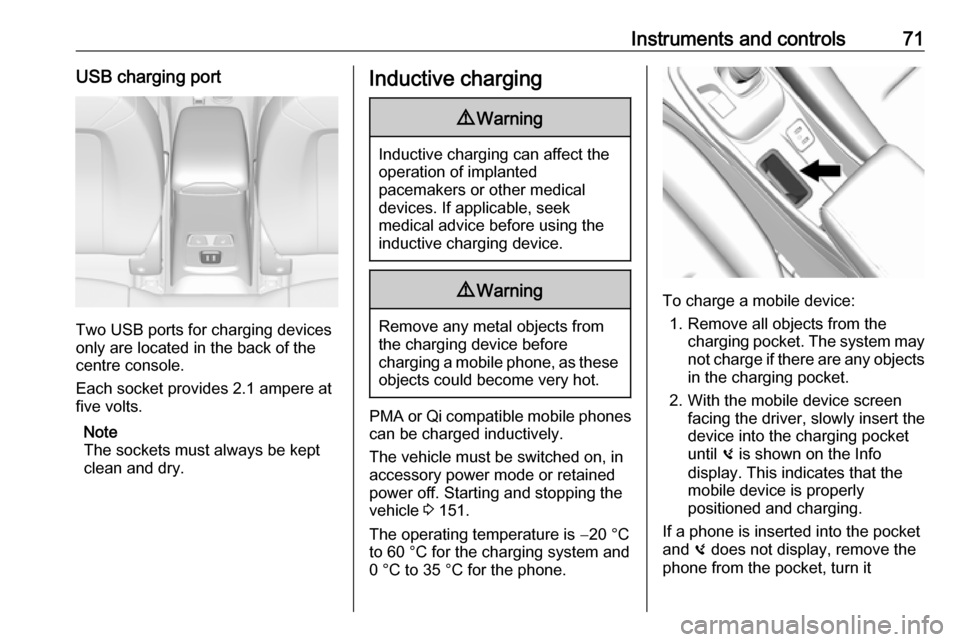
Two USB ports for charging devices
only are located in the back of the
centre console.
Each socket provides 2.1 ampere at
five volts.
Note
The sockets must always be kept
clean and dry.
Inductive charging9 Warning
Inductive charging can affect the
operation of implanted
pacemakers or other medical
devices. If applicable, seek
medical advice before using the
inductive charging device.
9 Warning
Remove any metal objects from
the charging device before
charging a mobile phone, as these
objects could become very hot.
PMA or Qi compatible mobile phones can be charged inductively.
The vehicle must be switched on, in
accessory power mode or retained
power off. Starting and stopping the
vehicle 3 151.
The operating temperature is −20 °C
to 60 °C for the charging system and
0 °C to 35 °C for the phone.
To charge a mobile device:
1. Remove all objects from the charging pocket. The system may
not charge if there are any objects
in the charging pocket.
2. With the mobile device screen facing the driver, slowly insert the
device into the charging pocket
until 0 is shown on the Info
display. This indicates that the
mobile device is properly
positioned and charging.
If a phone is inserted into the pocket
and 0 does not display, remove the
phone from the pocket, turn it
Page 77 of 265
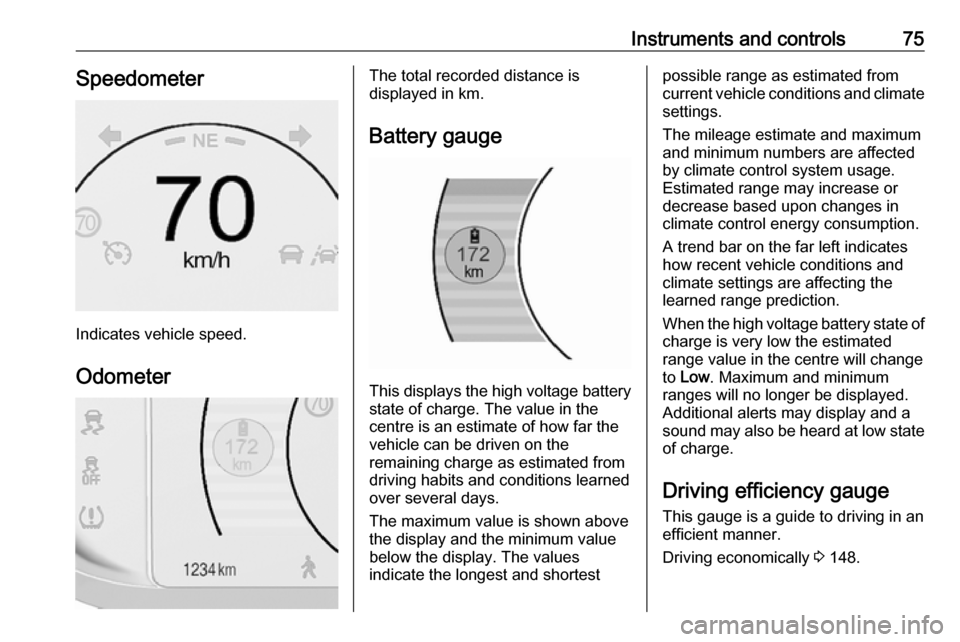
Instruments and controls75Speedometer
Indicates vehicle speed.
Odometer
The total recorded distance is
displayed in km.
Battery gauge
This displays the high voltage battery state of charge. The value in the
centre is an estimate of how far the
vehicle can be driven on the
remaining charge as estimated from
driving habits and conditions learned
over several days.
The maximum value is shown above
the display and the minimum value
below the display. The values
indicate the longest and shortest
possible range as estimated from
current vehicle conditions and climate
settings.
The mileage estimate and maximum
and minimum numbers are affected
by climate control system usage.
Estimated range may increase or
decrease based upon changes in
climate control energy consumption.
A trend bar on the far left indicates
how recent vehicle conditions and
climate settings are affecting the
learned range prediction.
When the high voltage battery state of charge is very low the estimated
range value in the centre will change
to Low . Maximum and minimum
ranges will no longer be displayed.
Additional alerts may display and a
sound may also be heard at low state
of charge.
Driving efficiency gaugeThis gauge is a guide to driving in an
efficient manner.
Driving economically 3 148.