ad blue OPEL AMPERA E 2018.5 Manual user
[x] Cancel search | Manufacturer: OPEL, Model Year: 2018.5, Model line: AMPERA E, Model: OPEL AMPERA E 2018.5Pages: 273, PDF Size: 6.6 MB
Page 137 of 273
Infotainment system135Pairing a deviceImportant information ● Up to ten devices can be paired to the system.
● Only one paired device can be connected to the Infotainment
system at a time.
● Pairing only needs to be carried out once, unless the device is
deleted from the list of paired
devices. If the device has been connected previously, the
Infotainment system establishes the connection automatically.
● Bluetooth operation considerably
drains the device's battery.
Therefore, connect the device to
the USB port for charging.
Pairing a new device 1. Activate the Bluetooth function of the Bluetooth device. For further
information, see the operating
instructions for the Bluetooth
device.
2. Press p and then select 1 in the
top left corner of the screen todisplay the application overview
screen.
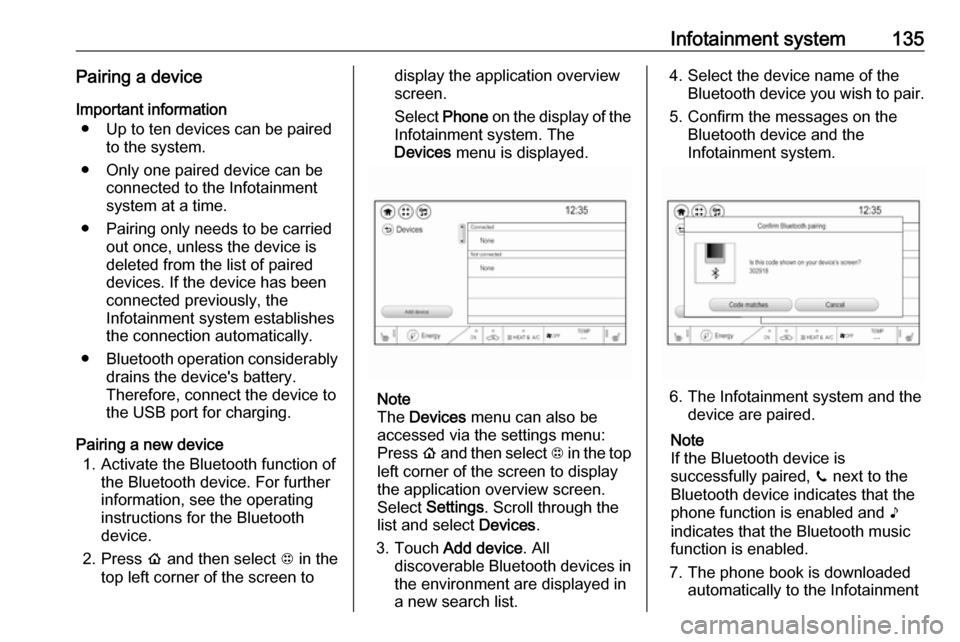
Select Phone on the display of the
Infotainment system. The Devices menu is displayed.
Note
The Devices menu can also be
accessed via the settings menu: Press p and then select 1 in the top
left corner of the screen to display
the application overview screen.
Select Settings . Scroll through the
list and select Devices.
3. Touch Add device . All
discoverable Bluetooth devices in
the environment are displayed in
a new search list.
4. Select the device name of the Bluetooth device you wish to pair.
5. Confirm the messages on the Bluetooth device and the
Infotainment system.
6. The Infotainment system and the device are paired.
Note
If the Bluetooth device is
successfully paired, ? next to the
Bluetooth device indicates that the phone function is enabled and >
indicates that the Bluetooth music
function is enabled.
7. The phone book is downloaded automatically to the Infotainment
Page 138 of 273

136Infotainment systemsystem. Depending on the phone,the Infotainment system must be
allowed access to the phone
book. If required, confirm the
messages displayed on the
Bluetooth device.
If this function is not supported by
the Bluetooth device, a
corresponding message is displayed.
Connecting a paired device Press p and then select 1 in the top
left corner of the screen to display the application overview screen.
Select Settings . Select Bluetooth
Phone and then Devices to display
the respective menu.
Select the Bluetooth device you wish to connect. The device is connected.
Disconnecting a device Press p and then select 1 in the top
left corner of the screen to display the
application overview screen.
Select Settings . Scroll through the list
and select Devices to display the
respective menu.Select the Bluetooth device currently connected. You are prompted with a
message.
Confirm the message to disconnect
the device.
Deleting a devicePress p and then select 1 in the top
left corner of the screen to display the application overview screen.
Select Settings . Scroll through the list
and select Devices to display the
respective menu.
Select Delete next to the Bluetooth
device you want to delete. You are
prompted with a message.
Confirm the message to delete the
device.
Resynchronising contacts
The contacts list can be reloaded via
the Settings menu.
Press p and then select 1 in the top
left corner of the screen to display the application overview screen.Select Settings . Select Bluetooth
Phone and then select Resync
Device Contacts . The contacts list is
resynchronised.
Emergency call9 Warning
Connection setup cannot be
guaranteed in all situations. For
this reason you should not rely
exclusively on a mobile phone
when a vitally important
communication (e.g. a medical
emergency) is concerned.
In some networks it may be
necessary for a valid SIM card to
be properly inserted in the mobile
phone.
9 Warning
Bear in mind that you can make
and receive calls with the mobile
phone if it is in a service area with a sufficiently strong signal. Under
Page 139 of 273
Infotainment system137certain circumstances,
emergency calls cannot be made in all mobile phone networks.
Problems may occur when certain
network services and / or
telephone functions are active.
You can enquire about this with
the local network operators.
The emergency call number can
differ depending on the region and country. Please enquire
beforehand about the correct
emergency call number for the
relevant region.
Making an emergency call
Dial the emergency call number (e.g.
112 ).
The telephone connection to the
emergency call centre is set up.
Answer when the service personnel
questions you about the emergency.
9 Warning
Do not end the call until you are
requested to do so by the
emergency call centre.
Operation
As soon as a connection via
Bluetooth has been set up between
your mobile phone and the
Infotainment system, you can operate many functions of your mobile phone
via the Infotainment system.
Note
In the hands-free mode, mobile
phone operation continues to be
possible, e.g. taking a call or
adjusting the volume.
After setup of a connection between
the mobile phone and the
Infotainment system, mobile phone
data is transmitted to the Infotainment
system. This can take some time
depending on the mobile phone and
the amount of data to be transferred.
During this period, operation of the
mobile phone via the Infotainment
system is possible only to a limited extent.
Note
Not every mobile phone supports all functions of the phone portal.
Therefore, deviations from the range
of functions described below are
possible.
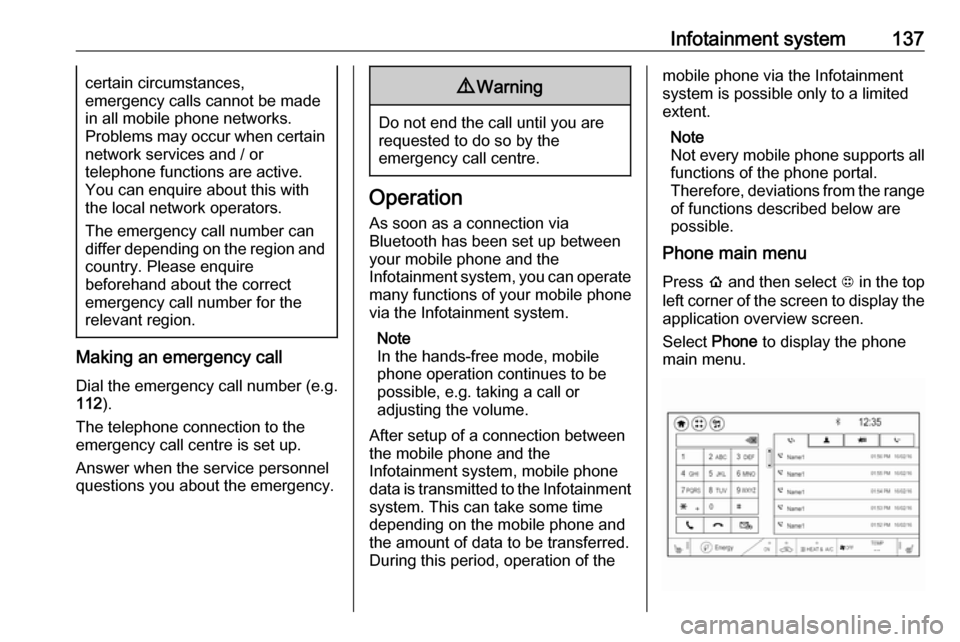
Phone main menu
Press p and then select 1 in the top
left corner of the screen to display the application overview screen.
Select Phone to display the phone
main menu.
Page 140 of 273

138Infotainment systemInitiating a phone call
Entering a phone number
Press p and then select 1 in the top
left corner of the screen to display the application overview screen.
Select Phone.
Enter a telephone number using the keypad in the phone main menu.
To delete one or more entered
characters, touch or touch and hold
{ .
Touch ? on the screen to start
dialling.
Phone book
When pairing a mobile phone with the
Infotainment system via Bluetooth,
the phone book of the mobile phone
is downloaded automatically 3 134.
Press p and then select 1 in the top
left corner of the screen to display the application overview screen.
Select Phone.
Activate the ^ tab in the phone main
menu.
To start a phone call, select the
desired contact in the list.
Note
To display a contact with all
information available, select More
next to the desired contact.
Contacts sorting
The phone book can be sorted by last
name or first name.
Press p and then select 1 in the top
left corner of the screen to display the application overview screen.
Select Settings to display the
respective menu.
Select Bluetooth Phone and then Sort
contacts . Activate the desired option.Call history
All incoming, outgoing, or missed
calls are registered.
Press p and then select 1 in the top
left corner of the screen to display the
application overview screen.
Select Phone. Select the Y tab in the
phone main menu.
Outgoing calls are marked with ],
incoming calls are marked with [ and
missed calls are marked with \.
Select the desired list entry to initiate
a phone call.
Page 142 of 273

140Infotainment systemPress p and then select 1 in the top
left corner of the screen to display the application overview screen.
Select Settings and then Bluetooth
Phone . Activate or deactivate
Privacy .
Functions during a call
During an ongoing phone call the
phone main menu is displayed.
Deactivating the hands-free mode
temporarily
To continue the conversation on the
mobile phone, activate m.
To return to the hands-free mode,
deactivate m.
Deactivating the microphone
temporarily
To mute the microphone, activate n.
To reactivate the microphone,
deactivate n.
Setting a call on hold
During an active phone call, the t
screen button changes to Hold.
Select Hold to set the call on hold.Ending a phone call
Select @ to end the call.
Voice mail box You may operate your voice mail boxvia the Infotainment system.
Voice mail number
To check the voice mail number of the
phone currently connected, press p
and then select 1 in the top left corner
of the screen.
Select Settings and then Bluetooth
Phone .
If available, the voice mail number is
displayed under My Number.
Calling the voice mail box
Press p and then select 1 in the top
left corner of the screen to display the application overview screen.
Select Phone to display the phone
main screen.
Select t on the keypad to call the
mailbox.
Alternatively, enter the voice mail
number via the phone keypad.Mobile phones and CB radio
equipment
Installation instructions and
operating guidelines
The vehicle specific installation
instructions and the operating
guidelines of the mobile phone and
hands-free manufacturer must be
observed when installing and
operating a mobile telephone. Failure to do so could invalidate the vehicleoperating permit (EU directive 95/54/
EC).
Recommendations for fault-free
operation:
● Professionally installed exterior antenna to obtain the maximum
range possible
● Maximum transmission power 10 W
● Installation of the phone in a suitable spot, consider relevant
Note in the Owner's Manual
3 45
Page 261 of 273

Customer information259To manually check for updates, select
Settings on the home screen,
Software information and then
Software Update . Follow the on-
screen prompts.
Note
Steps for downloading and installing updates may vary by vehicle.
Note
During the installation process, the
vehicle may not be operational.
Registered trademarksApple Inc.
Apple CarPlay™ is a trademark of Apple Inc.
App Store ®
and iTunes Store ®
are
registered trademarks of Apple Inc.
iPhone ®
, iPod ®
, iPod touch ®
, iPod
nano ®
, iPad ®
and Siri ®
are registered
trademarks of Apple Inc.Bluetooth SIG, Inc.
Bluetooth ®
is a registered trademark
of Bluetooth SIG, Inc.DivX, LLC
DivX ®
and DivX Certified ®
are
registered trademarks of DivX, LLC.EnGIS Technologies, Inc.
BringGo ®
is a registered trademark of
EnGIS Technologies, Inc.Google Inc.
Android™ and Google Play™ Store
are trademarks of Google Inc.Stitcher Inc.
Stitcher™ is a trademark of Stitcher,
Inc.Verband der Automobilindustrie e.V.
AdBlue ®
is a registered trademark of
the VDA.Vehicle data recording
and privacy
Event data recorders
Electronic control units are installed in
your vehicle. Control units process
data which is received by vehicle
sensors, for example, or which they
generate themselves or exchange
amongst themselves. Some control
units are necessary for the safe
functioning of your vehicle, others
assist you while you drive (driver
assistance systems), while others
provide comfort or Infotainment
functions.
Operating data in the vehicle Control units process data for
operation of the vehicle.
Page 266 of 273

264IndexAAccessories and vehicle modifications .......................... 210
Activating Bluetooth music .........128
Activating phone .........................137
Activating radio ........................... 120
Activating USB audio ..................128
Activating USB movie .................131
Activating USB picture ................130
Active emergency braking ..........170
Adjustable air vents ...................146
Airbag and belt tensioners ...........78
Airbag deactivation ................49, 78
Airbag label................................... 45 Airbag system .............................. 45
Air conditioning regular operation ................................ 147
Air intake .................................... 147
Air vents...................................... 146
Antilock brake system ................ 158
Antilock brake system (ABS) .......79
Anti-theft alarm system ................29
Anti-theft locking system .............. 29
Appearance care ........................244
Armrest ................................... 40, 42
Armrest storage ........................... 58
Audio files ................................... 126
Automatic anti-dazzle ..................33
Automatic light control ...............100
Automatic locking ........................25Auto volume................................ 116
AUX Connecting device ..................126
General information ................126
B Basic operation ........................... 113
Battery discharge protection ......105
Battery gauge ............................... 74
Battery voltage ............................. 90
Belts.............................................. 42
Bluetooth Bluetooth connection ..............134
Bluetooth music menu ............128
Connecting device ..................126
General information ................126
Pairing ..................................... 134
Phone ...................................... 137
Bluetooth connection ..................134
Bonnet ....................................... 213
Brake fluid .......................... 216, 248
Brakes ............................... 158, 216
Brake system ............................... 79
Breakdown.................................. 242
BringGo ...................................... 132
Bulb replacement ....................... 220
C Call Functions during a call ............137
Incoming call ........................... 137
Page 268 of 273

266Folding mirrors ............................. 32
Following distance indication ......169
Forward collision alert................. 167
Front airbag system .....................48
Front pedestrian protection ........172
Front seats.................................... 38
Front turn lights .......................... 220
Fuses ......................................... 223
G
Gauges ......................................... 74
General information ...126, 133,
134, 209
AUX ......................................... 126
Bluetooth ................................. 126
DAB ......................................... 124
Infotainment system ................106
Phone ...................................... 134
Smartphone applications ........126
USB ......................................... 126
Glovebox ..................................... 57
H Halogen bulbs ............................ 220
Hand brake ......................... 158, 159
Hazard warning flashers ............102
Headlight aiming .........................219
Headlight flash ........................... 101
Headlight range adjustment ......101
Headlights..................................... 99
Head restraint adjustment .............6Head restraints ............................ 37
Heated mirrors ............................. 33
Heated rear window ..................... 35
Heated steering wheel .................65
Heating .................................. 41, 42
High beam ........................... 81, 100
High beam assist ..................81, 100
High voltage devices and wiring 223
Home menu ................................ 113
Horn ....................................... 11, 66
I
Identification plate .....................250
Immobiliser ............................ 31, 81
Indicators ...................................... 74
Inductive charging ........................70
Info Display ................................... 85
Information displays...................... 82
Infotainment control panel ..........108
Instrument cluster ........................72
Instrument panel fuse box .........228
Instrument panel illumination control .................................... 104
Instrument panel overview ............. 8
Intellitext ..................................... 124
Interior care ............................... 245
Interior lighting ............................ 104
Interior lights .............................. 104
Introduction ............................... 0iPod............................................ 126
Connecting device ..................126
J
Jump starting ............................. 240
K Key, memorised settings ..............20
KeyPass ....................................... 26
Keys ............................................. 16
Keys, locks ................................... 16
L
Lane change alert .......................183
Lane keep assist ..................80, 191
Lashing eyes ............................... 61
Lifting the vehicle ........................211
Light switch .................................. 99
Load compartment ................28, 59
Load compartment cover .............60
Loading information .....................62
Location based charging ............197
M Manual seat adjustment ...............39
Maximum speed ......................... 232
Maximum startup volume ...........116
Memorised settings ......................20
Menu operation .......................... 113
Mirror adjustment ........................... 6 Misted light covers .....................103
Page 269 of 273

267Mobile phones and CB radioequipment .............................. 140
Movie files................................... 126
Mute............................................ 110
N New vehicle running-in ..............149
Number plate light .....................222
O
Object detection systems ...........174
Odometer ..................................... 74
One-pedal driving .......................154
OnStar .......................................... 94
Operation ............................ 137, 154
External devices ......................126
Menu ....................................... 113
Phone ...................................... 137
Radio ....................................... 120
Outside temperature ....................68
P Pairing ........................................ 134
Panoramic view system ..............184
Parking ................................ 15, 152
Parking assist ............................ 174
Parking brake ............................ 159
Parking lights ............................. 103
Pedestrian detection .....................81
Pedestrian safety alert ............11, 66
Performance .............................. 252Performing work ........................212
Phone Bluetooth ................................. 134
Bluetooth connection ..............134
Call history .............................. 137
Emergency calls ......................136
Entering a number ..................137
Functions during a call ............137
General information ................134
Incoming call ........................... 137
Phone book ............................. 137
Phone main menu ...................137
Selecting the ring tone ............137
Speed dial number ..................137
Phone book ................................ 137
Phone projection ........................132
Picture files ................................. 126
Playing audio .............................. 128
Playing movies ........................... 131
Post-crash label .......................... 152
Power button .............................. 149
Power indicator gauge ..................76
Power outlets ............................... 69
Power windows ............................ 34
Programmable charging .............197
Programmed charging override ..204
Propulsion system data ..............252R
Radio Activating................................. 120
Configuring DAB .....................124
Configuring RDS .....................123
DAB announcements ..............124
Digital audio broadcasting
(DAB) ...................................... 124
Favourite lists .......................... 121
Intellitext .................................. 124
Radio data system (RDS) .......123
Regional .................................. 123
Regionalisation ....................... 123
Selecting the waveband ..........120
Station search ......................... 121
Station tuning .......................... 121
Usage ...................................... 120
Radio data system .....................123
Radio Frequency Identification (RFID) ..................................... 262
Radio remote control ...................17
RDS ............................................ 123
REACH ....................................... 256
Reading lights ............................ 104
Rear cross traffic alert ................188
Rear floor storage cover ..............60
Rear fog light ....................... 81, 103
Rear seats .................................... 42
Rear view camera ...................... 186
Rear window wiper and washer ..68
Page 271 of 273

269UUltrasonic parking assist............. 174
Upholstery .................................. 245
Usage ......................... 110, 120, 133
AUX ......................................... 126
Bluetooth ................................. 126
iPod ......................................... 126
Menu ....................................... 113
Phone ...................................... 137
Radio ....................................... 120
USB ......................................... 126
USB Connecting device ..................126
General information ................126
USB audio menu .....................128
USB movie menu ....................131
USB picture menu ...................130
Using smartphone applications ..132
Using this manual ..........................2
V
Vehicle battery ........................... 217
Vehicle checks............................ 212
Vehicle data recording and privacy ..................................... 259
Vehicle detected ahead ................81
Vehicle dimensions .................... 253
Vehicle Identification Number ....250
Vehicle messages .......................89
Vehicle personalisation ...............91Vehicle ready ................................ 81
Vehicle security ............................ 29
Vehicle storage ........................... 211
Vehicle tools ............................... 231
Vehicle unlocking ........................... 4
Vehicle weight ........................... 252
Voice recognition ........................133
Volume Auto volume ............................ 116
Maximum startup volume ........116
Mute function........................... 110
Ring tone volume ....................116
Setting the volume ..................110
Speed compensated volume ..116
Touch beep volume ................116
TP volume ............................... 116
Volume limitation at high
temperatures ........................... 110
Volume settings .......................... 116
W
Warning chimes ........................... 90
Warning lights ............................... 74
Warning triangle .......................... 61
Washer and wiper systems .........12
Washer fluid ............................... 216
Waveband selection ...................120
Wheel covers ............................. 236
Wheels and tyres .......................231
Windows ....................................... 33Windscreen................................... 33
Windscreen wiper and washer ....66
Winter tyres ............................... 232
Wiper blade replacement ..........219
X Xenon headlights .......................220