parking brake OPEL AMPERA E 2018.5 Manual user
[x] Cancel search | Manufacturer: OPEL, Model Year: 2018.5, Model line: AMPERA E, Model: OPEL AMPERA E 2018.5Pages: 273, PDF Size: 6.6 MB
Page 155 of 273

Driving and operating1539Warning
● Always apply parking brake.
Pull switch m for approx.
1 second and check if the
control indicator m illuminates.
The electric parking brake is applied when control indicator
m illuminates 3 79.
● Switch off the vehicle.
● If the vehicle is on a level surface or uphill slope, apply
the parking brake and set the
selector lever to P before
switching off the vehicle. On an uphill slope, turn the front
wheels away from the kerb.
If the vehicle is on a downhill
slope, apply the parking brake
and set the selector lever to P
before switching off the vehicle.
Turn the front wheels towards
the kerb.
With the selector lever in P,
press POWER m briefly to
switch off the vehicle. Turn the
steering wheel until the
steering wheel lock engages.
● Close the windows.
● Lock the vehicle.
● Activate the anti-theft alarm system.
● The engine cooling fans may run
after the vehicle has been
switched off 3 212.
It is not recommended to park with the propulsion system running.
If the vehicle is left with the propulsion
system running, follow the proper
steps to be sure the vehicle will not move.
Post-crash label
The post-crash label is located in the
driver's door frame.
After an accident, park the vehicle
with a sufficient distance of
approx. 7.5 m to other objects.
Park on a non-flammable surface.
Call the hotline number given on the
label to get further instructions on how to handle the vehicle.
Page 157 of 273

Driving and operating155The selector lever always starts from
a centre position. The selected gear
is indicated by a yellow LED on the
selector lever. After releasing the
selector lever, it will return to the centre position.
P : This position locks the front
wheels. It is the recommended
position when starting the propulsion system because the vehicle cannot
move easily.9 Warning
It is dangerous to get out of the
vehicle if the selector lever is not fully in P with the parking brake
firmly applied. The vehicle can roll.
Do not leave the vehicle when the propulsion system is running, the
vehicle may move suddenly. You
or others can be injured. To be
sure the vehicle will not move,
even if you are on even ground,
always apply the parking brake
and move the selector lever to P.
The release button is designed to
prevent inadvertent shifting out of P
unless the vehicle has been started,
the brake pedal is depressed, and the release button is pressed.
When the vehicle is stopped, press
POWER m to switch off the vehicle.
The electric drive unit will shift to P
automatically.
The vehicle will not shift into P if it is
moving too fast. Stop the vehicle and
shift into P.
To shift into P, press the P button on
the selector lever.
To shift out of P:
1. Depress the brake pedal and press the release button.
2. Shift into the desired gear.
R : Use this gear to reverse.
If the vehicle is shifted from either R
to D, or D to R while the speed is too
high, the vehicle will shift
automatically to N. Stop the vehicle
and shift again.
To shift into and out of R:
1. Bring the vehicle to a complete stop.
2. To shift into R, press the release
button and move the selector
lever forward, and then to the left. R is illuminated in red.
To shift out of R, shift into the
desired gear.Caution
Shifting into R while the vehicle is
moving forward could damage the electric drive unit. Only shift intoR after the vehicle has been
stopped.
Page 159 of 273

Driving and operating157One-pedal drivingCaution
When the vehicle is operated in L
and the driver unfastens his seat
belt, the electric parking brake is
automatically applied and one
pedal driving is not possible.
With one-pedal driving, the
accelerator pedal can be used to
control the deceleration of the vehicle
down to a complete stop.
Quick releasing of the accelerator
pedal will result in aggressive
deceleration. Slow releasing of the
accelerator pedal will allow the
deceleration of the vehicle to be
adjusted as desired.
To use one-pedal driving, shift into L.
L is only selectable when the vehicle
is in D. Press the accelerator pedal to
achieve the desired speed. The
deceleration provided by one-pedal
driving provides full regenerative
braking and helps increase energy efficiency.
While driving on slopes, one-pedal
driving may not be able to bring the
vehicle to a complete stop or hold the
vehicle at a stop.
If the vehicle cannot stop on a slope
while using one-pedal driving, the
electric parking brake may be applied to hold the vehicle stationary.
To drive again, depress the
accelerator pedal, and the electric
parking brake will automatically
disengage.
One-pedal driving may become
disabled and the vehicle may
continue to creep forward, or if
stopped, may apply the electric
parking brake or shift to P.
This can be caused by the following: ● The driver's door is open.
● The driver's seat belt is unbuckled.
● The vehicle has remained stationary for 5 minutes.
● There is a problem with the propulsion system.Additional deceleration can be
achieved by using the regenerative braking paddle.
Regenerative braking 3 161.
Car wash mode This vehicle includes a car washmode that allows the vehicle to
remain in N (neutral) for use in
automatic car washes.
Car wash mode (vehicle off) - driver in vehicle
To place the vehicle in N with the
vehicle off and occupied:
1. Apply the brake pedal.
2. Shift to N.
3. Turn off the vehicle and release the brake pedal.
4. The indicator should continue to show N. If it does not, repeat steps
1-3.
The vehicle is now ready for the
car wash.
Page 161 of 273
Driving and operating159ABS starts to regulate brake pressure
as soon as a wheel shows a tendency to lock. The vehicle remains
steerable, even during hard braking.
ABS control is made apparent
through a pulse in the brake pedal
and the noise of the regulation
process.
For optimum braking, keep the brake
pedal fully depressed throughout the
braking process, despite the fact that
the pedal is pulsating. Do not reduce
the pressure on the pedal.
After starting off, the system performs a self-test which may be audible.
Control indicator u 3 79.
Fault9 Warning
If there is a fault in the ABS, the
wheels may be liable to lock due
to braking that is heavier than
normal. The advantages of ABS
are no longer available. During
hard braking, the vehicle can nolonger be steered and may
swerve.
Have the cause of the fault remedied
by a workshop.
Parking brake
Electric parking brake
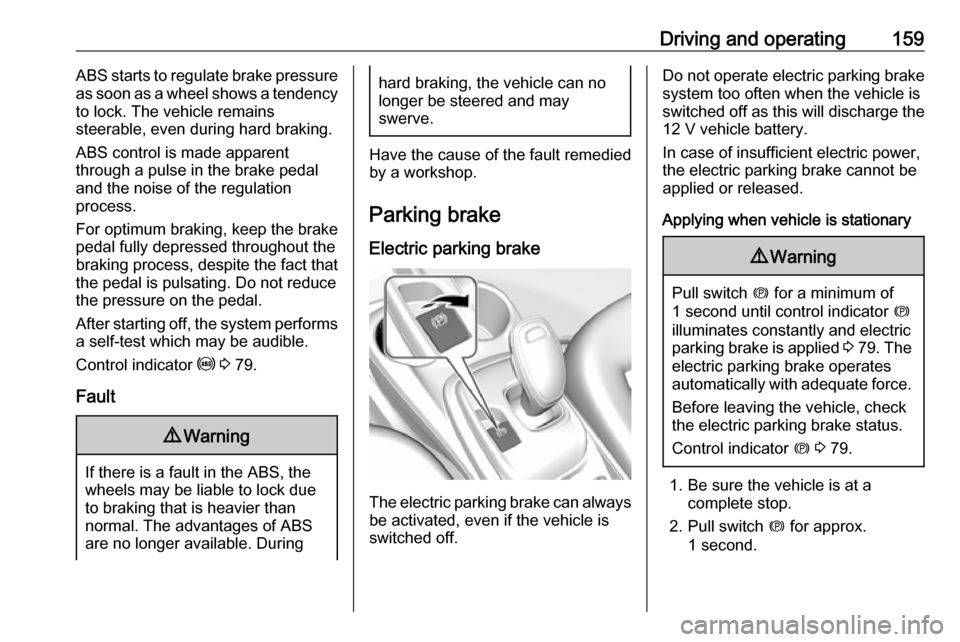
The electric parking brake can always
be activated, even if the vehicle is
switched off.
Do not operate electric parking brake
system too often when the vehicle is
switched off as this will discharge the 12 V vehicle battery.
In case of insufficient electric power,
the electric parking brake cannot be
applied or released.
Applying when vehicle is stationary9 Warning
Pull switch m for a minimum of
1 second until control indicator m
illuminates constantly and electric
parking brake is applied 3 79 . The
electric parking brake operates automatically with adequate force.
Before leaving the vehicle, check
the electric parking brake status.
Control indicator m 3 79.
1. Be sure the vehicle is at a
complete stop.
2. Pull switch m for approx.
1 second.
Page 162 of 273

160Driving and operatingThe control indicator m will flash and
then stay on once the electric parking brake is fully applied. Before leaving
the vehicle, check the control
indicator m to ensure the parking
brake is applied.
If the control indicator m flashes
continuously, then the electric parking
brake is only partially applied or there
is a problem with the electric parking
brake. A message is displayed in the
Driver Information Centre. Release
the electric parking brake and try to
apply it again. If the control indicator
m does not illuminate or keeps
flashing, seek the assistance of a
workshop.
Do not drive the vehicle if the control
indicator m is flashing 3 79.
If the electric parking brake is applied while the vehicle is moving, a chimewill sound and a message will be
displayed in the Driver Information
Centre. The vehicle will decelerate as
long as the switch is pulled.
Releasing the switch m during the
deceleration process will release the
parking brake. If the switch m ispulled until the vehicle stops moving,
the electric parking brake will remain
applied.
When the electric parking brake fault
indicator j illuminates, the electric
parking brake has detected a system
problem and is operating with
reduced functionality. To apply the
electric parking brake when j
illuminates, pull the switch m and
hold it until the control indicator m
remains on. If the control indicator j
illuminates, seek the assistance of a
workshop.
The vehicle may automatically apply
the electric parking brake in some
situations when the vehicle is not
moving. This is normal, and is done to periodically check the correct
operation of the electric parking brake
system.
If the electric parking brake fails to
apply, the rear wheels should be
blocked to prevent vehicle
movement.Releasing
1. Switch on the vehicle.
2. Keep brake pedal depressed.
3. Push switch m.
If attempting to release the electric parking brake without the brake pedal
being applied, a chime will sound and
a message will be displayed in the Driver Information Centre. The
electric parking brake is released
when m is off.
If control indicator j is illuminated, the
electric parking brake has detected a
system problem, and is operating with reduced functionality. To release the
electric parking brake when j is on,
push down the switch m and hold it
down until the control indicator j
goes off. If the control indicator
remains illuminated, seek the
assistance of a workshop.
Note
Driving with the parking brake on
can overheat the brake system and
cause premature wear or damage to brake system parts. Make sure that
Page 163 of 273
Driving and operating161the parking brake is fully released
and the control indicator m is off
before driving.
Automatic release
The electric parking brake is
automatically released when the
vehicle is running, placed into gear
and an attempt is made to drive away.
Avoid rapid acceleration when the
electric parking brake is applied, to
reduce wear of parking brake lining.
Electric parking brake control
indicator m 3 79.
Electric parking brake fault control
indicator j3 79.
Driver Information Centre 3 82.
Regenerative braking
Some braking energy from the
moving vehicle is turned back into
electrical energy. This energy is then
stored back into the high voltage
battery system, increasing energy
efficiency.
Regenerative power may be limited
when the high voltage battery is near
full charge or cold.Regeneration on demand
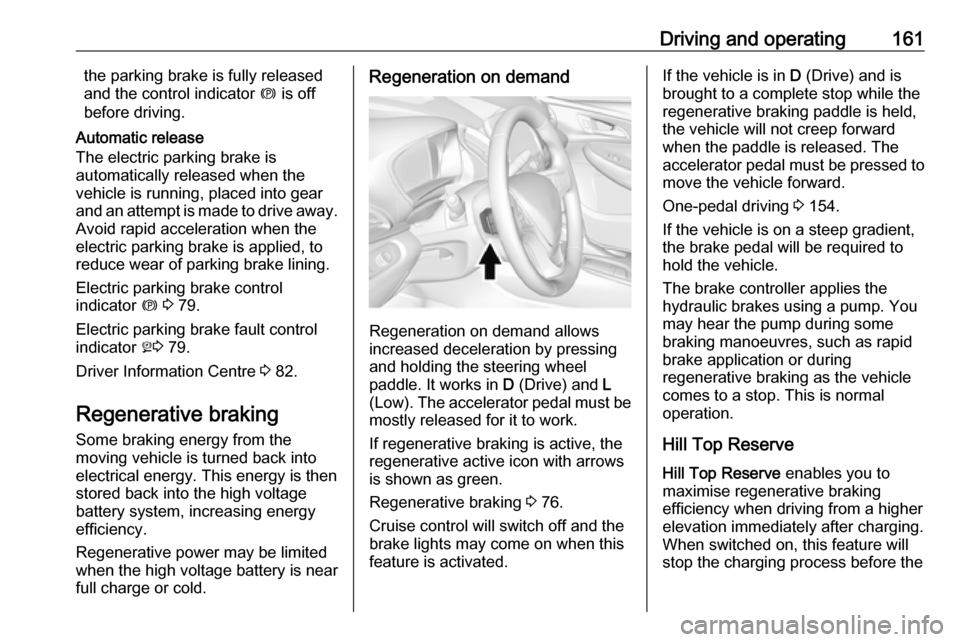
Regeneration on demand allows
increased deceleration by pressing
and holding the steering wheel
paddle. It works in D (Drive) and L
(Low). The accelerator pedal must be mostly released for it to work.
If regenerative braking is active, the regenerative active icon with arrowsis shown as green.
Regenerative braking 3 76.
Cruise control will switch off and the
brake lights may come on when this
feature is activated.
If the vehicle is in D (Drive) and is
brought to a complete stop while the regenerative braking paddle is held,
the vehicle will not creep forward
when the paddle is released. The
accelerator pedal must be pressed to
move the vehicle forward.
One-pedal driving 3 154.
If the vehicle is on a steep gradient,
the brake pedal will be required to
hold the vehicle.
The brake controller applies the
hydraulic brakes using a pump. You
may hear the pump during some
braking manoeuvres, such as rapid
brake application or during
regenerative braking as the vehicle
comes to a stop. This is normal
operation.
Hill Top ReserveHill Top Reserve enables you to
maximise regenerative braking
efficiency when driving from a higher
elevation immediately after charging.
When switched on, this feature will
stop the charging process before the
Page 173 of 273

Driving and operating171pedestrian protection, automatic
braking can also occur when a
pedestrian ahead is detected,
indicated by the pedestrian ahead
indicator 7.
The system operates up to a speed of
80 km/h.
Below a speed of 40 km/h the system can apply full braking.
Emergency automatic braking may slow the vehicle to a complete stop to
try to avoid a potential crash. If this
happens, emergency automatic
braking may engage the electric
parking brake to hold the vehicle at a
stop. To release, push the electric
parking brake switch or firmly depress the accelerator pedal.9 Warning
Emergency automatic braking is
an emergency crash preparation
feature and is not designed to
avoid crashes. Do not rely on the
system to brake the vehicle.
Emergency automatic braking will
not brake outside of its operating speed range and only responds to
detected vehicles.
Forward looking brake assist
In addition to the brake preparation
system and emergency automatic
braking, the forward looking brake
assist function makes the brake assist more sensitive. Therefore,
depressing the brake pedal less
strongly results in immediate hard
braking. This function helps the driver
brake quicker and harder before an
imminent collision.
The system operates up to a speed of 80 km/h.
9 Warning
Active emergency braking is not
designed to apply hard
autonomous braking or to
automatically avoid a collision. It is designed to reduce the vehicle
speed before a collision. It may not
react to animals. After a sudden
lane change, the system needs a
certain time to detect the next
preceding vehicle.
The complete attention of the
driver is always required while
driving. The driver must always be
ready to take action and apply the brakes and steer to avoid
collisions.
Intelligent brake assist
Intelligent brake assist may activate
when the brake pedal is applied
quickly by providing a boost to
braking based on the speed of
approach and distance to a vehicle
ahead.
Minor brake pedal pulsations or pedal movement during this time are normal and the brake pedal should continue
to be applied as required. Intelligent
brake assist will automatically
disengage only when the brake pedal is released.
Page 174 of 273

172Driving and operating9Warning
Intelligent brake assist may
increase vehicle braking in
situations when it may not be
necessary. You could block the
flow of traffic. If this occurs, take
your foot off the brake pedal and
then apply the brakes as needed.
Front pedestrian protection
Front pedestrian protection 3 172.
Deactivation Active emergency braking can be
deactivated in the personalisation
menu in the Info Display 3 91.
If deactivated, a message is
displayed in the Driver Information
Centre.
The system is reactivated the next time the vehicle is switched on.
System limitations In some cases, the active emergencybraking system may provide
automatic braking in situations that
seem to be unnecessary, for instance
in parking garages, due to traffic signs in a curve or due to vehicles in
another lane. This is normal
operation, the vehicle does not need
a service. Firmly apply the accelerator
pedal if the situation and
surroundings permit to override the
automatic braking.
In the following cases, active
emergency braking performance is
limited:
● When driving on winding or hilly roads.
● When not all vehicles are detected, especially vehicles witha trailer, tractors, muddy
vehicles, etc.
● When detecting a vehicle when weather limits visibility, such as in
fog, rain, or snow.
● During nighttime driving.
● When weather limits visibility, such as fog, rain, or snow.
● When the sensor in the windscreen is blocked by snow,
ice, slush, mud, dirt, windscreen
damage or affected by foreign
items, e.g. stickers.To avoid malfunction keep the areas
of the camera sensor in the
windscreen always clear of dirt, dust,
ice and snow.
Complete attention is always required while driving, and you should beready to take action and apply the
brakes and / or steer the vehicle to
avoid crashes.
Fault
In case the system requires a service, a message is displayed in the Driver
Information Centre.
If the system does not work as it
should do, vehicle messages are
displayed in the Driver Information
Centre.
Vehicle messages 3 89.
Front pedestrian protection
The front pedestrian protection
system may help avoid or reduce the
harm caused by front-end crashes
with nearby pedestrians when driving in a forward gear.
Page 176 of 273
174Driving and operatingAutomatic braking
If a crash into a pedestrian directly ahead is imminent and the brakes
have not been applied, the braking
strength is automatically adapted.
This can help to avoid some very low speed pedestrian crashes or reduce
pedestrian injury.
Automatic braking levels may be
reduced under certain conditions,
such as higher speeds.
If this happens, automatic braking
may engage the electric parking
brake to hold the vehicle at a stop.
Release the electric parking brake. A
firm press of the accelerator pedal will also release automatic braking and
the electric parking brake 3 159.
This system includes intelligent brake
assist, and the emergency automatic
braking system may also respond to
pedestrians.
Active emergency braking 3 170.
Automatic braking can be disabled
through vehicle personalisation 3 91.General information9 Warning
The driver must always be ready
to take action and apply the brakes and steer to avoid collisions.
9 Warning
Front pedestrian braking may alert
or automatically brake the vehicle
suddenly in situations where it is
unexpected and undesired. It
could falsely alert or brake for
objects similar in shape or size to
pedestrians, including shadows.
This is normal operation and the
vehicle does not need a service.
To override Automatic braking,
firmly depress the accelerator
pedal, if it is safe to do so.
System limitations
In the following cases, front
pedestrian protection may not detect
a pedestrian ahead or sensor
performance is limited:
● When vehicle speed is out of range from 8 km/h to 80 km/h .
● When the distance to an pedestrian ahead is more than
40 m.
● When weather limits visibility, such as fog, rain, or snow.
● During nighttime driving.
● When the sensor in the windscreen is blocked by snow,
ice, slush, mud, dirt, windscreen
damage or affected by foreign
items, e.g. stickers.
Parking assist
Rear parking assist9 Warning
It is the driver who bears full
responsibility for the parking
manoeuvre.
Always check the surrounding
area while reversing and using the rear parking assist system.
Page 198 of 273
196Driving and operatingSee "Temporary charge mode
override and cancel" in
Programmable charging 3 197.
Additionally, the stop charge
button on the electronic key may
also be used. Press and hold 5 on
the electronic key. This will also
unlock the vehicle plug.
2. Unplug the vehicle plug of the charge cord from the vehicle.
3. Close the charge port door by pressing firmly in the centre until it
engages.
4. Unplug the charge cord from the electrical outlet.
5. Place the charge cord into the storage compartment.
DC (direct current) charging
Check the charging station DC
vehicle plug for compatibility with the
DC charge port on this vehicle. When
recharging at a DC fast charge
station, the power cable connected to the vehicle must be less than 10 m in
length.
Follow the steps listed on the
charging station to perform a DC
vehicle charge.
If for any reason DC charging does
not begin or is interrupted, check the
DC charge station display for
messages. Unplug to restart the DC
charge process.
Start charging 1. Make sure the vehicle is parked.
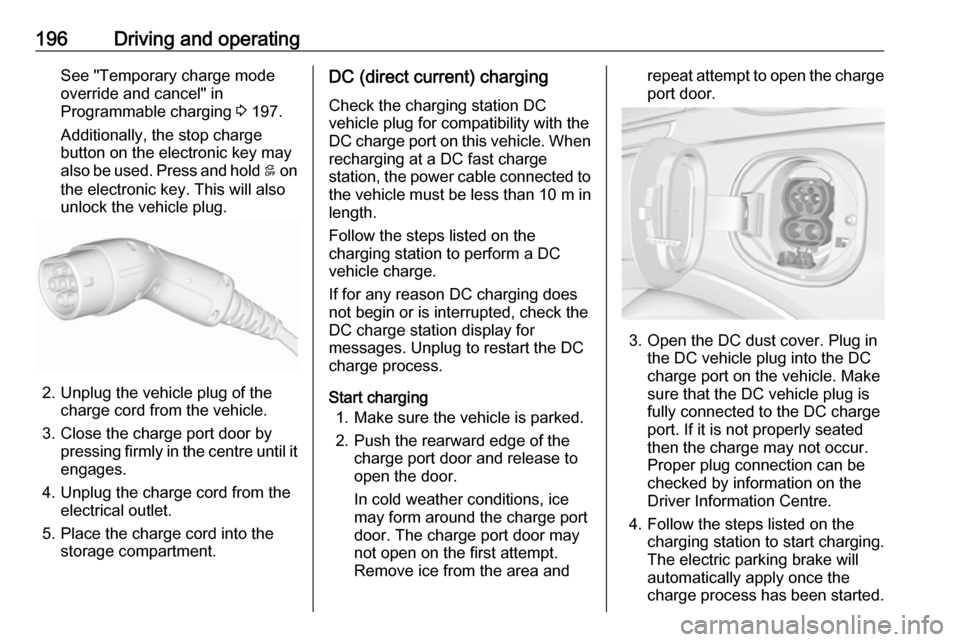
2. Push the rearward edge of the charge port door and release to
open the door.
In cold weather conditions, ice
may form around the charge port
door. The charge port door may
not open on the first attempt.
Remove ice from the area andrepeat attempt to open the charge
port door.
3. Open the DC dust cover. Plug in the DC vehicle plug into the DC
charge port on the vehicle. Make
sure that the DC vehicle plug is
fully connected to the DC charge
port. If it is not properly seated
then the charge may not occur.
Proper plug connection can be
checked by information on the
Driver Information Centre.
4. Follow the steps listed on the charging station to start charging.
The electric parking brake will
automatically apply once the
charge process has been started.