parking brake OPEL AMPERA E 2018.5 Manual user
[x] Cancel search | Manufacturer: OPEL, Model Year: 2018.5, Model line: AMPERA E, Model: OPEL AMPERA E 2018.5Pages: 273, PDF Size: 6.6 MB
Page 11 of 273

In brief91Power windows .....................34
2 Exterior mirrors .....................32
3 Central locking system ..........20
4 Side air vents ...................... 146
5 Turn lights, headlight
flash, low / high beam,
high beam assist .................102
Exit lighting ......................... 105
Parking lights ...................... 103
6 Regeneration on Demand ..161
7 Cruise control .....................164
Speed limiter ....................... 166
Forward collision alert .........167
Heated steering wheel ..........65
8 Instruments .......................... 74
Driver Information Centre ...... 82
9 Forward collision alert
indicator ............................. 167
Front pedestrian alert ..........172
10 Buttons for Driver
Information Centre ................82
11 Windscreen wiper and
washer, rear wiper and
washer ................................. 6612Centre air vents .................. 146
13 Info Display .......................... 85
14 Anti-theft alarm system
status LED ........................... 29
Light sensor ........................ 100
Charging status indicator ....204
15 Glovebox .............................. 57
16 Climate control system ........ 142
17 Hazard warning flashers ....102
Sport mode ........................ 154
Traction Control system .....162
Electronic Stability Control . 163
Parking assist / Advanced
parking assist .....................174
Lane keep assist ................191
18 Power outlet .......................... 69
19 Selector lever ...................... 154
20 USB port
21 Controls for Info Display
operation .............................. 85
22 Parking brake ......................159
23 Power button ....................... 149
24 Steering wheel adjustment ..65
25 Horn ..................................... 6626Bonnet release lever ..........213
27 Fuse box ............................ 228
28 Light switch .......................... 99
Headlight range
adjustment ......................... 101
Rear fog lights ....................103
Instrument illumination .......104
Page 17 of 273

In brief15ParkingNote
Do not allow the vehicle to remain in
extreme temperatures for long
periods without being driven or
being plugged in.9 Warning
● Always apply parking brake.
Pull switch m for approx.
1 second and check if the
control indicator m illuminates.
The electric parking brake is applied when control indicator
m illuminates 3 79.
● Switch off the vehicle.
● If the vehicle is on a level surface or uphill slope, apply
the parking brake and set the
selector lever to P before
switching off the vehicle. On an uphill slope, turn the front
wheels away from the kerb.
If the vehicle is on a downhill
slope, apply the parking brake
and set the selector lever to P
before switching off the vehicle.
Turn the front wheels towards
the kerb.
With the selector lever in P,
press POWER m briefly to
switch off the vehicle. Turn the
steering wheel until the
steering wheel lock engages.
● Lock the vehicle with ) on the
electronic key.
Activate the anti-theft alarm
system 3 29.
● The cooling fans may run after the vehicle has been switched off
3 212.
Keys, locks 3 16.
Laying-up the vehicle for a long period of time 3 211.
Page 29 of 273

Keys, doors and windows27●Vehicle status: View the vehicle’s
range and high voltage battery
level, charging status, and tyre
pressure.
● Welcome lighting: Request light when approaching the vehicle.
● Location services: Save the parked location or start
navigation at the vehicle’s GPS
coordinates.Setup function ● KeyPass setup
● Managing priority setting ● Modifying priority setting
● RevocationActive remote function ● Door lock / unlock
● Remote start / stop
● Panic alarm activation / termination
● Remote charge termination
● High voltage charge functions ● Temporary charging override
update
● Change the charging mode permanently● Update departure timeschedule
● High voltage priority charging
activation and deactivation
● Select charge level / limit preference screen
● Vehicle locator
● Routing / available mileagePassive function
Approach detection / welcome
lightingVisual display for vehicle information ● Low high voltage battery indication
● Tyre pressure
● Remote engine start status
● Odometer reading
● Rear closure ajar switch status
● Electric parking brake status
● Bonnet status
● High voltage battery state of charge status● Vehicle's position
● Charge mode status ● Available mileage
● Charge start and end times status
● Full week of time based delayed charging status
● Disable rate based and delayed charging status
● High voltage charging system fault (unable to
charge)
● High voltage charger power level
● High voltage battery charge cord connected indication
● Charge complete
● Usable state of charge
● High voltage depletion mode range
● High voltage battery state of charge status
Page 64 of 273
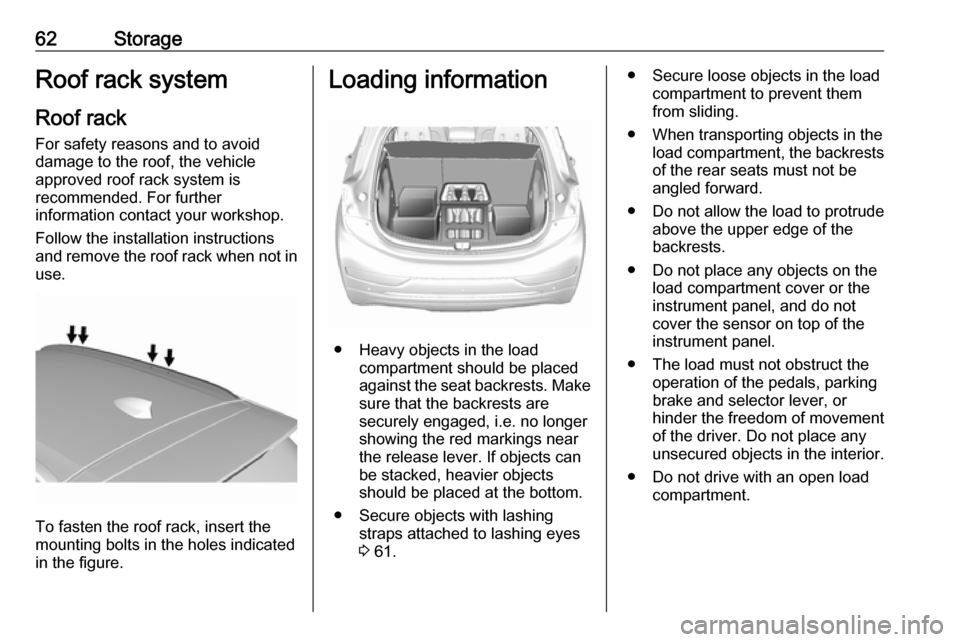
62StorageRoof rack systemRoof rackFor safety reasons and to avoid
damage to the roof, the vehicle
approved roof rack system is
recommended. For further
information contact your workshop.
Follow the installation instructions
and remove the roof rack when not in
use.
To fasten the roof rack, insert the
mounting bolts in the holes indicated
in the figure.
Loading information
● Heavy objects in the load compartment should be placed
against the seat backrests. Make
sure that the backrests are
securely engaged, i.e. no longer
showing the red markings near the release lever. If objects can
be stacked, heavier objects
should be placed at the bottom.
● Secure objects with lashing straps attached to lashing eyes3 61.
● Secure loose objects in the load
compartment to prevent themfrom sliding.
● When transporting objects in the load compartment, the backrestsof the rear seats must not be
angled forward.
● Do not allow the load to protrude above the upper edge of the
backrests.
● Do not place any objects on the load compartment cover or theinstrument panel, and do not
cover the sensor on top of the instrument panel.
● The load must not obstruct the operation of the pedals, parking
brake and selector lever, or
hinder the freedom of movement
of the driver. Do not place any
unsecured objects in the interior.
● Do not drive with an open load compartment.
Page 66 of 273

64Instruments and controlsInstruments and
controlsControls ....................................... 65
Steering wheel adjustment ........65
Steering wheel controls .............65
Heated steering wheel ...............65
Horn ........................................... 66
Pedestrian safety alert ...............66
Windscreen wiper and washer ..66
Rear window wiper and washer ...................................... 68
Outside temperature ..................68
Clock ......................................... 69
Power outlets ............................. 69
Inductive charging .....................70
Warning lights, gauges and indi‐ cators ........................................... 72
Instrument cluster ......................72
Speedometer ............................. 74
Odometer .................................. 74
Battery gauge ............................ 74
Driving efficiency gauge ............74
Power indicator gauge ...............76
Regenerative braking ................76
Total vehicle range ....................77
Service display .......................... 77Control indicators ......................77
Turn lights .................................. 77
Seat belt reminder .....................77
Airbag and belt tensioners .........78
Airbag deactivation ....................78
Charging system .......................78
Service vehicle soon .................79
Brake system ............................. 79
Electric parking brake ................79
Electric parking brake fault ........79
Antilock brake system (ABS) .....79
Sport mode ................................ 80
Lane keep assist .......................80
Electronic Stability Control off ...80
Electronic Stability Control and Traction Control system ...........80
Traction Control system off .......80
Tyre pressure monitoring system ...................................... 80
Immobiliser ................................ 81
Vehicle ready ............................. 81
Exterior light .............................. 81
High beam ................................. 81
High beam assist .......................81
Rear fog light ............................. 81
Cruise control ............................ 81
Vehicle detected ahead .............81
Pedestrian detection ..................81
Speed limiter ............................. 81Traffic sign assistant ..................82
Door open .................................. 82
Displays ....................................... 82
Driver Information Centre ..........82
Info Display ................................ 85
Vehicle messages ........................89
Warning chimes .........................90
Battery voltage .......................... 90
Vehicle personalisation ................91
Telematics service .......................94
OnStar ....................................... 94
Page 75 of 273

Instruments and controls73OverviewOTurn lights 3 77XSeat belt reminder 3 77vAirbag and belt tensioners
3 78VAirbag deactivation 3 78pCharging system 3 786Service vehicle soon
3 79RBrake system 3 79mElectric parking brake
3 79jElectric parking brake fault
3 79uAntilock brake system
(ABS) 3 793Sport mode 3 80aLane keep assist 3 80aElectronic Stability Control
off 3 80bElectronic Stability Control
and Traction Control
system 3 80kTraction Control system off
3 80wTyre pressure monitoring
system 3 80dImmobiliser 3 814Vehicle ready 3 818Exterior light 3 81CHigh beam 3 81fHigh beam assist 3 81øRear fog light 3 81mCruise control 3 81AVehicle detected ahead
3 817Pedestrian detection
3 81LSpeed limiter 3 81LTraffic sign assistant
3 82hDoor open 3 82
Reconfigurable instrument cluster
The cluster layout can be changed.
Use the steering wheel control to
move between the different display
zones and scroll through the different displays.
There are three display
configurations to choose from:
● Basic configuration displays the
speedometer with a simplified
high voltage battery gauge and
efficiency light.
● Standard configuration displays
the speedometer with a high
voltage battery gauge and
efficiency gauge.
● Enhanced configuration displays
the speedometer with high
voltage battery gauge, efficiency
ring, and power gauge.
Driver Information Centre 3 82.
Page 81 of 273

Instruments and controls79Illuminates when the propulsion
system is on
1. Move out of the flow of traffic as quickly as possible without
impeding other vehicles.
2. Stop, switch off the vehicle.
3. Seek the assistance of a workshop.
Driving while p illuminates could
drain the 12 V vehicle battery.
Starting and stopping the vehicle
3 151.
Service vehicle soon 6 illuminates yellow.
Fault in the vehicle. Seek the
assistance of a workshop
immediately.
Brake system
R illuminates red.
Illuminates after the vehicle is
switched on. The brake fluid level is
too low or any other problem with the
brake system exists.
Brake fluid level 3 216.9 Warning
Stop. Do not continue your
journey. Consult a workshop.
Electric parking brake
m illuminates or flashes red.
Illuminates
Electric parking brake is applied
3 159.
Flashes
Electric parking brake is not fully applied or released. Depress the
brake pedal and attempt to reset the system by first releasing then
applying the electric parking brake. If
m remains flashing, do not drive and
seek the assistance of a workshop.
Electric parking brake fault
j illuminates or flashes yellow.
Illuminates
Electric parking brake is operating
with degraded performance 3 159.
Flashes
Electric parking brake is in service
mode. Stop vehicle, apply and
release the electric parking brake to
reset.9 Warning
Have the cause of the fault
remedied immediately by a
workshop. Avoid parking on
inclines until the cause of the fault has been remedied.
An error message may be displayed
in the Driver Information Centre
3 82.
Antilock brake system
(ABS)
u illuminates yellow.
Illuminates for a few seconds after the
vehicle is switched on. The system is ready for operation when the control
indicator extinguishes.
If the control indicator does not go out after a few seconds, or if it illuminates
while driving, there is a fault in the
Page 92 of 273

90Instruments and controlsSome important messages may
appear additionally in the Info
Display. Some messages only pop-
up for a few seconds.
Warning chimes If several warnings appear at the
same time, only one warning chime will sound.
When starting the propulsion
system or whilst driving
The warning chime regarding not
fastened seat belts has priority over
any other warning chime.
● If seat belt is not fastened.
● If a door or the tailgate is not fully
closed when starting off.
● If a certain speed is exceeded with parking brake applied.
● If approaching a vehicle ahead too rapidly.
● If a programmed speed or speed
limit is exceeded.
● If a warning message appears in the Driver Information Centre.● If the electronic key is not in thepassenger compartment.
● If the parking assist detects an object.
● If an unintended lane change occurs.
● If safety function of the power tailgate detects obstacles in the
moving area.
When the vehicle is parked and /
or the driver's door is opened
● With exterior lights on.
Battery voltage
When the voltage of the 12 V vehicle
battery is running low, a warning
message will appear in the Driver
Information Centre.
1. Switch off any electrical consumers which are not requiredfor a safe drive, e.g. seat heating,
heated rear window or other main
consumers.
2. Charge the 12 V vehicle battery by
driving continuously for a while or
by using a charging device.The warning message will disappear
after the vehicle has been started
twice without a voltage drop.
If the 12 V vehicle battery cannot be
recharged, have the cause of the fault remedied by a workshop.
Page 150 of 273

148Driving and operatingDriving and
operatingDriving hints ............................... 148
Driving economically ...............148
Control of the vehicle ...............149
Starting and operating ...............149
New vehicle running-in ............149
Power button ........................... 149
Retained power off ..................151
Starting and stopping the vehicle .................................... 151
Parking .................................... 152
Electric vehicle operation modes ........................................ 154
Operation ................................. 154
Drive modes ............................ 154
Electric drive unit .......................154
Operation ................................. 154
Brakes ........................................ 158
Antilock brake system .............158
Parking brake .......................... 159
Regenerative braking ..............161
Ride control systems .................162
Traction Control system ..........162
Electronic Stability Control ......163Driver assistance systems .........164
Cruise control .......................... 164
Speed limiter ........................... 166
Forward collision alert .............167
Following distance indication ...169
Active emergency braking .......170
Front pedestrian protection .....172
Parking assist .......................... 174
Side blind zone assistant .........182
Lane change alert ....................183
Panoramic view system ...........184
Rear view camera ...................186
Rear cross traffic alert .............188
Traffic sign assistant ................189
Lane keep assist .....................191
Charging .................................... 194
Programmable charging ..........197
Programmed charging override .................................. 204
Charging status .......................204
Charge cord ............................. 205
Electrical requirements ............209
Towing ....................................... 209
General information .................209Driving hints
Driving economically The following advice is intended to
help maximise energy efficiency and
range.
In colder temperatures, while these
efficiency tips will help, the electric
vehicle's driving range may be lower
due to higher energy usage.
The weight of additional cargo in the
vehicle affects efficiency and range.
Avoid carrying more than is needed.
Avoid unnecessary use of electrical
accessories. Power used for
functions other than propelling the
vehicle will reduce electric vehicle
range.
Always keep the tyres properly
inflated and the vehicle properly
aligned.
Driving style
Avoid unnecessary rapid
accelerations and decelerations.
Use cruise control when appropriate.
Page 154 of 273

152Driving and operatingThe instrument cluster also displays
an active battery gauge when the
vehicle is ready to be driven.
A chime will sound if the driver's door is opened while the vehicle is
switched on. Always press
POWER m to switch off the vehicle
before exiting the vehicle.
If the vehicle will not start due to a low electronic key battery, the vehicle can
still be driven.
Operation in case of failure 3 149.
RestartingCaution
If the vehicle must be restarted
while it is still moving, move the
selector lever into N and press
POWER m twice without
depressing the brake pedal. The
propulsion system will not restart
in any other way.
Emergency shut off during driving
1. Brake using a firm and steady pressure. Do not pump the brakes
repeatedly. This may reduce
power assist, requiring increased brake pedal force.
2. Shift the selector lever into N. This
can be done while the vehicle is
moving. After shifting into N, firmly
apply the brakes and steer the
vehicle to a safe location.
3. Come to a complete stop, shift into P, and switch off the vehicle
by pressing POWERm.
4. Apply the parking brake. If the vehicle cannot be pulled
over and must be shut off while
driving, press and hold
POWER m for more than
2 seconds, or press twice briefly
within 5 seconds.9 Danger
Switching off the vehicle while
moving may disable the airbags.
While driving, only shut the
propulsion system off in an
emergency.
Starting the vehicle at low
temperatures
It is recommended to plug in the vehicle when exterior temperatures
are below 0 °C to maximise high
voltage battery life.
Should the exterior temperature be
lower than -32 °C, the vehicle must be
plugged in when the vehicle is
switched on.
Parking Note
Do not allow the vehicle to remain in
extreme temperatures for long
periods without being driven or
being plugged in.