battery OPEL AMPERA E 2018.5 Manual user
[x] Cancel search | Manufacturer: OPEL, Model Year: 2018.5, Model line: AMPERA E, Model: OPEL AMPERA E 2018.5Pages: 273, PDF Size: 6.6 MB
Page 196 of 273

194Driving and operatingCharging
This section explains the process of
charging the vehicle's high voltage
battery. Do not allow the vehicle to
remain in places with extremes of
temperature for long periods without
being driven or plugged in.
It is recommended to keep the vehicle plugged in, even if fully charged, to
keep the high voltage battery
temperature ready for the next drive.
The vehicle must be plugged in when
the temperatures are below -25 °C, to
operate properly and to maximise
high voltage battery life.
However, we recommend plugging in the vehicle when temperatures drop
below 0 °C or raise above 32 °C.
When using the portable charge cord, it will take approximately 33 hours to
charge the vehicle with the 10 A
setting.
When using a 230 V charging station,
it will take approximately 10 hours to
charge the vehicle with the 32 A
setting.Charge times will vary based on high
voltage battery condition and outside
temperature. There are three ways to programme how the vehicle is
charged.
Programmable charging 3 197.
The charging system may run fans
and pumps resulting in noises coming from the vehicle while it is turned off.
Additional clicking sounds may be
caused by the electrical devices used
while charging.
While the charge cord is plugged into
the vehicle, the vehicle cannot be
driven.
When to charge When the high voltage battery is
getting low, charging messages may
be displayed.
The Charge vehicle soon message
indicates that the driving range is low
and the vehicle needs to be charged
soon. As the charge level drops, the
Propulsion power is reduced
message is displayed and the
accelerator pedal response is
reduced. In addition, the remainingrange value will change to Low
indicating the vehicle should be charged immediately.
When the energy is fully depleted, the
Out of power. Charge vehicle now
message is displayed and the vehicle slows to a stop. Brake and steering
assist will still operate. Once the
vehicle has stopped, switch off the
vehicle.
AC (alternating current) charging
Start charging
A portable charge cord used to
charge the vehicle high voltage
battery is stored under the rear floor
storage cover in the load
compartment.
1. Shift into P (Park) and switch off
the vehicle.
Page 199 of 273

Driving and operating1975. Once charging, the DC vehicleplug will be locked to the DC
charge port and cannot be
disconnected while charging is
active.
6. Verify that the charging status indicator illuminates on top of the
instrument panel and a horn chirp occurs.
Charging status 3 204.Caution
Do not attempt to disconnect the
DC vehicle plug while charging is
active. This action may damage vehicle or charging station
hardware.
Stop charging
Controls on the charging station can
be used to stop the charge process at any time. Or press and hold 5 on the
electronic key. This will also unlock
the vehicle plug.
To stop charging when inside the
vehicle, you may use the Stop button
on the Charging screen.
Programmable charging 3 197.
There is also an available mobile app
with several charging functions.
Smartphone remote function 3 26.Automatic power supply cut-off
When the vehicle no longer needs to
use power from the charging station,
the charging process will be stopped.
Use the electronic key to unlock the
DC vehicle plug.
Energy can still be consumed from
the charging station when the
vehicle’s displays and indicators
show that the high voltage battery is
fully charged. This is to ensure the
high voltage battery is in optimal
temperature operating range to
maximise vehicle range.
Programmable charging 3 197.
End charging
1. Wait until the charging process has been fully stopped, the
vehicle plug is unlocked and the
charging status indicator is solid
green or off.
2. Unplug the DC vehicle plug from the DC charge port on the vehicle
and close the dust cover.
3. Close the charge port door by pressing firmly in the centre to
latch properly.
4. Manually disengage the electric parking brake before driving the
vehicle.
5. To start another DC charge, remove the DC vehicle plug and
reconnect.
Programmable charging
Programmable charge modes To view the current charge mode
status on the Info Display, touch Energy and then Charging.
The charge start and charge
complete time estimations are also
displayed on the screen. These
estimations are most accurate when
the vehicle is plugged in and in
moderate temperature conditions.
Also, to get an accurate time
estimate, the vehicle uses an internal
clock for programmable charging, not the clock in the instrument panel.
Page 201 of 273

Driving and operating199
Charge limit selection
The charge limit setting allows the
vehicle’s charge limit to be selected
so it matches the capability of the
charging location. If the vehicle
consistently stops charging after
plugging in, or if a circuit breaker
continues to trip, reducing to a lower
charge limit setting may resolve the
issue.
The charge limit setting should be
configured to match the electrical
current rating for the electrical outlet
that the charge cord is connected to.
On the Charge mode screen, toggle
the Charge limit selection between:
● 10 A
● 6 A
The charge limit setting must be
updated prior to the vehicle being
charged and the charge limit setting
will reset to a default value when the
vehicle is shifted from P.9 Warning
If the capacity of the electrical
circuit or AC socket is not known,
only use the lowest charge level
until the circuit capacity has been
inspected by a qualified
electrician. Using a charge level
that exceeds either the electrical
circuit or the AC outlet capacity
may start a fire or damage the
electrical circuit.
Electrical requirements 3 209.
Electric rate preference
The vehicle estimates the charging
start time based on the utility rate schedule, utility rate preference, and
the programmed departure time for
the current day of the week. The
vehicle will charge during the least
expensive rate periods to achieve a
full high voltage battery charge by the departure time. Electrical rate
information from the utility company
for the charging location is required
for this mode.
From the Charge mode screen with
Departure charge mode selected,
touch More to select the Electric rate
preference .
Page 202 of 273

200Driving and operating
Touch one of the following options to
select the Electric rate preference :
● Off: Delayed charging based on
departure.
● Off-peak only : Charge during off-
peak rates.
● Cost optimised off-peak & mid-
peak : Charge during mid-peak
and off-peak rates.
● Cost optimised all rates : Charge
during peak, mid-peak, and off-
peak rates.
Charging begins at the start time and
is complete by the departure time only if sufficient time is allowed after the
charge cord is plugged in. For
example, if the vehicle is plugged in
for only 1 hour prior to the departure
time, and the high voltage battery is completely discharged, the vehicle
will not be fully charged by the
departure time regardless of the rate
selection.
Also, if the selected electric rate
settings result in a very long charge
completion time, the vehicle will start
charging immediately upon plug-in.
For example, if the electric rate table
is set up with all peak rates and the
rate preference is to charge during
off-peak rates only, then the vehicle
will start charging immediately upon
plug-in.
Electric rate schedule
From the Charging mode screen with
Departure charge mode selected,
touch Edit in the Electric rate
preference .
Select one of the following for the
Charge completion option:
● Earliest possible
● Latest possible
Electric rates, or cost per unit, may
vary based on time, weekday /
weekend, and season. During the day
when the demand for electricity is
high, the rates are usually higher and
called peak rates. At night when the
demand for electricity is low, the rates
are usually lower and called off-peak
rates. In some areas, a mid-peak rate is offered.
Page 204 of 273
202Driving and operatingPriority charging
The priority charging feature will work
when the Departure charge mode is
selected. This feature is designed to ensure that the high voltage battery
pack has a minimal amount of energy prior to delaying a charge. Upon
completion of priority charging the
vehicle will return to normal
programmable charging operation.
The feature can be enabled or
disabled by selecting On or Off from
the Charge mode screen when the
Departure charge mode is selected.
When enabled, priority charging will
only prevent programmable charging
while the high voltage battery is
recharged from a depleted state to a
level allowing 40% of the driving
range.
Temporary charge mode override
and cancel
To temporarily override a delayed
charge event, unplug the charge cord
from the charge port and then plug it
back in within 5 seconds. A single
audible chirp will sound and charging will begin immediately.To cancel a temporary override,
unplug the charge cord, wait for
10 seconds, and then plug the charge
cord back in. A double audible chirp
will sound and charging will be
delayed.
Temporary override of a delayed
charge mode
Programmed delayed charge modes can be temporarily overridden to an
immediate charge mode for one
charge cycle. Also, the next planned
departure time can be temporarily
overridden for one charge cycle. In
addition to the in-vehicle overrides via the programmable charging screens,
there are other ways to temporarily override a delayed charge mode.
Programmed charging override
3 204.
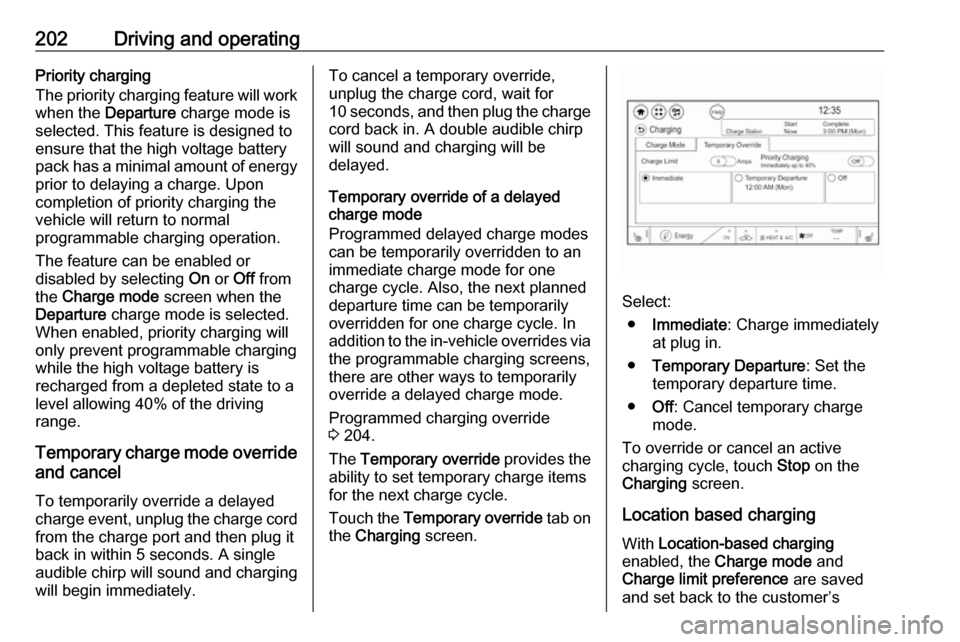
The Temporary override provides the
ability to set temporary charge items
for the next charge cycle.
Touch the Temporary override tab on
the Charging screen.
Select:
● Immediate : Charge immediately
at plug in.
● Temporary Departure : Set the
temporary departure time.
● Off: Cancel temporary charge
mode.
To override or cancel an active
charging cycle, touch Stop on the
Charging screen.
Location based charging With Location-based charging
enabled, the Charge mode and
Charge limit preference are saved
and set back to the customer’s
Page 206 of 273

204Driving and operatingProgrammable charging disabled
When the programmable charging
system is disabled, the Unable to
charge screen will be displayed.
Programmed charging override
To temporarily override a delayed charge event, unplug the charge cord from the charge port and then plug it
back in within 5 seconds. A single
horn chirp will sound and charging will begin immediately.
To cancel a temporary override,
unplug the charge cord, wait for
10 seconds, and then plug the charge cord back in. A double horn chirp will
sound and charging will be delayed.
Programmable charging 3 197.
Charging status
The vehicle has a charging status
indicator at the centre of the
instrument panel near the
windscreen. When the vehicle is
plugged in and the vehicle power is
off, the charging status indicator
indicates the following:
● Short flashing green – One horn chirp: Vehicle is plugged in. High
voltage battery is not fully
charged. High voltage battery is
charging. Flash rate increases
from one to four flashes as the
high voltage battery charges.
● Short flashing green – Two audible beeps: Vehicle is
charging but will delay by
programmable charging at least
once before the charge is
complete. Flash rate increases
from one to four flashes as the high voltage battery charges.
● Short flashing green – Four audible beeps: Insufficient time to
fully charge by departure time due to the selected rate
preference. To increase the high
voltage battery state of charge at
the departure time perform a
delayed charging override.
Programmable charging 3 197.
● Long flashing green – Two horn chirps: Charging is delayed by
programmable charging.
Charging will begin later.
Page 207 of 273

Driving and operating205● Solid green – No horn chirps:Charging is complete.
● Solid yellow – No horn chirp: Vehicle is plugged in. It is normalfor the charging status indicator
to turn yellow for a few seconds
after plugging in a compatible
charge cord. The solid yellow
may remain illuminated
depending on the vehicle.
This may also indicate that the
charging system has detected a
fault and will not charge the high
voltage battery.
● No light signal (upon plug‐in) – No horn chirps: Charge cord
connection should be checked.
● No light signal (after indication of
green or yellow charging status
indicator) – No horn chirps:
Charge cord connection should
be checked. If connection is
correct, this may be due to a
power failure and charging will
begin later. This may also occur
if the vehicle has detected a high voltage charging system fault.● No light signal – Three horn chirps: Charge port door is open.
● No light signal – Horn chirps repeatedly: The power supply
was interrupted before the
charging process could be
completed. Repeated chirps will stop if power is restored within
90 seconds.
Vehicle personalisation 3 91.
The system may be thermally
conditioning the high voltage battery
during any of the states mentioned
above, requiring electric energy to be
transferred to the vehicle.
If the vehicle is plugged in and vehicle power is on, the charging status
indicator will flash or illuminate solid green, depending on the charge level.
This also happens during Engine
Assisted Heating if the vehicle is
plugged in.
If the vehicle is plugged in and the
charging status indicator is off, a
charging fault has been detected.Charge cord9 Danger
There is a risk of electric shock
that may cause personal injury or
death.
Do not use the charge cord if any part of the charge cord is
damaged.
Do not open or remove the charge cord cover.
Service by qualified personnel
only. Connect the charge cord to a
properly grounded outlet with
cords that are not damaged.
A portable charge cord used to
charge the vehicle high voltage
battery is stored under the rear floor
storage cover in the load
compartment 3 194.
Page 212 of 273

210Vehicle careVehicle careGeneral Information...................210
Accessories and vehicle modifications .......................... 210
Lifting the vehicle .....................211
Vehicle storage ........................211
End-of-life vehicle recovery .....212
Vehicle checks ........................... 212
Performing work ......................212
Bonnet ..................................... 213
Cooling system ........................214
Washer fluid ............................ 216
Brakes ..................................... 216
Brake fluid ............................... 216
Vehicle battery ......................... 217
Wiper blade replacement ........219
Headlight aiming ......................219
Bulb replacement .......................220
Halogen bulbs ......................... 220
Xenon headlights .....................220
Front turn lights .......................220
Tail lights ................................. 221
Side turn lights ......................... 221
Number plate light ...................222Electrical system ........................223
High voltage devices and wiring ...................................... 223
Electrical system overload .......223
Fuses ....................................... 223
Engine compartment fuse box . 225
Instrument panel fuse box .......228
Vehicle tools .............................. 231
Tools ........................................ 231
Wheels and tyres .......................231
Tyres ....................................... 231
Winter tyres ............................. 232
Tyre designations ....................232
Tyre pressure .......................... 232
Tyre pressure monitoring system .................................... 233
Tread depth ............................. 235
Changing tyre and wheel size . 236
Wheel covers ........................... 236
Tyre chains .............................. 237
Tyre repair kit .......................... 237
Jump starting ............................. 240
Towing ....................................... 242
Towing the vehicle ...................242
Towing another vehicle ...........243
Appearance care .......................244
Exterior care ............................ 244
Interior care ............................. 245General Information
Accessories and vehiclemodifications
We recommend the use of genuine
parts and accessories and factory
approved parts specific for your
vehicle type. We cannot assess or
guarantee reliability of other products - even if they have a regulatory or
otherwise granted approval.
Any modification, conversion or other
changes made to standard vehicle
specifications (including, without
limitation, software modifications,
modifications of the electronic control units) may invalidate the warranty
offered by Opel. Furthermore, such
changes may affect driver assistance
systems and energy consumption.
They may also invalidate the vehicle
operating permit.Caution
When transporting the vehicle on
a train or on a recovery vehicle, the
mud flaps might be damaged.
Page 213 of 273
Vehicle care211Lifting the vehicle9Warning
Lifting the vehicle improperly can
cause serious injuries and
damage to the vehicle.
The vehicle should be lifted only by well-trained staff at an
authorised workshop.
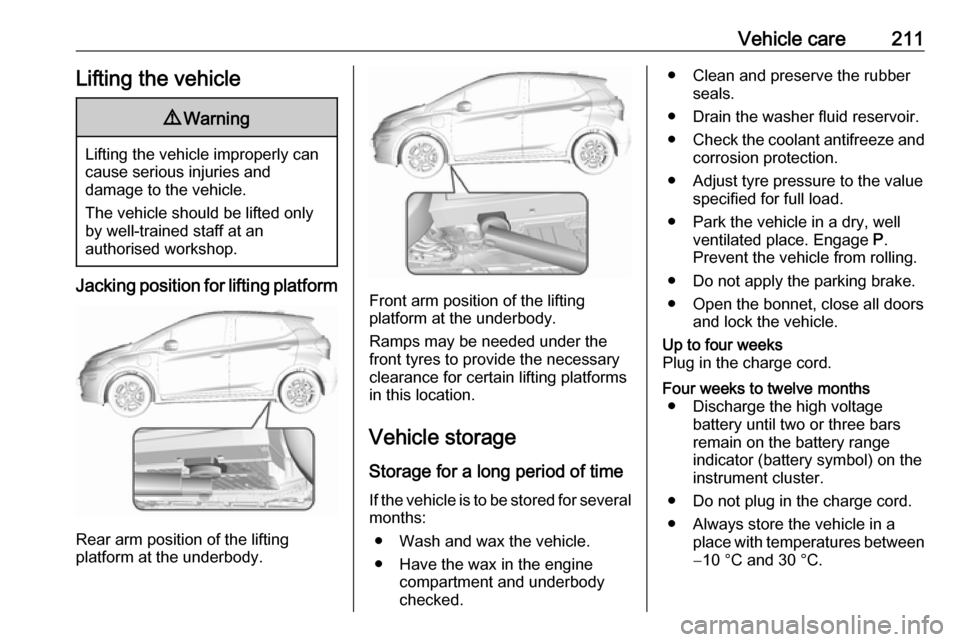
Jacking position for lifting platform
Rear arm position of the lifting
platform at the underbody.
Front arm position of the lifting
platform at the underbody.
Ramps may be needed under the
front tyres to provide the necessary
clearance for certain lifting platforms
in this location.
Vehicle storage Storage for a long period of timeIf the vehicle is to be stored for several months:
● Wash and wax the vehicle.
● Have the wax in the engine compartment and underbody
checked.
● Clean and preserve the rubber seals.
● Drain the washer fluid reservoir.
● Check the coolant antifreeze and
corrosion protection.
● Adjust tyre pressure to the value specified for full load.
● Park the vehicle in a dry, well ventilated place. Engage P.
Prevent the vehicle from rolling.
● Do not apply the parking brake.
● Open the bonnet, close all doors and lock the vehicle.Up to four weeks
Plug in the charge cord.Four weeks to twelve months ● Discharge the high voltage battery until two or three bars
remain on the battery range
indicator (battery symbol) on the
instrument cluster.
● Do not plug in the charge cord.
● Always store the vehicle in a place with temperatures between−10 °C and 30 °C.
Page 214 of 273
212Vehicle care● Vehicle storage at extremetemperatures may cause
damage to the high voltage
battery.
● Remove the black negative (−) cable from the 12 V vehicle
battery and attach a trickle
charger to the vehicle battery
terminals or keep the 12 V
vehicle battery cables connected and trickle charge from the
positive (+) and negative (−)
terminals in the engine
compartment.Caution
The vehicle is equipped with an
AGM 12 V vehicle battery, which
can be damaged by using the
incorrect type of trickle charger.
An AGM compatible charger must be used with the appropriate
setting selected.
Follow the trickle charger
manufacturer instructions.
After the 12 V vehicle battery cable is reconnected, it is possible that the
vehicle may not operate. If this
happens, the high voltage battery
may need to be charged.
Putting back into operation
When the vehicle is to be put back into operation:
● Connect the clamp to the negative terminal of the 12 V
vehicle battery. Activate the
electronics of the power
windows.
● Check tyre pressure.
● Fill up the washer fluid reservoir.
● Check the coolant level.
● Fit the number plate if necessary.
End-of-life vehicle recovery
Information on end-of-life vehicle
recovery centres and the recycling of
end-of-life vehicles is available on our website, where legally required. Only
entrust this work to an authorised
recycling centre.Vehicle checks
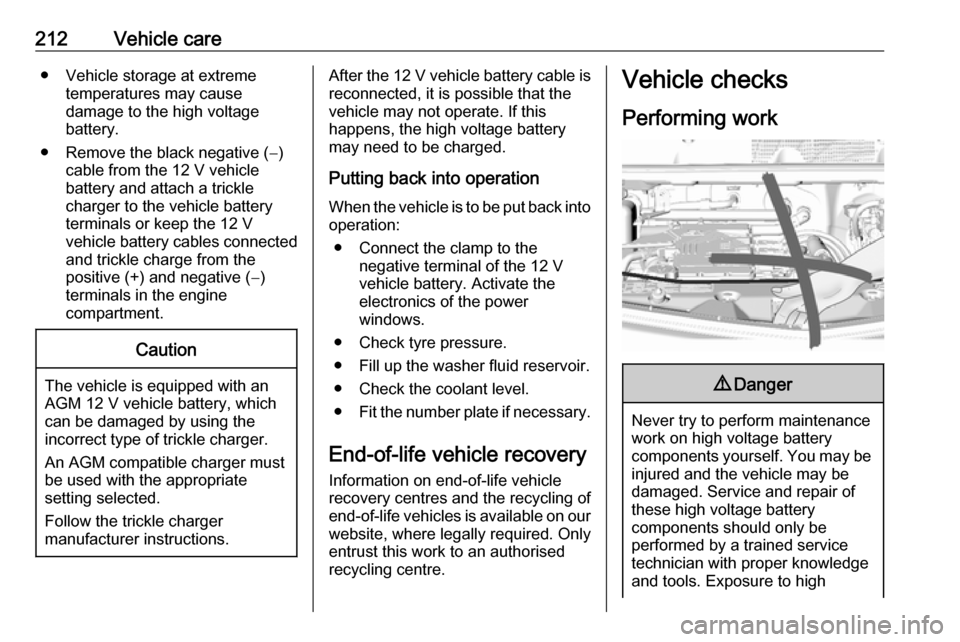
Performing work9 Danger
Never try to perform maintenance
work on high voltage battery
components yourself. You may be
injured and the vehicle may be
damaged. Service and repair of
these high voltage battery
components should only be
performed by a trained service
technician with proper knowledge
and tools. Exposure to high