phone OPEL AMPERA E 2018 Manual user
[x] Cancel search | Manufacturer: OPEL, Model Year: 2018, Model line: AMPERA E, Model: OPEL AMPERA E 2018Pages: 267, PDF Size: 6.45 MB
Page 96 of 267
94Instruments and controlsTelematics service
OnStar OnStar is a personal connectivity and
service assistant with integrated
Wi-Fi hotspot. The OnStar service is
available 24 hours a day, seven days
a week.
Note
OnStar is not available for all
markets. For further information,
contact your workshop.
Note
In order to be available and
operational, OnStar needs a valid
OnStar subscription, functioning
vehicle electrics, mobile service and GPS satellite link.
To activate the OnStar services and
set up an account, press Z and speak
with an advisor.Depending on the equipment of the vehicle, the following services are available:
● Emergency services and support
in the case of a vehicle
breakdown
● Wi-Fi hotspot
● Smartphone application
● Remote control, e.g. location of the vehicle, activation of horn and
lights, control of central locking
system
● Stolen vehicle assistance
● Vehicle diagnostics
● Destination download
Note
The OnStar module of the vehicle is
deactivated after ten days without
switching on the vehicle. Functions
requiring a data connection will be
available again after switching on
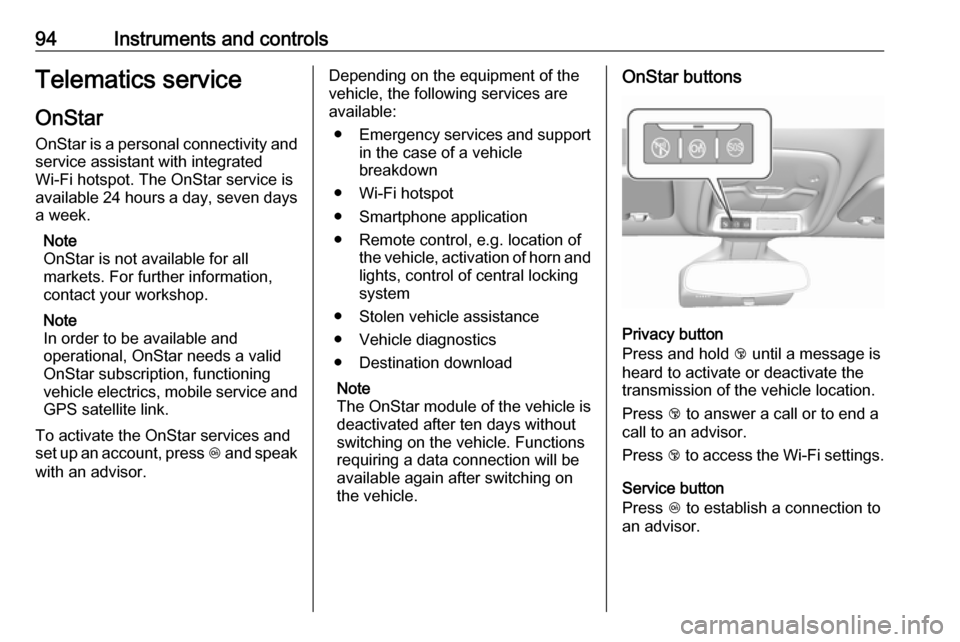
the vehicle.OnStar buttons
Privacy button
Press and hold j until a message is
heard to activate or deactivate the
transmission of the vehicle location.
Press j to answer a call or to end a
call to an advisor.
Press j to access the Wi-Fi settings.
Service button
Press Z to establish a connection to
an advisor.
Page 98 of 267

96Instruments and controlsSmartphone app
With the myOpel smartphone app,
some vehicle functions can be
operated remotely.
The following functions are available: ● Lock or unlock vehicle.
● Honk horn or flash lights.
● Operate parking heater.
● Check vehicle battery-related information.
● Check tyre pressure (only with tyre pressure monitoring
system).
● Send navigation destination to the vehicle for use with
navigation application via phone
projection.
● Locate vehicle on a map.
● Manage Wi-Fi settings.
To operate these functions, download the app from App Store ®
or
Google Play™ Store.Remote control
If desired, use any phone to call an
advisor, who can remotely operate
specific vehicle functions. Find the
respective OnStar phone number on
our country-specific website.
The following functions are available: ● Lock or unlock vehicle.
● Provide information on the vehicle location.
● Honk horn or flash lights.
Stolen vehicle assistance
If the vehicle is stolen, report the theft
to the authorities and request OnStar
stolen vehicle assistance. Use any
phone to call an advisor. Find the
respective OnStar phone number on
our country-specific website.
OnStar can provide support in
locating and recovering the vehicle.Theft alert
When the anti-theft alarm system is
triggered, a notification is sent to
OnStar. You are then informed about
this event by text message or email.Restart prevention
By sending remote signals, OnStar
can prevent the vehicle from
restarting once it has been turned off.
On-demand diagnostics
At any time e.g. if the vehicle displays a vehicle message, press Z to
contact an advisor and ask to
complete a real-time diagnostic check
to directly determine the issue.
Depending on the results, the advisor
will provide further support.
Diagnostic report
The vehicle automatically transmits
diagnostic data to OnStar which
sends a monthly email report to you
and your preferred workshop.
Note
The workshop notification function
can be disabled in your account.
The report contains the status of key
operating systems of the vehicle like
propulsion system, airbags, ABS, and
other major systems. It also provides
information on possible maintenance
items and tyre pressure (only with tyre
pressure monitoring system).
Page 107 of 267

Infotainment system105Infotainment systemIntroduction................................ 105
General information .................105
Theft-deterrent feature ............106
Control elements overview ......107
Usage ...................................... 109
Basic operation .......................... 112
Tone settings ........................... 114
Volume settings .......................115
System settings .......................116
Radio ......................................... 119
Usage ...................................... 119
Station search ......................... 120
Radio data system (RDS) ........122
Digital audio broadcasting .......123
External devices ........................125
General information .................125
Playing audio ........................... 127
Displaying pictures ..................129
Playing movies ........................ 130
Using smartphone applications ............................ 131
Speech recognition ....................132
General information .................132
Usage ...................................... 132Phone........................................ 133
General information .................133
Bluetooth connection ...............134
Emergency call ........................136
Operation ................................. 136
Mobile phones and CB radio equipment ............................... 140Introduction
General information
The Infotainment system provides
you with state-of-the-art in-car
infotainment.
Using radio tuner functions, you can
listen to a great number of different
radio stations.
You can connect external data
storage devices to the Infotainment
system as further audio sources;
either via cable or via Bluetooth.
The Infotainment system is equipped
with a phone portal that allows for
comfortable and safe use of your
mobile phone in the vehicle.
You can also operate specific
smartphone applications via the
Infotainment system.
Optionally, the Infotainment system
can be operated using the touch
screen and buttons on the control
panel, the controls on the steering wheel, or - if provided by your mobile
phone - via speech recognition.
Page 110 of 267
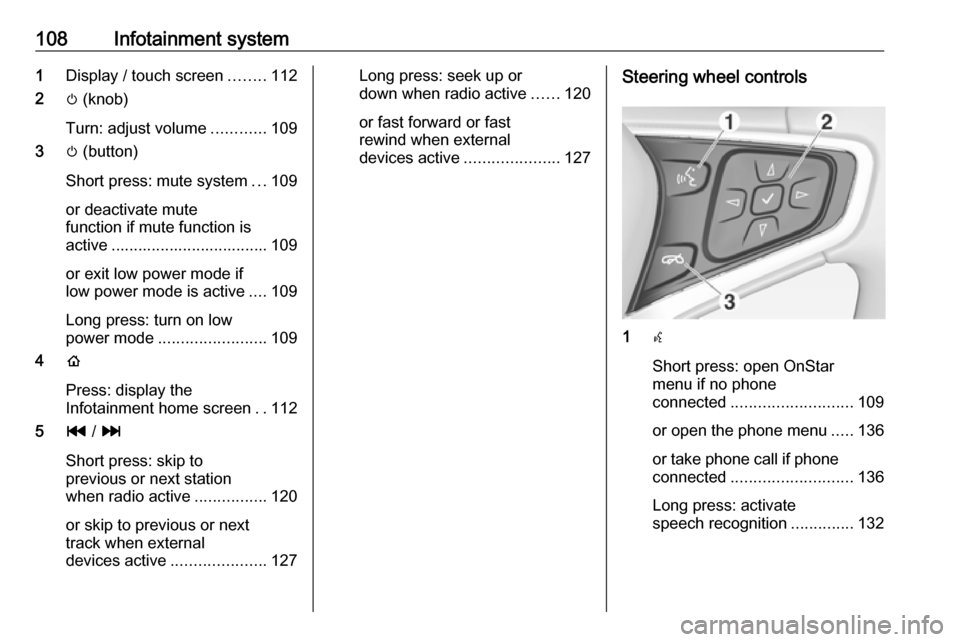
108Infotainment system1Display / touch screen ........112
2 m (knob)
Turn: adjust volume ............109
3 m (button)
Short press: mute system ...109
or deactivate mute
function if mute function is
active ................................... 109
or exit low power mode if
low power mode is active ....109
Long press: turn on low
power mode ........................ 109
4 p
Press: display the
Infotainment home screen ..112
5 t / v
Short press: skip to
previous or next station
when radio active ................120
or skip to previous or next
track when external
devices active .....................127Long press: seek up or
down when radio active ......120
or fast forward or fast
rewind when external
devices active .....................127Steering wheel controls
1w
Short press: open OnStar
menu if no phone
connected ........................... 109
or open the phone menu .....136
or take phone call if phone connected ........................... 136
Long press: activate
speech recognition ..............132
Page 113 of 267
Infotainment system111
Audio
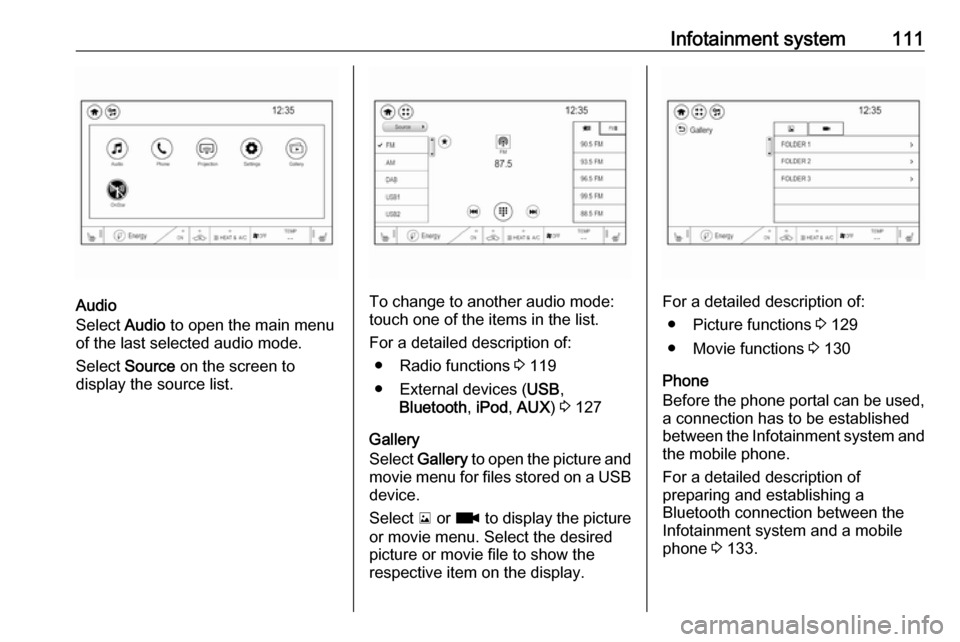
Select Audio to open the main menu
of the last selected audio mode.
Select Source on the screen to
display the source list.To change to another audio mode:
touch one of the items in the list.
For a detailed description of: ● Radio functions 3 119
● External devices ( USB,
Bluetooth , iPod , AUX ) 3 127
Gallery
Select Gallery to open the picture and
movie menu for files stored on a USB device.
Select y or z to display the picture
or movie menu. Select the desired
picture or movie file to show the
respective item on the display.For a detailed description of:
● Picture functions 3 129
● Movie functions 3 130
Phone
Before the phone portal can be used, a connection has to be established
between the Infotainment system and
the mobile phone.
For a detailed description of
preparing and establishing a
Bluetooth connection between the Infotainment system and a mobile
phone 3 133.
Page 114 of 267

112Infotainment systemIf the mobile phone is connected,
select Phone to display the main
menu of the phone portal.
For a detailed description of mobile
phone operation via the Infotainment
system 3 136.
Projection
To show specific apps of your
smartphone display on the
Infotainment system, connect your smartphone.
Select Projection to start the
projection function.
Depending on the smartphone
connected, a main menu with
different selectable apps is displayed.
For a detailed description 3 131.
Settings
Select Settings to open a menu for
various system related settings, e.g.
deactivating Audible touch feedback .
OnStar
To display the OnStar menu, select
OnStar .
For a detailed description 3 94.
Basic operation
The display of the Infotainment
system has a touch-sensitive surface
that allows direct interaction with the
displayed menu controls.Caution
Do not use pointed or hard items
like ballpoint pens, pencils or
similar for touch screen operation.
v screen button
Select v in the top left corner of the
screen or press p on the faceplate to
display the Infotainment home
screen.
1 screen button
Select 1 to display the application
overview screen.
u screen button
When operating the menus, select u
in the respective submenu to return to the next higher menu level.
Page 116 of 267

114Infotainment systemNote
Constant pressure must be applied
and the finger must be moved at
constant speed.
● Move the slider of the scroll bar on the left side of the list up and
down with your finger.
Note
In subsequent chapters, the
operating steps for scrolling to a list
item via the touch screen will be
described as "...scroll to
Editing the Infotainment home
screen
Press p to display the Infotainment
home screen and then select Edit. A
screen with different possible home
screen layouts is displayed.
Select the desired layout. The layout
is changed.
If you select Custom layout , a screen
for custom layout settings is
displayed.
Touch the different screen areas and design the layout as desired.
Quick-jumping to the Audio or
Phone menu
Using the w symbol displayed in the
top line of some menus, you may
directly jump to the main menu of the
active audio source.When a phone call is active and the phone screen is not displayed, a
quick-jump phone icon is displayed to directly jump to the phone main
menu.
Tone settings In the tone settings menu, the tone
characteristics can be set. The menu
may be accessed from each audio
main menu.
To open the tone settings menu,
select Menu and then activate the
Audio settings tab. Select Tone
settings to display the respective
menu.
Page 127 of 267
Infotainment system125Select Menu to open the
corresponding waveband-specific
submenu and then select the Audio
settings tab.
Activate or deactivate DAB to FM
linking .
L band
With this function, you may define which DAB wavebands are received
by the Infotainment system.
L band (earth and satellite radio) is an
additional radio band that can be
received.
Select Menu to open the
corresponding waveband-specific
submenu and then select the Audio
settings tab.
Activate or deactivate L band.External devices
General information
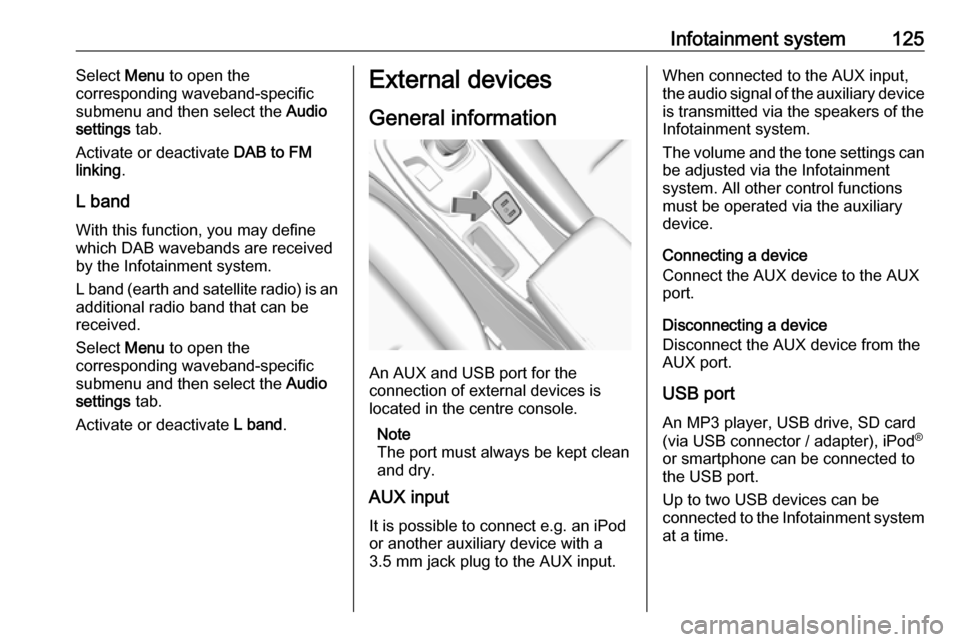
An AUX and USB port for the
connection of external devices is
located in the centre console.
Note
The port must always be kept clean
and dry.
AUX input
It is possible to connect e.g. an iPod
or another auxiliary device with a
3.5 mm jack plug to the AUX input.
When connected to the AUX input,
the audio signal of the auxiliary device is transmitted via the speakers of the
Infotainment system.
The volume and the tone settings can
be adjusted via the Infotainment
system. All other control functions
must be operated via the auxiliary
device.
Connecting a device
Connect the AUX device to the AUX
port.
Disconnecting a device
Disconnect the AUX device from the
AUX port.
USB port An MP3 player, USB drive, SD card
(via USB connector / adapter), iPod ®
or smartphone can be connected to
the USB port.
Up to two USB devices can be
connected to the Infotainment system at a time.
Page 133 of 267
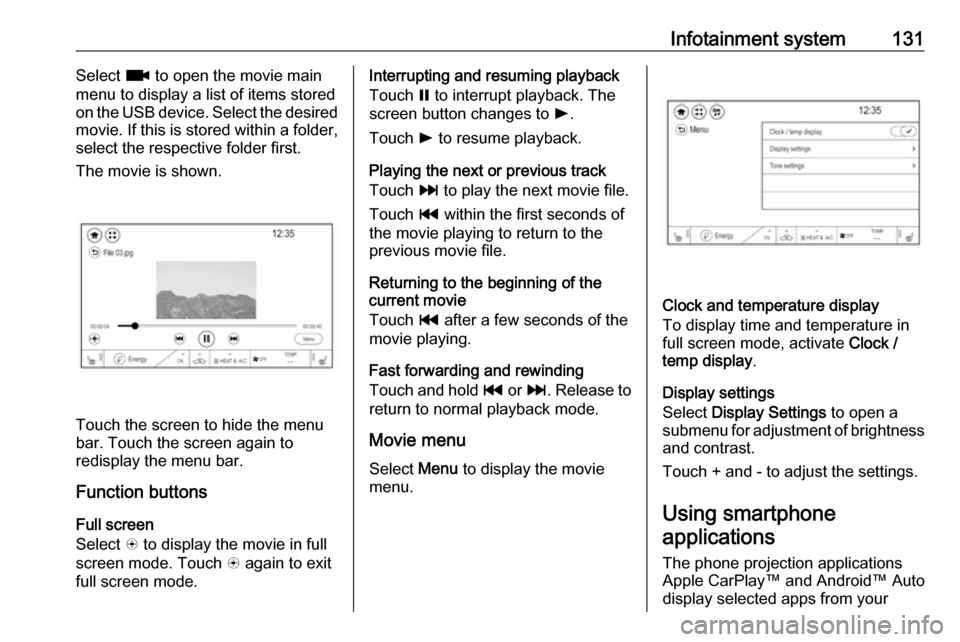
Infotainment system131Select z to open the movie main
menu to display a list of items stored on the USB device. Select the desired
movie. If this is stored within a folder,
select the respective folder first.
The movie is shown.
Touch the screen to hide the menu
bar. Touch the screen again to
redisplay the menu bar.
Function buttons
Full screen
Select q to display the movie in full
screen mode. Touch q again to exit
full screen mode.
Interrupting and resuming playback
Touch = to interrupt playback. The
screen button changes to l.
Touch l to resume playback.
Playing the next or previous track
Touch v to play the next movie file.
Touch t within the first seconds of
the movie playing to return to the
previous movie file.
Returning to the beginning of the
current movie
Touch t after a few seconds of the
movie playing.
Fast forwarding and rewinding
Touch and hold t or v. Release to
return to normal playback mode.
Movie menu Select Menu to display the movie
menu.
Clock and temperature display
To display time and temperature in
full screen mode, activate Clock /
temp display .
Display settings
Select Display Settings to open a
submenu for adjustment of brightness and contrast.
Touch + and - to adjust the settings.
Using smartphone
applications
The phone projection applications
Apple CarPlay™ and Android™ Auto
display selected apps from your
Page 134 of 267

132Infotainment systemsmartphone on the Infotainment
screen and allow their operation
directly via the Infotainment controls.
Check with the device's manufacturer
if this function is compatible with your
smartphone and if this application is
available in the country you are in.
Preparing the smartphone
Android phone: Download the
Android Auto app to your smartphone from the Google Play™ Store.
iPhone: Make sure Siri ®
is activated
on your smartphone.
Activating phone projection in the
settings menu
Press p and then select 1 in the top
left corner of the screen to display the application overview screen.
Select Settings .
Scroll through the list to
Apple CarPlay or Android Auto .
Make sure the respective application
is activated.Connecting the mobile phone
Connect the smartphone to the USB
port 3 125.
When first connecting a device, a privacy consent message may be
displayed. Confirm the message to
continue the connection procedure.
Starting phone projection Press p and then select 1 in the top
left corner of the screen to display the application overview screen.
To start the phone projection function,
select Projection .
Note
If the application is recognised by the Infotainment system, the
application icon may change to Apple CarPlay or Android Auto .
Alternatively, press and hold p.
The phone projection screen
displayed depends on your
smartphone and software version.
Returning to the Infotainment
screen
Press p.Speech recognition
General information
The voice pass-thru application of the
Infotainment system allows access to the speech recognition commands on your smartphone. See your
smartphone manufacturer's
operating instructions to find out
whether your smartphone supports this feature.
In order to use the voice pass-thru
application, the smartphone must be
connected to the Infotainment system
via USB cable 3 125 or via Bluetooth
3 134.
Usage
Activating speech recognition
Press and hold w on the steering
wheel to start a speech recognition
session. A voice command message
is displayed on the screen.