Child OPEL AMPERA E 2019 User Guide
[x] Cancel search | Manufacturer: OPEL, Model Year: 2019, Model line: AMPERA E, Model: OPEL AMPERA E 2019Pages: 271, PDF Size: 6.7 MB
Page 52 of 271
50Seats, restraints
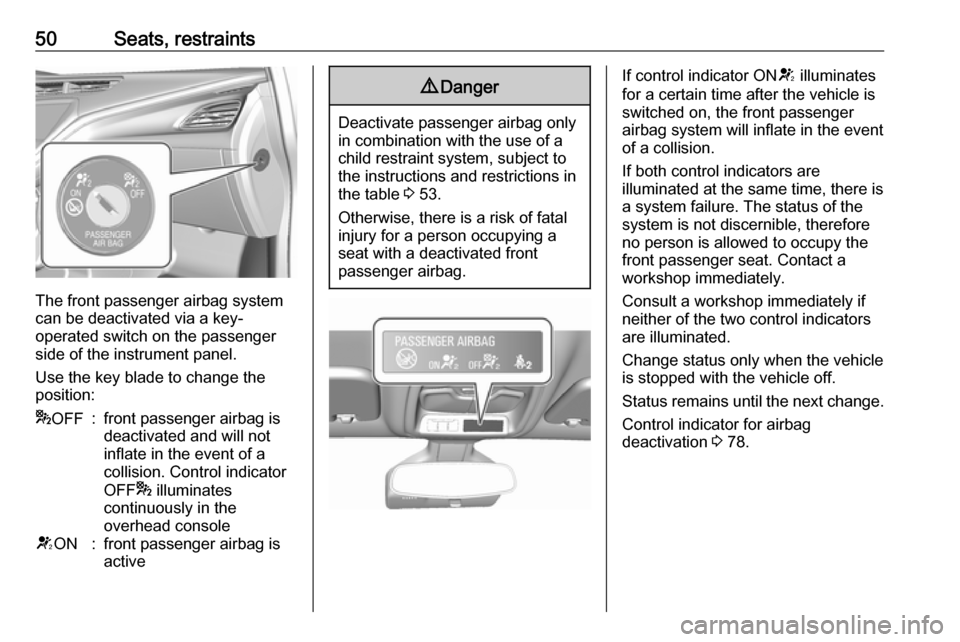
The front passenger airbag system
can be deactivated via a key-
operated switch on the passenger side of the instrument panel.
Use the key blade to change the
position:
* OFF:front passenger airbag is
deactivated and will not
inflate in the event of a
collision. Control indicator
OFF * illuminates
continuously in the
overhead consoleV ON:front passenger airbag is
active9 Danger
Deactivate passenger airbag only
in combination with the use of a
child restraint system, subject to
the instructions and restrictions in
the table 3 53.
Otherwise, there is a risk of fatal
injury for a person occupying a
seat with a deactivated front
passenger airbag.
If control indicator ON V illuminates
for a certain time after the vehicle is switched on, the front passenger
airbag system will inflate in the event
of a collision.
If both control indicators are
illuminated at the same time, there is
a system failure. The status of the
system is not discernible, therefore
no person is allowed to occupy the
front passenger seat. Contact a
workshop immediately.
Consult a workshop immediately if
neither of the two control indicators
are illuminated.
Change status only when the vehicle is stopped with the vehicle off.
Status remains until the next change.
Control indicator for airbag
deactivation 3 78.
Page 53 of 271
Seats, restraints51Child restraints
Child restraint systems9 Danger
If using a rear-facing child restraint
system on the front passenger
seat, the airbag system for the
front passenger seat must be
deactivated. This also applies to certain forward-facing child
restraint systems as indicated in
the tables 3 53.
Airbag deactivation 3 49.
Airbag label 3 45.
We recommend a child restraint system which is tailored specifically to the vehicle. For further information,
contact your workshop.
When a child restraint system is being
used, pay attention to the following
usage and installation instructions
and also those supplied with the child
restraint system.
Always comply with local or national
regulations. In some countries, the
use of child restraint systems is
forbidden on certain seats.
Child restraint systems can be
fastened with:
● Three-point seat belt
● ISOFIX brackets
● Top-tether
Three-point seat belt
Child restraint systems can be
fastened by using a three-point seat
belt. Depending on the size of the
used child restraint systems, up to
three child restraint systems can be
attached to the rear seats. After
fastening the child restraint system
the seat belt has to be tightened
3 53.ISOFIX brackets
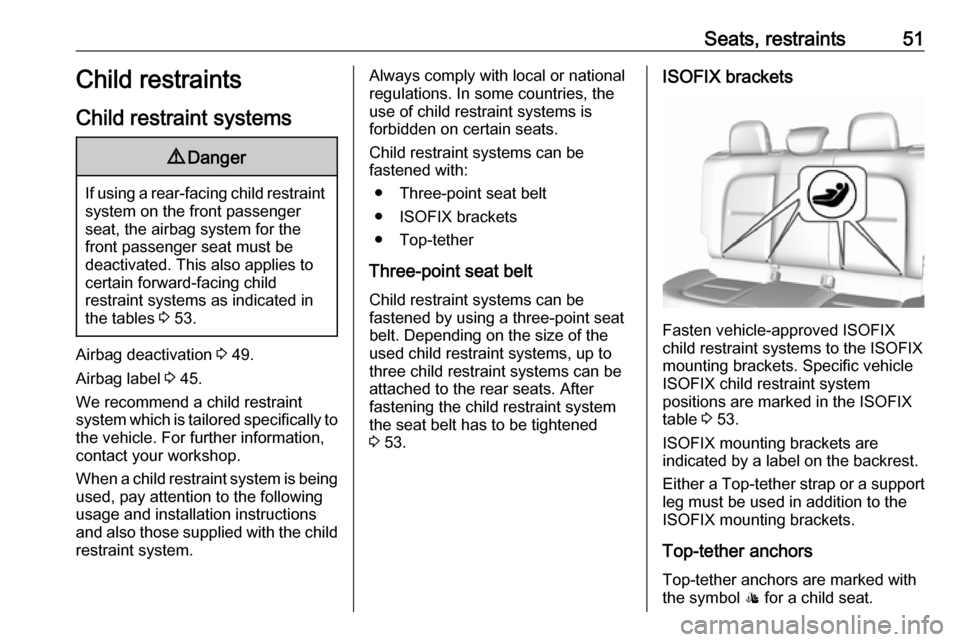
Fasten vehicle-approved ISOFIX
child restraint systems to the ISOFIX
mounting brackets. Specific vehicle
ISOFIX child restraint system
positions are marked in the ISOFIX
table 3 53.
ISOFIX mounting brackets are
indicated by a label on the backrest.
Either a Top-tether strap or a support leg must be used in addition to the
ISOFIX mounting brackets.
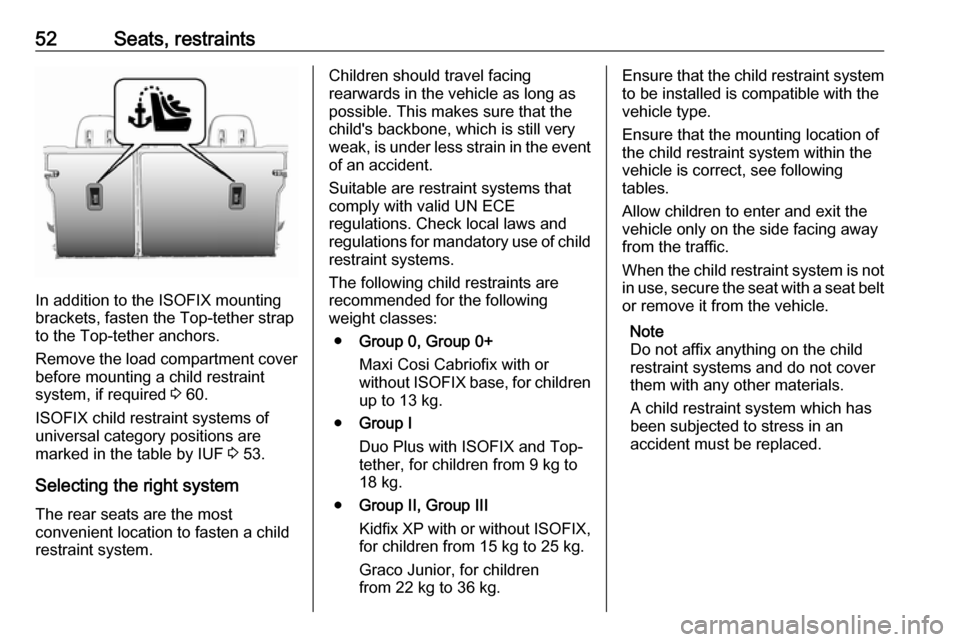
Top-tether anchors Top-tether anchors are marked with
the symbol : for a child seat.
Page 54 of 271
52Seats, restraints
In addition to the ISOFIX mounting
brackets, fasten the Top-tether strap
to the Top-tether anchors.
Remove the load compartment cover before mounting a child restraint
system, if required 3 60.
ISOFIX child restraint systems of
universal category positions are
marked in the table by IUF 3 53.
Selecting the right system The rear seats are the most
convenient location to fasten a child
restraint system.
Children should travel facing
rearwards in the vehicle as long as
possible. This makes sure that the child's backbone, which is still very
weak, is under less strain in the event
of an accident.
Suitable are restraint systems that
comply with valid UN ECE
regulations. Check local laws and
regulations for mandatory use of child restraint systems.
The following child restraints are
recommended for the following
weight classes:
● Group 0, Group 0+
Maxi Cosi Cabriofix with or
without ISOFIX base, for children
up to 13 kg.
● Group I
Duo Plus with ISOFIX and Top-
tether, for children from 9 kg to
18 kg.
● Group II, Group III
Kidfix XP with or without ISOFIX,
for children from 15 kg to 25 kg.
Graco Junior, for children
from 22 kg to 36 kg.Ensure that the child restraint system to be installed is compatible with the
vehicle type.
Ensure that the mounting location of
the child restraint system within the
vehicle is correct, see following
tables.
Allow children to enter and exit the
vehicle only on the side facing away
from the traffic.
When the child restraint system is not in use, secure the seat with a seat beltor remove it from the vehicle.
Note
Do not affix anything on the child
restraint systems and do not cover
them with any other materials.
A child restraint system which has
been subjected to stress in an
accident must be replaced.
Page 55 of 271

Seats, restraints53Child restraint installation locations
Permissible options for fastening a child restraint system with a three-point seat belt
Weight class
On front passenger seat
On rear outboard seatsOn rear centre seat
activated airbagdeactivated airbagGroup 0: up to 10 kgXU 1,2U/L 3UGroup 0+: up to 13 kgXU1,2U/L 3UGroup I: 9 to 18 kgXU1,2,4U/L 3,4U4Group II: 15 to 25 kgU1,2,4XU/L 3,4U4Group III: 22 to 36 kgU1,2,4XU/L 3,4U4U:universal suitability in conjunction with three-point seat beltL:suitable for particular child restraint systems of the 'specific-vehicle', 'restricted' or 'semi-universal' categories. The
child restraint system must be approved for the specific vehicle type (refer to the vehicle type list of the child restraint
system)X:no child restraint system permitted in this weight class1:move seat forwards as far as necessary and adjust seat backrest as far as necessary to a vertical position to ensure that the belt runs forwards from the upper anchorage point2:move seat upwards as far as necessary and adjust seat backrest as far as necessary to a vertical position to ensurethat the belt is tight on the buckle side3:move the respective front seat ahead of the child restraint system forwards as far as necessary4:adjust the respective headrest as necessary or remove if required
Page 56 of 271

54Seats, restraintsPermissible options for fitting an ISOFIX child restraint system with ISOFIX brackets
Weight classSize classFixture
On front passenger seatOn rear outboard
seatsOn rear centre
seatactivated airbagdeactivated airbagGroup 0: up to 10 kgGISO/L2XXXXFISO/L1XXXXEISO/R1XXIL 3XGroup 0+: up to 13 kgEISO/R1XXIL 3XDISO/R2XXIL3XCISO/R3XXIL3XGroup I: 9 to 18 kgDISO/R2XXIL 3,4XCISO/R3XXIL3,4XBISO/F2XXIL, IUF 3,4XB1ISO/F2XXXIL, IUF 3,4XAISO/F3XXIL, IUF3,4XGroup II: 15 to 25 kgXXIL3,4XGroup III: 22 to 36 kgXXIL3,4X
Page 57 of 271

Seats, restraints55IL:suitable for particular ISOFIX restraint systems of the 'specific-vehicle', 'restricted' or 'semi-universal' categories.The ISOFIX restraint system must be approved for the specific vehicle type (refer to the vehicle type list of the child
restraint system)IUF:suitable for ISOFIX forward-facing child restraint systems of universal category approved for use in this weight classX:no ISOFIX child restraint system approved in this weight class1:move seat forwards as far as necessary and adjust seat backrest as far as necessary to a vertical position to ensure
that the belt runs forwards from the upper anchorage point2:move seat upwards as far as necessary and adjust seat backrest as far as necessary to a vertical position to ensure
that the belt is tight on the buckle side3:move the respective front seat ahead of the child restraint system forwards as far as necessary and adjust seat
backrest as far as necessary to a vertical position4:adjust the respective headrest as necessary or remove if required
ISOFIX size class and seat device
A – ISO/F3:forward-facing child restraint system for children of maximum size in the weight class 9 to 18 kgB – ISO/F2:forward-facing child restraint system for smaller children in the weight class 9 to 18 kgB1 – ISO/F2X:forward-facing child restraint system for smaller children in the weight class 9 to 18 kgC – ISO/R3:rear-facing child restraint system for children of maximum size in the weight class up to 18 kgD – ISO/R2:rear-facing child restraint system for smaller children in the weight class up to 18 kgE – ISO/R1:rear-facing child restraint system for young children in the weight class up to 13 kgF – ISO/L1:left lateral facing position child restraint system (carry-cot)G – ISO/L2:right lateral facing position child restraint system (carry-cot)
Permissible options for fitting an i-Size child restraint system with ISOFIX brackets
On front passenger seat
On rear outboard seatsOn rear centre seat
activated airbagdeactivated airbagi-Size child restraint systemsXXXX
Page 58 of 271

56Seats, restraintsX:seating position not suitable for i-Size 'universal' child restraint systems
Page 174 of 271
172Driving and operatingThe front pedestrian protection
system can detect and alert about
pedestrians when in a forward gear at
speeds between 8 km/h and
80 km/h.
Additionally, the front pedestrian protection system can provide a
boost to braking or automatically
brake the vehicle.
During daytime driving, the system
detects pedestrians up to a distance
of approximately 40 m. During
nighttime driving, system
performance might be limited.
The front pedestrian protection can
be set to Off, Alert or Alert and
Brake in the vehicle personalisation
3 90.9 Danger
Front pedestrian braking does not
provide an alert or automatically
brake the vehicle, unless it detects
a pedestrian.
The system may not detect
pedestrians, including children,
when the pedestrian is not directly
ahead, not fully visible, not
standing upright, or when part of a
group.
Front pedestrian protection includes:
● detecting front pedestrian ahead● front pedestrian alert
● automatic braking
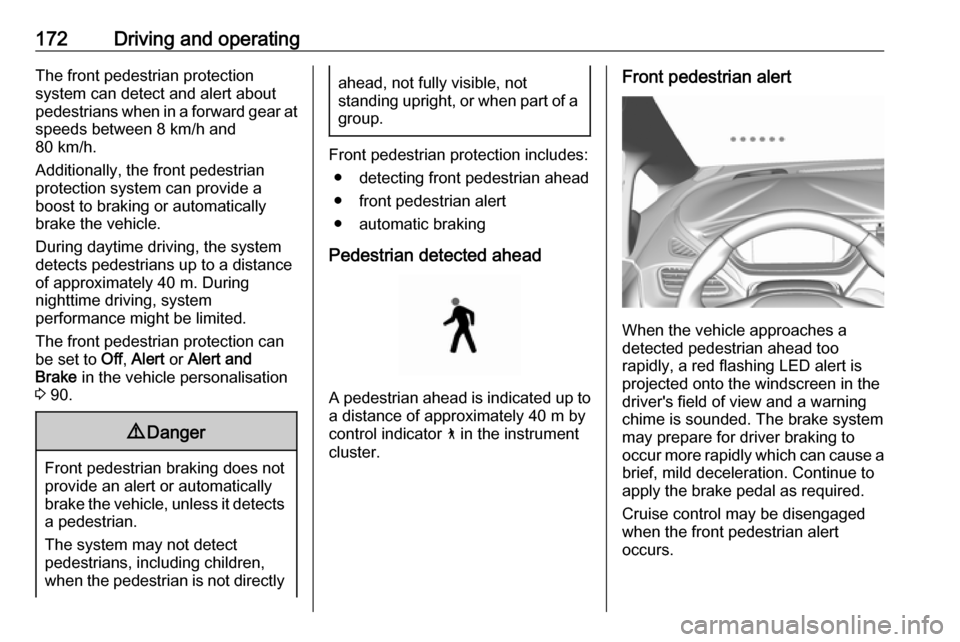
Pedestrian detected ahead
A pedestrian ahead is indicated up to
a distance of approximately 40 m by control indicator 7 in the instrument
cluster.
Front pedestrian alert
When the vehicle approaches a
detected pedestrian ahead too
rapidly, a red flashing LED alert is projected onto the windscreen in the
driver's field of view and a warning
chime is sounded. The brake system
may prepare for driver braking to
occur more rapidly which can cause a
brief, mild deceleration. Continue to
apply the brake pedal as required.
Cruise control may be disengaged
when the front pedestrian alert
occurs.
Page 186 of 271

184Driving and operating
1. Area displayed by the panoramicview system
2. Area not shown
Front vision camera
A view of the area in front of the
vehicle may be displayed in the Info
Display. The front view is shown after
shifting from R to D and when the
vehicle is moving forward slower than
8 km/h.
9 Warning
The camera(s) do not display
children, pedestrians, bicyclists,
crossing traffic, animals, or any
other object outside of the
cameras’ field of view, below the bumper, or under the vehicle.
Shown distances may be different from actual distances. Do not driveor park the vehicle using only
these camera(s). Always check
behind and around the vehicle
before driving. Failure to use
proper care may result in injury, death, or vehicle damage.
The system also works when the
surrounding is dark, but performance
may be restricted.
Rear view camera
The rear view camera assists the
driver when reversing by displaying a view of the area behind the vehicle.
The view of the camera is displayed
in the Info Display.
9 Warning
The rear view camera does not
replace driver vision. Note that
objects that are outside the
camera's field of view and the
Page 189 of 271

Driving and operating1879Warning
The rear cross traffic alert does not
replace driver vision. Note that
objects that are outside sensors,
e.g. below the bumper or
underneath the vehicle, are not
displayed.
Pedestrians, children or animals
are not detected. Do not reverse
the vehicle by only looking at the
Info Display and check the
surrounding behind and around
the vehicle before reversing.
Activation
Rear cross traffic alert is
automatically activated together with
the rear view camera when reverse
gear is engaged.
Detection zones
The system sensors cover a zone of
approx. 20 m to the left or right side
behind the vehicle.
Deactivation
Rear cross traffic alert is deactivated
together with the rear view camera
when a certain forward speed is
exceeded or if reverse gear is not
engaged for approx. 10 seconds.
Activation or deactivation of the rear
cross traffic alert can be set in the
vehicle personalisation menu in the
Info Display.
Select the relevant setting in Settings
I Vehicle settings in the Info Display.
Info Display 3 85.
Vehicle personalisation 3 90.
Fault
The system may not operate properly
when:
● Ice, snow, mud, or anything else covers the sensors.
● The vehicle had a rear end accident.
● There are extreme temperature changes.
Traffic sign assistant Functionality
Traffic sign assistant detects
designated traffic signs via a front
camera and displays them in the
Driver Information Centre.