Vehicle personalisation OPEL AMPERA E 2019 Owner's Guide
[x] Cancel search | Manufacturer: OPEL, Model Year: 2019, Model line: AMPERA E, Model: OPEL AMPERA E 2019Pages: 271, PDF Size: 6.7 MB
Page 145 of 271
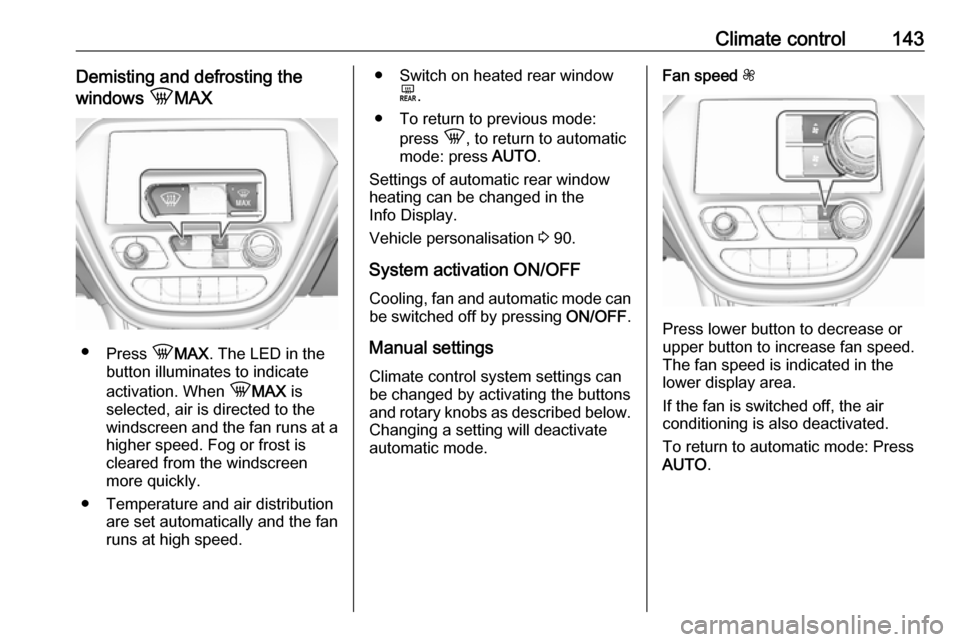
Climate control143Demisting and defrosting the
windows hMAX
●
Press hMAX . The LED in the
button illuminates to indicate
activation. When hMAX is
selected, air is directed to the
windscreen and the fan runs at a
higher speed. Fog or frost is cleared from the windscreenmore quickly.
● Temperature and air distribution are set automatically and the fan
runs at high speed.
● Switch on heated rear window
f.
● To return to previous mode: press h, to return to automatic
mode: press AUTO.
Settings of automatic rear window
heating can be changed in the
Info Display.
Vehicle personalisation 3 90.
System activation ON/OFF Cooling, fan and automatic mode can
be switched off by pressing ON/OFF.
Manual settings Climate control system settings can
be changed by activating the buttons
and rotary knobs as described below.
Changing a setting will deactivate
automatic mode.Fan speed Z,
Press lower button to decrease or
upper button to increase fan speed.
The fan speed is indicated in the
lower display area.
If the fan is switched off, the air
conditioning is also deactivated.
To return to automatic mode: Press
AUTO .
Page 168 of 271

166Driving and operatingResume limit speed
Press RES/+ . The stored speed limit
will be obtained.
Switching off the system
Press L, the speed limit indication
extinguishes in the Driver Information Centre. The stored speed is deleted.
By pressing m to activate cruise
control or adaptive cruise control,
speed limiter is also deactivated and
the stored speed is deleted.
By switching off the vehicle, speed
limiter is also deactivated, but the
speed limit will be stored for next
speed limiter activation.
Forward collision alert The forward collision alert may help to
avoid or reduce the harm caused by
front-end crashes.
The forward collision alert uses the front camera system in the
windscreen to detect a vehicle
directly ahead, in your path, within a
distance of approx. 60 m.
A vehicle ahead is indicated by the
control indicator A.
If a vehicle directly ahead is
approached too quickly, a warning
chime is sounded.
Additionally, the driver is notified by a flashing red LED stripe which is
projected on the windscreen in the
driver's field of view.
A precondition is that forward collision alert is not deactivated in the vehicle
personalisation 3 90.
Activation
Forward collision alert operates
automatically above 8 km/h, if it is not deactivated in the vehicle
personalisation menu.
Alerting the driver
The vehicle ahead control indicator
A illuminates green in the instrument
cluster when the system has detected
a vehicle in the driving path.
The control indicator A changes to
yellow when the distance to a
preceding moving vehicle gets too
small or when approaching another
vehicle too rapidly.Caution
The colour lighting of this control
indicator does not correspond to
local traffic laws on following
distance. The driver bears full
responsibility for maintaining safe
following distance according to
applicable traffic rules, weather
and road conditions etc. at all
times.
When the time to a potential collision
with a vehicle in front gets too small
and a collision is imminent, the driver
is notified by a flashing red LED stripe which is projected on the windscreen
in the driver's field of view.
Page 169 of 271
Driving and operating167
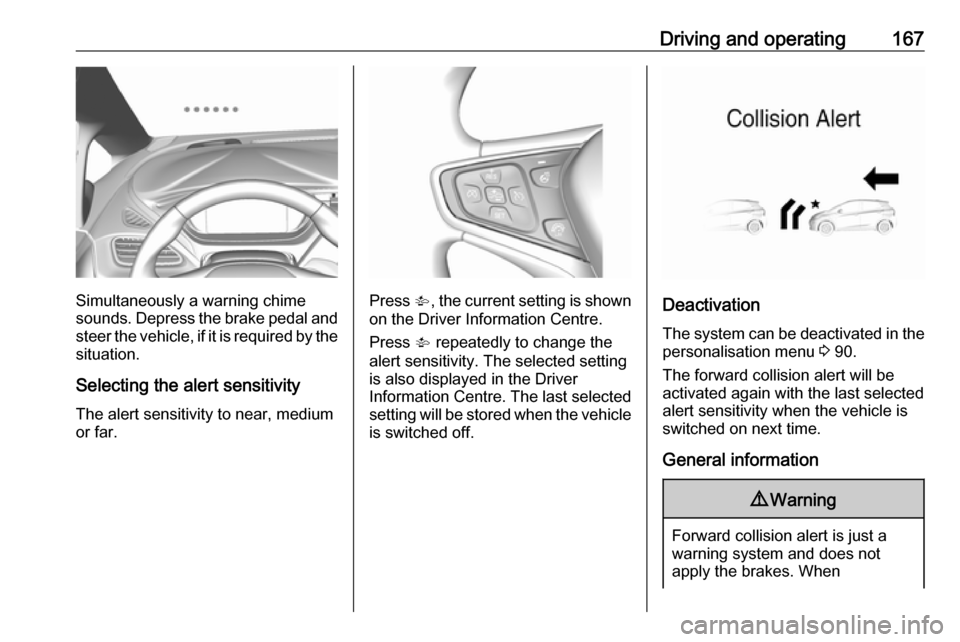
Simultaneously a warning chime
sounds. Depress the brake pedal and
steer the vehicle, if it is required by the
situation.
Selecting the alert sensitivity The alert sensitivity to near, medium
or far.Press V, the current setting is shown
on the Driver Information Centre.
Press V repeatedly to change the
alert sensitivity. The selected setting
is also displayed in the Driver
Information Centre. The last selected
setting will be stored when the vehicle
is switched off.Deactivation
The system can be deactivated in the
personalisation menu 3 90.
The forward collision alert will be
activated again with the last selected
alert sensitivity when the vehicle is
switched on next time.
General information
9 Warning
Forward collision alert is just a
warning system and does not
apply the brakes. When
Page 171 of 271

Driving and operating169supplemental use only to reduce
the vehicle speed before a
collision.
The system may not react to
animals. After a sudden lane
change, the system needs a
certain time to detect the next
preceding vehicle.
The driver must always be ready
to take action and apply the brakes
and steer to avoid collisions.
Functionality
If equipped only with front camera the
active emergency braking operates in
a forward gear above walking speed
up to 80 km/h.
A precondition is that the system is
not deactivated in the vehicle
personalisation menu 3 90.
The system includes: ● brake preparation system
● emergency automatic braking ● forward looking brake assist
● front pedestrian protection system
Brake preparation system
When approaching a vehicle ahead
or a pedestrian so quickly that a
collision is likely, the brake
preparation system slightly
pressurises the brakes. This reduces
the response time, when a manual or automatic braking is requested.
The brake system is prepared so that
braking can occur more rapidly.
If equipped only with front camera the system operates up to a speed of
80 km/h.
Emergency automatic braking After activation of brake preparation
system and just before the imminent
collision, this function automatically
applies limited braking to reduce the
impact speed of the collision or
prevent a crash.
Depending on the situation, the
vehicle may automatically brake
moderately or hard. This front
automatic braking can only occur if a
vehicle ahead is detected, indicated
by the vehicle ahead indicator A
3 166. On vehicles with frontpedestrian protection, automatic
braking can also occur when a
pedestrian ahead is detected,
indicated by the pedestrian ahead
indicator 7.
The system operates up to a speed of
80 km/h.
Below a speed of 40 km/h the system can apply full braking.
Emergency automatic braking may slow the vehicle to a complete stop to
try to avoid a potential crash. If this
happens, emergency automatic
braking may engage the electric
parking brake to hold the vehicle at a
stop. To release, push the electric
parking brake switch or firmly depress the accelerator pedal.9 Warning
Emergency automatic braking is
an emergency crash preparation
feature and is not designed to
avoid crashes. Do not rely on the
system to brake the vehicle.
Emergency automatic braking will
Page 172 of 271

170Driving and operatingnot brake outside of its operatingspeed range and only responds to
detected vehicles.
Forward looking brake assist
In addition to the brake preparation
system and emergency automatic
braking, the forward looking brake
assist function makes the brake assist more sensitive. Therefore,
depressing the brake pedal less
strongly results in immediate hard
braking. This function helps the driver
brake quicker and harder before an
imminent collision.
The system operates up to a speed of 80 km/h.
9 Warning
Active emergency braking is not
designed to apply hard
autonomous braking or to
automatically avoid a collision. It is designed to reduce the vehicle
speed before a collision. It may not
react to animals. After a sudden
lane change, the system needs a
certain time to detect the next
preceding vehicle.
The complete attention of the
driver is always required while
driving. The driver must always be
ready to take action and apply the brakes and steer to avoid
collisions.
Intelligent brake assist
Intelligent brake assist may activate
when the brake pedal is applied
quickly by providing a boost to
braking based on the speed of
approach and distance to a vehicle
ahead.
Minor brake pedal pulsations or pedal movement during this time are normal and the brake pedal should continue
to be applied as required. Intelligent
brake assist will automatically
disengage only when the brake pedal is released.
9 Warning
Intelligent brake assist may
increase vehicle braking in
situations when it may not be
necessary. You could block the
flow of traffic. If this occurs, take
your foot off the brake pedal and
then apply the brakes as needed.
Front pedestrian protection
Front pedestrian protection 3 171.
Deactivation Active emergency braking can be
deactivated in the personalisation
menu in the Info Display 3 90.
If deactivated, a message is
displayed in the Driver Information
Centre.
We recommend to deactivate the system in the following cases:
● when the vehicle is being towed
● before using an automatic car wash with ignition switched on
Page 174 of 271
172Driving and operatingThe front pedestrian protection
system can detect and alert about
pedestrians when in a forward gear at
speeds between 8 km/h and
80 km/h.
Additionally, the front pedestrian protection system can provide a
boost to braking or automatically
brake the vehicle.
During daytime driving, the system
detects pedestrians up to a distance
of approximately 40 m. During
nighttime driving, system
performance might be limited.
The front pedestrian protection can
be set to Off, Alert or Alert and
Brake in the vehicle personalisation
3 90.9 Danger
Front pedestrian braking does not
provide an alert or automatically
brake the vehicle, unless it detects
a pedestrian.
The system may not detect
pedestrians, including children,
when the pedestrian is not directly
ahead, not fully visible, not
standing upright, or when part of a
group.
Front pedestrian protection includes:
● detecting front pedestrian ahead● front pedestrian alert
● automatic braking
Pedestrian detected ahead
A pedestrian ahead is indicated up to
a distance of approximately 40 m by control indicator 7 in the instrument
cluster.
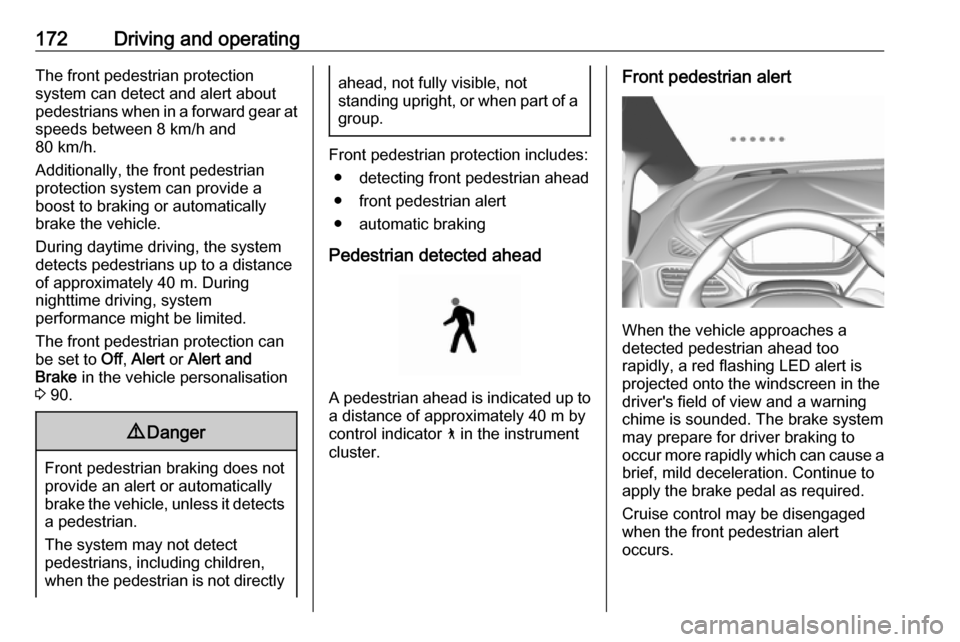
Front pedestrian alert
When the vehicle approaches a
detected pedestrian ahead too
rapidly, a red flashing LED alert is projected onto the windscreen in the
driver's field of view and a warning
chime is sounded. The brake system
may prepare for driver braking to
occur more rapidly which can cause a
brief, mild deceleration. Continue to
apply the brake pedal as required.
Cruise control may be disengaged
when the front pedestrian alert
occurs.
Page 175 of 271

Driving and operating173Automatic brakingIf a crash into a pedestrian directly
ahead is imminent and the brakes
have not been applied, the braking
strength is automatically adapted.
This can help to avoid some very low speed pedestrian crashes or reduce
pedestrian injury.
Automatic braking levels may be
reduced under certain conditions, such as higher speeds.
If this happens, automatic braking
may engage the electric parking
brake to hold the vehicle at a stop.
Release the electric parking brake. A
firm press of the accelerator pedal will
also release automatic braking and
the electric parking brake 3 158.
This system includes intelligent brake
assist, and the emergency automatic
braking system may also respond to
pedestrians.
Active emergency braking 3 168.
Automatic braking can be disabled
through vehicle personalisation 3 90.General information9 Warning
The driver must always be ready
to take action and apply the brakes and steer to avoid collisions.
9 Warning
Front pedestrian braking may alert
or automatically brake the vehicle
suddenly in situations where it is
unexpected and undesired. It
could falsely alert or brake for
objects similar in shape or size to
pedestrians, including shadows.
This is normal operation and the
vehicle does not need a service.
To override Automatic braking,
firmly depress the accelerator
pedal, if it is safe to do so.
System limitations
In the following cases, front
pedestrian protection may not detect
a pedestrian ahead or sensor
performance is limited:
● When vehicle speed is out of range from 8 km/h to 80 km/h .
● When the distance to an pedestrian ahead is more than
40 m.
● When weather limits visibility, such as fog, rain, or snow.
● During nighttime driving.
● When the sensor in the windscreen is blocked by snow,
ice, slush, mud, dirt, windscreen
damage or affected by foreign
items, e.g. stickers.
Parking assist
Rear parking assist9 Warning
It is the driver who bears full
responsibility for the parking
manoeuvre.
Always check the surrounding
area while reversing and using the rear parking assist system.
Page 183 of 271
Driving and operating181Before changing a lane, always
check all mirrors, look over the
shoulder and use the turn lights.
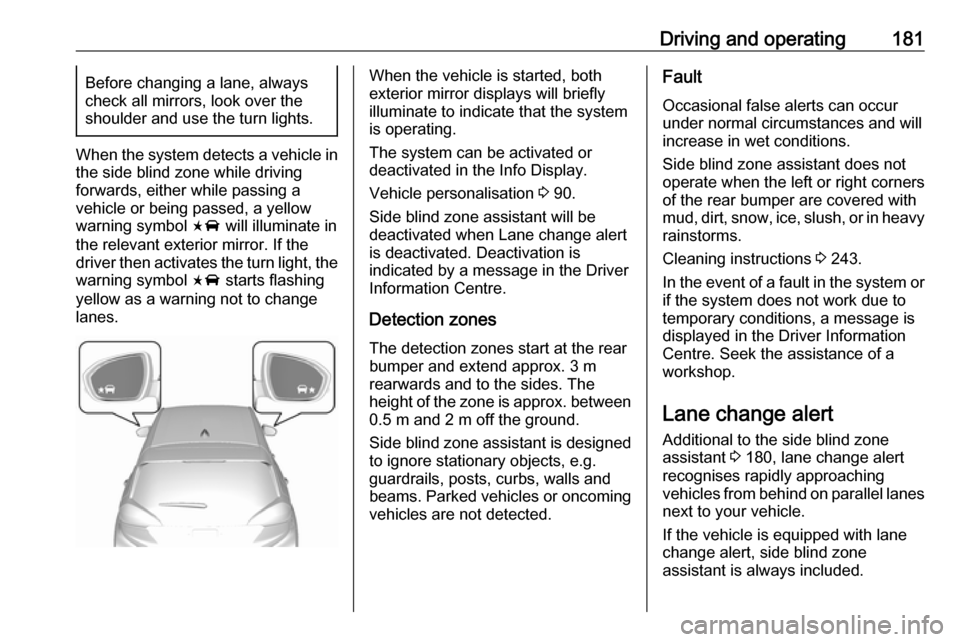
When the system detects a vehicle in
the side blind zone while driving
forwards, either while passing a
vehicle or being passed, a yellow
warning symbol F will illuminate in
the relevant exterior mirror. If the
driver then activates the turn light, the warning symbol F starts flashing
yellow as a warning not to change
lanes.
When the vehicle is started, both
exterior mirror displays will briefly illuminate to indicate that the system
is operating.
The system can be activated or
deactivated in the Info Display.
Vehicle personalisation 3 90.
Side blind zone assistant will be
deactivated when Lane change alert
is deactivated. Deactivation is
indicated by a message in the Driver Information Centre.
Detection zones
The detection zones start at the rear bumper and extend approx. 3 m
rearwards and to the sides. The
height of the zone is approx. between 0.5 m and 2 m off the ground.
Side blind zone assistant is designed
to ignore stationary objects, e.g.
guardrails, posts, curbs, walls and
beams. Parked vehicles or oncoming
vehicles are not detected.Fault
Occasional false alerts can occur
under normal circumstances and will
increase in wet conditions.
Side blind zone assistant does not
operate when the left or right corners
of the rear bumper are covered with
mud, dirt, snow, ice, slush, or in heavy rainstorms.
Cleaning instructions 3 243.
In the event of a fault in the system or
if the system does not work due to
temporary conditions, a message is
displayed in the Driver Information
Centre. Seek the assistance of a
workshop.
Lane change alert
Additional to the side blind zone
assistant 3 180, lane change alert
recognises rapidly approaching
vehicles from behind on parallel lanes
next to your vehicle.
If the vehicle is equipped with lane change alert, side blind zone
assistant is always included.
Page 184 of 271

182Driving and operatingThe system alerts visually in each
exterior mirror when detecting rapidly
approaching vehicles from behind.
The radar distance sensors are
located in the rear bumper.9 Warning
Lane change alert does not
replace driver vision.
Before changing a lane, always
check all mirrors, look over the
shoulder and use the turn light.
When the system detects an
approaching vehicle from behind
which drives considerably faster, the
yellow warning symbol F will
illuminate in the relevant exterior mirror. If the driver then activates the
turn light, the warning symbol F
starts flashing yellow as a warning not to change lanes.
When the vehicle is started, both
exterior mirror displays will briefly
come on to indicate that the system is
operating.
Detection zones
The system sensors cover a zone of
approx. 3.5 m parallel on both vehicle
sides and approx. 3 m rearwards on
side blind zone assistant (A) and
approx. 70 m rearwards on lane
change alert (B) on parallel lanes.
The zones start at each exterior
mirror. The height of the zone is
approx. between 0.5 m and 2 m off the ground.
Deactivation Activation or deactivation of the lane
change alert can be set in the vehicle
personalisation menu in the Info
Display.
Page 185 of 271

Driving and operating183Vehicle personalisation 3 90.
Info Display 3 85.
Deactivation is indicated by a
message in the Driver Information
Centre.
Note
Each new vehicle requires a
calibration. For optimal
performance, drive as soon as
possible on a straight highway road
with roadside objects, e.g. guardrails
and barriers for some distance.
System limitations
Occasional false alerts can occurunder normal circumstances or in
sharp curves. The system can
temporarily alert of objects in the blind zone at specific weather conditions
(rain, hail etc). Driving on a wet road
or in the transitions from a dry area to
a wet area can cause the system to light up, as water splash can be
interpreted as an object. Otherwise
F may illuminate due to guardrails,
signs, trees, shrubs or other immobile
objects. This is normal operation and
the system does not need a service.The system may not operate properly
when:
● ice, snow, mud, or anything else covers the sensors
● driving in heavy rainstorms
● the vehicle had an accident
● there are extreme temperature changes
In the event of a fault in the system or if the system does not work due to
temporary conditions, a message is
displayed in the Driver Information Centre. Seek the assistance of a
workshop.
Panoramic view system The panoramic view system vision
displays an image of the area
surrounding the vehicle, along with
the front or rear camera views in the
centre console.The system uses four cameras:
● rear camera, installed above the license plate
● front camera, installed in the grille or near the front emblem
● side cameras, located at the bottom of both exterior mirrors9Warning
The surround vision cameras have
blind spots and will not display all
objects near the corners of the
vehicle. Folding side mirrors that
are out of position will not display
the surrounding view correctly.
Always check around the vehicle
when parking or reversing.