alarm OPEL ANTARA 2009 Owners Manual
[x] Cancel search | Manufacturer: OPEL, Model Year: 2009, Model line: ANTARA, Model: OPEL ANTARA 2009Pages: 234, PDF Size: 3.01 MB
Page 6 of 234

In brief6
In brief
To unlock and open the vehicle:
Press button q, pull door handle
6 Door locks - see pages 30, 72,
keys - see page 21,
electronic immobiliser - see page 22,
radio frequency remote control -
see page 23,
central locking system - see page 25,
anti-theft locking system - see page 27,
anti-theft alarm system - see page 27.
To unlock and open the tailgate:
Press button q on remote control,
operate button above
license plate
6 Tailgate - see page 26,
radio frequency remote control -
see page 23,
central locking system - see page 25,
anti-theft alarm system - see page 27.
Page 11 of 234

In brief11
Page
1 Side air vents ................................... 104
2 Door window defroster vents ......... 104
3 Headlamp flash and main beam .... 14
turn signal lamps .............................. 14
Peripheral lighting............................. 98
cruise control 3............................... 140
4 Infotainment system
remote control buttons ................... 101
Trip computer 3.......................... 81, 88
5 Horn ................................................... 15
6 Instruments ........................................ 70
7 Windscreen and tailgate
wipers and washers .................... 15, 16
headlamp washers 3........................ 16
8 Central information display for time,
date, outside temperature,
Infotainment system,
check control 3................................. 91
Trip computer 3.......................... 81, 88 Page
9 Centre air vents ............................... 104
10 Hazard warning ................................ 14
Park pilot 3..................................... 142
Descent Control System (DCS) ....... 138
Electronic Stability Control (ESC) ... 136
Front passenger’s
seat belt reminder 3......................... 46
Fold in exterior mirrors 3................. 30
Control indicator for
anti-theft alarm system 3................ 29
11 Infotainment system ....................... 101
12 Front passenger’s airbag ................. 52
13 Glove compartment.................. 64, 105
14 Fuse box .......................................... 182
15 Climate control................................ 103
16 Ignition switch ................................... 13 Page
17 Accelerator pedal ........................... 127
18 Driver’s airbag .................................. 52
19 Brake pedal............................. 127, 146
20 Clutch pedal 3........................ 127, 128
21 Steering wheel adjustment .............. 13
22 Bonnet release ................................ 171
23 Coin storage...................................... 67
24 Card holder ....................................... 67
25 Parking lamps ................................... 94
dipped beam .............................. 14, 95
automatic dipped beam
activation 3...................................... 95
headlamp range adjustment 3....... 97
front fog lamps ................................. 96
fog tail lamp ..................................... 96
instrument illumination .................... 98
Page 12 of 234

In brief12
Control indicators
uABS (Anti-lock Brake System):
see page 148.
gTrailer indicator 3:
see page 70.
4Brake system:
see pages 70, 145.
rPark pilot 3:
see pages 71, 142.
5DCS (Descent Control System):
see pages 71, 138.
BAWD (All Wheel Drive):
see pages 71, 121.
7ESC Active & Warning
(Electronic Stability Control):
see page 136.
AESC Not Ready:
see page 136.
JESC OFF:
see page 136.
qAutomatic headlamp range
adjustment 3 :
see pages 71, 97.
WCoolant temperature:
see pages 71, 195.
oElectronic immobiliser:
see pages 22, 72.
9Door open:
see page 72.
3Engine electronics,
transmission electronics 3:
see pages 72, 134.
vAirbag systems 3,
belt tensioners:
see pages 44, 52.
1Tailgate open:
see page 72.
XDriver’s seat belt reminder:
see page 72.
OTurn signal lamps:
see pages 14, 72, 95.
YLow fuel level:
see pages 72, 76, 132, 225.
>Front fog lamps:
see pages 73, 96.
rFog tail lamp:
see pages 73, 96.
PHeadlamp main beam:
see pages 14, 73, 95.
GLow windscreen washer fluid:
see page 73.
NWater in diesel fuel filter 3:
see pages 73, 194.
CChange engine oil 3:
see page 73.
NPreheating for diesel engines 3:
see pages 19, 73.
IDPF (Diesel particle filter) 3:
see pages 73, 135.
mCruise control 3:
see page 140.
SEngine oil level 3:
see page 73.
2Power steering:
see page 73.
aAnti-theft alarm system activation
without monitoring of passenger
compartment and vehicle tilt 3:
see page 28.
IEngine oil pressure:
see page 74.
pAlternator:
see page 74.
ZExhaust emissions:
see pages 74, 134.
0Winter program:
see pages 74, 117.
Page 20 of 234

In brief20
Parking the vehicle:
Apply hand brake firmly,
close windows,
switch off engine, remove key,
engage steering column lock,
lock vehicle
6Further information - see pages 22, 128,
radio frequency remote control -
see page 23,
central locking system - see page 25,
anti-theft alarm system - see page 27.
Advice when parking:
z Always apply hand brake firmly and as
firmly as possible on slopes.
z Push key into igniti on switch before
removing (vehicles with automatic
transmission 3: depress foot brake and
shift into P before removing key). Turn
steering wheel until lock is felt to engage
(anti-theft protection).
z If the vehicle is parked on a level surface
or a hill, select 1st gear before switching
ignition off (vehicles with automatic
transmission 3: move selector lever to P ).
Also turn front wheels away from kerb if
parked on an uphill slope.
If the vehicle is parked on a downhill
slope, select reverse gear before
switching ignition off (vehicles with
automatic transmission 3: move selector
lever to P). Also turn front wheels
towards kerb.
z Switch off exterior lamps, otherwise the
headlamp warning device will sound
when the driver’s door is opened.
z Cooling fans may run on after the engine
has been switched off.
z Do not park on easily ignitable surfaces
as hot exhaust system temperatures
could cause the surface to ignite.
That was the most important
information for your first drive in
your Antara in brief.
Your vehicle has still more
instruments and controls,
possibly also optional equipment.
The remaining chapters of the
Owner’s Manual contain
important information on
operation, safety and
maintenance as well as a
complete index.
Page 21 of 234

Locks, doors, windows21
Locks, doors, windowsReplacement keys
The key is a constituent of the electronic
immobiliser. In case of loss, replacement
keys can be ordered from your Opel
Partner by quoting the key number and
Vehicle Identification Number (VIN).
Once a new transmitter is coded, the lost
transmitter will not unlock your vehicle.
Ordering keys from an Opel Partner
guarantees problem-free operation of the
electronic immobiliser.
Keep spare key in a safe place.
Locks - see page 205.
Car Pass
The Car Pass contains all of the vehicle’s
data and should therefore not be kept in
the vehicle.
Have your Car Pass on hand when
consulting an Opel Partner.
Key with foldaway key section 3
Press button to extend. Press button to
retract; key section audibly engages.
Replacement keys .............................. 21
Car Pass............................................... 21
Key with foldaway key section
3...... 21
Electronic immobiliser......................... 22
Radio frequency remote control ....... 23
Central locking system ....................... 25
Tailgate ............................................... 26
Mechanical anti-theft locking system 3........................................... 27
Anti-theft alarm system 3................. 27
Child safety locks ................................ 30
Exterior mirrors.................................... 30
Interior mirror ...................................... 31
Electric windows.................................. 32
Sun visors............................................. 34
Slide/tilt sun roof 3............................. 34
Page 22 of 234

Locks, doors, windows22
Electronic immobiliser
The system checks whether the vehicle may
be started using the key that has been
inserted. If the key is recognised as
"authorised", the vehicle can be started.
The check is carried out via a transponder
housed in the key.
The electronic immobiliser is automatically
activated when the key is turned to LOCK
position and removed from the ignition
switch. Control indicator
o for immobiliser
The control indicator illuminates when the
ignition is switched on, then extinguishes.
If the control indicator stays illuminated
after the ignition is switched on, there is a
fault in the immobiliser system.
z Turn key to LOCK po sition and remove,
z wait approximately two seconds,
z then repeat starting procedure.
If the control indicator fails to extinguish,
try to start the engine using the spare key
and seek the assistance of a workshop. Note
The immobiliser does not lock the doors.
Therefore, after leaving the vehicle, always
lock it and switch on the anti-theft alarm
system 3
- see pages 25, 27.
Page 23 of 234
Locks, doors, windows23
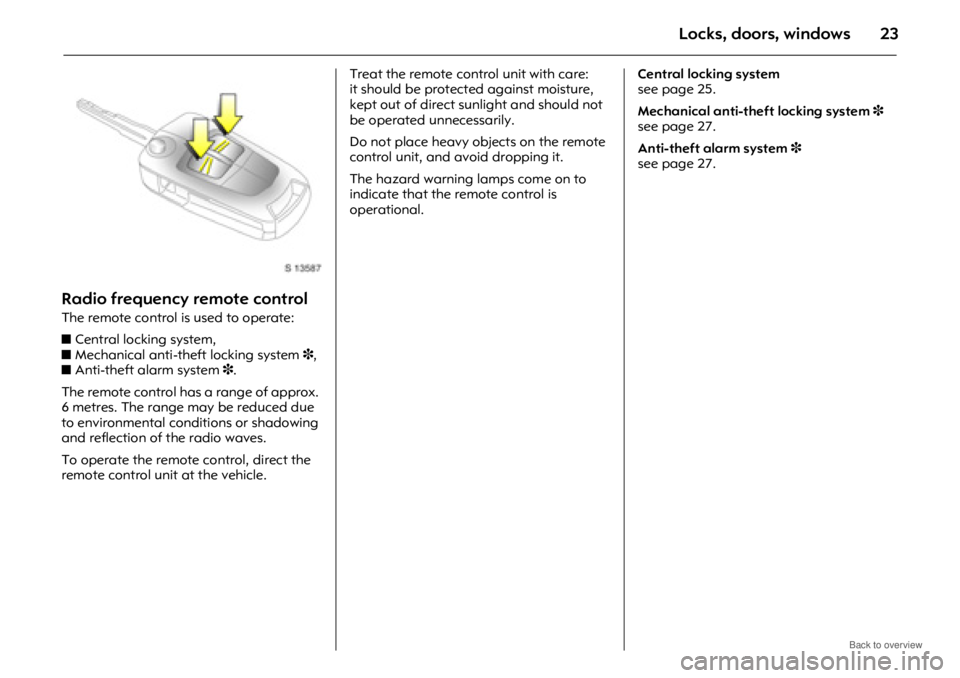
Radio frequency remote control
The remote control is used to operate:
z Central locking system,
z Mechanical anti-the ft locking system 3,
z Anti-theft alarm system 3.
The remote control has a range of approx.
6 metres. The range may be reduced due
to environmental conditions or shadowing
and reflection of the radio waves.
To operate the remote control, direct the
remote control unit at the vehicle. Treat the remote control unit with care:
it should be protected against moisture,
kept out of direct sunlight and should not
be operated unnecessarily.
Do not place heavy objects on the remote
control unit, and av
oid dropping it.
The hazard warning lamps come on to
indicate that the remote control is
operational. Central locking system
see page 25.
Mechanical anti-theft locking system
3
see page 27.
Anti-theft alarm system 3
see page 27.
Page 25 of 234

Locks, doors, windows25
Central locking system
For front doors, rear doors, tailgate and
tank flap.
To lock:
Press button p on remote control
- or -
With the doors closed, press central locking
switch
m in driver’s door.
The central locking system can be
activated with the windows open.
Always ensure that the doors, bonnet,
tailgate, sun roof 3 and windows are
properly closed and that there are no
passengers left in the vehicle before
locking with the remote control. To unlock:
Press button
q on remote control
- or -
Press central locking switch
m in driver’s
door.
If no door is opened within approx.
30 seconds after the vehicle has been
unlocked via the remote control, the vehicle
is relocked automatically and anti-theft
alarm 3 is reactivated.
When button q is pressed, the instrument
panel illuminates for approx. 30 seconds or
until ignition switch is turned to the
ACC position. Central locking switch
mUse the central locking switch to lock or
unlock the doors, tailgate and tank flap
from inside the vehicle.
Press the right part of the switch to lock or
the left part of the switch to unlock.9 Warning
For safety reasons, the vehicle cannot be
locked or unlocked via the remote control
(and the anti-theft system 3 will not be
activated) if the key is in the ignition
switch.
Page 27 of 234

Locks, doors, windows27
Mechanical anti-theft locking
system 3
To lock:
All doors and the tailgate must be closed;
press button p on remote control again
within 3 seconds after locking
- or -
Turn key in driver's door lock towards rear
of vehicle again within 3 seconds after
locking, then turn it back to the vertical
position and remove.
Lock buttons on all doors are positioned
such that doors cannot be opened. To unlock
:
Press button q on remote control
- or -
Turn key in driver's d oor lock towards front
of vehicle, then turn it back to the vertical
position and remove.Anti-theft alarm system 3
The system monitors:
zFront and rear doors.
z Tailgate, bonnet.
z Ignition switch.
z Passenger compartment 3.
z Vehicle tilt, e.g. if it is raised 3.
z Siren power supply 3.
9 Warning
Do not use the system if there are people
in the vehicle. The doors cannot be
unlocked from inside.
9 Warning
Unlocking is not possible in any other
way, so keep spare key in a safe place.
Page 28 of 234

Locks, doors, windows28
The remote control unit is used to operate
the anti-theft alarm system.
To activate
Always ensure that the doors, bonnet,
tailgate, sun roof 3 and windows are
properly closed and that there are no
passengers left in the vehicle before
activating anti-theft alarm system.
Press button p on remote control
- or -
Lock driver’s door by turning key in door
lock towards rear of vehicle then turn it
back to the vertical position and remove;
z Hazard warning lamps flash once,
z All doors are locked,
z Anti-theft system is activated after
approx. 30 seconds. Confirm that the cont
rol indicator starts
flashing slowly, after illuminating for
approx. 30 seconds, to show that the anti-
theft system has been activated.
If button p is pressed again, the anti-theft
alarm system will activate automatically,
bypassing the 30 second delay.
If the hazard warning lamps do not flash
on activation or the control indicator
flashes quickly, this may indicate that a
door, the tailgate or the bonnet is not fully
closed. Activation without monitoring of
passenger compartment and vehicle tilt
3
Switch on when, for example, animals are
to be left in the vehicle.
9 Warning
Do not use the system if there are
passengers in the vehicle. The doors
cannot be unlocked from the inside when
the alarm is activated.
1. Close tailgate and bonnet.
2. Press button
a in the roof lining.
Control indicator a illuminates in
yellow in the instrument panel.
3. Close doors.
4. Switch on anti-theft alarm system. Control indicator for anti-theft alarm
system illuminates. After a 30 second
delay, the system is activated without
monitoring of the passenger
compartment or vehicle tilt.
Control indicator
a remains
illuminated in the instrument panel
until the system is switched off by
pressing button
a again.