manual transmission OPEL ANTARA 2009 Owners Manual
[x] Cancel search | Manufacturer: OPEL, Model Year: 2009, Model line: ANTARA, Model: OPEL ANTARA 2009Pages: 234, PDF Size: 3.01 MB
Page 17 of 234

In brief17
Drying misted up or iced up
windows:
Set air distribution to positionl,
set the temperature rotary knob
to red and fan to position 4,
switch on heated rear window Ü
Close centre air vents, open side air vents
and direct them towards the door windows.
6 Heating, ventilation and air conditioning
system - see pages 106, 109.
To set automatic mode of
Electronic Climate Control 3:
Press AUTO button,
set temperature using
rotary knob
Open all air vents.
6 Electronic Climate Control (ECC) -
see page 111.
Manual transmission:
Only engage reverse gear when the vehicle
is stationary.
1 to 5 = 1st to 5th gear
R = Reverse gear
Page 18 of 234

In brief18
Automatic transmission 3:
Starting is only possible in P or N. To move
from P or N, switch on ignition, depress foot
brake and press selector lever button.
Engage P or R: press selector lever button.
6 Automatic transmission - see page
115. Manual mode:
6
Further information - see page 117.
Before starting-off, check:
zTyre pressures and condition.
z Engine oil level and fluid levels in engine
compartment (see page 192).
z All windows, mirrors, exterior lighting
and license plates are free from dirt,
snow and ice and are operational.
z Objects are securely located and will not
be thrown forward in the event of
sudden braking.
z Seats, seat belts and mirrors are
correctly adjusted.
z All gauges and control indicators.
z Brake operation.
P=Park position
R = Reverse
N = Neutral (idle)
D = Automatic gear selection
P: Only with vehicle stationary,
first apply hand brake
R : Only with vehicle stationary.
<= Shift to higher gear
]=Shift to lower gear
Page 19 of 234

In brief19
Starting the engine:
Manual transmission in neutral,
Depress clutch and foot brake,
Automatic transmission in P or N,
Do not accelerate
Petrol engines:
TurnkeytoSTARTand release it
Diesel engines:
Turn key to ON, when preheating
control indicator N
extinguishes
1), turn key to START
and release it
Key returns automatically to ON position
when released. Start attempts should not last longer than
15 seconds. If engine does not start, wait
10 seconds before repeating starting
procedure.
The increased engine
speed automatically
returns to normal idling speed as the
engine temperature rises.
Drive at a moderate speed, especially in
cold weather, until normal engine
operating temperatures have been
reached.
6 Electronic immobiliser - see page 22,
diesel fuel system - see page 171,
further information - see pages 127, 129,
131.
Releasing the hand brake:
Raise lever slightly,
press release button,
lower lever fully
To reduce operating forces, depress foot
brake at the same time.
Do not drive with hand brake on, to avoid
damage to brakes on the rear wheels. Do
not apply hand brake while vehicle is in
motion or as a substitute for the foot brake.
Drive carefully, economically and with the
environment in mind. While driving, do not
do anything that could distract you.
6 Hand brake - see page 147.
1)Preheating system switches on only if outside
temperature is low.
Page 20 of 234

In brief20
Parking the vehicle:
Apply hand brake firmly,
close windows,
switch off engine, remove key,
engage steering column lock,
lock vehicle
6Further information - see pages 22, 128,
radio frequency remote control -
see page 23,
central locking system - see page 25,
anti-theft alarm system - see page 27.
Advice when parking:
z Always apply hand brake firmly and as
firmly as possible on slopes.
z Push key into igniti on switch before
removing (vehicles with automatic
transmission 3: depress foot brake and
shift into P before removing key). Turn
steering wheel until lock is felt to engage
(anti-theft protection).
z If the vehicle is parked on a level surface
or a hill, select 1st gear before switching
ignition off (vehicles with automatic
transmission 3: move selector lever to P ).
Also turn front wheels away from kerb if
parked on an uphill slope.
If the vehicle is parked on a downhill
slope, select reverse gear before
switching ignition off (vehicles with
automatic transmission 3: move selector
lever to P). Also turn front wheels
towards kerb.
z Switch off exterior lamps, otherwise the
headlamp warning device will sound
when the driver’s door is opened.
z Cooling fans may run on after the engine
has been switched off.
z Do not park on easily ignitable surfaces
as hot exhaust system temperatures
could cause the surface to ignite.
That was the most important
information for your first drive in
your Antara in brief.
Your vehicle has still more
instruments and controls,
possibly also optional equipment.
The remaining chapters of the
Owner’s Manual contain
important information on
operation, safety and
maintenance as well as a
complete index.
Page 76 of 234

Instruments, controls76
Fuel gauge
Indicates fuel level when the ignition is on.
After adding fuel and restarting engine,
fuel gauge pointer slowly moves to show
new fuel level.
When fuel gauge indica tes that fuel supply
is low, control indicator
Y illuminates:
fill up fuel tank as soon as possible -
see page 132.
Never let the fuel tank become empty.
Diesel engines: if the tank has been run dry,
bleed the fuel system as described on
page 171.
Because of the amount of fuel remaining in
the tank, the amount of fuel required to fill
the tank may be less than the specified
tank capacity. Transmission display 3
Display of the selected gear or mode with
automatic transmission
3.
Information display
Board information display
Display of time, outside temperature and
date/Infotainment system (when it is on).
An F in the display in dicates a fault.
Have the cause of the fault remedied by a
workshop.
P Park position.
R Reverse gear.
N Neutral.
D Automatic mode.
1 to 5 Selected gear in manual
mode.
11:25}21.5°C
Range
RDS [TP]
257km
Page 102 of 234

Infotainment system102
Mobile telephones and radio
equipment (CB) 3
The Opel installation instructions and the
operating guidelines provided by the
telephone manufacturer must be observed
when fitting and op erating a mobile
telephone. Failure to do so could invalidate
the vehicle’s operating permit (EU Directive
95/54/EG).
Requirements to ensure trouble-free
operation:
z Professionally installe d exterior antenna,
to obtain the maximum range possible
z Maximum transmission power 10 W.
z Installation of the telephone in a suitable
spot (front centre console).
See important notes on page 57. Obtain advice on predetermined
installation locations for the external
antenna and equipment holder and ways
of using devices with transmission power of
more than 10 Watts. We recommend that
you consult your Opel Partner, who will
have brackets and various installation kits
and install them in accordance with
regulations.
Operation of a handsfree attachment with
no outside antenna, using the mobile
telephone standards GSM 900/1800/1900
and UMTS, may take place only if the
maximum transmission power of the
mobile telephone does not exceed 2 W, in
the case of GSM 900, and otherwise 1 W.
The operating instructions of the
manufacturer of the telephone and
handsfree attachment must be noted in all
cases.
For reasons of safety, we recommend that
you do not use the phone while driving.
Even use of a handsfree set can be a
distraction while driving. Be sure to observe
any country-specific regulations.
Infotainment and navigation
systems
3
The systems are operated as described in
the instruction manuals supplied.
The navigation system is supplied with a
CD or DVD detailing the local territory.
For additional coun tries/territories,
separate CD’s are availa ble from your Opel
Partner.
9 Warning
When used in the vehicle interior, mobile
telephones and radio equipment (CB)
with integrated antenna may cause
malfunctions in the vehicle electronics.
Mobile telephones and radio equipment
( C B ) s h o u l d o n l y b e u s e d w i t h a n a n t e n n a
fitted on the vehicle exterior.
Page 115 of 234

Driving and operation115
Driving and operationAutomatic transmission 3
The automatic transmission permits
manual gearshifting (manual mode) or
automatic gearshifting ( automatic mode)
with fully automatic clutch control.
The engine can only be started when the
selector lever is in position P or N. When
starting in P, turn key in ignition switch to
ACC or ON, depress foot brake and press
selector lever button before selecting a
gear.
Do not accelerate whilst gearshifting. If a
gear has been selected and the foot brake
is released without accelerating, the
vehicle will "creep".
Never operate the brake pedal and
accelerator simultaneously. Selecting
D puts the transmission in
automatic mode.
If the selector lever is moved to the left from
position D, manual mode is activated.
Forward gear changes only can then be
made manually by tipping the selector
lever towards + or -.
Automatic transmission
3................. 115
All Wheel Drive.................................... 121
Driving hints ........................................ 127
Save fuel, protect the environment ... 129
Fuels, refuelling ................................... 131
Catalytic converter, exhaust emissions........................................... 133
Drive control systems ......................... 136
Brake system ....................................... 145
Anti-lock Brake System (ABS) u....... 148
Wheels, tyres ....................................... 149
Roof racks 3........................................ 153
Flex-Fix system 3................................ 154
Towing equipment 3 .......................... 164
Towing ................................................. 1679 Warning
Disregard of these instructions may
cause damage to the vehicle and lead to
injuries or endanger life.
Page 116 of 234
Driving and operation116
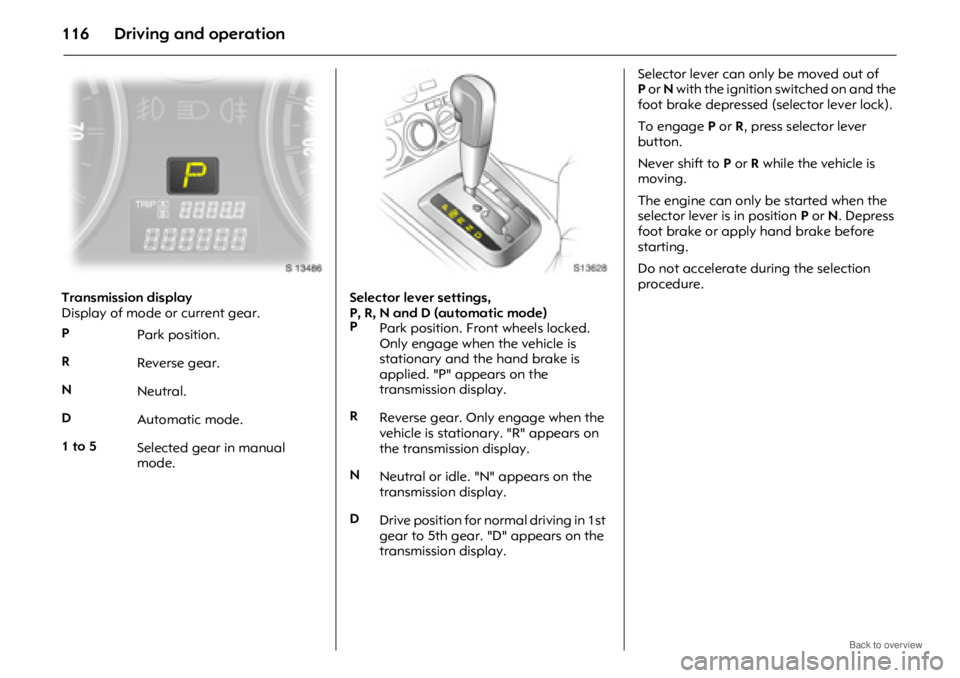
Transmission display
Display of mode or current gear.Selector lever settings,
P, R, N and D (automatic mode)Selector lever can only be moved out of
P
or N with the ignition switched on and the
foot brake depressed (selector lever lock).
To engage P or R, press selector lever
button.
Never shift to P or R while the vehicle is
moving.
The engine can only be started when the
selector lever is in position P or N. Depress
foot brake or apply hand brake before
starting.
Do not accelerate during the selection
procedure.
P Park position.
R Reverse gear.
N Neutral.
D Automatic mode.
1 to 5 Selected gear in manual
mode.
P
Park position. Front wheels locked.
Only engage when the vehicle is
stationary and the hand brake is
applied. "P" appears on the
transmission display.
R Reverse gear. Only engage when the
vehicle is stationary. "R" appears on
the transmission display.
N Neutral or idle. "N" appears on the
transmission display.
D Drive position for normal driving in 1st
gear to 5th gear. "D" appears on the
transmission display.
Page 117 of 234
Driving and operation117
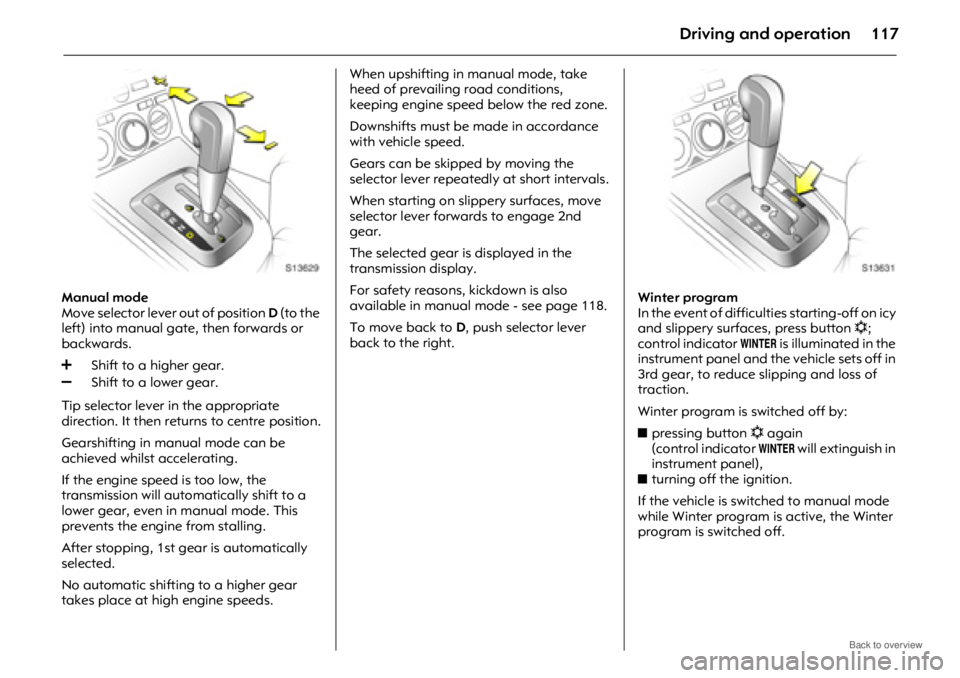
Manual mode
Move selector lever out of position D (to the
left) into manual gate, then forwards or
backwards.
Tip selector lever in the appropriate
direction. It then returns to centre position.
Gearshifting in manual mode can be
achieved whilst accelerating.
If the engine speed is too low, the
transmission will automatically shift to a
lower gear, even in manual mode. This
prevents the engine from stalling.
After stopping, 1st gear is automatically
selected.
No automatic shifting to a higher gear
takes place at high engine speeds. When upshifting in manual mode, take
heed of prevailing road conditions,
keeping engine speed below the red zone.
Downshifts must be made in accordance
with vehicle speed.
Gears can be skipped by moving the
selector lever repeated
ly at short intervals.
When starting on slippery surfaces, move
selector lever forwards to engage 2nd
gear.
The selected gear is displayed in the
transmission display.
For safety reasons, kickdown is also
available in manual mode - see page 118.
To move back to D, push selector lever
back to the right. Winter program
In the event of difficult
ies starting-off on icy
and slippery surfac es, press button n;
control indicator
0 is illuminated in the
instrument panel and the vehicle sets off in
3rd gear, to reduce slipping and loss of
traction.
Winter program is switched off by:
z pressing button n again
(control indicator
0 will extinguish in
instrument panel),
z turning off the ignition.
If the vehicle is switched to manual mode
while Winter program is active, the Winter
program is switched off.
Page 118 of 234
Driving and operation118
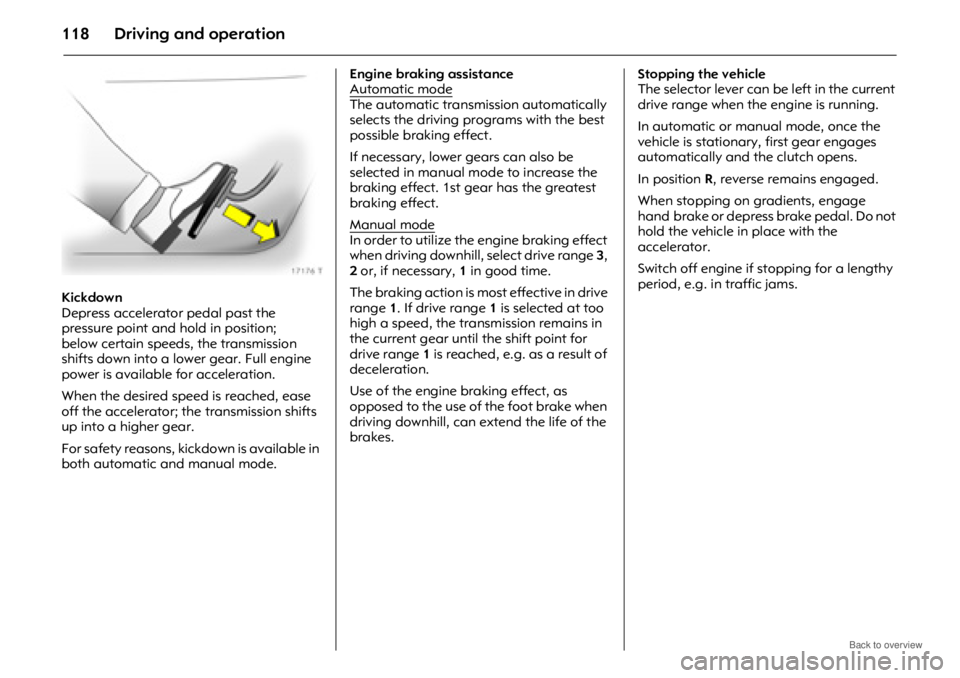
Kickdown
Depress accelerator pedal past the
pressure point and hold in position;
below certain speeds, the transmission
shifts down into a lower gear. Full engine
power is available for acceleration.
When the desired speed is reached, ease
off the accelerator; the transmission shifts
up into a higher gear.
For safety reasons, kickdown is available in
both automatic and manual mode. Engine braking assistance
Automatic mode
The automatic transmi
ssion automatically
selects the driving programs with the best
possible braking effect.
If necessary, lower gears can also be
selected in manual mo de to increase the
braking effect. 1st gear has the greatest
braking effect.
Manual mode
In order to utilize the engine braking effect
when driving downhill, select drive range 3,
2 or, if necessary, 1 in good time.
The braking action is mo st effective in drive
range 1. If drive range 1 is selected at too
high a speed, the transmission remains in
the current gear until the shift point for
drive range 1 is reached, e.g. as a result of
deceleration.
Use of the engine braking effect, as
opposed to the use of the foot brake when
driving downhill, can ex tend the life of the
brakes. Stopping the vehicle
The selector lever can be
left in the current
drive range when the engine is running.
In automatic or manual mode, once the
vehicle is stationary, first gear engages
automatically and the clutch opens.
In position R, reverse remains engaged.
When stopping on gradients, engage
hand brake or depress brake pedal. Do not
hold the vehicle in place with the
accelerator.
Switch off engine if stopping for a lengthy
period, e.g. in traffic jams.