wheel OPEL ANTARA 2014 User Guide
[x] Cancel search | Manufacturer: OPEL, Model Year: 2014, Model line: ANTARA, Model: OPEL ANTARA 2014Pages: 217, PDF Size: 6.04 MB
Page 60 of 217
58StorageUnderseat storage
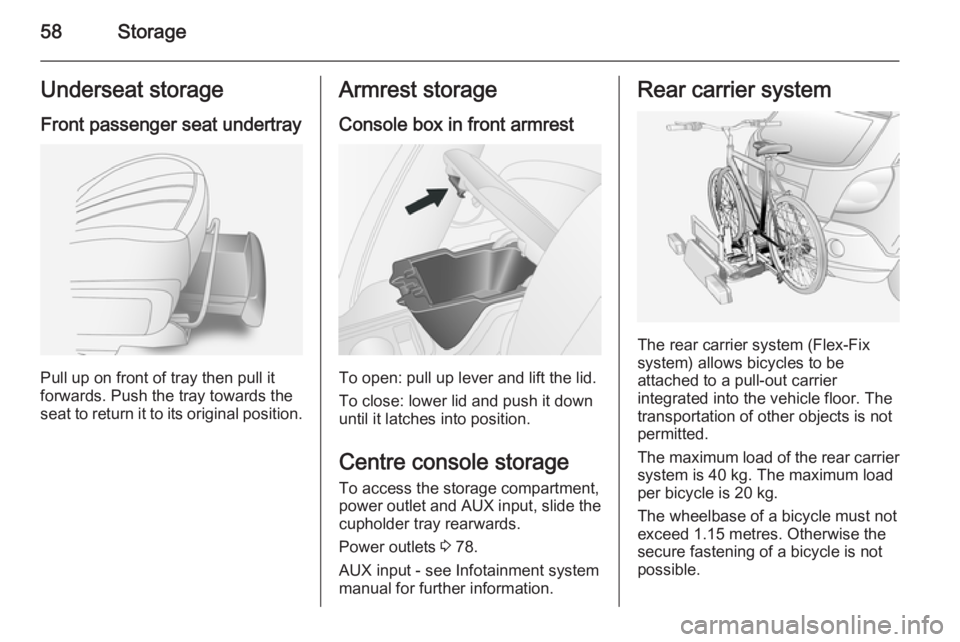
Front passenger seat undertray
Pull up on front of tray then pull it
forwards. Push the tray towards the
seat to return it to its original position.
Armrest storage
Console box in front armrest
To open: pull up lever and lift the lid.
To close: lower lid and push it down
until it latches into position.
Centre console storage To access the storage compartment,
power outlet and AUX input, slide the
cupholder tray rearwards.
Power outlets 3 78.
AUX input - see Infotainment system
manual for further information.
Rear carrier system
The rear carrier system (Flex-Fix
system) allows bicycles to be
attached to a pull-out carrier
integrated into the vehicle floor. The
transportation of other objects is not
permitted.
The maximum load of the rear carrier
system is 40 kg. The maximum load
per bicycle is 20 kg.
The wheelbase of a bicycle must not
exceed 1.15 metres. Otherwise the
secure fastening of a bicycle is not
possible.
Page 64 of 217
62Storage
Adapting the rear carrier systemto a bicycle
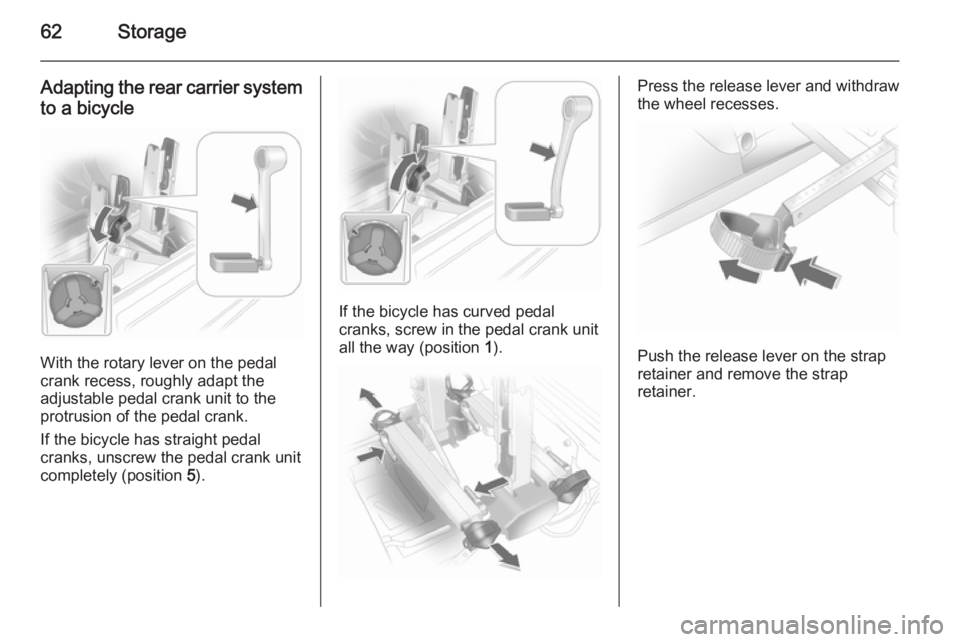
With the rotary lever on the pedal
crank recess, roughly adapt the
adjustable pedal crank unit to the
protrusion of the pedal crank.
If the bicycle has straight pedal
cranks, unscrew the pedal crank unit
completely (position 5).
If the bicycle has curved pedal
cranks, screw in the pedal crank unit all the way (position 1).
Press the release lever and withdraw
the wheel recesses.
Push the release lever on the strap
retainer and remove the strap
retainer.
Page 65 of 217
Storage63
Prepare the bicycle for
attachment
Note
The maximum width for the pedal
crank is 38.3 mm and the maximum
depth is 14.4 mm.
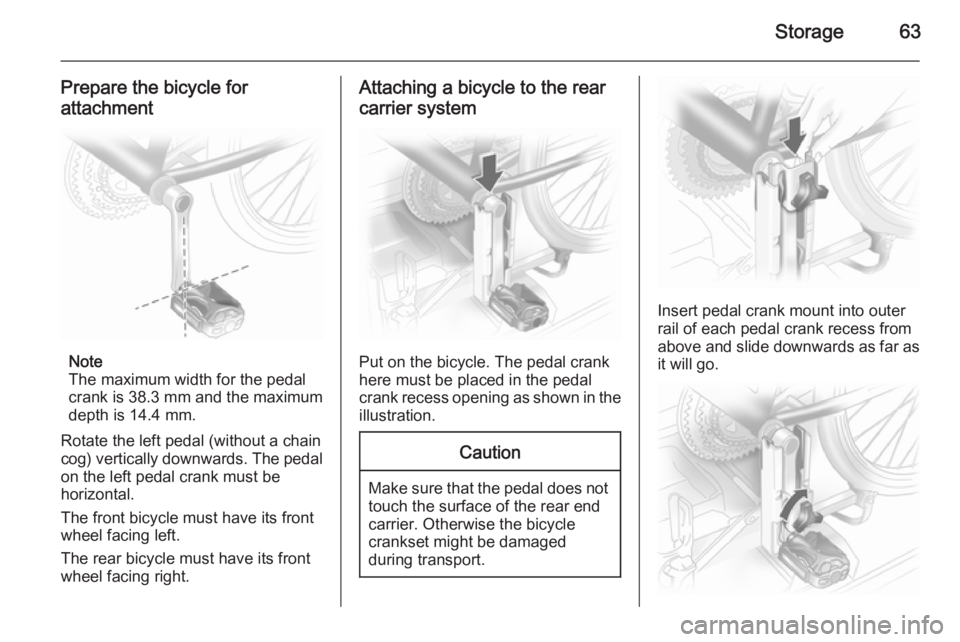
Rotate the left pedal (without a chain
cog) vertically downwards. The pedal
on the left pedal crank must be
horizontal.
The front bicycle must have its front
wheel facing left.
The rear bicycle must have its front
wheel facing right.
Attaching a bicycle to the rear
carrier system
Put on the bicycle. The pedal crank
here must be placed in the pedal
crank recess opening as shown in the
illustration.
Caution
Make sure that the pedal does not
touch the surface of the rear end
carrier. Otherwise the bicycle
crankset might be damaged
during transport.
Insert pedal crank mount into outer
rail of each pedal crank recess from
above and slide downwards as far as
it will go.
Page 66 of 217
64Storage
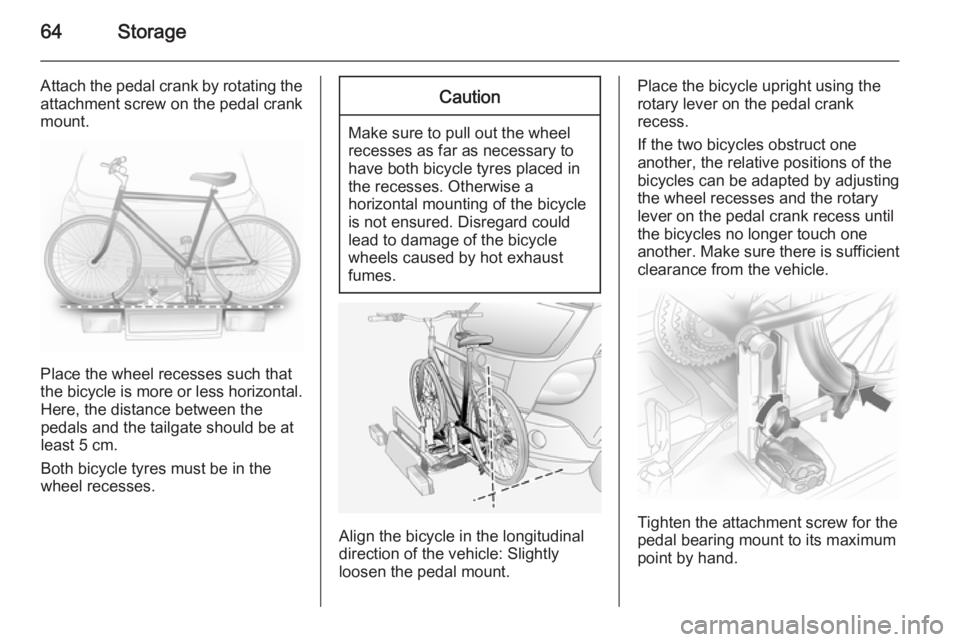
Attach the pedal crank by rotating the
attachment screw on the pedal crank
mount.
Place the wheel recesses such that
the bicycle is more or less horizontal. Here, the distance between the
pedals and the tailgate should be at
least 5 cm.
Both bicycle tyres must be in the
wheel recesses.
Caution
Make sure to pull out the wheel
recesses as far as necessary to have both bicycle tyres placed in
the recesses. Otherwise a
horizontal mounting of the bicycle
is not ensured. Disregard could
lead to damage of the bicycle
wheels caused by hot exhaust
fumes.
Align the bicycle in the longitudinal direction of the vehicle: Slightly
loosen the pedal mount.
Place the bicycle upright using the
rotary lever on the pedal crank
recess.
If the two bicycles obstruct one
another, the relative positions of the
bicycles can be adapted by adjusting
the wheel recesses and the rotary
lever on the pedal crank recess until
the bicycles no longer touch one
another. Make sure there is sufficient
clearance from the vehicle.
Tighten the attachment screw for the
pedal bearing mount to its maximum
point by hand.
Page 67 of 217
Storage65
Secure both bicycle wheels to the
wheel recesses using strap retainers.
Check the bicycle to make sure it is
secure.Caution
Ensure gap between bicycle and
vehicle is at least 5 cm. If
necessary, loosen handlebar and swivel sideways.
The settings for the wheel recesses
and on the rotary lever on the pedal
crank recess should be noted and saved for each bicycle. Correct
presetting will facilitate refitting of the
bicycle.Note
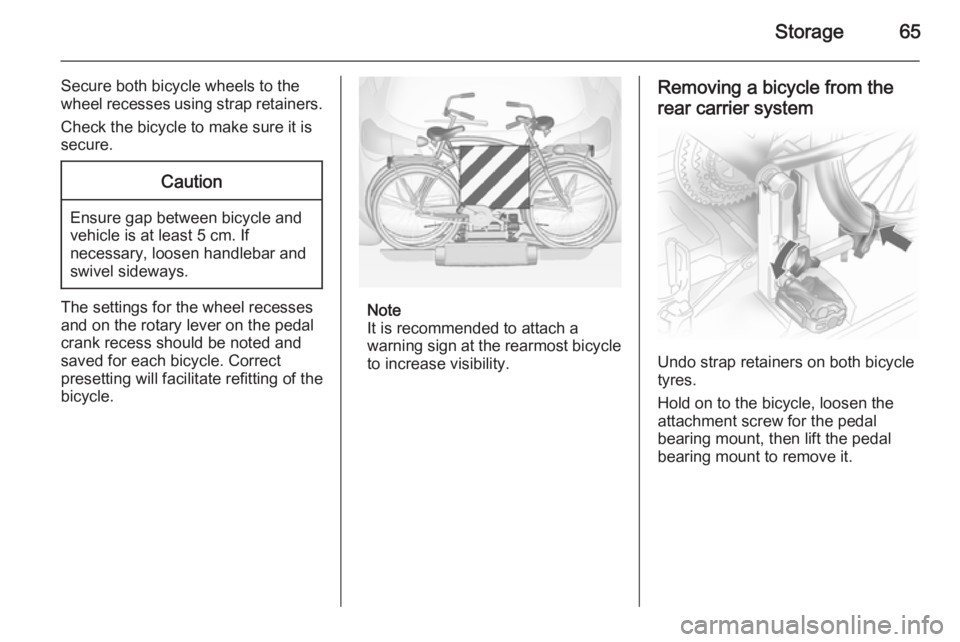
It is recommended to attach a
warning sign at the rearmost bicycle to increase visibility.
Removing a bicycle from the
rear carrier system
Undo strap retainers on both bicycle
tyres.
Hold on to the bicycle, loosen the attachment screw for the pedal
bearing mount, then lift the pedal
bearing mount to remove it.
Page 68 of 217
66Storage
Retracting the rear carrier
system
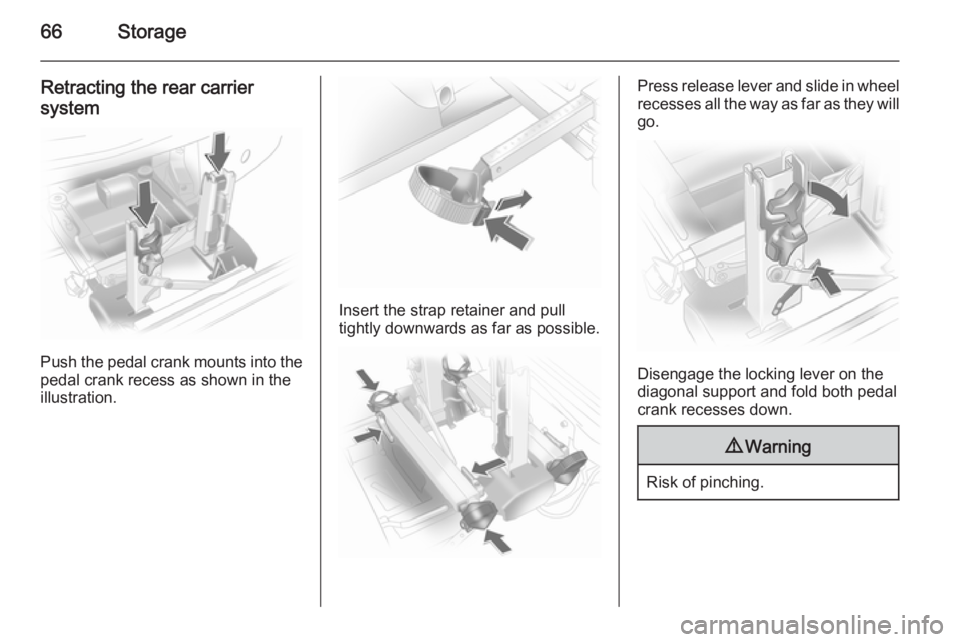
Push the pedal crank mounts into the
pedal crank recess as shown in the
illustration.
Insert the strap retainer and pull
tightly downwards as far as possible.
Press release lever and slide in wheel recesses all the way as far as they will
go.
Disengage the locking lever on the
diagonal support and fold both pedal crank recesses down.
9 Warning
Risk of pinching.
Page 72 of 217
70Storage
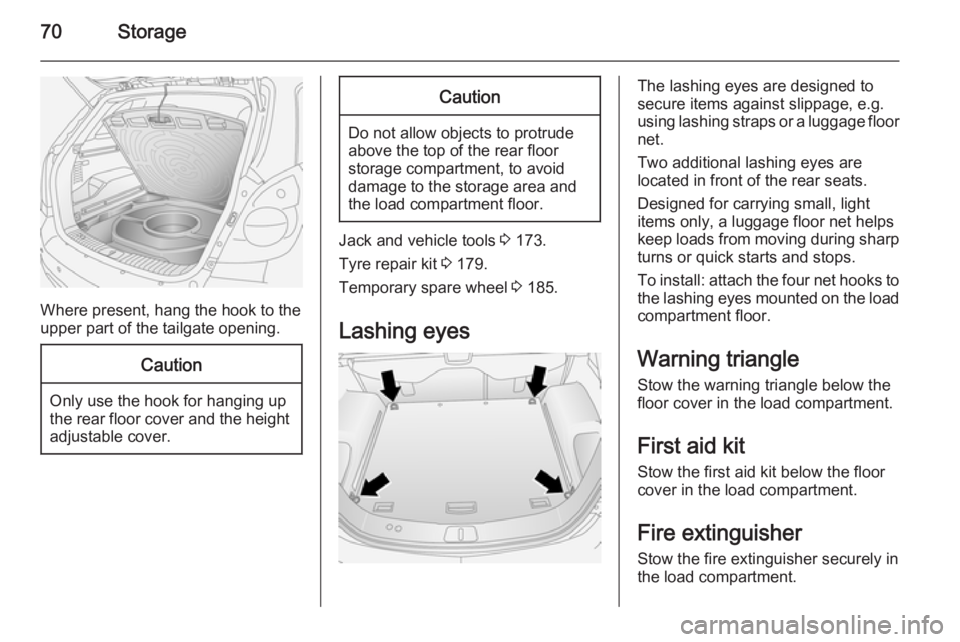
Where present, hang the hook to the
upper part of the tailgate opening.
Caution
Only use the hook for hanging up
the rear floor cover and the height adjustable cover.
Caution
Do not allow objects to protrude
above the top of the rear floor
storage compartment, to avoid
damage to the storage area and
the load compartment floor.
Jack and vehicle tools 3 173.
Tyre repair kit 3 179.
Temporary spare wheel 3 185.
Lashing eyes
The lashing eyes are designed to
secure items against slippage, e.g.
using lashing straps or a luggage floor
net.
Two additional lashing eyes are
located in front of the rear seats.
Designed for carrying small, light
items only, a luggage floor net helps keep loads from moving during sharp turns or quick starts and stops.
To install: attach the four net hooks to
the lashing eyes mounted on the load
compartment floor.
Warning triangle Stow the warning triangle below the
floor cover in the load compartment.
First aid kit Stow the first aid kit below the floor
cover in the load compartment.
Fire extinguisher
Stow the fire extinguisher securely in
the load compartment.
Page 75 of 217
Instruments and controls73Instruments and
controlsControls ....................................... 73
Warning lights, gauges and indi‐ cators ........................................... 80
Information displays .....................92
Vehicle messages ........................ 99
Trip computer ............................. 101Controls
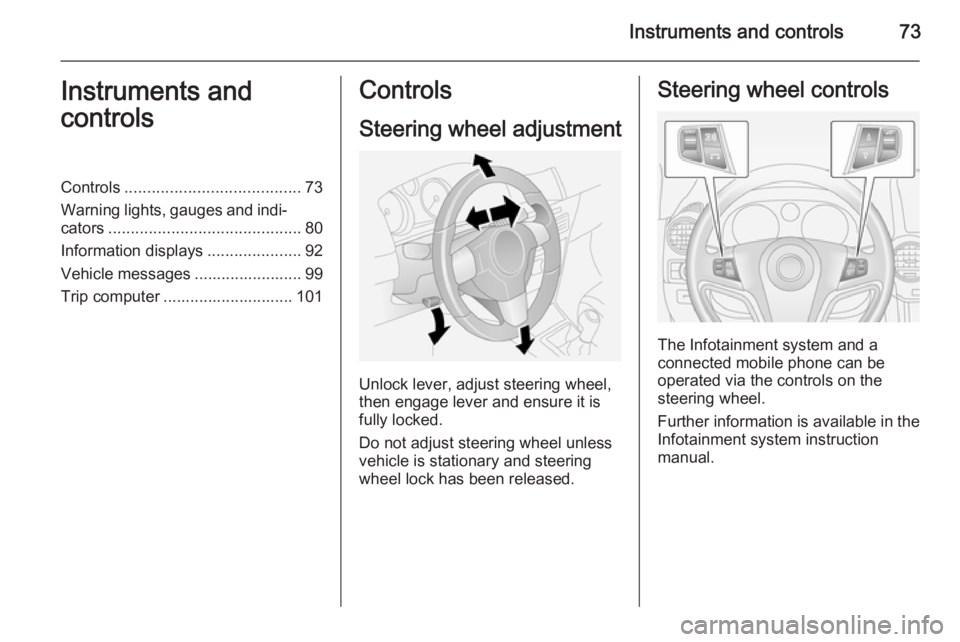
Steering wheel adjustment
Unlock lever, adjust steering wheel,
then engage lever and ensure it is fully locked.
Do not adjust steering wheel unless
vehicle is stationary and steering
wheel lock has been released.
Steering wheel controls
The Infotainment system and a
connected mobile phone can be
operated via the controls on the
steering wheel.
Further information is available in the
Infotainment system instruction
manual.
Page 88 of 217
86Instruments and controls
Illuminates when engine is running if
fluid level for brake hydraulics is too
low 3 156.
Brake system 3 136.
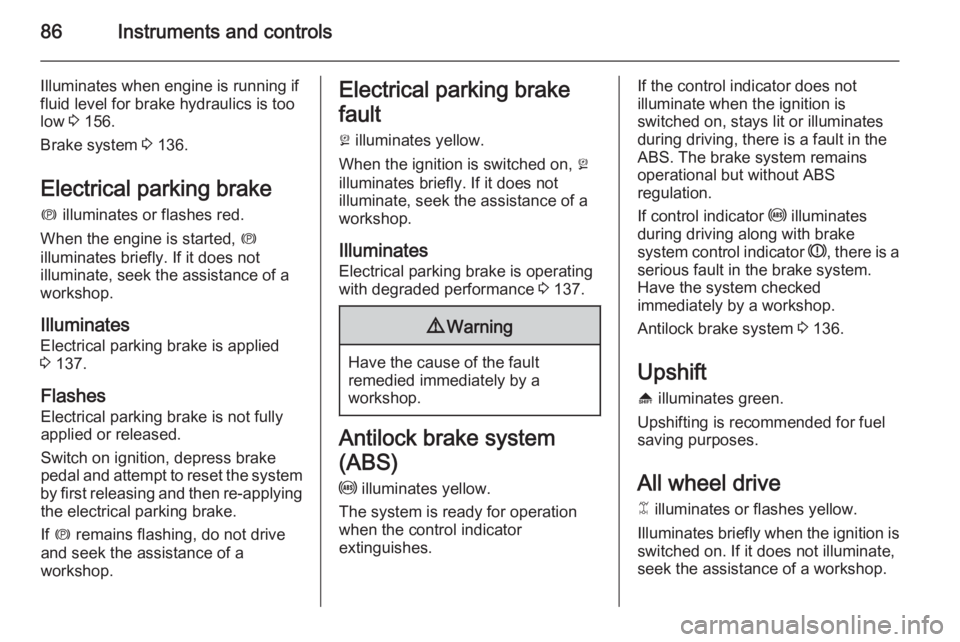
Electrical parking brake
m illuminates or flashes red.
When the engine is started, m
illuminates briefly. If it does not
illuminate, seek the assistance of a
workshop.
Illuminates Electrical parking brake is applied3 137.
Flashes Electrical parking brake is not fully
applied or released.
Switch on ignition, depress brake
pedal and attempt to reset the system
by first releasing and then re-applying the electrical parking brake.
If m remains flashing, do not drive
and seek the assistance of a
workshop.Electrical parking brake
fault
j illuminates yellow.
When the ignition is switched on, j
illuminates briefly. If it does not
illuminate, seek the assistance of a workshop.
Illuminates Electrical parking brake is operating
with degraded performance 3 137.9 Warning
Have the cause of the fault
remedied immediately by a
workshop.
Antilock brake system
(ABS) u illuminates yellow.
The system is ready for operation
when the control indicator
extinguishes.
If the control indicator does not
illuminate when the ignition is
switched on, stays lit or illuminates
during driving, there is a fault in the
ABS. The brake system remains
operational but without ABS
regulation.
If control indicator u illuminates
during driving along with brake
system control indicator R, there is a
serious fault in the brake system.
Have the system checked
immediately by a workshop.
Antilock brake system 3 136.
Upshift [ illuminates green.
Upshifting is recommended for fuel
saving purposes.
All wheel drive B illuminates or flashes yellow.
Illuminates briefly when the ignition is
switched on. If it does not illuminate,
seek the assistance of a workshop.
Page 89 of 217
Instruments and controls87
Flashes briefly when the engineis running
The system is temporarily disabled.
Flashes continuously when the
engine is running System fault. Seek the assistance of
a workshop immediately.
All wheel drive 3 134.
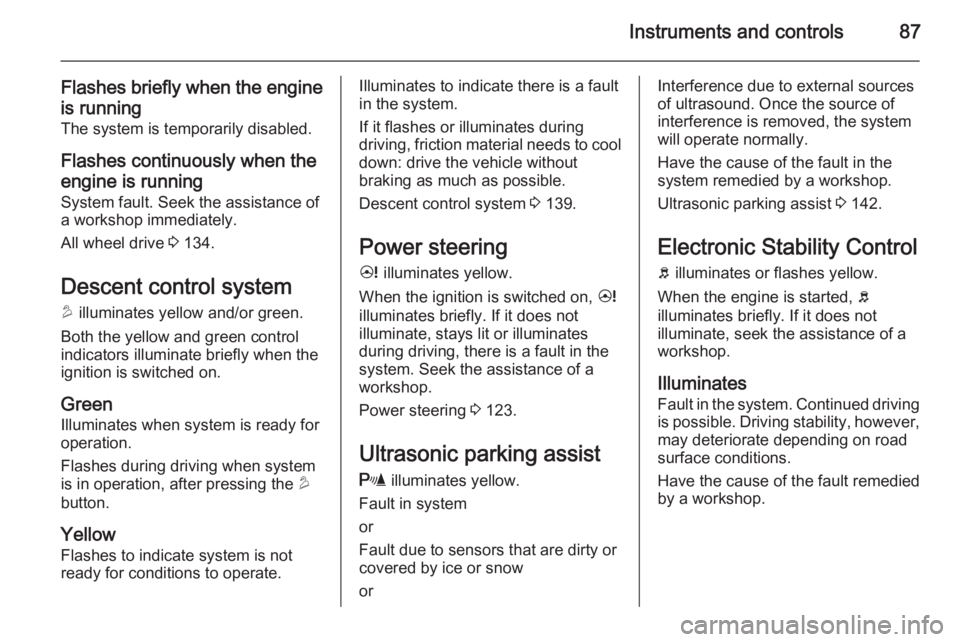
Descent control system
u illuminates yellow and/or green.
Both the yellow and green control
indicators illuminate briefly when the
ignition is switched on.
Green
Illuminates when system is ready for
operation.
Flashes during driving when system
is in operation, after pressing the u
button.
Yellow
Flashes to indicate system is not ready for conditions to operate.Illuminates to indicate there is a fault
in the system.
If it flashes or illuminates during
driving, friction material needs to cool down: drive the vehicle without
braking as much as possible.
Descent control system 3 139.
Power steering 2 illuminates yellow.
When the ignition is switched on, 2
illuminates briefly. If it does not
illuminate, stays lit or illuminates
during driving, there is a fault in the
system. Seek the assistance of a
workshop.
Power steering 3 123.
Ultrasonic parking assist
r illuminates yellow.
Fault in system
or
Fault due to sensors that are dirty or
covered by ice or snow
orInterference due to external sources of ultrasound. Once the source ofinterference is removed, the system
will operate normally.
Have the cause of the fault in the
system remedied by a workshop.
Ultrasonic parking assist 3 142.
Electronic Stability Control
b illuminates or flashes yellow.
When the engine is started, b
illuminates briefly. If it does not
illuminate, seek the assistance of a
workshop.
Illuminates Fault in the system. Continued driving
is possible. Driving stability, however,
may deteriorate depending on road
surface conditions.
Have the cause of the fault remedied
by a workshop.