lock OPEL ASTRA J 2017 Manual user
[x] Cancel search | Manufacturer: OPEL, Model Year: 2017, Model line: ASTRA J, Model: OPEL ASTRA J 2017Pages: 295, PDF Size: 8.23 MB
Page 63 of 295

Storage61StorageStorage compartments................61
Glovebox ................................... 61
Cupholders ................................ 61
Front storage ............................. 62
Underseat storage .....................63
Armrest storage .........................63
Centre console storage .............64
Load compartment .......................65
Rear storage .............................. 67
Load compartment cover ...........67
Rear floor storage cover ............68
Lashing eyes ............................. 69
Warning triangle ........................70
First aid kit ................................. 70
Roof rack system .........................71
Roof rack ................................... 71
Loading information .....................71Storage compartments9Warning
Do not store heavy or sharp
objects in the storage
compartments. Otherwise, the
storage compartment lid could
open and vehicle occupants could be injured by objects being thrown
around in the event of hard
braking, a sudden change in
direction or an accident.
Glovebox
The glovebox features a pen holder,
a credit card holder, a coin holder and
an adapter for the locking wheel nuts.
The glovebox should be closed whilst
driving.
Cupholders
Cupholders are located in the centre
console.
Page 67 of 295
Storage65Load compartment
The rear seat backrest is divided into
two parts. Both parts can be folded
down.
Load compartment extension ● Only 3-door hatchback: remove the load compartment cover ifnecessary.
● Press and hold the catch to push
the head restraints down 3 39.
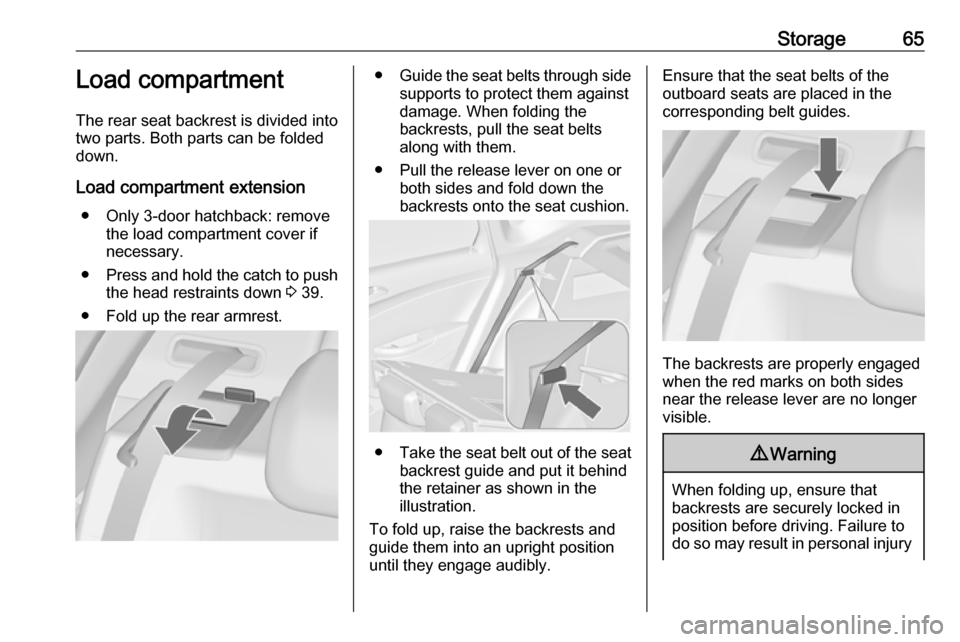
● Fold up the rear armrest.● Guide the seat belts through side
supports to protect them against
damage. When folding the
backrests, pull the seat belts along with them.
● Pull the release lever on one or both sides and fold down the
backrests onto the seat cushion.
● Take the seat belt out of the seat
backrest guide and put it behind
the retainer as shown in the
illustration.
To fold up, raise the backrests and
guide them into an upright position until they engage audibly.
Ensure that the seat belts of the
outboard seats are placed in the corresponding belt guides.
The backrests are properly engaged
when the red marks on both sides near the release lever are no longer
visible.
9 Warning
When folding up, ensure that
backrests are securely locked in
position before driving. Failure to
do so may result in personal injury
Page 68 of 295

66Storageor damage to the load or vehicle inthe event of hard braking or a
collision.
The seat belt of the centre seat could
be blocked when the backrest is
folded up too quickly. To unlock the
retractor, push in the seat belt or pull it out by approx. 20 mm then release.
Open the pass-through in the rear centre backrest
● Fold down the rear armrest.
● Pull the grip and open the cover.
Suitable for loading long, narrow
objects.
Ensure that the cover engages after
folding up.The closed cover can be secured from the side of the load
compartment. Turn the knob 90°:
knob horizontal:cover secured
from the side of
the passenger
compartmentknob vertical:cover not secured
Page 75 of 295

Instruments and controls73Instruments and
controlsControls ....................................... 74
Steering wheel adjustment ........74
Steering wheel controls .............74
Heated steering wheel ...............74
Horn ........................................... 75
Windscreen wiper/washer .........75
Rear window wiper/washer .......77
Outside temperature ..................77
Clock ......................................... 78
Power outlets ............................. 79
Cigarette lighter ......................... 80
Ashtrays .................................... 80
Warning lights, gauges and indi‐ cators ........................................... 81
Instrument cluster ......................81
Speedometer ............................. 81
Odometer .................................. 81
Trip odometer ............................ 81
Tachometer ............................... 81
Fuel gauge ................................ 82
Fuel selector .............................. 82
Engine coolant temperature gauge ....................................... 82
Service display .......................... 83Control indicators ......................84
Turn signal ................................. 87
Seat belt reminder .....................87
Airbag and belt tensioners .........87
Airbag deactivation ....................87
Charging system .......................88
Malfunction indicator light ..........88
Service vehicle soon .................88
Brake and clutch system ...........88
Operate pedal ............................ 88
Electric parking brake ................88
Electric parking brake fault ........89
Antilock brake system (ABS) .....89
Upshift ....................................... 89
Power steering .......................... 89
Lane departure warning ............89
Ultrasonic parking assist ...........90
Electronic Stability Control off ...90
Electronic Stability Control and Traction Control system ...........90
Traction Control system off .......90
Preheating ................................. 90
Diesel particle filter ....................90
Tyre pressure monitoring system ...................................... 91
Engine oil pressure ....................91
Low fuel ..................................... 91
Immobiliser ................................ 92
Reduced engine power .............92
Exterior light .............................. 92High beam................................. 92
High beam assist .......................92
Adaptive forward lighting ...........92
Fog light ..................................... 92
Rear fog light ............................. 92
Low washer fluid ........................92
Cruise control ............................ 92
Adaptive cruise control ..............92
Vehicle detected ahead .............93
Door open .................................. 93
Information displays .....................93
Driver Information Centre ..........93
Graphic-Info-Display, Colour- Info-Display .............................. 97
Smartphone controller ...............99
Vehicle messages ........................99
Warning chimes .......................102
Battery voltage ........................ 102
Trip computer ............................. 103
Vehicle personalisation ..............105
Telematics service .....................110
OnStar ..................................... 110
ERA GLONASS .......................113
Page 76 of 295
74Instruments and controlsControlsSteering wheel adjustment
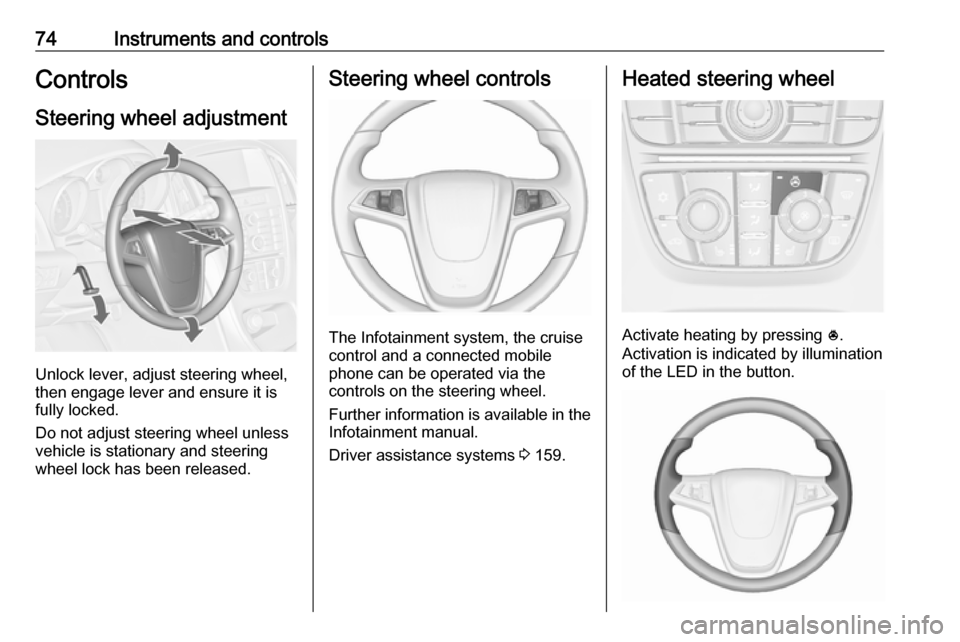
Unlock lever, adjust steering wheel,
then engage lever and ensure it is
fully locked.
Do not adjust steering wheel unless
vehicle is stationary and steering
wheel lock has been released.
Steering wheel controls
The Infotainment system, the cruise
control and a connected mobile
phone can be operated via the
controls on the steering wheel.
Further information is available in the
Infotainment manual.
Driver assistance systems 3 159.
Heated steering wheel
Activate heating by pressing *.
Activation is indicated by illumination
of the LED in the button.
Page 80 of 295
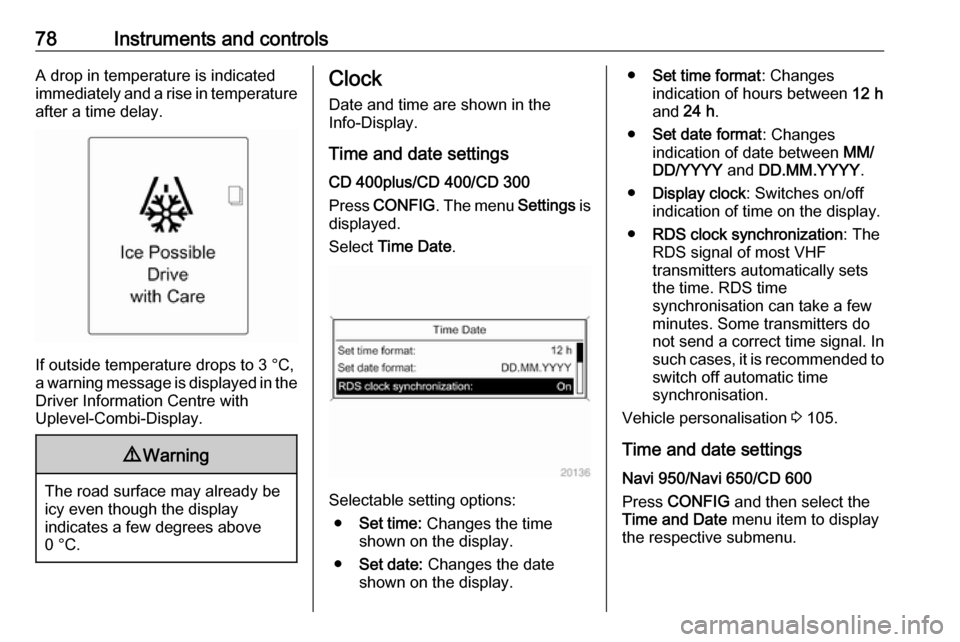
78Instruments and controlsA drop in temperature is indicated
immediately and a rise in temperature
after a time delay.
If outside temperature drops to 3 °C,
a warning message is displayed in the Driver Information Centre with
Uplevel-Combi-Display.
9 Warning
The road surface may already be
icy even though the display
indicates a few degrees above
0 °C.
Clock
Date and time are shown in the
Info-Display.
Time and date settings
CD 400plus/CD 400/CD 300
Press CONFIG . The menu Settings is
displayed.
Select Time Date .
Selectable setting options:
● Set time: Changes the time
shown on the display.
● Set date: Changes the date
shown on the display.
● Set time format : Changes
indication of hours between 12 h
and 24 h.
● Set date format : Changes
indication of date between MM/
DD/YYYY and DD.MM.YYYY .
● Display clock : Switches on/off
indication of time on the display.
● RDS clock synchronization : The
RDS signal of most VHF
transmitters automatically sets
the time. RDS time
synchronisation can take a few
minutes. Some transmitters do
not send a correct time signal. In
such cases, it is recommended to
switch off automatic time
synchronisation.
Vehicle personalisation 3 105.
Time and date settings
Navi 950/Navi 650/CD 600
Press CONFIG and then select the
Time and Date menu item to display
the respective submenu.
Page 88 of 295
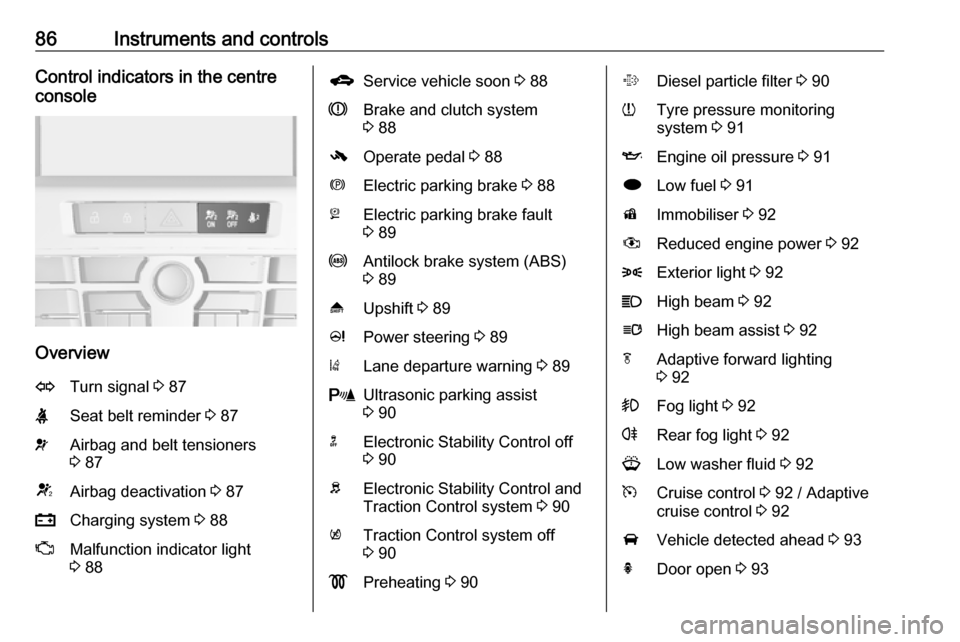
86Instruments and controlsControl indicators in the centre
console
Overview
OTurn signal 3 87XSeat belt reminder 3 87vAirbag and belt tensioners
3 87VAirbag deactivation 3 87pCharging system 3 88ZMalfunction indicator light
3 88gService vehicle soon 3 88RBrake and clutch system
3 88-Operate pedal 3 88mElectric parking brake 3 88jElectric parking brake fault
3 89uAntilock brake system (ABS)
3 89[Upshift 3 89cPower steering 3 89)Lane departure warning 3 89rUltrasonic parking assist
3 90nElectronic Stability Control off
3 90bElectronic Stability Control and
Traction Control system 3 90kTraction Control system off
3 90!Preheating 3 90%Diesel particle filter 3 90wTyre pressure monitoring
system 3 91IEngine oil pressure 3 91iLow fuel 3 91dImmobiliser 3 92#Reduced engine power 3 928Exterior light 3 92CHigh beam 3 92lHigh beam assist 3 92fAdaptive forward lighting
3 92>Fog light 3 92rRear fog light 3 92GLow washer fluid 3 92mCruise control 3 92 / Adaptive
cruise control 3 92AVehicle detected ahead 3 93hDoor open 3 93
Page 91 of 295

Instruments and controls89Illuminates
Electric parking brake is applied
3 152.
Flashes
Electric parking brake is not fully applied or released. Switch on
ignition, depress brake pedal and
attempt to reset the system by first
releasing and then applying the
electric parking brake. If m remains
flashing, do not drive and seek the
assistance of a workshop.
Electric parking brake fault j illuminates or flashes yellow.
Illuminates
Electric parking brake is operating
with reduced performance 3 152.
Flashes
Electric parking brake is in service mode. Stop vehicle, apply and
release the electric parking brake to
reset.9 Warning
Have the cause of the fault
remedied immediately by a
workshop.
Antilock brake system
(ABS)
u illuminates yellow.
Illuminates for a few seconds after the ignition is switched on. The system is
ready for operation when the control
indicator extinguishes.
If the control indicator does not go out after a few seconds, or if it illuminates while driving, there is a fault in the
ABS. The brake system remains
operational but without ABS
regulation.
Antilock brake system 3 151.
Upshift [ illuminates green as a control
indicator, or is shown as a symbol R
with the number of a higher gear in the
Driver Information Centre, when
upshifting is recommended for fuel
saving reasons.
On some versions, gearshift
indication is popped-up as full page in the Driver Information Centre.
EcoFlex drive assistant 3 103.
Power steering
c illuminates yellow.
Illuminates with power steering
reduced
Power steering is reduced due to
overheating of the system. Control
indicator extinguishes when the
system has cooled down.
Stop-start system 3 142.
Illuminates with power steering
disabled
Failure in the power steering system.
Consult a workshop.
Lane departure warning
) illuminates green or flashes yellow.
Page 93 of 295
Instruments and controls91Flashes
The maximum filling level of the filter
is reached. Start cleaning process
immediately to avoid damage to the
engine.
Diesel particle filter 3 145, Stop-start
system 3 142.
Tyre pressure monitoring system
w illuminates or flashes yellow.
Illuminates
Tyre pressure loss. Stop immediately
and check tyre pressure.
Flashes
Fault in system or tyre without pressure sensor mounted ( e.g. spare
wheel). After 60-90 seconds the
control indicator illuminates
continuously. Consult a workshop.
Engine oil pressure
I illuminates red.Illuminates when the ignition is
switched on and extinguishes shortly
after the engine starts.
Illuminates when the engine is
runningCaution
Engine lubrication may be
interrupted. This may result in
damage to the engine and/or
locking of the drive wheels.
1. Depress clutch.
2. Select neutral gear, set selector lever to N.
3. Move out of the flow of traffic as quickly as possible without
impeding other vehicles.
4. Switch off ignition.
9 Warning
When the engine is off,
considerably more force is needed
to brake and steer. During an
Autostop the brake servo unit will still be operational.
Do not remove key until vehicle is stationary, otherwise the steeringwheel lock could engage
unexpectedly.
Check oil level before seeking the
assistance of a workshop 3 203.
Low fuel
i illuminates or flashes yellow.
Illuminates
Level in fuel tank is too low.
Flashes
Fuel used up. Refuel immediately.
Never run the tank dry.
Catalytic converter 3 146.
Bleeding the diesel fuel system
3 208.
Page 102 of 295

100Instruments and controlsVehicle messages on the
Midlevel-Display
The vehicle messages are displayed
as code numbers.
No.Vehicle message2No radio remote control
detected, depress clutch pedal
to restart4Air conditioning off5Steering wheel is locked6Depress brake pedal to release
electric parking brakeNo.Vehicle message7Turn steering wheel, switch ignition off then on9Turn steering wheel, restart
engine12Vehicle overloaded13Compressor overheated15Centre high-mounted brake
light failure16Brake light failure17Headlight levelling malfunction18Left low beam failure19Rear fog light failure20Right low beam failure21Left sidelight failure22Right sidelight failure23Reversing light failure24Number plate light failure25Left front turn signal failureNo.Vehicle message26Left rear turn signal failure27Right front turn signal failure28Right rear turn signal failure29Check trailer brake light30Check trailer reversing light31Check left trailer turn signal32Check right trailer turn signal33Check trailer rear fog light34Check trailer rear light35Replace battery in radio remote
control48Clean side blind spot alert
system49Lane departure warning
unavailable53Tighten fuel filler cap54Water in diesel fuel filter55Diesel particle filter is full
3 145