change wheel OPEL ASTRA J 2019 Manual user
[x] Cancel search | Manufacturer: OPEL, Model Year: 2019, Model line: ASTRA J, Model: OPEL ASTRA J 2019Pages: 205, PDF Size: 6.25 MB
Page 171 of 205
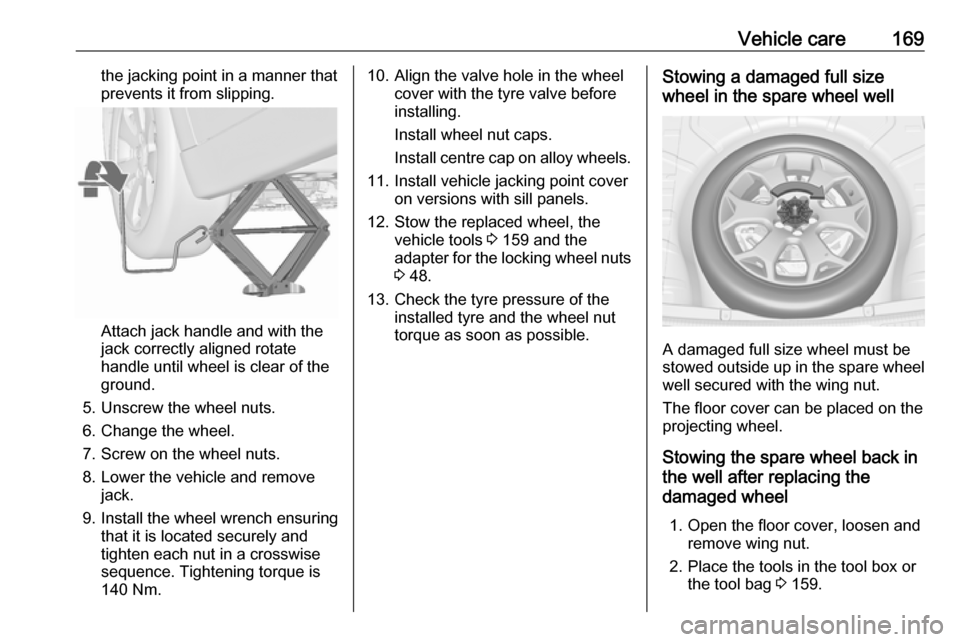
Vehicle care169the jacking point in a manner thatprevents it from slipping.
Attach jack handle and with the
jack correctly aligned rotate handle until wheel is clear of theground.
5. Unscrew the wheel nuts.
6. Change the wheel.
7. Screw on the wheel nuts.
8. Lower the vehicle and remove jack.
9. Install the wheel wrench ensuring that it is located securely and
tighten each nut in a crosswise
sequence. Tightening torque is
140 Nm.
10. Align the valve hole in the wheel cover with the tyre valve before
installing.
Install wheel nut caps.
Install centre cap on alloy wheels.
11. Install vehicle jacking point cover on versions with sill panels.
12. Stow the replaced wheel, the vehicle tools 3 159 and the
adapter for the locking wheel nuts 3 48.
13. Check the tyre pressure of the installed tyre and the wheel nut
torque as soon as possible.Stowing a damaged full size
wheel in the spare wheel well
A damaged full size wheel must be
stowed outside up in the spare wheel
well secured with the wing nut.
The floor cover can be placed on the
projecting wheel.
Stowing the spare wheel back in
the well after replacing the
damaged wheel
1. Open the floor cover, loosen and remove wing nut.
2. Place the tools in the tool box or the tool bag 3 159.
Page 197 of 205

Customer information195Comfort and infotainment
functions
Comfort settings and custom settings
can be stored in the vehicle and
changed or reset at any time.
Depending on the equipment level in
question, these include
● seat and steering wheel position settings
● chassis and air conditioning settings
● custom settings such as interior lighting
You can input your own data in the
infotainment functions for your
vehicle as part of the selected
features.
Depending on the equipment level in
question, these include
● multimedia data such as music, videos or photos for playback in
an integrated multimedia system
● address book data for use with an
integrated hands-free system or an integrated navigation system● input destinations
● data on the use of online services
This data for comfort and
infotainment functions can be stored
locally in the vehicle or be kept on a
device that you have connected to the
vehicle ( e.g. a smartphone, USB stick
or MP3 player). Data that you have input yourself can be deleted at any
time.
This data can only be transmitted out
of the vehicle at your request,
particularly when using online
services in accordance with the
settings selected by you.
Smartphone integration, e.g.
Android Auto or Apple CarPlay
If your vehicle is equipped
accordingly, you can connect your
smartphone or another mobile device
to the vehicle so that you can control
it via the controls integrated in the
vehicle. The smartphone image and
sound can be output via the
multimedia system in this case. At the same time, specific information is
transmitted to your smartphone.
Depending on the type of integration,this includes data such as position
data, day / night mode and other
general vehicle information. For more
information, please see the operating
instructions for the vehicle /
infotainment system.
Integration allows selected
smartphone apps to be used, such as navigation or music playback. No
further integration is possible
between smartphone and vehicle, in
particular active access to vehicle
data. The nature of further data
processing is determined by the
provider of the app used. Whether
you can define settings, and if so
which ones, is dependent on the app
in question and your smartphone's
operating system.