Eco OPEL ASTRA J 2019 Manual user
[x] Cancel search | Manufacturer: OPEL, Model Year: 2019, Model line: ASTRA J, Model: OPEL ASTRA J 2019Pages: 205, PDF Size: 6.25 MB
Page 67 of 205

Instruments and controls65The remaining engine oil life duration
is displayed in percent in the Driver
Information Centre.
Reset
Press SET/CLR on turn signal lever
for several seconds to reset. The
remaining engine oil life duration
page must be active. Switch on
ignition, but not the engine.
The system must be reset every time
the engine oil is changed, to ensure
proper functionality. Seek the
assistance of a workshop.
Next serviceA message appears in the Driver
Information Centre, when
maintenance of the vehicle is
required. Have maintenance work
carried out by a workshop within one week or 500 km, whichever occursfirst.
Service information 3 177.Control indicators
The control indicators described are
not present in all vehicles. The
description applies to all instrument
versions. Depending on the
equipment, the position of the control
indicators may vary. When the
ignition is switched on, most control
indicators will illuminate briefly as a functionality test.
The control indicator colours mean:red:danger, important reminderyellow:warning, information, faultgreen:confirmation of activationblue:confirmation of activationwhite:confirmation of activation
Page 70 of 205
68Instruments and controlsFlashes
A turn signal or the hazard warning flashers are activated.
Rapid flashing: failure of a turn signal
light or associated fuse.
Bulb replacement 3 145, Fuses
3 154.
Turn signals 3 100.
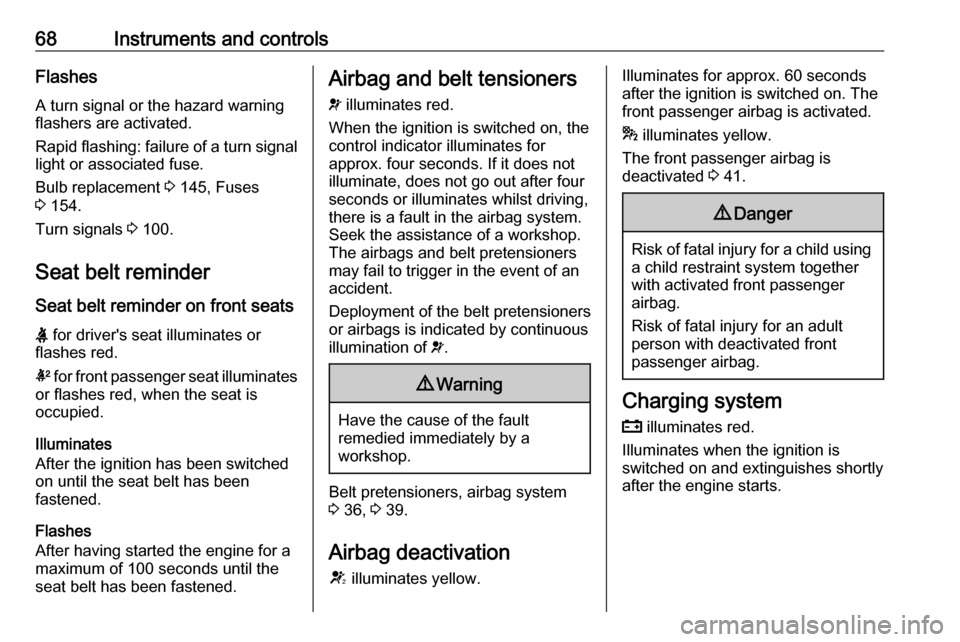
Seat belt reminder
Seat belt reminder on front seats
X for driver's seat illuminates or
flashes red.
k for front passenger seat illuminates
or flashes red, when the seat is
occupied.
Illuminates
After the ignition has been switched
on until the seat belt has been
fastened.
Flashes
After having started the engine for a
maximum of 100 seconds until the
seat belt has been fastened.Airbag and belt tensioners
v illuminates red.
When the ignition is switched on, the control indicator illuminates for
approx. four seconds. If it does not
illuminate, does not go out after four
seconds or illuminates whilst driving,
there is a fault in the airbag system.
Seek the assistance of a workshop.
The airbags and belt pretensioners
may fail to trigger in the event of an
accident.
Deployment of the belt pretensioners
or airbags is indicated by continuous
illumination of v.9 Warning
Have the cause of the fault
remedied immediately by a
workshop.
Belt pretensioners, airbag system
3 36, 3 39.
Airbag deactivation
V illuminates yellow.
Illuminates for approx. 60 seconds
after the ignition is switched on. The
front passenger airbag is activated.
* illuminates yellow.
The front passenger airbag is
deactivated 3 41.9 Danger
Risk of fatal injury for a child using
a child restraint system together
with activated front passenger
airbag.
Risk of fatal injury for an adult
person with deactivated front
passenger airbag.
Charging system
p illuminates red.
Illuminates when the ignition is
switched on and extinguishes shortly
after the engine starts.
Page 72 of 205

70Instruments and controlsFlashes
Electric parking brake is not fully applied or released. Switch on
ignition, depress brake pedal and
attempt to reset the system by first
releasing and then applying the
electric parking brake. If m remains
flashing, do not drive and seek the
assistance of a workshop.
Electric parking brake fault j illuminates or flashes yellow.
Illuminates Electric parking brake is operating
with reduced performance 3 126.
Flashes
Electric parking brake is in service mode. Stop vehicle, apply and
release the electric parking brake to
reset.9 Warning
Have the cause of the fault
remedied immediately by a
workshop.
Antilock brake system
(ABS)
u illuminates yellow.
Illuminates for a few seconds after the ignition is switched on. The system is
ready for operation when the control
indicator extinguishes.
If the control indicator does not go out after a few seconds, or if it illuminates while driving, there is a fault in the
ABS. The brake system remains
operational but without ABS
regulation.
Antilock brake system 3 125.
Upshift [ illuminates green as a control
indicator, or is shown as a symbol R
with the number of a higher gear in the
Driver Information Centre, when
upshifting is recommended for fuel
saving reasons.
On some versions, gearshift
indication is popped-up as full page in the Driver Information Centre.
Driver Information Centre 3 73.
Power steering
c illuminates yellow.
Illuminates with power steering
reduced
Power steering is reduced due to
overheating of the system. Control
indicator extinguishes when the
system has cooled down.
Illuminates with power steering
disabled
Failure in the power steering system.
Consult a workshop.
Parking assist r illuminates yellow.
Fault in system
Page 74 of 205
72Instruments and controlsFlashes
Fault in system or tyre without pressure sensor mounted ( e.g. spare
wheel). After 60-90 seconds the
control indicator illuminates
continuously. Consult a workshop.
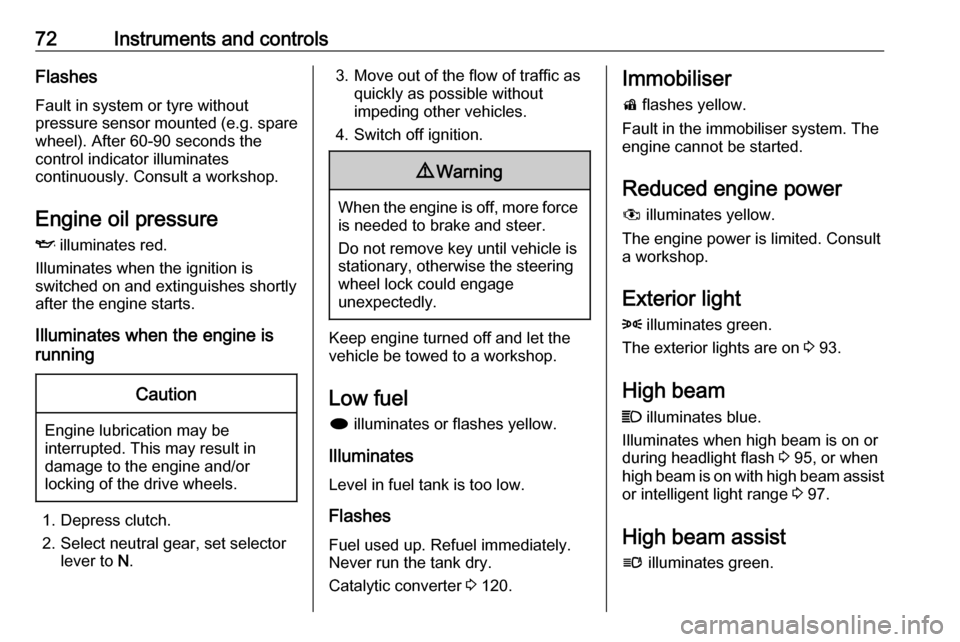
Engine oil pressure
I illuminates red.
Illuminates when the ignition is
switched on and extinguishes shortly
after the engine starts.
Illuminates when the engine is
runningCaution
Engine lubrication may be
interrupted. This may result in
damage to the engine and/or
locking of the drive wheels.
1. Depress clutch.
2. Select neutral gear, set selector lever to N.
3. Move out of the flow of traffic as
quickly as possible without
impeding other vehicles.
4. Switch off ignition.9 Warning
When the engine is off, more force
is needed to brake and steer.
Do not remove key until vehicle is
stationary, otherwise the steering wheel lock could engage
unexpectedly.
Keep engine turned off and let the
vehicle be towed to a workshop.
Low fuel i illuminates or flashes yellow.
Illuminates
Level in fuel tank is too low.
Flashes
Fuel used up. Refuel immediately.
Never run the tank dry.
Catalytic converter 3 120.
Immobiliser
d flashes yellow.
Fault in the immobiliser system. The
engine cannot be started.
Reduced engine power
# illuminates yellow.
The engine power is limited. Consult
a workshop.
Exterior light8 illuminates green.
The exterior lights are on 3 93.
High beam
C illuminates blue.
Illuminates when high beam is on or during headlight flash 3 95, or when
high beam is on with high beam assist
or intelligent light range 3 97.
High beam assist
l illuminates green.
Page 75 of 205
Instruments and controls73The high beam assist or intelligent
light range is activated 3 95,
3 97.
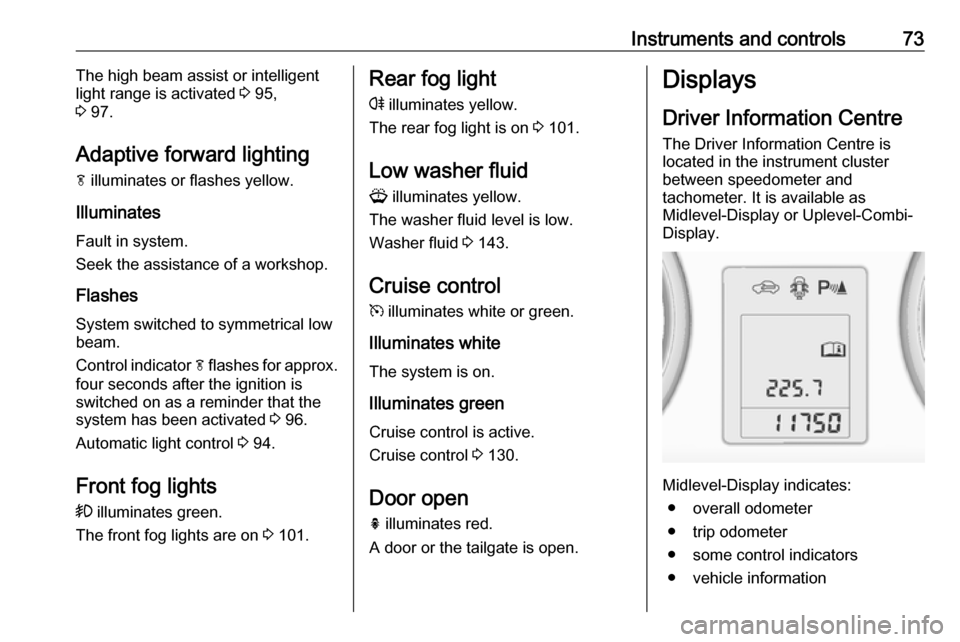
Adaptive forward lighting
f illuminates or flashes yellow.
Illuminates
Fault in system.
Seek the assistance of a workshop.
Flashes
System switched to symmetrical low
beam.
Control indicator f flashes for approx.
four seconds after the ignition is
switched on as a reminder that the
system has been activated 3 96.
Automatic light control 3 94.
Front fog lights
> illuminates green.
The front fog lights are on 3 101.Rear fog light
r illuminates yellow.
The rear fog light is on 3 101.
Low washer fluid G illuminates yellow.
The washer fluid level is low.
Washer fluid 3 143.
Cruise control m illuminates white or green.
Illuminates white The system is on.
Illuminates green
Cruise control is active.
Cruise control 3 130.
Door open
h illuminates red.
A door or the tailgate is open.Displays
Driver Information Centre
The Driver Information Centre is
located in the instrument cluster
between speedometer and
tachometer. It is available as
Midlevel-Display or Uplevel-Combi-
Display.
Midlevel-Display indicates:
● overall odometer
● trip odometer
● some control indicators
● vehicle information
Page 76 of 205
74Instruments and controls● trip/fuel information
● vehicle messages, displayed as code numbers 3 79.
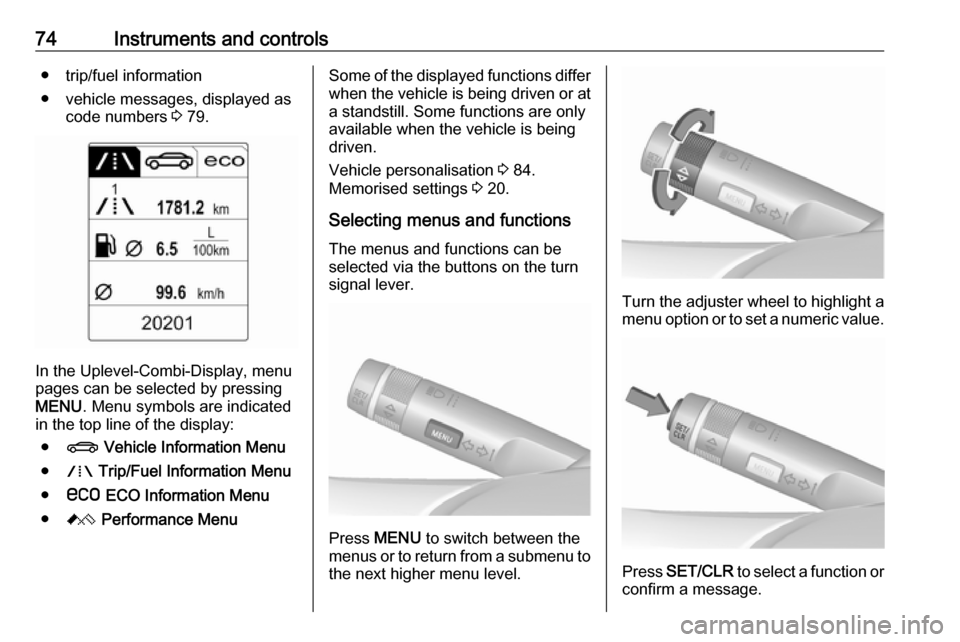
In the Uplevel-Combi-Display, menu
pages can be selected by pressing
MENU . Menu symbols are indicated
in the top line of the display:
● X Vehicle Information Menu
● W Trip/Fuel Information Menu
● s ECO Information Menu
● C Performance Menu
Some of the displayed functions differ
when the vehicle is being driven or at a standstill. Some functions are only
available when the vehicle is being
driven.
Vehicle personalisation 3 84.
Memorised settings 3 20.
Selecting menus and functions The menus and functions can be
selected via the buttons on the turn
signal lever.
Press MENU to switch between the
menus or to return from a submenu to the next higher menu level.
Turn the adjuster wheel to highlight a
menu option or to set a numeric value.
Press SET/CLR to select a function or
confirm a message.
Page 78 of 205
76Instruments and controls
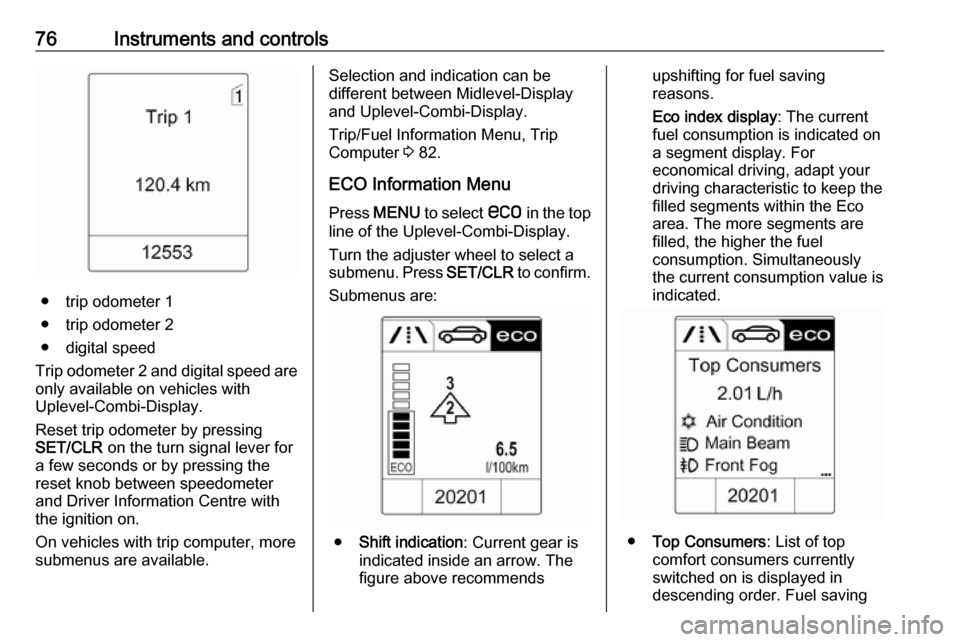
● trip odometer 1
● trip odometer 2
● digital speed
Trip odometer 2 and digital speed are
only available on vehicles with
Uplevel-Combi-Display.
Reset trip odometer by pressing
SET/CLR on the turn signal lever for
a few seconds or by pressing the
reset knob between speedometer
and Driver Information Centre with
the ignition on.
On vehicles with trip computer, more
submenus are available.
Selection and indication can be
different between Midlevel-Display
and Uplevel-Combi-Display.
Trip/Fuel Information Menu, Trip
Computer 3 82.
ECO Information Menu Press MENU to select s in the top
line of the Uplevel-Combi-Display.
Turn the adjuster wheel to select a
submenu. Press SET/CLR to confirm.
Submenus are:
● Shift indication : Current gear is
indicated inside an arrow. The
figure above recommends
upshifting for fuel saving
reasons.
Eco index display : The current
fuel consumption is indicated on a segment display. For
economical driving, adapt your driving characteristic to keep the
filled segments within the Eco
area. The more segments are
filled, the higher the fuel
consumption. Simultaneously
the current consumption value is
indicated.
● Top Consumers : List of top
comfort consumers currently
switched on is displayed in
descending order. Fuel saving
Page 79 of 205
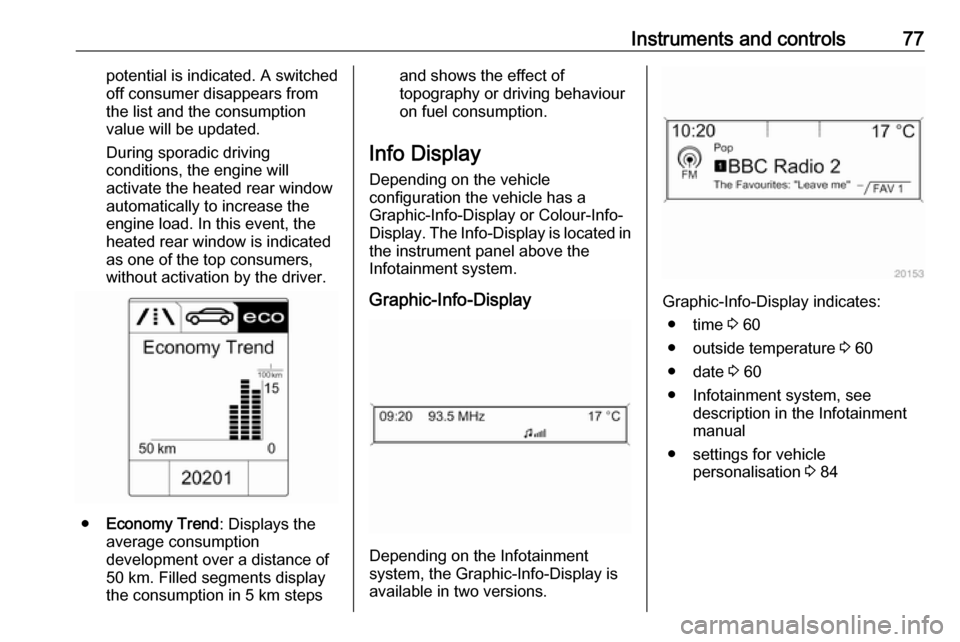
Instruments and controls77potential is indicated. A switched
off consumer disappears from
the list and the consumption
value will be updated.
During sporadic driving
conditions, the engine will
activate the heated rear window
automatically to increase the
engine load. In this event, the
heated rear window is indicated
as one of the top consumers,
without activation by the driver.
● Economy Trend : Displays the
average consumption
development over a distance of
50 km. Filled segments display
the consumption in 5 km steps
and shows the effect of
topography or driving behaviour
on fuel consumption.
Info Display Depending on the vehicle
configuration the vehicle has a
Graphic-Info-Display or Colour-Info-
Display. The Info-Display is located in
the instrument panel above the
Infotainment system.
Graphic-Info-Display
Depending on the Infotainment
system, the Graphic-Info-Display is
available in two versions.
Graphic-Info-Display indicates:
● time 3 60
● outside temperature 3 60
● date 3 60
● Infotainment system, see description in the Infotainment
manual
● settings for vehicle personalisation 3 84
Page 81 of 205
Instruments and controls79Press (the outer ring)● to select or activate the highlighted option
● to confirm a set value
● to switch a system function on/off
BACK
Press BACK to:
● exit a menu without changing settings
● return from a submenu to a higher menu level
● delete the last character in a character sequence
Press and hold the BACK for a few
seconds to delete the entire entry.
Vehicle personalisation 3 84.
Memorised settings 3 20.Vehicle messages
Messages are indicated mainly in the
Driver Information Centre, in some
cases together with a warning chime.
Press SET/CLR , MENU or turn the
adjuster wheel to confirm a message.
Vehicle messages on the
Midlevel-Display
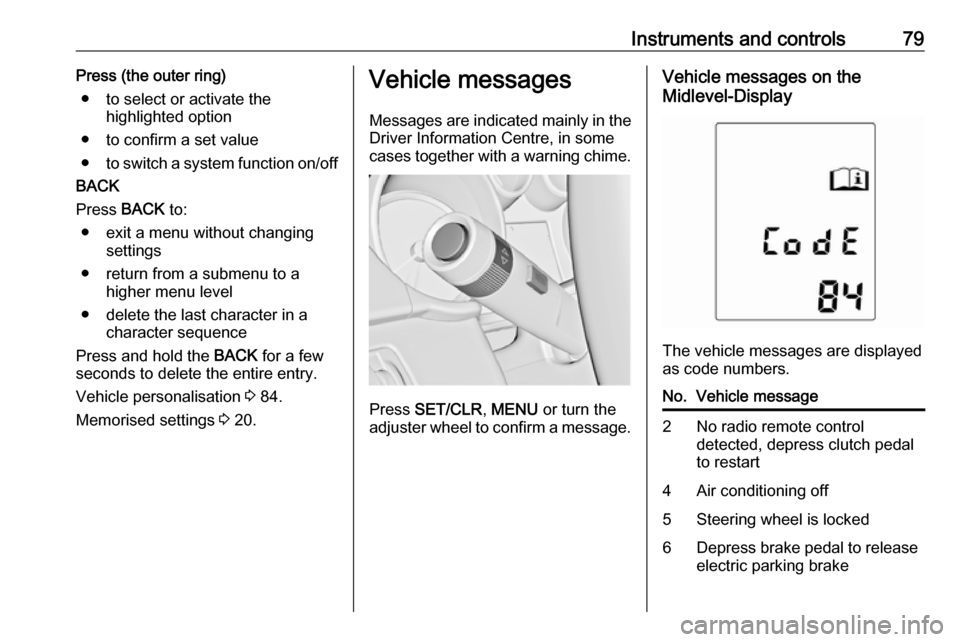
The vehicle messages are displayed
as code numbers.
No.Vehicle message2No radio remote control
detected, depress clutch pedal
to restart4Air conditioning off5Steering wheel is locked6Depress brake pedal to release
electric parking brake
Page 83 of 205

Instruments and controls81No.Vehicle message134Park assist fault, clean bumper136Service parking assist145Check washer fluid level174Low vehicle battery258Parking assist off
Vehicle messages on the
Uplevel-Combi-Display
The vehicle messages are displayed
as text. Follow the instructions given
in the messages.
Vehicle messages on the Colour-
Info-Display
Some important messages appear
additionally in the Colour-Info-
Display. Press the multifunction knob to confirm a message. Some
messages only pop-up for a few
seconds.
Warning chimes If several warnings appear at the
same time, only one warning chime will sound.
When starting the engine or whilst driving
The warning chime regarding
unfastened seat belts has priority
over any other warning chime.
● If seat belt is not fastened.
● If a door or the tailgate is not fully
closed when starting off.
● If a certain speed is exceeded with parking brake applied.
● If a programmed speed is exceeded.● If a warning message or awarning code appears in the
Driver Information Centre.
● If the parking assist detects an object.
● If an unintended lane change occurs.
● If the exhaust filter has reached the maximum filling level.
When the vehicle is parked and/or
the driver's door is opened
● With exterior lights on.
Battery voltage When the vehicle battery voltage is
running low, a warning message or
warning code 174 will appear in the
Driver Information Centre.
1. Switch off immediately any electric consumers which are not
required for a safe ride, e.g. seat
heating, heated rear window or
other main consumers.
2. Charge the vehicle battery by driving continuously for a while or
by using a charging device.