Eco OPEL ASTRA J 2019 Manual user
[x] Cancel search | Manufacturer: OPEL, Model Year: 2019, Model line: ASTRA J, Model: OPEL ASTRA J 2019Pages: 205, PDF Size: 6.25 MB
Page 85 of 205
Instruments and controls83
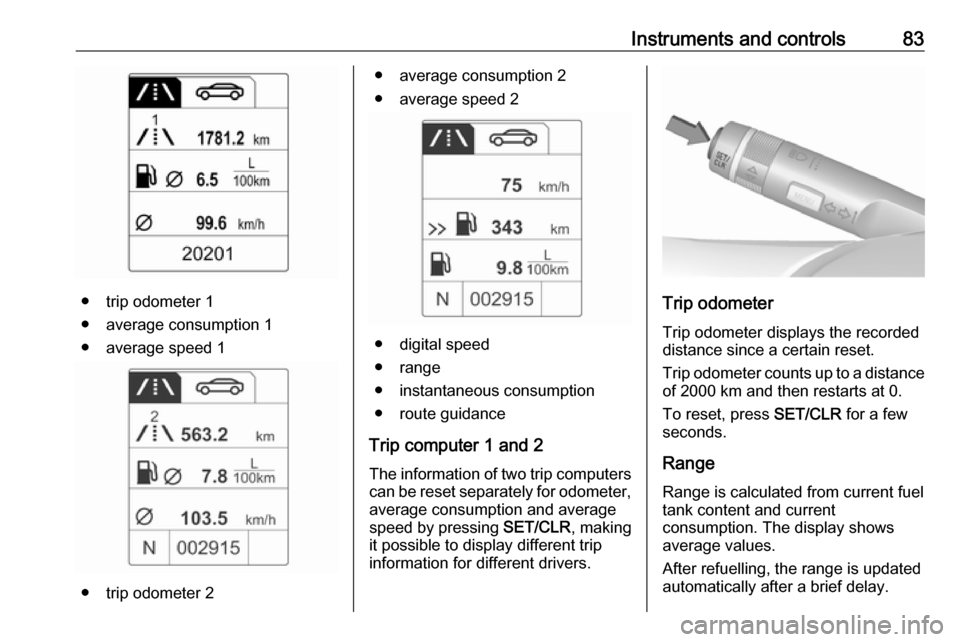
● trip odometer 1
● average consumption 1
● average speed 1
● trip odometer 2
● average consumption 2
● average speed 2
● digital speed
● range
● instantaneous consumption
● route guidance
Trip computer 1 and 2 The information of two trip computerscan be reset separately for odometer,
average consumption and average
speed by pressing SET/CLR, making
it possible to display different trip
information for different drivers.
Trip odometer
Trip odometer displays the recorded
distance since a certain reset.
Trip odometer counts up to a distance
of 2000 km and then restarts at 0.
To reset, press SET/CLR for a few
seconds.
Range Range is calculated from current fuel
tank content and current
consumption. The display shows
average values.
After refuelling, the range is updated
automatically after a brief delay.
Page 86 of 205

84Instruments and controlsWhen the fuel level in the tank is low,
a message appears on vehicles with
Uplevel-Combi-Display.
When the tank needs to be refuelled
immediately, a warning code or
warning message is displayed on
vehicles with Midlevel-Display or
Uplevel-Combi-Display.
Additionally, control indicator i
illuminates or flashes in the fuel
gauge 3 72.
Average consumption
Display of average consumption. The measurement can be reset at any
time and starts with a default value.
To reset, press SET/CLR for a few
seconds.
Instantaneous consumption Display of the instantaneous
consumption.
Average speed Display of average speed. The
measurement can be reset at any
time.To reset, press SET/CLR for a few
seconds.
Digital speed Digital display of the instantaneous
speed.
Route guidance In addition to the navigation
information in the Colour-Info-
Display, route guidance is displayed
in the Driver Information Centre.Vehicle personalisation
The vehicle's behaviour can be
personalised by changing the settings
in the Info-Display.
Some of the personal settings for
different drivers can be memorised individually for each vehicle key.
Memorised settings 3 20.
Depending on vehicle equipment and country-specific regulations some ofthe functions described below may
not be available.
Some functions are only displayed or
active when the engine is running.
Personal settings in the
Graphic-Info-Display
CD 400plus/CD 400/CD 300
Page 87 of 205
Instruments and controls85
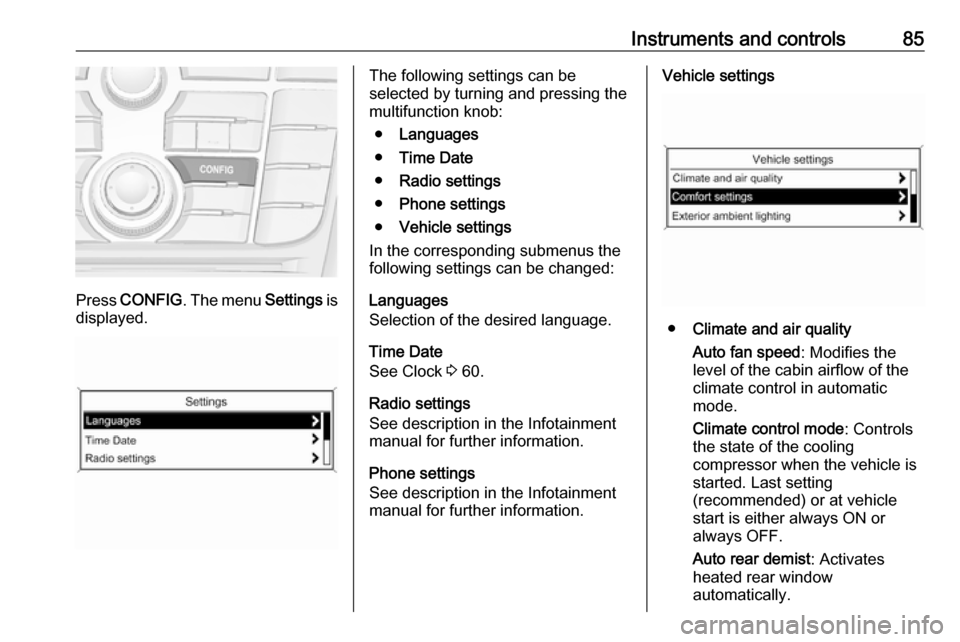
Press CONFIG . The menu Settings is
displayed.
The following settings can be
selected by turning and pressing the
multifunction knob:
● Languages
● Time Date
● Radio settings
● Phone settings
● Vehicle settings
In the corresponding submenus the
following settings can be changed:
Languages
Selection of the desired language.
Time Date
See Clock 3 60.
Radio settings
See description in the Infotainment
manual for further information.
Phone settings
See description in the Infotainment
manual for further information.Vehicle settings
● Climate and air quality
Auto fan speed : Modifies the
level of the cabin airflow of the
climate control in automatic
mode.
Climate control mode : Controls
the state of the cooling
compressor when the vehicle is
started. Last setting
(recommended) or at vehicle
start is either always ON or
always OFF.
Auto rear demist : Activates
heated rear window
automatically.
Page 93 of 205

Instruments and controls91Stolen vehicle assistance
If the vehicle is stolen, report the theft
to the authorities and request OnStar
stolen vehicle assistance. Use any
phone to call an advisor. Find the
respective OnStar phone number on
our country-specific website.
OnStar can provide support in
locating and recovering the vehicle.Restart prevention
By sending remote signals, OnStar
can prevent the vehicle from
restarting once it has been turned off.
On-demand diagnostics
At any time e.g. if the vehicle displays a vehicle message, press Z to
contact an advisor and ask to
complete a real-time diagnostic check
to directly determine the issue.
Depending on the results, the advisor
will provide further support.
Diagnostic report
The vehicle automatically transmits
diagnostic data to OnStar which
sends a monthly email report to you
and your preferred workshop.
Note
The workshop notification function
can be disabled in your account.
The report contains the status of key
operating systems of the vehicle like
engine, transmission, airbags, ABS,
and other major systems. It also
provides information on possible
maintenance items and tyre pressure
(only with tyre pressure monitoring
system).
To look at the information in greater
detail, select the link within the email
and log in to your account.
Destination download
A desired destination can be directly
downloaded to the navigation system.
Press Z to call an advisor and
describe the destination or point of
interest.
The advisor can look up any address
or point of interest and directly send
the destination to the built-in
navigation system.OnStar settings
OnStar PIN
To have full access to all OnStar
services, a four-digit PIN is required.
The PIN has to be personalised when first talking to an advisor.
To change the PIN, press Z to call an
advisor.
Account data
An OnStar subscriber has an account
where all the data is stored. To
request a change of the account
information, press Z and talk to an
advisor or log in to your account.
If the OnStar service is used on
another vehicle, press Z and request
that the account be transferred to the
new vehicle.
Note
In any case, if the vehicle is disposed of, sold or otherwise transferred,
immediately inform OnStar about
the changes and terminate the
OnStar service on this vehicle.
Page 98 of 205
96LightingHeadlight range adjustment
Manual headlight range
adjustment
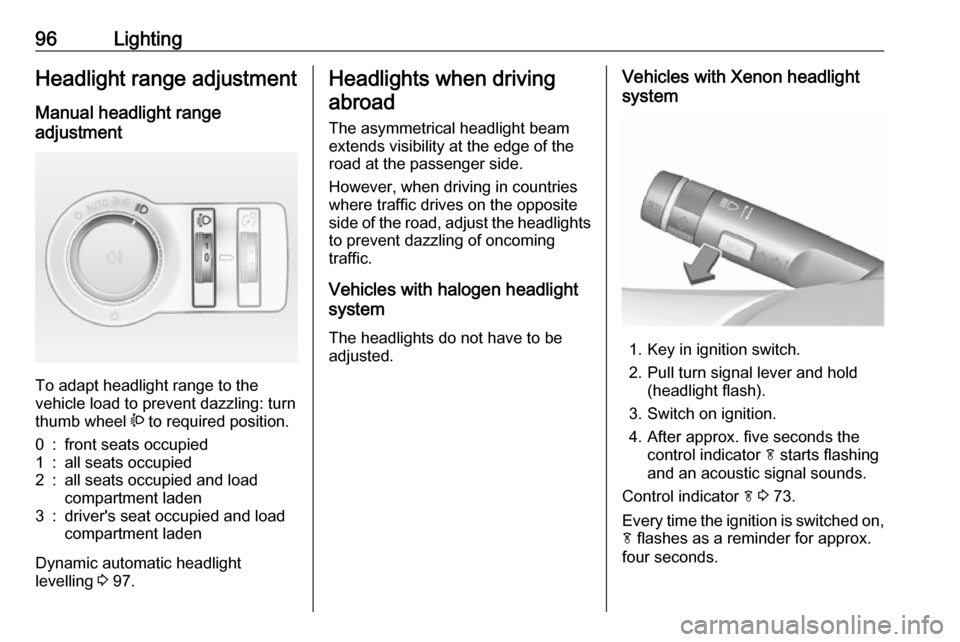
To adapt headlight range to the
vehicle load to prevent dazzling: turn
thumb wheel ? to required position.
0:front seats occupied1:all seats occupied2:all seats occupied and load
compartment laden3:driver's seat occupied and load
compartment laden
Dynamic automatic headlight
levelling 3 97.
Headlights when driving
abroad
The asymmetrical headlight beam
extends visibility at the edge of the
road at the passenger side.
However, when driving in countries
where traffic drives on the opposite
side of the road, adjust the headlights to prevent dazzling of oncoming
traffic.
Vehicles with halogen headlight
system
The headlights do not have to be adjusted.Vehicles with Xenon headlight
system
1. Key in ignition switch.
2. Pull turn signal lever and hold (headlight flash).
3. Switch on ignition.
4. After approx. five seconds the control indicator f starts flashing
and an acoustic signal sounds.
Control indicator f 3 73.
Every time the ignition is switched on,
f flashes as a reminder for approx.
four seconds.
Page 99 of 205

Lighting97For deactivation, operate the same
procedure as described above. f will
not flash when function is
deactivated.
Daytime running lights
Daytime running lights increase
visibility of the vehicle during daylight.
They are switched on automatically
when ignition is on.
If the vehicle is equipped with
automatic light control function, the
system switches between daytime running light and low/high beam
automatically depending on the
lighting conditions and information
given by the rain sensor system.
Automatic light control 3 94.
Adaptive forward lighting
The Adaptive forward lighting
functions are only available with Bi-
Xenon headlights. Light range, light
distribution and intensity of light are
variably triggered depending on the
light conditions, weather and road
type.With the light switch in position
AUTO all lighting functions are
available.
The following functions are available
also with light switch in position 9:
● dynamic curve lighting ● cornering light
● reversing function
● dynamic automatic headlight levelling
Playstreet lighting
Activated automatically at low speed
up to approx. 30 km/h. The light beam is turned at an angle of 8° to the
roadside.
Town lighting Activated automatically at a speed
range between approx. 40 and
55 km/h and when street lights are
detected by the light sensor. The light
range is reduced by an extended light
distribution.Country lighting
Activated automatically at a speed
range between approx. 55 and
115 km/h. The beam of light and the
brightness is different between the left and the right side.
Motorway lighting
Activated automatically at a speed
above approx. 115 km/h and minimal steering movements. It switches on
after a delay or directly when the vehicle is powerfully accelerated. The light beam is longer and brighter.
Adverse weather lighting
Activated automatically up to a speed of approx. 70 km/h, when the rain
sensor recognizes condensation or
the wiper operates continuously. The
range, distribution and light intensity
is regulated variably depending on visibility.
Page 100 of 205

98LightingDynamic curve lighting
The light beam pivots based on
steering wheel angle and speed,
improving lighting in curves.
Control indicator f 3 73.
Corner lighting
On tight bends or when turning off,
depending on the steering angle or
the turn signal light, an additional left
or right reflector is switched on which illuminates the road at a right angle to
the direction of travel. It is activated
up to a speed of 40 km/h.
Control indicator f 3 73.
Reversing function
If the headlights are on and reverse
gear is engaged, both corner lights
are switched on. They remain
illuminated for 20 seconds after
disengaging reverse gear or until
driving faster than 17 km/h in a
forward gear.
High Beam Assist
This feature allows high beam as
main driving light by night and when
vehicle speed is faster than 40 km/h.
It switches to low beam when: ● The camera in the windscreen detects the lights of oncoming or
preceding vehicles.
● The vehicle speed is slower than
20 km/h.
● It is foggy or snowy.
● Driving in urban areas.
If there are no restrictions detected, the system switches back to high
beam.Activation
The high beam assist is activated by
pushing the indicator lever twice with
a speed above 40 km/h.
The green control indicator l
illuminates continuously when the
assist is activated, the blue one 7
illuminates when high beam is on.
Control indicator l 3 72.
Deactivation
Push indicator lever once. It is also
deactivated when front fog lights are
switched on.
Page 101 of 205

Lighting99If a headlight flash is activated when
the high beam is on, the high beam assist will be deactivated.
If a headlight flash is activated when the high beam is off, the high beam
assist will stay activated.
High beam assist is always active
after the ignition is switched on.
Intelligent light ranging with
automatic high beam activation
Intelligent light ranging uses the
properties of Bi-Xenon headlights to
extend the light range of the low beam by up to 400 metres and additionally
activates automatic high beam
without dazzling or disturbing
oncoming or preceding traffic.
High beam is deactivated and the low
beam light range is reduced to avoid
dazzling when the following
restrictions are detected by the front
camera in the windscreen:
● A preceding vehicle is recognised.
● An oncoming vehicle is recognised.● Urban areas are entered.
● It is foggy or snowy.
If there are no restrictions detected, the system switches back to high
beam.
When the system is active, the front
camera monitors the area ahead of
the vehicle and ensures an optimum
light distribution for maximum driver
vision during almost all conditions.
Intelligent light ranging with automatic
high beam activation therefore
reduces the difference between
conventional low and high beam
without drastic changes in light-
range, distribution and intensity.A special topographical evaluation
function detects preceding vehicles
on hills or slopes by recognising the
rear light moving ahead. The system
adjusts the height of the light range to
ensure optimum illumination on the
road ahead without dazzling.
Activation
Intelligent light ranging and automatic
high beam activation are switched on together by pushing the indicator
lever twice. They can be switched on
with ignition on.
Page 107 of 205

Lighting105Exit lighting is switched off
immediately if the turn signal lever is pulled while the driver's door is open.
Activation, deactivation and duration
of this function can be changed in the
Settings menu in the Info-Display.
Vehicle personalisation 3 84.
The settings can be saved for the key being used 3 20.
Battery discharge protection Vehicle battery state of charge
function
The function guarantees longest
vehicle battery life via a generator with controllable power output and
optimised power distribution.
To prevent discharge of the vehicle
battery when driving, the following
systems are reduced automatically in
two stages and finally switched off:
● Heated rear window and mirrors
● Heated seats
● FanIn the second stage a message which confirms the activation of the vehicle
battery discharge protection will be
displayed in the Driver Information Centre.
Switching off electric lights
To prevent discharge of the vehicle
battery when the ignition is switched
off, some interior lights are switched
off automatically after some time.
Page 111 of 205
Climate control109●Switch on heated rear window Ü.
● Open side air vents as required and direct them towards the doorwindows.
Electronic climate control system
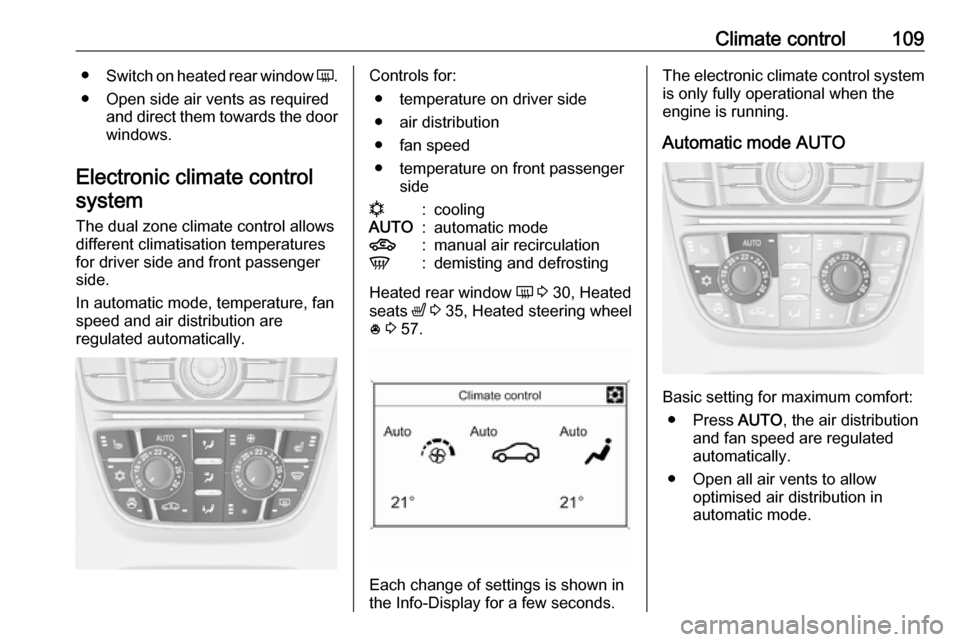
The dual zone climate control allows
different climatisation temperatures
for driver side and front passenger
side.
In automatic mode, temperature, fan
speed and air distribution are
regulated automatically.Controls for:
● temperature on driver side
● air distribution
● fan speed
● temperature on front passenger siden:coolingAUTO:automatic mode4:manual air recirculationV:demisting and defrosting
Heated rear window Ü 3 30, Heated
seats ß 3 35, Heated steering wheel
* 3 57.
Each change of settings is shown in
the Info-Display for a few seconds.
The electronic climate control system
is only fully operational when the
engine is running.
Automatic mode AUTO
Basic setting for maximum comfort: ● Press AUTO, the air distribution
and fan speed are regulated
automatically.
● Open all air vents to allow optimised air distribution in
automatic mode.