lock OPEL ASTRA J 2019 Manual user
[x] Cancel search | Manufacturer: OPEL, Model Year: 2019, Model line: ASTRA J, Model: OPEL ASTRA J 2019Pages: 205, PDF Size: 6.25 MB
Page 91 of 205
Instruments and controls89Depending on the equipment of the
vehicle, the following services are available:
● Emergency services and support
in the case of a vehicle
breakdown
● Wi-Fi hotspot
● Smartphone application
● Remote control, e.g. location of the vehicle, activation of horn and
lights, control of central locking system
● Stolen vehicle assistance
● Vehicle diagnostics
● Destination download
Note
The OnStar module of the vehicle is
deactivated after ten days without an
ignition cycle. Functions requiring a
data connection will be available
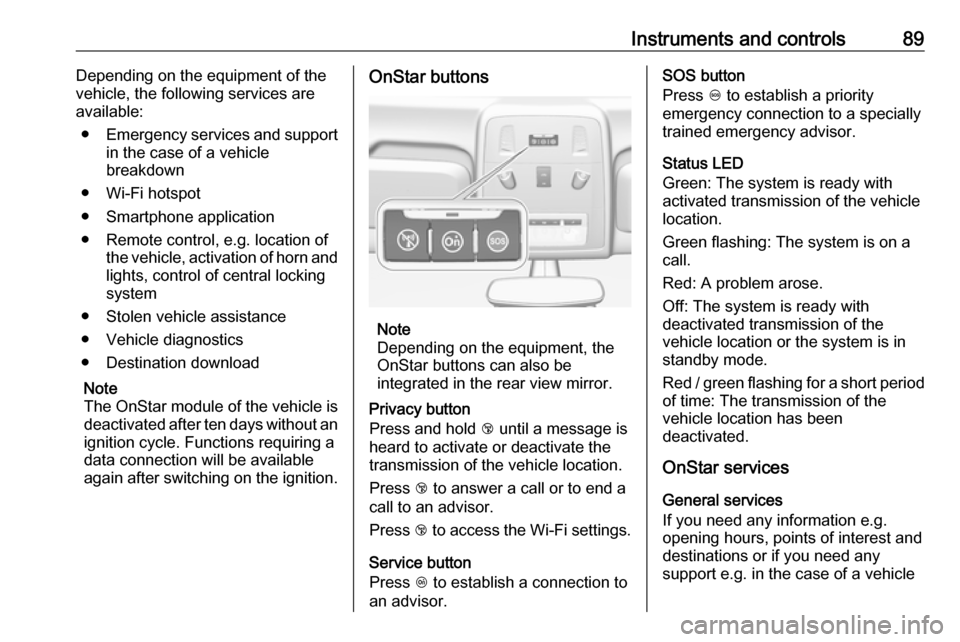
again after switching on the ignition.OnStar buttons
Note
Depending on the equipment, the
OnStar buttons can also be
integrated in the rear view mirror.
Privacy button
Press and hold j until a message is
heard to activate or deactivate the transmission of the vehicle location.
Press j to answer a call or to end a
call to an advisor.
Press j to access the Wi-Fi settings.
Service button
Press Z to establish a connection to
an advisor.
SOS button
Press [ to establish a priority
emergency connection to a specially
trained emergency advisor.
Status LED
Green: The system is ready with
activated transmission of the vehicle
location.
Green flashing: The system is on a
call.
Red: A problem arose.
Off: The system is ready with
deactivated transmission of the
vehicle location or the system is in standby mode.
Red / green flashing for a short period of time: The transmission of the
vehicle location has been
deactivated.
OnStar services
General services
If you need any information e.g.
opening hours, points of interest and
destinations or if you need any
support e.g. in the case of a vehicle
Page 92 of 205

90Instruments and controlsbreakdown, a flat tyre and empty fuel
tank, press Z to establish a
connection to an advisor.
Emergency services
In the case of an emergency situation,
press [ and talk to an advisor. The
advisor then contacts emergency or
assistance service providers and
directs them to your vehicle.
In the case of an accident with
activation of airbags or belt
tensioners, an automatic emergency
call is established. The advisor is
immediately connected to your
vehicle to see whether help is
needed.
Wi-Fi hotspot
The Wi-Fi hotspot of the vehicle
provides internet connectivity with a
maximum speed of 4G/LTE.
Note
The Wi-Fi hotspot functionality is not available for all markets.
Up to seven devices may be
connected.To connect a mobile device with the
Wi-Fi hotspot:
1. Press j and then select Wi-Fi
settings on the Info-Display. The settings displayed include the Wi- Fi hotspot name (SSID),
password and connection type.
2. Start a Wi-Fi network search on your mobile device.
3. Select your vehicle hotspot (SSID) when listed.
4. When prompted, enter the password on your mobile device.
Note
To change the SSID or password,
press Z and talk to an advisor or log
in to your account.
To switch off the Wi-Fi hotspot
functionality, press Z to call an
advisor.
Smartphone app
With the myOpel smartphone app,
some vehicle functions can be
operated remotely.The following functions are available:
● Lock or unlock vehicle.
● Honk horn or flash lights.
● Check fuel level, engine oil life and tyre pressure (only with tyre
pressure monitoring system).
● Send navigation destination to the vehicle, if equipped with a
built-in navigation system.
● Locate vehicle on a map.
● Manage Wi-Fi settings.
To operate these functions, download the app from App Store ®
or
Google Play™ Store.
Remote control
If desired, use any phone to call an
advisor, who can remotely operate
specific vehicle functions. Find the respective OnStar phone number on
our country-specific website.
The following functions are available: ● Lock or unlock vehicle.
● Provide information on the vehicle location.
● Honk horn or flash lights.
Page 106 of 205
104LightingLighting featuresCentre console lighting Spotlight incorporated in the interior
lighting comes on when headlights
are switched on.
Entry lighting
Welcome lighting The following lights are switched on
for a short time by unlocking the
vehicle with the radio remote control:
● headlights
● tail lights
● number plate lights
● instrument panel light
● interior lights
● door and console lights
● puddle lights
Some functions work only in the dark and facilitates locating the vehicle.
The lighting switches off immediately
when the ignition key is turned to
position 1 3 116.Activation or deactivation of this
function can be changed in the
Settings menu in the Info-Display.
Vehicle personalisation 3 84.
The settings can be saved for the key
being used 3 20.
The following lights will additionally
switch on when the driver's door is
opened:
● illumination of some switches
● Driver Information Centre
● door pocket lights
● console lights
Exit lighting The following lights switch on if the
key is removed from the ignition
switch:
● interior lights
● instrument panel light (only when
it is dark)
● door lights
● puddle lights
They will switch off automatically after
a delay and will be activated again if
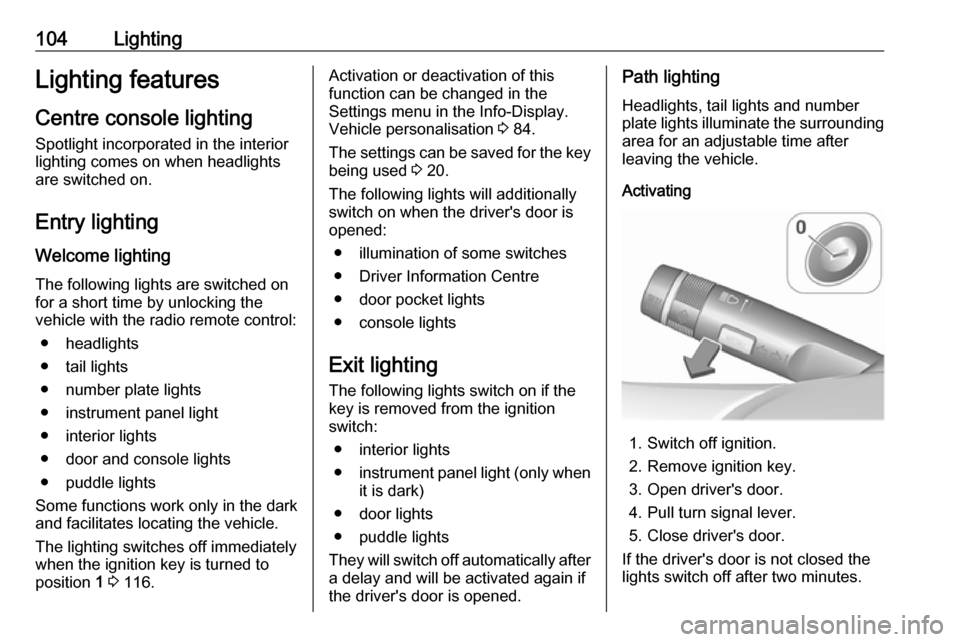
the driver's door is opened.Path lighting
Headlights, tail lights and number
plate lights illuminate the surrounding
area for an adjustable time after
leaving the vehicle.
Activating
1. Switch off ignition.
2. Remove ignition key.
3. Open driver's door.
4. Pull turn signal lever.
5. Close driver's door.
If the driver's door is not closed the
lights switch off after two minutes.
Page 117 of 205

Driving and operating115Driving and
operatingDriving hints ............................... 115
Control of the vehicle ...............115
Steering ................................... 116
Starting and operating ...............116
New vehicle running-in ............116
Ignition switch positions ...........116
Retained power off ..................116
Starting the engine ..................117
Overrun cut-off ........................ 117
Parking .................................... 118
Engine exhaust .......................... 119
Exhaust filter ............................ 119
Catalytic converter ...................120
Automatic transmission ..............121
Transmission display ...............121
Selector lever .......................... 121
Manual mode ........................... 122
Electronic driving programmes 123
Fault ........................................ 123
Interruption of power supply ....123
Manual transmission ..................124
Brakes ........................................ 125
Antilock brake system .............125Parking brake .......................... 126
Brake assist ............................. 127
Hill start assist ......................... 128
Ride control systems .................128
Traction Control system ..........128
Electronic Stability Control ......129
Driver assistance systems .........130
Cruise control .......................... 130
Speed limiter ........................... 131
Parking assist .......................... 133
Fuel ............................................ 135
Fuel for petrol engines .............135
Refuelling ................................ 136Driving hints
Control of the vehicle Never coast with engine not
running
Many systems will not function in this
situation (e.g. brake servo unit, power steering). Driving in this manner is a
danger to yourself and others.
Idle boost If charging of the vehicle battery is
required due to battery condition, the
power output of the generator must be increased. This will be achieved by
an idle boost which may be audible.
A message is displayed in the Driver
Information Centre.
Pedals
To ensure the pedal travel is
uninhibited, there must be no mats in
the area of the pedals.
Use only floor mats which fit properly and are fixed by the retainers on the
driver's side.
Page 118 of 205
116Driving and operatingSteeringIf power steering assist is lost
because the engine stops or due to a
system malfunction, the vehicle can
be steered but may require increased
effort.
Control indicator c 3 70.Caution
Vehicles equipped with hydraulic
power steering:
If the steering wheel is turned until it reaches the end of its travel, and
is held in that position for more
than 15 seconds, damage may occur to the power steering
system and there may be loss of
power steering assist.
Starting and operating
New vehicle running-in
Do not brake unnecessarily hard for
the first few journeys.
During the first drive, smoke may
occur because of wax and oil
evaporating off the exhaust system.
Park the vehicle in the open for a
while after the first drive and avoid
inhaling the fumes.
During the running-in period fuel and engine oil consumption may be
higher and the cleaning process of the exhaust filter may take place more
often.
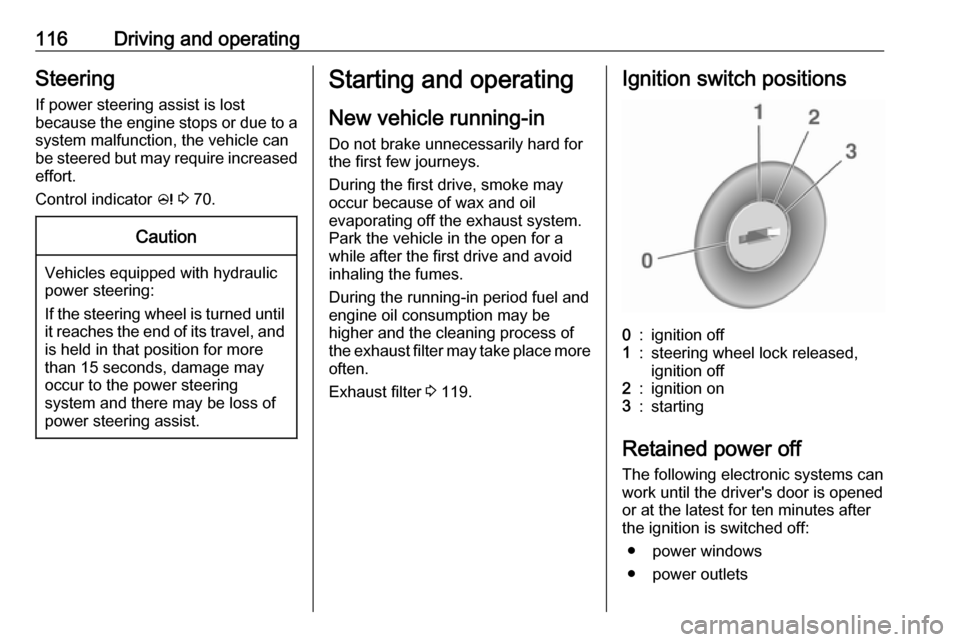
Exhaust filter 3 119.Ignition switch positions0:ignition off1:steering wheel lock released,
ignition off2:ignition on3:starting
Retained power off
The following electronic systems can
work until the driver's door is opened
or at the latest for ten minutes after
the ignition is switched off:
● power windows
● power outlets
Page 120 of 205
118Driving and operatingParking9Warning
● Do not park the vehicle on an
easily ignitable surface. The
high temperature of the
exhaust system could ignite the
surface.
● Always apply the parking brake. Activate the manual
parking brake without pressing the release button. Apply as
firmly as possible on a downhill slope or uphill slope. Depress
brake pedal at the same time to
reduce operating force.
For vehicles with electric
parking brake, pull switch m for
approx. one second.
The electric parking brake is
applied when control indicator
m illuminates 3 69.
● Switch off the engine.
● If the vehicle is on a level surface or uphill slope, engage
first gear or set the selector
lever to position P before
removing the ignition key. On
an uphill slope, turn the front
wheels away from the kerb.
If the vehicle is on a downhill
slope, engage reverse gear or
set the selector lever to position
P before removing the ignition
key. Turn the front wheels
towards the kerb.
● Close the windows.
● Remove the ignition key from the ignition switch. Turn the
steering wheel until the
steering wheel lock is felt to
engage.
For vehicles with automatic
transmission, the key can only
be removed when the selector
lever is in position P.
● Lock the vehicle.
● The engine cooling fans may run
after the engine has been
switched off 3 140.
Caution
After running at high engine
speeds or with high engine loads,
operate the engine briefly at a low load or run in neutral for
approx. 30 seconds before
switching off, in order to protect
the turbocharger.
Note
In the event of an accident with
airbag deployment, the engine is
turned off automatically if the vehicle
comes to a standstill within a certain time.
Page 123 of 205
Driving and operating121Automatic transmission
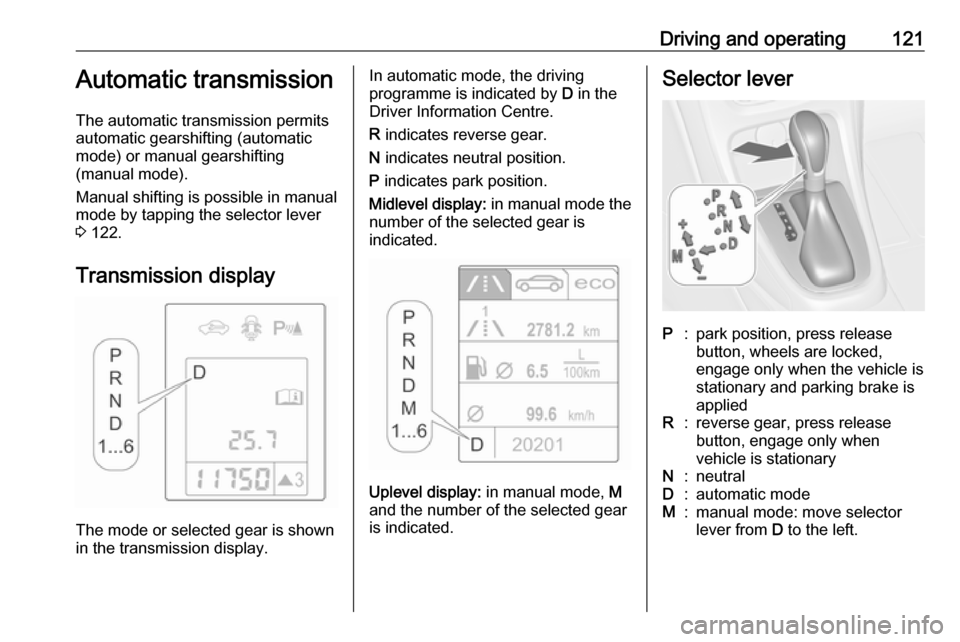
The automatic transmission permits
automatic gearshifting (automatic
mode) or manual gearshifting
(manual mode).
Manual shifting is possible in manual mode by tapping the selector lever 3 122.
Transmission display
The mode or selected gear is shown
in the transmission display.
In automatic mode, the driving
programme is indicated by D in the
Driver Information Centre.
R indicates reverse gear.
N indicates neutral position.
P indicates park position.
Midlevel display: in manual mode the
number of the selected gear is
indicated.
Uplevel display: in manual mode, M
and the number of the selected gear
is indicated.
Selector leverP:park position, press release
button, wheels are locked,
engage only when the vehicle is
stationary and parking brake is
appliedR:reverse gear, press release
button, engage only when
vehicle is stationaryN:neutralD:automatic modeM:manual mode: move selector
lever from D to the left.
Page 124 of 205
![OPEL ASTRA J 2019 Manual user 122Driving and operating<:manual mode upshifting: move
selector lever in position M and
tap upwards]:manual mode downshifting:
move selector lever in position
M and tap rearwards
The selector lever](/img/37/18776/w960_18776-123.png "OPEL ASTRA J 2019 Manual user 122Driving and operating<:manual mode upshifting: move
selector lever in position M and
tap upwards]:manual mode downshifting:
move selector lever in position
M and tap rearwards
The selector lever")
122Driving and operating<:manual mode upshifting: move
selector lever in position M and
tap upwards]:manual mode downshifting:
move selector lever in position
M and tap rearwards
The selector lever is locked in P and
can only be moved when the ignition
is on and the brake pedal is applied.
Without brake pedal applied, the
control indicator j illuminates.
If the selector lever is not in P when
the ignition is switched off, the control
indicators j and P flash.
To engage P or R, press the release
button.
The engine can only be started with the lever in position P or N. When
position N is selected, press the brake
pedal or apply the parking brake
before starting.
Do not accelerate while engaging a
gear. Never depress the accelerator
pedal and brake pedal at the same
time.
When a gear is engaged, the vehicle
slowly begins to creep when the
brake is released.
Engine braking To utilise the engine braking effect,select a lower gear in good time when
driving downhill, see manual mode.
Rocking the vehicle
Rocking the vehicle is only
permissible if the vehicle is stuck in
sand, mud or snow. Move the selector
lever between D and R in a repeat
pattern. Do not race the engine and
avoid sudden acceleration.Parking
Apply the parking brake and engage
P .
The ignition key can only be removed
when the selector lever is in position
P .
Manual mode
Move selector lever out of position D
towards the left to select manual
mode M.
Tap selector lever
forwards <:shift to a higher gearbackwards ]:shift to a lower gear
Page 126 of 205

124Driving and operating
2. Release the selector lever trimfrom the centre console at the
front, fold it upwards and rotate it
to the left.
3. Insert a screwdriver into the opening as far as it will go and
move the selector lever out of P or
N . If P or N is engaged again, the
selector lever will be locked in
position again. Have the cause of
the power supply interruption
remedied by a workshop.
4. Mount the selector lever trim onto
the centre console and refit.Manual transmission
To engage reverse, with the vehicle
stationary, depress clutch pedal,
press the release button on the
selector lever and engage the gear.
If the gear does not engage, set the
lever to neutral, release the clutch
pedal and depress again; then repeat
gear selection.
Do not slip the clutch unnecessarily.
When operating, depress the clutch
pedal completely. Do not use the
pedal as a foot rest.
Page 127 of 205

Driving and operating125Caution
It is not advisable to drive with thehand resting on the selector lever.
Upshift indication 3 70.
Brakes
The brake system comprises two independent brake circuits.
If a brake circuit fails, the vehicle can
still be braked using the other brake
circuit. However, braking effect is
achieved only when the brake pedal
is depressed firmly. Considerably
more force is needed for this. The
braking distance is extended. Seek
the assistance of a workshop before
continuing your journey.
When the engine is not running, the
support of the brake servo unit
disappears once the brake pedal has
been depressed once or twice.
Braking effect is not reduced, but
braking requires significantly greater
force. It is especially important to bear this in mind when being towed.
Control indicator R 3 69.
Antilock brake system
Antilock brake system (ABS)
prevents the wheels from locking.ABS starts to regulate brake pressure as soon as a wheel shows a tendency to lock. The vehicle remains
steerable, even during hard braking.
ABS control is made apparent
through a pulse in the brake pedal
and the noise of the regulation
process.
For optimum braking, keep the brake
pedal fully depressed throughout the
braking process, despite the fact that
the pedal is pulsating. Do not reduce
the pressure on the pedal.
After starting off the system performs
a self-test which may be audible.
Control indicator u 3 70.
Adaptive brake light
During full braking, all three brake
lights flash for the duration of ABS
control.