reset OPEL ASTRA K 2018.75 Manual user
[x] Cancel search | Manufacturer: OPEL, Model Year: 2018.75, Model line: ASTRA K, Model: OPEL ASTRA K 2018.75Pages: 319, PDF Size: 9.63 MB
Page 189 of 319

Driving and operating187Reduce speedWith cruise control active, hold thumb
wheel turned to SET/- or briefly turn to
SET/- repeatedly: speed decreases
continuously or in small increments.
Deactivation of the functionality
Press y; control indicator m in
instrument cluster illuminates white.
On Uplevel display m changes to
white.
Cruise control is deactivated, but not
switched off. Last stored speed
remains in memory for later speed
resume.
Automatic deactivation: ● Vehicle speed is below approx. 30 km/h.
● Vehicle speed drops more than 25 km/h below the set speed.
● The brake pedal is depressed.
● The clutch pedal is depressed for
a few seconds.
● The selector lever is in N.
● Engine speed is in a very low range.● The Traction Control system orElectronic Stability Control is
operating.
● Parking brake is applied.
● Simultaneous pressing RES/+
and brake pedal deactivates
cruise control and will delete
stored speed.
Resume stored speed
Turn thumb wheel to RES/+ at a
speed above 30 km/h. The stored
speed will be obtained.
Switching off the system
Press m, control indicator m in
instrument cluster extinguishes. The
stored speed is deleted.
Pressing L to activate the speed
limiter or switching off the ignition also switches off cruise control and
deletes the stored speed.
Speed limiter
The speed limiter prevents the
vehicle exceeding a preset maximum speed.The maximum speed can be set at
speeds above 25 km/h up to
200 km/h.
The driver can only accelerate up to
the preset speed. Deviations from the
limited speed may occur when driving
downhill.
The preset speed limit is displayed in
the Driver Information Centre when
the system is active.
Activation of the functionality
Illustrations show different versions.
Page 219 of 319
Driving and operating217
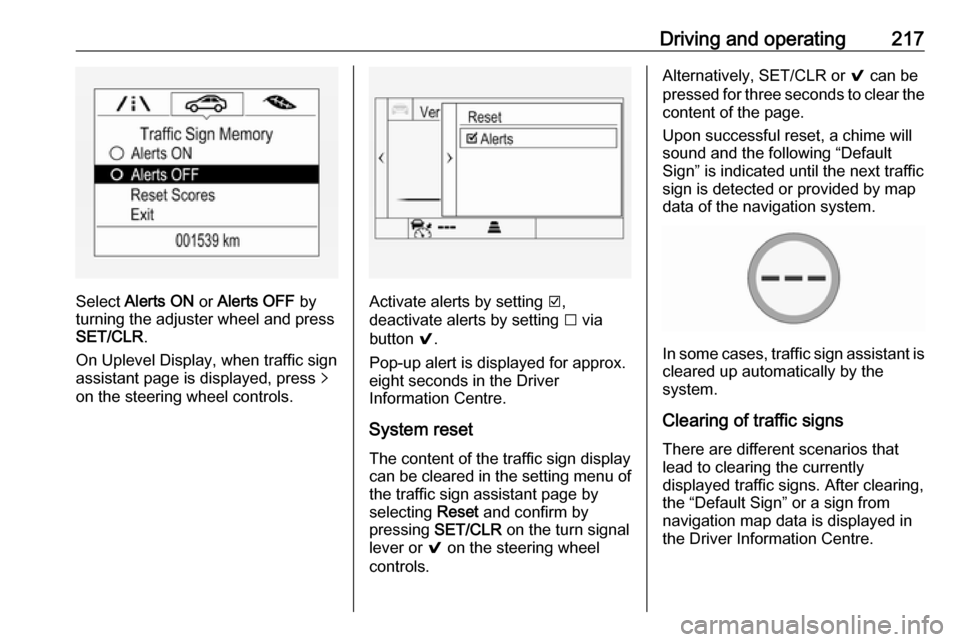
Select Alerts ON or Alerts OFF by
turning the adjuster wheel and press
SET/CLR .
On Uplevel Display, when traffic sign
assistant page is displayed, press q
on the steering wheel controls.Activate alerts by setting J,
deactivate alerts by setting I via
button 9.
Pop-up alert is displayed for approx.
eight seconds in the Driver
Information Centre.
System reset The content of the traffic sign display
can be cleared in the setting menu of
the traffic sign assistant page by
selecting Reset and confirm by
pressing SET/CLR on the turn signal
lever or 9 on the steering wheel
controls.
Alternatively, SET/CLR or 9 can be
pressed for three seconds to clear the
content of the page.
Upon successful reset, a chime will
sound and the following “Default
Sign” is indicated until the next traffic
sign is detected or provided by map
data of the navigation system.
In some cases, traffic sign assistant is
cleared up automatically by the
system.
Clearing of traffic signs
There are different scenarios that
lead to clearing the currently
displayed traffic signs. After clearing,
the “Default Sign” or a sign from
navigation map data is displayed in
the Driver Information Centre.
Page 311 of 319

Customer information309● Faults and defects in importantsystem components (e.g. lights,
brakes),
● System reactions in special driving situations (e.g. triggeringof an airbag, actuation of the
stability control systems),
● Information on events damaging the vehicle.
In special cases (e.g. if the vehicle
has detected a malfunction), it may be
necessary to save data that would
otherwise just be volatile.
When you use services, the operating
data saved can be read together with the vehicle identification number andused if necessary. Staff working for
the service net-work (e.g. garages,
manufacturers) or third parties (e.g.
breakdown services) can read the
data from the vehicle. Services
include repair services, maintenance
processes, warranty cases and
quality assurance measures.
Data is generally read via the OBD
(On-Board Diagnostics) port
prescribed by law in the vehicle. The operating data which has been read
out documents the technical conditionof the vehicle or individual
components and assists with fault
diagnosis, compliance with warranty
obligations and quality improvement.
This data, in particular information on
component stress, technical events,
operator errors and other faults, is
transmitted to the manufacturer
where appropriate, together with the vehicle identification number. The
manufacturer is also subject to
product liability. The manufacturer
potentially also needs operating data
from vehicles for product recalls.
Fault memories in the vehicle can be
reset by a service company when
carrying out servicing or repairs.
Comfort and infotainment
functions
Comfort settings and custom settings can be stored in the vehicle and
changed at any time.Depending on the equipment level in
question, these include
● Seat and steering wheel position settings,
● Chassis and air conditioning settings,
● Custom settings such as interior lighting.
You can input your own data in the
infotainment functions for your
vehicle as part of the selected
features.
Depending on the equipment level in
question, these include
● Multimedia data such as music, videos or photos for playback in
an integrated multimedia system,
● Address book data for use with an integrated hands-free system
or an integrated navigation
system,
● Input destinations,
● Data on the use of online services.
This data for comfort and
infotainment functions can be stored
locally in the vehicle or be kept on a