instrument cluster OPEL COMBO E 2019.75 Manual user
[x] Cancel search | Manufacturer: OPEL, Model Year: 2019.75, Model line: COMBO E, Model: OPEL COMBO E 2019.75Pages: 285, PDF Size: 10.68 MB
Page 117 of 285
Instruments and controls115Touch required menu display icon or
a function with the finger.
Confirm a required function or
selection by touching.
Touch r on the display to exit a
menu without changing a setting.
For further information, see
Infotainment manual.Speech recognition
Description see Infotainment manual.
Vehicle personalisation 3 118.
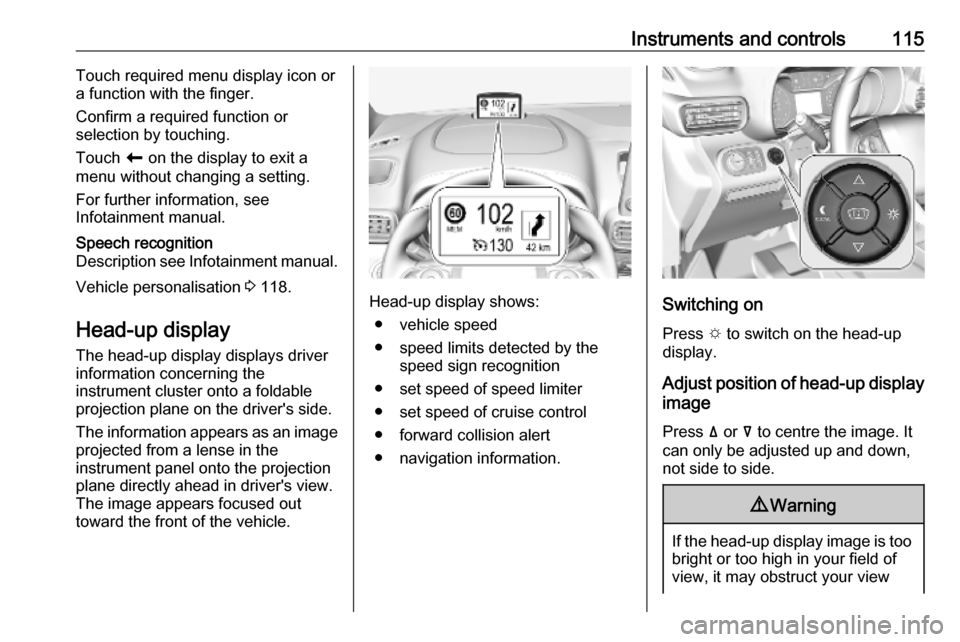
Head-up display The head-up display displays driver
information concerning the
instrument cluster onto a foldable
projection plane on the driver's side.
The information appears as an image
projected from a lense in the
instrument panel onto the projection
plane directly ahead in driver's view.
The image appears focused out
toward the front of the vehicle.Head-up display shows:
● vehicle speed
● speed limits detected by the speed sign recognition
● set speed of speed limiter
● set speed of cruise control
● forward collision alert
● navigation information.Switching on
Press e to switch on the head-up
display.
Adjust position of head-up display
image
Press ä or å to centre the image. It
can only be adjusted up and down,
not side to side.
9 Warning
If the head-up display image is too
bright or too high in your field of
view, it may obstruct your view
Page 162 of 285
160Driving and operatingPull right paddle + to shift to a higher
gear.
Pull left paddle - to shift to a lower
gear.
Multiple pulls allow gears to be
skipped.
The selected gear is indicated in the
instrument cluster.
If a higher gear is selected when
vehicle speed is too low, or a lower
gear when vehicle speed is too high,
the shift is not executed. This can
cause a message in the Driver
Information Centre.
In manual mode, no automatic
shifting to a higher gear takes place
at high engine revolutions.
Gear shift indication
The symbol R or S with a number
beside it is indicated when
gearshifting is recommended for fuel
saving reasons.
Shift indication appears only in
manual mode.Electronic driving
programmes
● Following a cold start, the operating temperature
programme increases engine
speed to quickly bring the
catalytic converter to the required
temperature.
● Special programmes automatically adapt the shifting
points when driving up inclines or
down hills.
● In snowy or icy conditions or on other slippery surfaces, the
electronic transmission control
enables the driver to select
manually first, second or third
gear for starting off.
Kickdown Pressing down the accelerator pedal
beyond the kickdown detent will lead to maximum acceleration
independent of selected driving
mode. The transmission shifts to a
lower gear depending on engine
speed.Fault
In the event of a fault a message is
displayed in the Driver Information Centre.
Vehicle messages 3 117.
Electronic transmission control
enables only third gear. The
transmission no longer shifts
automatically.
Do not drive faster than 100 km/h.
Have the cause of the fault remedied by a workshop.
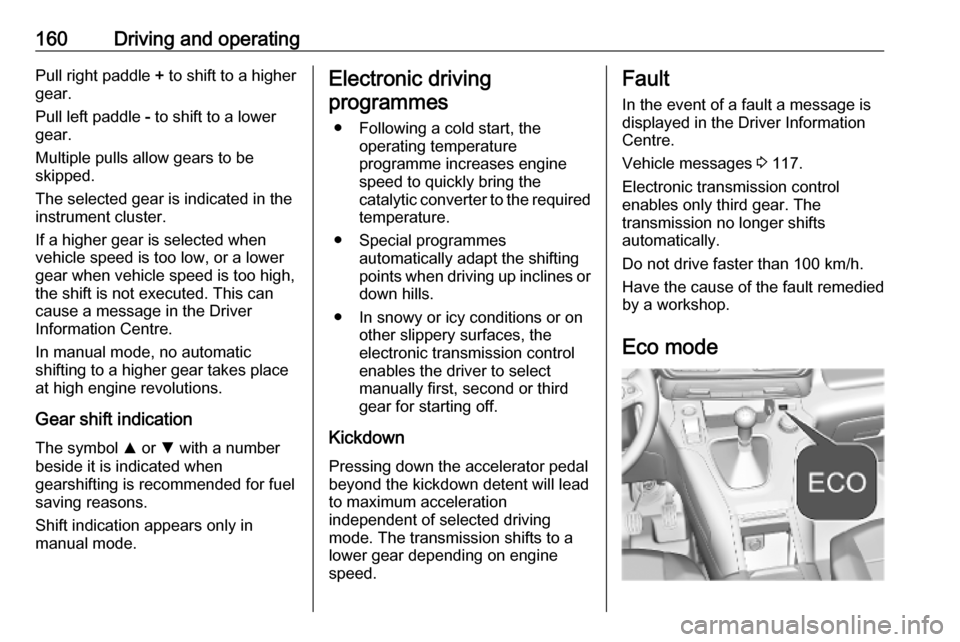
Eco mode
Page 166 of 285

164Driving and operating3 106. The electric parking brake
operates automatically with
adequate force.
Before leaving the vehicle, check
the electric parking brake status.
Control indicator m 3 106.
The electric parking brake can always
be activated, even if the ignition is off.
Do not operate electric parking brake
system too often without engine
running as this will discharge the
vehicle battery.
Releasing
Switch on ignition. Keep foot brake
pedal depressed and then push
switch m.
Drive away function
Vehicles with manual transmission:
Depressing the clutch pedal and then
slightly releasing the clutch pedal and slightly depressing the accelerator
pedal releases the electric parking
brake automatically. This is only
possible if the automatic operation of
the electric parking brake is activated.
It is not possible when switch m is
pulled at the same time.
Vehicles with automatic transmission: Engaging D and then depressing the
accelerator pedal releases the
electric parking brake automatically.
This is only possible if the automatic
operation of the electric parking brake
is activated. It is not possible when
switch m is pulled at the same time.
Braking when vehicle is moving
When the vehicle is moving and the
switch m is kept pulled, the electric
parking brake system will decelerate the vehicle. As soon as the switch
m is released, braking will be
stopped.
The antilock brake system and the Electronic Stability Control stabilise
the vehicle while the switch m is kept
pulled. If an error of the electric
parking brake occurs, a warning
message is displayed in the driver
information centre. If the antilock
brake system and the Electronic
Stability Control fail, one or both
indicators i and J illuminate in theinstrument cluster. In this case,
stability can only be provided by
repeatedly pulling and pushing the
switch m until the vehicle is
immobilised.
Automatic operation
Automatic operation includes
automatic application and automatic
release of the electric parking brake.
The electric parking brake can also be
applied or released manually by using
the switch m.
Automatic application: ● The electric parking brake is automatically applied when the
vehicle is stationary and the
ignition is switched off.
● j illuminates in the instrument
cluster and a display message
pops up to confirm the
application.
Page 167 of 285

Driving and operating165Automatic release:● Parking brake releases automatically after moving off.
● j extinguishes in the
instrument cluster and a display message pops up to confirm the
release.
If the vehicle is equipped with an
automatic transmission and the brake
is not released automatically, make
sure the front doors are correctly
closed.Deactivation of automatic operation 1. Start the engine.
2. If the parking brake is released, apply the parking brake pulling the
switch m.
3. Take your foot off the brake pedal.
4. Press the switch m for at least
10 s and maximum 15 s.
5. Release the switch m.
6. Press and hold the brake pedal. 7. Pull the switch m for 2 s.
The deactivation of the automatic operation of the electric parking brake
is confirmed by o illuminating in theinstrument cluster 3 106 . The electric
parking brake can only be applied and released manually.
To reactivate the automatic
operation, repeat the steps described above.
Functionality check
When the vehicle is not moving, the
electric parking brake might be
applied automatically. This is done to
check the system.
Fault
Failure mode of electric parking brake
is indicated by a control indicator j
and by a vehicle message which is
displayed in the Driver Information Centre.
Vehicle messages 3 117.
Apply electric parking brake: pull and
hold the switch m for more than 5 s.
If control indicator m illuminates,
electric parking brake is applied.
Release electric parking brake: push
and hold the switch m for more than
2 s. If control indicator m
extinguishes, electric parking brake is
released.Control indicator m flashes: electric
parking brake is not fully applied or released. When continuously
flashing, release electric parking
brake and retry applying.
Brake assist If brake pedal is depressed quickly
and forcefully, maximum brake force
is automatically applied.
Operation of brake assist might
become apparent by a pulse in the
brake pedal and a greater resistance
when depressing the brake pedal.
Maintain steady pressure on the
brake pedal as long as full braking is
required. Maximum brake force is
automatically reduced when brake pedal is released.
Hill start assist The system helps prevent unintendedmovement when driving away on
inclines.
Page 170 of 285

168Driving and operatingAt speeds below approx. 50 km/h,
press ò. The system can also be
activated when the vehicle is
stationary with the engine running. The control indicator ò in the
instrument cluster is illuminated in
green to show the system is
activated.
When the vehicles starts its descent, the system controls the speed of the
vehicle; accelerator and brake pedals can be released.
● If the gearbox is in first or second
gear, the speed decreases andthe control indicator in the
instrument cluster flashes
rapidly.
● If the gearbox is in neutral or the clutch pedal is released, the
speed decreases and the control
indicator in the instrument cluster
flashes slowly.
If the system is operating, the brake
lights automatically come on.
If the speed exceeds 30 km/h,
regulation is paused. The ò
indicator light in the instrument cluster
changes to grey. However, the LEDof the ò button is still illuminated.
Regulation is automatically resumed
if the speed falls below 30 km/h, the
slope is greater than 5% and the
pedal release conditions are met.
Deactivation Press ò again until the LED in the
button extinguishes. The green
control indicator u in the instrument
cluster extinguishes, too.
Depressing the foot brake or
accelerator will also cause the system to be deactivated.
If the speed exceeds 70 km/h, the
system is automatically deactivated. The LED in the button estinguishes.
Fault
If the green control indicator ò
does not illuminate or flash after
pressing the button, there is a fault in
the system.
Seek the assistance of a workshop.Selective ride controlCaution
The vehicle is designed to drive
principally on-road, but it also
enables driving off-road
occasionally.
However, do not drive on terrain
where the vehicle could be
damaged due to obstacles, such
as rocks among others and on
terrain with steep inclines and
poor grip.
Do not cross waters.
Caution
When driving off-road, sudden
motion and manoeuvres can
cause a collision or losing control.
Selective ride control is designed to
optimise traction in low-grip
conditions (snow, mud and sand).
Page 185 of 285

Driving and operating183In the following cases, forward
collision alert may not detect a vehicle
ahead or sensor performance is
limited:
● driving on winding or hilly roads
● driving during nighttime
● weather limits visibility, such as fog, rain, or snow
● the sensor in the windscreen is blocked by snow, ice, slush, mud,dirt etc.
● the windscreen is damaged or affected by foreign objects, e.g.
stickers
Active emergency braking
Active emergency braking can help to reduce the damage and injury from
crashes with vehicles, pedestrians and obstacles directly ahead, when a
collision can no longer be avoided
either by manual braking or by
steering. Before the active
emergency braking applies, the driver is warned by the forward collision
alert or the front pedestrian protection
alert.Forward collision alert 3 181
Front pedestrian protection 3 185
The feature uses various inputs (e.g.
camera sensor, brake pressure,
vehicle speed) to calculate the
probability of a frontal collision.9 Warning
This system is not intended to
replace the driver responsibility for driving the vehicle and looking
ahead. Its function is limited to
supplemental use only to reduce
the vehicle speed before a
collision.
The system may not react to
animals. After a sudden lane
change, the system needs a
certain time to detect the next
preceding vehicle.
The driver must always be ready
to take action and apply the brakes and steer to avoid collisions.
Functionality
Active emergency braking is
equipped with a front camera and
operates in forward gear above
walking speed up to 85 km/h. The
system detects stationary vehicles
only if the speed does not exceed
80 km/h.
A precondition is that active
emergency braking is not deactivated
in the vehicle personalisation menu
3 118.
If deactivated, m illuminates in the
instrument cluster and a warning
message is displayed in the Driver
Information Centre
If the system has been deactivated
manually, it is reactivated
automatically the next time the
ignition is switched on.
The system includes: ● emergency automatic braking● forward collision alert
● front pedestrian protection
Page 186 of 285

184Driving and operatingEmergency automatic braking
After activation of brake preparation
system and just before the imminent
collision, this function automatically
applies limited braking to reduce the
impact speed of the collision or
prohibit a crash.
If active emergency braking is
applied, m flashes in the instrument
cluster.
Depending on the situation, the
vehicle may automatically brake
moderately or hard.
Front automatic braking can only
occur if a vehicle or a pedestrian
ahead is detected.
Forward collision alert 3 181
Front pedestrian protection 3 185
Below a speed of 30 km/h,
emergency automatic braking may
slow down the vehicle to a complete
stop. If the speed exceeds 30 km/h,
emergency automatic braking
reduces the speed. However, the
driver must apply the brake.Emergency automatic braking may slow the vehicle to a complete stop to
try to avoid a potential crash.
● Automatic transmission: If the vehicle comes to a complete
stop, automatic braking is
maintained for up to two
seconds. Keep the brake pedal
depressed to prevent the vehicle
from starting off again.
● Manual transmission: If the vehicle comes to a complete
stop, the engine may stall.
Operation of the function may be felt
by a slight vibration in the brake
pedal.9 Warning
Emergency automatic braking is
an emergency crash preparation
feature and is not designed to
avoid crashes. Do not rely on the
system to brake the vehicle.
Emergency automatic braking will
not brake outside of its operating speed range and only responds to
detected vehicles and
pedestrians.
System limitations
In some cases, the active emergencybraking system may provide an
automatic braking in situations that
seem to be unnecessary, for instance
in parking garages, due to traffic signs
in a curve or due to vehicles in
another lane. This is normal
operation, the vehicle does not need
service. Firmly apply the accelerator
pedal to override the automatic
braking if the situation and the
surroundings permit.
In the following cases, active
emergency braking performance is
limited:
● driving on winding or hilly roads
● detecting all vehicles, especially vehicles with a trailer, tractors,
muddy vehicles, etc.
● detecting a vehicle when weather
limits visibility, such as in fog,
rain, or snow
● driving during nighttime
● windscreen damaged or stickered
Page 187 of 285

Driving and operating185Complete attention is always required
while driving, and you should be
ready to take action and apply the
brakes and / or steer the vehicle to
avoid crashes.
We recommend to deactivate the
system in the vehicle personalisation
in the following cases:
● when towing a trailer or caravan
● when carrying long objects on roof bars or a roof rack
● when the vehicle is being towed with the engine running
● when a spare wheel is fitted that is smaller than the other wheels
● before using an automatic car wash with the engine running
● before placing the vehicle on a rolling road in a workshop
● if the windscreen has been damaged close to the camera
● if the front bumper has been damaged
● if the brake lamps are not workingFault
In case the system requires a service, m is illuminated in the instrument
cluster, a message is displayed in the Driver Information Centre and an
audible signal is given.
If the system does not work as it
should do, vehicle messages are
displayed in the Driver Information
Centre.
Vehicle messages 3 117.
Front pedestrian protection Front pedestrian protection may help
to avoid or reduce the harm caused
by front-end crashes with pedestrians when driving forward.
The system uses the front camera in
the windscreen to detect a pedestrian
directly ahead in your path.
Front pedestrian protection can
detect and alert to pedestrians in a
forward gear at speeds between
5 km/h and 60 km/h.
During nighttime driving, system
performance is limited.9 Danger
Front pedestrian braking does not
provide an alert or automatically
brake the vehicle, unless it detects
a pedestrian.
The system may not detect
pedestrians, including children,
when the pedestrian is not directly ahead, not fully visible, not
standing upright, or when part of a
group.
Front pedestrian protection includes:
● detecting front pedestrian ahead● front pedestrian alert
Front pedestrian protection is
activated together with forward
collision alert.
Forward collision alert 3 181.
Detecting front pedestrian ahead
A pedestrian ahead up to a distance
of approx. 40 m is indicated by a
symbol in the instrument cluster.
Page 191 of 285

Driving and operating189Graphic Info Display: The system is
ready to operate when the LED in the
parking assist button ¼ is not
illuminated.
Colour Info Display: Activate the
parking assist is in the vehicle
personalisation 3 118.
Indication
Depending on which side of the
vehicle is closer to an obstacle, you will hear acoustic warning signals inthe vehicle on the respective side.
The interval between the sounds
becomes shorter as the vehicle gets
closer to that obstacle. When the
distance is less than approx. 30 cm,
the sound is continuous.
Additionally, the distance to rear, front
and lateral obstacles is displayed by
changing distance lines in the Colour
Info Display 3 113.
Deactivation
The system is deactivated
automatically when vehicle speed
exceeds 10 km/h, by applying the
electric parking brake or by pressing
the parking assist button ¼.
Graphic Info Display: The system is
switched off when the LED in the
parking assist button ¼ is illuminated.
Colour Info Display: Deactivate the
parking assist in the vehicle
personalisation 3 118.
System limitations In the event of a fault or if the system
does not work temporarily, e.g. because of high external noise level
or other interference factors, C
illuminates in the instrument cluster.
A message is displayed in the Driver Information Centre.9 Warning
Under certain circumstances,
various reflective surfaces on
objects or clothing as well as
external noise sources may cause the system to fail to detect
obstacles.
Special attention must be paid to
low obstacles which can damage
the lower part of the bumper.
Page 194 of 285

192Driving and operatingvehicle, select reverse gear, release
the steering wheel and start moving without exceeding 7 km/h.
Move forwards and backwards as
instructed by observing the warnings of the parking assist and paying
attention to the acoustic signals until
the end of manoeuvre is indicated.
When finished, $ extinguishes in the
instrument cluster.
During the parking manoeuvre, the
system is automatically deactivated
once the rear of the vehicle is within
50 cm of an obstacle.
Exiting a parallel parking slot
Activation
Colour Info Display: when exiting a
parallel parking slot, activate the
system by pressing Í. Select Driving
functions on the Info Display and then
Park Assist . Select Exit parallel
parking space .
Select exit side by switching on the respective turn light.
Engage reverse or forward gear,
release the steering wheel and start
moving without exceeding 5 km/h.Move forwards and backwards while
observing the warnings of the Parking
assist until the end of manoeuvre is
indicated. The manoeuvre is
complete when the vehicle's front
wheels are out of the parking slot.
After deactivation check control over
the vehicle.
Display indication
The instructions on the display show: ● general hints and warning messages
● the demand to stop the vehicle, when a parking slot is detected
● the direction of driving during the
parking manoeuvre
● the demand to shift into reverse or first gear
● the demand to stop or to drive slowly
● the successful completion of the parking manoeuvre indicated bya pop-up symbol and a chime
● the cancelling of a parking manoeuvre