instrument cluster OPEL COMBO E 2019.75 Manual user
[x] Cancel search | Manufacturer: OPEL, Model Year: 2019.75, Model line: COMBO E, Model: OPEL COMBO E 2019.75Pages: 285, PDF Size: 10.68 MB
Page 196 of 285

194Driving and operatingObjects with a very small reflection
cross-section, e.g. objects of
narrow size or soft materials, may
not be detected by the system.
Parking assist systems do not
detect objects outside the
detection range.
Note
It is possible that the sensor detects a non-existing object caused by
echo disturbance from external
acoustic noise or mechanical
misalignments (sporadic false
warnings may occur).
Make sure that the front number
plate is properly mounted (not bent
and no gaps to the bumper on the left
or right side) and the sensors are
firmly in place.
Advanced parking assist system
may not respond to changes in the
available parking space after
initiating a parking manoeuvre. The
system may recognize an entry, a
gateway, a courtyard or even a crossing as a parking slot. After
selecting reverse gear the system
will start a parking manoeuvre. Take
care regarding the availability of the
suggested parking slot.
Surface irregularities, e.g. on
construction zones, are not detected
by the system. The driver accepts
responsibility.
Side blind spot alert
The side blind spot alert system
detects and reports objects on either
side of the vehicle, within a specified
blind spot zone. The system displays
a visual alert in each exterior mirror,
when detecting objects that may not
be visible in the interior and exterior
mirrors.
Side blind spot alert uses some of the
advanced parking assist sensors
which are located in the front and rear bumper on both sides of the vehicle.9 Warning
Side blind spot alert does not
replace driver vision.
The system does not detect:
● vehicles outside the side blind zones which may be rapidly
approaching
● pedestrians, cyclists or animals
Before changing a lane, always
check all mirrors, look over the
shoulder and use the turn signal.
Activation
Colour Info Display: press Í. Select
Driving functions on the Info Display
and then Blind spot sensors . Activate
the function.
B illuminates continously green in the
instrument cluster to confirm the
function.
Page 197 of 285

Driving and operating195Functionality
When the system detects a vehicle inthe side blind zone while driving
forwards, an LED will illuminate in the
relevant exterior mirror.
The LED comes on immediately when being passed.
The LED comes on after a delay when
passing another vehicle slowly.
Operation conditions
The following conditions must be
fulfilled for proper operation:
● all vehicles are moving in the same direction and in adjacent
lanes
● the speed of your vehicle is between 12 and 140 km/h
● passing a vehicle with a speed difference of less than 10 km/h
● another vehicle is passing with a speed difference of less than
25 km/h
● the traffic flow is normal
● driving on a straight or slightly curved road
● the vehicle is not pulling a trailer
● the sensors are not covered by mud, ice or snow
● the warning zones in the door mirrors or the detection zones on
front and rear bumper ar not
covered with adhesive labels or
other objectsNo alert will be given in the following
situations:
● in the presence of non-moving objects, e.g. parked vehicles,
barriers, street lamps, road signs
● with vehicles moving in the opposite direction
● driving on a winding road or a sharp corner
● when passing or being passed by
a very long vehicle, e.g. lorry,
coach, which is at the same time
detected at the rear in the blind
spot angle and present in the
driver's forward field of vision
● in very heavy traffic, vehicles detected in front and behind are
confused with a lorry or a
stationary object
● when passing too quickly
Deactivation The system is deactivated in the
vehicle personalisation 3 118. B
extinguishes in the instrument cluster.
Additionally, an acoustic signal
sounds.
Page 204 of 285
202Driving and operatingsystem steers not sufficient. Turn
steering wheel gently into opposite
direction, if lane change is intended.
When the system steers to correct the trajectory of the vehicle, a flashes
yellow in the instrument cluster.
A warning message in the Driver
Information Centre accompanied by a warning chime alerts the driver when
immediate driver´s action is required.
Unintended lane departure is not
assumed by the system when the turn lights are operated and during 20 s
after turn lights have been switched
off.
Note
The system may be switched off if it
detects lanes which are too narrow,
too wide or too curved.
Following preconditions have to be
fullfilled:
● vehicle speed must be between 65 km/h and 180 km/h
● the driver must hold the steering wheel with both hands● the change of trajectory is notaccompanied by operation of the
turn signals
● the Electronic Stability Control is activated and not in operation
● the vehicle is not connected to a trailer or an electric bicycle carrier
● normal driving behaviour (system
detects dynamic driving style, i.e.
pressure on the brake or
accelerator pedal)
● roads with poor lane markings
● no spare wheel is used
● the driver needs to be active during the correction
● the vehicle is not driven in a tight
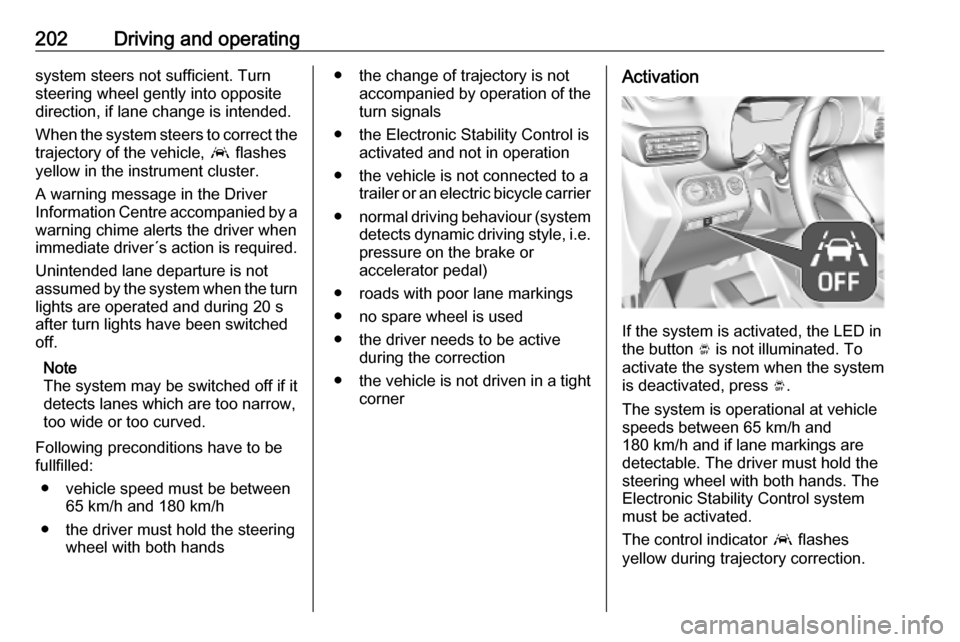
cornerActivation
If the system is activated, the LED in
the button Ó is not illuminated. To
activate the system when the system
is deactivated, press Ó.
The system is operational at vehicle
speeds between 65 km/h and
180 km/h and if lane markings are
detectable. The driver must hold the
steering wheel with both hands. The Electronic Stability Control system
must be activated.
The control indicator a flashes
yellow during trajectory correction.
Page 233 of 285
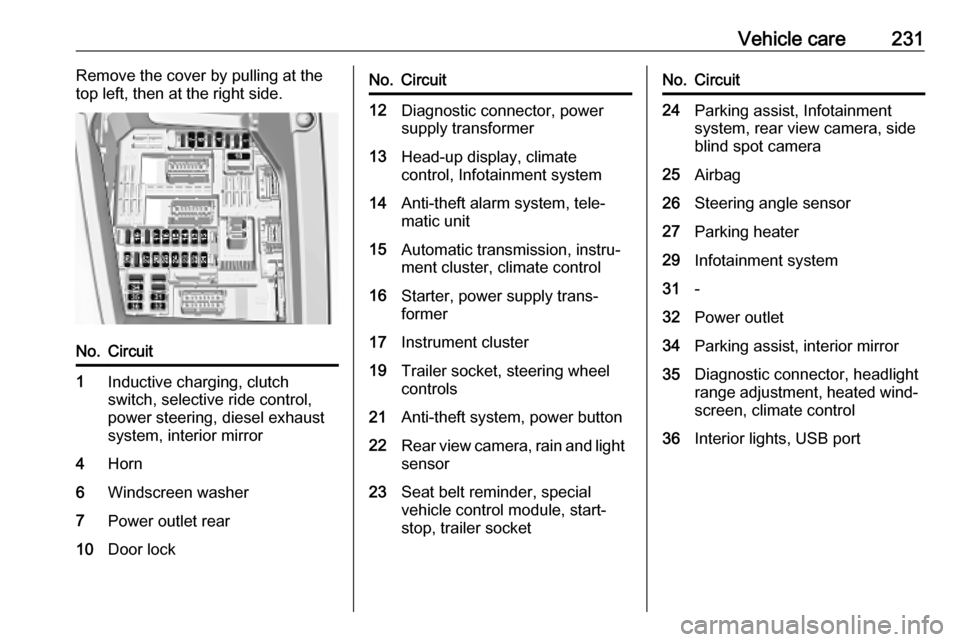
Vehicle care231Remove the cover by pulling at the
top left, then at the right side.No.Circuit1Inductive charging, clutch
switch, selective ride control,
power steering, diesel exhaust
system, interior mirror4Horn6Windscreen washer7Power outlet rear10Door lockNo.Circuit12Diagnostic connector, power
supply transformer13Head-up display, climate
control, Infotainment system14Anti-theft alarm system, tele‐
matic unit15Automatic transmission, instru‐
ment cluster, climate control16Starter, power supply trans‐
former17Instrument cluster19Trailer socket, steering wheel
controls21Anti-theft system, power button22Rear view camera, rain and light sensor23Seat belt reminder, special
vehicle control module, start-
stop, trailer socketNo.Circuit24Parking assist, Infotainment
system, rear view camera, side
blind spot camera25Airbag26Steering angle sensor27Parking heater29Infotainment system31-32Power outlet34Parking assist, interior mirror35Diagnostic connector, headlight
range adjustment, heated wind‐ screen, climate control36Interior lights, USB port
Page 253 of 285

Vehicle care251For painting work and when using a
drying booth at a temperature above 60 °C, the liquid gas tank must be
removed.
Do not make any modifications to the
liquid gas system.
Towing equipment Do not clean the coupling ball bar with
a steam-jet or high-pressure jet
cleaner.
Interior care Interior and upholstery
Only clean the vehicle interior,
including the instrument panel fascia
and panelling, with a dry cloth or
interior cleaner.
Clean the leather upholstery with
clear water and a soft cloth. In case of
heavy soiling, use leather care.
The instrument cluster and the
displays should only be cleaned using
a soft damp cloth. If necessary use aweak soap solution.Clean fabric upholstery with a
vacuum cleaner and brush. Remove
stains with an upholstery cleaner.
Clothing fabrics may not be
colourfast. This could cause visible
discolourations, especially on light-
coloured upholstery. Removable
stains and discolourations should be
cleaned as soon as possible.
Clean seat belts with lukewarm water
or interior cleaner.Caution
Close Velcro fasteners as open
Velcro fasteners on clothing could
damage seat upholstery.
The same applies to clothing with
sharp-edged objects, like zips or
belts or studded jeans.
Plastic and rubber parts
Plastic and rubber parts can be
cleaned with the same cleaner as
used to clean the body. Use interior cleaner if necessary. Do not use any
other agent. Avoid solvents and petrol in particular. Do not use high-
pressure jet cleaners.
Floor mats9 Warning
If a floor mat has the wrong size or
is not properly installed, it can
interfere with the accelerator pedal
and/or brake pedal, what can
cause unintended acceleration
and/or increased stopping
distance which can cause a crash and injury.
Use the following guidelines for
proper floor mat usage.
● The original equipped floor mats were designed for your vehicle.
Have damaged floor mats only
Page 282 of 285

280Gear shifting............................... 106
General information ...................208
Glass panel .................................. 46
Glovebox ..................................... 72
Glovebox cooler ......................... 144
Graphic Info Display ...................118
H Halogen headlights ....................221
Hand brake ................................. 163
Hazard warning flashers ............127
Headlight flash ........................... 126
Headlight range adjustment ......127
Headlights................................... 124 Headlights when driving abroad 127
Head restraint adjustment .............8
Head restraints ............................ 47
Head-up display.......................... 115 Heated mirrors ............................. 40
Heated rear window ..................... 44
Heated steering wheel .................92
Heated windscreen .......................45
Heating ........................................ 52
Heating and ventilation system . 133
High beam ......................... 109, 125
High beam assist ................109, 125
Hill start assist ........................... 165
Horn ....................................... 15, 93I
Identification plate .....................259
Ignition switch positions .............146
Immobiliser .................................. 38
Indicators .................................... 100
Inductive charging ........................97
Info Display ................................. 113
Installing seats .............................. 54
Instrument cluster ........................99
Instrument panel fuse box .........230
Instrument panel illumination control .................................... 130
Instrument panel overview ........... 10
Interior care ............................... 251
Interior lighting ............................ 130
Interior lights ...................... 130, 229
Interior mirrors .............................. 40
Introduction .................................... 3
J
Jump starting ............................. 245
K Keys ............................................. 22
Keys, locks ................................... 22
L
Ladder flap.................................... 77
Lane keep assist ................107, 201
Lashing eyes ............................... 81
LED headlights ...................109, 224Lighting features .........................131
Light switch ................................ 124
Load compartment ................33, 77
Load compartment cover .............78
Load compartment grille ...............84
Loading ............................. 50, 53, 54
Loading information .....................88
Low beam ................................... 109
Low fuel ..................................... 109
M
Malfunction indicator light ..........105
Manual anti-dazzle ......................40
Manual mode ............................. 159
Manual transmission .................. 161
Mirror adjustment ........................... 8
Misted light covers .....................129
Multimedia .................................. 118
Multimedia Navi Pro ...................118
N New vehicle running-in ..............146
Number plate light .....................228
O Object detection systems ...........186
Odometer ................................... 100
Oil, engine .......................... 257, 261
Opel Connect.............................. 122
Outside temperature ....................95
Overhead console .......................74