ignition OPEL COMBO E 2019.75 Owner's Guide
[x] Cancel search | Manufacturer: OPEL, Model Year: 2019.75, Model line: COMBO E, Model: OPEL COMBO E 2019.75Pages: 285, PDF Size: 10.68 MB
Page 98 of 285
96Instruments and controlsClockDate and time are shown in the Info
Display.
The adjustment of date and time is described in the Infotainment Manual.
Info Display 3 113.
Power outlets
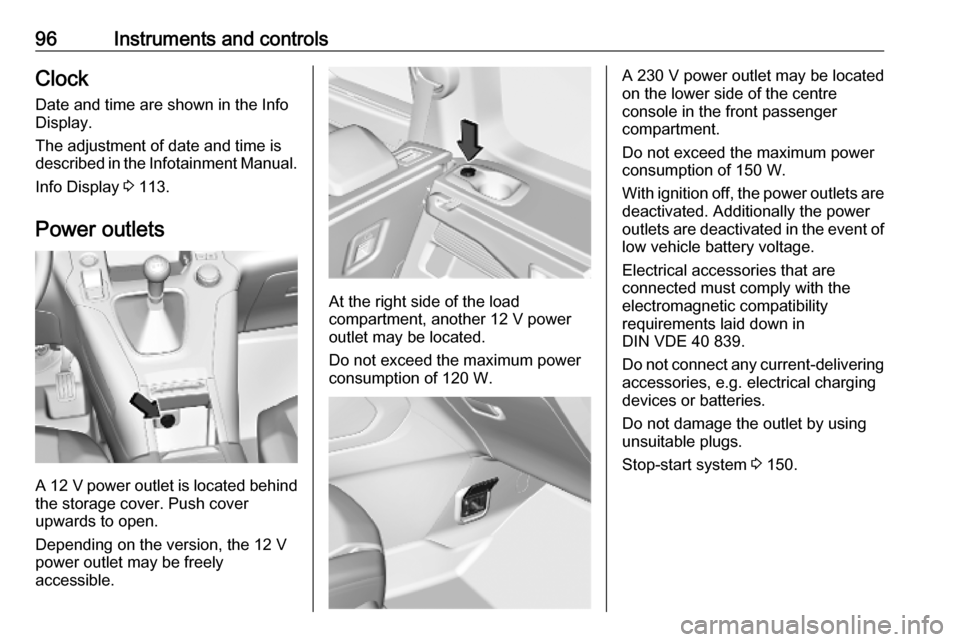
A 12 V power outlet is located behind
the storage cover. Push cover
upwards to open.
Depending on the version, the 12 V
power outlet may be freely
accessible.
At the right side of the load
compartment, another 12 V power
outlet may be located.
Do not exceed the maximum power
consumption of 120 W.
A 230 V power outlet may be located
on the lower side of the centre
console in the front passenger
compartment.
Do not exceed the maximum power
consumption of 150 W.
With ignition off, the power outlets are
deactivated. Additionally the power
outlets are deactivated in the event of
low vehicle battery voltage.
Electrical accessories that are
connected must comply with the
electromagnetic compatibility
requirements laid down in
DIN VDE 40 839.
Do not connect any current-delivering
accessories, e.g. electrical charging
devices or batteries.
Do not damage the outlet by using
unsuitable plugs.
Stop-start system 3 150.
Page 100 of 285

98Instruments and controls
The portable device to be charged
must be compatible with the Qi
standard, either by design or by using a compatible holder or shell. The
charging zone is identified by the Qi
symbol.
To charge a device, the ignition must
be switched on.
To charge a mobile device: 1. Remove all objects from the charging device.
2. Place the mobile device with the display facing upwards on the
charging device in the storage.
Charging status is indicated in the
LED: illuminates green, when mobile
device is charging.
Protective cover for the mobile device
could have impact on the inductive
charging.
In the event that the mobile device is
not charging properly, rotate it 180°
and place it on the charging device
again.
Cigarette lighter
The cigarette lighter is freely
accessible.
Depending on version, the cigarette
lighter may be located behind the storage cover. Press cover to open.
Press in cigarette lighter. It switches
off automatically once the element is
glowing. Pull out cigarette lighter.
AshtraysCaution
To be used only for ash and not for combustible rubbish.
A portable ashtray can be placed in
the cupholders.
Page 104 of 285

102Instruments and controlsCaution
If engine coolant temperature is
too high, stop vehicle, switch off
engine. Danger to engine. Check
coolant level.
Engine oil level monitor
The state of the engine oil level is
displayed in the Driver Information
Centre for a few seconds following
the service information after switching
on the ignition.
A proper state of engine oil level is
indicated by the message Oil level
correct .
If engine oil level is low, I flashes
and Oil level incorrect is indicated,
accompanied by C. Confirm
engine oil level by using the oil
dipstick and top up engine oil
respectively.
Engine oil 3 216.
A fault of measurement is indicated
by the message Oil level
measurement invalid . Check engine
oil level manually by using the
dipstick.
Service display
The service system informs when to
change the engine oil and filter or a
vehicle service is required. Based on
driving conditions, the interval at
which an engine oil and filter change
is required can vary considerably.
Service information 3 254.
A required service due is displayed in the Driver Information Centre for
seven seconds after switching on the
ignition.
If no service is required for the next
3000 km or more no service
information appears in the display.
If service is required within the next
3000 km, the remaining distance or
time duration is indicated for several
seconds. Simultaneously C lights
up permanently as reminder.
If service is required in less than
1000 km, C flashes and then lights
up permanently. Remaining distance
or time duration is indicated for
several seconds.
Overdued service is indicated by a message in the Driver Information
Centre which indicates the overdueddistance. C flashes and then lights
up permanently until service is
executed.
Reset of service interval After each service, the service
indicator must be reset to ensure
proper functionality. It is
recommended to seek the assistance
of a workshop.
If service is executed by yourself,
operate as following:
● switch off ignition
● press and hold button CHECK
● switch on ignition, the distance indication begins a countdown
● when the display indicates =0,
release the button
C disappears
Page 105 of 285
Instruments and controls103Retrieving service information
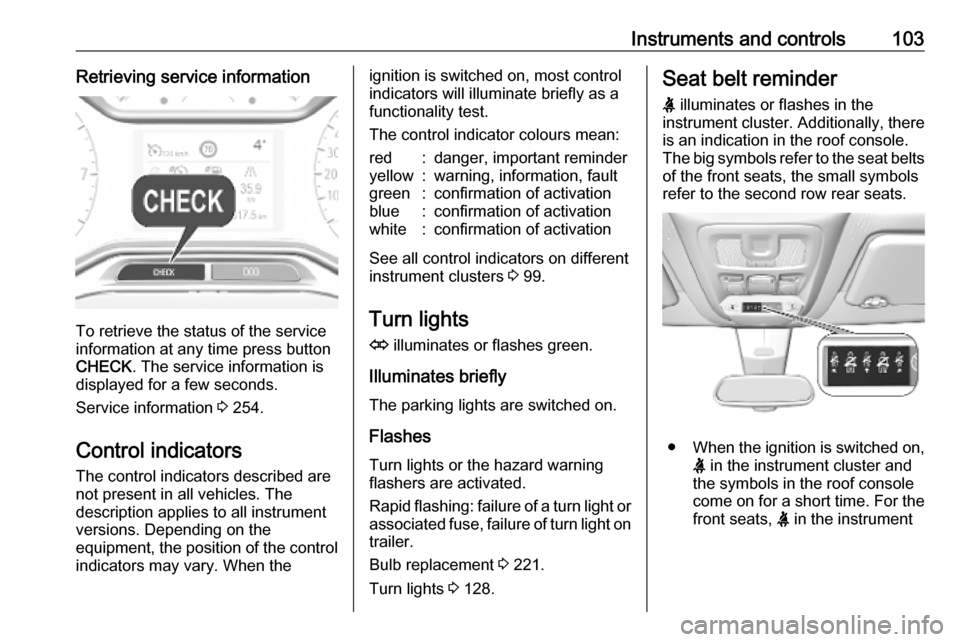
To retrieve the status of the service
information at any time press button
CHECK . The service information is
displayed for a few seconds.
Service information 3 254.
Control indicators The control indicators described are
not present in all vehicles. The
description applies to all instrument
versions. Depending on the
equipment, the position of the control indicators may vary. When the
ignition is switched on, most controlindicators will illuminate briefly as afunctionality test.
The control indicator colours mean:red:danger, important reminderyellow:warning, information, faultgreen:confirmation of activationblue:confirmation of activationwhite:confirmation of activation
See all control indicators on different
instrument clusters 3 99.
Turn lights
O illuminates or flashes green.
Illuminates briefly The parking lights are switched on.
Flashes
Turn lights or the hazard warning
flashers are activated.
Rapid flashing: failure of a turn light or associated fuse, failure of turn light on
trailer.
Bulb replacement 3 221.
Turn lights 3 128.
Seat belt reminder
X illuminates or flashes in the
instrument cluster. Additionally, there
is an indication in the roof console.
The big symbols refer to the seat belts of the front seats, the small symbols
refer to the second row rear seats.
● When the ignition is switched on,
X in the instrument cluster and
the symbols in the roof console
come on for a short time. For the
front seats, X in the instrument
Page 106 of 285
104Instruments and controlscluster and the symbols in the
roof console illuminate until seat
belt is fastened.
● When driving faster than 20 km/h and a seat belt isunfastened, the symbol in the
roof console for the respective
seat flashes and a chime is
audible. For the second row rear
seats, this only applies if at least
one rear seat belt was previously
fastened.
Aditionally, X illuminates in the
instrument cluster.
After two minutes the chime goes off and X in the roof console
illuminates constantly until the
seat belt of the respective seat is
fastened.
Airbag and belt tensioners v illuminates red.
When the ignition is switched on, the control indicator illuminates for
approx. four seconds. If it does not
illuminate, does not extinguish after
four seconds or illuminates whilst
driving, there is a fault in the airbagsystem. Seek the assistance of a
workshop. The airbags and belt
pretensioners may fail to trigger in the
event of an accident.
Deployment of the belt pretensioners
or airbags is indicated by continuous
illumination of v.9 Warning
Have the cause of the fault
remedied immediately by a
workshop.
Belt pretensioners 3 57.
Airbag system 3 60.
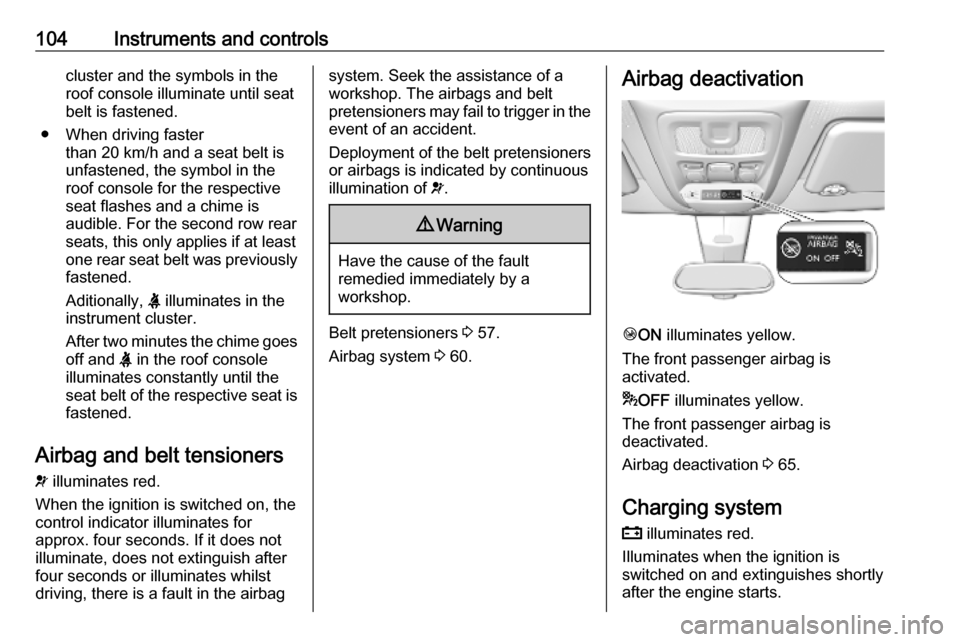
Airbag deactivation
Ó ON illuminates yellow.
The front passenger airbag is
activated.
* OFF illuminates yellow.
The front passenger airbag is
deactivated.
Airbag deactivation 3 65.
Charging system
p illuminates red.
Illuminates when the ignition is
switched on and extinguishes shortly
after the engine starts.
Page 107 of 285

Instruments and controls105Illuminates when the engine is
running
Stop, switch off engine. Vehicle
battery is not charging. Engine
cooling may be interrupted. The
brake servo unit may cease to be
effective. Seek the assistance of a
workshop.
Malfunction indicator light
Z illuminates or flashes yellow.
Illuminates when the ignition is
switched on and extinguishes shortly
after the engine starts.
Illuminates when the engine is
running
Fault in the emission control system.
The permitted emission limits may be
exceeded. Seek the assistance of a
workshop immediately.Flashes when the engine is
running
Fault that could lead to catalytic
converter damage. Ease up on the
accelerator until the flashing stops.
Seek the assistance of a workshop
immediately.
Service vehicle soon
C illuminates yellow.
Illuminates briefly when the ignition is
switched on.
May illuminate together with other
control indicators and a
corresponding message in the Driver
Information Centre.
Seek the assistance of a workshop
immediately.
Stop engine
Y illuminates red.
Illuminates briefly when the ignition is switched on.Illuminates together with other control
indicators, accompanied by a warning chime and a corresponding message in the Driver Information Centre.
Stop engine immediately and seek
the assistance of a workshop.
System check
J illuminates yellow or red.
Illuminates yellow
A minor engine fault has been
detected.
Illuminates red A major engine fault has been
detected.
Stop engine as soon as possible and
seek the assistance of a workshop.
Brake and clutch systemR illuminates red.
The brake and clutch fluid level is too
low.
Page 108 of 285

106Instruments and controls9Warning
Stop. Do not continue your
journey. Consult a workshop.
Parking brake
m illuminates red.
Illuminates when the manual parking
brake is applied and ignition is
switched on 3 163.
Electric parking brake
m illuminates or flashes red.
Illuminates
Electric parking brake is applied
3 163.
Flashes
Electric parking brake is not applied
automatically. The application or the
release is faulty.
9 Warning
Have the cause of the fault
remedied immediately by a
workshop.
o illuminates yellow.
Illuminates Automatic operation is deactivated or
faulty. Activate automatic operation
again or have the cause remedied by
a workshop in the event of a fault.
Automatic operation 3 163.
Electric parking brake fault
E illuminates yellow.
Illuminates
Electric parking brake has a fault
3 163.
9 Warning
Have the cause of the fault
remedied immediately by a
workshop.
Antilock brake system
(ABS)
u illuminates yellow.
Illuminates for a few seconds after the ignition is switched on. The system is
ready for operation when the control
indicator extinguishes.
If the control indicator does not
extinguish after a few seconds, or if it illuminates while driving, there is a
fault in the ABS. The brake system
remains operational but without ABS
regulation.
Antilock brake system 3 162.
Gear shifting R with the number of a higher gear is
indicated, when upshifting is
recommended for fuel saving
reasons.
Overload indicator
& illuminates.
Illuminates when the overload
indicator detects an exceeding of the
maximum authorised weight 3 89.
Page 110 of 285

108Instruments and controlsContinue driving until the control
indicator extinguishes.
Illuminates temporarily Start of saturation of the exhaust filter.
Start cleaning process as soon as
possible by driving at a vehicle speed
of at least 60 km/h.
Illuminates constantlyIndication of a low additive level. Seek
the assistance of a workshop.
Exhaust filter 3 154.
AdBlue Y flashes or illuminates yellow.
Illuminates yellow
The remaining driving range is
between 800 km and 2400 km.
Flashes yellow
The remaining driving range is
between 0 km and 800 km.
AdBlue level is low. Refill AdBlue soon to avoid prevention of the
engine start.AdBlue 3 155.
Deflation detection system
w illuminates or flashes yellow.
Illuminates
Tyre pressure loss in one or more
wheels. Stop immediately and check
tyre pressure.
Flashes
Fault in system. Consult a workshop.
Deflation detection system 3 234.
Engine oil pressure
I illuminates red.
Illuminates when the ignition is
switched on and extinguishes shortly
after the engine starts.Illuminates when the engine is
runningCaution
Engine lubrication may be
interrupted. This may result in
damage to the engine and / or
locking of the drive wheels.
1. Select neutral gear.
2. Move out of the flow of traffic as quickly as possible without
impeding other vehicles.
3. Switch off ignition.
Page 115 of 285

Instruments and controls113When the fuel level is low, a message
appears on the display and the
control indicator o in the fuel gauge
illuminates 3 109.
Instantaneous Fuel Consumption
Display of the instantaneous
consumption.
Trip 1 page:
Average speed
Display of average speed. The
measurement can be reset at any
time.
Average fuel consumption
Display of average consumption. The measurement can be reset at any
time and starts with a default value.
Distance travelled
Displays the current distance for trip
1 since the reset.
The values of trip 1 page can be reset
by pressing SET/CLR for a few
seconds.
Trip 2 page:
Average speedDisplay of average speed. The
measurement can be reset at any
time.
Average fuel consumption
Display of average consumption. The measurement can be reset at any
time and starts with a default value.
Distance travelled
Displays the current distance for trip
2 since a certain reset.
The values of trip 2 page can be reset
by pressing SET/CLR for a few
seconds.
Digital speed page
Digital display of the instantaneous
speed.
Stop and Start time counter
A time counter calculates the time
spent in STOP mode during a
journey. It resets to zero every time
the ignition is switched on.
Compass page
Displays the geographic direction of
driving.Blank page
No trip/fuel information is displayed.
AdBlue Press CHECK repeatedly until the
AdBlue menu is shown.
AdBlue range
Indicates an estimate of the AdBlue
level. A message indicates whether
the level is sufficient or low.
3 155.
Info Display The Info Display is located in the
instrument panel near the instrument
cluster.
Depending on the vehicle
configuration the vehicle has a
● Graphic Info Display
or
● Colour Info Display with
touchscreen functionality
The Info Displays can indicate: ● time 3 96
● outside temperature 3 95
Page 125 of 285

Instruments and controls123Status LED
Illuminates green and red and
extinguishes after a short time, when
the ignition is switched on: the system
works properly.
Illuminates red: fault in the system.
Contact a workshop.
Flashes red: backup battery needs
replacement.
Breakdown call function
Pressing . for more than two
seconds connects you to a roadside
assistance service provider.
For information about coverage and
scope of services of the roadside
assistance, please refer to the
Service and warranty booklet.