light OPEL CORSA 2009 Owner's Manual
[x] Cancel search | Manufacturer: OPEL, Model Year: 2009, Model line: CORSA, Model: OPEL CORSA 2009Pages: 284, PDF Size: 4.96 MB
Page 93 of 284

87
Instruments, controls
p
Alternator
Control indicator lights up and/or flashes
red.
It illuminates when the ignition is switched
on and goes out shortly after the engine
starts.
Flashes during or after engine start
Battery voltage too lo w. Have electrical
system tested by a workshop.
Illuminates when the engine is runningStop and switch engine off. Battery will not
be charged. Engine cooling may be
interrupted. Effect of brake servo unit may
stop in vehicles with diesel engines.
Contact a workshop for assistance. p
Electro-hydraulic power assisted steering
Control indicator lights up yellow.
Fault in electro-hydr aulic power assisted
steering system. The power assisted
steering may have failed. The vehicle can
be steered but considerably more force is
required. Contact a workshop for
assistance.
O
Turn signal lamps
Control indicator flashes green.
The control indicator flashes if a turn signal
or the hazard warning flashers are
activated.
Rapid flashes: A turn signal lamp or the
related fuse has failed, failure of turn signal
lamp on the trailer 3.
Change bulbs 3212. Fuses 3 209.
Y
Fuel level
Control indicator lights up and/or flashes
yellow
Lamps
Level in fuel tank too low.
Flashes
Fuel level is used up, fuel immediately.
Never let the tank run dry!
Erratic fuel supply can cause catalytic
converter to overheat 3155.
Diesel engines: Bleed the fuel system after
running empty 3190.
C
Main beam
Control indicator lights up blue.
It is illuminated when main beam is on and
during headlamp flash 311, 3109.
W
Coolant temperature
Stop, switch off engine.
Check coolant level immediately 3244.
If there is sufficient coolant, consult a
workshop. Caution
Coolant temperature too high.
Back to overview
Page 94 of 284

88 Instruments, controls
Picture no: 18469s.tif
* Airbag systems which can be deactivated
for the front passenger
Symbol is lit, or flashes in the kilometre
display.
Illuminatedtogether with the LEDs in the button *:
airbag deactivated 376.
FlashesThe system can be activated or
deactivated within 15 seconds of switching
on the ignition 376.
Picture no:
T
Winter setting for automatic
transmission 3 or manual
transmission automated 3
Symbol lights up on the transmission
display if the Winter program is selected
3 140, 3146. 1
Manual transmission automated SPORT
mode 3
Symbol lights up on the transmission
display if the Sport program is selected
3 139.
q Headlamp range adjustment
Symbol is lit in the kilometre display
together with the setting.
It comes on for 4 seconds when dipped
beam is switched on, as well as when the
headlamp range has been adjusted.>
Fog lamps 3
Control indicator lights up green
This comes on when the front fog lamps
are switched on 3110.
8
Exterior lights
Control indicator lights up green
Illuminates when the exterior lighting is on
3 108.
r
Fog tail lamp
Control indicator lights up yellow.
This comes on when the fog tail lamp is
switched on 3110.
Back to overview
Page 95 of 284
89
Instruments, controls
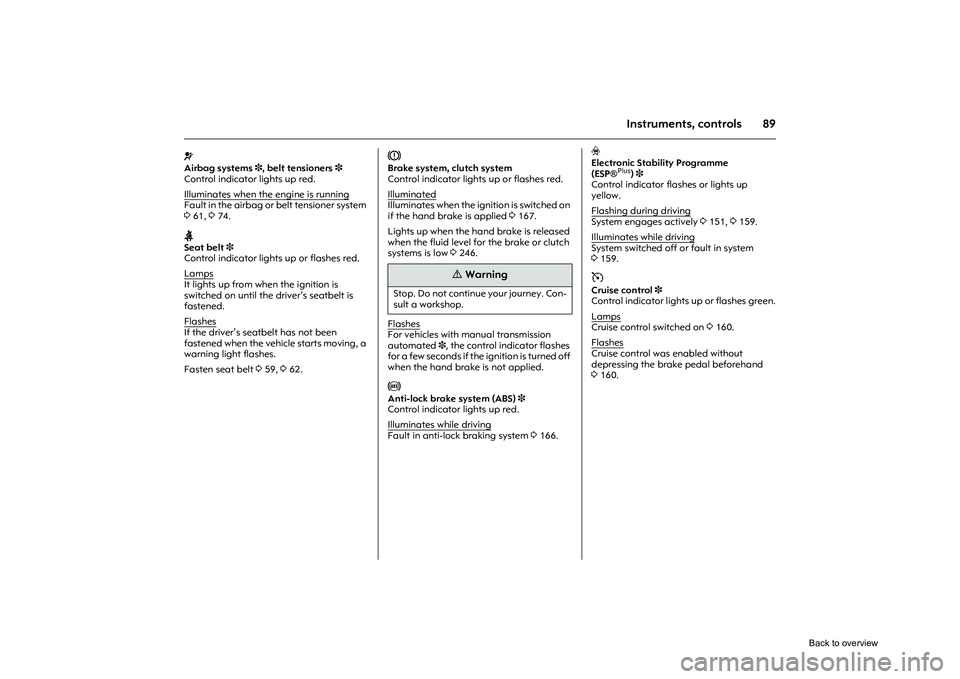
v
Airbag systems 3, belt tensioners 3
Control indicator lights up red.
Illuminates when the engine is runningFault in the airbag or belt tensioner system
3 61, 374.X
Seat belt 3
Control indicator lights up or flashes red.
Lamps
It lights up from when the ignition is
switched on until the dr iver’s seatbelt is
fastened.
Flashes
If the driver’s seatbelt has not been
fastened when the vehicle starts moving, a
warning light flashes.
Fasten seat belt 359, 362.
R
Brake system, clutch system
Control indicator lights up or flashes red.
Illuminated
Illuminates when the ignition is switched on
if the hand brake is applied 3167.
Lights up when the hand brake is released
when the fluid level for the brake or clutch
systems is low 3246.
FlashesFor vehicles with ma nual transmission
automated 3, the control indicator flashes
for a few seconds if the ignition is turned off
when the hand brake is not applied. u
Anti-lock brake system (ABS) 3
Control indicator lights up red.
Illuminates while driving
Fault in anti-lock braking system 3166.
v
Electronic Stability Programme
(ESP ®
Plus
)3
Control indicator flashes or lights up
yellow.
Flashing during driving
System engages actively 3151, 3159.
Illuminates while drivingSystem switched off or fault in system
3 159.m
Cruise control 3
Control indicator lights up or flashes green.
Lamps
Cruise control switched on 3160.
Flashes
Cruise control was enabled without
depressing the brake pedal beforehand
3 160.
9
Warning
Stop. Do not continue your journey. Con-
sult a workshop.
Back to overview
Page 96 of 284
90 Instruments, controls
Picture no: 18240s.tif
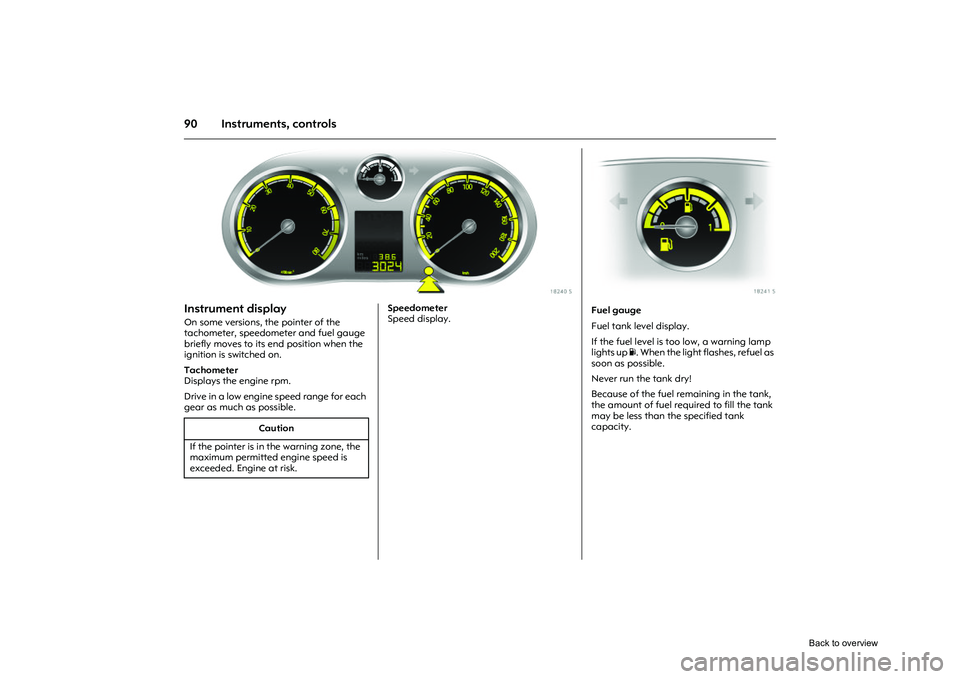
Instrument display On some versions, the pointer of the
tachometer, speedometer and fuel gauge
briefly moves to its end position when the
ignition is switched on.
Tachometer
Displays the engine rpm.
Drive in a low engine speed range for each
gear as much as possible.
Picture no:
Speedometer
Speed display.
Caution
If the pointer is in the warning zone, the
maximum permitted engine speed is
exceeded. Engine at risk.
Picture no: 18241s.tif
Fuel gauge
Fuel tank level display.
If the fuel level is too low, a warning lamp
lights up Y. When the light flashes, refuel as
soon as possible.
Never run the tank dry!
Because of the fuel remaining in the tank,
the amount of fuel requ ired to fill the tank
may be less than the specified tank
capacity.
Back to overview
Page 103 of 284
97
Instruments, controls
Picture no: 18612t.tif
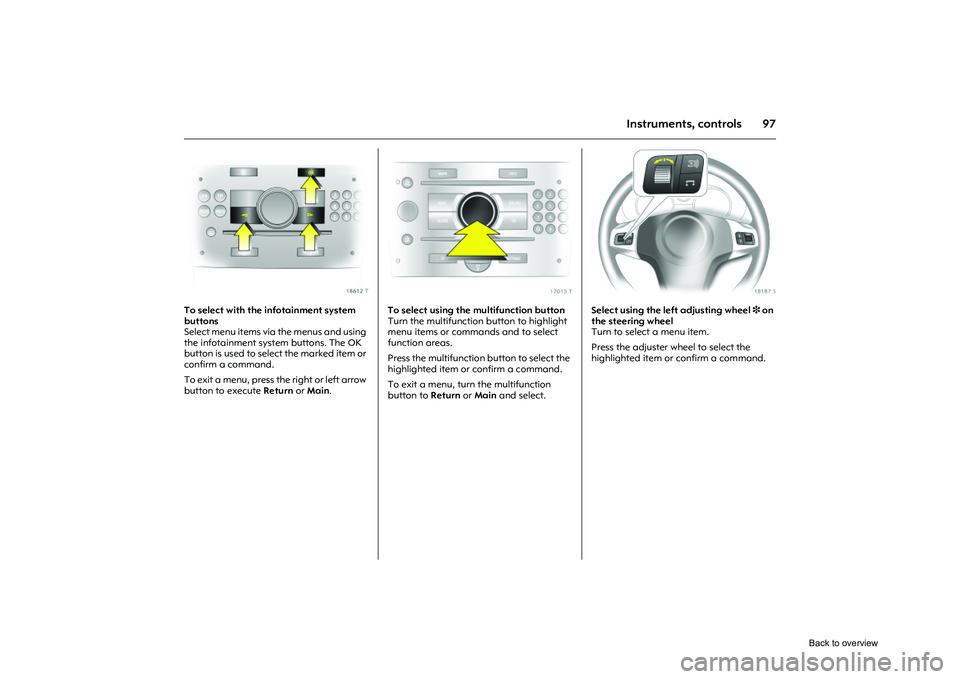
To select with the infotainment system
buttons
Select menu items via the menus and using
the infotainment system buttons. The OK
button is used to select the marked item or
confirm a command.
To exit a menu, press the right or left arrow
button to execute Return or Main .
Picture no: 17013t.tif
To select using the multifunction button
Turn the multifunction button to highlight
menu items or commands and to select
function areas.
Press the multifunction button to select the
highlighted item or confirm a command.
To exit a menu, turn the multifunction
button to Return or Main and select.
Picture no: 18187s.tif
Select using the left adjusting wheel 3 on
the steering wheel
Turn to select a menu item.
Press the adjuster wheel to select the
highlighted item or confirm a command.
Back to overview
Page 106 of 284
100 Instruments, controls
Picture no: 17343t.tif
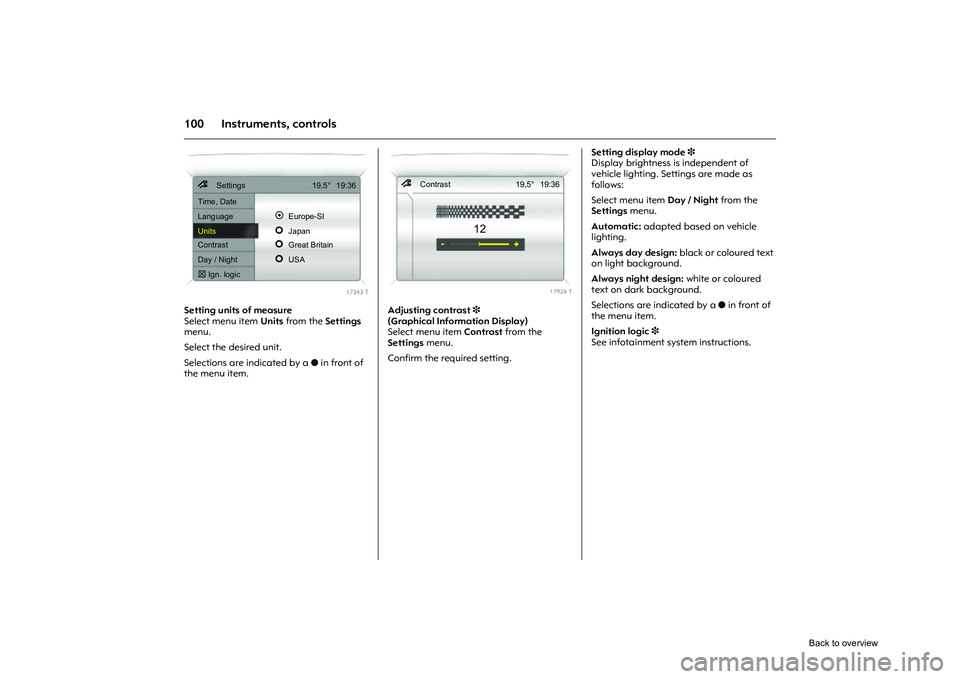
Setting units of measure
Select menu item Units from the Settings
menu.
Select the desired unit.
Selections are indicated by a o in front of
the menu item.
Picture no: 17926t.tif
Adjusting contrast 3
(Graphical Information Display)
Select menu item Contrast from the
Settings menu.
Confirm the required setting. Setting display mode
3
Display brightness is independent of
vehicle lighting. Settings are made as
follows:
Select menu item Day / Night from the
Settings menu.
Automatic: adapted based on vehicle
lighting.
Always day design: black or coloured text
on light background.
Always night design: white or coloured
text on dark background.
Selections are indicated by a o in front of
the menu item.
Ignition logic 3
See infotainment sy stem instructions.
7 Settings 19,5° 19:36
Time, Date
Language
!
Europe-SI
Units
"
Japan
Contrast
"
Great Britain
Day / Night
"
USA
! Ign. logic
7 Contrast 19,5° 19:36
12
Back to overview
Page 111 of 284

105
Instruments, controls
Acknowledge warning messages as
described on page 96, confirm.
Unacknowledged warning messages can
be re-displayed later.
Warning messages:Remote Control
Battery
check
Remote control battery voltage too low
3 32.
Brakelight switch
check
Brake light does not come on during
braking. Have the cause of the fault
eliminated immediately by a workshop.
Picture no: 18435s.tif
If there is a fault in the lighting system, the
respective location of the fault is displayed
as text, e.g.:
Brakelight
check right
Interruption of power supply
Stored warning messages appear on the
display one after the other.
Warning buzzersWhen starting the engine or whilst
driving:
z If seat belt is not fastened 3.
z If a door or the luggage compartment
has not been closed correctly when you
set off.
z Once you have reached a certain speed
if the hand brake is applied.
z If the speed programmed at the factory 3
is exceeded.
z If the car has automated manual
transmission 3 and the driver’s door is
opened when the engine is running, a
gear is engaged and the foot brake is
not depressed.
z Warning signal sounded three times if
the Flex-Fix system is extended 3 and
reverse gear is selected.
When the vehicle is parked and the
driver’s door is opened:
z When the key is in the ignition switch 3.
z With parking lamps or dipped beam on.
z For automated manual transmission 3, if
the hand brake is not applied and no
gear is engaged when the engine is
switched off.
Brakelightcheck right
OK
Back to overview
Page 114 of 284
108 LightingLighting
Picture no: 18197s.tif
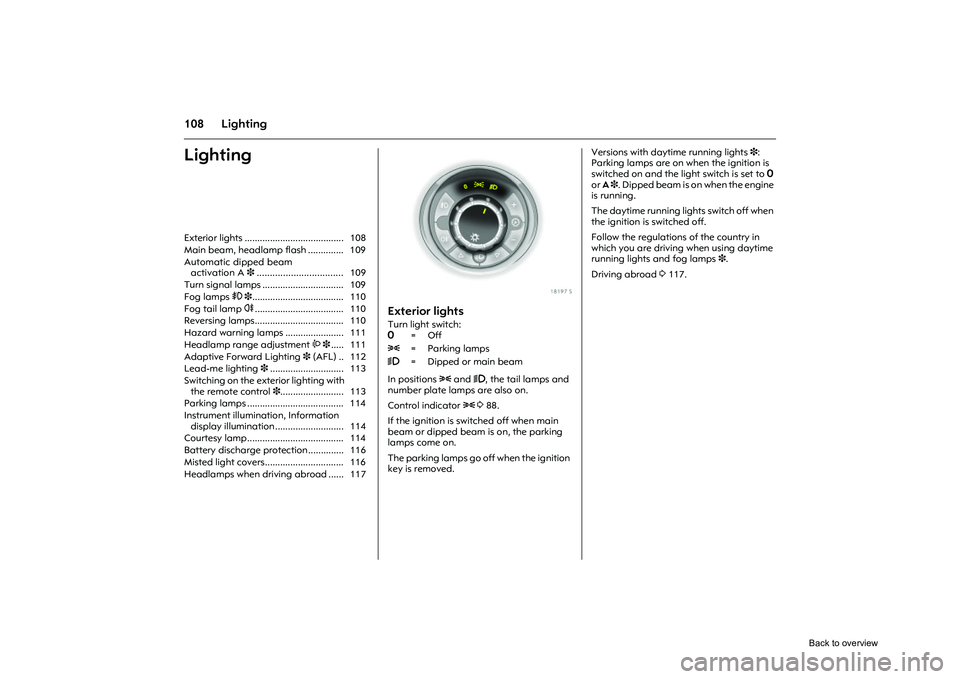
Exterior lightsTurn light switch:
In positions 8 and 9, the tail lamps and
number plate lamps are also on.
Control indicator 8388.
If the ignition is switched off when main
beam or dipped beam is on, the parking
lamps come on.
The parking lamps go off when the ignition
key is removed. Versions with daytime running lights 3
:
Parking lamps are on when the ignition is
switched on and the lig ht switch is set to 7
or A 3. Dipped beam is on when the engine
is running.
The daytime running lig hts switch off when
the ignition is switched off.
Follow the regulations of the country in
which you are driving when using daytime
running lights and fog lamps 3.
Driving abroad 3117.
Exterior lights ....................................... 108
Main beam, headlamp flash .............. 109
Automatic dipped beam
activation A 3................................. 109
Turn signal lamps ................................ 109
Fog lamps > 3.................................... 110
Fog tail lamp r................................... 110
Reversing lamps................................... 110
Hazard warning lamps ....................... 111
Headlamp range adjustment ? 3..... 111
Adaptive Forward Lighting 3 (AFL) .. 112
Lead-me lighting 3............................. 113
Switching on the exterior lighting with the remote control 3......................... 113
Parking lamps ...................................... 114
Instrument illumination, Information display illumination ........................... 114
Courtesy lamp...................................... 114
Battery discharge protection .............. 116
Misted light covers............................... 116
Headlamps when driving abroad ...... 117 7
=Off
8 = Parking lamps
9 = Dipped or main beam
Back to overview
Page 115 of 284

109
Lighting
Picture no: 18165s.tif
Main beam, headlamp flash Push stalk forward to switch from dipped
beam to main beam.
To switch to dipped beam, push stalk
forward again or pull towards steering
wheel.
To operate the headlamp flash, pull stalk
towards steering wheel. The main beam is
switched on for as long as the stalk is held
in this position.
Picture no: 18198s.tif
Automatic dipped beam
activation A
3
Light switch set to A: when the engine is
running, dipped beam switches on when
external light conditions are poor.
The exterior lights switch off when the
ignition is switched off.
For reasons of safety, the light switch
should always remain in the A position.
If visibility is poor (in foggy conditions, for
example) turn light switch to 9.
Picture no: 18167s.tif
Turn signal lamps Push stalk up or down to activate:
After operation, the turn signal stalk
returns to its starting position.
If the stalk is moved past the resistance
point, the turn signal lamp remains on.
When the steering wheel moves back
toward the straight-ahead position, the
turn signal lamp is automatically
deactivated.
Move the stalk to the resistance point and
hold for the turn signals to flash longer.
Switch the turn signal off manually by
moving the stalk slightly. Lever upwards = Right turn signal
Lever downwards = Left turn signal
Back to overview
Page 116 of 284
110 LightingShort turn signal 3
Push stalk until you feel resistance and
release. The turn signal flashes three times,
e.g. for changing lanes. This function can
be activated or deactivated depending on
the key that is used, see "personalised key",
P3 339, 341.
Acoustic turn signal 3
The volume of the acoustic turn signal can
be adjusted. This function can be
programmed depending on the key used,
see "Personalised key", P7 339, 341.
Picture no: 18199s.tif
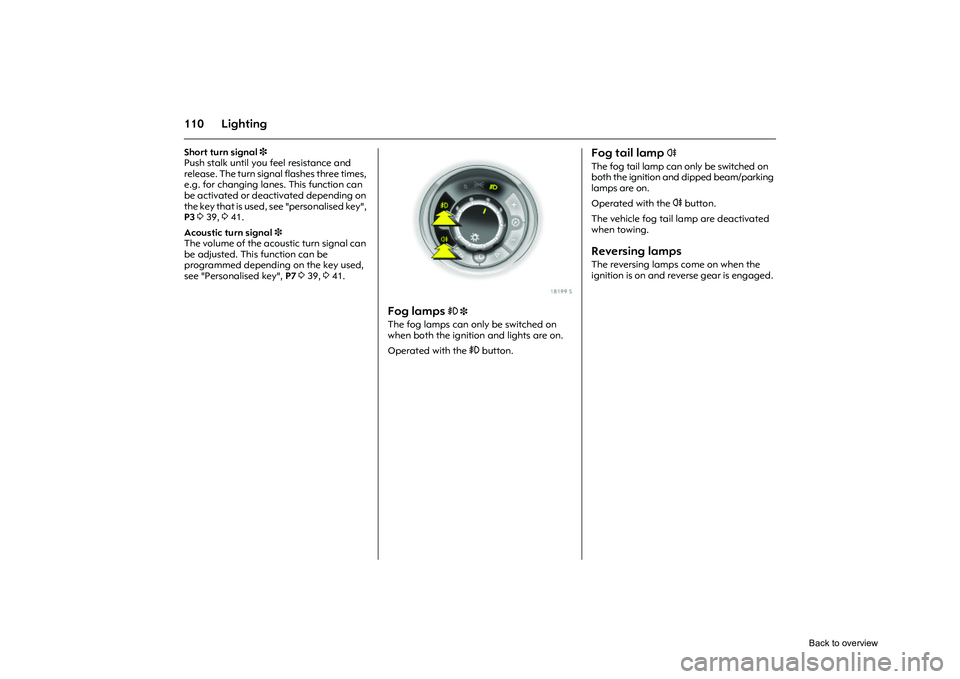
Fog lamps
> 3
The fog lamps can only be switched on
when both the ignition and lights are on.
Operated with the > button.
Fog tail lamp
r
The fog tail lamp can only be switched on
both the ignition and dipped beam/parking
lamps are on.
Operated with the r button.
The vehicle fog tail lamp are deactivated
when towing.
Reversing lamps The reversing lamps come on when the
ignition is on and reverse gear is engaged.
Back to overview