engine change OPEL CORSA E 2018 Owner's Manual
[x] Cancel search | Manufacturer: OPEL, Model Year: 2018, Model line: CORSA E, Model: OPEL CORSA E 2018Pages: 271, PDF Size: 7.99 MB
Page 88 of 271
86Instruments and controlsIf the LED changes to red and Y
illuminates yellow, refuel the tank soon.
If the LED illuminates red and Y
flashes yellow, refuel immediately.
Never run the fuel tank dry.
The arrow indicates the vehicle side
where the fuel filler flap is located.
Because of the fuel remaining in the
tank, the top-up quantity may be less
than the specified tank capacity.
During liquid gas operation, the
system automatically switches over to
petrol operation when gas tanks are
empty 3 86.
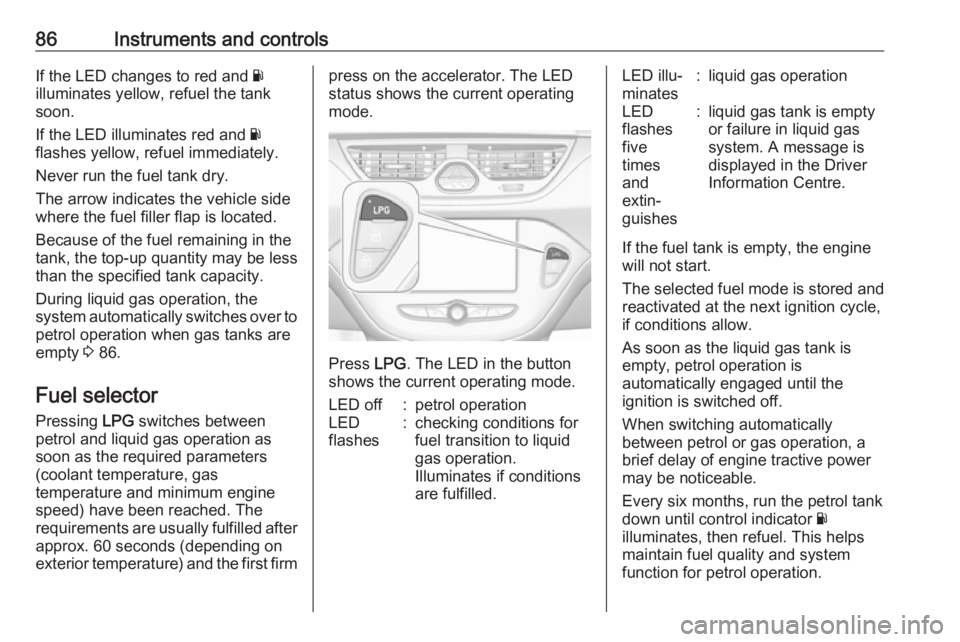
Fuel selector Pressing LPG switches between
petrol and liquid gas operation as soon as the required parameters
(coolant temperature, gas
temperature and minimum engine
speed) have been reached. The
requirements are usually fulfilled after
approx. 60 seconds (depending on
exterior temperature) and the first firmpress on the accelerator. The LED
status shows the current operating
mode.
Press LPG. The LED in the button
shows the current operating mode.
LED off:petrol operationLED
flashes:checking conditions for
fuel transition to liquid
gas operation.
Illuminates if conditions
are fulfilled.LED illu‐
minates:liquid gas operationLED
flashes
five
times
and
extin‐
guishes:liquid gas tank is empty
or failure in liquid gas
system. A message is
displayed in the Driver
Information Centre.
If the fuel tank is empty, the engine
will not start.
The selected fuel mode is stored and reactivated at the next ignition cycle,
if conditions allow.
As soon as the liquid gas tank is
empty, petrol operation is
automatically engaged until the
ignition is switched off.
When switching automatically
between petrol or gas operation, a
brief delay of engine tractive power
may be noticeable.
Every six months, run the petrol tank
down until control indicator Y
illuminates, then refuel. This helps
maintain fuel quality and system
function for petrol operation.
Page 90 of 271

88Instruments and controlsCaution
If engine coolant temperature is
too high, stop vehicle, switch off
engine. Danger to engine. Check
coolant level.
Service display
The engine oil life system lets you
know when to change the engine oil
and filter. Based on driving
conditions, the interval at which an
engine oil and filter change will be
indicated can vary considerably.
To display the remaining engine oil
life duration use turn signal lever
buttons:
Press MENU to select the Vehicle
Information Menu ? .
Turn the adjuster wheel to select
Remaining Oil Life .
The remaining engine oil life duration
is displayed in percent in the Driver
Information Centre.
Reset Press SET/CLR on turn signal lever
for several seconds to reset. The
remaining engine oil life duration
menu must be active. Switch on
ignition, but not the engine.
The system must be reset every time
the engine oil is changed to ensure
proper functionality. Seek the
assistance of a workshop.
Next service When the system has calculated that
engine oil life has diminished, a
warning message appears in the
Driver Information Centre. Have
engine oil and filter changed by a
workshop within one week or
500 km (whichever occurs first).
Driver Information Centre 3 98.
Service information 3 238.
Page 96 of 271

94Instruments and controlsBrake and clutch systemR illuminates red.
The brake and clutch fluid level is too
low, when manual parking brake is
not applied 3 197.9 Warning
Stop. Do not continue your
journey. Consult a workshop.
Illuminates when the manual parking
brake is applied and ignition is
switched on 3 152.
Operate pedal - illuminates or flashes yellow.
Illuminates
Clutch pedal must be depressed to
start the engine in Autostop mode.
Stop-start system 3 138.
Flashes
Clutch pedal must to be depressed to start the engine with the key 3 19,
3 137.
On some versions, the Driver
Information Display indicates a
message to operate the clutch pedal
3 104.
Antilock brake system
(ABS)
u illuminates yellow.
Illuminates for a few seconds after the ignition is switched on. The system is
ready for operation when the control
indicator extinguishes.
If the control indicator does not go out after a few seconds, or if it illuminates while driving, there is a fault in the
ABS. The brake system remains
operational but without ABS
regulation.
Antilock brake system 3 151.
Gear shifting R with the number of a higher gear is
indicated, when upshifting is
recommended for fuel saving
reasons.Power steering
c illuminates yellow.
Illuminates with power steering disabled
Failure in the power steering system.
Consult a workshop.
Illumination of c and b
simultaneously
Power steering system must be
calibrated, system calibration 3 155.
Lane departure warning
) illuminates green or flashes yellow.
Illuminates green
System is switched on and ready to
operate.
Flashes yellow
System recognises an unintended
lane change.
Lane departure warning 3 179.
Page 103 of 271

Instruments and controls101Unit
Press SET/CLR while page is
displayed. Select imperial (unit 1) or
metric (unit 3) by turning the adjuster
wheel. Press SET/CLR to set the unit
of measurement.
Speed warning
The speed warning function alerts the driver when a set speed is exceeded.
To set the speed warning, press
SET/CLR while the page is displayed.
Turn the adjuster wheel to select the
value. Press SET/CLR to set the
speed.
If the selected speed limit is
exceeded, a warning chime sounds.
Once the speed is set, this feature
can be turned off by pressing
SET/CLR while viewing this page.
Remaining oil life
Indicates an estimate of the oil's
useful life. The number in percentage means the current remaining oil life
and indicates when to change the
engine oil and filter 3 88.
Tyre pressure
Tyre pressures of all wheels are
displayed on this page during driving
3 215.
Tyre load
The tyre pressure category according
to the actual tyre inflation pressure
can be selected 3 215.
Outside temperature
Display of current outside
temperature.
Following distance
Displays the distance in seconds to a preceding moving vehicle 3 162.Traffic sign assistant
Displays the detected traffic signs for
the current route section 3 176.
Language
Select preferred country language as
the display language.
Eco information menu @
Possible pages are: ● economy trend
● economy index
● top consumers
Economy trend
Page 106 of 271
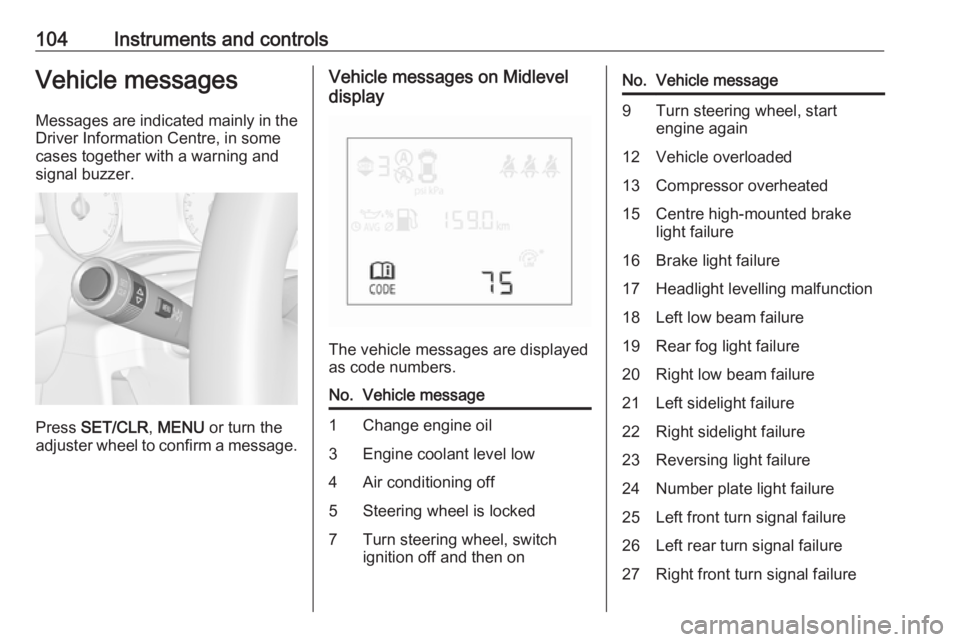
104Instruments and controlsVehicle messagesMessages are indicated mainly in the
Driver Information Centre, in some
cases together with a warning and
signal buzzer.
Press SET/CLR , MENU or turn the
adjuster wheel to confirm a message.
Vehicle messages on Midlevel
display
The vehicle messages are displayed
as code numbers.
No.Vehicle message1Change engine oil3Engine coolant level low4Air conditioning off5Steering wheel is locked7Turn steering wheel, switch
ignition off and then onNo.Vehicle message9Turn steering wheel, start
engine again12Vehicle overloaded13Compressor overheated15Centre high-mounted brake
light failure16Brake light failure17Headlight levelling malfunction18Left low beam failure19Rear fog light failure20Right low beam failure21Left sidelight failure22Right sidelight failure23Reversing light failure24Number plate light failure25Left front turn signal failure26Left rear turn signal failure27Right front turn signal failure
Page 107 of 271
Instruments and controls105No.Vehicle message28Right rear turn signal failure29Check trailer brake light30Check trailer reversing light31Check left trailer turn signal32Check right trailer turn signal33Check trailer rear fog light34Check trailer rear light35Replace battery in radio remote
control48Clean side blind spot alert
system49Lane departure warning
unavailable53Tighten fuel filler cap54Water in diesel fuel filter55Diesel particle filter is full
3 14256Tyre pressure imbalance on
front axleNo.Vehicle message57Tyre pressure imbalance on rear axle58Tyres without TPMS sensors
detected59Open then close driver window60Open then close front
passenger window65Theft attempted66Service anti-theft alarm system67Service steering wheel lock68Service power steering75Service air conditioning76Service side blind spot alert
system79Top up engine oil81Service transmission82Change engine oil soon84Engine power reduced89Service vehicle soonNo.Vehicle message90Service brake assist94Shift to park before exiting95Service airbag128Bonnet open134Parking assist fault, clean
bumper136Service parking assist145Check washer fluid level151Press clutch to start174Low vehicle battery258Parking assist off
Vehicle messages on Uplevel-
Display
The vehicle messages are displayedas text. Follow the instructions given
in the messages.
Page 108 of 271

106Instruments and controlsVehicle messages on
Colour-Info-Display
Some important messages appear
additionally in the
Colour-Info-Display. Some
messages only pop-up for a few
seconds.
Warning chimes
When starting the engine or whilst driving
Only one warning chime will sound at a time.
The warning chime regarding
unfastened seat belts has priority
over any other warning chime.
● If seat belt is not fastened.
● If a door or the tailgate is not fully
closed when starting off.
● If a certain speed is exceeded with parking brake applied.
● If a programmed speed is exceeded.
● If a warning message appears in the Driver Information Centre orInfo-Display.● If the parking assist detects an object.
● If unintended lane change occurs.
● If the reverse gear is engaged and the rear end carrier
extended.
● If the diesel particle filter has reached the maximum filling
level.
When the vehicle is parked and/or
the driver's door is opened
● With exterior lights on.
During an Autostop ● If the driver's door is opened.
Battery voltage Uplevel display
When the vehicle battery voltage is
running low, a warning message will
appear in the Driver Information
Centre.
Midlevel displayWhen the vehicle battery voltage is
running low, a warning code 174 will appear in the Driver Information
Centre.
1. Switch off immediately any electrical consumers which are
not required for a safe drive, e.g.
seat heating, heated windscreen
and heated rear window or other
main consumers.
2. Charge the vehicle battery by driving continuously for a while or
by using a charging device.
The warning message or warning
code will disappear after the engine has been started twice consecutively
without a voltage drop.
If the vehicle battery cannot be
recharged, have the cause of the fault
remedied by a workshop.
Page 109 of 271

Instruments and controls107Vehicle personalisation
The vehicle's behaviour can be
personalised by changing the settings in the Info-Display.
Some of the personal settings for
different drivers can be memorised
individually for each vehicle key.
Memorised settings 3 24.
Depending on vehicle equipment and
country-specific regulations, some of
the functions described below might
not be available.
Some functions are only displayed or
active when the engine is running.
Personal settings Graphic-Info-Display
Press CONFIG for the Settings menu.
Turn the MENU-TUNE control to
move to the desired setup menu, and then press MENU-TUNE .
Select Settings and then Vehicle
settings .
Vehicle settings
● Climate and air quality
Auto fan speed : Modifies the
level of the cabin airflow of the
climate control in Automatic
mode.
Auto rear demist : Activates
automatically the heated rear
window.
● Comfort settings
Chime volume : Changes the
volume of warning chimes.
Personalization by driver :
Activates or deactivates the
personalisation function.
Rear auto wipe in reverse :
Activates or deactivates
automatic switching on of the
rear window wiper when reverse gear is engaged.
● Park assist / Collision detection
Park assist : Activates or
deactivates the ultrasonic
parking assist. Activation is
selectable with or without
attached trailer coupling.
Side blind zone alert : Changes
the settings for the side blind spot alert system.
● Exterior ambient lighting
Exterior lighting by unlocking :
Activates or deactivates the entry
lighting.
Page 114 of 271

112Instruments and controlsTo connect a mobile device with the
Wi-Fi hotspot:
1. Press j and then select Wi-Fi
settings on the Info-Display. The settings displayed include the Wi-
Fi hotspot name (SSID),
password and connection type.
2. Start a Wi-Fi network search on your mobile device.
3. Select your vehicle hotspot (SSID) when listed.
4. When prompted, enter the password on your mobile device.
Note
To change the SSID or password,
press Z and talk to an advisor or log
in to your account.
To switch off the Wi-Fi hotspot
functionality, press Z to call an
advisor.
Smartphone app
With the myOpel smartphone app,
some vehicle functions can be
operated remotely.The following functions are available:
● Lock or unlock vehicle.
● Honk horn or flash lights.
● Check fuel level, engine oil life and tyre pressure (only with tyre
pressure monitoring system).
● Send navigation destination to the vehicle, if equipped with a
built-in navigation system.
● Locate vehicle on a map.
● Manage Wi-Fi settings.
To operate these functions, download the app from App Store ®
or
Google Play™ Store.
Remote control
If desired, use any phone to call an
advisor, who can remotely operate
specific vehicle functions. Find the
respective OnStar phone number on
our country-specific website.
The following functions are available: ● Lock or unlock vehicle.
● Provide information on the vehicle location.
● Honk horn or flash lights.Stolen vehicle assistance
If the vehicle is stolen, report the theft
to the authorities and request OnStar
stolen vehicle assistance. Use any
phone to call an advisor. Find the
respective OnStar phone number on
our country-specific website.
OnStar can provide support in
locating and recovering the vehicle.Theft alert
When the anti-theft alarm system is
triggered, a notification is sent to
OnStar. You are then informed about
this event by text message or email.Restart prevention
By sending remote signals, OnStar can prevent the vehicle from
restarting once it has been turned off.
On-demand diagnostics
At any time e.g. if the vehicle displays a vehicle message, press Z to
contact an advisor and ask to
complete a real-time diagnostic check
to directly determine the issue.
Depending on the results, the advisor
will provide further support.
Page 115 of 271

Instruments and controls113Diagnostic report
The vehicle automatically transmits
diagnostic data to OnStar which
sends a monthly email report to you
and your preferred workshop.
Note
The workshop notification function
can be disabled in your account.
The report contains the status of key
operating systems of the vehicle like
engine, transmission, airbags, ABS,
and other major systems. It also
provides information on possible
maintenance items and tyre pressure
(only with tyre pressure monitoring
system).
To look at the information in greater
detail, select the link within the email and log in to your account.
Destination download
A desired destination can be directly
downloaded to the navigation system.
Press Z to call an advisor and
describe the destination or point of
interest.The advisor can look up any address
or point of interest and directly send
the destination to the built-in
navigation system.
OnStar settings
OnStar PIN
To have full access to all OnStar
services, a four-digit PIN is required.
The PIN has to be personalised when
first talking to an advisor.
To change the PIN, press Z to call an
advisor.
Account data
An OnStar subscriber has an account
where all the data is stored. To
request a change of the account
information, press Z and talk to an
advisor or log in to your account.
If the OnStar service is used on
another vehicle, press Z and request
that the account be transferred to the
new vehicle.Note
In any case, if the vehicle is disposed of, sold or otherwise transferred,
immediately inform OnStar about
the changes and terminate the
OnStar service on this vehicle.
Vehicle location
The vehicle location is transmitted to OnStar when service is requested ortriggered. A message on the Info-
Display informs about this
transmission.
To activate or deactivate the
transmission of the vehicle location,
press and hold j until an audio
message is heard.
The deactivation is indicated by the
status light flashing red and green for
a short period of time and each time
the vehicle is started.
Note
If the transmission of the vehicle
location is deactivated, some
services are no longer available.