instrument cluster OPEL CROSSLAND X 2018.5 Manual user
[x] Cancel search | Manufacturer: OPEL, Model Year: 2018.5, Model line: CROSSLAND X, Model: OPEL CROSSLAND X 2018.5Pages: 261, PDF Size: 8.04 MB
Page 74 of 261
72Instruments and controlsInstruments and
controlsControls ....................................... 73
Steering wheel adjustment ........73
Steering wheel controls .............73
Heated steering wheel ...............73
Horn ........................................... 74
Windscreen wiper and washer ..74
Rear window wiper and washer ...................................... 76
Outside temperature ..................76
Clock ......................................... 77
Power outlets ............................. 77
Inductive charging .....................78
Cigarette lighter ......................... 79
Ashtrays .................................... 79
Warning lights, gauges and indi‐ cators ........................................... 80
Instrument cluster ......................80
Speedometer ............................. 84
Odometer .................................. 84
Trip odometer ............................ 84
Tachometer ............................... 84
Fuel gauge ................................ 85
Fuel selector .............................. 85Engine coolant temperature
gauge ....................................... 86
Engine oil level monitor .............87
Service display .......................... 87
Control indicators ......................88
Turn lights .................................. 88
Seat belt reminder .....................88
Airbag and belt tensioners .........89
Airbag deactivation ....................89
Charging system .......................89
Malfunction indicator light ..........90
Service vehicle soon .................90
Stop engine ............................... 90
System check ............................ 90
Brake and clutch system ...........90
Antilock brake system (ABS) .....91
Gear shifting .............................. 91
Lane departure warning ............91
Electronic Stability Control and Traction Control system ...........91
Electronic Stability Control and Traction Control system off ......91
Engine coolant temperature ......92
Preheating ................................. 92
Diesel particle filter ....................92
AdBlue ....................................... 92
Deflation detection system ........92
Engine oil pressure ....................92
Low fuel ..................................... 93
Autostop .................................... 93Exterior light.............................. 93
High beam ................................. 93
High beam assist .......................93
Low beam .................................. 93
Fog light ..................................... 93
Rear fog light ............................. 93
Rain sensor ............................... 93
Cruise control ............................ 94
Side blind spot alert ...................94
Active emergency braking .........94
Speed limiter ............................. 94
Door open .................................. 94
Displays ....................................... 94
Driver Information Centre ..........94
Info Display ................................ 97
Head-up display ........................98
Vehicle messages ......................100
Warning chimes .......................100
Battery voltage ........................ 101
Vehicle personalisation ..............101
Telematics service .....................105
OnStar ..................................... 105
Page 82 of 261

80Instruments and controlsWarning lights, gauges
and indicators
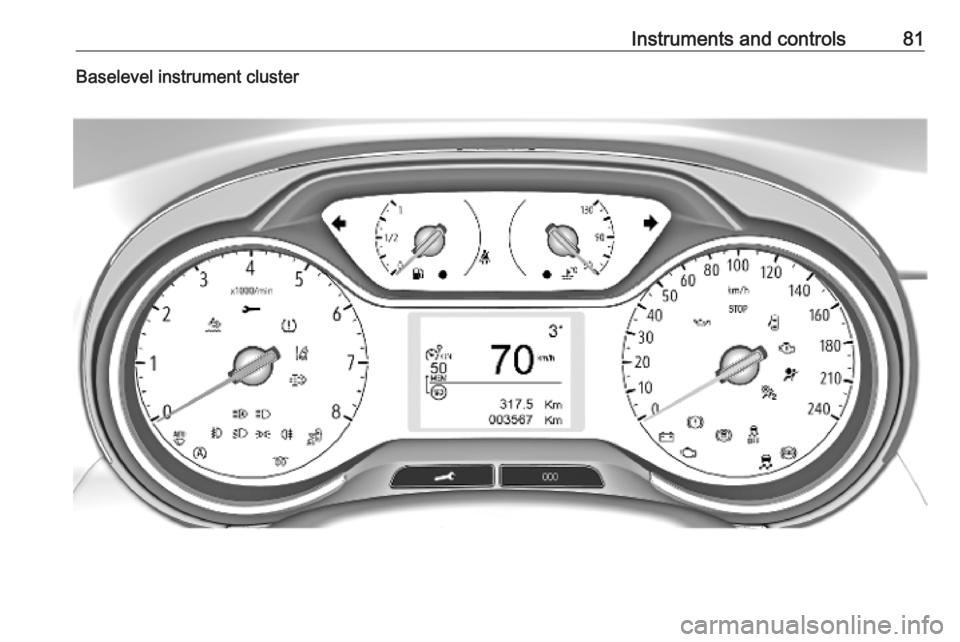
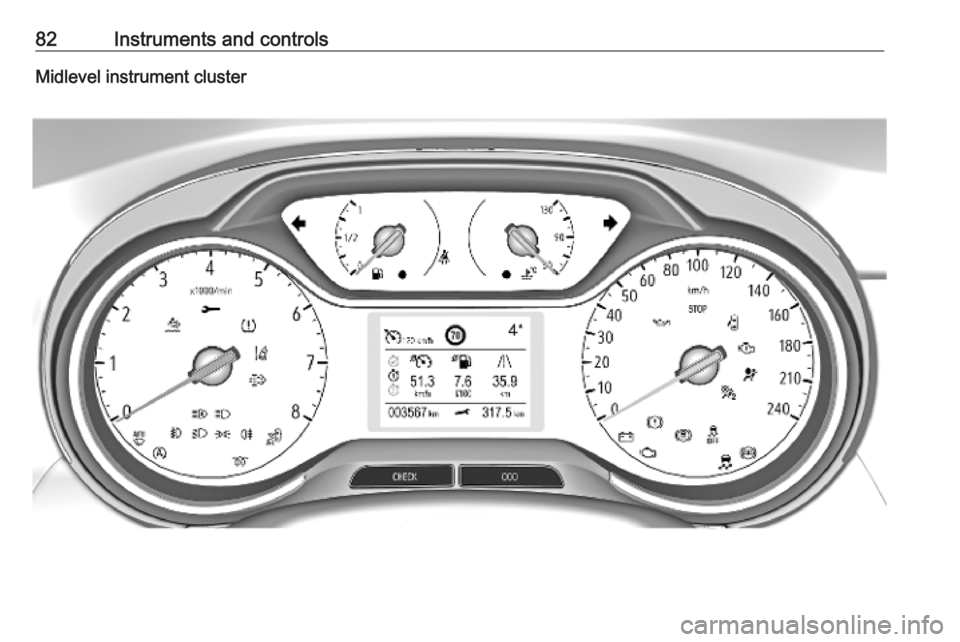
Instrument cluster
Depending on the version, two
instrument clusters are available:
Page 83 of 261
Instruments and controls81Baselevel instrument cluster
Page 84 of 261
82Instruments and controlsMidlevel instrument cluster
Page 90 of 261
88Instruments and controlsOverdued service is indicated by a
message in the Driver Information
Centre which indicates the overdued
distance. F flashes and then lights up
permanently until service is executed.
Reset of service interval After each service, the service
indicator must be reset to ensure
proper functionality. It is
recommended to seek the assistance
of a workshop.
If service is executed by yourself, operate as following:
● switch off ignition
● press and hold button M or
CHECK
● switch on ignition; the distance indication begins a countdown
● when the display indicates =0,
release the button. Symbol F
disappearsRetrieving service information
To retrieve the status of the service
information at any time press button
M or CHECK . The service
information is displayed for a few
seconds.
Service information 3 226.
Control indicators
The control indicators described are
not present in all vehicles. The
description applies to all instrument
versions. Depending on the
equipment, the position of the control indicators may vary. When the
ignition is switched on, most control
indicators will illuminate briefly as a
functionality test.
The control indicator colours mean:red:danger, important reminderyellow:warning, information, faultgreen:confirmation of activationblue:confirmation of activationwhite:confirmation of activation
See all control indicators on different
instrument clusters 3 80.
Turn lights
O illuminates or flashes green.
Illuminates briefly The parking lights are switched on.
Flashes
A turn light or the hazard warning
flashers are activated.
Rapid flashing: failure of a turn light or associated fuse, failure of turn light on
trailer.
Bulb replacement 3 193, Fuses
3 201.
Turn lights 3 113.
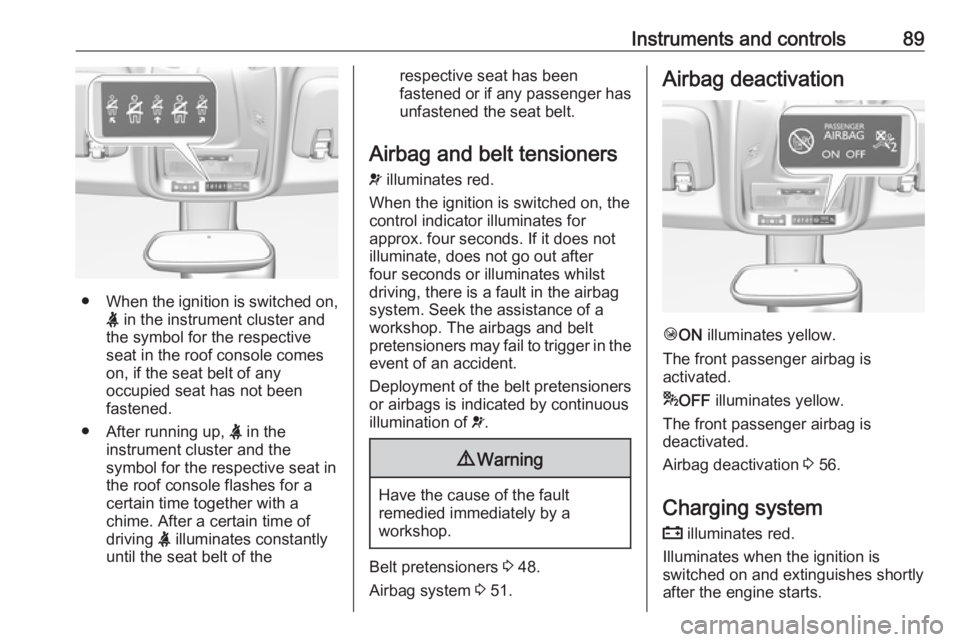
Seat belt reminder
Seat belt reminder on all seats
X illuminates or flashes red in the
instrument cluster together with the
indication in the roof console for each
seat belt.
Page 91 of 261
Instruments and controls89
●When the ignition is switched on,
X in the instrument cluster and
the symbol for the respective
seat in the roof console comes
on, if the seat belt of any
occupied seat has not been
fastened.
● After running up, X in the
instrument cluster and the
symbol for the respective seat in
the roof console flashes for a
certain time together with a
chime. After a certain time of
driving X illuminates constantly
until the seat belt of the
respective seat has been
fastened or if any passenger has
unfastened the seat belt.
Airbag and belt tensioners
v illuminates red.
When the ignition is switched on, the control indicator illuminates for
approx. four seconds. If it does not
illuminate, does not go out after
four seconds or illuminates whilst
driving, there is a fault in the airbag
system. Seek the assistance of a
workshop. The airbags and belt
pretensioners may fail to trigger in the event of an accident.
Deployment of the belt pretensioners
or airbags is indicated by continuous
illumination of v.9 Warning
Have the cause of the fault
remedied immediately by a
workshop.
Belt pretensioners 3 48.
Airbag system 3 51.
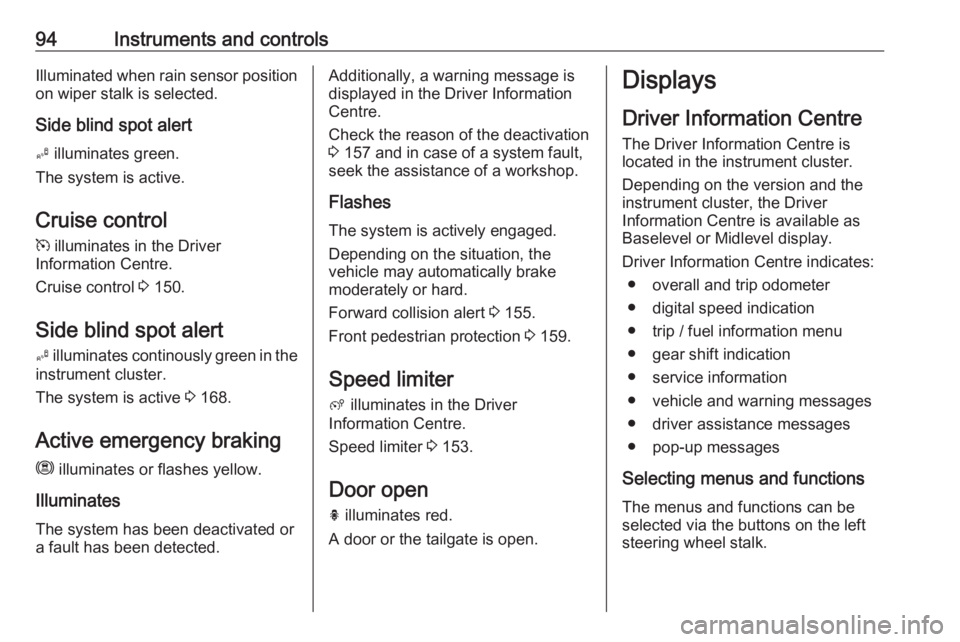
Airbag deactivation
Ó ON illuminates yellow.
The front passenger airbag is
activated.
* OFF illuminates yellow.
The front passenger airbag is
deactivated.
Airbag deactivation 3 56.
Charging system
p illuminates red.
Illuminates when the ignition is
switched on and extinguishes shortly
after the engine starts.
Page 96 of 261
94Instruments and controlsIlluminated when rain sensor positionon wiper stalk is selected.
Side blind spot alert
B illuminates green.
The system is active.
Cruise control
m illuminates in the Driver
Information Centre.
Cruise control 3 150.
Side blind spot alert B illuminates continously green in the
instrument cluster.
The system is active 3 168.
Active emergency braking m illuminates or flashes yellow.
Illuminates
The system has been deactivated or a fault has been detected.Additionally, a warning message is
displayed in the Driver Information
Centre.
Check the reason of the deactivation
3 157 and in case of a system fault,
seek the assistance of a workshop.
Flashes
The system is actively engaged.
Depending on the situation, the
vehicle may automatically brake
moderately or hard.
Forward collision alert 3 155.
Front pedestrian protection 3 159.
Speed limiter
ß illuminates in the Driver
Information Centre.
Speed limiter 3 153.
Door open h illuminates red.
A door or the tailgate is open.Displays
Driver Information Centre The Driver Information Centre is
located in the instrument cluster.
Depending on the version and the
instrument cluster, the Driver
Information Centre is available as
Baselevel or Midlevel display.
Driver Information Centre indicates: ● overall and trip odometer
● digital speed indication
● trip / fuel information menu
● gear shift indication
● service information
● vehicle and warning messages ● driver assistance messages
● pop-up messages
Selecting menus and functions The menus and functions can be
selected via the buttons on the left
steering wheel stalk.
Page 99 of 261
Instruments and controls97Blank page
No trip/fuel information is displayed.
Info Display The Info Display is located in theinstrument panel near the instrument
cluster.
Depending on the vehicle
configuration the vehicle has a
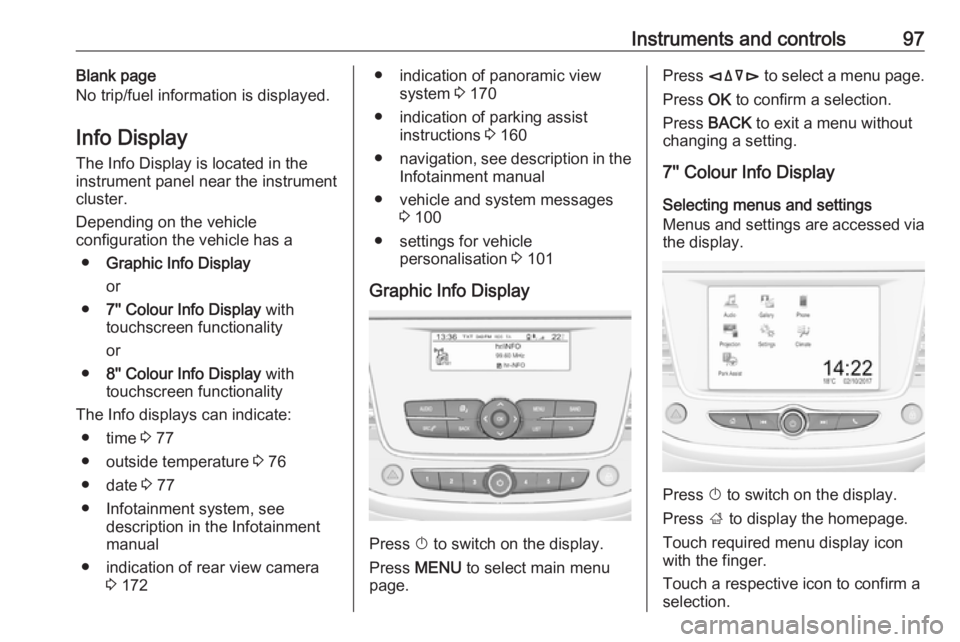
● Graphic Info Display
or
● 7'' Colour Info Display with
touchscreen functionality
or
● 8'' Colour Info Display with
touchscreen functionality
The Info displays can indicate: ● time 3 77
● outside temperature 3 76
● date 3 77
● Infotainment system, see description in the Infotainment
manual
● indication of rear view camera 3 172● indication of panoramic view
system 3 170
● indication of parking assist instructions 3 160
● navigation, see description in the
Infotainment manual
● vehicle and system messages 3 100
● settings for vehicle personalisation 3 101
Graphic Info Display
Press X to switch on the display.
Press MENU to select main menu
page.
Press èäåé to select a menu page.
Press OK to confirm a selection.
Press BACK to exit a menu without
changing a setting.
7'' Colour Info Display
Selecting menus and settings
Menus and settings are accessed via
the display.
Press X to switch on the display.
Press ; to display the homepage.
Touch required menu display icon
with the finger.
Touch a respective icon to confirm a
selection.
Page 100 of 261
98Instruments and controlsTouch 9 to return to the next higher
menu level.
Press ; to return to the homepage.
For further information, see
Infotainment manual.
Vehicle personalisation 3 101.
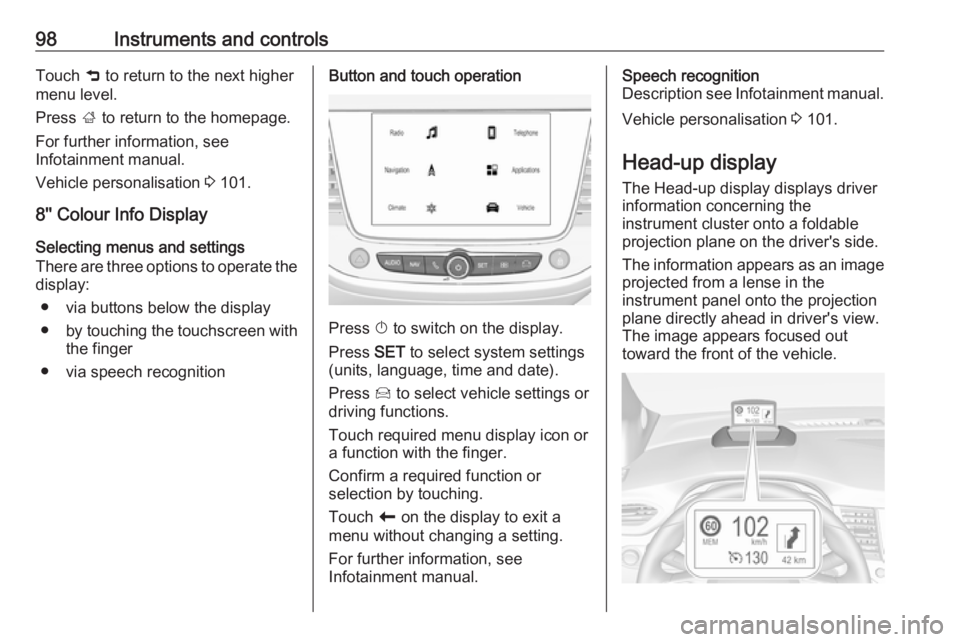
8'' Colour Info Display Selecting menus and settings
There are three options to operate the
display:
● via buttons below the display
● by touching the touchscreen with
the finger
● via speech recognitionButton and touch operation
Press X to switch on the display.
Press SET to select system settings
(units, language, time and date).
Press Í to select vehicle settings or
driving functions.
Touch required menu display icon or a function with the finger.
Confirm a required function or
selection by touching.
Touch r on the display to exit a
menu without changing a setting.
For further information, see
Infotainment manual.
Speech recognition
Description see Infotainment manual.
Vehicle personalisation 3 101.
Head-up display
The Head-up display displays driver
information concerning the
instrument cluster onto a foldable projection plane on the driver's side.
The information appears as an image
projected from a lense in the
instrument panel onto the projection
plane directly ahead in driver's view.
The image appears focused out
toward the front of the vehicle.
Page 159 of 261
Driving and operating157● the sensor in the windscreen isblocked by snow, ice, slush, mud,dirt etc.
● the windscreen is damaged or affected by foreign objects, e.g.
stickers
Active emergency braking
Active emergency braking can help to reduce the damage and injury from
crashes with vehicles, pedestrians and obstacles directly ahead, when a
collision can no longer be avoided
either by manual braking or by
steering. Before the active
emergency braking applies, the driver is warned by the forward collision
alert 3 155 or the front pedestrian
protection alert 3 159.
The feature uses various inputs (e.g.
camera sensor, brake pressure,
vehicle speed) to calculate the
probability of a frontal collision.9 Warning
This system is not intended to
replace the driver responsibility for driving the vehicle and looking
ahead. Its function is limited to
supplemental use only to reduce
the vehicle speed before a
collision.
The system may not react to
animals. After a sudden lane
change, the system needs a
certain time to detect the next
preceding vehicle.
The driver must always be ready
to take action and apply the brakes and steer to avoid collisions.
Operation conditions
Active emergency braking is
equipped with a front camera and
operates in forward gear above
walking speed up to 85 km/h. The
system detects stationary vehicles
only if the speed does not exceed
80 km/h.
Activation
A precondition is that forward collision
alert with front camera system is not
deactivated in the vehicle
personalisation menu 3 101.
Functionality The system includes: ● emergency automatic braking
● forward looking brake assist ● forward collision alert
● front pedestrian protection
Emergency automatic braking
After activation of brake preparation
system and just before the imminent
collision, this function automatically
applies limited braking to reduce the
impact speed of the collision or
prohibit a crash. If active emergency
braking is applied, m flashes in the
instrument cluster. Depending on the
situation, the vehicle may
automatically brake moderately or
hard. This front automatic braking can
only occur if a vehicle 3 155 or a
pedestrian 3 159 ahead is detected.