lock OPEL CROSSLAND X 2018 Manual user
[x] Cancel search | Manufacturer: OPEL, Model Year: 2018, Model line: CROSSLAND X, Model: OPEL CROSSLAND X 2018Pages: 257, PDF Size: 7.81 MB
Page 175 of 257
Driving and operating173Displayed images may be further
or closer than they appear. The
area displayed is limited and
objects that are close to either
edge of the bumper or under the
bumper are not displayed on the
screen.
System limitations
Caution
For optimal operation of the
system, it is important to keep the
lense of the camera in the tailgate between the number plate lightsalways clean. Rinse the lense with water and wipe with a soft cloth.
Do not clean the lense with a
steam-jet or high-pressure jet
cleaner.
The panoramic view system may not
operate properly when:
● The surrounding is dark.
● The sun or the beam of headlights is shining directly into
the camera lenses.
● During nighttime driving.
● Weather limits visibility, such as fog, rain, or snow.
● The camera lenses are blocked by snow, ice, slush, mud, dirt.
● The vehicle is towing a trailer.
● The vehicle had an accident.
● There are extreme temperature changes.
Rear view camera The rear view camera assists the
driver when reversing by displaying a
view of the area behind the vehicle.
The view of the camera is displayed
in the Info-Display.9 Warning
The rear view camera does not
replace driver vision. Note that
objects that are outside the
camera's field of view and the
parking assist sensors, e.g. below
the bumper or underneath the
vehicle, are not displayed.
Do not reverse or park the vehicle
using only the rear view camera.
Always check the surrounding of
the vehicle before driving.
Switching on
Rear view camera is automatically
activated when reverse gear is
engaged.
Functionality
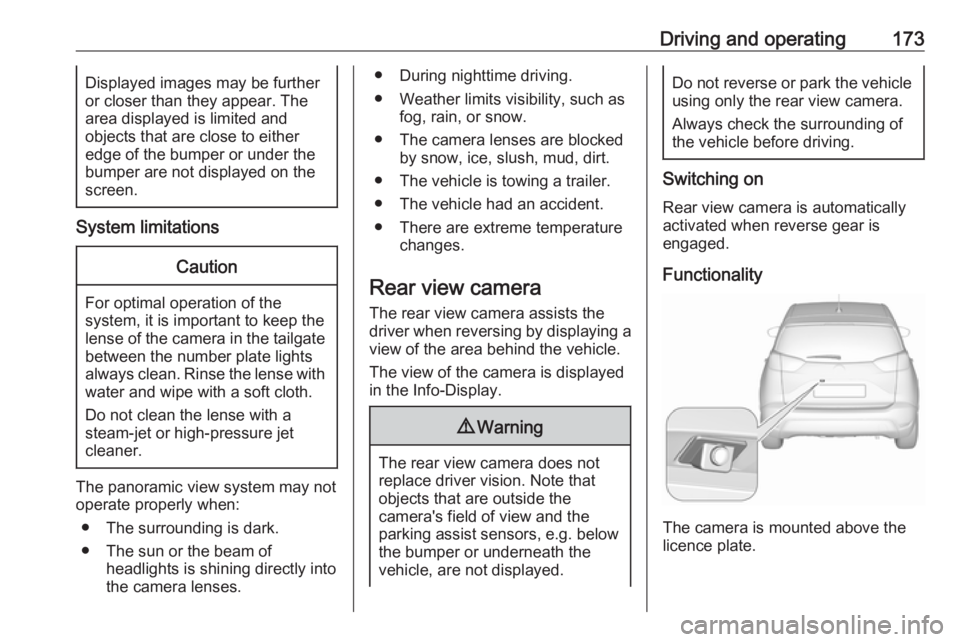
The camera is mounted above the
licence plate.
Page 176 of 257

174Driving and operatingThe area displayed by the camera is
limited. The distance of the image that
appears on the display differs from
the actual distance.
Guide lines
The vertical lines represent the
general direction of the vehicle and
the distance between the vertical
lines corresponds to the width of your vehicle without mirrors. The first
horizontal line represents a distance
of about 30 cm beyond the edge of
vehicle's rear bumper. The upper
horizontal lines represent distances
of about 1 and 2 metres beyond the
edge of your vehicle's rear bumper.
The crossing curves represent the
maximum turning circle.
Deactivation of guide lines
Guide lines can be deactivated in the Info-Display. Select Settings, I
Vehicle , I Collision detection , I Rear
view camera guide lines , I § .
Info-Display 3 98.
Vehicle personalisation 3 103.
Switching off
The camera is switched off when a
certain forward speed is exceeded or
if reverse gear is disengaged for
approx. 10 seconds.
System limitationsThe rear view camera may not
operate properly when:
● The surrounding is dark.
● The beam of headlights is shining
directly into the camera lenses.
● During nighttime driving.
● Weather limits visibility, such as fog, rain, or snow.● The camera lenses are blockedby snow, ice, slush, mud, dirt.Clean the lense, rinse with water,
and wipe with a soft cloth.
● The tailgate will be opened.
● The vehicle is towing an electrically connected trailer.
● The vehicle had a rear end accident.
● There are extreme temperature changes.
Lane departure warning
The lane departure warning system
observes the lane markings between
which the vehicle is driving via a front camera. The system detects lane
changes and warns the driver in the
event of an unintended lane change
via visual and acoustic signals.
Criteria for the detection of an
unintended lane change are:
● No operation of turn signals.
● No brake pedal operation.
● No active accelerator operation or speeding-up.
Page 177 of 257

Driving and operating175If the driver is active, no warning will
be issued.
Activation
The lane departure warning system is activated by pressing ½. The system
is switched on when the LED in the
button is not illuminated.
The system is only operable at
vehicle speeds above 60 km/h and if
lane markings are available.
When the system recognises an
unintended lane change, the control
indicator ) flashes yellow.
Simultaneously a chime sound is
activated.
Deactivation
The system is deactivated by
pressing ½, the LED in the button
illuminates.
At speeds below 60 km/h the system
is inoperable.
Fault
In the event of a fault, F
appears in the instrument panel,
accompanied by a display message.
Contact a dealer or a qualified
workshop to have the system
checked.
The lane departure warning system
may not operate properly when:
● The windscreen is not clean.
● There are adverse environmental
conditions like heavy rain, snow,
direct sunlight or shadows.
The system can not operate when no
lane marking is detected.
System limitations The system performance may not
operate properly when:
● Vehicle speed is below 60 km/h.
● Driving on winding or hilly roads.
● During nighttime driving.
● Weather limits visibility, such as fog, rain, or snow.
● The sensor in the windscreen is blocked by snow, ice, slush, mud,dirt, windscreen damage or
affected by foreign items, e.g.
stickers.
● The sun is shining directly into the camera lens.
● Close vehicles ahead.
● Banked roads.
● Road edges.
● Roads with poor lane markings.
● Sudden lighting changes.
Page 182 of 257
180Driving and operating
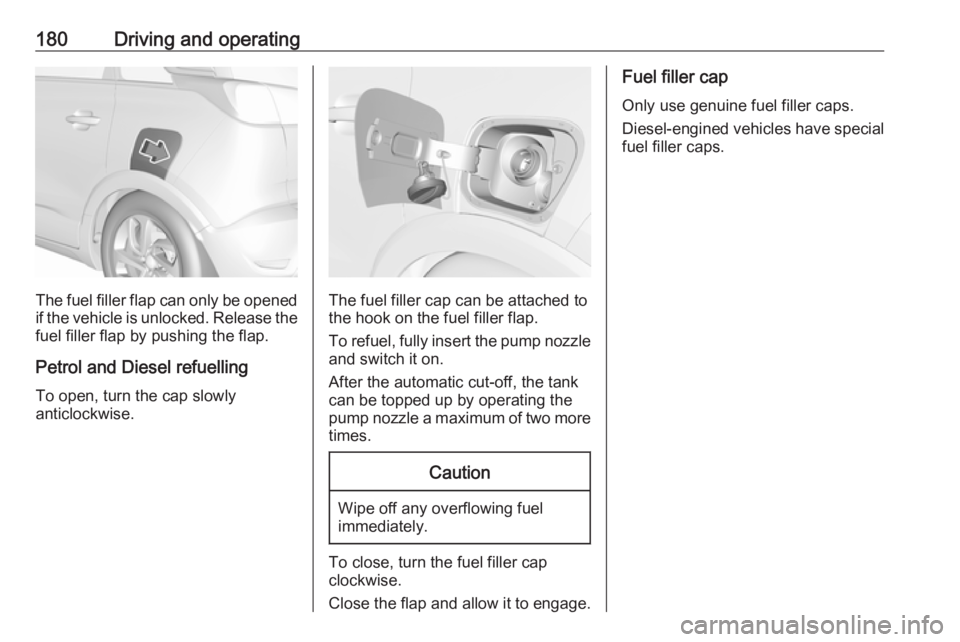
The fuel filler flap can only be opened
if the vehicle is unlocked. Release the
fuel filler flap by pushing the flap.
Petrol and Diesel refuelling To open, turn the cap slowly
anticlockwise.The fuel filler cap can be attached to the hook on the fuel filler flap.
To refuel, fully insert the pump nozzle
and switch it on.
After the automatic cut-off, the tank can be topped up by operating the
pump nozzle a maximum of two more
times.
Caution
Wipe off any overflowing fuel
immediately.
To close, turn the fuel filler cap
clockwise.
Close the flap and allow it to engage.
Fuel filler cap
Only use genuine fuel filler caps.
Diesel-engined vehicles have special fuel filler caps.
Page 185 of 257

Driving and operating183Swivel the connecting socket
downwards. Remove the sealing plug
from the opening for the coupling ball
bar and stow it.
Checking the tensioning of the
coupling ball bar
● Red marking on rotary knob must
point towards green marking on
coupling ball bar.
● The gap between the rotary knob
and the coupling ball bar must be approx. 6 mm.
● The key must be in position c.
Otherwise, the coupling ball bar must be tensioned before being inserted:● Unlock coupling ball bar by
turning key to position c.
● Pull out rotary knob and turn
clockwise as far as it will go.
Inserting the coupling ball bar
Insert the tensioned coupling ball bar
in the opening and push firmly
upwards until it audibly engages.
The rotary handle snaps back into its
original position resting against the
coupling ball bar without a gap.
9 Warning
Do not touch rotary handle during
insertion.
Lock the coupling ball bar by turning
the key to position e. Remove the key
and close the protective flap.
Page 186 of 257

184Driving and operatingEye for break-away stopping cable
Attach breakaway stopping cable to
eye.
Check that the coupling ball bar is correctly installed
● Green marking on rotary knob must point towards green
marking on coupling ball bar.
● There must be no gap between the rotary handle and the
coupling ball bar.
● The coupling ball bar must be firmly engaged in the opening.
● The coupling ball bar must be locked and the key removed.
9Warning
Towing a trailer is permitted only
when a coupling ball bar is fitted correctly. If the coupling ball bardoes not engage correctly, seekthe assistance of a workshop.
Dismounting the coupling ball bar
Open the protective flap and turn the
key to position c to unlock the
coupling ball bar.
Pull out rotary handle and turn
clockwise as far as it will go. Pull out coupling ball bar downwards.
Insert sealing plug in opening.
Swivel the connecting socket
upwards.
Stow the coupling ball bar in the bag
and secure by fixing the strap through the rear right lashing eye. Wrap
around twice and tighten the strap to
secure the bag.
Page 188 of 257
186Vehicle careCaution
When transporting the vehicle on
a train or on a recovery vehicle, the
mud flaps might be damaged.
Vehicle storage
Storage for a long period of time
If the vehicle is to be stored for several months:
● Wash and wax the vehicle.
● Have the wax in the engine compartment and underbody
checked.
● Clean and preserve the rubber seals.
● Fill up fuel tank completely.
● Change the engine oil.
● Drain the washer fluid reservoir.
● Check the coolant antifreeze and
corrosion protection.
● Adjust tyre pressure to the value specified for full load.
● Park the vehicle in a dry, wellventilated place. Engage first or
reverse gear or set selector lever
to P. Prevent the vehicle from
rolling.
● Do not apply the parking brake.
● Open the bonnet, close all doors and lock the vehicle.
● Disconnect the clamp from the negative terminal of the vehicle
battery. Beware that all systems
are not functional, e.g. anti-theft
alarm system.
Putting back into operation
When the vehicle is to be put back into
operation:
● Connect the clamp to the negative terminal of the vehicle
battery. Activate the electronics
of the power windows.
● Check tyre pressure.
● Fill up the washer fluid reservoir.
● Check the engine oil level.
● Check the coolant level.
● Fit the number plate if necessary.End-of-life vehicle recovery
Information on end-of-life vehicle
recovery centres and the recycling of
end-of-life vehicles is available on our website, where legally required. Only
entrust this work to an authorised
recycling centre.
Page 195 of 257

Vehicle care193
High beam, turn signal light (1)
Low beam ( 2)
High beam
1. Rotate the cap (1) anticlockwise and remove it.
2. Withdraw the upper bulb holderfrom the reflector housing.
3. Remove the bulb from the plugconnector by pulling.
4. Replace the bulb and connect it to
the plug connector.
5. Insert and push the bulb holder into the reflector housing by
setting the lug into position.
6. Fit the cap and rotate clockwise.
Turn signal light
1. Rotate the cap (1) anticlockwise and remove it.
Page 196 of 257

194Vehicle care
2. Rotate the lower bulb holderanticlockwise to disengage.
Withdraw the bulb holder from the
reflector housing.
3. Press latch and remove the bulb from the bulb holder.
4. Replace the bulb and attach it to the bulb holder.
5. Insert the bulb holder into the reflector housing and rotate
clockwise.
6. Fit the cap and rotate clockwise.
Low beam
1. Rotate the cap (2) anticlockwise and remove it.
2.Lift the retainer, then pull the plug
connector backwards.
3. Fold down the retainer and remove the bulb from the reflectorhousing.
Page 197 of 257
Vehicle care1954. Replace the bulb and push it intothe reflector housing by setting
the lug into position.
5. Fold up the retainer and hold in position.
6. Attach the plug connector to the bulb and fix it with the retainer.
7. Fit the cap and rotate clockwise.
Sidelight/Daytime running light In case of defective LEDs, have them
replaced by a workshop.
LED headlights
Headlights for low and high beam,
sidelights, daytime running lights and turn signal lights are designed as
LEDs and can not be changed.
Have lights repaired by a workshop in
case of failure.
Fog lights
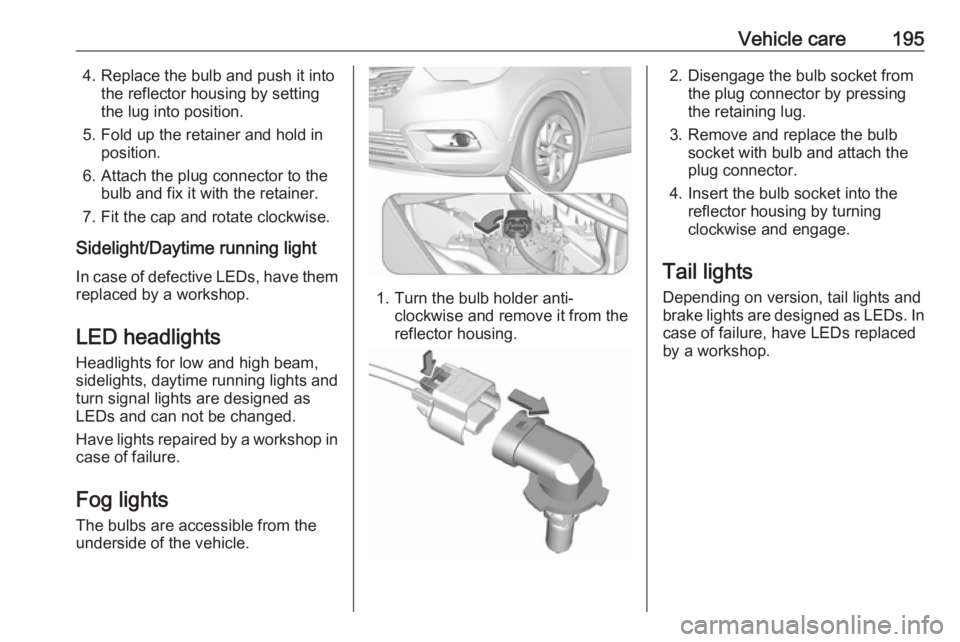
The bulbs are accessible from the
underside of the vehicle.
1. Turn the bulb holder anti- clockwise and remove it from the
reflector housing.
2. Disengage the bulb socket from the plug connector by pressing
the retaining lug.
3. Remove and replace the bulb socket with bulb and attach the
plug connector.
4. Insert the bulb socket into the reflector housing by turning
clockwise and engage.
Tail lights
Depending on version, tail lights and
brake lights are designed as LEDs. In case of failure, have LEDs replaced
by a workshop.