differential OPEL FRONTERA 1998 Workshop Manual
[x] Cancel search | Manufacturer: OPEL, Model Year: 1998, Model line: FRONTERA, Model: OPEL FRONTERA 1998Pages: 6000, PDF Size: 97 MB
Page 689 of 6000
4C–23 DRIVE SHAFT SYSTEM
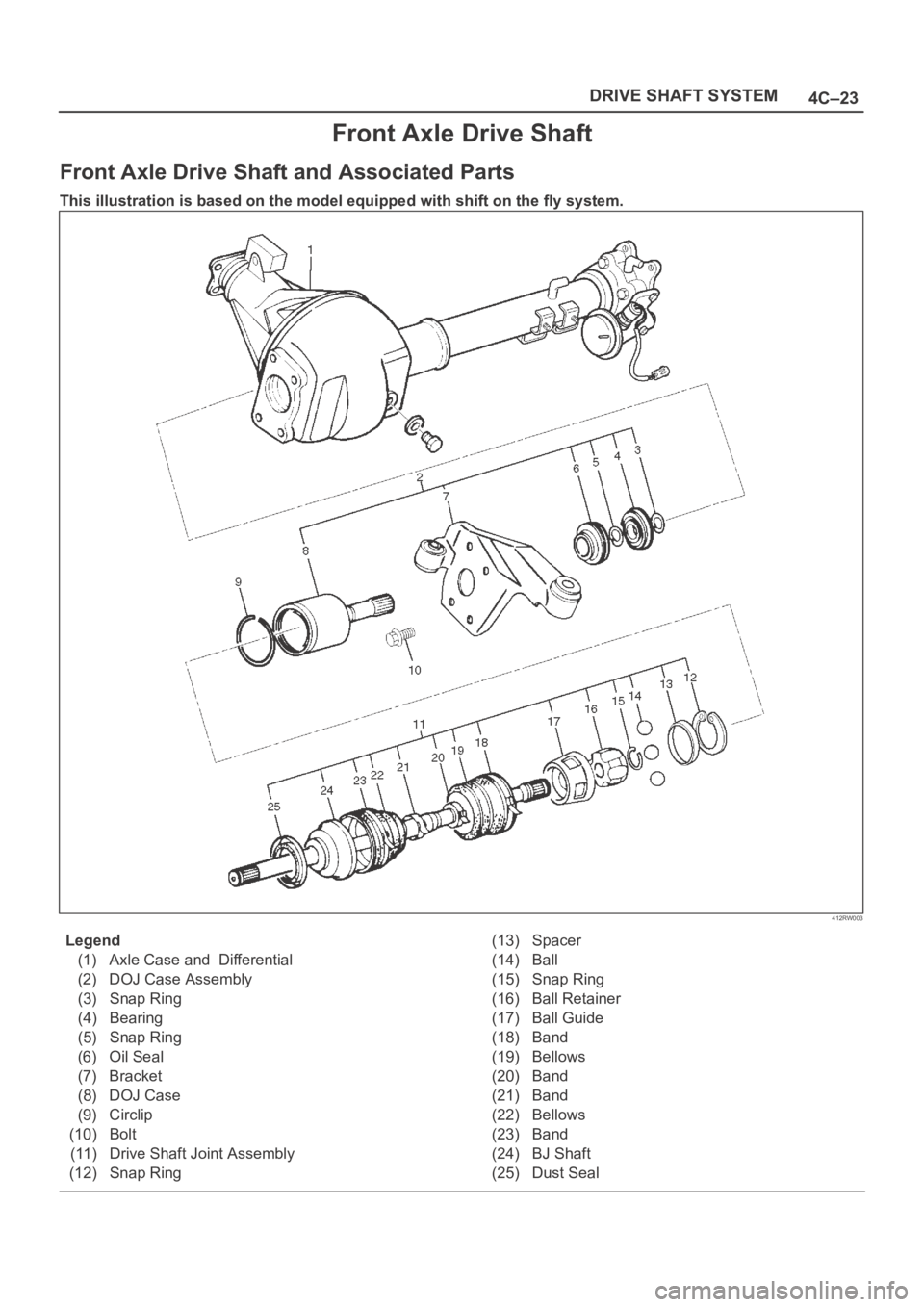
Front Axle Drive Shaft
Front Axle Drive Shaft and Associated Parts
This illustration is based on the model equipped with shift on the fly system.
412RW003
Legend
(1) Axle Case and Differential
(2) DOJ Case Assembly
(3) Snap Ring
(4) Bearing
(5) Snap Ring
(6) Oil Seal
(7) Bracket
(8) DOJ Case
(9) Circlip
(10) Bolt
(11) Drive Shaft Joint Assembly
(12) Snap Ring(13) Spacer
(14) Ball
(15) Snap Ring
(16) Ball Retainer
(17) Ball Guide
(18) Band
(19) Bellows
(20) Band
(21) Band
(22) Bellows
(23) Band
(24) BJ Shaft
(25) Dust Seal
Page 699 of 6000

4C–33 DRIVE SHAFT SYSTEM
412RS037
Reassembly
1. Install the new oil seal which has been immersed in
differential gear oil, by using an oil seal installer
5–8840–2407–0 and grip 5–8840–0007–0.
412RS043
2. Force a new needle bearing into inner shaft by using a
installer 5–8840–2408–0 and grip 5–8840–0007–0.
412RS051
3. Place a new snap ring(internal) in inner shaft.
Force a new inner shaft bearing into the inner shaft by
using a installer 5–8840–2197–0 and press.
412RS044
4. Install snap ring(external).
NOTE: Be careful not to damage the inner shaft.
5. Clean the housing contact surface of the front axle
case and insert inner shaft assembly into the front
axle case.
Page 700 of 6000

4C–34
DRIVE SHAFT SYSTEM
NOTE: Be careful not to damage seal.
6. Install snap ring (internal) in the groove of front axle
case.
NOTE: Be sure to install the snap ring properly.
412RW017
7. Apply differential gear oil to clutch gear, then install
clutch gear.
8. Apply differential gear oil to sleeve, then install
sleeve.
9. Clean contact surface with the front axle and actuator
mounting surface. Apply liquid gasket to the contact
surface on the front axle case, then install in the
housing.
412RW023
10. Tighten bolts to specified torque.
Torque: 116Nꞏm (11.8 kgꞏm/85 lb ft)11. Clean the actuator contact surface with the housing
then Install and tighten shift position switch to
specified torque.
Torque: 39Nꞏm (4.0 kgꞏm/29 lb ft)
12. Apply liquid gasket to the contact surface on the
actuator side.
412RW012
13. Align shift arm with the groove of sleeve and install the
actuator.
14. Tighten bolts to specified torque.
Torque: 13Nꞏm (1.3 kgꞏm/113 lb in)
15. Install front axle drive shaft and mounting bracket.
Tighten fitting bolts to specified torque.
Torque: 116Nꞏm (11.8 kgꞏm/85 lb ft)
16. Pour specified amount of differential gear oil to filler
plug.
Front Differential
Oil Capacity: 1.4lit (1.23 Imp qt/1.48 US qt)
Actuator Housing
Oil Capacity: 0.12lit (0.10 Imp qt/0.13 US qt)
17. Install filler plug through gasket and tighten to
specified torque.
To r q u e : 7 8 N ꞏm ( 5 8 l b f t )
Page 701 of 6000

4C–35 DRIVE SHAFT SYSTEM
Main Data and Specifications
General Specifications
Front drive axle oil capacity1.4 liter (1.23 Imp qt/1.48 US qt)(Differential)
0.12 liter (0.10 Imp qt/0.13 US qt)(Actuator Housing:Shift on the fly)
Type of lubricantGL–5 (Multi grade type) Refer to chart in General Information
Axle shaft typeConstant velocity joint(Birfield joint type and double offset joint)
Torque Specifications
E04RW020
Page 1070 of 6000
6C–3
ENGINE FUEL
Adhere to all Notices and Cautions.
All gasoline engines are designed to use only unleaded
gasoline. Unleaded gasoline must be used for proper
emission control system operation.
Its use will also minimize spark plug fouling and extend
engine oil life. Using leaded gasoline can damage the
emission control system and could result in loss of
emission warranty coverage.
All cars are equipped with an Evaporative Emission
Control System. The purpose of the system is to minimize
the escape of fuel vapors to the atmosphere.
Fuel Metering
The Engine Control Module (ECM) is in complete control
of this fuel delivery system during normal driving
conditions.
The intake manifold function, like that of a diesel, is used
only to let air into the engine. The fuel is injected by
separate injectors that are mounted over the intake
manifold.
The Manifold Absolute Pressure (MAP) sensor measures
the changes in the intake manifold pressure which result
from engine load and speed changes, which the MAP
sensor converts to a voltage output.
This sensor generates the voltage to change
corresponding to the flow of the air drawn into the engine.
The changing voltage is transformed into an electric
signal and provided to the ECM.
With receipt of the signals sent from the MAP sensor,
Intake Air Temperature sensor and others, the ECM
determines an appropriate fuel injection pulse width
feeding such information to the fuel injector valves to
effect an appropriate air/fuel ratio.
The Multiport Fuel Injection system utilizes an injection
system where the injectors turn on at every crankshaft
re vol u tion . Th e EC M con tro ls t he in je cto r on tim e so t ha t
the correct amount of fuel is metered depending on
driving conditions.
Two interchangeable “O” rings are used on the injector
that must be replaced when the injectors are removed.
The fuel rail is attached to the top of the intake manifold
and supplies fuel to all the injectors.
Fuel is recirculated through the rail continually while the
engine is running. This removes air and vapors from the
fuel as well as keeping the fuel cool during hot weather
operation.
The fuel pressure control valve that is mounted on the fuel
rail maintains a pressure differential across the injectors
under all operating conditions. It is accomplished by
controlling the amount of fuel that is recirculated back to
the fuel tank based on engine demand.
See Section “Driveability and Emission” for more
information and diagnosis.
Page 3505 of 6000
RESTRAINT CONTROL SYSTEM 9J1–18
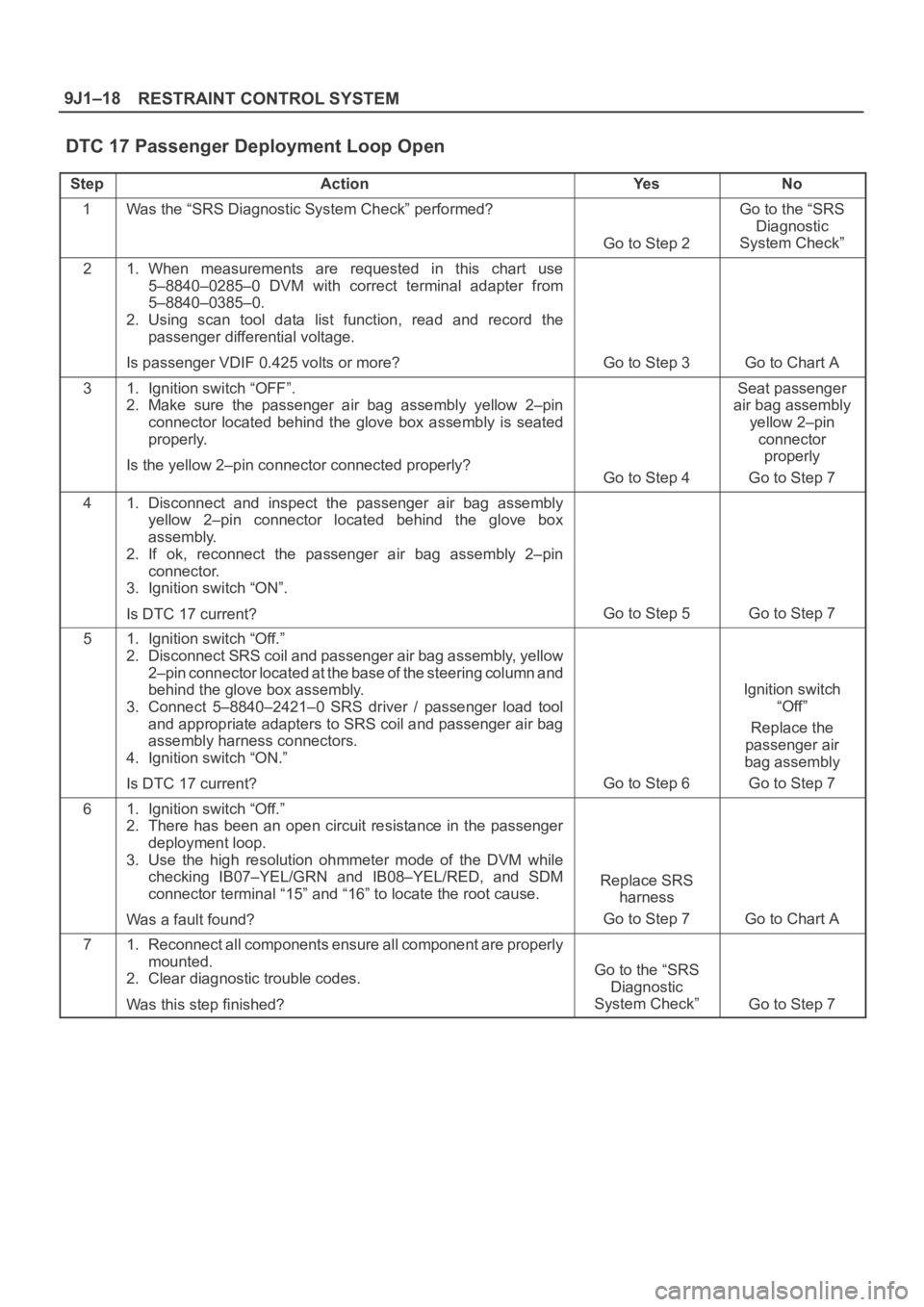
DTC 17 Passenger Deployment Loop Open
StepActionYe sNo
1Was the “SRS Diagnostic System Check” performed?
Go to Step 2
Go to the “SRS
Diagnostic
System Check”
21. When measurements are requested in this chart use
5–8840–0285–0 DVM with correct terminal adapter from
5–8840–0385–0.
2. Using scan tool data list function, read and record the
passenger differential voltage.
Is passenger VDIF 0.425 volts or more?
Go to Step 3Go to Chart A
31. Ignition switch “OFF”.
2. Make sure the passenger air bag assembly yellow 2–pin
connector located behind the glove box assembly is seated
properly.
Is the yellow 2–pin connector connected properly?
Go to Step 4
Seat passenger
air bag assembly
yellow 2–pin
connector
properly
Go to Step 7
41. Disconnect and inspect the passenger air bag assembly
yellow 2–pin connector located behind the glove box
assembly.
2. If ok, reconnect the passenger air bag assembly 2–pin
connector.
3. Ignition switch “ON”.
Is DTC 17 current?
Go to Step 5Go to Step 7
51. Ignition switch “Off.”
2. Disconnect SRS coil and passenger air bag assembly, yellow
2–pin connector located at the base of the steering column and
behind the glove box assembly.
3. Connect 5–8840–2421–0 SRS driver / passenger load tool
and appropriate adapters to SRS coil and passenger air bag
assembly harness connectors.
4. Ignition switch “ON.”
Is DTC 17 current?
Go to Step 6
Ignition switch
“Off”
Replace the
passenger air
bag assembly
Go to Step 7
61. Ignition switch “Off.”
2. There has been an open circuit resistance in the passenger
deployment loop.
3. Use the high resolution ohmmeter mode of the DVM while
checking IB07–YEL/GRN and IB08–YEL/RED, and SDM
connector terminal “15” and “16” to locate the root cause.
Was a fault found?
Replace SRS
harness
Go to Step 7
Go to Chart A
71. Reconnect all components ensure all component are properly
mounted.
2. Clear diagnostic trouble codes.
Was this step finished?
Go to the “SRS
Diagnostic
System Check”
Go to Step 7
Page 3521 of 6000
RESTRAINT CONTROL SYSTEM 9J1–34
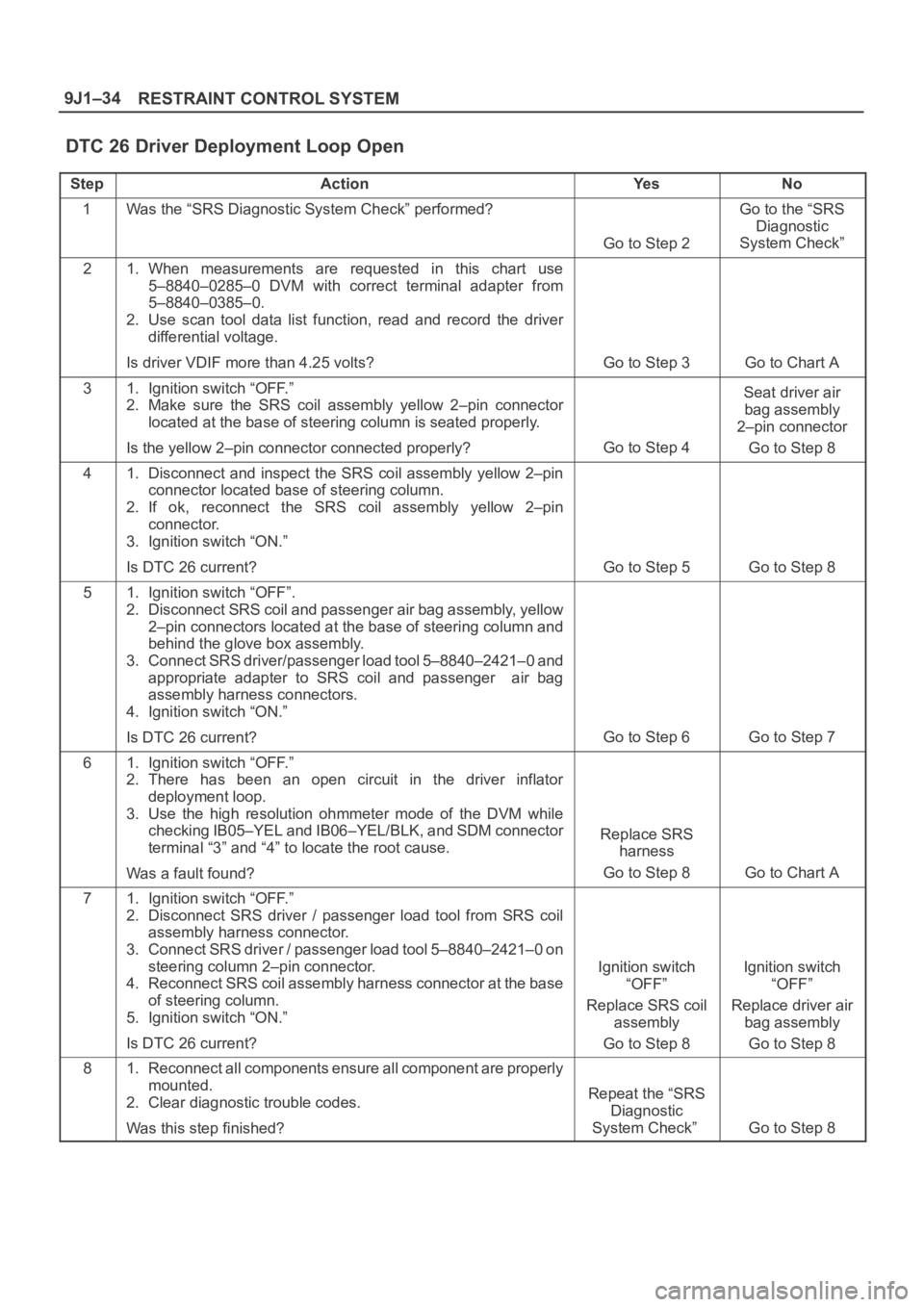
DTC 26 Driver Deployment Loop Open
StepActionYe sNo
1Was the “SRS Diagnostic System Check” performed?
Go to Step 2
Go to the “SRS
Diagnostic
System Check”
21. When measurements are requested in this chart use
5–8840–0285–0 DVM with correct terminal adapter from
5–8840–0385–0.
2. Use scan tool data list function, read and record the driver
differential voltage.
Is driver VDIF more than 4.25 volts?
Go to Step 3Go to Chart A
31. Ignition switch “OFF.”
2. Make sure the SRS coil assembly yellow 2–pin connector
located at the base of steering column is seated properly.
Is the yellow 2–pin connector connected properly?
Go to Step 4
Seat driver air
bag assembly
2–pin connector
Go to Step 8
41. Disconnect and inspect the SRS coil assembly yellow 2–pin
connector located base of steering column.
2. If ok, reconnect the SRS coil assembly yellow 2–pin
connector.
3. Ignition switch “ON.”
Is DTC 26 current?
Go to Step 5Go to Step 8
51. Ignition switch “OFF”.
2. Disconnect SRS coil and passenger air bag assembly, yellow
2–pin connectors located at the base of steering column and
behind the glove box assembly.
3. Connect SRS driver/passenger load tool 5–8840–2421–0 and
appropriate adapter to SRS coil and passenger air bag
assembly harness connectors.
4. Ignition switch “ON.”
Is DTC 26 current?
Go to Step 6Go to Step 7
61. Ignition switch “OFF.”
2. There has been an open circuit in the driver inflator
deployment loop.
3. Use the high resolution ohmmeter mode of the DVM while
checking IB05–YEL and IB06–YEL/BLK, and SDM connector
terminal “3” and “4” to locate the root cause.
Was a fault found?
Replace SRS
harness
Go to Step 8
Go to Chart A
71. Ignition switch “OFF.”
2. Disconnect SRS driver / passenger load tool from SRS coil
assembly harness connector.
3. Connect SRS driver / passenger load tool 5–8840–2421–0 on
steering column 2–pin connector.
4. Reconnect SRS coil assembly harness connector at the base
of steering column.
5. Ignition switch “ON.”
Is DTC 26 current?
Ignition switch
“OFF”
Replace SRS coil
assembly
Go to Step 8Ignition switch
“OFF”
Replace driver air
bag assembly
Go to Step 8
81. Reconnect all components ensure all component are properly
mounted.
2. Clear diagnostic trouble codes.
Was this step finished?
Repeat the “SRS
Diagnostic
System Check”
Go to Step 8
Page 3539 of 6000

RESTRAINT CONTROL SYSTEM 9J1–52
DTC 34 Passenger Pretensioner Loop Open
StepActionYe sNo
1Was the “SRS Diagnostic System Check” performed?
Go to Step 2
Go to the “SRS
Diagnostic
System Check”
21. When measurements are requested in this chart use
5–8840–0285–0 DVM with correct terminal adapter from
5–8840–0385–0.
2. Using scan tool data list function, read and record the
passenger pretensioner differential voltage.
Is passenger pretensioner VDIF 0.425 volts or more?
Go to Step 3Go to Chart A
31. Ignition switch “OFF”.
2. Make sure the passenger pretensioner assembly yellow 2–pin
connector located at the base of the passenger seat.
Is the yellow 2–pin connector connected properly?
Go to Step 4
Seat passenger
pretensioner
assembly yellow
2–pin connector
properly
Go to Step 7
41. Disconnect and inspect the passenger pretensioner assembly
yellow 2–pin connector located at the base of the passenger
seat.
2. If ok, reconnect the passenger pretensioner assembly 2–pin
connector.
3. Ignition switch “ON”.
Is DTC 34 current?
Go to Step 5Go to Step 7
51. Ignition switch “Off.”
2. Disconnect the passenger pretensioner assembly, yellow
2–pin connector located at the base of the passenger seat.
3. Connect 5–8840–2421–0 SRS driver / passenger load tool
and appropriate adapters to passenger pretensioner
assembly harness connectors.
4. Ignition switch “ON.”
Is DTC 34 current?
Go to Step 6
Ignition switch
“Off”
Replace the
passenger
pretensioner
assembly
Go to Step 7
61. Ignition switch “Off.”
2. There has been an open circuit resistance in the passenger
pretensioner loop.
3. Use the high resolution ohmmeter mode of the DVM while
checking IB15–BLU/BLK and IB16–BLU/ORG, and SDM
connector terminal “9” and “10” to locate the root cause.
Was a fault found?
Replace SRS
harness or repair
chassis harness
Go to Step 7
Go to Chart A
71. Reconnect all components ensure all component are properly
mounted.
2. Clear diagnostic trouble codes.
Was this step finished?
Go to the “SRS
Diagnostic
System Check”
Go to Step 7
Page 3545 of 6000

RESTRAINT CONTROL SYSTEM 9J1–58
DTC 44 Driver Pretensioner Loop Open
StepActionYe sNo
1Was the “SRS Diagnostic System Check” performed?
Go to Step 2
Go to the “SRS
Diagnostic
System Check”
21. When measurements are requested in this chart use
5–8840–0285–0 DVM with correct terminal adapter from
5–8840–0385–0.
2. Use scan tool data list function, read and record the driver
pretensioner circuit differential voltage.
Is driver pretensioner VDIF more than 4.25 volts?
Go to Step 3Go to Chart A
31. Ignition switch “OFF.”
2. Make sure the driver pretensioner assembly yellow 2–pin
connector located at the base of the driver seat is seated
properly.
Is the yellow 2–pin connector connected properly?
Go to Step 4
Seat driver
pretensioner
assembly 2–pin
connector
Go to Step 7
41. Disconnect and inspect the driver pretensioner assembly
yellow 2–pin connector located base of the driver seat.
2. If ok, reconnect the driver pretensioner assembly yellow 2–pin
connector.
3. Ignition switch “ON.”
Is DTC 44 current?
Go to Step 5Go to Step 7
51. Ignition switch “OFF”.
2. Disconnect driver pretensioner assembly, yellow 2–pin
connectors located at the base of the driver seat.
3. Connect SRS driver/passenger load tool 5–8840–2421–0 and
appropriate adapter to driver pretensioner assembly harness
connectors.
4. Ignition switch “ON.”
Is DTC 44 current?
Go to Step 6Go to Step 7
61. Ignition switch “OFF.”
2. There has been an open circuit in the driver pretensioner loop.
3. Use the high resolution ohmmeter mode of the DVM while
checking IB13–BLU/RED and IB14–BLU/YEL, and SDM
connector terminal “21” and “22” to locate the root cause.
Was a fault found?
Replace SRS
harness or repair
chassis harness
Go to Step 7
Go to Chart A
71. Reconnect all components ensure all component are properly
mounted.
2. Clear diagnostic trouble codes.
Was this step finished?
Repeat the “SRS
Diagnostic
System Check”
Go to Step 7
Page 3564 of 6000

PAGE BACK PAGE NEXT
THIS MALUAL INCLUDES THE FOLLOWING SECTIONS:
SECTION No. CONTRNTS
4A1 DIFFERENTIAL (FRONT)
4A2A DIFFERENTIAL (Rear 220mm)
4A2B DIFFERENTIAL (REAR 244mm)
4B1 DRIVELINE CONTROL SYSTEM (SHIFT ON
THE FLY)
4B2 DRIVELINE CONTROL SYSTEM (TOD)
4C DRIVE SHAFT SYSTEM
4D1 TRANSFER CASE (STANDARD TYPE)
4D2 TRANSFER CASE (TOD)
HOME
4A1
4A2A
4A2B
4B1
4B2
4C
4D1
4D2