clutch OPEL FRONTERA 1998 Owner's Manual
[x] Cancel search | Manufacturer: OPEL, Model Year: 1998, Model line: FRONTERA, Model: OPEL FRONTERA 1998Pages: 6000, PDF Size: 97 MB
Page 280 of 6000

6. Remove any excess oil resulting from installing the
new seal parts from the shaft and inside the
compressor neck.
7. Install the clutch plate and hub assembly as
described previously.8. Reinstall compressor belt and tighten bracket.
9. Evacuate and charge the refrigerant system.
COMPRESSOR PRESSURE RELIEF VALVE
Removal
1. Recover the refrigerant using Refrigerant Recovery
System.
2. Remove old pressure relief valve.
Installation
1. Clean valve seat area on rear head.2. Lubricate O-ring of new pressure relief valve and
O-ring assembly with new 525 viscosity refrigerant
oil. Install new valve and torque in place, 9.0 Nꞏm
(6.1 ft lbs)
3. Evacuate and recharge the system.
4. Leak test system.
COMPRESSOR OIL
Compressor Oil Check
The oil used to lubricate the compressor is circulating
with the refrigerant.
Whenever replacing any component of the system or a
large amount of gas leakage occurs, add oil to maintain
the original amount of oil.
Checking and Adjusting Oil Quantity for
Used Compressor
1. Perform oil return operation. Refer to Oil Return
Operation in this section.
2. Discharge and recover refrigerant and remove the
compressor.
3. Drain the compressor oil and measure the extracted
oil with a measuring cylinder.
4. If the amount of oil drained is much less than 90 cc
(3.0 fl. oz.), some refrigerant may have leaked out.
Conduct a leak tests on the connections of each
system, and if necessary, repair or replace faulty
parts.
5. Check the compressor oil contamination. (Refer to
Contamination of Compressor Oil in this section.)
6. Adjust the oil level following the next procedure
below.7. Install the compressor, then evacuate, charge and
perform the oil return operation.
8. Check system operation.
When it is impossible to preform oil return
operation, the compressor oil should be checked in
the following order:
1. Discharge and recover refrigerant and remove the
compressor.
2. Drain the compressor oil and measure the extracted
oil with a measuring cylinder.
3. Check the oil for contamination.
4. If more than 90 cc (3.0 fl. oz.) of oil is extracted from
the compressor, supply the same amount of oil to
the compressor to be installed. If the amount of oil
extracted is less than 90 cc (3.0 fl. oz.), recheck the
compressor oil in the following order:
5. Supply 90 cc (3.0 fl. oz.) of oil to the compressor
and install it onto the vehicle.
6. Evacuate and recharge with the proper amount of
refrigerant.
7. Perform the oil return operation.
8. Remove the compressor and recheck the amount of
oil.
9. Adjust the compressor oil, if necessary.
Checking and Adjusting for Compressor
Replacement
The oil is not charged in compressor (service parts). So
it is necessary to charge the proper amount of oil to the
new compressor. (Oil Capacity)
Capacity total in system 150 cc (5.0 fl.oz)
Compressor (Service 150 cc (5.0 fl.oz)
parts) charging amount
(Collected Amount) (Charging Amount)
more than 90 cc same as collected
(3.0 fl.oz) amount
less than 90 cc (3.0 fl.oz) 90 cc (3.0 fl.oz)
(Collected Amount) (Charging Amount)
more than 90 cc same as collected
(3.0 fl.oz) amount
less than 90 cc (3.0 fl.oz) 90 cc (3.0 fl.oz)
Page 281 of 6000

1. Perform oil return operation.
2. Discharge and recover the refrigerant and remove
the compressor.
3. Drain the compressor oil and measure the extracted
oil.
4. Check the compressor oil for contamination.
5. Adjust the oil level as required.
6. Evacuate, charge and perform the oil return
operation.
7. Check the system operation.
Contamination of Compressor Oil
Unlike engine oil, no cleaning agent is added to the
compressor oil. Even if the compressor runs for a long
period of time (approximately one season), the oil never
becomes contaminated as long as there is nothing
wrong with the compressor or its method of use.
Inspect the extracted oil for any of the following
conditions:
The capacity of the oil has increased.
The oil has changed to red.
Foreign substances, metal powder, etc., are present
in the oil.
If any of these conditions exists, the compressor
oil is contaminated. Whenever contaminated
compressor oil is discovered, the receiver/drier
must be replaced.
Oil Return Operation
There is close affinity between the oil and the
refrigerant. During normal operation, part of the oil
recirculates with the refrigerant in the system. When
checking the amount of oil in the system, or replacing
any component of the system, the compressor must be
run in advance for oil return operation. The procedure
is as follows:
1. Open all the doors and the engine hood.
2. Start the engine and air conditioning switch to "ON"
and set the fan control knob at its highest position.
3. Run the compressor for more than 20 minutes
between 800 and 1,000 rpm in order to operate the
system.
4. Stop the engine.
Replacement of Component Parts
When replacing the system component parts, supply
the following amount of oil to the component parts to be
installed.
Compressor Leak Testing (External and
Internal)
Bench-Check Procedure
1. Install test plate J-39893 on rear head of compressor.
2. Using Refrigerant Recovery System, attach center
hose of manifold gage set on charging station to a
refrigerant drum standing in an upright drum.
3. Connect charging station high and low pressure
lines to corresponding fittings on test plate J-39893.
Suction port (low-side) of compressor has large
internal opening. Discharge port (high-side) has
smaller internal opening into compressor and
deeper recess.
4. Open low pressure control, high pressure control
and refrigerant control on charging station to allow
refrigerant vapor to flow into compressor.
5. Using a leak detector, check for leaks at pressure
relief valve, rear head switch location, compressor
front and rear head seals, center cylinder seal,
through bolt head gaskets and compressor shaft
seal. After checking, shut off low pressure control
and high-pressure control on charging station.
6. If an external leak is present, perform the necessary
corrective measures and recheck for leaks to make
certain the leak has been connected.
7. Recover the refrigerant.
8. Disconnect both hoses from the test plate J-39893.
9. Add 90 ml (3 oz.) new PAG lubricant to the
compressor assembly. Rotate the complete
compressor assembly (not the crankshaft or drive
plate hub) slowly several turns to distribute oil to all
cylinder and piston areas.
10. Install a M9
1.25 threaded nut on the compressor
crankshaft if the drive plate and clutch assembly are
not installed.
11. Using a box-end wrench or socket and handle,
rotate the compressor crankshaft or clutch drive
plate on the crankshaft several turns to insure
piston assembly to cylinder wall lubrication.
12. Using Refrigerant Recovery System, connect the
charging station high-pressure line to the test plate
J-39893 high-side connector.
13. Using Refrigerant Recovery System, connect the
charging station low-pressure line to the low
pressure port of the test plate J-39893. Oil will drain
out of the compressor suction port if the compressor
is positioned with the suction port downward. (Component parts to be (Amount of Oil)
installed)
Evaporator 50 cc (1.7 fl. oz.)
Condenser 30 cc (1.0 fl. oz.)
Receiver/dryer 30 cc (1.0 fl. oz.)
Refrigerant line (one 10 cc (0.3 fl. oz.)
piece)
(Amount of oil drained (Charging amount of oil
from used compressor) to new compressor)
more than 90 cc same as drained amount
(3.0 fl.oz)
less than 90 cc (3.0 fl.oz) 90 cc (3.0 fl.oz)
Page 527 of 6000

4A2B–24DIFFERENTIAL (REAR 244mm)
4. Remove Differential shaft (2) using hammer and
punch.
Place shop towel behind case to prevent differential
shaft from dropping out of case.
425RW005
5. Assemble clutch pack unloading tool
5–8840–2586–0 .
a. Install cap (1) to the bottom differential side gear.
b. Install threaded screw cap (2) to top differential
side gear. Thread forcing screws (3) into threaded
screw cap until it becomes centered into the
bottom cap.
425RW064
c. Tighten forcing screw until tight enough to collapse
dished spacers and allow looseness between side
and pinion mate gears.6. Both pinion mate gear thrust washers using a shim
stock (1) of 0.51 mm (0.020 in.) or equivalent tool to
push out washers.
425RW007
7. Relieve tension of dished spacers by loosening
forcing screw.
NOTE:
You may have to adjust the forcing screw slightly to
allow the case to rotate.
8. Insert differential shaft into its hole of case. Pull on
shaft and rotate case until pinion mate gears can be
removed.
9. Remove pinion mate gears.
10. Hold side gear top clutch pack (1) with one hand and
remove positraction unloading tools.
425RW008
Page 528 of 6000

DIFFERENTIAL (REAR 244mm)
4A2B–25
11. Remove top side gear and clutch pack.
NOTE:
Keep the stack of plates and discs intact and in
exactly the same position while they are being
removed.
12. Remove case from holder. Turn case with flange or
ring gear side up to allow side gear and clutch pack to
be removed from case.
13. Remove differential plate retainer from both clutch
packs to allow separation of the plates and discs.
NOTE:
Keep the discs and plates in the same order as they
were removed.
425RW009
Legend
(1) Differential Plate
(2) Differential Disc
(3) Dished Spacer
(4) Side Gear
Inspection and Repair
Cleaning
All parts with solvent.
Visual Inspection
Clean all parts with solvent.
Plates and Discs. If any one disc or plate in either
stack shows evidence of excessive wear or scoring,
the complete stack is to be replaced on both sides.
Side Gears and Pinion Mate Gears. The gear teeth of
these parts should be checked for extreme wear and
possible cracks. The external teeth of the side gear,
which retain the concentric groove discs, should also
be checked for wear or cracks.
If replacement of one gear is required due to wear,
etc., then both side gears, pinion mate gears, and
thrust washers are to be replaced.
Differential Shaft. If excessive wear is evident, the
differential shaft should be replaced.
Differential Plate Retainers. If wear is evident on any
one of the differential plate retainers, all four retainers
must be replaced.
Differential Case. If scoring, wear or metal pickup is
evident on the machined surfaces, replacement of
the case is necessary.
Reassembly
1. Lubricate thrust face of side gears, plates and discs
with the proper limited slip rear axle lubricant.
2. Assemble plates and discs in exactly in the same
position as they were removed, regardless of whether
they are new or original.
3. Install differential plate retainer to ears of plates.
NOTE:
Make sure both retainers are completely seated on
ears of plates.
4. Install clutch pack and side gear into bottom side gear
bore. Make sure clutch pack stays assembled to side
gear splines, and that retainers are completely seated
into pockets of case.
NOTE:
To prevent clutch pack from falling out of case, hold
clutch pack in place by hand while repositioning case
on bench.
5. Install other side gear and clutch pack. Make sure
clutch pack stays assembled to side gear splines, and
retainers are completely seated into pockets of case.
6. Hold clutch pack in position and assemble special tool
5–8840–2586–0, screw cap (2), cap (1) and forcing
screw (3). Tighten forcing screw into bottom cap to
hold both clutch packs in position.
7. With tools assembled to case, position case on shaft
by aligning splines of side gear with those of shaft.
Tighten forcing screw to compress clutch packs in
order to provide clearance for pinion mate gears.
425RW064
Page 529 of 6000
4A2B–26DIFFERENTIAL (REAR 244mm)
8. Install pinion mate gears.
Place the pinion mate gears into the differential 180
degrees apart.
9. While holding gears in place, insert differential shaft in
its hole of case. Pull on shaft and rotate case, allowing
gears to turn. Make sure that holes in pinion mate
gears align with holes in case.
It may be necessary to adjust tension on forcing
screw to rotate case.
10. Tighten forcing screw to compress the clutch packs,
to allow installation of tapered washers.
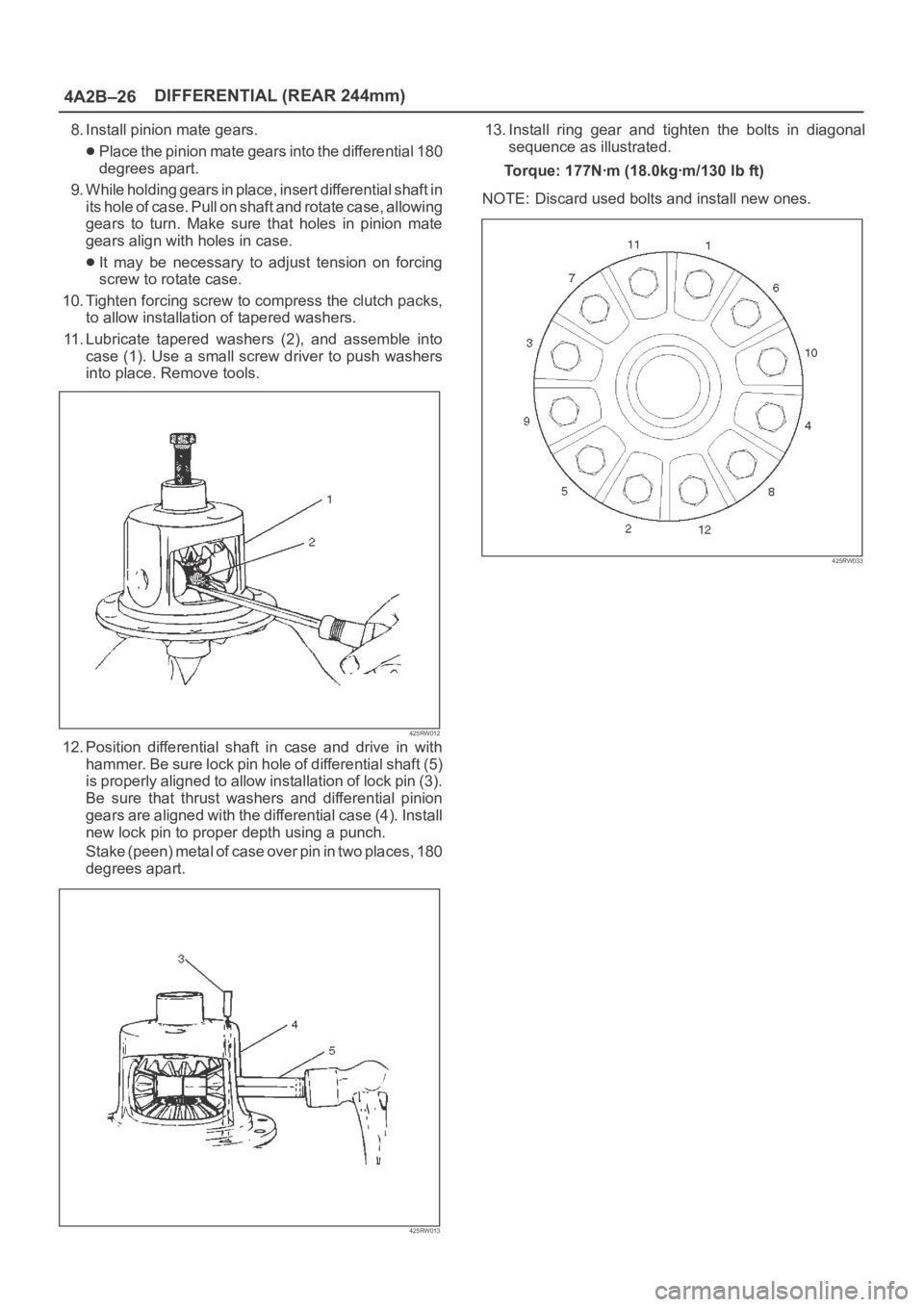
11. Lubricate tapered washers (2), and assemble into
case (1). Use a small screw driver to push washers
into place. Remove tools.
425RW012
12. Position differential shaft in case and drive in with
hammer. Be sure lock pin hole of differential shaft (5)
is properly aligned to allow installation of lock pin (3).
Be sure that thrust washers and differential pinion
gears are aligned with the differential case (4). Install
new lock pin to proper depth using a punch.
S t a k e ( p e e n ) m e t a l o f c a s e o v e r p i n i n t w o p l a c e s , 1 8 0
degrees apart.
425RW013
13. Install ring gear and tighten the bolts in diagonal
sequence as illustrated.
Torque: 177Nꞏm (18.0kgꞏm/130 lb ft)
NOTE: Discard used bolts and install new ones.
425RW033
Page 533 of 6000

4A2B–30DIFFERENTIAL (REAR 244mm)
ILLUSTRATIONTOOL NO.
TOOL NAME
5–8840–2573–0
(J–42827)
Pilot;Inner
5–8840–2572–0
(J–42826)
Gage plate
5–8840–0126–0
(J–8001)
Dial indicator
5–8840–2577–0
(J–42825)
Disc (2 required)
5–8840–0128–0
(J–23597–1)
Arbor
5–8840–2574–0
(J–42828)
Installer; Pinion bearing
ILLUSTRATIONTOOL NO.
TOOL NAME
5–8840–2293–0
(J–39209)
Punch; End nut lock
5–8840–2570–0
(J–42829)
Installer; Side bearing
5–8840–2323–0
(J–39602)
Remover; Outer bearing
5–8840–2586–0
(J–39858)
Clutch pack unloading
tool kit Includes
Screw cap, Cap and
Forcing screw
Page 573 of 6000
DRIVE LINE CONTROL SYSTEM (TOD) 4B2–2
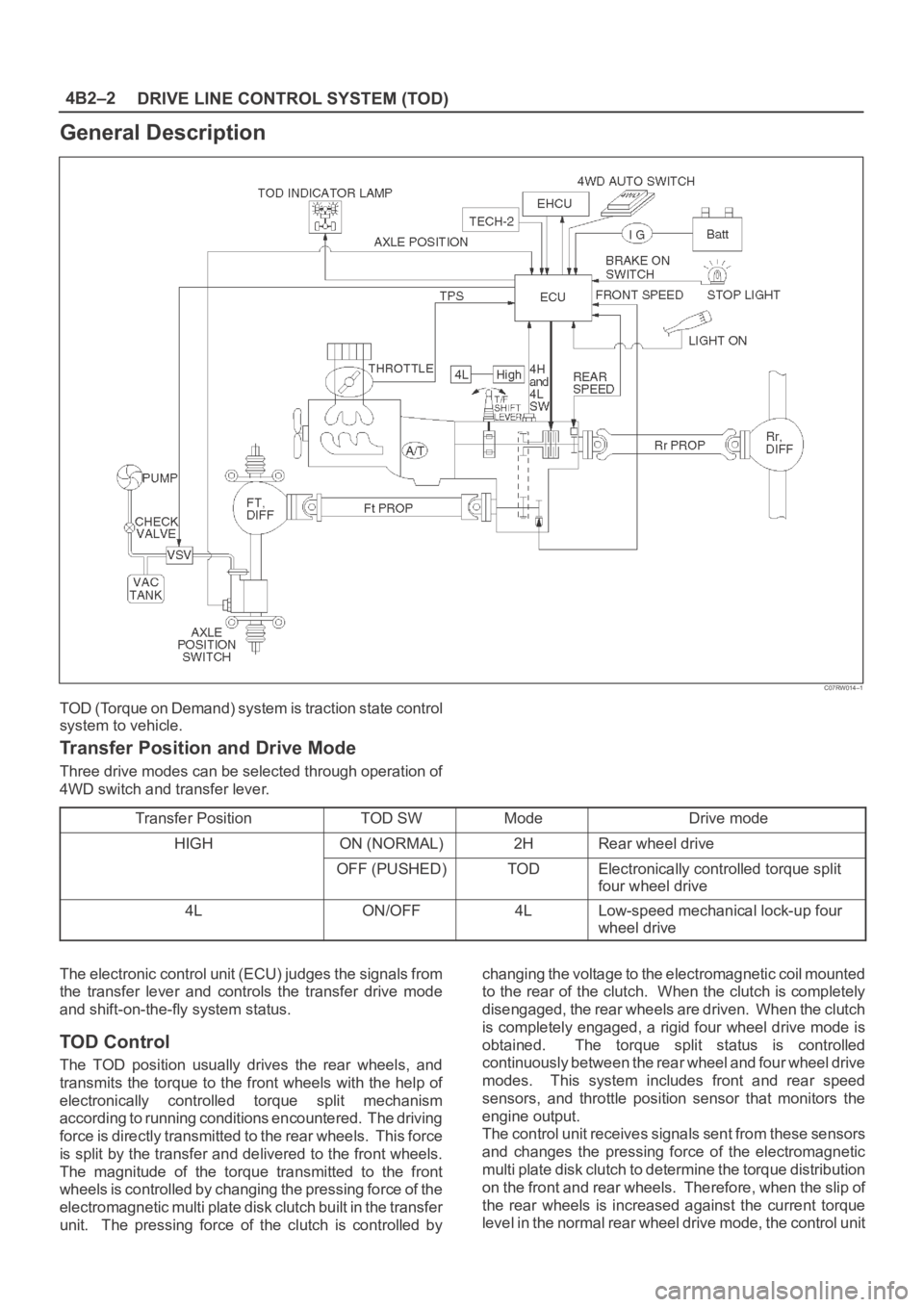
General Description
C07RW014–1
TOD (Torque on Demand) system is traction state control
system to vehicle.
Transfer Position and Drive Mode
Three drive modes can be selected through operation of
4WD switch and transfer lever.
Transfer Position
TOD SWModeDrive mode
HIGHON (NORMAL)2HRear wheel drive
OFF (PUSHED)TODElectronically controlled torque split
four wheel drive
4LON/OFF4LLow-speed mechanical lock-up four
wheel drive
The electronic control unit (ECU) judges the signals from
the transfer lever and controls the transfer drive mode
and shift-on-the-fly system status.
TOD Control
The TOD position usually drives the rear wheels, and
transmits the torque to the front wheels with the help of
electronically controlled torque split mechanism
according to running conditions encountered. The driving
force is directly transmitted to the rear wheels. This force
is split by the transfer and delivered to the front wheels.
The magnitude of the torque transmitted to the front
wheels is controlled by changing the pressing force of the
electromagnetic multi plate disk clutch built in the transfer
unit. The pressing force of the clutch is controlled bychanging the voltage to the electromagnetic coil mounted
to the rear of the clutch. When the clutch is completely
disengaged, the rear wheels are driven. When the clutch
is completely engaged, a rigid four wheel drive mode is
obtained. The torque split status is controlled
continuously between the rear wheel and four wheel drive
modes. This system includes front and rear speed
sensors, and throttle position sensor that monitors the
engine output.
The control unit receives signals sent from these sensors
and changes the pressing force of the electromagnetic
multi plate disk clutch to determine the torque distribution
on the front and rear wheels. Therefore, when the slip of
the rear wheels is increased against the current torque
level in the normal rear wheel drive mode, the control unit
Page 574 of 6000
4B2–3 DRIVE LINE CONTROL SYSTEM (TOD)
detects the slip condition, determines the optimum torque
based on the feedback control logic, and increases the
torque to the front wheels.
The control unit uses the signal from the throttle position
sensor to predict the future vehicle condition and the
intention of the driver with respect to acceleration and
deceleration, and determines the initial torque distribution
using these data and the information from the speed
sensors.
In case of small circle turning in the parking lot, for
example, the control unit minimizes the clutch pressing
force restrict a braking phenomenon. When the ABS
becomes active, the control unit optimizes the clutch
pressing force to ensure stable braking.
TOD Indicator Control
The TOD indicator on the instrument panel informs the
driver of the current working status of the transfer unit.
The information consists of two items: the drive mode
(2H, TOD, 4L, transition) and the torque split status of the
TOD (torque distribution level). The indicator can display
occasional errors and corresponding error codes.
Page 575 of 6000

DRIVE LINE CONTROL SYSTEM (TOD) 4B2–4
System Components
Parts Location
A07RW020
Legend
(1) T/F Connector
(2) 4H Switch and 4L Switch
(3) High-Low Planetary Gear Set
(4) Mechanical Lock(5) Multi Plate Disk Clutch Pack
(6) Electromagnetic Coil
(7) Rear Speed Sensor
(8) Front Speed Sensor
Page 576 of 6000
4B2–5 DRIVE LINE CONTROL SYSTEM (TOD)
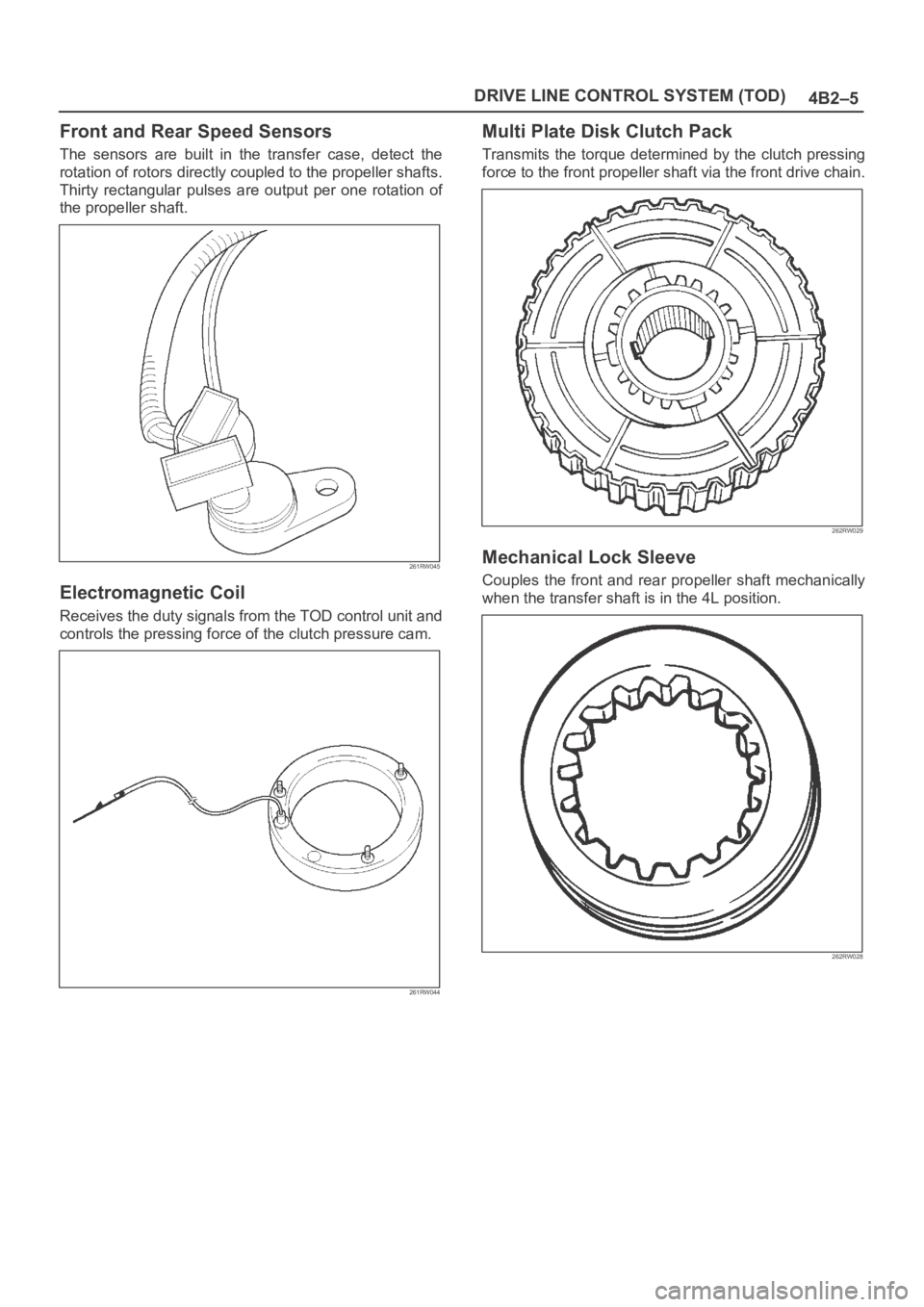
Front and Rear Speed Sensors
The sensors are built in the transfer case, detect the
rotation of rotors directly coupled to the propeller shafts.
Thirty rectangular pulses are output per one rotation of
the propeller shaft.
261RW045
Electromagnetic Coil
Receives the duty signals from the TOD control unit and
controls the pressing force of the clutch pressure cam.
261RW044
Multi Plate Disk Clutch Pack
Transmits the torque determined by the clutch pressing
force to the front propeller shaft via the front drive chain.
262RW029
Mechanical Lock Sleeve
Couples the front and rear propeller shaft mechanically
when the transfer shaft is in the 4L position.
262RW028