audio OPEL GRANDLAND X 2018 Infotainment system
[x] Cancel search | Manufacturer: OPEL, Model Year: 2018, Model line: GRANDLAND X, Model: OPEL GRANDLAND X 2018Pages: 127, PDF Size: 2.31 MB
Page 116 of 127

116Bluetooth musicIf the device is already connected,
repeatedly press SRCq to change to
Bluetooth music mode.
If music playback does not start
automatically, it may be required to
start the audio files from the Bluetooth device.
Function buttons
Playing the next or previous track
Press O to play the next track.
Press N to play the previous track.
Page 122 of 127
122PhoneTo start dialling, scroll through the list
and select the desired entry.
Sending contacts from a mobile
device to the Infotainment system
With certain telephones connected byBluetooth, you can send a contact to
the directory of the Infotainment
system. Contacts imported this way
are saved in a permanent directory
visible to all, irrespective of the
telephone connect.
To enter this directory, press MENU
and then select Telephone.
Select Directory management .
The menu for this directory is not accessible if it is empty.
Putting incoming calls
automatically on hold
For safety reasons the Infotainment
system can put all incoming calls on
hold by default.
To activate this function, press
MENU and then select Telephone.
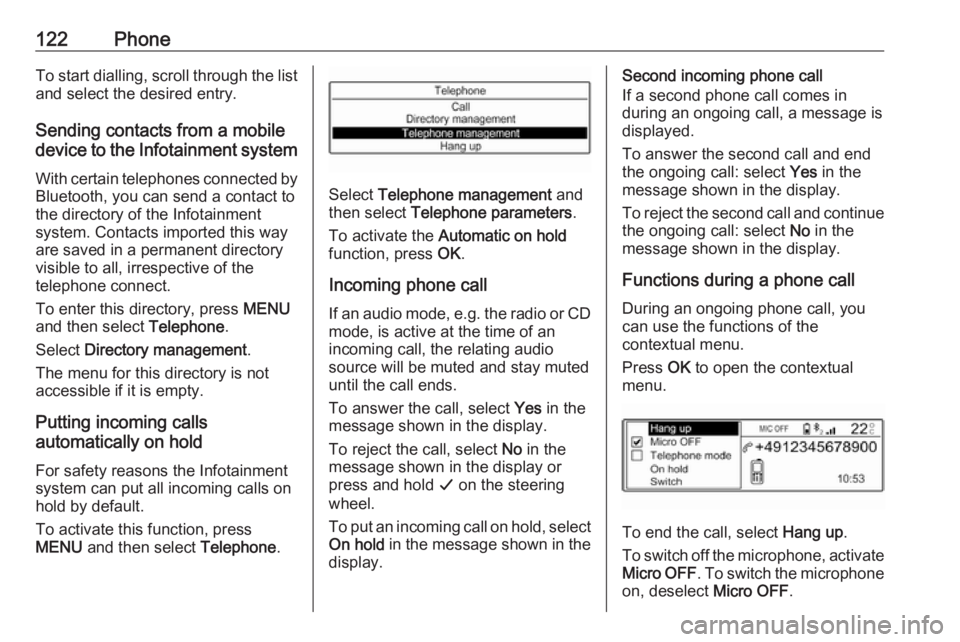
Select Telephone management and
then select Telephone parameters .
To activate the Automatic on hold
function, press OK.
Incoming phone call If an audio mode, e.g. the radio or CD
mode, is active at the time of an
incoming call, the relating audio
source will be muted and stay muted
until the call ends.
To answer the call, select Yes in the
message shown in the display.
To reject the call, select No in the
message shown in the display or
press and hold G on the steering
wheel.
To put an incoming call on hold, select
On hold in the message shown in the
display.
Second incoming phone call
If a second phone call comes in
during an ongoing call, a message is
displayed.
To answer the second call and end
the ongoing call: select Yes in the
message shown in the display.
To reject the second call and continue the ongoing call: select No in the
message shown in the display.
Functions during a phone call During an ongoing phone call, you
can use the functions of the
contextual menu.
Press OK to open the contextual
menu.
To end the call, select Hang up.
To switch off the microphone, activate Micro OFF . To switch the microphone
on, deselect Micro OFF.
Page 124 of 127
124IndexAActivating Bluetooth music .........115
Activating the Infotainment system ..................................... 103
Activating the radio .....................109
Activating the USB function ........113
Adjust time and date ...................107
Automatic volume adjustment ....106
Auto volume................................ 106
B Balance....................................... 106
Basic operation ........................... 105
Bass............................................ 106
Blocking out traffic announcements ......................110
Bluetooth Bluetooth connection ..............119
Bluetooth music....................... 115
Phone ...................................... 121
Bluetooth connection ..................119
Bluetooth music Activating................................. 115
General information ................115
Operation ................................ 115
Prerequisites ........................... 115C
Call Functions during a call ............121
Incoming call ........................... 121
Initiating a phone call ..............121
Call lists ...................................... 121
Change display language ...........107
Control elements Infotainment system ................100
Phone ...................................... 118
Steering wheel ........................ 100
Control elements overview .........100
D DAB ............................................ 111
Date adjust....................................... 107
Digital audio broadcasting ..........111
Display activate automatic scrolling .....107
adjust brightness .....................107
adjust units for temperature
and fuel consumption ..............107
change language ....................107
Distribution.................................. 106
Dynamic audio adaption .............111
E Emergency call ........................... 120
Equaliser..................................... 106
Page 125 of 127
125F
Factory default settings ..............107
G General information ...113, 115,
117, 118
Bluetooth music....................... 115
Infotainment system ..................98
Phone ...................................... 118
USB port.................................. 113
I
Infotainment control panel ..........100
M
Menu operation .......................... 105
Mobile phones and CB radio equipment .............................. 123
Mute............................................ 103
O Operation ............................ 115, 121
Bluetooth music....................... 115
Infotainment system ................103
Menu ....................................... 105
Phone ...................................... 121
Radio ....................................... 109
USB port.................................. 113P
Personal settings ........................107
Phone Activating................................. 121Bluetooth ................................. 118
Bluetooth connection ..............119
Call lists ................................... 121
Control elements .....................118
Dialling a number ....................121
Emergency calls ......................120
Functions during a call ............121
General information ................118
Important information ..............118
Incoming call ........................... 121
Phone book ............................. 121
Selecting the ring tone ............121
Phone book ................................ 121
Playing saved audio files ............113
R Radio Activating................................. 109Band selection ........................ 111
Configuring DAB .....................111
Digital audio broadcasting
(DAB) ...................................... 111
Dynamic audio adaption .........111
Radio data system (RDS) .......110
Radio traffic service................. 110
Selecting the waveband ..........109Station search ......................... 109
Station tuning .......................... 109
Traffic announcements ...........110
Usage ...................................... 109
Radio data system (RDS) ..........110
Radio traffic service ....................110
RDS ............................................ 110
Ring tone Selecting the ring tone ............121
S Selecting the waveband .............109
Sound ......................................... 106
Speech recognition .....................117
Station search............................. 109
Switching the Infotainment system on ................................ 103
Switching the radio on ................109
System settings .......................... 107
T
Theft-deterrent feature ................. 99
Time adjust....................................... 107
Tone and volume settings ..........106
Traffic announcements ...............110
Treble ......................................... 106
U Update software ......................... 107
Usage ......................... 103, 109, 117